 Problems? See this thread at archive.org.
Anyone tried to replace the screen of Z830/Z930 by himself or herself?
I may buy this laptop in the near future for its weight/ports/price. Before making the final decision, I just want to have an idea how much it would cost me if the screen got broken.
Thanks.
-
^^^^^
I just searched on some "screen" sites and found the matte 13.3" version for the z830 for $100. The glossy screen should be a bit cheaper if you can find one. -
Thanks for the reply.
-
So I got the restore disc from Toshiba. It doesn't work. I get various errors after Windows installs like F3-F200-0002. So I just used a copy of Windows 7 and reinstalled. All good.
Now the problem is trying to get the Drivers to install. They are in a zip file. They auto extract and are supposed to automatically go through the installation. They aren't doing this.
Can anyone please tell me how to get the drivers to install? -
FYI... BIOS 1.70 is out.
-
It's been awhile since I have posted anything on this board. I still have my z835 and it's been running great. Over the last week or so I have been thinking about updating storage, I have never really been happy with the 128g ssd it came with. Newegg has the 256g M4 listed at 169.99 right now. I jumped on it. i'll update when I get the thing in.
( Newegg.com - Crucial M4 CT256M4SSD3 mSATA 256GB SATA III MLC Internal Solid State Drive (SSD))
for those who have also jumped on the M4 bandwagon: SSD Tool - free space trimmer - Crucial Community - M4, free space trimmer. -
That's a pretty good price on a 256 GB mSATA. Let us know how the upgrade goes after getting it up and running.
Good luck -
Has anyone else purchased a Toshiba dynadock? If so, do you have the same trouble I have -- that, upon resuming Windows and connecting the dynadock, the system gets confused and can't properly connect the audio with the correct speakers? I pretty much have to reboot after connecting to the DynaDock or else I'm wayyyy in the "Sounds of silence."
-
You may try here to see if there are any updates to the Dynadock.
Updated dynadock
See if there's any updated audio drivers, etc....
Good luck and keep us posted with any updates. -
I'll check, but I think I'm good. When I bought the z930 in August and the Dynadock installed on it, I downloaded new drivers then.
-
Have it up and running. I must admit, It's a noticeable step up. I have not had a chance to run AS SSD on the new unit yet, but I did remember to run it on the Toshiba ssd before I took it out for comparison purposes. I'll try and remember to get those pics updated.
Spoiler: the Toshiba 128g ssd in the z835 runs VERY low #s. -
Stock 128g Toshiba Controlled SSD
![[IMG]](images/storyImages/old-1.jpg)
-
256g M4
![[IMG]](images/storyImages/newHD.jpg)
-
I'm VERY happy with the M4 so far. -
what sites? i just screwed up my display trying to get the back plate back on. really pissed at myself. any help would be greatly appreciated.
-
I believe it was "screencountry". However, I have never used them nor know if they are credible.
-
thanks, i checked and they have good prices, but out of stock, which does me no good.
-
Hey z930/z935 owners, Can you please check if your fan is always on at 42% ? I've Z930 core i7 256SSD and Toshiba PC health monitor shows fan always at 42%. My fan turns off once in a while, but 95% of the time it's on and I'm only surfing net. If I go to power settings and change cooling method to any setting, the fan goes to 0% the moment I click apply button but kicks back to 42% in two minutes. The fan is always at 42% no matter what I do and it makes little buzzing sound also. If somebody's interested, I'm attaching Crystal disk score for my 256ssd and it was ran on 'Balanced' power mode, I get higher disk score if I run Crystal Disk at ''Maximum performance' mode. Let me know if you have any questions, I received my laptop today and so far I'm loving it, it's insanely light, but it feels little fragile. 'Balanced' power mode, watching youtube videos stutters.
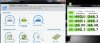
-
Is this thread dying? :hi2:
-
Well... the z83x is one year old now... is there a z93x thread?
-
Can't find one anywhere
-
http://forum.notebookreview.com/toshiba/690111-toshiba-portege-z930-z935-owners-thread.html
First Page [a few threads down].
It doesn't bother me if owners want to discuss both z830/z930 laptops in the same thread; as they are both very similar.
As for your fan problem, many z830 owners initially had a similar issue with the fan constantly being on and hearing a buzzing noise. It was eventually remedied with a BIOS fix, but you would think Toshiba would have been aware of the issue before launching the z930.
Hopefully others can be of more help. -
Would like to warn people of the horrible experience I had with Toshiba
I bought the Toshiba Portege Z930-S9302 3 months ago. Went to visit my dad on his deathbed and brought my computer to use while I looked after him. About the third day of my stay the screen started to flicker on bootup and the screen developed both horizontal and vertical lines. The machine was never dropped or damaged in any other way.
I figure bad luck but it least it'll be covered under the warranty. I go through the diagnosis over the phone with tech and he agrees it's a hardware problem and they send me a box to ship it to their repair depot. Long story short after waiting 5 days I call them up and get a level-one support woman. She claimed that the tech determined I had damaged it and it would cost $460 to repair. When I asked to escalate this to a more senior customer support person so they could hear my side of the story she refused.
I WILL NEVER BUY ANOTHER TOSHIBA AGAIN!!!!!
Because it was under 90 days that I purchased it AMEX is now dealing with them. Dealing with them was like talking to a rock. They sell flimsy machines and don't support them when they break.. -
anybody here upgraded to windows 8 yet ?
just got the email today from microsoft $14.99 upgrade to windows 8 ..... still downloading as of the moment. hope everything will work out fine -
Should be ok. Make sure to goto your Toshiba Support page and download the appropriate Windows 8 drivers and possibly update the BIOS if needed [which Toshiba has provided].
If others are curious to know which models are supported by Toshiba for the Windows 8 upgrade, you can find those models here: http://www.csd.toshiba.com/cgi-bin/tais/support/jsp/bulletin.jsp?ct=SB&soid=3495677&ref=EV
I found this link provided by Toshiba. You need to input your model number and it gives you a list of instructions on what drivers to install and the order [instructions can be found after Step 6].
http://www.csd.toshiba.com/cgi-bin/tais/support/jsp/bulletin.jsp?soid=3437733
Good luck and keep us posted with any results. -
I have a lot of work to do this weekend or else I would upgrade today. I was just running the Windows 8 upgrade assistant to see what will and won't work. Looks like the only Toshiba things that are not compatible are TOSHIBA Wireless LAN Indicator and TOSHIBA PC Health Monitor. The W8 adviser has the same link as alexUW posted above. I have the Best Buy version Z835-P330. The model number they are asking for is the first 5 characters of the Part No., so don't be looking for Z830, Z835.... because you won't find it in the list. Mine is PART NO. PT224
Hope to read some updates from others, if not I will post an update sometime next week when I get the chance to upgrade. -
i bought a replacement screen on ebay for $130 and went to an authorized toshiba repair shop and the repair cost $50. i wish it never happened, but i didnt get charged an arm and a leg (only an arm) and I didnt have to ship my laptop anywhere
-
My Toshiba Z835-P330 died in early October and I called up support and shipped it to their depot in Louisville, Kentucky. It arrived there on October 10th and it's been sitting at the depot 20+ days waiting for a system board replacement for which they have no parts for nor do they know when it will be fixed. I called up last week and asked for status and they said that it would be repaired by now, but it hasn't. I called today and escalated two levels and then to over their Customer Relations Department. They are calling my system in the depot DOA and upgrading me to the Z835-P370 with the Core i5 and more memory. It took 20+ days, but I'm okay with it if they are upgrading my system from an i3 to an i5.
-
For those of you who haven't entered the Official NoteBookReview Give-Away Contest for a free 256 GB mSATA SDD, here's the link:
http://forum.notebookreview.com/hardware-components-aftermarket-upgrades/694719-mydigitaldiscount-contest-win-mydigitalssd-bp3-256gb-msata-ssd-msata-usb-3-0-enclosure-combo-kit.html
Would be a nice little upgrade to your z830. -
can you get info where you get your wifi card and how to install it in the z830?
-
Sorry if anyone was waiting on any feedback from my Windows 8 upgrade but I haven't gotten around to it yet. This is my work computer and work is busy right now and I was worried that my work flow would get messed up if I upgraded, so I am hoping in the next week things settle down and I can afford the time it takes to figure out where everything is.
-
I took the dive and installed Windows 8. Wiped the hard disk and installed Windows 8, but it took twice as long as a normal Windows 8 install on my other systems. The system was very laggy and unusable until I installed the proper AHCI drivers. Disk usage in Task Manager hit 100% and did not respond until the driver was used.
-
My Z830 takes a lot to wake from sleep - up to 1 min. Sometimes it stays for ~1 min at the blue screen, sometimes the blue screen goes instantly but the hdd is unusable for ~1 min. Any idea what might cause this?
-
Hello all,
I have been reading along on this thread since the z830 first came out. I was in the middle of ordering a customized z930, when I had the following chat with a sales rep where he insists that the Z930 RAM can NOT be upgraded after it leaves the factory.
Is he sales talking ( = lying) to convince me to spend hundreds of extra $ for RAM that I could install myself?
Has anybody seen postings of users upgrading the RAM on z930's - all I keep finding is upgrades on z830's.
thanks, Russ
Toshiba sales chat session follows:
You: I know there is a glossy screen and a matte screen on the 930 ultrabook - will custom ordering the z930-bt9300 give the matte screen?
Paul: Yes, it has a Matte Screen.
You: I plan to add my own ram into the empty slot. what will be largest memory I can add after I purchase it?
Paul: The maximum RAM the laptop can ave is 8GB.
Paul: Unfortunately, the memory is not user upgradable. It is factory installed so it means that you cannot add your own memory.
You: hhmmm I always thought empty ram slot = user can add. I have seen forums where users have added their own memory chips into the empty slots... I am pretty sure I have seen total memories (with screen shots) of 10-12GB
Paul: Yes, on our other laptops, you can add memory once you have the laptop but the Portege Ultrabook series, the memory is factory installed and not user upgradable.
You: for the RAM.... there appears to be 2 or 4 GB "onboard" and then additional RAM gets into a separate slot
Paul: It will have 2GB onboard.
You: OK, and additional ram would have been installed in another slot, that slot will be empty when the laptop is sent?
Paul: No, there will be no empty slot once you have the laptop and you did not get the 8GB RAM.
You: this makes no sense: from your website: 6GB DDR3 1600MHz (2GB on-board + 4GB in slot)
You: If I order 2GB - that is onboard..... what happens to the slot that would have held the additional 4 gb?
You: The slot would still be there and wouldn't it just be empty
Paul: As mentioned earlier, there will be no slot that you can add memory unlike other laptops. Whatever memory capacity you choose, that is how the laptop will be built and you cannot add anymore memory on to the slot. -
^^The z-series Porteges have a specific type of torx screw to prevent the user from opening the laptop. Can it still be opened? Maybe. It could have been changed since the z830 models.
The slots could have been modified to prevent user upgrades, but I seriously doubt this; it would take extra effort and cost to prevent each z930 from being upgradable.
Will the ram upgrade affect your warranty? I have no idea. It might be worth checking with Toshiba; Sales Rep or Customer Support.
Here's a post referencing the torx bit size needed to open the laptop: http://forum.notebookreview.com/toshiba/610559-new-portege-z830-16.html#post8154091
Good luck -
I would hazard a guess that the guy has no idea what he is talking about. The Z930 is more than likely physically identical to the Z830. I have a US spec Z830 that I have had apart several times to replace the RAM and SSD for larger/faster models with no issues at all.
There is 100% one DDR3 SODIMM standard memory module slot in my Z830, you simply undo all the standard screws on the base of the laptop, then use a think its a T6 secure torx screwdriver on the single central screw of this type and the bottom of the laptop lift off complete. inside there is a mSATA slot for the SSD, a single memory slot and a mPCIe for the wireless card. I have a thread showing repasting the cpu heatsink if you look in my profile that shows a picture of the inside of the laptop and you can see all the gubbins in that picture.
Persoanlly I have a Portege Z830-S8302 with a core i5 2557M cpu and I recently stuck a 8Gb corsair pc3-10600 sodimm into the single slot to go with the 2gb onboard and it works with 10gb available in windows no problem. I also replaced the 128Gb Toshiba SSD with a Crucial M4 mSATA 256Gb SSD and again, works perfectly.
So overall the ultrabook is very upgradeable, same as any other laptop really, its just Toshiba don't want you ripping apart their premium model to see its not so premium essentially, and also I would guess doing so will totally invalidate your warranty. not something that bothers me but to some it matters!
hope this helps
cheers
Ben -
I typed and talked to three different reps yesterday - they definitely follow a script with answers to imply that you MUST buy all RAM from them when the machine is built. I was able to get them to eventually confirm that the slot for the extra RAM is available to me, assuming I have the skills to get to it. ( and the special Torx screwdriver) I am ordering the i7 with 4 gb on the motherboard. I will use it for 1-2 months to make sure there are no issues such as the space bar, and then open it up to add more ram. Time to organize all my notes cut & pasted from this thread to do the fresh windows install, re-load only the necessary drivers and utilities, etc.
-
Howdy folks! It's been a while since I've been in this thread... I was a lot more active early on. But my Z835 has been working mostly perfect for the entire year, so I didn't have a lot to say. Of course, now the warranty is about to end, so I'm sending it in to finally get that darn HDMI port fixed that stopped working in January. Crossing my fingers that I don't encounter some of the horror stories that others are describing regarding 20 days of waiting for their laptop to be returned!
But since I'm expecting a system reformat, I thought now would be a good time for upgrading! I've looked through the last 10-20 pages (sorry, I can't make it through all 170 again!) and it looks like some people have had some success. But I just want to make sure this is all kosher before I upgrade.
1) Is it true the system now accepts an 8GB RAM stick? I'm not sure if the initial advertised limits were simply due to a lack of 8gb ram on the market, or if there is actually a hardware limitation? It looks like my best buy model i3 cpu does take up to 16gb of ram (THinking of going with this: Newegg.com - G.SKILL 8GB 204-Pin DDR3 SO-DIMM DDR3 1333 (PC3 10600) Laptop Memory Model F3-1333C9S-8GSA)
2) Is a 256GB Crucial mSATA SSD compatible? There were a lot of questions last year about the really slow toshiba SSD, possible SATA3 speeds. Now I'm seeing that maybe sleep makes the SATA switch to 6Gbps speeds? I suppose even if it was still SATAII speeds, the crucial SSD should still work, and it should be a lot faster. I did see someone who upgraded, and was getting pretty good speeds in comparison.
3) I read that someone easily replaced the Z830 fan with a Z930 fan, and that its a lot quieter. Not that it was a big issue for me post update, but I thought I'd look into it. Anyone know where to buy a replacement fan from the Z930 line?
4) Clean install or factory image? There was a lot of debate before on what should be installed on a clean install from the toshiba apps to get sleep, lights, buttons working properly. Is there still a good list of that stuff?
Those were all the questions I had for now... nice to see some familiar names like Alex and Z830guy. -
Well if they have it for 20 days, you can ask them to send you a newer model (refurbed). In my case they did, they sent me Z835-P370 with a Core i5 and 6gb of ram over the Z835-P330 Core i3 that I had. There is only 1 available SO-DIMM slot and yes it can take PC1333 memory up to 8gigs for a max of 10 (2 soldered on board). 256GB/240GB mSATA does work, but won't kick into the first sleep of the system after a reboot. I'm not sure about replacing the fan. I upgraded to Windows 8 on my system so there is no factory image (flash cards don't work).
-
Hello! Just wanted to let you know that a) I still do monitor this thread and that b) I still love my Toshiba z930. It's performed flawlessly since day 1. I tell everybody that I meet that I have to be the happiest customer of any laptop ever. Still carry my z930 everywhere I go and would still be glad to speak on a commercial about how it has changed my life. For me, it's the perfect machine.
Good luck with your upgrades. Wish I could help -- but I've never cracked one of these babies open, so I'm not much help. But I wish you the best!
Z830guy (Doug)
-
No problem if you don't have any specific suggestions...although if you REALLY wanted to help, you could go over to the Louisville, KY Toshiba Repair center and make sure they put my Z835 as priority #1!
But along the same lines, I have absolutely loved my Z835 over the past year. Small, sturdy, fast (even with i3 and stock SSD). Paired with the Toshiba Dynadock 3.0, it makes the perfect desktop. Battery life is waning, but I can still get a good 3-4 hours out of it with moderate use. I could pull 5 probably in airplane mode. And to think, it all cost me about $530 after all the discounts of Black Friday 2011! -
As a consultant I bring my laptop into many different client locations, including some locations where "recording devices" are not allowed.
Last month I custom ordered a z930 from toshibadirect with NO webcam/microphone.
The laptop came with NO webcam/microphone above the LCD screen...
But I have discovered THERE IS ANOTHER MICROPHONE on the keyboard about 1/2 inch to the left of the power button.
I found it by making a recording (start --> accessories --> sound recorder) and then talking and tapping around the laptop to find the microphone.
Every Toshiba sales and tech person I talk to keeps saying that if I order the Laptop with NO webcam/microphone there should be no microphone. None of Toshiba spec sheets acknowledge that there is another microphone installed on the motherboard that "hears" through the pinhole near the power button.
Questions:
1) Does anyone out there have a Z830 or 930 that came with absolutely NO microphone at the keyboard? (test it using sounds recorder). If Toshiba can actually produce such a laptop, I would return the Z930 and order another one.
2) If I physically snip the microphone from the motherboard... anybody think the microhone jack would still work? ( I would still want to be able to skype call home using a headset when I travel out of the country. Disabling the realtek audio/recording driver is not good enough. That would be like telling the customer; "I am bringing a microphone into your workspace, but I promise not to turn it on".
Thanks
Jan 5 - UPDATE: While installing extra RAM into the empty slot, I decided to "go after" the microphone. Even with the batttery removed, and a few more screws from the motherboard removed, the entire mother board was not entirely lifting away for me to have full access to the side of the mother board facing the keyboard. (this is the side that contains the extra microphone) But with the 1-1.5 inches of clearance I did have I was able to:
- pop off a rubber "boot" that was covering the microphone.
- use a needle nose pliers and then a small flat screwdriver to pry/break-off the 1/8" inch square microphone that was surface mounted to the mother board.
I am happy to report that my Toshiba 930 finally no has NO microphone at all (none above the LCD and none in the keyboard)
AND the Microhone jack continues to work fine for those occasions when I want to use an external headset/mic for Skype.
Now I will begin the clean install of windows 7 (with no crapware) and install only the necessary drivers.
I am a happy camper - Thin light laptop, I7 , 8Gb Ram, and all the connections I need (VGA, ethernet, etc) -
Hello
Anyone know a problem like this?
Computer cover too fragile can cause breakage monitor on open.
ThanksLast edited by a moderator: May 12, 2015 -
It looks like the screen was probably damaged. Could have been from too much pressure being applied to that edge [perhaps someone was holding it between their fingers at that point], or perhaps it was damage when the lid was closed.
There has been some reports of the screen breaking for others. My advise would be owners have to be careful with their screens.
As for you, you can try contacting Toshiba Customer Support and check if they can repair/replace the screen; you have too call them.
Good luck and keep us posted with any updates. -
quick update
unfortunately my Crucial M4 mSATA drive bombed out after less than a month, just wont boot, as such I have swapped back to my old W7 install and the original drive and the Crucial unit is being collected today for RMA
hopefully its a one off and I will get a replacement drive that's fault free
-
Uh oh... I just ordered one of those drives today. In general, the reviews are very good!
-
I know, I read nothing but good reviews as well and the drive was excellent until one day it simply wouldn't boot
as said, hopefully its a one off, we'll see! -
Hi Guys
I have a 2.5" crucial M4 working for couple of months now problem-free and overall feedback for this drive is indeed good. hope your mSata version was that one off
I've become interested in this ultrabook. has anyone actually managed to find a replacement battery anywhere? getting to the insides is easy but seems none are available on ebay. is toshiba offering a battery replacement service ?
don't know about other ultraportables but if there are no options for battery replacement then this one shall become worthless after battery wears out to poor levels !
have you owners thought about this ?
-
Got my Z835 back from Toshiba Repair. Took 7 business days total-- not too bad. HDMI port is working again, the slightly flaky audio is back to normal. Installed a new crucial m4 mSATA drive that is very fast (after spending two hours figuring out why windows wasn't installing- turned out that I shouldnt plug it into the USB3 port!) Also installed 8GB RAM module for a total of 10GB. Running very smoothly now. Couldn't be happier!
-
got another drive, fitted it, DOA
fail! right that's it I give up with crucuial, i'm going to get my refund then search for a mydigital BP3 drive instead, little bit more expensive but hopefully it wont bomb! -
WOW! Sorry to hear that.
Keep us posted with your new drive, and how it compares to your old crucial drive. -
Hi everybody!
I have this mysterious hdd password / sleep issue: with a hdd password (though not with a bios password and not with no password), the computer takes 1-2 minutes to wake from sleep. I thought it might be from the drive so I replaced the Toshiba with a Dell-branded Lite-on (Marvell) drive, but the problem persists. So it's definitely notebook- rather than hdd-related. I run on bios 1.70 now, but I had this problem with 1.60 as well (and possibly, but I am not completely sure, with 1.20 too).
I would very much appreciate the hdd password so... has anyone heard about this, and possibly about a solution as well?
New Portege Z830
Discussion in 'Toshiba' started by Hoopsontoast, Sep 12, 2011.


