Problems? See this thread at archive.org.
will these ultrabooks, and obviously the z830 in quesiton here, take a full 2.5" form factor SATA ssd?? i know toshiba use propriatry cables and connectors on their R700/R830 SSD's (1.8" form factor) but in those larger laptops theres space to swap out the cable for one that runs a standard SATA connector (from lower spec of same model with mechanical HDD) and run the full size drives. but this is obviously as the whole laptop was designed to take standard SATA mechanical drives so can swap bits easily. my concern is these new ultrabooks were never designed to have anything other than SSD, and if toshiba have stuck to their 1.8" prop drives, even if there is space for a full 2.5" there may not be a cable available to swap the standard SATA interface in
-
ignore above, i didnt research fully and clock the mSATA references! so its on mPCIe correct?
-
I'll see about taking the bottom of the notebook off later today; doesn't look too bad, about 12 screws. It's not my laptop, it's a review unit. If it were my notebook, I'd have taken it apart already.

But yes it is most likely an mSATA SSD. These Ultrabooks were never designed to use anything else; the chassis is simply too thin. -
mSATA is not the same as mPCIe. Details are on this forum (I actually contributed the Samsung Series 9 info).
http://forum.notebookreview.com/sol...age/541361-msata-1-8-sata-ssds-available.html
See the note below the first table that says " mSATA and mPCIe SATA SSDs have different pinouts, so require modding like shown to make them interchangeable." -
I completely agree with you. This is something that requires not only a "spare" SATA III SSD but time to test and most importantly to a certain degree taking a new machine apart. I wished Toshiba would be more open to provide these information and not being so secretive. I guess many of would benefit and buy their product.
Thanks for letting us know that your friend will do some tests.
Can you ask your friend who will test the SATA III to test an 8GB RAM as well?
These are the two items I really want to know about this Laptop. Otherwise I see the Z830/835 as a really solid machine.
Anyway, please post your friend's findings because I am really interested to learn about these.
-
Charles,
Please take couple of pictures if you remove the bottom. This will definitely add value to your review.
-
Those pics won't make it to the review unfortunately, all the shots were already taken before the notebook was sent out to me for review.
Anyways I am trying to get into the BIOS, it's not exactly straightforward ... what key do you usually press on a Toshiba? The POST screen just has the Toshiba logo. Already tried the DEL and ESC keys. -
@Charles
After turning on the laptop, immediately press F2 to access the BIOS (as far as I can remember) -
esc then f2 it should be, however if theres a lock on the BIOS need to use INS key when toshiba logo shows up should then prompt for password
not sure if review machines have BIOS password pre-installed, its possible? -
Wow, it really looks like Toshiba dropped the ball with the SSD. Slower than a regular hard drive? That's terrible. In fact, that probably borders on toshiba-completely-overlooked-this.
@Charles: (thanks for being so helpful, by the way), maybe it would be valuable to contact the people who sent you the review unit to see whether this was just overlooked by their engineers. Why would they go through all the effort to make this otherwise fantastic notebook, and stick in a crappy SSD? If you're going to give us such a poorly performing SSD, why not go the Acer route, and give the hybrid SSD, and at least let us have more storage. If Asus can give us SATAIII for under a thousand, then surely Toshiba can too. I wonder if their upgraded models have better quality SSDs that take advantage of SATAIII
Out of curiosity, what would people purchase to replace the SSD they use in there now, if it turns out SATAIII is not disabled by Toshiba? I'm looking on Newegg, and all I see are very expensive, not very well reviewed models that hardly even get to 128gb.
Other random thoughts-
I'm glad Charles isn't having issues with the keyboard like the Asus. That was the biggest dealbreaker for me. I don't care how well the keys travel, as long as I can still type accurately.
The UX31 did not have WiDi. Its because they used a different wireless controller. That was the same reason the UX31 didn't work on 5GHz channels either. I assume the Z835 does have 5GHz- maybe Charles can confirm this?
I can deal with a constantly-on but quiet fan. There's no way it can be worse than my HP TX1000, with a fan that was unusually loud when new, and is now starting to click even louder. (Also, that laptop could probably cook an egg on its base)
Another question for Charles- what do you think of the screen? Other people have said the colors are a bit washed out. Is it noticeable? Is it bothersome? What about viewing angles? For example, if you have the computer angled so the middle of the laptop screen is right in your line of site, and then you stare down at the clock in the taskbar (without further angling the screen), can you read the white text?
Last random thought of the day- I wonder when this laptop is going to be released? It must be soon if they are sending out review units. I also wonder what models will be available to us outside of Best Buy or Toshiba.com. I think I'd rather have an i5 than an i3. The i7 is probably overkill for me. Hopefully I can still find such an option that isn't overly expensive on the web. Don't like purchasing from Best Buy or Toshiba as a general rule, mostly because taxes add an extra 150 bucks to the laptop price. On the bright side, it looks like Chase Credit Card users will get 10% cashback on Best Buy purchased on Cyber Monday... so maybe I'll go to them anyways. Although I really don't like dealing with Best Buy... I just feel like they rob their customers with their prices. -
it does seem rediculous to have such a slow SSD when the whole point of intel pushing these ultrabooks was to compete/outperform apples mac books / mba's with wake from sleep times, boot times etc. i cant think that intel would be too happy having invested so much to get this result, let alone us end users
-
It's pretty obvious that Toshiba wanted to cut costs of the Z380/Z835 by using their (slow) Toshiba-branded SSD.
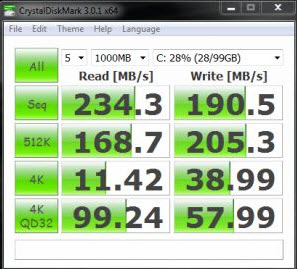
These three scores are really indicative of the poor SSD that Toshiba has put in here. One of the most important scores is the 4K Write (2nd col, 3rd row in each).
#1 is from Charles' Z835 testing
#2 is from Samsung Series 9 SATA II
#3 is from Runcore T50 SATA III
You can see the differences in the 4K Write.Attached Files:
-
-
This is good to know.
There have been complaints about the WiFi in the UX31 so this may benefit the Tosh in having a different controller... and WiDi too.
It's just strange because I thought the Intel ubook initiative required certain components to be used, and I would think that Intel would require the same wireless controller for all of them. -
The Z835 has an Intel WiFi Link 1000BGN. The ASUS UX31 uses a non-Intel wireless chip.
Thanks for the comparisons with other SSDs. I work as a writer over at StorageReview and write a lot of SSD reviews, the Toshiba SSD is positively pathetic. One of the worst I've ever seen.
The notebook seems pretty snappy though ... -
Do you think there is anyone at Toshiba that you're in contact with that could explain themselves?
-
Does anyone know if there are any differences between the Z835 Best Buy model and Z830 with the same specs?
It scares me because as we've seen with the Samsung Series 7 and the previous R835, there might be some behind the scenes neutering... like using a hamster on a wheel instead of a proper fan to cool it.
-
@BigNerd
Based on other reviews that I've seen, I have no reason to suspect that the Best Buy model has been limited or neutered in any way. The SSD in the Z830/Z835 sucks.
That doesn't bother me. If I buy a Z830 and then add a Sata 3 SSD, I'll probably have something cheaper and with better performance than the three Samsung Series 9 that I've had. -
Sorry to re-ask the same question, but where would you find a reasonably priced, decent mSATA III SSD?
-
Unfortunately, you will not find a reasonably priced mSATA SATA III SSD this year. Look here msata sata iii
$360 for 120GB SSD.
Hopefully they'll become cheaper and more common in 2012...
I'm just saying that the Toshiba + mSATA 6GBp/s is cheaper (and faster) than Samsung Series 9 (and hopefully doesn't have the same production issues). -
Alright, thanks for the info. I may end up going with SATAII-- while it would be nice to have bleeding edge tech, probably too expensive for me, and I'm not sure if it would be a major benefit for my usage. What do you think of this one:
MyDigitalSSD 128GB 50mm Bulletproof mSATA SSD | My Digital Discount
Still not cheap, but I feel like I at least deserve some storage with a write speed that is faster than my 5yr old laptop... is that asking too much? (Still in disbelief.) -
@makryger
Yes, I think that pretty much anyone would be happy with a good SATA II SSD in on one these Ultrabooks. It's much better than what's in the Z830 now.
That's a pretty good price too!
Here's a review of that MyDigital SSD
http://forum.notebookreview.com/sol...let-proof-128gb-msata-review.html#post7767088 -
Here's a new CNET review of the (Core i3) Z835 that Best Buy will have:
Toshiba Portege Z835-P330 Review - Watch CNET's Video Review -
Those performance scores are horrible when compared to the competition.
We need:
Toshiba's wt/dimensions, ports and touchpad
Asus's screen, CPU and SSD
Lenovo's keyboard
and Acer's price
And then we will have a compelling product. But I guess there is always next year (Ivy) and maybe next time around they have worked out the kinks. -
Watched the C|Net video and read their review and it does have the smaller more rectangular keys.
I think it also mentioned that this Z835 model does not have Bluetooth. I don't remember if the other ubooks had BT (and the review infers that the Z830 ones will have BT). -
- If you plan use this (Z830) notebook for scientific research yes, its not fast enough.
- If you are a hard-core gamer and plan to use Z830 for gaming, yes its not fast enough (SSD + graphics).
But if you are a standard home+office user then I believe this SSD and Notebook is more than enough. Yes, its SSD not fast but compare its overall performance with other notebooks (Air and UX31). You will see that its not so slow, in fact it boots faster than most other Notebooks with SSD.
I believe its the best Ultrabook for that price. (price/performance ratio) -
I'm curious to see how the i5 version does in comparison.
-
That clarifies a lot of things. Looks like this is not a matte display, and there isn't any bluetooth. That along with the cheap SSD would make it three strikes... I agree with a previous poster that for everyday use, the SSD and i3 will still be fine, but for me the bluetooth is the real dealbreaker. I guess I'll wait to see what the other configurations from Toshiba end up being. If they end up being similar to the R835 offerings, we may get that matte screen, bluetooth, plus a 3 year warranty even.
-
@makryger
Did it actually say that there was NOT a matte display or bluetooth? I don't remember them being mentioned.
The Toshiba Z830 (what they call the Satellite model), that is on Germany's Amazon site, is listed with matte (or at least "anti-reflective") display and bluetooth!
Intel Core i5-2467M Processor (2x 1.60 GHz): 33.8 cm (13.3 ") HD display, anti-reflective, with LED backlight:: 4 GB RAM, 128 GB SSD: Intel HD graphics, HDMI, Wi-Fi , BT3.0, USB 3.0:: 1.12 kg battery life of up to 8 h, Windows 7 Home Premium 64-bit
This review says the Z830 has matte display and bluetooth. I think that there might be different versions released (and people's questions about BestBuy selling a different version might be valid). -
My particular Z835 does not have Bluetooth. The display has a glossy surface, which is a shame. Never understood the use of glossy displays.
-
Thanks. So it looks like Best Buy one is different (or it could be because it's the the Core i3 version).
-
It's probably safe to assume the Best Buy version will have the most minimal specification set given they will be selling it for $899.
Regarding SATA II vs SATA III - don't bother.
It can make a difference if you're using the fastest SandForce-based SSDs on the market such as the OCZ Vertex 3. I'm not sure of the performance of various mSATA SSDs.
At any rate you would be hard-pressed to tell the difference between a SATA II and SATA III SSD for 99.5% of uses. The only place that would come into play is as I said, you're using one of the fastest SSDs on the market AND doing something where the data transfer rate would be exceeded (transferring a large 10GB+ sequential file). E.g. you'll likely never notice the difference. And if you do, you shouldn't be using an Ultrabook.
We don't know whether the R830 is SATA III. -
I don't think the video mentioned it, but the text of the review did:
And Charles confirmed it... so there is a bit of BB neutering for the Z835. That's okay for me... I just want to test it out in person, then I'll order online (hopefully Amazon has some discounted pre-configs). -
At $899 I think this machine is an excellent value ... much cheaper than a comparable MacBook Air. I think other configurations are going to present a very different value proposition. If a model with an i5 and BT costs $100 more ... you really have to ask yourself whether that's worth it. If the i3 isn't fast enough, chances are the i5 will struggle too. Usually the best values are found in the base model.
In other news, I've had the system idling for 3 hrs, 30 mins @ 70% brightness, it's at 42% left. So 6 hrs total battery life from this model. -
The other plus for the Tosh is it looks more like an ultra-thin *PC* notebook... not just a MacBook Air clone.
Don't get me wrong... MBAs are really nice looking... but the Z830 looks more like a business notebook than a consumer one. -
Charles: "You da man !!!"
Really looking forward to that review
-
I understand what you are saying, but look at the test results. The Z835 is 2-3X slower than the other laptops- even the Acer which uses a HDD.
If you are going to be that much slower, and are fine with that- why not just settle for a good netbook and pocket the change?
For comparison, I looked at similar benchmarks from CNET when they tested laptops like the x120e and Sony Y. It turns out the Toshiba ends up midway between these cheaper laptops and the other ultrabook competition. And if you install an ssd into an x120e you might bridge the gap and end up with a better keyboard (but a heavier machine.)
I'm not saying the x835 is a bad machine. But I also think you can't ignore it is 3X as slow as a MBA. The performance gap seems to be of an order of magnitude where I would not put them in the same class (unlike the Asus.)
Multimedia multitasking test (in seconds)
Apple Macbook Air 13.3-inch (Summer 2011)
233
Dell XPS 14z
551
Asus UX31E-DH52 (Zenbook)
670
Lenovo IdeaPad U300s
701
Acer Aspire S3-951-6646
782
Toshiba Portege Z835-P330
1109
Adobe Photoshop CS3 image-processing test (in seconds)
Dell XPS 14z
75
Apple Macbook Air 13.3-inch (Summer 2011)
85
Lenovo IdeaPad U300s
93
Asus UX31E-DH52 (Zenbook)
100
Acer Aspire S3-951-6646
121
Toshiba Portege Z835-P330
175
Apple iTunes encoding test (in seconds)
Apple Macbook Air 13.3-inch (Summer 2011)
98
Dell XPS 14z
100
Asus UX31E-DH52 (Zenbook)
130
Acer Aspire S3-951-6646
156
Lenovo IdeaPad U300s
194
Toshiba Portege Z835-P330
304
Read more: Toshiba Portege Z835-P330 Review - Watch CNET's Video Review -
The CNET review had on the comparison page that the z835 has a 5400 rpm HDD; but on the specs page says 128GB SSD. I wonder if it's a type-o or if it really was a 5400 rpm drive.....
Here's the Systems Compared:
-
The Toshiba website ( Toshiba Portege® Z830 | Toshiba Thin & Light Ultrabook Laptops | us.toshiba) says its going to be available tomorrow!
So all our questions will soon be answered.
I may have to make a trip to my local best buy to assess the keyboard, screen, speed, fan and form factor myself. -
Definitely not a 5400 HDD. It may seem like one based on those write speeds, but its not. The very first sentence of the CNET article lists the 128GB SSD as part of the benefits of the laptop.
-
A new review...
Toshiba Portege Z835 ultrabook review | The Verge
And a useful comparison chart of the 4 Ultrabooks currently available Or maybe that should have been currently and soon to be available... -
Not a particularly glowing review...
-
Do note that the Z835 uses a Core i3. The rest of the ultrabook reviews are Core i5 machines. Intel cripples a lot of features for the i3. The i5 2557 for example can clock up to 2.7GHz, nearly double the i3's 1.4GHz.
I would wait for a review with a Core i5 unit, or another Core i3 ultrabook to be reviewed, before complaining about performance on non-disk write heavy tasks. -
If ToshibaDirect sells the z830, it will probably be customizable; I'm curious to see how a z830 equipped with an Intel SSD compares to the others.
**EDIT**
Here's a mSATA SSD review that compares a 128GB offbrand with a 80GB intel. Those interested in switching out the Toshiba 128GB mSATA SSD may be interested.
http://forum.notebookreview.com/solid-state-drives-ssds-flash-storage/599675-mydigitalssd-bullet-proof-128gb-msata-review.html -
@alexmuw
I posted a link to that SSD review just two pages ago
BTW, I don't think that Toshiba will use any better (or faster) SSDs in there Core i5 or i7 models (but I would be happy to be proven wrong...). -
Oh, sorry , ya stumbled across it when addressing another thread.
-
The big thing that worries me about customization is that it will make the computer way more expensive. For example, I'm looking at one preconfigured model that has an i5 cpu, 6gb ram, and 640 gb hdd, for $830. If I try to configure the same model,it ends up at like $1300. Also, the configurable models all seem to be W7 Pro- I don't need to pay the extra, i just want Home premium.
-
Seeing as how I paid for (and returned) a $2,000 Samsung Series 9, I think that these prices are reasonable in comparison (and I'm not making many compromises...).
-
Haha, touche. I guess its all relative. For me, my price benchmark is the MBA, which also seems to be the ultrabook to beat. (Though for me, I need better connectivity, like the Toshiba has to offer.)
-
@makryger
Just to be clear, I wasn't bragging or anything. I was an "early adopter" on Samsung Series 9 and unfortunately always pays a premium for being that.
You're right. It's all relative though. I would pay $2,000 for an Ultrabook that combined the best features of the four that are available (or about to be available). -
We'll see tomorrow (Sunday) as that's when Tosh will let us CTO these.
According to TheVerge review, the Lenovo U300 also supports WiDi so I guess the ZenBook and the Acer don't.
I find it surprising that the Zenbook doesn't have a backlit keyboard and the Z830 does... you think they all would considering the MBAs now have it.
New Portege Z830
Discussion in 'Toshiba' started by Hoopsontoast, Sep 12, 2011.