Problems? See this thread at archive.org.
Toshiba came through with details the Z830 and Z835, as promised, today. See Toshiba Portege® Z830 | Toshiba Thin & Light Ultrabook Laptops | us.toshiba
No resellers seem to have the new models listed yet (except the Best Buy one).
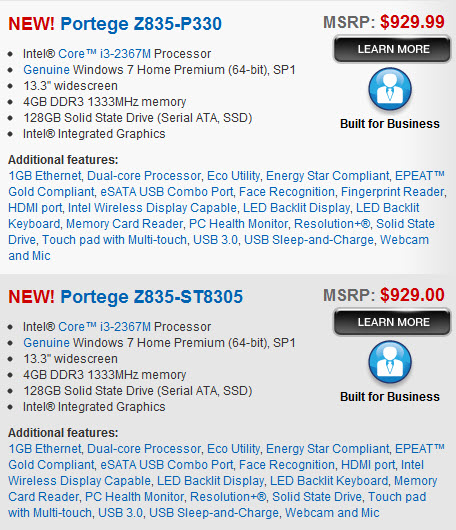
I had planned to buy the Core i7 model as soon as it became available BUT I am concerned about the price from ToshibaDirect.com. For example, they have the Z835-P330 for $929.99 and Best Buy has that same model (shown online now) for $799.99. So ToshibaDirect is not discounting the models at all.
So, I'm not buying one today from ToshibaDirect as
1. It appears that resellers may sell them at lower prices
2. Some resellers have better return policies than ToshibaDirect's 15 days
3. ToshibaDirect says "Usually ships within 1-2 weeks" so it sounds like they're not ready yet
4. I'm not sure the LED is matte or gloss yet. I can only see TruBrite and non-TruBrite LED Backlit Displays mentioned
5. I just read last night that we should be seeing some info very soon about the HP Ultrabook (which is supposedly "similar" to the Toshiba).
[A caveat. I am prone to fits of enthusiasm so cannot guarantee that I won't order one today....]
I do like the fact that the Core i5 and Core i7 come with 3-year warranties. The two Core i3 models have 1-year warranties (like the Best Buy one).
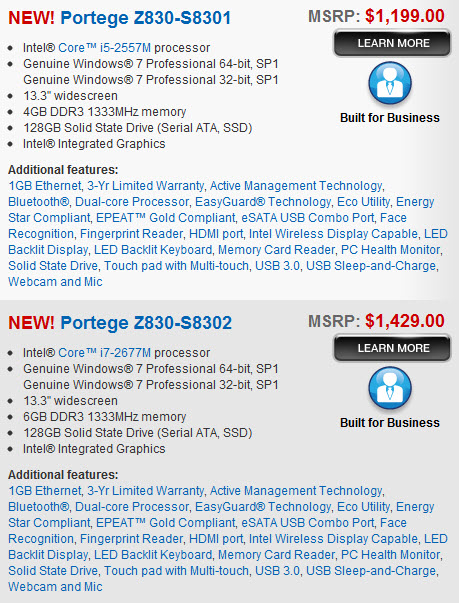
These are the four pre-packaged models:
-
Attached Files:
-
-
Alright, looking at the specs closely, here is what you get by upgrading to the i5 model:
3-yr warranty
Bluetooth
Upgrade to i7:
6GB RAM
It looks like all of them are truebright displays.
The big shocker here is the price on Bestbuy.com! $100 less than I expected! Suddenly the base model becomes MUCH more attractive. I really hope it stays at that price when it becomes available.
For example, if I bought that one, substituted the MyDigitalSSD we discussed earlier (+$200), accepted the two year warranty by purchasing through my credit card, bought the bluetooth wireless module on ebay (+$20), 4GB DDR3 Memory (+$25), the laptop is still only $1045 (+tax). So you get the better SSD, you don't lose bluetooth, you get more RAM, and you're paying just a little more than the base Asus UX31 model.
My question would be: where would you install the new wireless card? I don't see a slot here: http://www.youtube.com/watch?v=8y3RCNlKd1k#t=01m50s -
@ makryger
There is not a separate bluetooth slot on the Core i5 and i7 models. Bluetooth is provided by the use of the Intel Centrino Advanced-N 6230 adapter.
I don't know what adapter the Core i3 models have but it is an Intel. Probably the 6205 if it doesn't have bluetooth.
I have an idle Intel Centrino Advanced-N 6230 adapter that I've been planning to eBay...
Regarding memory, on that Z835-P330 model, it says "Configured with 4GB DDR3 1333MHz (max 6GB). 2 main memory slots. Both slots occupied. (not user upgradable)". So I wouldn't assume that you could go to 6GB. -
Right, that's what i was referring to- the Advanced-N 6230. They are about $20 (from Hong Kong) on ebay. But I don't see where the adapter would be plugged in? I would have assumed it would replace wherever the included adapter was, but I don't see it on the board in that youtube clip. You're probably right it is the 6200 adapter, i just don't see it.
On a similar note, I'm looking at this most recent set of Centrino wireless adapters on intel.com- looks like they have a 6300 model too that does speeds up to 450 Mbps, but no bluetooth! And its the same price on ebay. I think I'd choose bluetooth over the extra speed, though. -
@ makryger
Watch out for the really cheap Intel WiFi adapters on eBay. They are fake.
The Intel WiFi adapter is not visible on that YouTube video. -
@Kalahari- Really? These sellers seem to have 99%+ ratings, and from what i see for their other wireless cards they've sold, everyone seems happy. The price is pretty much the same I could get at MacMall, for example.
-
When I bought mine, a couple of months ago, there were some fake ones from China. I did some research to confirm that. There's a lot more now and the prices have dropped so you're probably fine -- especially with MacMall and others.
-
I was looking at other differences:
Only on 835:
Resolution+
Only on 830:
EasyGuard
Active Management
On 830s and one version of the 835:
Fingerprint reader
I wonder if the SSD drive is better on the 830s.
$799 for the Tosh entry ubook is a very compelling price. -
Good info guys !

I hope someone has a chance to go check one of these z-models at Best Buy soon and let us know what they think. I have a feeling these will sell fast.
P.S. - IN MY OPINION, The Toshiba MSRP can be misleading. They usually aim to be more than what most retailers charge; there by making these retailers look like a good deal. Use it as a guide, if it's near the MSRP look elsewhere imo. I've heard and personally experienced, if you buy from ToshibaDirect you can haggle a bit with the person on the phone to get a discount from the ToshibaDirect price [usually the most expensive].
Good luck -
Thanks for the info, alex. I called up my local best buy. They said the computers where in the warehouse, but not in stock yet. So it'll stil be a bit of a wait.
I'm not sure about Toshiba in particular, but other laptops seem to consistently be at MSRP at least on release for the early adopters. -
I've been watching for this notebook since it was announced in Sept; I'm curious about screen quality, and also about the ease of installing a better SSD.
This thread has been very helpful, BTW; my thanks to the participants. -
The screen quality is nothing special; it's about the same quality as the 15.6" glossy panels found on most budget notebooks. It is satisfactory for casual usage, but not for photo editing (no important photo editing, anyway). The ASUS UX31 had a much nicer screen especially since it had a 1600x900 resolution. It also had better color reproduction.
I find that most notebooks with LED backlighting have a bluish/cold color temperature, probably due to the fact that the LEDs are blue. The Toshiba Z835 is no exception. Needs calibration.
If Best Buy really is selling this thing for $800 then that's a good deal. I think $900 is the limit of what I'd spend for this machine, regardless of processor and extras.
Here's my con list for the Z835:
-Exceptionally slow SSD (slower than a hard drive)
-Fan is not silent
-Glossy display surface
-Glossy touchpad buttons
-No Bluetooth in the base model
Pro list:
-Decent backlit keyboard (could use a bit more key travel though)
-Very thin and light
-Good touchpad, has an on/off button
-6 hr battery life
-USB 3.0 included, full-size VGA and HDMI ports
Personally I can't see depending on it for use as a primary machine ... it's not robust enough. But as a travel companion, absolutely.
Full review will be finished today and most likely published this week. -
Charles, what do you feel comes closest to this laptop (similar size and weight, etc) that you *would* depend on as a primary machine?
Thanks. -
I have a 17" ~9 lb HP business workstation as my primary computer.
If I did have to get something with a 12-13" screen as a primary notebook - probably a Lenovo ThinkPad X220 with the 12.5" IPS display. ThinkPad keyboards are pretty much unbeatable. You should easily be able to snag one for under $1,000 ... check the Lenovo Outlet and the coupon sites.
I used to own one of these and liked it a lot for everyday usage. -
FWIW, I did a chat session on the Toshiba site this evening. Here are a few things I learned:
1. RAM is upgradable, post-purchase by the consumer, and upgrading on your own won't affect the warranty.
2. SSD is upgradable, post-purchase, by the consumer and switching out the SSD won't affect the warranty.
3. Matte screen -- all the Portege Z830 models have a matte screen. They also claimed the Z835 has a matte screen.
4. There is NO port for the Toshiba brand Hi-Speed Port Replicator II. Very disappointing for business use, and an additional
disappointment with the 2nd rate screen and 4th rate SSD. Buying this in the i7 version would maybe be overkill given the limitations.
BTW, If you do a chat session on their web site, they offer a survey, which has discount codes for extended warranty and accessories.
The Portege R830 is looking more interesting right now. A half pound heavier, but has the port for the port replicator, can be purchased with 8G RAM (from sites like portableone), and also has a DVD drive. Same screen and SSD though. -
Thanks for the info. Glad to hear that the upgrades won't affect the warranty... if I do end up buying, I'll at least be adding more RAM and a new wireless chip, and very possibly a new SSD, if the best buy price remains $800. I'm not sure about this whole "matte screen" thing. It sounds like most of the reviewed models have been glossy so far. The screen is the one thing that has been really inconsistent among reviewers- some say its not great, others say its good.
While I initially would have liked a port replicator, I'd rather go for the WiDi display adapter. and just only need to plug in the power when I need to. Otherwise, everything else I have can be accessed wirelessly... printer, hard drives, internet, video, keyboard/mouse. -
From my experience wit this Z835-P330 review unit, there is nothing special at all about the display. Just a generic 13.3" LED backlit panel ... washed out by my standards, crap viewing angles, and the annoying glossy surface. Color gamut is probably 60-65% at best. All of this is 100% normal and expected on a consumer notebook.
ThinkPad X220 is your best bet if you want a good-looking display (w/ the IPS panel). Otherwise, an external monitor is your friend. -
the R830 is a different SSD completely, it uses true SATA connection, not mSATA and is also encased in a 2.5" drivebay, so can be easily swapped out (with a cable change) for any SATA 2.5" SSD on the market, OCZ, Crucial, etc etc, so much more flexible
i really like my R700, basically first gen R830, and i run an OCZ SATA2 drive, its screams along, lightning fast
the main thing i like about this Z830 is the backlit keyboard (hoping to retrofit to my R700, but not holding out hope of it working! plus need to find a keyboard on the market)
the screen on my R700 (13.3" backlit LED, matte) is more than likely the same as the one on the Z830 and basically, its functional. fine for browsing and document management/office tasks and does an okay job of HD films etc, however it trousers for photo's etc, colour washout is pretty bad compared to even last gen hardware (my old Dell XPS 1330 has a much better screen!) -
Be careful with the SSD on the R830 models. Toshiba limited the speed to SATA II in the R830. I am not sure whether they have this limit in the Z830/835 models.
Also, if somebody can drop in an 8GB module in any of the Z830/Z835 would be great. This would giev 10GB RAM but the question again whether toshiba limited this as well.
-
I just tried speaking to the toshiba sales chat. (emphasis:try). From what she told me, the ram and ssd are upgradeable, as a previous poster mentioned. She seemed to think the wireless card was not swappable. I don't know what to make of that, as the card has got to be the mSATA centrino if its got 2nd gen WiDi, which means it has to be swappable. I doubt they would solder it on, as thats the kind of part thats prone to warranty issues, and could be easily replaced by a technician inexpensively.
The other thing I asked, which I kind of expected based on some early reviews, is that the screen is NOT matte and anti-glare. It does have "TruBrite", which according to toshiba is an anti-reflective technology, but not particularly effective, and comes on their cheap models as well. We seem to be getting a lot of mixed messages... people with review models over the past week seem to say the screen is glossy, though if you look back at tradeshow models in sept and oct, the screens are matte, then we have two different toshibadirect salespeople giving us two opposite answers. -
ai, the R830's intel chipset will run SATA 3 but Toshiba refuse to release a BIOS patch to unleash the power!lol! so your stuck on SATA 2
although in the real world, it makes naff all difference for office tasks and messing about on the internet. its only going to come into play on huge, sequential writes to the hard drive, which in all fairness only video editing will produce, and frankly these systems arent exactly fit for purpose for that kind of use for a host of reasons. -
looking at it i'd say the 'cheaper' best buy specced Z835 will be glossy screen'd and the 'pricier' Z830 'business' models will be matte.
but thats an educated guess, not cold hard fact
-
Another review:
Toshiba Portege Z835 Ultrabook Review | Techland | TIME.com
I think we're starting to see a pattern in these reviews-
The Good: decent keyboard, decent trackpad, impressively light, with ample ports.
The Bad: Screen is disappointing, audible fan, slightly cheap-looking design. -
their conclusion:
-
I'll tell ya, if the Macbook Air came with an option to get a Windows keyboard (instead of the Apple keyboard) I'd probably buy it. But since it doesn't, this Toshiba still looks pretty decent to me.
-
Went to BB today... no Z835 to be found... they did have the Acer Aspire S3 at Costco for $879... which makes the BB $799 for the Z835 a real bargain.
-
Pending a trip to best buy to take a look at the laptop (need to confirm 1-that the keyboard is usable, 2-that the screen isn't terrible, and 3-that it looks at least a bit attractive) I'm leaning more and more towards this laptop. Unfortunately, those three aspects seem to vary widely among reviewers, so I just need to decide for myself. The keyboard is definitely issue #1, the screen I'm willing to deal with some imperfection, knowing that the only truly good screen around is from Apple.
I really hope this is released before Black Friday; Chase is offering 10% cashback on purchases made on Black Friday at BestBuy.com. That makes the computer $760 after tax and cashback. Then, I'll swap in a new SSD, a new 4GB memory stick, and the bluetooth version of the wireless card. That brings my total to a respectable $1000- exactly what I was budgeting. -
If the Z830-ZS8301 (MSRP $1199) goes for a discount online for ~$1000, I think that's the one I'd get.
It has an i5, BT, fingerprint reader and Win 7 Pro... and I can hope that the 830 models have a better SSD than the 835s. -
Berkeleydb, thanks for this post. It's great news. I ordered first thing Sunday, as soon as the site was functional. My z830 is supposed to ship out *tomorrow*. I'm guessing it should arrive by the following Monday for sure. I'm eager. My 2 extra AC Adaptors have already shipped. But the unit itself is supposed to leave the factory (or distribution center) on 11/15/2011! Looking forward to finding out how slow the SSD is. I'd be a candidate for an upgrade to something faster and roomier, if I knew what to get and where to get it. Either way, looking forward to just getting a keyboard -- period. I've been working off of an Asus EP121 now since January (a Windows 7 slate) as my desktop replacement. Soooooooooooo looking forward to just *typing*!!!!
-
So -- is this the kind of replacement SSD that I'll need to save up to afford?
at newegg.com, item # N82E16820227727
a "OCZ Agility 3 AGT3-25SAT3-240G 2.5" 240GB SATA III MLC Internal SSD" ??
$339 currently (with a rebate going on) -
No, you will need an mSata form factor SSD.
Here is a SATA III that will be blazing fast. The only question remains is whether Toshiba enabled SATA III speed in the bios. -
No one seems to have msata greater than 120 gig. Bummer.
-
Annoying, but fortunately, external drives are so fast (and cheap!) these days that you can really just focus on keeping the necessary day-to-day files on the laptop, and then store longer term files externally. In fact, I've got a 128GB HDD in my current laptop, and I have never once had to worry about storage. You could go for a larger external USB3.0 drive, or even a smaller usb thumb drive.
It hasn't been mentioned yet, but apparently the z835 does eSATA as well. Although I always thought the combo eSATA/USB ports had a bit of a different shape- I don't really see that in the pictures.
EDIT: Scratch that... it listed eSATA/USB yesterday, but its no longer on that list today. Sad. -
Here I found a very nice review that more resembles me a semi-professional review on some tech-site
Toshiba - Portégé Ultrabook Laptop / Intel® Core i3 Processor / 13.3" Display / 4GB Memory - Silver - Z835-P330 -
Looks like Charles posted his review today of the z835:
http://forum.notebookreview.com/notebook-news-reviews/624986-toshiba-portege-z835-review-best-ultrabook-discussion.html#post8075782 -
Day 2 of the Z835 Hunt:
Still no sign of it at my local Best Buy... or any 830s online. -
Just so y'all make informed decision, here's the first look at HP's entry into the Ultrabook domain. At 3.3 pounds, and 18mm thick, its probably a bit too un-ultrabook for me. Otherwise, a lot of the specs are similar to the Z830. That means i'm probably gonna go for the Z835, assuming the keyboard and screen are usable.
Exclusive First Look: Pics and Official Specs of Upcoming HP Ultrabooks | Ritchies Room -
Can someone verify these support sata 3 ssd upgrade? I wonder if the z830 models have a faster ssd?
-
Worth noting the 13" HP Folio (aka DM3) has a 59Whr li-ion 6-cell, versus the Z835/Z830's 47Whr 8-cell. Meaning the Folio will see ~25.5% longer battery life. Could be an important pro for some.
-
I had contacted Toshiba Support. They said the SSD in the all the Z830 and Z835 models is the same. They could obviously be incorrect but that's what I was told.
As far as the Sata 3 support goes, that is a valid question. The R830 BIOS does not support Sata 3 so I would be surprised if the BIOS in the Z83x does. Hopefully, someone will test this soon. A better Sata 2 SSD is probably a good option for the Z83x though. -
Anandtech's posted their review of the z835
AnandTech - Toshiba Portege Z835: A New Ultrabook Appears
Looks like I'll be holding onto my r835...
They do raise a good point in the review about the maddening race to get laptops thinner and thinner. Logically speaking thinner laptops will be lighter but instead of focusing on thinness, manufacturer's should focus on the weight.
For me the added weight and girth of the r835 is worth it as it has an optical drive and is very easy to upgrade. I upgraded the ram to 8gb, threw in a 256gb ssd and swapped the included wifi for an intel 6250. From the reviews upgrading the z835 does not look so simple and my 3.2 lbs r835 is plenty light however the 2.4 lbs does sound amazing. Having said that the r835 does have better battery life compared to the z835 eve with the i5 CPU
At the end of the day, i'm just happy I get to keep my money in the pocket
-
FWIW, an online vendor told me today that the Toshiba z830 won't be readily available outside the Toshiba site until February 2012. Tight allocation, limited availabilty. At least that's what I was told.
I was interested in the z830, but it has too many compromises and limitations. Very disappointed in the limited upgrade options. Lenovo X220 is starting to look better. -
@berkelydb
I have just spent the last hour reviewing the X220. Am considering that too.
It's not so much the upgrade options that bother me because the specs for the Z830-S8302 are pretty good as far as Ultrabooks go.
I am more concerned about the reports of the noisy fan, negative reports of the keyboard -- especially the left and right edges of the spacebar; and the slow SSD that I know that I would want to upgrade. -
1.1" 3.3lbs 11.6" Asus U24E is worth a look too. A i7-2620M/4GB/500GB U24E starts at US$745. There you get a full powered CPU, 2.5" drive bay, 56Whr battery, contemporary looks and chiclet keyboard. Appears to be exceptionally good value.
-
Well, I'm going to take a look at the Z835- they are now starting to come out at best buy, and its available at bestbuy.com.
For this class of notebook, its definitely underpowered compared to others, but the price is also the best out there. For me personally, I've been working with an "underpowered compared to ultrabooks" laptop for four years, and I really haven't been limited by performance. So even though this notebook may not be the best of the best, it is still much better than what I have now, and therefore completely adequate for my usage pattern.
Of course, I'm still going to go play with it at Best Buy first before making any final decisions. -
A nice short article comparing the ultrabooks on the market thusfar:
Ultrabook Showdown: Which is the Best? -
Here's another Ultrabook to consider, the HP Folio:
HP's 13-inch Ultrabook: The HP Folio Hands-On
Much heavier @ 3.3 lbs but it looks like it might be more solid than the Z835. $899 at Best Buy, includes the i5 processor, a better battery, and Bluetooth.
I read Anandtech's review of the Z835, it pretty much goes along with what I said. They bashed the keyboard more than I did. In my view, and I review a lot of notebooks, the keyboard is very usable. Is it particularly enjoyable to type on? Not really, and the reason is that it's simply too thin to provide sufficient feel. But it is most certainly usable. Best way I can describe it is "not bad". Certainly not something I'd complain about using, anyway. The ASUS UX31's keyboard - yes, that is garbage by comparison.
That said I still stand by what I said about the price; $799-899 is the absolute limit of what I'd spend for the Z835. Really, $799 is pushing it.
If you can deal with the extra size, the ThinkPad X220 is a much better and more robust computer. -
@Charles: Well, let's not forget that in your review you said the $899 pricetag made it a "very attractive choice". Maybe you've changed your mind since then, but it sounded like the $899 wasn't really "pushing it" for you, so I'd imagine 799 makes it even better.
In my case, I have a 10% off coupon for Best Buy, which brings the price down to $720. It's awfully hard to pass up an Ultrabook at that price point, even if I do upgrade to bluetooth and 6GB RAM for an additional $40. -
Rats. Is it 100% that this keyboard is only 90% standard key spacing? ... or is it standard key spacing, but with slightly smaller key caps?
-
Well, the reason I have been searching for a new laptop and am now looking at ultrabooks, specifically the Z835, is that I had purchased a Lenovo ThinkPad X220 in June, after reading glowing reviews of this machine. Many people, including pharmaceutical reps I deal with where the X220 predecessors (X200, X210, etc.) are standard issue for "in-the-field" laptops, lauded Lenovo's great quality control and the reliability of their machines. Indeed, the X220 has a very nice screen and a great keyboard. However, my brief experience with the X220 was quite the contrary to what I had been led to anticipate with Lenovo machines, to wit:
Case Number "1": *******
Bluetooth worked at first but now has completely disappeared from Device Manager. Lenovo had me ship the computer postage paid to the IBM service center and sent it back 48 hours later. Absolutely nothing was done about the Bluetooth issue despite my including a full statement of the problem with the machine and, in fact, Lenovo's report of their test on my X220 didn't even mention that they had tested Bluetooth! Finally, after several weeks of dealing with various service centers, Lenovo told me that, due to the earthquake and tsunami in Japan, their best case scenario was that they would not be able to fix the Bluetooth until September.
Case Number "2": *******
X220 Tablet freezes after installation and reinstallation of USB Port Replicator with Digital Video Serial No. A1043A003357.
Case Number "3": *******
When I use the thin travel AC adapter with my X220 Tablet, the Touchpad does not function properly, with the cursor becoming very difficult to control, sometimes jumping unexpectedly across the screen. This does not occur with the AC adapter that came with the X220 Tablet.
Some Advice after My Bad X220 Experience
For those of you potential Toshiba Z830/Z835 customers who decide to purchase a Lenovo X220, if you have any problems with the machine, do NOT accept any "run-arounds" from IBM, who apparently are contracted to repair Lenovo hardware, or from most Lenovo personnel. Instead, insist on dealing only with the Customer Advocate who is in the Lenovo Customer Complaint Resolutions Department, part of the Customer Satisfaction Programs for Lenovo Services. This guy was a gem and gave me the option of returning the machine to Lenovo with full refund, because I had initiated my complaint process during the first two weeks I owned the X220, even though it was already beyond the one month deadline by the time I found out that a customer ombudsman existed within Lenovo.
New Portege Z830
Discussion in 'Toshiba' started by Hoopsontoast, Sep 12, 2011.