Problems? See this thread at archive.org.
Well after all the money put into it I dont see that being the route I'd want to take to be honest. I just bought a i7 940xm for it and its got 16gb of memory and also 1.5tb of space. I intend on making a desktop for home gaming and the 360gts seems to hold up alright but not going to lie Id definatly would appreciate better. I was wondering if anyone had any experience swapping one out and what kind of success theyve had with it, Also im sure I can get a 460gtx for a fair price... theres alot of times people scrap broken laptops without knowing the value of the parts that are still good.
-
This person claims to have installed the GTX 560m from a Toshiba x770 into a x500/x505 successfully.
Video card upgrade for Toshiba X505-q890 from 360M... - Toshiba Forums
Hopefully it's true! That means x500/x505 owners can upgrade [potentially] to other Toshiba GPUs or more! -
Well could always resell the card if it didnt work, Im going to look into prices and keep my eye out on ebay. Currently I see gtx 460's going for about 140 which is a reasonably fair price I just wish Toshiba would include the higher end graphics cards for their units.
-
I did some research into the 560m "upgrade" and from what Ive found the interface is completly different making the upgrade from a 775 560m card in a x500/505 series impossible... However from the looks of it going from a 360 to a 460 looks entirely possible, its just a matter of weather or not the bios will support it. For the price I dont think theres much risk there its worth a shot, Ill purchase the card take some pictures and let yall know how it goes.
-
This guy said he did it. No reply's to see what happened with the drivers though.
Video card upgrade for Toshiba X505-q890 from 360M... - Toshiba Forums -
Hello! I have a friend who owns a qosmio x500 with the 360m gpu. When he starts a game (eg wow) the laptop shuts down (or at least black screen not sure if fans are spinning since I did not have the laptop to check - I am currently abroad). He tested for overheating (even run furmark) and heat is not the issue. Anyone knows how to fix this? Any advice from x500 owners would be nice! PS formated the laptop and installed just gpu and chipset driver (from toshiba). Still same results.
-
Does it shutdown with any game? Is it immediate or there's a time period before it shutsdown.
I'm a bit puzzled it can not run WoW, but it can run Furmark. I think Furmark is GPU intensive, whereas maybe WoW is CPU intensive ?[maybe CPU is overheating]
Is your friend absolutely sure it is not overheating? Did he use a utility to measure temperatures? what were they?
I'm guessing the laptop works fine when it's not gaming; if it was a hardware problem would it still function outside of games?
Lastly, the x505s [pre-Sandy bridge] have had a lot of BIOS updates. I would recommend your friend verifies he has the latest BIOS; never know could address some problems.
I personally still think it's an overheating issues; whether CPU or GPU.
I'm sure you guys already checked, but make sure the vents are clean, and you may have to open it up and manually take out of dust bunnies [just did this with a HP dv4; external view looked clean, but the interior was filled with dust].
Good luck keep us informed with any updates. -
Hello again. I never had the chance to check the laptop myself since I was abroad. His laptop was still under warranty so he has send it for a repair. According to him he had the latest bios, tested prime 95 and furmark and passed but when he started a game the laptop shut down nearly immediately. Anws if after the repair he still has problems I will have a look at it and let you all know. Thanks for the info though!
-
No problem, and sorry I wasn't able to be of more help; considering you've been a fountain of knowledge for other owners.
Keep us posted with the solution to the problem [if one is discovered]. Good luck -
My friends laptop was returned after a week from toshiba and still has the same issue. I will be testing it personally later today. I have read in other forums similar problems with the qosmio x500 and 360m gts in WOW (shutting down unexpectedly not the usual shut down but a like power cut shut down) and the suggested solution is to disable the audio. Audio is important so if anyone knows of a better way? Maybe its a bad mobo and needs to be send back to toshiba? I will be doing a clean install of windows and drivers on his lappy (so I know its not the drivers). Can you suggest me the best drivers for his chipset, audio and gpu (I am using an x300 so I never had any experience with the x500)? PS the invoice from toshiba says that they changed fans and heatsinks. Will run prime95 and furmark to test the temps and let you know.
-
I've never done a "clean install" of Windows on a x505; so I would only be able to point you to the Toshiba Support page for drivers.
Model Content Page
Could it be that the power supply is faulty? Just throwing out ideas.....
Very interested in knowing the results of your stress tests. Keep us updated. -
Okay! So its the first time I had real time with the qosmio x500 (my first thoughts when I saw it at toshiba exhibition where negative but now I believe this machine is beautiful). Back to our topic I did all the stress tests after installing the latest display drivers from nvidia. So cpu stress test 1hr with prime 95 only 80c. Furmark 1hr 78c. If I had them run together the system was more stressed but still managed to be 92-93c for cpu and 80c gpu. So no shut downs no problems. I then went into nvidia control panel and disabled and reenabled physx. Changed under the adjust image settings with preview to use the advanced 3d image settings. After running wow for 1+hrs we could not replicate the problem. Moreover I changed the plug that was plugged as well. So really I am not quite sure if the newer driver, different power slot, or nvidia control panel settings were the problem. My friend said that he will test it more and let me know if the problem comes back. As far as I have been there we could not replicate the problem (my bad we didn't test it by changing 1 variable at a time so it could be any of the changes I made or just pure luck of not replicating while there).
-
Okay so an update to the Qosmio X500. Laptop still has the same issue with shutting down unexpectedly and restarting into windows (like a power cut). It is 100% no heat issue. Age of mythology (old game) does it most of the times and WOW here and there. I have tried disabling powermizer, different nvidia drivers but did not do the trick. The gpu is a GTS 360m. I have finally downclocked the gpu using nvidia tools from Core 575mhz to 500mhz,Shader Speed 1325mhz to 1300mhz and memory from 1800 to 1700. Tried age of mythology for an hour and no unexpected shut down. Testing will continue but it seems like the gpu is unstable at its default clocks. Any suggestions? Laptop still under warranty should we ring toshiba and request for a gpu exchange?
-
Has any of you upgraded your Qosmio to Windows 8?
-
I wouldn't bother with it. Windows 8 is still teething and I'd leave it be until the first SP comes out for it. >.>
-
I would ring up Toshiba and let them know of your findings. A GPU replacement should be no problem. I know Toshiba will probably say no, but maybe ask for a GTX 460m replacement [it should work with his laptop].
Good luck and keep us posted.
I think the 1st generation i7 x505 Qosmios are not Officially Supported for Windows 8 by Toshiba [ie: Toshiba doesn't provide any instructions nor drivers for the upgrade]. So you'll have to manually track down the supported Win8 drivers for your laptop's hardware [which could be a pain].
My x505 Qosmio [2nd gen i7] is officially supported by Toshiba for the upgrade, but I have no plans on doing this anytime soon.
If you plan to do the Win8 upgrade, make sure to let us know how it turns out. -
I've been running Win 8 pro rtm since the first Technet release on my x505-q850 VERY early model.
Use the Win 8 drivers for x875-q7390 and the latest nvidia drivers, etc. obviously do NOT use the bios update, etc.
BTW, for whatever reason, I accidentally updated MY computer with my daughters 8GB SODIMMS. 8GB DDR3 1333 sodimms and my laptop LOVES them. 16GB even tho TOSH says 8 max. -
Good info! Thanks for the update
-
Biggest deal was getting the laptop to 16GB!!!!!
Windows 8 isn't anything special once you add an "aftermarket" start button. Consider it Windows 7 with an add on to support "metro" apps. Everything that worked on 7, has worked on 8 for me.
But the 16GB ram, that opens all kinds of new VMWare workstation possibilities. I can now keep 2 or 3 other VM's running for my work instead of 1. I bought the Corsair Value ram 8GB 1333 Mhz Sodimms for $35 and change each at Compusa on a whim. Now I have to buy 2 more for my daughter's laptop. hahahahaha. -
Wait...16GB ram is possible?!?! Oh man oh man, I've let so many deals pass by cause I thought it was limited to 8GB...
Toshiba, why advertise false RAM limits?!? -
Probably because 8GB sodimms didn't exist when the earlier models came out. Therefore they had nothing to test with. Best upgrade ever for me.
-
wondering if anyone can help,
mates got a x500 and the main laptop screen doesn't work, if he plugs in the hdmi it then works on the tv, but not on his laptop screen, any idea's -
Since your friend gets an image when he connects his laptop to an external source [TV, external monitor, etc...], then that means his motherboard/graphics-unit is ok. The problem must then be localized to the screen itself.
You can try holding a flashlight to the screen, or getting very close to the screen while it is turned on to check whether you are in fact getting an image. If there is a faint image, then I believe replacing the screen inverter should fix it.
It may find the part here: Laptop Parts & Repair - SparePartsWarehouse.com
If there is no image what so ever, he may try checking the connection where the screen connects to the motherboard.
good luck -
long time no replay right? xDDDDD
generally.. i have problem with bios! please help
Downgrade Bios Of My X505-Q8102X - Toshiba Forums -
^^^^
Will it let you run the installer for the 1.40 BIOS? I know owners of the x775 Qosmio were able to downgrade their BIOS.
If I may ask, why do you want to revert back to the 1.40 BIOS? I am curious as I still use the 1.40 BIOS [as opposed to the 1.90].
Oh, and Welcome Back! :thumbsup: -
I DO NOT like the new Win 8. I have it on my new Leveno Notebook. Too much clutter with all those apps. They're trying to turn notebooks into cell phones with the apps layout.
Just got a Qosmio X505-Q830 last week for $450 and updated with a new 128GB SSD with fresh Win7 install and increased the memory to 8GB.
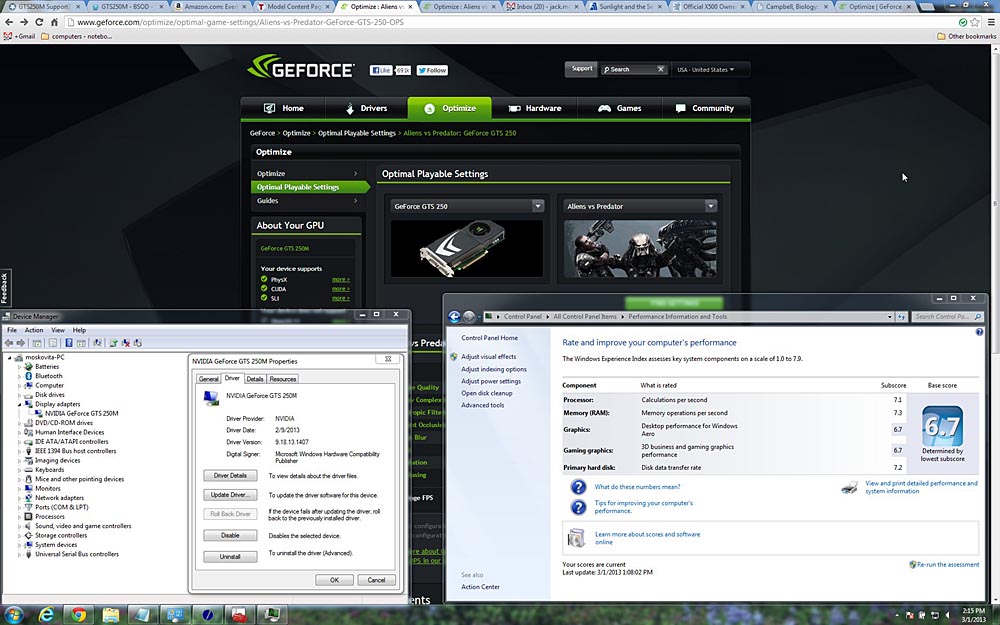
Got the Windows Experince Index score of 6.7
The weak link is the Graphic. How can I improve on that?
Any particular settings or can the GPU be swapped out for a newer one?
I'd also like to add a 500GB 7200rpm HD to replace the DVD unit with a caddy HD.
Anyone here done any of this?
This awesome machine is flawless, nary a scratch or smudge anywhere on it.
NOTE: This notebook may be over 2 years old but still holds it's own with the newer notebooks.
At Best Buy the other day I checked the Windows Experience Index on their 3 high end HP, Gateway & Samsung's $1,200+ machines and my 6.7 score was higher.
It blows away all the new ones under $1000 too. -
Gone to either Heaven or Hell
-
The x505 can only use GPUs designed by Toshiba [it has a proprietary MXM slot]. Thus, that limits you to the GTS 250m ; GTS 360m ; GTX 460m that are either pulled from decommissioned x505 Qosmios, or that are ordered from Toshiba part suppliers [this can cause several hundreds of dollars, example: $300-$400]
However, there is the problem with the 830 only being 120W. Does this 120W problem only extend to the powersupply? or does it also affect the plugin for the motherboard?
I point to this, as the x505s that have the GTS 360m and GTX 460m also have a 180W powersupply; considering the more powerful GPUs require this extra power.
No one knows if a 120W Qosmio can use a 180W powersupply; as if you want to try, you'd be one of the first.
Thus, with the above points, I would say no to the upgradability of your GPU. Is it possible? Yes, but not probable.
If I were you, I'd just save up and buy a $1000 gaming laptop in a year or two. I say this, as you can already get a x875 Qosmio for around $1100, which comes with a GTX 670m [much more powerful than any of the above mentioned x505 GPUs]. In a few years, a $1000 gaming laptop will be much more advanced.
However, glad to hear you like the 18.4" monster x505 Qosmio. I do agree they are very nice!!!
Good luck -
Hey Alex! I see your from Seattle and go to UW!
I live in Tacoma and went to UW 1974-1978. -
I'm alive!
I think the forums aren't very active cause there's not really much to go wrong with the X505. Only problems I've ever had have been Nvidia driver issues that were usually fixed in a new version. -
Do you have the latest version from Nvidia or from Toshiba's website. I heard the Nvidia didn't support the X505-830 gpu?
-
I use the nvidia WHQL drivers (non-Toshiba) without any issues; however my GPU is a GTX 460m. My current driver is 310.90.
I know when the x505s first launched, users complained that nvidia drivers did not fully work or were not compatible. However, I think nvidia has added better support for the x505 series since then.
If you want to try it, just make sure you have a copy of your current drivers; in case you want to revert back to those. -
From the Toshiba support page, the latest driver for the gpu was 8-11-2010.
NVidia site had very current ones at 2-9-2013
GeForce GTS 250M | GeForce
Works great... got a WEI score of 6.7 with the weak links still the GPU. The rest were in the 7+ range.
Here is the screenshot
![[IMG]](images/storyImages/Nvidia2.jpg)
Attached Files:
-
-
Hello there,
I'd like to add a second hard drive to my Qosmio X505-Q893. What was the part that was needed and where can I buy it? I know it has been mentioned before in this thread, but can't find it. I don't live in the US anymore, but my family is coming to visit this summer, so I'd like to find the exact link so they can buy it and bring it to me. Thanks! -
I believe this is the part: National Parts Depot - \ \ \ A000049520
I used information from this thread: Does all of the X505 2nd HDD bays take the same A0... - TOSHIBA FORUMS
One of these days I too am going to buy the 2nd bay bracket. Too bad it didn't come stock with the x505.
Good luck and let us know how the bracket works out.Andanzas likes this. -
Question: With the Q893, could I get a Bluray drive from one of the higher X505 models and plug it in to the Q893?
-
It should work; the x505's all used the same motherboard and BIOS, so it shouldn't be a limitation from those 2 areas.
Though, it may be pricey to find a x505 bluray drive. -
Actually, not bad:
qosmio x505 blu ray | eBay
From $30-70, cheaper than most players. Of course, now I'm wondering if there's any software issues...but I'm certainly intrigued. -
thnx master =D and sorry about late >___<
i already download the 1.40 but i scared! so i ask before try run the installer !
i have 3 problems after update:
1- eco touch button not working
2- the normal temperature before update was between 35 - 45 and when play games go to 50 - 65..
after update the normal temperature between 50 - 65 and when play games go to 75 - 93 !!
3- i buy 8gb 1600mhz ram and work great with full speed! after bios update the speed down to 1333!!
what i can to do? and sorry again for my bad english xDD -
I would verify that your fans/vents are clean of any dust; to rule out any other reasons for the overheating.
If you're still under warranty, you can give Toshiba a call have have them service it.
As for the downgrade; I do not know of any x505 owners who have downgraded the BIOS; so you'd be the first to attempt it. If you do not feel comfortable doing it, then that is probably a sign to not attempt it.
Again, try to exhaust all other routes [clean vents, repaste CPU/GPU]; hopefully one of those will solve the overheating problem.
Good luck and keep us posted with any updates -
Hi everyone.
I picked up a used X-500 about a month ago as a desktop replacement. I love the unit but it overheats when playing games or even youtube hd.
World of Warcraft , Diablo 3, wolfenstein new order....all got the temps up to 100 degrees c.
So...I was keen to find a solution. I found a few x500 dissection guides and went to work.
Took the unit apart...and went nuts with a can of compressed air. The vents in the back were almost completely blocked by dust from the inside.
See pix.
After blowing with the air and using a qtip to clean further....I reassembled the unit.
I wanted to reapply some paste on the CPU but didn't feel confident in taking out the system board.
Anyways....temps have significantly lowered and gameplay does not exceed 65-70 degrees C.
A Windows experience run did get some of the cores up to 92 degrees C but I'm content for now as the laptop does not get so burning hot when playing games.
![[IMG]](images/storyImages/cxl3.jpg)
![[IMG]](images/storyImages/pex7t.jpg)
-
A tip for avoiding that kind of dust buildup, should work for all laptops:
Take a used dryer sheet, cut part of it and tape it against the air vent. Voila, perfect makeshift dust filter. By the time it needs changing, you should have another sheet ready.
My X505-Q893 is still chugging along, no problems. I suspect I may have to change the HDD next year or so, it's still fine. I did get a Blu-ray drive and it works fine. Only actual repair I've done was the CPU fan, the original one was quite noisy, the new one's been working fine.
I saw the new X70s...not bad. I personally miss the old 18.4" size, but it's a damn sight better than the X770s... -
Greetings.
I have been struggling with my Qosmio X505-Q882 for nearly 2 years now; I'd had it for some time when I decided to do some cleanup and reformatted the hard drive. After doing so, I was unable to run most games without the computer shutting down - just a clean reset with a 'beep' noise as if I'd held the power button down - no BSOD and the computer doesn't even create an error log. The only way to prevent this is to run without the power plugged in and play on battery (which doesn't last long enough for this to be viable); as soon as the cord is plugged back in, the system goes down.
I've posted on many forums (even here once I believe) and have failed to even get a response from many of them. I've done extensive testing to check for overheating, driver issues, bad RAM... I've exhausted literally option except straight up replacing parts - though I did replace a fan and the AC brick. Overheating seems to be the go-to suggestion, but I cannot stress enough that this is NOT the issue. I have tested it too thoroughly and games that WILL run have pushed the temps up to 100C without the system crashing, while I have replicated crashes while the computer was literally sitting outside in -20F weather and did not even approach 30C. I am certain that the issue is software related, and that reformatting removed something that was regulating voltage.
What I'd like to try is underclocking or undervolting the machine, but the machine's BIOS has almost no options beyond selecting boot options and it seems most of the 'usual suspects' won't allow me to modify the GPU or RAM clocks at all.
Any help whatsoever would be appreciated. I'd like to find a way to force the voltage down, as something about running on only battery appears to be the trick here, but I can't for the life of me find a tool that will allow me to change these settings. The machine is long out of warranty and servicing it in a shop is out of the question; simply put, this thing is not getting any more money - and neither is Toshiba after the poor customer service I received during this one's life. -
Perhaps try the machine without the battery installed and the AC brick in? It might be a faulty battery.
If that's not the case, then flash the BIOS and give that a go. I remember having a similar issue at some point and it's kinda frustrating.
How long has this issue been going on for?
Official X500 Owner's Lounge!
Discussion in 'Toshiba' started by Red_Dragon, Oct 26, 2009.