Problems? See this thread at archive.org.
unfortunately we are.
i did get a reply but it seems they are only interested if you fill out every bit of information, including organization.
http://www.silego.com/contact.shtml
if you want to give it a shot and give a good reason why you need the datasheet
say you are coding for a toshiba utility and you work for toshiba development
-
lol, okay I leave it here today. Can I just full it random? I don't have any company. Maybe I can write which school I study at lol
 But I will try it with the tip you gave me
-
ok sounds good
well you have to make it legitimate otherwise they wont take consideration. -
Talk about a biig problem I'm even not 18
I hate situations like this -.-
-
no problem i can run it now. but remember crysis doesn't support crossfire. so one one card will be used.
-
thanks, this is what i got:
2.55Ghz
test 1 27.51
test 2 15.59
test 3 32.24
2.26Ghz
test 1 24.70
test 2 14.25
test 3 29.67
again, only overclocking the fsb. wish we could play with the multiplier like you can. sigh. -
wait what are your settings? plus i am only running one card cause crossfire doesn't work on it. i am stock cpu and gpu.
everything very high motion blur off.
5/18/2009 10:35:33 PM - Vista 64
Beginning Run #1 on Map-island, Demo-benchmark_gpu
DX10 1680x1050, AA=No AA, Vsync=Disabled, 32 bit test, FullScreen
Demo Loops=3, Time Of Day= 9
Global Game Quality: VeryHigh
==============================================================
TimeDemo Play Started , (Total Frames: 2000, Recorded Time: 111.86s)
!TimeDemo Run 0 Finished.
Play Time: 131.99s, Average FPS: 15.15
Min FPS: 10.58 at frame 148, Max FPS: 22.89 at frame 991
Average Tri/Sec: -6053780, Tri/Frame: -399527
Recorded/Played Tris ratio: -2.29
!TimeDemo Run 1 Finished.
Play Time: 115.56s, Average FPS: 17.31
Min FPS: 9.97 at frame 1950, Max FPS: 22.89 at frame 991
Average Tri/Sec: -6701686, Tri/Frame: -387236
Recorded/Played Tris ratio: -2.37
!TimeDemo Run 2 Finished.
Play Time: 116.23s, Average FPS: 17.21
Min FPS: 9.97 at frame 1950, Max FPS: 22.89 at frame 991
Average Tri/Sec: -6645201, Tri/Frame: -386179
Recorded/Played Tris ratio: -2.37
TimeDemo Play Ended, (3 Runs Performed)
==============================================================
Completed All Tests
<><><><><><><><><><><><><>>--SUMMARY--<<><><><><><><><><><><><><>
5/18/2009 10:35:33 PM - Vista 64
Run #1- DX10 1680x1050 AA=No AA, 32 bit test, Quality: VeryHigh ~~ Overall Average FPS: 17.26 -
Does anybody have any info on RAID for the x305?
-
are you running a 32bit system? if not there should be 3 tests in the 64bit folder. 2 for the cpu, 1 for gpu. i wanted to know what you get for all 3, but primarily the 2 cpu tests. at 2.5GHz cpu core? everything on high, not very high. or devil may cry 4, everything at highest?
thanks again
edit:
ok, on dmc4 all settings highest 16xQ AA, 1680x1050:
scene 1 - 74.41
scene 2 - 52.87
scene 3 - 81.72
scene 4 - 59.79 -
no i am 64bit. but the x64 crysis doesnt respond and closes for me. thats why i don't run it. here id dmc4 everything on superhigh. no aa
sorry my internet is slow but here are my scores
114.51
88.36
140.23
88.44
this was done at 1680*1050
i'm going to re run crysis now. -
ok, thanks. i'll rerun dmc4 without aa and let you know what i get in the morning.
-
Bump
(10.Char) -
cpu at 2.5GHz dmc4 all settings highest no aa, 1680x1050:
scene 1 - 100.99
scene 2 - 77.95
scene 3 - 115.1
scene 4 - 78.33
what cpu speed were you running? 2.5GHz -
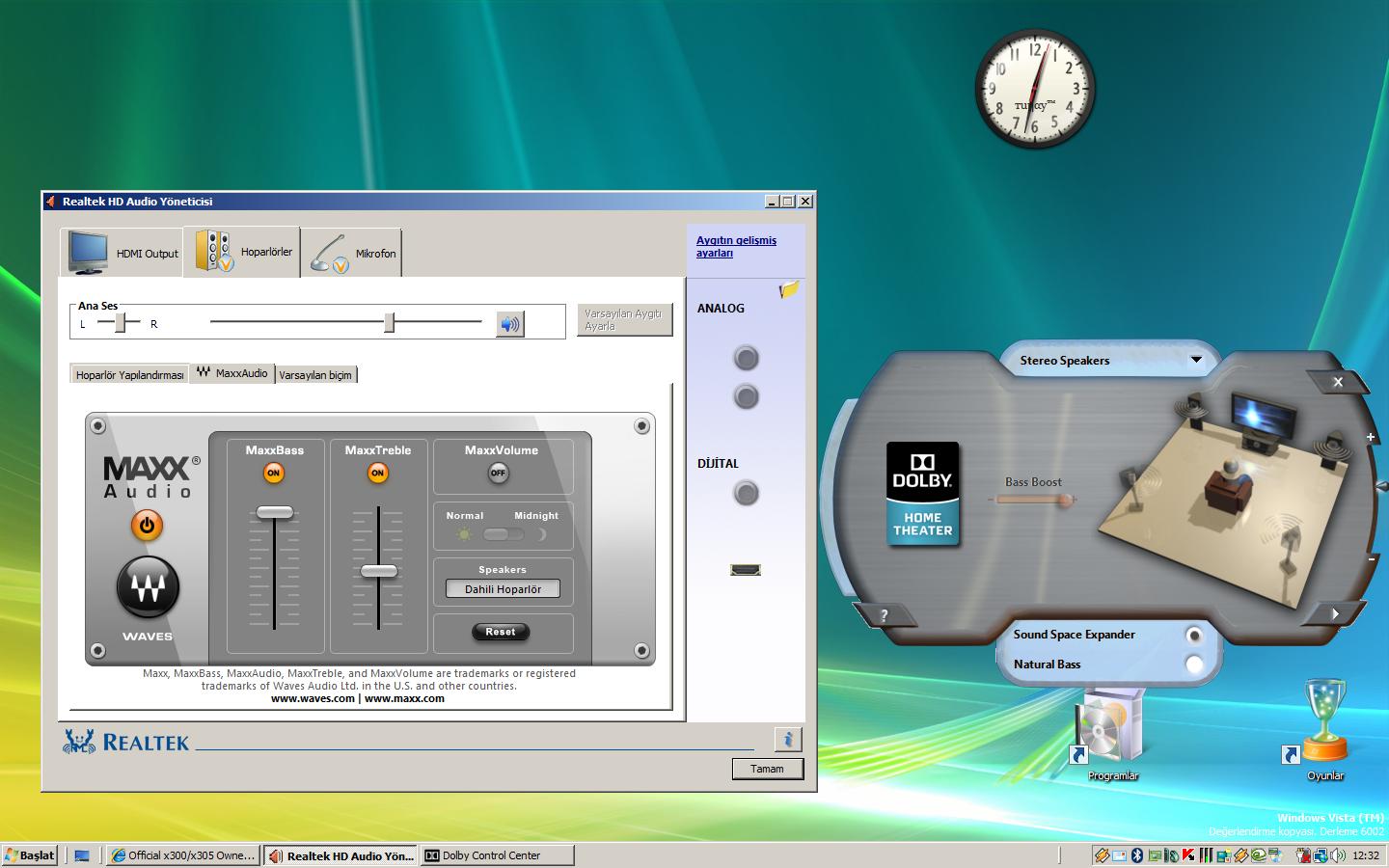
So, what your settings at Dolby Control Center And Realtek HD Audio ?
I post picture of mine, what is yours?
Natural Bass - On/Off ?
Sound Space Expander - On/Off ?
Which level is MaxxBass And MaxxTrable at ?Attached Files:
-
-
i'm at 2.53ghz but for dmc4 the cpu doesn't matter.
-
ok here is dmc everything on super high no aa
![[IMG]](images/storyImages/30sw13r.jpg)
and this is aa on 8x i don't have 16x i have to tweak my driver to get it. but i'm of to work i will post results when i get back.
![[IMG]](images/storyImages/73jz7n.jpg)
i think we are better off making a new thread for this. if someone those this before me(i will in about 8 hours cause off work) then someone shoot me a PM so i know where to go.
-
Haha unay, are you the same guy posting at OCZ SSD's?
Too funny. -
Theres a guy at OCZ SSD forum with the same name posted something extremely funny, but wasnt you i guess lol
-
No, It wasn't me
P.M link? I want to see that guy with same name as me !
-
so any news about x305/x300 performance around here?
-
Nothing from me
I'm around 200 3dMarks from 12k -
do you mean the 3870 crossfire vs the 9800m gts sli.
we don't have much games in common to do it. i'm still up for it. -
i guys. my qx9300 has arrived.
only had time to run some quick benchs.
3dmark 2006 bumped from 10xxx to 12xxx
cinebench r10 bumped from 88xx to 109xx
it is working perfectly with the 1.60 bios.
temps - idle are about 43º and with occt 3.1.0 the max i see is 75º
So, you can exchange the cpu. it works. -
Sweet man!
-
Have you tried overclocking it with Nvidia system tools yet?
-
no, dondadah, the drivers currently for the hybrid 9800's render any benchmarks useless. the average q706 or q708 should be scoring near 13,000, with heavy gpu overclocks 14,000
-
nop. overclocking the 9800 IN SLI does patrically nothing until you have unlocked multipiers on the bios. so the only option to have a beter score is drivers for now.
-
the reason that overclocking the GPU's does almost nothing to improve performance I THINK is the CPU being a reather large bottleneck. just overclock the CPU to see results. or upgrade. speaking of which, anyone else has a x9100 and can confirm these scores? or anything near it?
sounds way high for stock, but i'll believe it with screenshots... i know damn well what i am doing with drivers, both updating and beta testing, so i know all mine are most recent, or most stable... so what the hell?
looking at the specs for this laptop shows it is upgradable to 8GB of memory, anyone know if it also has the nforce 730i chipset? i think so since it is sli, but anyone able to confirm it for me?
EDIT:someone at laptopvideo2go.com posted this pic of the 706 with a x9100 proc and 185.85 drivers:
http://www.laptopvideo2go.com/forum/index.php?act=attach&type=post&id=2899 -
Most of X300/305 models support up to 8Gb RAM. Don't know anything about chipset, I have intel
-
you also dont have sli. something that is either nvidia, or the x58 chipset for intel. and i dont think that is available in this laptop. i already know from looking at the intel spec sheet that that chipset supports 8GB, but nowhere on the nvidia site can i find the info for the 706/708... which has the 730i, or 9400m g SLI. so again, IF ANYONE KNOWS about THIS chipset, share some knowledge? please?
-
So here is:
Attached Files:
-
-
With nvidia chipset you can also get 8GB of ram. Info from Toshiba Support
-
So if with bios 1.06 you can use the Q9300, i wonder how the X9100 would do in this unit. Would it even be detected? Are there Qosmios out there using the X9100 with this bios and version?
-
Yes, there are
For example X300-14X in Poland. -
Yes, but do we know bios version ?
-
Of course. They come with 1.60 version.
-
Okay, maybe there is only me with 2.10 here
-
Hmm, as far as i know, 1.60 is for SLI and 2.10 for non-sli
-
yep, thats about right.
and arcean which drivers are you using? -
185.85 from Dox + modded bios 1.60.
The main purpose of modifing bios was getting sli to work.
When i've received X300 it was extremely slow... only 5200pt in 3dm06 - which is slower than 9600M GT GDDR3. I was wondering why... After some research i saw that second 9800M GTS is not working!!! The first 9800M GTS was working in SLI with... yeah 9400M
. I still don't know how it is possible. A three weeks ago my friend also bought that notebook and now i'm working with him to get this SLI run extremely fast, like it should be.
New bios is working fine, but sometimes it hangs the os. Propably it is a problem with nvidia driver which thinks that the first device is 9400M. Hmm, we are still working on it.
Main changes in modified bios:
* Updated vbios of gpus to the newest from nvidia
* Changed vbios settings:
- GF 9400M is no more master device - now it is slave
- first and second GF 9800M GTS are master devices
- some small tweaks about memory management
* Nvidia tools recognize SLI in X300 -
thanks arcean, and sorry for the doubt, but i saw another with the x305-706 who had upgraded to that proc, and only got almost 13k in 3dmark06. on the us toshiba support site i could find no details on memory upgrade for our models, not untill i looked on the international site did i see that for the x300-14x, but then i couldnt tell if it was the nvidia chipset or intel. are those the dox 185.85 drivers btw? where can i get the latest vbios? is it laptop video2go.com? or elsewhere? i would like to learn more (work with/help you?) about the modded bios, and modding the bios. if you need help, please let me know...
and yes, 1.6 bios is for sli (nvidia chipset), and 2.1 is for the non-sli (intel chipset) -
Impossible. On this laptop sli 9400 + 9800 is impossible. that would be GeForce Boost.
http://www.nvidia.com/object/hybridsli_notebook.html
"HybridPower
"""""HybridPower unleashes graphics performance when needed and switches to quiet, low-power quiet operation for everyday computing. Combine an NVIDIA Hybrid SLI-enabled GPU into a NVIDIA Hybrid SLI-enabled motherboard (mGPU) for the ultimate control"""""". Dial up performance for demanding 3D games and applications; downshift to the mGPU to reduce noise and extended battery life for everyday computing tasks like browsing the Web, word processing, or watching High Definition videos. (this is what X300 does/supports)
GeForce Boost
GeForce Boost turbocharges the performance of """""""NVIDIA discrete GPUs when combined with NVIDIA motherboard GPUs. Plug any NVIDIA Hybrid SLI-enabled GPU into any NVIDIA Hybrid SLI-enabled motherboard to enjoy additive performance and more for your money.""""""" (not possible on the x300)
The 9800s have different bios.
Fist device has bios 62.94.50.00.16 and second has 62.94.50.00.17 and both are accessible via nvflash.
I'm 100% that sli 9800+9800 is working/detected on my x300.
![[IMG]](images/storyImages/captureyys.jpg)
![[IMG]](images/storyImages/capture2wbx.jpg)
The 9400M is part of the mcp79, so only accessible opening the bios with phoenix bios editor. Nibitor does not support correctly the 9400M Bios but does support the 9800s
![[IMG]](images/storyImages/capture1n.jpg)
![[IMG]](images/storyImages/capture3v.jpg)
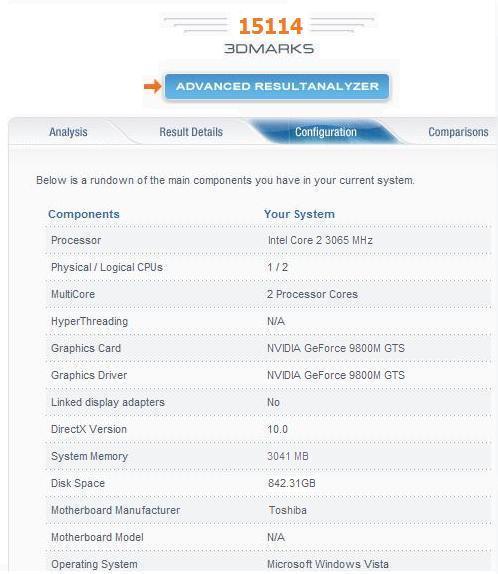
your 15xxx score is because of the x9100. I have the qx9300 and get 12xxx.
But if you run 3dmark vantage your score would be lower than mine because i have a quad core.
The cool thing would be if someone would unlock/add to the bios multiplier changing on the extreme cpus like the x9100 / qx9300.
I have the feeling that the drivers are still not working quite well with hybrid-sli on this laptop. For some reason the x300 hybrid-sli versions are note officially supported by the nvidia drivers.
when i first benchmarked this laptop, out of the box i got 10xxx marks , not one single time i had 5xxx marks !! never. -
adolftregosa: hybrid power might just be possible with the 9400. look here http://www.nvidia.com/object/product_nforce_730i_us.html.
from that page "Innovative Hybrid SLI® Technology
Combine select NVIDIA discrete GPUs with NVIDIA nForce 730i MCP to boost application performance by over 70% at the same system price."
but you are right, the 9800m gts doesnt support it. -
X300 with QX9300 and 9800M GTX (out of the box) is scoring also about 5200 in 3dm06 - look here. Tests run in 1024x768 so it performs slower than my Qosmio. Toshiba drivers for gpu are totally screwed
Now for me SLI is working properly. From our observations, changing 9400M from master to slave have the biggest impact on a performance. Actually we are using internal phoenixe tools instead of nibitor or bios editors.
@adolfotregosa: Which version of X300 do you have? -
doesnt sound too stock...
so is it just overclocked in vbios? it could be a heat issue causing the hangs, try to check temps. -
No, the new bios doesn't change any clocks and voltage settings for GPUs.
it means changed settings for Turbo Cache (for 9400M) and some minor tweaks in pci express communication. Temps are the same, only for 9400M there is a small drop (propably, becouse of new vbios for it). Everything we have done, is just for optimal SLI work. And sometimes it is working, and sometimes no
-
my point is that nobody else upgrading to x9100 will see that improvement
-
i'm 100% shure that an stock x9100 will get you 15xxx marks on 3dmark 2006 but not higher score on vantage since it's a dual vs quad.
My highest score with the qx9300 bumped to 2850 (300fsb) got me 13975, basically 14k.
Do i need to post a print ?
when you are using the 9800s, the 9400M does nothing on the """x300""" i'm not talking about other systems since i do not know. (i have the x300-156 but i changed the cpu).
If someday i have some way of changing multipliers i will get 15k . until then i will not.
PS - 5200 on 3dmark 2006 (qx9300 - 9800GTX is nonsence !!!!! ) we have were ppl with 118xx at 1280x1024 and the cpu is a t9600 !!!! you have/had smt really wrong. -
nice scores. i'm glad you like your qx9300
Official x300/x305 Owner's Lounge
Discussion in 'Toshiba' started by Bartlett, Oct 4, 2008.