Problems? See this thread at archive.org.
thank youyou are ok !!!
-
-
Hi Guys,
Im new to this forum but I have been busy silently reading all the wonderful info on the X305 here. I still have plenty of pages to go but since I have already ordered an X305 Q720 (with the quadcore and single 9800 gts), I would really appreciate some feedback from owners who actually own this model. Posting some benchmarks would be wonderful. I also realise that there is a Gateway model with very similar specs (Q9000, 4gb ram and 9800 gts) thats kinda popular. How do you suppose the Toshiba measures upto that?
It does appear that the Q706 is where this party is at but would really like to know about the Q720!
Cheers! -
adolftregosa: look here for another x305-706 with x9100 processor upgrade.
http://www.laptopvideo2go.com/forum/index.php?s=&showtopic=24003&view=findpost&p=115158
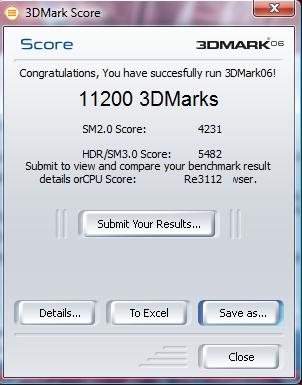
he gets only 13078 in 3dmark06, not 15k. -
i went for the qx9300 instead
-
Link dosn't work
-
hey everyone, check out my site in my sig please. thanks
-
So nobody owns a Q720? I didnt even find any good reviews for this model
-
Wow, I'm with you there, it was not so easy to find information about this model.
But I found this link, maybe it helps
http://forum.notebookreview.com/showthread.php?t=343153 -
Thanks for the link but it wasnt much help. I'm starting to think maybe I should really have gone for Q706 but since I also do some video editing and a lot of Photoshop, I thought the quadcore would come in handy. The Q720 costs me around $2000 cuz im paying shipping (and customs) to Pakistan as well
Q706 around $2400 so thats a lot of money. In more than one way I envy you guys from the US
-
The Quad-core will handle PhotoShop and Video editing well. I will like to see some benchmarks-test from you
ByTheWay, I have T9600 at 2.80Ghz. I want to upgrade to Quad-core too
-
Yeah my sentiments exactly! I'd be getting mine on Friday so really looking forward to putting up some benchmarks. BTW the Gateway P-7808u FX has more or less similar specs http://www.gateway.com/systems/product/529668248.php. Ive seen some good reviews for this laptop so I am expecting good numbers from the Q720. Keeping my fingers crossed!
-
I leave this one here;
Prime95 (64bit) - 25.8
http://files.extremeoverclocking.com/file.php?f=205
Link on first message is dead. So this is newer version and for 64-Bit. I'm going to test my RAM at 7-6-6-14. No problems so far
-
My results with 7-6-6-14. I arborted it after 13 minutes, becouse it just starten off again and again
Does it stop automaticliy at all ???
http://img33.imageshack.us/img33/2228/torturev.jpg -
Hi! Some testing without gpu OC but with cpu OC 300 fsb = 2.50Ghz =) 185,85 DOX
Attached Files:
-
-
tuηay, what timings you change while OC memory? I know nothing about that =)
-
Nop, 300fsb x 7.5 max multiplier (q9000) = 2250mhz. (q9000 is not 8.5 multiplier like nvidia panel reports)
Nvidia performance panel reports cpu speed wrong. use cpu-z or that math. -
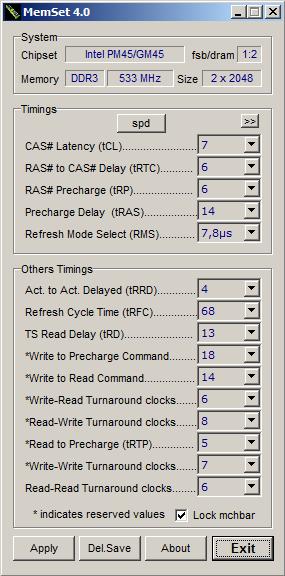
I have mine currently at 7-6-6-14. I have used it at 7-6-6-15 for long time without errors. Now I'm tryring 7-6-6-14. I suggest you to stay at 7-6-6-15, But if you mean that a Bluscreen or system crash don't hurt: go for 7-6-6-14 then. Like you see, I have ran the stabilitiy test without any errors, but you never know... Take a look at
Attachment
You can find the MemSet program at first page.
Please note that I don't take any consequences of any damage!
I learned this from Dude55, All respect and Rep goes to him...
Attached Files:
-
-
Looking on Sanekn's results i can say that second GPU in x305-706 gives 0 results
. Now I'm completley sure that there is something wrong with 706 laptop even after we got Nautis/Dox driver release...
-
Maybe there is something with 3DMark06 (?). It does not support 4 cores (Quad-core) so maybe we should start to compare with 3Dmark Vantage...
-
you are 100% right. For all of the others go to nvidia panel, 3d profiles and on the 3dmark 2006 profile change the sli to single card, then run 3dmark.
Like i said before i reached 14k with the new cpu and i'm again 100% shure that sli is working! Just activate the sli load graphic. On 3dmark vantage I reached P99XX with oc. -
Could you not increase the cpu multiplier on nvidia control panel if you got an nvidia chipset?
Also found something very interesting about the fans, not too sure if this is posted before (CBA reading 100 pages!) or if this works for everyone but it definitely works for me to keep the system cooler on idle.
Normally, the fans are off until gpu reaches around 50C then it kicks in to cool it around 47C (well for me anyway, maybe other peoples X305's are different) then shuts off again. But what you find is if you run on high performance with SLI enabled and play something intensive for 10-15 minutes (eg. 3D Mark) or playing a game the fans will rev at the fastest speed. Once youre done quickly change it to run on 9400m and the fans stay on full speed without shutting off. That keeps CPU and GPU running around 30C and i when i enable the SLI again to use for gaming etc. they start at around 23C which makes me believe they sta at that temperature when they are left unused.
So for people who keeps the laptop on all the time (like myself) and wants to keep the system cool its a nice trick. Hope it helps -
that's actually a bug on toshiba power management that gets installed with the "value pack".
you can actually change how the fans reacts. "battery optimized" the fans are alot more time on idle and spins with less rpm. Maximum performance works the other way.
what you described is a bug.
Just have a look on the detailed part of the profiles (balanced, high performance) for the options under the "toshiba power management". smt like this.
ALSO - the models with 2 fans, they operate separately. one time i hear the cpu/gpu1 fan, other time i hear the gpu2 fan and when playing you hear both.
PS - No , you do not have access to the cpu multipliers on the panel unfortunately -
Yes it is a bug mate. And yes I have also set the fans to maximum performance on both "plugged in" and "battery" but it still wouldnt give a max fan speed and would still turn itself off after 47-48c whereas this bug would give the max fan speed continuously and would cool it to about 30c and thats the diffeence.
Pity about no multiplier settings on nvidia control panel i thought i read somewhere on this thread (from tomcom i think) that it can be set if you got nvidia nforce chipset instead of the intel one. -
Yeah, what puzzles me is how although there is an availability for 2 fans, there is only 1 in my model. Toshiba thinks their cooling is so superior as to only have 1 and be sufficient enough. Well the GPU still hits 200F without a cooler and the CPU 160F, so talk about ridiculous.
-
rictorious : I have also the same issue, fans kick at 50C-52C. The temps. drop to 38C.
Dude55 : That is maybe why I got like temps like you with my card
-
Does anyone know how much of a difference tighter memory timings make?
Is it worth spending $200 or so for sweet memory with lower timings?
and will the system use SPD to use the manufacturers settings or would the timing be the same as the installed toshiba factory memory? -
some time i preferred not to try and dig up things...
really, how much time would the bios programmers need to unhide this ?? 5 min ???
this is plain stupid...
![[IMG]](images/storyImages/mult.jpg)
-
x300/305 users : I went back to 7-6-6-15, becouse I got some random freezing and some read errors at shutdown. I will try it out more later...
And: Does any one have Intel Storage Matrix Manager installed? -
@tomcom2k
I bought HyperX 5-5-5-15 ddr3 for mine, installed it, and it was detected by spd, however it was 6-5-5-15 for some reason. After a few mem tests, i discovered the Ram was faulty, and sent it back, i will have a new 4Gig pair in a week or so and will let ya know the outcome.
I am also ordering this laptop cooler ( http://www.newegg.ca/Product/Product.aspx?Item=N82E16834997340), i think it will make a world of difference compared to my lifting up the back edge of the laptop with a metal jar lid (LMAO) to get better air flow.
@Arcean I would love a copy of this Bios to play around with, to see what it could do. -
You can adjust the timings with MemSet if they aren't detected by BIOS and faster memory improves performance in intensive applications such as CAD or gaming, which may increase frames by 1-3 per second.
-
memset doesn't work with nvidia chipset.
-
Ah I see, I didn't know that, especially since I don't have an Nvidia chipset.
-
There are options in Nvidia system tools to adjust memory timings, but I'm not sure what to adjust.
![[IMG]](images/storyImages/capture4w.th.png) [/URL][/IMG]
[/URL][/IMG]
-
Change TRCD and TRP to 6 and TRAS to 16.
-
It appears that as long as speedstep is enabled in bios, nomatter what multiplier you set the mainboard to manually, it is overwritten instantly.
I used crystalcpuid to change the muliplier but it didn't work. It does let you easily undervolt (or increase as needed)
Saying that I got my FSB up to 320mhz which gave a nice memory and CPU clock.
I think the RAM is limiting the clock on the processor and its the ram thats freezing its why i was considering getting higher rated DDR3 13333 RAM.
Normally I have a really low temperate of the system, highest on full load is around 55'c. So I really expect a good overclock.
Also I played with the pheonix bios editor and given a bit of time learning i'm hoping to have a more unlocked bios soon. -
I leave this one here for Qosmio users
http://www.laptopvideo2go.com/forum/index.php?showtopic=24107
This version works with my Qosmio x300-13o and is much better then last one, first of all it does not take a while to open it
The touch DOLBY button work too
Tested BY. tuηay -
Already seen it and i'm with you, faster loading. but for me nothing new
-
It short down the time when you use the touch panel. But setup and every thing looks more "modern" now
-
Man, i really wish you luck with that. Because i did not managed to unlock anything. The editor is very limited.
You can see the strings but for what i've learn you need to edit the templat0.rom, that's the menu you see when you go to the bios.
If you have any ideas please do pm me. -
With NVIDIA System Tools can i overclock my GeForce 9700M GTS? works on mobile GPU?
-
Yes, you can overclock and it works on nearly all Nvidia GPU's.
-
I have Toshiba Qosmio x300-13o, im using Windows 7 RC 64bit and my touchpad dont work, is it windows fault, or my touchpad is damaged? I didnt tried Vista 32bit where it worked, just asking if it work for someone with Windows 7 RC 64bit. I tried to install drivers for Vista 64bit, but still, it dont work (i have it enabled in bios of course).
-
Okay okay
here is new laptop M17x from Alienware with the same chipset as x305-706 and 708. At last we will get good drivers and BIOS
-
Hi!
You have same laptop as me, I have not tried to use TouchPad in Windows7. I didin't use it for long time becouse my bluetooth didn't work. I have my touchpad always disabled becouse I don't use my computer as mobile solution. Try FN + F9. If that dosn't work, try to enable it from Control Panel. Don't forget that; If you had it disabled on your Vista and you installed Windows7 without enabling it, and the driver has a conflict with Windows7 then it can be hard to enable it...
Let me know if this work for you...
Cheers -
Hello,
Thanks for tip about FN + F9 .. i totally forgot about FN button next to CTRL. -
No problem, Just let me know if this work for you...
-
I will, anyway i tried also recover toshiba image of windows 32bit home premium, but touchpad didnt worked too, so my only hope is FN + F9
-
Strage but it can be!
If you have disabled it, becouse like I said my touchpad don't work after Windows installation if I have disabled it before. Sometimes when I wach film or something and don't want to use my mouse then I enable touchpad (with FN + F9) and use it. Always disabling it when I don't need it
-
Guys, anyone with X305-706 (PQX31U) uses BIOS from PQX31E 1.60 version?
EDIT: omg it is the same BIOS... sry -
hi there i just purchased the toshiba qosmio x300-02k and love it!! now my question is not sure if anyone knows ive done alot of search and came up with nothing but does anyone know if this specific model can support the dual sli video cards?? currently it has the one nvidia 9700gts 512? anyone else got this model? thanx
Official x300/x305 Owner's Lounge
Discussion in 'Toshiba' started by Bartlett, Oct 4, 2008.