 Problems? See this thread at archive.org.
Anyone found a way to install latest nvidia drivers on the SLI system?
-
Hi Priest. Mine only has the one socket which is why I am looking at changing the motherboard. The one I am looking at comes with the 2 fans. Will the 2 fan board change out ok with my single fan?
Hi again Priest. Any idea what this motherboard came out of KSRAA LA-4471P K000064450??
I am trying to work out what GPU, CPU it had originally.
I have also had a tip to use a q9200. Any advice?
Thanks for your help. -
Has anyone successfully updated the qosmio x300 screen to a 1920x1080 resolution one? If yes can I have the model? Maybe qosmio g40 screen can fit and work?
-
I need some help !!!
I have a X300-13W.
With two 9800M GTS Cards.
First of all My Damn Graphics card doesn't Find any dedicated memory !!! second of all My laptop keeps overheating.. didn't overclock it or whatever...
I've
already cleaned out the vents and also the Fan's does any one have a solution I;ve serched the threats and such but can't find Jack ..
also UNinstalled the Drivers and got the:306.97 WHQL driver from nvidia.. soo I don't Know what I should do...
Greetzz Joshua. PS pic's are the info..
-preview.PNG)
-preview.PNG)
-preview.PNG)
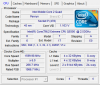
-
Hello there. Firstly about ur heat issues you will probably need to disassemble the laptop and clean it out. If you have done that then check if your fans are running. If fans are running check if you have installed the new cooling paste (thermal compound) correctly. If none of these does the trick you will need to check your heatsink if it does transfer heat all over (mine didn't transfer the heat equally and got high temps on the 1 9800m gts and normal on the other one). If you do all that heating should not be an issue. I have disassembled mine to install the qx9300 processor so I cleaned it thoroughly changed, and added arctic silver on both gpus and cpu. For the onboard 9400m gpu u should better keep the pad since cooling paste does not do the trick. After me reapplying arctic silver 5 my temps for gpu are 45-50 idle and 50-70 full load and under furmark extreme test goes up to 80c. The 9400m idles at 40-45c and under load can go up to 61-62c due to it being cooled by the same heatsink as the cpu so heat from cpu increases the heat of the 9400m. Now onto the next part about drivers. Nvidia stopped supporting hybrid sli (such as our system and the dell m17x r1 which have 2 dedicated sli gpu and 1 onboard gpu). So for us qosmio x300 sli owners we cannot install the newer drivers since they will use by default the 9400m instead of the dedicated gpus. m17x r1 owners are a bit more lucky since dell provided them with a bios that they can disable the 9400m completely and thus install the latest drivers with the only downfall not having the stealth mode aka running on the 9400m when on battery for saving power. Now for us x300 owners the latest working driver tested by me is the 280.26 though I have found that there is a bug with the vsync in those drivers if you force it via nvidia control panel. Best and most stable driver for the x300-sli is the 270.61 as tested by me. I run windows 7 64bit and I have had no blue screen or any error or any fps drop with the 270.61 drivers. I would love to find a way to modify the newer drivers to support hybrid sli but I don't think there is a way since I tried searching a lot. Moreover toshiba will not care about us since there machine is a 5year old model thus they won't provide a new bios enabling us to disable the 9400m. PS if u haven't got the latest bios v1.8 u should install it.
-
Hey all, new poster, old owner! I have a Qosmio X300-11S (yes the base crappy UK one)
Gutted it and upgraded it, trying to read through 466 pages here to find if anyone managed the following;
Full HD LCD or LED panel
A guide on how to fit two 9800M GTX's
A guide on how to get the damn bezel of the DVD drive for a BDROM swap
Also where can I get:
Quad core heat sink for my QX9100 ES
A four pin connector for the 2nd fan. There is a JFAN2 dual solder point ready for a 2nd connection to be soldered, I have no problem doing this and getting it working, I just can't get the actual 4 pin socket for the fan.
The official 2nd fan, I have a reasonable aftermarket out of a samsung wired into the first fan but its delicate and I want official.
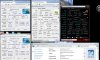
I find our stats to be very similar are our rigs as similar? -
Okay from the info you gave us. You must have the intel mobo so the max gpu option you have is the single 9800m GTX but you need the toshiba specific one (here is an ebay link of the card Toshiba Qosmio X300/X305 GF9800M GTX 1024MB 1GB K000063270 LS-4471P | eBay).
Now about the screen I have not found anyone being able to upgrade to the 1920x1200 (or full hd) screen so the max you can go is the 1680x1050 (officially). If you search the forum there was one guy that was successful at installing a LED 1440x900 screen though I do not remember how he did it.
About the 2nd fan connection, I don't remember anyone mentioning that they found that part in order to solder it but if you want you can mod the 2nd fan to draw power from the same slot as the 1st one.
Priest-king has mentioned the quad-core heatsink part numbers for the intel mobo based qosmio x300 (K000063170). Now where to find it depends on where in the world you live! Just use google and search for the part number I quoted from Priest-king.
About similarity well Qosmio X300 came into 2 versions. One was the intel mobo based version that used the single gpus (9700m GTS, 9800m GTS and 9800m GTX), some of them have 2 fans and some 1fan (I reckon the ones with the 9800m GTX had the dual fans). The 2nd version is with the nvidia mobo which featured 3 gpus in hybrid sli configuration that is 9400m + Dual 9800m GTS in SLI. Thus the difference in the part numbers the nvidia being pqx31 and the intel pqx32 . Now on to our scores I have a qx9300 overclocked at 2.93ghz (without voltage increase) so my cpu score is 7.3 and my ram score is 7.3 . My dual 9800m GTS score 7.1 (default clocks) though my hdd is the default toshiba installed (7200rpm) and only achies a 5.9score.
PS this thread is pretty dead so I hope I managed to answer your questions. I don't think many people are monitoring it anymore.
-
Any update?
-
Managed to get the BluRay drive for a tiny £24 from UK, easy swap for the bezel as well.
Its a shame its as good as dead and buried, as my machine, now OC'd to 2.8GhZ smokes most MS Laptops and even a couple of *URGH* MacBooks
Long live the Qosmio and all those who persevered with it!! -
Yeah..hopefully toshiba will revive the new qosmio line with touchscreen and windows 8.

-
Finally, already ordered my gc from this seller
Dont know how long will it take to reach home. -
U must really like the qosmio X300 series to pay that much for an old gpu!!! Don't worry I like mine as well, I don't feel like moving on to another laptop just yet... The only game I have trouble playing at the moment is the nfs most wanted 2012.. In medium settings I get 30-42fps and I have some drops to 25. I believe its the game engine since so many people are talking about problems with it but..
-
I think the laptop is still in good condition, and I dont have any important reason to upgrade even to Core i series laptop..I will use it as long as I can still fix it
But surely one day the time will come when I have to buy a new laptop (and coz the toshiba has broken at that time)
Better I buy new graphic card than buying new laptop, best bang-for-my-bucks option after all. -
Hi guys can you please someone with 9700M GTS dump VBIOS and post it here or to PM?
-
Guys, just wanna ask something.
Is X305 have msata slot?
wondering what slot is it between wireless modul below keyboard. -
Well, the time has come for me to retire the beast to backup status. My X305 is still far faster than when it left the factory, but I have greater need for even more performance than before.
My new laptop will be one of the X875's, because they can be loaded up with up to 32 gb's of ram ( 4 memory slots) and the Nvidia 670M GTX GPU has 3 gb's of DDR 5 video memory on board.
Just waiting for tax return to seal the deal. -
When you get a hold of your new x875, let us know what you think of it.
-
I would really like to see a review from an x300 owner compared to the new offering from toshiba.. I want to buy the razr blade though I cannot find it available in the UK (I like its thin design for what it offers). So I might as well move on to the new qosmio since alienware is still expensive. I would love to see pictures of your x300 vs the x875 ! Update us when you get it!!
-
I can't see the X300 coming even close performance wise. The specs on the X875 far surpass those of the X300/X305's.
Nvidia 670M GTX
Up to 32gb's of ram
i7 Quad core 2.4-3.4mhz
four ram slots. two under the keyboard, and two under a panel on the bottom of the laptop are what are most surprising to me.
I'm getting the X875-Q7380 because it does not take much to upgrade it to the same specs as the much higher cost models. (1080 screens are only about 90 dollars on amazon.com, and the 8gb sticks are not to expensive either.
I have a PCPitstop account where I saved my old performance tests from my X305, so I will post the results for both systems from there. -
Obviously the x300 is inferior since its a 4-5year old model. Though what I would like to see is whether X875 gpu and components stay cool, do not throttle and if there are any other issues which were a headache to the x300 to fix.
-
Barring any unforeseen delays, my new laptop should arrive tomorrow. First order of business unfortunately will be removing the virus known as Windows 8 that it ships with and installing Windows 7.
-
Here is a start to my review of my new laptop, and a heads up if you get one and decide to remove the virus known as windows 8 and replace it with 7.
Ok, physically, the Qosmio X875 is lighter than the X305 by a couple of pounds. It is also thinner, and it has a much more solid feel to it. the area around the keyboard that on the X305 feels like a trampoline is solid, with almost no squishiness to it. lol Seriously, the entire palm rest area is very sturdy and the feel to it is rock solid.
The graphics look very good and it's performance matches that. I ran 3dmark 2006 on it and got a score of 22000 plus, and the frame rate was excellent throughout all of the tests. I then ran 3dmark vantage on it, and it also did extremely well performance wise, and the graphics were far better than I had seen with my old X305.
Now for the fun part of this review.
I love to upgrade systems that aren't meant to be upgraded, such as the systems that Toshiba releases. Now after looking at the various articles and reading the specs I have learned that the X875 has excellent upgrade ability. I remember that Judgement wanted to upgrade his display in his X300, well with the 870/875 he could do that. The i7 base model systems have a 1600 x 900 led back lit display, while the much more expensive systems come with a 1920 x 1080 display. Ebay has direct made to oem specs LED backlit displays that will fit the lower cost systems, but that have the higher resolution capability of the more expensive system.
Also, as some of you may know, the X875's have 4 memory slots, and supports up to 32 gb's of ram. I have already installed my intel SSD drive to the system, and it screams. It took me less than 15 minutes from start to finish to install windows seven. (Not including the 31/2 hours I spent cursing it, it's designer, and anyone else I could think of who decided to choose those bios settings, before I discovered the problem that is.)
This page has all of the specs for my system as it sits now, but in a few months it will be nearly identical in performance to the top of the line model. I paid a lower price for mine than is shown on that page though. I paid 1,228.99 including next day shipping service costs. For roughly no more than $300.00 more I will have a laptop that is nearly identical to the higher priced system that costs about $2700.00, a savings of almost $1,000.00. dollars
http://us.toshiba.com/computers/laptops/qosmio/X870/X875-Q7380/
Now for the heads up.
If any here get one and intend to install windows 7 on it, there are a couple of things that you need to do first.
First, DOWNLOAD AT LEAST THE NETWORK DRIVERS FOR WINDOWS 7 FIRST< Do that before you wipe out windows 8. Windows 7 does not have either the wifi driver, or the lan driver, so download both from the download page of one of the earlier model X875/X870's driver download page.
Now another thing to do before trying to install windows 7.
3 bios settings will interfere with the systems ability to even see the windows 7 install disc boot loader, let alone allow you to install it, so those settings must be changed before you attempt to install windows.
Here is the procedure and the settings that need to be changed.
Before you begin, make sure there are adequate Windows 7 drivers and utilities for your model. I used driver genius pro to get all of the other drivers for the system.
In order to boot using UEFI from the Windows 7 installation media, follow this procedure.
-Shut down Windows 8 while pressing the Shift key to completely power off.
-Power on and press F2 while the Toshiba logo is displayed to enter the UEFI Setup Menu.
-Go to the Security tab and set the "Secure Boot" setting to "Disabled".
-Go to the Advanced tab, enter "System Configuration" and set the Boot Mode to "CSM Boot."
Also disable the fast boot option using the Toshiba hardware setup tool, so that getting into the bios from a cold boot won't be a nightmare, and it will also allow you to boot from a bootable DVD/CD.
-Press F10 to save and exit.
In order to successfully install Windows 7, you need to remove the existing GPT partitions during Setup and create new (MBR) partitions.
To get a decent Windows Experience Index score in Windows 7, make sure that you install DirectX 11. If you do not install DirectX 11 you will get a 5.6 for graphics score, but with DirectX11 I get a 7.2.
Am I happy with the system? Hell yeah I am, and I very much look forward to beginning the upgrades, and also very much hope that they throw an even more powerful GPU into one of the higher end models, so that I can upgrade that too. As the graphics are right now with the 670M GTX, it screams already, so I really have no complaints there. I'm using my 24 inch external display for now, because it is both larger, and supports 3D with a 1920 X 1080 resolution.
The 875's all use the same chipset, so the max for the ram is the same for all of them. The Toshiba spec sheets only show the installed max for that specific subtype of X875. All of them can accept 32 gb's of ram.
This is what I installed in mine.
http://www.corsair.com/us/memory-by...p-memory-upgrade-kit-cmsx16gx3m2a1600c10.html
If they did not post the specs the way that they do, no one would buy the higher priced versions. It's so much cheaper to buy the lower priced models and then do the upgrades to it yourself.
Things already done.
Dumped Windows hate for Windows 7 Ultimate.
Intel SSD drive installed for boot drive.
32 gb's ram installed
On my list of things still to do are.
Screen upgrade to 1920 x 1080 approx $145.00 Ebay
Blu-ray burner drive install Approximately $65.00 Ebay
I do my own labor.
Some of these upgrades can void the warranty, so only do them after the warranty expires. Unless you are like me, and you don't particularly care about the warranty. -
I'm trying to upgrade my X305-Q701 after many years of running stock. I've decided the Q9100 is right for my computer needs/budget. The PM45 compatibility page from intel supports the Q9100 for compatibility. I have the P7350. I plan on getting the heatsink as suggested but other than this, any other reason i should avoid getting this CPU? I have already done a SSD upgrade as well and find my processor just doesn't cut it for gaming/processing. Also just a few questions. Will the quad core heatsink fit inside my laptop housing (I.E. are they exactly same size)? My old CPU is 25w compared to the 45w q9100, in reference to overheating, does the heatsink upgrade help with this? Perhaps a 2nd fan could negate any heat issues? Any help you can offer or point me in a direction would be much appreciated.
*EDIT*
Didn't realize I was beating a dead horse here since I posted about this a while ago. Since stock, I've upgraded from 4 to 8 on ram, SSD, and now to processor. I plan on building a desktop sometime within the next year but don't want my laptop to be completely obsolete. I just want to tackle this as cheaply as possible and still get a performance boost. -
Hello. Firstly yes all qosmio x300 are one size so the new heatsink rated for 45w will fit properly and will be able to handle the new processor heat. About the 2nd fan, it depends which gpu ur config has though some older x300 motherboards did not have the 2nd fan slot on the motherboard. Thus if urs doesn't have the 2nd fan slot u will need to mod both fans into the one available slot (if you browse this thread u will find out how). Moreover if you have the 2nd slot on the motherboard I would recommend installing it anw! Lower temps are always better and the fans are quite cheap on ebay. Furthermore how much are u getting that q9100 for? I believe u can find a q9200 (which is the qx9300 underclocked to 2.4) for around the same price. Q9200 is confirmed to work in the x300, has higher speed 2,4 vs 2,1 and can be overclocked using throttle stop. Let us know how ur update goes!
-
Hello, didn't catch your reply until later. After further research I decided to install the Q9100 using my stock heatsink. I know it was a gamble but my patience and finances just wasn't making me think straight. That being said the upgrade is working great so far. Had some seating issues as I had a pin that was slightly bent. I very carefully bent it back a bit and it dropped right in with some maneuvering. After I put it all back together had some issues getting my wifi adapter to stay on after boot. After I connected it to the net with my phone and rebooted it seemed fine.
As for temps they've been hovering around upper 40C lower 50C. Under load the highest i've seen is 67C. I haven't done any type of stress testing and not sure if I will. I'll just monitor the temps from daily use. I never bothered to look for the 2nd fan. Maybe if temps become a problem down the road I'll look into it as well as the heat sink upgrade. I used artic silver thermal paste, dabbing a bit on the heatsink and scraping it off with a credit card to fill in the imperfections. Then grain of rice on the CPU. I wasn't sure at first if the heatsink would make contact with both die but temps on all 4 cores are consistant with one another.
I'm running the X305-701 with Q9100 2.26ghz quad core, 9700m gts, 8gb ram, intel 180gb cherryville SSD, 300gb WD media drive. I'll check back on the thread within a few days if anyone has any questions or if I run into any issues. I'm currently dealing with the "black screen sound loop" with the video card. The RivaTuner fix worked but I had to install the driver from toshiba and it runs a little funky on windows 8. Underclocking works as well but I'm not satisfied with having to underclock my GPU. Dont think I'll spend the money on another GPU, would rather save it for my desktop build I'm going to tackle next year after i get married, wedding taking up all our funds
Thanks for all the support so far, if it wasn't for this thread I would have never tackled the job. As mentioned I'll keep you updated. Thanks again!! -
Just a quick note. I know it's been posted but some people may not realize that RivaTuner doesn't work with the newer GeForce drivers. So to fix the black screen freeze/sound loop for the 9700m GTS, here are the steps.
Download and install the windows 7 nvidia drivers from the qosmio support page (x305-q701). Model Content Page
Next using the latest version of RivaTuner click the arrow next to customize under the driver settings in the main tab
click system settings (first one of the bunch)
where it says "force constant performance level" select performance 3D
*if for some reason this option isn't available, click the power user tab from the main window, expand "Rivatuner \ Nvidia \ Overclocking" and next to "EnablePerfLevelForcing" double click the value box and enter "1"
Before this fix, I would launch Tribes Ascend, and get a black screen freeze up that can only be fixed with a hard reboot. Afterwards I played for about 3-4 hours with no issues. It's super annoying because I like to have everything up-to-date on my computer, but this renders my once un-usable videocard, usable again.
I know some of this is repeated information but I was unable to use the RivaTuner with the newest drivers and thought this might help some people. -
There is a program that sets the performance 3d all the time.Here is the link https://www.box.com/shared/v7jpoateoq You can try it as it creates the registry if its not created by the newer nvidia drivers and sets the drivers at 3d performance all the time according to the settings you choose. Test it and let us know if it works since I own the SLI version and thus I do not have the black screen problem.
-
I added a bit more info to my review.
-
Hey judgement i also have a qosmio x300 and i have experienced trouble with it now for 3 years and i didnt soved it. Through this posts i found from you i assume you are very experienced in this. I'd like to get in contact with you personally so you can help me out with my qosmio and i would be very grateful. Im lookin forward for a response.
p.s i have skype maybe we could get along that way ^^ -
If I can help y not, but it depends which model of the qosmio x300 you have. IF its the SLI version then yes I might be able to help. If its the single gpu setup with the intel motherboard then I have none experience with it whatsoever..
-
Yes Its is the SLI version (9800 M GTS SLI) with 9400 M G Hybrid SLI. I think we have exactly the same laptop.
-
Can you post your problem. I might have a solution for u.. I cannot message u privately since u just joined the forums..
-
Thats why i wanted to message you privately with another program like skype or whatever because my problem would be too long to describe it here. It would be cool if we chat directly together or even talk since that would make it very efficient and would save us time
-
Well I cannot share publicly my skype
! Moreover if you have a problem it is better to discuss it here for others with similar issues to be able to see!
-
Going to give it a shot with new drivers. Will let you know.
*edit* Works like a charm, thanks!! -
I just need to know which drivers you use more specifically wich Gpu drivers you use.
-
I am using 280.26. It was the latest one that is stable and gives the most fps.
-
any modifiyed INF file that you used with the gpu driver?
-
Since the 280.26 version works perfectly fine (even got a 13600 3d mark score) I did not modify the inf
-
i dont know what went wrong but it says error occured and i cant install the driver
-
try this: http://www.nvidia.co.uk/object/notebook-win7-winvista-64bit-280.26-whql-driver-uk.html
PS I am using windows 7 ultimate 64bit -
Im very thankful, the driver worked and i made a clean installation of it. i currently tested several games and the driver gets me performance i never imagined. Thank you sir.
I might send other posts in the future how the other games works. -
No worries! Glad it worked! And yes it is the only driver I used without modifying that worked perfectly!
-
Okay since i finally solved the problem im curious to get an even better performance. Do you have any tipps and tricks to keep your laptop in the best performance. I for my example always clean the ventilator so it doesnt overheat.
Or programms or any settings... just anything. If you could share them i woulbe be thankfull. Furthermore do you have any drivers (except GPU driver) that a qosmio x300 must have? My drivers mainly come from the maufacturer (toshiba) itself. Tell me more of your drivers that you use (if they are special and not from the toshiba) -
I think I use a very popular group of programs for my maintenance. CCleaner for registry and junk files. I like Auslogics Disk Defragger instead of windows version. I also use CoreTemp for monitoring my temps since I use a dual CPU heat sink with a quad core CPU. Highly suggest a SSD for a performance boost. I'm still a fan of AVG for virus software. Keep your PC clean and tidy and it will run very smoothly. As far as technical tweaks, the only one I use is for my 9700m GTS is a registry tweak to prevent the black screen freeze. My Qosmio runs like a champ.
-
Just ordered parts for my custom desktop build. Selling my Qosmio to help but some parts. This thread has been great and I'm sure ill return from time to time since I'm selling it to my mom. For those interested in my new build specs are below
Corsair 750W PSU
Intel i5-3570k
EVGA nvidia GeForce 660 in SLI configuration
G-Skill sniper series 1866 8gb Ram
ASRock Z77 extreme4 MoBo
Asus 24" LED 1080p
Thanks for all the great info on the Qosmio. Special thanks to Judgment for his vast knowledge and selfless help on this thread! -
Ur specs for the new desktop look good but if I were you I would prefer either a gtx 680 or a gtx 690 instead of ur current sli setup. First it will cost about the same, 2nd you have the chance to upgrade to SLI in the future and finally with the gtx 680 u won't have any worries with SLI combatibility. PS I do know that the 660 SLI will give better performance from the single 680 bt I would prefer not to have to bother with sli
-
With the 280.26 driver, can u adjust the screen brightness when it is running on SLI?
-
Thanks for the good answer travis junkie and i agree with judgement i rather get a good slingle GPU then a SLI setup which is better then the single one but you always have the option for updating the other GPU and since 680 GTX seems solid^^.
To answer jungement, i dont know if i can adjust it ^^. -
Ahh.. I will soon post my frequenzys of my GPU'S im curious what you will think about that
Official x300/x305 Owner's Lounge
Discussion in 'Toshiba' started by Bartlett, Oct 4, 2008.


