Problems? See this thread at archive.org.
The only way I could get Bioshock to run was to install the 163.69 drivers on my X205-9349, for me it seems to be running at consistent frame rates so far at 1280x800.
-
Hi, has anybody managed to pick one of these X205s up in Hong Kong? What sort of price should I expect to pay?
S -
HELLO from greece
using my new toshiba tecra a9
have a problem.. Intel(R) 965GM Graphics
and when i plug an external monitor (lg tv m208wa)
i cannot get the resolution (1680x1050) of notebook monitor
do you know what is the problem? i have tried to reinstall many times
intel drivers but same problem.. also my external monitor image
is not as stable as the notebook (like having a mobile phone near an old crt )
any help would be appreciated!! -
How are you connecting to the external? HDMI, DVI, S-Video?
What is the native res of the external? -
I think it is compatible. You need to either use the HDMI port or some adapter for the sound card. I can't remember the name of it.
-
It is defaulted to 5.1. I know cause I was fumbling around one day and found that it was set to 5.1. You'll find that in the settings for the Toshiba HD DVD Player. You also have several settings you can play with under Control Panel in Sound. That is where you would select HDMI output so the NB can send the sound via HDMI to your Monitor or HDTV. There is also a selection under Control Panel for the sound card called Realtek HD Manager. There you can make some setting changes to go with your Home Theater.
-
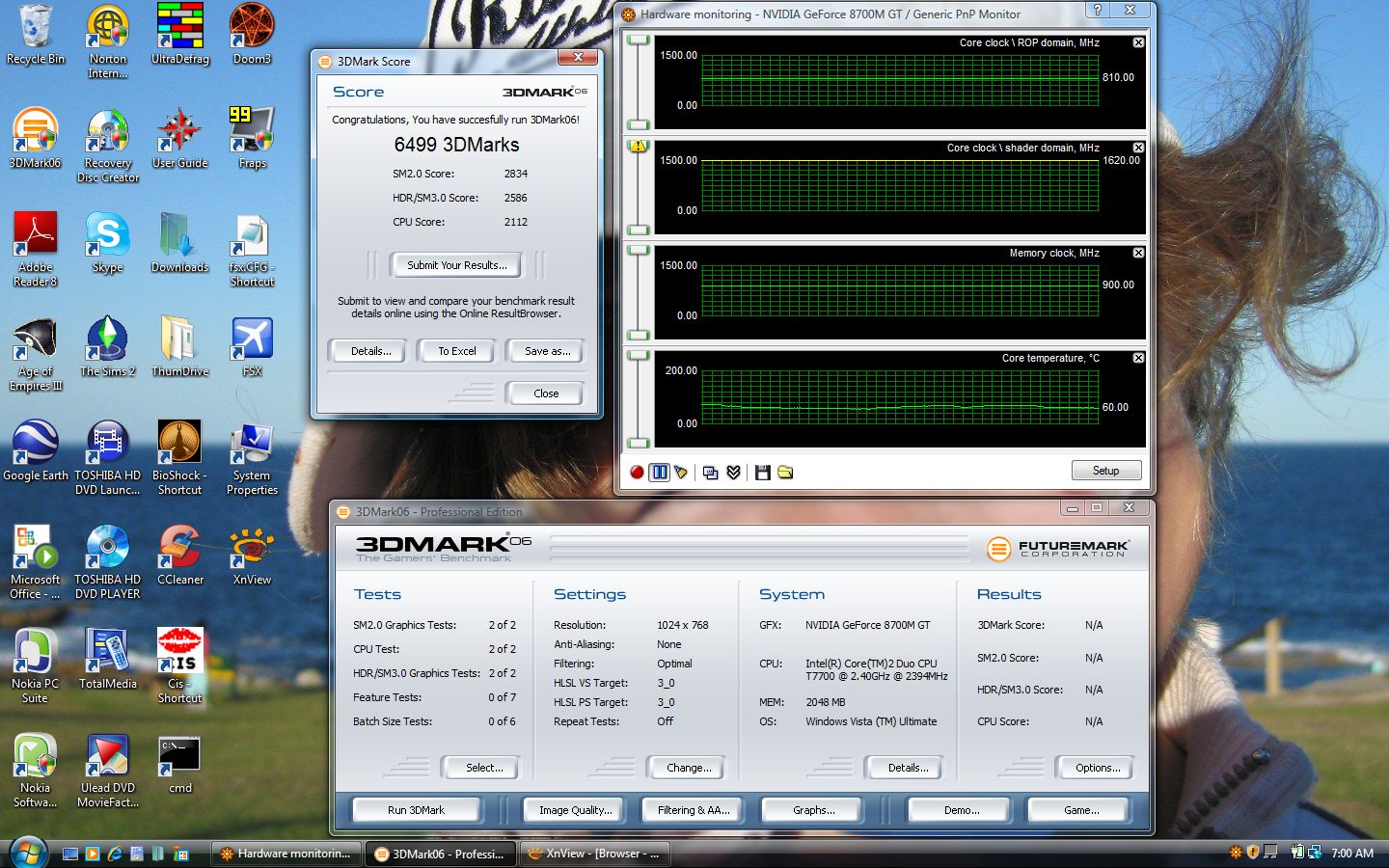
Just got these 3DMarks..
Old driver on toshiba website, used so i could o'clock.
Anyone know if there is a driver version that plays Bio and can be o'clocked?Attached Files:
-
-
Holy crap. It's at the lower resolution and... I know, I know... 3DMark06 isn't always a great indicator, but still... near 6500? Wow.
-
Unfortunately that was with 158 drivers.
Can't overclockwith 163.xx.
3Dmark06 falls back to 4200's with these drivers, since no overclock.
Stock 625/700MHz sure does suck.
Taking a 35% hit in 3Dmark06 translates to real problems ingame.
I hope a workaround comes out soon.I have read of some lucky people who have been able to overclock these drivers with mobile cards.
Would love someone to shed some light...
Cheers -
163.71 is out!!
Hope it can overclock, fingers crossed..... -
Thanks for the reply! ^^
I'll be ordering my X200 (Norwegian) later today, can't wait 'til it gets here.
-
Hi,
Can anyone check your x205 gpu specs?
what's your memory default clock?
- 700mhz, or the official 800mhz by nvidia.
http://www.nvidia.com/object/geforce_8700m.html
also, 3dmark06 system details reports that my 8700m has shader version 3.0:
Vertex Shader Version 3.0
Pixel Shader Version 3.0
But nvidia says the new 8700m should have the new shader model 4.0 instead!!!
http://www.nvidia.com/object/geforce_8700M_techspecs.html
What is toshiba giving us - a factory subpar-8700m!?? -
Planet my friend,
I think we have to resign ourselves to the fact that a toshy 8700M has a stock memory clock of 700Mhz...
We all have to just wait for an o'c capable driver to come out (that doesn't cause Bio to crash!!!).
Waiting.... Waiting....
BTW, does anyone else have their 8700M core clock speed detected incorrectly??? -
How's about switching to something we CAN do something about...
Does anyone know of an optimal DUAL HDD MANAGEMENT STRATEGY for NON RAID SYSTEMS???
I'll start it off...
What about keeping everything you have (OS, programs, files, downloads, the lot!) on the first drive (C, and switching the pagefile over to the second (D
.
Rationale: You want your pagefile to reside on the fastest part of a disc (ie. the front), and you want to make use of those two physical disc heads moving about reading data. After a game loads into main memory from drive C:, that head is then free to roam around doing OS related stuff. Meanwhile, D: is happily skipping around doing pagefile duty (which i imagine is quite a job while something like Bioshock is running).
How does that sound.... Any ideas... -
Hey - I think this is an interesting topic. I'm always thinking about different to efficently manage two hard drives on one system. Actually, this is the reason I bought the Toshiba over a Sager 5790.
Myself, I have all my personal data folders on the D drive. Its pretty easy to do in Windows vista, just open the properties dialog for each folder located under your Named folder and choose "location". Aside from easy data backup, it also helps to eliminate fragmentation. I'm constantly recording and deleting movies using MCE. I also manage a 35GB music collection.
Also, putting the page file on a seperate hard drive is a solid performance idea. I've heard it recommended multiple times and I do it on my desktop. From what I've read this also helps to prevent fragmentation.
I've read that some people like to put their OS and programs on one HD and their games on another, but from what I've ready its better to install all of one's programs on the same hard drive.
Curious to read how other people take advantage of the dual hard drive. -
I was wondering if I'm missing anything on my X205. I got the manuals, ad crap and the recovery disk (2), but did not see anything with Vista activation codes that I have seen with older Microsoft OS recovery disk. Is this the new way of doing things? Anyone got pics of the accessories unboxed. Thanks
Pug -
Code is on a sticker on the bottom of your laptop.
-
Hey guys, I am a proud owner of a X200 (2GB, 8700M, 1.8Ghz) and an XPS M1710 (7950, 4GB) and I must say I prefer the Toshiba a lot more. I'm big on the desktops, but I'm a complete noob when it comes to the notebook sector of gaming
.
I was just wondering, this proccessor really crimps my style, is it possible to upgrade it to something more powerful, 2.4Ghz perhaps? Cost isn't really an issue.
Also, I want to get 4GB's of the fastest ram possible, and do something with the 2nd HD, which up until reading this thread I really didn't know existed. Basically, I want to make this puppy scream as hard as it can.
Sidenote: I was devastated to learn I wouldn't be able to update the 8700, I was dangerously close to attacking the dude at Toshiba who told me I could with a wooden spoon. Any Help would be appreciated, thanks. -
There is someone here that has upgraded the cpu, so that should not be an issue. I've got 4gb of ram in mine now, although vista only sees 3gb, and will have the latest 7200rpm Hitachi drive in later this week. I shop at Newegg and haven't seen any cas 4 2gb sticks there yet so I settled with cas 5.
I've tried my sys with 3gb of ram, but was mixing sticks and lost stability, so now I'm back to 4gb. -
FYI: You may have to call into Microsoft to activate it if you're doing a clean install. The serial number on the bottom of the laptop is valid, but I could not activate mine (even with no hardware changes) without calling into Microsoft to validate it.
It takes about five minutes or so. -
Don't use the CD key on the bottom of the laptop. You need a program to backup and restore the OEM activation certificate.
Read this thread on how to do it. It'll save you a lot of hassle. -
Regarding the 5 FREE HD DVDs rebates,
Anyone got a picture to show me where to cut out the correct UPC code,
in order to send it together with the rebate forms?
What other things to send?
Anyone successfully got them already?
what's the best way to ensure quick delivery?
Thanks. -
Could X205/X200 owners please download CPU-Z and report in this thread what chipset it detects?
-
I have just bought the X200 and am looking for a laptop sleeve for it to help keep it's good looks. As it is rather large, I am having some difficulty sourcing one. Can someone point me in the right direction?
Cheers. -
hi there,
There is this clear plastic covering the webcam...
is this for protective purpose or we should remove it? -
Hi !
I orderd earlier this week the europe version of x-205 S9359.
But the 25 of september x-205 SLI-3 came with SLI Dual GeForce 8600M GT.
Will this graphic card crush Go8700 GT 512?
This modell isn't at the moment in norway (or other places in europe as i know), but i think it will be sooner or later. -
Since 32-bit Vista does not recognize 4GB of RAM, anyone try just replacing one of the original 1GB sticks with one 2GB sticks for a total of 3 GB? Someone stated earlier that they had stability issues... It just seems like such a waste to buy two 2GB sticks only to have the NB only recognize 3 GB total.
-
You can remove it.
-
Hi, i just purchased a Toshiba x200-20s which is basically the high end Toshiba u guys have in the US. I also have a Samsung plasma with a resolution of 1024x768 on vga and supporting 720p and 1080i via component and hdmi.I know 1080i works because my ps3 is connected and i get a 1080i signal. Now when i connect my laptop via hdmi the nvidia control panel shows only 720p as available. Can anyone help me on how to get 1080i on my TV? Any suggestion would be helpful thx guys!
-
What is the 59Hz issue? how to resolve by software/firmware?
-
If any of you know someone that would like one of these notebooks have them check out my listing, I'm getting a gaming desktop instead. Its only 2 weeks old.
http://forum.notebookreview.com/showthread.php?t=173849
Thanks! -
Has anyone been able to utilize the two 5400 RPM drives in RAID 0, or any RAID for that matter. There was a previous debate with no conclusive result. What motherboard/chipset is in the X205-S9349? I find it odd that there are 2 drives with no RAID capability. Even after 4 hours of Toshiba tech support, I was not able to get an answer. If you have succeeded, please tell me how I can do the same. FYI, I love this laptop, excellent display size. Perfect for bringing on vacation and playing games. Yes, it's large...but you didn't actually want to put it on that tiny airliner dinner tray did you?
Thanks,
Brian -
Just got, or rather, I just unboxed (last week) my X205 9349 that I got about 3 weeks ago. Been real busy at school.Paid $1527 out the door.
Love it so far.
It used to take an eternity to get it booted up, so I ran selective startup and now it is much faster but not fast enough. Also my cpu usage meter was really high, not it idles at about 30-40% which I think is way too much.
I am going to try a clean install, but the hunt for drivers is going to suck.
Anyway, I hear that clean install gives this puppy some super speed with boot up and processes. So I have to go for it.
Ed G -
My speakers are causing a horrible rattle. If I squeeze the right side of the laptop I can make it stop. Anyone else have this problem?
-
Absolutely not. Sound you get should be asbsolutely clear and astonishing. Otherwise something is wrong.
I find one annoying "feature" of X200 that it blows hot air from video card cooler onto right hand if you use a mouse - in graphics-intensive games this becomes unhealthy. -
What do you mean "squeeze"..?
There is some dissapointing distortion though at high or low pitch...especially instrumental, vocal is not so obvious. -
Gentlemen, go into your sound settings (speakers and playback), and DISABLE all sound effects. The distortion caused when its on but no effect is chosen is quite noticeable.
I also recommend the "dolby surround" option as it tends to fill out the speakers. (personal preference, some things sound better without it)
I also recommend disabling your microphone if you are not using it as it tends to pick up ambient sound AND the speaker output and rebroadcast at higher volume levels. (remember to rclick to "show disabled devices" so you can easily turn it back on when you want it.)
The x205 in front of me has incredible sound playback as long as you let the system do what its meant to do. -
I was listening to an online sermon I missed at church, so it was just voice that was causing the rattle. I guess it was more like a buzz from around the DVD drive. If I grab the right side and squeeze it, it stops.
I just used your tips Kernal, so I will see if it fixes it. -
Bumppedy bump bump bump
-
Do you have a question?????????
-
Well, I took your advice... and bumppedy bump bump bumped and my Coke landed on the floor, fizzing and splashing its way to a liquidy death. Bumping random things on my desk prooved needlessly destructive and served no purpose.
I miss my Coke now.
-
is there space for a 2nd 8700 gt in the model that has the single 8700 gt?
-
I didnt see a second connector, so I dont think there is.
But its quite a possibility that SLIs use not a separate card, but 2 chips on single video module - but we won't know for sure unless somebody takes SLI model apart
-
No there is no space for a second card and there is only one connection, I believe what they do with the sli version the 2 cards are sandwiched together as one like the 7950GX2's were and only have the one connector to plug them into the motherboard.
-
I'm on the X205 with the 1.66 GHz Centrino Core Duo, 256 MB 8700m video, 240 GB HDD and Win Vista Home Prem.
I like it pretty well so far, although I don't like all the junk that came preinstalled.
Is there any way to get rid of those stupid FN keys that slide down when the cursor is at the top of the screen? They get in the way. -
Must be, I've never had them.
-
The only thing keeping me from watching HD movies were the HD sound drivers. That was after I reinstalled Vista, though.
-
How much ram can the x205 hold?
-
It supports up to 4 Gigs of memory which would be useful if you get the 64Bit version of Vista or XP.
official "X205 Owner's Thread"
Discussion in 'Toshiba' started by Sonickid101, Aug 23, 2007.