 Problems? See this thread at archive.org.
Sony actually does offer a smaller one. It is just as long but about half the width.
Sent from my SCH-I535 using Tapatalk 2
-
Who knew? I stand corrected!
-
Hello guys!
The question is to SVS1512 (or SVS1312) owners. Could you please check out your memory settings in CPU-Z?
I found that my SVS1512U1RW (model for russian and ukrainian market) 4GB DDR3L onboard RAM operates with Command Rate 2T (while same model 1511 operates with 1T). As i know its a serious disadvantage. -
Hi.
I'm interested in the Sony Vaio S15 (SVS1512Z1E):
SVS1512Z1E | Portátil VAIO Série S | Especificações técnicas | SVS1512Z1ES.CEP | SVS1512Z1E | Sony
Some questions:
1. I've been reading of fome problems with the display color. Is this true for the more recent models?
2. Is it true that I can only run the HDD\SSD as SATA2?
3. Are there any common problems with this laptop? -
1. Yes. Problem with red color
2. Yes. But you can turn off DVD-ROM in bios settings, go to sleep mode, go from sleep mode, and HDD or SSD will work as SATA3
3. Yes. -
But those problems with red color affect every models?
So, everytime I reboot or turnoff the laptop I need to do that workaround to activate SATA3?
What common problems Vaio S has?
Thanks. -
I guess every SVS1511XXXX and 1512XXXX model.
Yes
I guess most common problems are software, support and marketing
Well there is no perfect laptop. So if you like VAIO S you'll buy it anyway. -
Does anybody know if the 13.3 1600x900 screen from a 2011 SA can be swapped into a 2012 SVS13 with a 1366x768. I have both laptops currently but want to swap screens...
Thanks! -
I see... so it doesnt work in Win8.. Not that I really care or use it, but just curious..
Yeah, will update it one day, still doing ok on the old version.
Thanks! -
Just saw Skyfall last night. I'm pretty sure all the MI6 laptops were S15s
-
Yet, the current James Bond offer does not apply to S15
(at least in Europe)
-
I'm planning on replacing the hdd i my S13p with a new ssd. I know I'm supposed to set BIOS to AHCI before installing windows but I only have two options: UEFI and Legacy. With the old hdd its set to UEFI. Which one to choose?
-
I've bought the SVS1512Z1E (exactly this model). I am not a photographer or gonna make any professional foto-video editing and I do not care about sRGB comparison or whatever. For me the screen in simply astonishing. I do not see any orange in that Ferrari and I can see a cristal clear difference between orange and red in those windows 8 tiles. Maybe the orangegate is gone in this screen or model? Maybe orangegate was only something disturbing for professional photoshopers? I really don't mind, for me is perfect and so far I am very satisfied with the laptop, except centrino 6235 issues (please check previous page and answer to me if anyone has a clue about it).
Edited: speed issues solved, kind of no understanding problem between router and card solved resetting first one.

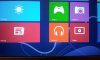
-
mmmmmmm those pics look very promising. i pulled it up on my win 7 s's screen and also on my phone. if it was fixed then the picture on my phone should be really red and the one on my s be not so red.... this would indicate (not really confirm because my phone's settings or your camera settings may skew the results) that the lack of red has been fixed...... DAAMN than pick looks good. i think it might be fixed haha
-
I read a post that said connectors are different
Sent from my SCH-I535 using Tapatalk 2
Read page 1 of this thread.
Sent from my SCH-I535 using Tapatalk 2 -
Alright can anyone help me with this..
So I got a S15 an I just recently got an SSD, fresh installed windows 8 , installed all the drivers, everything works normal including hot keys and all that. The one problem I have now is that my battery never charges past 80%, once on 80 it says plugged in but not charging, I searched online and read that I can change this setting on the vaio control center but I looked and I don't see an option for that. Also another problem that I have is that even if I turn off the automatic brightness my screen will always dim even if I turn the brightness all the way up, this happens on battery and plugged in. If anyone can me fix these things id really appreciate it. Thanks -
I'm still lagging in games after I installed windows 8, why is this? My computer should be able to play it, it played it fine on windows 7.
-
I posted in the Orangegate thread also about this. I really wanted this machine and was waiting for the color balance to be fixed. I recently acquired a customized Vaio S 15 and the colors look great. I specially checked all the colors against other laptops and monitors and the Sony looks great. If you do end up with an "orange" version you can always return it, they have new panels in the supply chain.
-
I had the auto brightness problem and it was soooooo frustrating. i fixed it once but had to reinstall win 8 and the second time i couldnt find the toggle... luckily i did eventually find it. first you need to install shared library from the windows 7 drivers page. if you search the bios mod thread, or this one i cant remember, you can find a post by me with pictures. ensure that your VCC looks like mine. aka has all the tabs on the left. then: (the first thing is on the left panel > this thing is on the right panel)
for brightness: Image Quality > first option is the display brightness. turn that off. in win 7 it would auto adjust but +/- of what you set with the brightness buttons... so it would only vary a bit.... i thought it was great. but this new win 8 one is downright annoying.
the second thing is also in VCC (vaio control center) and it can be found at "power and battery" > Battery. here turn the care function off
i would read up in the bios mod thread there are a lot of tips to getting your games to run right. like making sure your priority to ventilation and things like making sure you are running on the dedicated graphics card and stuff. -
Oh wow I did not see those there the first time I looked lol, thanks tho got it how I want it now
-
Hey, anybody else with a Vaio S13A has an issue with the metal plating on the hinge being a bit flimsy and causing a bit of creaking noises when adjusting the display? :S
Also anybody else has an issue with backlight bleeding on the top and bottom of the screen (a 0,5 mm stripe which is brighter than the rest of the screen)?
Then I have an issue witht he left arrow key, which seems to be blocked by something, maybe a crumb. Is it risk free to remove the key myself to clean it or should I give it to a professional? -
Hi to all, I'm really interested on new S15 (3632QM) with Windows 8, but I need of some infos.
I read that if I replace the HDD with a SSD, it will work on SATA2 mode instead of SATA3 mode, but if I disable ODD then it will work on SATA3 mode, is it true even with new Windows 8 version or new Windows 8 BIOS upgraded machines?
I imagine that this is ever true even on laptops with ODD replaced with a caddy?
I know the there is a GT640LE BIOS mod, that increase drastically the performance, but for laptops born with Window 8 that mod isn't still working.
What are the performances difference between that mod and a overclock with MSI afterburner? -
as far as we can tell msi afterburner wont actually modify clock speeds. the performance difference between stock and OC is roughly 90%. it is not currently working for the new win 8 models
I cant answer your question about the sata2/sata3 trick as i dont own the new version but if you put a hard drive in the ODD bay and you want to use it... then you cannot use the sata trick. this is because you would have to disable the connection to the ODD bay in order to use the trick and by definition you will disable the HDD that you put in that bay. -
Upgraded to Windows 8 and I noticed that some of the vaio software were removed/overwritten by W8 apps.
Looking at the Sony eSupport, many of the drivers/software were updated for W8, which sony applications should I download? -
Happy to know that the Orange-red, Blue-purple issues got fixed. No can anyone say what are those fixed new S series models.?
-
Hello everyone, I ordered an s series 15.5'svs151190x with i7 3612QM, nvidia 640m le 2gb, ssd 256gb raid 0 (128x2) blue ray player burner ,and one thing I've detected as a shortcoming is this: The 3612 has a maximum memory bandwidth of 25.6gb/sec but here it says:
The integrated memory controller (IMC) greatly increases performance
when storing or accessing data due to low latency and multiple data
paths. The IMC can support two dual inline memory modules (DIMMs) of
unbuffered DDR3 memory. The 3rd generation Intel Core processor added
support for the DDR3 1600 MHz memory speeds, which increased memory
performance. Compared to the previous-generation embedded controller
using the 2nd generation Intel Core processor, memory capabilities
have grown from DDR3 1333 MHz to 1600 MHz. A system with two channels
of DDR3 1600 MHz RAM has a theoretical memory bandwidth of 37.0 GB/s
compared to a system using two channels of DDR3 1333 MHz RAM having a
theoretical memory bandwidth of 21.3 GB/s. This results in an up to 74
percent theoretical memory bandwidth increase.
As you can see, the processor will be bottlenecked, losing 4.3gb/sec of memory bandwitdth due to the 1333mhz ram! 3rd Generation Intel® Core
There's the address of the article I found about Ivy Bridge specs.
Also, I have read in the thread that the sony ssd operates at sata3 speeds, but I fear that this might be a mistake. If it truly did then it should indicate 12gb/sec data transfer rate, not merely 6, since a raid 0 configuration uses two drives simultaneously. I suspect that someone saw 6 gb/sec, and said OK sata3, but really that would be sata 2 raid 0. -
Instead Sony RAID0 SSD operates with 2 SATA3 links, if you see some test it can go over 800MB/s in sequential read and this is possible only if it uses 2 SATA3 links.
The max theoretical speed with 2 SATA2 links is 600MB/s. -
I am yet to receive it, but that is at least some reassurance.
-
So is it worth getting a blueray drive on a laptop overall im looking at the s 15 but cant decide? is there any good coupon codes u guys know about for the 15 like freeps3 which probably does not work???
-
I don't own a blue ray drive so getting one in my lappy made sense. Not sure about ur situation.
Sent from my SCH-I535 using Tapatalk 2 -
i do, i just dont want like for example in a year all software disc to be in bluray disc and no more regular dvd usage cause of the transition into that u get me
-
Ha. The transition will be to flash before bluray... they aren't too far off and bluray is still a little niche. But honestly there is no reason for most programs to transition because very few use the entire 4.7 of a standard DVD.
Also ID assume that if blue ray got to that point a USB DVD drive would be as much as the one in the computer now so save the money now and if it does switch over then buy an external....
Sent from my SGH-I777 using Tapatalk 2 -
One question:
I searched around ebay and google and found nothing about a protective Skin for the outside and inside of the S13A. Does something like that exists and where can I buy it because 1) the S is a real fingerprint magnet and 2) it is depending on the color very easy to scratch
-
Im pushing this since I got no answer (was on Page 477). Sorry, but I`m really desperate about fixing this and it seems like the sony support is not going to help me
-
Hi I've purchased a Sony SVS131190X with nvida gt 640m le, 1366x768 in late august and just yesterday, I noticed two smudges on my screen. Is there anyway I could replace the original screen with a 1600x900 screen? Thanks
-
So, I got my S15 two days ago, and other than the horrid speakers, am pretty happy with it.
I have one issue, though. In addition to the speakers sounding awful to boot, the left one seems to resonate at certain frequencies. As there are no more models in stock where I bought the device from, no chance to do a DOA swap (or whatever that may be called officially), and I really wouldn't like sending the brand new device in for repairs.
So the question is: As I'm going to open up the laptop and remove the ODD, is there any chance of fixing the speaker myself by some miracle bluetack etc. solution? Has anyone else had this problem (for some reason the thread search tool is not searching anything)? Maybe if I just keep running it at a moderate volume, it will set? Or should I just send my shiny new laptop in for repairs and hope I'll get it back sooner rather than later? -
I installed Windows 8 drivers for SVS131190X while my model is SVS131A12M because I apparently this model doesn't exist in the drivers page. Now the Vaio Control Center is much more basic than the one I had in Windows 7.
For example I can't set "Prior to ventilation" mode, the option just doesn't exist! -
ive mentioned this many many times. in order to get all the options in the vaio control center you need to install shared libraries from the windows 7 driver page. possible something else but shared libraries gets you 90% there
-
true true thanks for the convincing :O
-
Make sure nothing is triggering the nvidia gpu such as windows aero. If its in use at all the fan speed is much higher
Sent from my GT-I9000 using Tapatalk 2 -
Hey I just noticed after upgrading to windows 8 that the right side of the fan doesn't work? I could only feel the back fan working. I don't feel any air blowing from the right one.
Anyone else having this problem? -
The vents on the right are for intake, so you wouldn't feel any air coming out of the right. Cool air goes in the right side vents, and hot air exhausts out the back vents
-
if Windows Aero is triggering my GPU how do I make it not do that? What other things could trigger the Gpu?
Sent from my SCH-I535 using Tapatalk 2 -
If the fan is still loud after putting the laptop on stamina and rebooting, you can assume its not
Sent from my GT-I9000 using Tapatalk 2 -
Selling the S13 to buy an S15, I can't stand the quality of display.
Does someone have a written guide on how to clean install Windows 8 with all the proper drivers? -
Same here. I also can't open some Windows-related programs, like Control Panel, or Network Center.
Does anybody else have this problem? -
I told myself my next laptop would use IPS LCD but I wanted the portability of a 13" so I just got a SVS13 premium custom stock except for Blu-ray for $701 after trading in a 2010 CW27 Vaio 14" which got me a credit of $446. This S is much better size/weight wise & doesn't feel plasticy but I too am disappointed that the LCD is only TN. I guess I can live with it since it isn't worse then what I had & better in that it's matte. But it makes me wonder why they didn't use IPS like for the 15" model. I guess one can hope for any model refreshes next year that they'll switch to a better screen that can be swapped.
Btw does anyone have a section of loose LCD bezel? Really an OCD thing but the right side has a small section that bulges out just a tiny bit & when you press it you can feel a click as it's trying to grab a tab but can't. Other minor issue it a bit of creaking in the hinge (don't know how the engineers can miss this one). The speakers I find adequate. -
Hey, so it might be an inexperienced mistake but I tried installing an Intel 330 SSD 180 gig and I did a clean install of windows 8 on my original HDD, I dragged and dropped the exact same partitions in order using macrium from the HDD to the SSD and then swapped the drives. When it loads it's giving the error message in the image
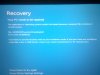 . It won't let me press any button and go further or load a system restore from a USB, what should I do ? any help would be appreciated !
-
Thanks.
I tried this, but no improvement.
When I used MSI Afterburner to see if the clock of my gpu might be messed up, I notices some weird bumps in the clock. (See the image below).
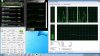
It resumes most of the time at 135mhz, but sometimes jumps to 500mhz fort a short time. Is this normal?
I opened some more diagnostic stuff, maybe someone sees problems that I am not able to recognize? -
Mine does this also. Be nice if anybody has an answer. It also does it when unplugging from ac
Sent from my SCH-I535 using Tapatalk 2
Official 2012 Sony S Series Owners Thread
Discussion in 'VAIO / Sony Owners' Lounge Forum' started by Petrov, Jun 9, 2012.


![[-Mac-]](images/avatars/[-Mac-])


