 Problems? See this thread at archive.org.
Is it just me or the Vaio S13A suffers from keyboard ghosting horror issue. Especially Q+W+SpaceBar and Q+W+D, now this is not a problem if you play strategy games or games like Diablo 3 but if you play MMORPG or shooter games that requires you to use the keys surrounding WSAD keys in the movement area then you know what i'm talking about.
Can any S13 or S15 test their keyboards, just click on this link Microsoft Applied Sciences Group
-
Hmm can anyone with SSD installed confirm that the BIOS is set to ACHI mode ?
Read that ACHI mode is better for SSDs .. Couldn't find the option to enable ACHI in the insynde bios. -
A+W+space works on my s15...
-
I can't get Q+W+Space to work on my s13a either. I think you shouldnt use the W+Q keys together or you could use an external keyboard...
-
My S13A keyboard is fine.. no ghosting.
-
Anyone?
I ordered the S1512 and I would like to know if I can stream my screen to my TV. -
Hi, Dekabal,
I bought the SVS1512S1ES (i5-3210M, 4GB RAM, 500GB HDD) this week. Initially I wanted to buy the ASUS UX51VZ, but it had some drawbacks (not upgradable with HDD for storage, high pricetag, heat/throttling/noise) which made me reconsider, so after some research I finally decided to give the Sony VAIO S15 a chance. I knew beforehand about the BIOS flashing issue with the new Win8 models, as well as the possibility of a fixed screen (no more orangegate) and i took the leap and bought it for 990.
Here are some thoughts/observations:
- Orangegate has been fixed on my unit indeed, 255/0/0 RGB is as red as it can be. The screen is gorgeous by the way!
- I upgraded my notebook with a new Samsung SSD 840 Pro 128GB (it cost me 135). I swapped the HDD with the new SSD and then I got stuck for a few hours, because I couldn't find a way to access BIOS/boot menu to boot from a DVD. So after some more research in the manual I found out that you have to press the ASSIST-button and will instantly be forwarded to BIOS/maintenance/boot menu/etc... So I just inserted the recovery disc I created before the upgrade and shortly afterwards, Windows 8 and all the useful tools and drivers (and unfortunately also the bloatware) were installed on my SSD. I then finally deleted the recovery partition it created on the SSD (~37GB) using the ASSIST menu again.
- I overclocked the GT640M LE using Afterburner from 500MHz core clock to the maximum of 540MHz and the memory clock from 900MHz to 1000MHz. I hope that in the near future someone will find a way to crack the locked BIOS and release a mod comparable to the ones for the Win7 models.
- When playing Battlefield I get about 30-40 FPS (definitely playable), sometimes even 50 FPS (depending on the size and complexity of the level, and whether or not you are airborne), but it hardly ever goes below 30 FPS. The settings I used are 1920x1080 @ 60Hz, Low preset, Vsync off. With a working BIOS mod I expect about 40-50 FPS at at FullHD and medium preset. One funny thing i discovered is that singleplayer mode seems to be a little bit more demanding than multiplayer (even with 64 players).
- Since this model is shipping with only 4GB of RAM soldered to the mainboard, I ordered an additional 8GB RAM module (28) for a total of 12GB RAM (I don't actually need all of the 12GB, but hey, prices are cheap, so why not^^)
- The speakers of the S15 are crap (no subwoofer, sounds a bit tinny), even compared to my 4 year old HP Pavilion dv7. I don't plan on using it as my primary computer, so I don't really care about it, but if you do and you want to have good audio quality, you might wanna consider the ASUS N56VZ for example (same price (999) but better processor, better graphics, better audio, but also heavier and thicker)
- Regarding temperatures I observed that the GPU does not get hotter than 70°C. At this point the fans (speed mode + max. performance) are quite noisy but the only scenario where you would be under full load is while gaming, so it doesn't really matter -> headphones. The palm rest stays very cool the whole time (at least when you exchange the HDD with an SSD^^). The exhaust for the cooling system is beneath the screen at the back and it can get quite warm over there.
- I'm planning to exchange the optical drive with an HDD, but you have to be aware that you are using the right 5,25" to 2,5" caddy. The optical drive is slot-in, which means that is has a height of 9,5 mm, so you can't buy any slimdrive adapter. There are 9,5 mm and 12,7 mm, but the latter don't fit in the laptop. I know it because I own one and it didn't fit, so I have to buy another one for 25-30.
- I really like the build quality of the chassis as well as the materials used, which are Aluminium and Magnesium. My model has a silver coating by the way. The palm rest is quite sturdy, however there is a little bit of flex to the keyboard and the screen, but it is not disturbing in any way in normal usage. If you are also planning on exchanging the optical drive, then the caddy underneath will eliminte flex on left side of the keyboard (WASD...).
So all in all, this notebook will cost me about 1180 including all upgrades (SSD+RAM+HDD-ODD), and with a (hopefully soon available) working BIOS mod for enhanced graphics performance I doubt that you will get much better performance/money ratio at this point of time, considering the screen and build quality and mobility (weight, thickness). -
Hi All,
I have the S13P and have just installed Windows 8 - love it so far.
However I followed heywhitmarshs' guide (thanks by the way, very useful) but I am missing several options still:
1) no Battery Care options in Vaio Control Center
2) no fan control in Vaio Control Center
3) VAIO Smart Network service is installed and running but I have no way of accessing it - no icon in system try, etc.
4) hot keys do not work (apart from the volume ones)
5) switching the stamina/speed switch does not provide any notifications on screen at all
6) The ISBUtility is also now not recognizing my battery so I've had to disable that at startup
I have installed everything as required (including the Wireless state driver, shared library, firmware parser, etc) and everything seemed to install OK. Oh and I have a single unknown device in device manager but I can deal with that later.
Before this I had been running Windows 7 from a clean install since July with absolutely no issues whatsoever.
Any help much appreciated. -
Excellent! I am waiting for my Sony to arrive. I am debating about keeping it or returning it. I am not a graphics designer so it is not a huge deal. The IPS screen and the 4.4 lbs had me sold.
Have you tried medium settings in BF3? I didn't buy the computer to game on, but I would like to play games at least on medium settings. I might turn the resolution down to 1600x900 on graphic demanding games.
Sent from my SPH-L900 using Tapatalk 2 -
I too just ordered a custom S15 (awaiting patiently).....however my better half currently has a S13...and we also have this -
HDTV Adapter | NETGEAR Push2TV HD Adapter | NGPTV2000 | Sony USA
...meaning we can stream wirelessly from our Vaio's to our Samsung TV (soon to be Sony).
Hope this helps
-
Thank you, that answered almost all of my questions. Does anyone know how the battery life is on this machine realistically? How much battery life do you get on the extended battery and does it make the laptop very thick/heavy?
-
Great, well then just try it out and if you don't like it you can still return it. What I would definitely recommend you to do, no matter what you are planning on doing with this notebook, is to get an SSD (preferably aftermarket-upgrade because it's much cheaper) and if you are starving for storage just exchange the ODD with the HDD+5,25"-caddy.
Which model did you get?
Battlefield 3 at 1600x900 (60Hz) and medium preset without Vsync will give you 30-40 FPS (max. 50 FPS). It also rarely drops below 30 FPS
Battlefield 3 at 1600x900 (60Hz) and low preset without Vsync will give you 40-50 FPS
Note that I tested it in multiplayer mode with the GT640M LE core clock at 540MHz and the memory clock at 1000MHz.
Energy profile was set to max. performance and VAIO control center SPEED option was also set to performance.
I did not observe any throttling concering the GPU.
GPU temperatures did not go over 68°C. -
Thanks
On the link you gave it says that this works with WiDi enabled computers
So if it works with your S13, it should also work on other (more recent) models
-
I got the SVS15127PXB model. But I just realized that it had the glossy screen and not the matte version. That is a deal breaker for me, so I am more than likely going to return it.
Do you get much glare in your laptop?
Sent from my SPH-L900 using Tapatalk 2 -
It works on the current S13 in the house....which was purchased in Jan of 2011. We'll see if it work on my S15 Custom, which is coming (hopefully) this week Will post back if you haven't found out already.
-
for surfing, I get right around 4 hours.
This laptop is one of my all time faves. The screen is wicked. I bought two more as gifts. -
Hello everyone!
I just bought a brand new and customized Sony VAIO SVS151190X about a week ago. It came with Windows 7 Home Premium 64 bit. Like many of you guys, being able to upgrade components was a big incentive to go with this laptop. Another reason, was Sony's promise for being able to immediately upgrade to Windows 8. However, that second promise has been not been elusive so far as I am having serious issues with Windows 8.
I followed Sony's instructions and did a clean Windows 8 install and used the "VAIO Upgrade Tool" to upgrade drivers, utilities and Sony apps. However, I am missing the following functionality:
1. The F5/F6 keys for controlling screen brightness do not work!
2. I do not see all options under VAIO Control Center. For example, there is no "Display" option. My screen keeps changing brightness on it's own and it's annoying to the point where I can enjoy watching videos. Yet, I can't change the auto brightness setting from VAIO Control Center because the "Display" option is missing.
3. Stamina/Speed switch doesn't work either.
I have spoken to Sony Tech support online a few times and they haven't been able to give me a straight answer, besides telling me to wait a "few weeks" for more driver updates or trying to re-install VAIO Control Center (it did not work!).
At this point, I am extremely frustrated and am considering reverting back to Windows 7. Sony has been advertising this laptop being Windows 8 ready at the time I bought it, but turns out it's not ready for prime time. Any ideas towards a solution or words of wisdom are greatly appreciated!
-
yes you can.
-
Oh, I'm sorry to hear that. Do you have a customized model? And if so, can you configure whether it is glossy or matte?
I didn't really notice much glare on my notebook yet, however I didn't have the opportunity to test it against sunlight until now.
Hi
1. If you haven't already done that, now is the time to create your 5 recovery DVDs by accessing VAIO Care in Windows (the amount of DVDs may vary due to other models)
2. Power down your notebook.
3. Start your notebook by pressing the ASSIST button (that's the one with the red/pink label next to the fingerprint sensor). Do NOT start it by pressing the power button.
4. Now insert your recovery disc 1 and choose to boot from DVD in the ASSIST menu.
5. Now, I don't quite know how it is called in English because I have the German version, but you will have to choose something that sounds like "extended recovery assistant"
6. Now you can delete your recovery partition and add the ~37GB (again, size may vary due to model differences) to drive C:\
Note, that this option is ONLY available if you are booting from your recovery DVD!
Hope I could help. -
Is there a way to bring the laptop monitor back down to 10degrees so the bottom of my external monitor won't get blocked by the laptop screen? All my previous laptop i had was able to do that. (Thinkpad/Macbook/Acer)
I always plug the laptop to an external monitor and use the laptop keyboard but the s13 will not allow me to push the monitor back down to nearly flat as it will lock at around 65 degree.
I tried putting my external monitor higher than the laptop screen but it was too high and uncomfortable. I'm also using it on a small table so purchasing an external keyboard is not an option.
Im seriously considering returning this laptop. Any help? -
Damn.. unlucky me. Wanted to transfer the stuff from my HDD to SSD.. But the HDD refuses to boot via the SATA adaptor..
Geez.
Guess I've to do a clean re-install of Win 7 to my SSD then. -
With all this talk about Windows 8 preventing you from BIOS modding, would simply downgrading to windows 7 fix this problem?
-
You'll have to switch your BIOS setting from UEFI to Legacy.
-
It's not Windows 8, which is preventing you from BIOS modding, but it is the new locked BIOS which is shipping with the new Win8 models
-
Hi Guys,
I own a Sony S13P - SVS13A15GGB model. I have had a little problem . I am running the original pre loaded windows 7 64 bit with kaspresky antivirus installed . I have been facing this problem when I am in Stamina mode that my computer will just lag out of a sudden and last for about 5 sec each time . It's pretty annoying ! However I seem to notice that when in "speed" mode none of this happens. Also I noticed during Lag it seems that something overload the CPU based on my all CPU widget on desktop. I tried to check at task manager but everything looks pretty normal to me.
Anyone have such experience and willing to help . It is a pretty annoying issue.
Also, Do you suggest upgrading to Windows 8 ?
Thank You in advance. -
I DO NOT recommend upgrading to Windows 8 yet. My Windows 7 to Windows 8 upgrade experience has been flawed at best. Sony still hasn't released all the drivers or there are major bugs still. Please see my prior post on page # 517 about my brand new SVS151190X and many important functionality not working in Windows 8!
-
It worked very well for me and all the buttons/VAIO Functions keys are working fine as well.
Install the drivers from Sony www in the following order, see previous posts.
Sotty, I just saw you have a S13, I have a S151290S...

-
Thanks for this nt123. Can you confirm whether you restarted after each driver install (manually or did a dialog box appear asking you to restart)? The reason I ask is that I installed according to the guide a few posts back and I was not asked to restart at all.
Cheers. -
About 15 times ?
But with the ADATA SDD I've installed, this beast take less than 24 seconds to reboot !!!
-
Thanks. I might try again this evening. As I use my machine for paid work I have a system image ready to go to roll back to Win7 if I have issues (I did last night). Love Windows 8 though and I know what you mean with the SSD - from power off to password screen on a virgin Win8 install is about 5 seconds. Thats just insane.
EDIT: where did you get the driver files from - the US driver site? -
From Sony Canada (sony.ca)
For a S15 that is. -
And, see post #5108
-
what driver is number 16 ? SODFEP ?
-
What Driver is Number 16 ? -
Two problems with your thought about downgrading: 1) it's not Win8 causing the problem with BIOS mods it's the locked UEFI BIOS that ships with the new Win8 versions of the S series. The locked BIOS can't be downgraded or reverted to unlocked once loaded! 2) downgrading a comp designed to work with a certain OS is very problematic unless the manufacturer decides to issue drivers for the downgrade OS. In the case of the new Win8 S series there are no Win7 drivers on the website to support the downgrade....you MIGHT be able to use the Win7 drivers from one of last years models....but I sure wouldn't count on it. If you want to do BIOS modding the best thing to do IMHO is buy one of the Win7 models before they are gone and THEN add Win8 as an UPGRADE (if you want the new OS) as the drivers for that are right on the Sony website! Results reported here for the upgrade experience to Win8 are VERY mixed however!
See my post 5144 for more info on locked BIOS. -
Got my vaio 15.5 last week and everything was going fine until I played some games (presumably the dedicated card kicked in). Afterwards I am occasionally getting red pixels everywhere on screen, sometimes they would go away for a bit if I angle the screen differently, other times I would have to reboot/sleep and other times they go away after a while. My reboot screen sometimes would turn into red/orange rather than black. Did a complete reset of my PC and the same thing is still showing up. So seems like its both the graphics card and the screen. Anyone knows what this is about?
-
Thanks Liebespanzer!! You've done exactly what I'm planning on doing with the laptop.
I am waiting for my S15 (with i7 instead of i5) to arrive. I was also considering the Asus but decided to go with the Sony for the same reasons as yourself.
I've also ordered the exact same SSD (840 Pro) and plan to do the following:
1. Create recovery media (I've asked for a clean install so I'm hoping there is minimal bloatware)
2. Swap out HDD for SSD.
3. Restore from recovery media.
My question is: Does the recovery media backup only the OS and Sony bloatware? Or does it take a full image of the entire hard disk? -
Sony Firmware Extension Parser Device Ver. 8.0.2.4
-
Does anyone know what "ME Driver" stands for? From this page: Sony eSupport - Electronics - Support Information
-
I'm having a very strange issue with my Sony Vaio S13. I have the WIndows 7 model (SVS13A190X) but I recently did a complete clean install with Windows 8. Up until yesterday everything was fine. However, yesterday I noticed that every 3 minutes of inactivity my computer would sleep. I checked the advanced power settings and it is set to never sleep. However, today I noticed that for some reason "Require password on wakeup" automatically switched itself to "No" from "Yes", so I switched it back. However, my PC continues to go to sleep after 3 minutes of inactivity.
I have the latest drivers installed for everything, including the BIOS.
What could be causing this? Is there a third party application interfering with my PC's sleep function? I only use basic programs like Steam, Skype, Spotify, iTunes, VLC, etc, nothing fancy. -
Also, I noticed I have an unknown device, even though I have every driver on the Sony website installed. Anyone have any idea what this could be? I am almost certain it has something to do with the sleep issue I mentioned about due to ACPI.
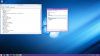
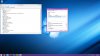
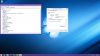
-
It's my famous #19 driver, Google for him : SODSWS-80270637-0082.EXE
-
Thanks, I really appreciate it! It's finally gone from device manager.
Going to see if my sleep issue still persists now. If it doesn't then I might actually have time to go to the gym instead of debugging this. -
Sleep issue is gone! OP should be updated with the above post.
Sent from my SGH-I747 -
I'm not up on whats going on with this BIOS problem in windows 8. Is the problem simply that it won't let you overclock the gpu?
-
Thanks it worked.
-
After seven attempts at a clean re-install of Windows 8, I am going to revert back to Win7 until the driver issue is sorted. I have the UK S13P and have tried US/UK/CA (and combinations of) drivers according to the current Windows 8 guide and the guide for Windows 7 (which worked perfectly). I still have no battery care, fan control, hotkeys or speed/stamina notification. Everything else works fine.
My only guess is that the UK model has something slightly different about it and the UK drivers site has not yet caught up. The only thing I havent tried is an UPGRADE from windows 7 but I'd much rather do a clean install.
Shame really as I really like windows 8 - it feels much snappier and cleaner.
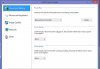
I have attached a screenshot of the Vaio Control Center that I am seeing - do you guys that have everything working see extra options for Fan control, etc?:
-
upgrade from 7 went grand using the uk site drivers
and yes that screenshot is missing a lot of things -
Ah right - thanks for the confirmation of that. When I first got the laptop I did make a system image of a clean windows 7 install (with all drivers working) so I might re-instate that and then upgrade to windows 8 that way.
-
DarkImmortal - one thing I have noticed during all of my attempts is that I have a single unknown device and the one thing that's missing when I compare to my Device Manager screenshots is the "Intel USB 3.0 eXtensible Host Controller Driver". I also notice that when I run the upgrade assistant, this same device is shown as not compatible.
My existing driver for Win7 does not work and I cannot find a win8 driver anywhere for this device - is it installed as part of something else now?
Cheers for your help.
Official 2012 Sony S Series Owners Thread
Discussion in 'VAIO / Sony Owners' Lounge Forum' started by Petrov, Jun 9, 2012.


