 Problems? See this thread at archive.org.
I will take a few PrtSc shots and I hope these "very light shadows" are captured.
-
I doubt a screenshot would capture what you're seeing, since it takes a shot of what the display should be rather than the output of the screen. (same way a prtscrn wouldn't capture the orangegate issue). You might have to use a camera and take a picture of the screen.
-
Thanks specLegacy. You are right. Since I don't have a camera I will borrow one. I would really appreciate your input, as well as that from other posters, after seeing what I mean.
-
Corrected.
It seems like you have an issue with your screen. I'm no optometrist but I've reviewed about 50 notebooks over the years, most of which were published on this site, and my S15 has the best notebook screen that I have ever used. -
Frigging small, just on this webpage...
I'm using Opera 97% of the time and a capital S in S15 measure approx 1/16". Same in Chrome but Explorer seems to zoomed achieving a 3/32" on the same S.
Very clear and crisp, but sooo small... -
Make sure your brightness isn't up too high. That will cause a lot of strain. Or too low now that I think of it. Try in a well lit but not sunny room and play with the brightness. Or maybe you need glasses
Sent from my SGH-I777 using Tapatalk 2 -
ohhhh it wasn't on here Sony eSupport - SVS13A190X - Support
Got it from the page you posted whoops. Yea I didn't have the fan settings until I installed Sony Firmware Extension Parser and Sony Shared Library.
Thanks! -
Trying to get a Cache SSD running through the ODD. It is the Sandisk ReadyCache 32gb ssd drive. Had minimal success but then the drive failed to recognized after initial half-installation's restart process. Was not able to repeat the results so far.
-
Windows 8 users: Don't know if people are still having issues like this one but I was as well (screen brightness hotkey not functional, no fan control, stamina/speed doesn't do anything, etc) until I installed the Sony Firmware Extension Parser Device Driver and Sony Shared Library.
Your brightness control keys, Vaio button, stamina/speed switch, etc will now work.
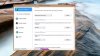
I believe the Vaio Control Center should look like this (unless I'm missing something else >_<):
-
Thanks for the info. I had issue with upgrading to Windows 8 but I have the 13 inch model; not the 15 and it does seem to be different. The only way I could get anything to work was to UPGRADE winodws 8 over the top of a clean windows 7 install. My vaio control center looks identical to the one I had on windows 7 whereas your screenshot looks updated. I would be interested to know if other users who have the 13 inch model have the same-looking VCC.
Most of my confusion I think has come from assuming that the 13 inch model would behave the same as the 15 inch model when it comes to drivers and windows 8 - I guess not. -
Are those of you running windows 8 seeing any better performance or any advantages over windows 7, curious as I love Windows 7.
-
I have the latest 15" S series model. I've replaced the ODD with the HDD that came with the laptop. The OS is now on an SSD.
However, using this configuration I always get 20% cpu usage in idle, caused by system interrupts (3-5%) and system (15-17%).
If I switch to stamina, the cpu usage in idle drops to 6-7%.
I ran some diagnostic tools and found that the cpu usage is mainly caused by ACPI.sys.
The weird thing is that as soon as I put back the ODD but leave the SSD the cpu usage returns to normal (0-2% in idle).
Disabling the ODD in BIOS also does not help if I use the caddy+HDD.
I know that lots of people have successfully replaced the ODD with an HDD+caddy so i wonder why this won't work for me. I'd appreciate any ideas. -
I have the 13P model good sir. did a fresh install of Windows 8 too haha. Don't worry I felt the same way too about using the 15 inch driver page. The only reason we wouldn't go directly to our own Windows 8 driver page is because it doesn't list the most important drivers (for some reason) but nonetheless, fully compatible with our model: Sony Firmware Extension Parser Device Driver and Sony Shared Library.
Actually, maybe this will make you feel better. It's a the newer 13 inch model. No differences internally except Windows 8 pre-installed I believe.
Sony eSupport - SVS131290X - Support

-
Regarding screen's quality for reading -- the best I have ever had, and I read A LOT on the screen, I research, write, copy/paste, and do it daily for hours. Not tiresome on my eyes at all.
But of course you have to use zoom.. With hotkeys it's really a non-issue, and the graphics interpolation is usually very good. Also as far as web browsing goes, Firefox remembers the zoom you set for a particular site, so you don't have to do it all the time. -
Picking mine up from the mailbox today! Very exciting! This thread has been so helpful already and I don't even have it yet. Thanks to you all in advance for the help you've provided!
-
Hi,
Where is the power and battery tab?
Thanks -
Well that's just weird.
I've tried approx. 9 clean re-install attempts using drivers from the 15 inch CA site, 13 inch US site and 13 inch UK site. Followed all the instructions and installation order to the letter with no success at all. I could not get the VCC to install properly no matter the combination or source of the Firmware parser, Shared library, Wireless state driver, etc, etc, etc. In the end the only thing that worked was upgrading over an existing WIN7 clean install. I don't think I'm incompetent with this (built my own machines for over 15 years now) and the win 7 clean install worked perfectly - Windows 8 just wont play ball with me.
I wonder if it could be something to do with the UK models vs the US models (the model numbers are different but I suspect the innards are the same). -
Does anyone else's trackpad have little white 'fringes' near the edges? I have a black VAIO S15 Win8 and it is perfect except for this. If I look at my trackpad from above it looks perfect, and If I look at it from an extreme angle it also looks fine. I can really only see it if I use the laptop. It's only visible at certain angles. There are no scratches on it. I can take a picture of it but it'll be hard to see. Also my trackpad will sometimes go unresponsive for about a minute. It happens about once or twice a week. Maybe less but it happens nonetheless. I can't stop thinking that these two things are somehow connected. Can anyone else check their VAIO?
-
Many of us have done the trace and found acpi to be the error. A lot of people run the latest bios on windows 8 without a hitch but my high CPU usage went away by going to the second to last bios. Recently I reflashed to the new one and the problem appeared again and disappeared upon rolling back the bios. It could very well be a missing driver but I have tried everything and the only fix was the bios.
Sent from my SGH-I777 using Tapatalk 2 -
I have the new Win 8 Sony S 15 and everytime i put my display higher it goes right back down to the lowest setting. Am I able to fix this?
-
Disable auto brightness from VAIO control center
-
Thank you, that's good to know. I got the laptop with Bios R0080C8 and updated to R0081C8 but the acpi issue occured with both. So I guess I can only hope that they'll release another bios to fix this problem or is it possible to flash an older bios (R0142C5) on laptops that come with win8?
-
Also, there was an update for VCC a few days ago, which improves the auto brightness function considerably. But true, the easiest way is to just disable it.
-
With a Crucial M4 and Windows 8 my boot up time is so fast that I simply shut my laptop down when not in use instead of putting it in sleep mode. From powering on to opening a Web browser it takes 12 seconds, if I didn't have a password setup.
With Windows 7 it was about 80% longer.
Otherwise there is no noticeable difference. Windows 7 has better driver support though.
Sent from my SGH-I747 -
Hello!
I have two questions:
1. Is there a possibility to disable the ugly dvd drive sound when booting or coming from standby without disable the ODD in the bios?
2. I noticed a battery drain on my Vaio S13A. Was on charge till 5:30 in the morning and at 9:20 I booted it up and from my max charge 80% there is just 72% in about 4 hours... Does someone is having this, too?
I am a bit afraid because normally I put the Vaio in my Bag in the evening and do not take the charger with me, because the runtime is enough for my actual day. When there is a big battery drain it is not so good. -
Just a quick update -
Just recieved my S15 today. I was a bit worried about some of the comments on the screen, but I am amazed at the quality of this laptop, especially the screen. The screen is absolutley incredible/gorgeous. The text is not too small, an the zoom feature on the scroll pad is great when browsing forums like this...seems to save my zoom setting on this forum. It looks amazing crisp.....actually the screen is the best part of this laptop, those of you worried about it, look no further!
I ordered mine directly from Sony website, and was lucky enough to get the Windows 7 version SVS151190x with the R0142C5 bios.......I figured I was getting the newer windows 8 model, but I am pleased to find out I will be able to use the BIOS MOD and overclock the GPU.....I am STOKED!!!!!! (I am guessing thats while I got a $150 discount at the time of checkout, probably because this was the windows 7 version, anyways, I feel very lucky.)
After spending ALL day removing the bloatware and doing a Black Viper windows services cleanup, this computer screams fast. I am ordering a SSD and more RAM immediately, but untill those arrive, I have this laptop running clean and tweaked - its fast and what a beautiful laptop.
Still first day of use, I'll report back after throwing the 1000/1000 bios mod and running some games/photoshop, but thusfar, this thing is EXEEDING my expectations so far. Orangegate is way overrated, as reds looks like RED to me...lol.
Speakers are fine too...its a laptop....If need deep sound I plug it into my home stereo.....lol. -
Also, about the TouchPad-
It needs to be calibrated carefully, and adjusted to your particular touch.
I has taken me a few hours, in between tweeking the rest of the Windows/Drivers....to get it just right.
I love the touchpad now, but be advised, when it comes "stock", you need to adjust the settings it or it just doesnt feel right.
The setting for the touchpad are found in the Control Panel-Mouse. Don't forget to update ALL your Sony drivers, that may help also if they have 'updated' the pad driver...... -
Same here. When the Vaio is shutdown it still drains a lot of battery. I had an older model and it was the same.
I disabled the USB charging in the vaio control center but did not notice any change.
So I leave it plugged all the time to prevent that drain. But when traveling it is annoying -
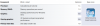
Wow man, I didn't expect such nice WEI scores in the GPU and calculations departments.. the hard disk score is due to a Samsung 830 SSD though.
After using it for 3 weeks, I must say the Sony S13A convinced me of a good buy =)
( The clean install was pain in the a.s.s though ) -
Can you tell us how you got a windows 7 model? Did you but it from the outlet? Was there an option that you checked when customizing or did it just happen? -
The Display is gorgeous, but Orangegate is a huge problem. To any potential buyers, do not take this issue lightly if this will be a problem for you. I recommend reading all the posts in this thread http://forum.notebookreview.com/sony/696286-s15-orange-gate-fixed-9.html. My S15 is less than a week old, November assembly... Orangegate is most definitely present. There are rumoured to be some more red displays out there, but Sony themselves told me they are aware of the issue, but do not yet have a solution.
-
OK, I took the jump ...
Refursbished S15 with i7 Quad Core, 12GB RAM (I would have taken only 4 but since it's there), 640GB hard drive (which I will replace by my Crucial M4 512GB), win 7. All of that for 1027 euros. -
Actually, I searched for coupons on google (10 days ago, just recieved it today), and came upon one for $150 off the S15. It directed me straight to the SONY website (seemed to be a S15 page that was unaccessable execpt from that link, and not the outlet)......and after I made my custom selection on the S15 I inputed the savings code at the checkout screen, my S15 came to $799.....OMG
Anyways, at that time I did'nt even know there was a difference between the windows 7 and windows 8 models, and I made the purchase not knowing which one I was getting. It was'nt until then, I started browsing here to learn more about this laptop I just purchased that the Windows 7 unit seems to be the unlocked bios version, and I got lucky and recieved one.
I would presume that if you called Sony direct, and specifically asked them for the Windows 7 models, you will still be able to purchase them, hopefully you'd talk to someone who'd know the difference.
Hope that helps.....feel free to ask any questions. -
Sorry to hear that about yours Mike,
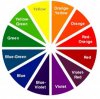
I just recieved my S15 today, and pulling up "color" charts on Google, my red is red and deffinately not orange, maybe they have fixed the ones that are going out now, I don't know. Maybe I got lucky. If someone had'nt mentioned this, I would not have even given it a second thought, but, even after searching desperately for colored pictures and palletes in photoshop I don't see any problem, red is red....I guess the ones shipping out are new screens..?
In this color wheel I see a distinct red and 3 strong to light oranges....
Not the best color wheel...but it works....
-
Thanks Sting,
Yeah, it seems more random than that. Mine was literally just shipped out less than 2 weeks ago. Brand new. So at this point it seems completely random even which New models are getting these red screens. It's weird that some are shipping with them, Yet Sony says there is no fix yet for the Orange one. I will try to track one down at a local shop with a red screen, take a photo of mine next to it and then call Sony again
I just caution new buyers to check the screen first before purchasing. Unless, like me you've bought online. In which case, it seems like luck of the draw for the moment. -
I upgraded the 13 and have the new style vcc
Sent from my GT-I9000 using Tapatalk 2 -
Anyone else getting a drop in FPS similar to the time when priority was not set to ventilation? I'm on Windows 8 and I'm getting huge drops in FPS every now and then specifically when the fan is on super loud. It goes away after a while so it reminded me of the time I didn't set priority to ventilation on Windows 7. My setting is on Performance though in the new VCC..
-
Monitor your GPU temp.
Do a quick furmark test.
See whether it throttled down on certain temp. -
So the S13P is shipping today (I hope). And as I did last time, I am wondering about possibly replacing the display panel. What information about a potential to replacement would I need outside of size? Has anyone tried this?
-
Manipulate,
Are you replacing it to fix the "orangegate" issues? If so, I asked Sony to replace mine, and they told me that they are aware of the issue, but currently have no fix to offer. If you discover something different, I'd love to hear about it! -
There is no orange gate on S13P since it's not an IPS display
-
He's getting the 13" version which doesn't suffer from the "orangegate" issues (but, supposedly suffers from everything else ). I'm interested in such a swap myself (as I'm getting the S13P and have asked a few times in this thread, but got no response. I guess nobody tried it yet.
A possible first step might be to get some photos of the LCD screen from the S13 to see which connector is used. Does Anyone have a disassembled S13P bezel or a spare part screen? -
oops... helps to read thoroughly
-
Yes this is what I was referring to.
I actually received mine today and it looks great. Actually compared to my SB, the screen looks fantastic, then compared to my buddies macbook, it looks like crap.
I have another issue though. This one came with a slot load dvd drive. But the soft material that keeps dust out looks like it was cut by a fourth grader (see image). Should I return it?
Edit: Sorry about the image quality, too much caffeine and therefore handshaking for the phone camera.
-
Hi, new to this forum and am looking for laptop for my son in college. I have question for those who have seen both 1366 and 1600 screens on the Sony S13 please. As a frame of reference, the choice has come down to the Sony S 13.3 and Lenovo Twist or X230 - which has fantastic screen color/contrast/black level. Although my son and I are both into photography, this computer is used mostly for class work and surfing the web, rarely gaming, and not for photo editing.
1. For reading/typing and for web surfing, does the 1600 screen make text too small on a 13.3 screen? Is 1366 "better" for this function?
2. For picture quality, is there a significant difference in picture quality between 1600 versus 1366?
3. If there is a difference in 2 above, is it strictly due to the higher resolution? Or is there a different in contrast/black level/color rendering also between Sony 1600 and Sony 1366 screens?
TIA and sorry if these questions have already been discussed - there are so many pages to read here. -
I am having the 1600x900 screen ..
Q1 : Yes, text may seem a little small.. I use the inbuilt "make text bigger or smaller" function and scaled everything to 125% instead of the default 100%.
Q2: My previous laptop has a 1366x768 display, but it is a 14-incher. Hmm, the 1600x900 screen on my Vaio is sharper and clearer, but it you don't nitpick on it, it is fine.
Q3: On this, I have limited knowledge haha, someone else needs to answer that. -
OMG I ran GPU-Z while I was playing Planetside 2 and highest temp I got was 84C! This is dangerous! What happened? This wasn't happening on Windows 7. Is this fan not working correctly?
-
Regarding the Sony screens, I can't really say (maybe the lower resolution one sucks less?), but the X230 can come with an IPS screen (an optional upgrade) which is probably miles ahead of the screens in the Sony S13 if the resolution is not a problem (there used to be some slow responsiveness with the older Lenovo IPS screens on the X220, but I think it was resolved a year ago and all the laptops produced since come with the improved panels).
But, since I'm used to the 1366*768 on my 11,6" Acer (can't imagine Sony to be much worse screen quality wise), I just can't accept the same resolution on the 13" - for the increased size of the laptop I expect bigger screen space as I might need it for occasional programming. Will get my S13A by Christmas so I'll see how foolish that decision was. Otherwise, I would have opted for the LG P330 which seems better to me (better design, mSATA slot instead of ODD, better cooling, better battery life) apart from the glossy 1366x768 screen and the lack of backlighted keyboard (and the fact that it's Sandy Bridge era with the GT 555 GPU, albeit the latest variant). I waited for some Ivy Bridge refresh (and with GT 650M, hopefully), but I guess it will not happen due to the latest Ultrabook/Windows 8 touch screen craze. -
Ouch, that's noticeably bad.
I was planning to replace mine with a caddy and get an SSD as it doesn't come with the mSATA slot. Don't really care for the SSD speeds much, but I'd appreciate the Intel RST and the almost instant hibernate revival times on the portable laptops. I'll re-use the blu-ray drive for my trusty old Dell Precision (the stock slot-in DVD-RW seemed twitchy anyway).. So, to cut the long story (rant) short, are there any covers available for this slot? What does it look like with the SATA HDD caddy installed? -
It's probably because you were limiting your CPU speed(99%, 95%, 90%, etc) when you're on Windows 7.
Now it has been set back to default (100%).
What's you ambient temp? Just curious.
Official 2012 Sony S Series Owners Thread
Discussion in 'VAIO / Sony Owners' Lounge Forum' started by Petrov, Jun 9, 2012.


