 Problems? See this thread at archive.org.
VMs? Get the quad core, obviously.
-
HELLO Guys, help me please with this common problem - after upgrading Win7->Win8
Intel(R) HM76 Express Chipset LPC Controller - 1E59
tried all available drivers for my SVS15113FXB - nothing helped. 1 unknown device remains
thanks! -
Same thing for me.
But im also missing some settings in controll center and the shortcut buttons dont work. Only the ones for sound do. -
Different question: If I want to do a clean install of Windows 8 on an SSD, can I just use the Vaio Upgrade Tool instead of downloading and installing all of the drivers myself?
-
Hey everybody...
Can anyone tell me what mark of a memory DDR3 is in Sony Vaio S1512 and if you can check what are the timmings and voltages? Any of it 4GB or 8GB.
THank you. -
QUOTE=reauxbot;9027502]Different question: If I want to do a clean install of Windows 8 on an SSD, can I just use the Vaio Upgrade Tool instead of downloading and installing all of the drivers myself?[/QUOTE]
Definitely no ! -
Dont anyone know how to solve the issues with installing windows 8 on a vaio S mid summer 2012 unit.
It is really annoying not be able to do all the stuff in controll center like i could in windows 7. Now my battery is stuck on 80% max cos thats what it was set to in windows 7.
And i cant change it in windows 8. Also 1 device is not installed propperly. And the shortcut buttons dont work as they should.
And this is with a clean install of windows 8 and followed the list of recomended drivers for windows 8 to the letter but it still wont work.
Surely alot of people must have the same issue as i have. How do you fix it??? -
help please! -
Definitely no ![/QUOTE]
I see. So it's manual download and installation then. Thank you. -
It must be part of the Intel Chipset Driver, specifically PantCore.inf in it. I don't know if it installs in Windows 8. Also, I thought SVS15 chipset is HM77, not HM76 and, hence, the device should be "Intel(R) HM77 Express Chipset LPC Controller - 1E57"
-
developers running middle-ware can't do that...we need to sleep the session
-
learn how to use hyper-v and linux integration services; you want 12 gigs, and the core 7...don't be foolish
-
So I have been looking for this for a while and realized that this would be the easiest place to find it:
Has anyone found a way to get "Three-finger Tap" to be middle click? I have three finger press enabled but I would like to tap instead of press because its easier for more casual browsing! -
Anyone? This is regarding the constant 20% cpu usage when replacing the ODD with an HDD/SDD.
I know the solution, downgrade the firmware to the second last version, but I haven no clue on where to find this version. -
Happy New Year! I own a SVS13A15GG. I bought it last Oct. 2012. I am having issues with it like it freezes everytime when I leave my laptop running and no activity for say 15min or so. Example, I am downloading something and I just leave it until it completes the download. When I go back and check my download, the computer freezes, except my mouse. I can move my mouse but I can not even close any window, shutdown my laptop. I have to press the power button for say 5 seconds just to power it down.
Any help out there? -
Your vaio care is not properly installed (some components may be missing) or a wrong version was installed. Try installing the hotkeys also. Installing a vaio care made for a different modell may render vaio care erroneous. It happened to me also, when i installed a vaio care made for US modell on a European Vaio S.
I had also a device with exclamation mark (WI-something) i just deleted and it never popped up again. Of course everything is working fine. -
I dont accually want vaio care. But ive installed it now to see if it helps.
When i ran windows 7 i dident have vaio care installed ath all and everything worked great. So i dont think this has anything to do with vaio care really. Its controll center thats not working properly. And the shortcut buttons. The thing is that i dont have the hotkey utillities on my download list when i search for my laptop. And if i try to install the one for the replacement laptop for mine that came with windows 8. I get an error saying "this driver aint made for your modell" -
How long ago did this start? Do a system restore to a point when it did not freeze
Sent from my SCH-I535 using Tapatalk 2 -
So basicly no one have gotten their win 7 vaio S uppgraded with win 8 to fully work.
In other words gotten all functions in controll center and stuff to work.
That is kind of a huge deal.
Esepecially since sony did alot of comercials about the fact that it was gonna have full windows 8 suport.
This REALLY sux tbh.
Have no one really figured out how to get this crap to work? -
The VAIO SE dock (which i believe is compatible with s15) is on sale for $50 + an additional 25% off until jan 12th... so ordered mine for $40 after tax.
-
Well, as far as I am concerned everything works for me.
Clean Windows 8 install on a blank SSD of SVS1511C5E.
Just got all the drivers I thought I will be needing: some off the USA site, some from Sony UK, some from my model's support pages, some from others, and some even from the Win7 section.
I got installed Vaio Control Center and Vaio Care and all the options are there -- if I am missing anything then obviously I don't need it. The hotkeys work like a charm although there is no indicator for screen brightness (and the volume indicator is different than in Win7). I'm also looking to set-up the fingerprint reader for which I have a driver but no software.
xHCI/HM77 issue had been addressed in an earlier post:
-
So you can set the fan speed and set the limit on battery charge?
And if so. How on earth did u manage that? -
Hmm, haven't touched the fan controls but did set the battery charging level to 50% in Vaio Control Center. I also adjusted basic performance settings for "balanced" and "performance" modes in the Control Center and some finer details in Win8 Control Panel.
I am not that much bothered by fan as it only goes up with CPU intensive tasks which in my case is temporary. Where can I check if my fan controls work as they are supposed to?
-
Is this the one with 500GB HDD inside?
Edit: Nevermind... I've seen it is not But anyway is very cheap!
-
Just wondering, when checking the CPU-Z program, why is that when I am in STAMINA mode, my Core Speed is only around 1500Mhz with a Bus Speed of 99.80MHz. Shouldn't my Core Speed by 2.6GHz?
When I am in SPEED mode, my Core Speed goes up to around 3400MHz, with the same Bus Speed. Shouldn't the max Core Speed be 3.60GHz?
I have the Intel i7-3520M Processor. Are my speeds normal? What speeds do you guys have with the I7 Processor? And what WEI scores do you have with the i7 Processor?
PS: My WEI Processor's score went from 7.2 down to 7.0....what is which the drop?
Thanks in advance!
BTW, when I check my RAM speed, it says DRAM Frequency: 665.7MHz...shouldn't it be 1333MHz? -
I use the Display Color Calibration wizard in Windows 8 and the screen does look a bit better. But it still suffers from horrible viewing angles and the colors are muddy looking.
I my original post, I mentioned that I did like the SVS13A for the most part. There are no other laptops out there with high res screens, dedicated graphics and full-voltage CPUs in a small form factor (15 inch I think is too big still). The Z doesn't count because it has that silly media dock and I think the keyboard feels wonky.
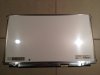
That being said, I'm keeping the SVS13A, but maybe in the future I'll upgrade the screen to a higher quality one...If I can find one that'll fit. I busted open the front bezel and took at look at the current screen:
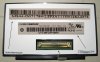
It's a Chimei Innolux model N133FGE-L31. According to this website, it has been discontinued. There are only two other screens that have the same specs which might fit:
1. LG model LP133WD2-SLBx which is a nice IPS display, apparently
2. Chunghwa Picture Tubes (CPT) model CLAA133UA0x
The bezel conforms to the screen very tightly, so the replacement screen must have the same shape. They all have the same 40-pin connector.
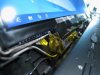
Unfortunately, the replacement screens above have slightly different shaped circuit boards than the original screen. I'm tempted to purchase the LG display and see if it fits! I wouldn't mind spending another $150 for a good screen. -
Does anyone have a really fast black flash when turning on their laptop? My black screen flash occurs when I am at the "Welcome" screen...
-
The core speed differences are due to Intel's SpeedStep technology. When the processor isn't being used much, the core speed drops down to a minimum level to save power. Try doing something processor intensive when you have CPU-Z open and watch the core speed increase (scrolling through webpages usually should do it). When you are in SPEED mode, the core speed goes up because the minimum level for the core speed is set much higher than in STAMINA (usually 100% in SPEED, but only 5% in STAMINA). You can check your advanced power settings to make sure.
And now, Intel processors have something called Turbo Boost which I don't understand at all. Why can we just say the processor's max speed is the "Turbo Boost" frequency of 3.6 GHz instead of 2.9 GHz, in the case of the i7-3520M? And why is the bus speed only 100Mhz? Didn't we used to have 133 and even 200 MHz bus speeds a while back? -
URGENT! Another question arose!
I don't remember the exact date, but before, whenever I startup my laptop, I always have the Dolby notification icon in the bottom right.
But now, I don't know what I did, the notification icon never appears for Dolby. The settings for that icon is set to "Show" but whenever I click on it again, it says "This notification is currently not active." Eventhough, I'm pretty sure it's on.
I tried reinstalling, but I keep getting error messages once it's reinstalled. So I have to use System Restore, and this has been driving me nuts...and this keeps going in circles.
I think there is something wrong with the registry of this program.
When I go to the program location, I have a Dolby Profile Selector, Dolby Profile Editor, and Dolby Profile Launcher...I am so confused now, as I always had the Notification Icon available.
I can add Dolby to the Startup Folder, but when turning on the laptop, the entire Dolby profile pops up when Windows 7 boots, and that was not what happened before.
Now it's my OCD kicking in...can't sleeeepppp.....
URGENT
Thanks in advance !!!!! -
I already changed in the SVS13A1 a panel, for LP133WD2-SLB1. It was necessary to finish a cover and a panel a little.
As there is bug with a new panel on it the BIOS menu isn't displayed. -
This sounds interesting.. Any more details or photos? So, the BIOS screen doesn't show? Does it show on an external monitor (as a potential workaround)? And what do you mean with "it was necessary to finish a cover and a panel"?
What is the difference between LP133WD2-SLB1 and LP133WD2-SLB2 panels? -
Came back here after some time to see if some1 has finally managed to change the screen.
Good ti know that you succeded wwiktor. Any other bugs you encounterd? Would you say it's hard to change the panel?
What did you mean by " It was necessary to finish a cover and a panel a little."? -
Yes on the external monitor all OK.
Seems to me that the problem in a firmware of a new panel (by the way after up-dating of system BIOS it is necessary to include 1 time a notebook with an old panel differently pictures isn't present absolutely)
I had to file a cover to set a new panel and as to file the printed circuit board - she by the sizes more original and without alterations wasn't located on the panel. The photo isn't present - everything is already collected.
Sory for my English it is on-line translation from Russian
-
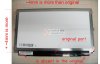
I found a panel photo on the Chinese site and added my alterations
-
So what you basically did is filed off the edges of that screen to make it fit. It's only 4mm, thats not all that much, can't be to hard.
How did you move the connector? are the wires long enough to fit? Or did you move the connector on the laptop? -
It was necessary to cut the frame on perimeter (on back face of a cover) and to delete some latches on the frame (in front).
At a panel I deleted superfluous (shaded on the picture) with the lower part it was necessary will tinker - to cut off so that not to damage copper tracks.
Wires sufficed original, they need to be located a little on another in the notebook that were longer.
Now the cover is pasted (in a consequence of deleting latches the frame puffed up) therefore to photograph as everything is made I can't.
But in principle it wasn't strongly difficult. On alteration ~4 hours left -
Aha! I think I got it. Sounds good. Thank you!
Could you take a picture of your laptop and the screen? Did you have to modify the screen bazel as well? Or did the new screen fit in without the need to modify it?
Oh and where did you find the manual to disassemble the screen? -
How did you get all those controlls in controll center?
I had them all in win 7 but now its not there.
Ive tryed freeking everything.
Plz tell me how you got em working.
When i said fan i meant the settings where you can decide what fan speed it should be for stamina and performance swich. There are 3 settings
Priority to silence
Balanced
Priority to ventelation
None of those is on mine. Neither is the battery charge level or the sound settings or settings for keyboard light and such-
Did you get all this with a clean install? And if so how? -
Wow, that sounds tough. But you've given us hope! It sounds like filing-down the additional width of the circuit board on the bottom without ruining the traces was probably the biggest challenge. The extra 4 mm is a big problem because the frame that holds the panel inside the bezel is form-fitting to the original screen. The bezel would have to be heavily modified.
5n4ke: Opening up the screen is not hard at all. There are two rubber pads on the bottom left and right corners. Take those off and remove the screws underneath. Then take a plastic spudger and carefully release the plastic clips that hold the front part of the bezel to the back frame. Start from the bottom and work your way up the sides and finally the top. Take off the front bezel and LCD screen as a whole and remove the LVDS cable before trying to take the bezel off the screen. The bottom edge of the front bezel is taped to the LCD with a very strong adhesive.
Here are some more pictures I took with the screen disassembled:
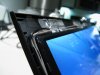
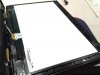
-
i don't know if this will help with the LCD replacement, but i have some info for you here
i have an 13"asus laptop with the same chimei lcd panel came with the SA/S13
the lcd on the asus stoped working and get all black, since the VGA port was dead on it, i took off the LCD of a 15" netbook to see if it was the mainbo or the lcd the faulty on the 13" asus.
since (i gues) all the LCD came now with a 40pins connector, the 15" lcd connector was the same, and warked perfectly on the 13".
so i think you can take any lcd with a 40pins on it to replace the original S13 one
the only thing will be to get it fit on the housing/bezel of the S13, you can even put a 14" if you can make it fit !!
sorry for my poor english
edit: why don't try to put the Z FHD panel ? if you have the model number of course
edit2: i have made some search and here is the SVZ FHD LCD http://cgi.ebay.fr/B131HW02-V0-LAPT...s_LCD_Panels&hash=item231f1734c1#ht_901wt_650
it is a toshiba B131HW02 -
Hey guys,
Just wondering, when I installed Vaio Hardware Diagnostics and Vaio CPU Fan Diagnostics, how come they arn't showing up in All Programs?
If I search, I can't find them as well..
Only Vaio CPU Fan Diagnostics shows up in Control Panel... -
You guys are amazing!
I have done some research today. Not much since I'm in for finals next week.
I have the 13p vaio. SVS13A2... something.
Every vaio s13 (the current revision at least) has technically a 12.5" screen. I'm guessing that the laptop lid size is 13.3".
We have a 40pin connector. I'm quite happy to hear that it work with any screen. I think that replacement screen's board & the bezel should be modified just a tiny bit for it to fit perfectly. I think the problem lies on the south edge of the screen. Since all the circuitry is there, that part should be modified (filled down circuit board & bezel)
prone: do you by any chance have more pictures? -
I have them installed as well; and they do show up under installed software, but I can't find them in the start menu.
It's normal, those are used by Vaio Control Center. -
same here with cpu fan diagnostic
what do you mean with :
" I think the problem lies on the south edge of the screen. Since all the circuitry is there, that part should be modified (filled down circuit board & bezel)"
are you talking about reshapping the bezel, or moving the circuit board ?
if it is about the circuit board, i don't think you can move it, since it is soldered to the lcd panel
the bezel then is realy large and i think there are enought place to do something nice there.
where did you see that it was actualy a 12.5" unstead of a 13.3" ? -
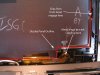
If you take a ruler and measure the bezel opening, it is exactly 13.25" (13.3 rounded up). I agree that the LG panel circuitry will be in the way. There are some metal brackets that are part of the hinge assembly which cannot just be filed-down. Attached are some more pictures of the bottom part of the bezel frame where the lcd panel sits.
Looking at the pictures of the LG panel, I wonder if that metal frame that surrounds the panel can be taken off entirely? Maybe we can gain back those extra 4 mm for clearance. Unless the actual glass itself is 4 mm larger...that would suck. I guess that's why wwiktor had to resort to cutting the carbon fiber frame backing.
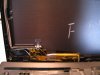
-
If I could find the website again that said it's a 12.5" display then I would gladly share it. The only thing I'm finding now is contradictory information. On some site the original screen of the s13 as noted by prone is said to be 13,3" (ex. panelook.com) and on another site (alibiba.com) it is said to be either 12.5" or 13"3, depending on the seller. Same is true for the LG IPS display: LP133WD2-SLB1
That would be awesome. I'd say lets check out the technical sheet. But .. I don't have any p-coing for panelook.com to download it for the LG-IPS display. And my google-fu is failing me atm in finding it floating around somewhere...
BTW: I'm using this page as reference for the LG panel: http://www.panelook.com/LP133WD2-SLB1_LG Display_13.3_LCM_invitemdetail_26506.html
The picture there is good enough for so-so comparison.
"Our" original panel is: http://www.panelook.com/N133FGE-L31_Chimei Innolux_13.3_LCM_overview_15312.html -
Yes, I have those working.
Unfortunately I don't remember anymore the exact order of installation, but it was kind of logical: first the chipset drivers, then sata, wireless, video, and so on one by one...
I downloaded my drivers from 3 different sources but in the end just used the newest version of the driver available from either directory. The drivers I used were all Windows 8 but there was one file I had to get from Windows 7.
Here are 2 of my download links containing 90% of the drivers I installed:
Sony eSupport - SVS1511CFXB - Support
Sony : SVS1511C5E updates | Download updates for SVS1511C5E
Besides drivers I also installed following utilities:
Sony® Firmware Extension Parser Device Driver 8.0.2.4
Sony® Shared Library 6.0.0.07180
VAIO® Hardware Diagnostics 4.6.1.08030
VAIO® Peripherals Metadata 1.3.1.07270
VAIO® Power Management 6.0.1.07270
VAIO® Image Optimizer 3.0.00.08170
VAIO® CPU Fan Diagnostic 1.1.0.09200
VAIO® Battery Checker 5.0.1.08210
VAIO® Control Center 6.0.5.10150
VAIO Care™ Software 8.1.0.10120
VAIO® Smart Network 3.12.0.08100
VAIO® Update Software 6.1.1.10250
What model do you have? Maybe it's a model specific glitch? -
I recommend not getting your info off of alibaba.com. It's just a trading site for wholesalers. I don't think people on that site even know what they're selling half the time. They probably get their numbers all confused. I trust panelook.com more than anything else, but their "p-coin" thing, like you said, is silly. I also can't find the LG datasheet. The only one I could find is the CPT CLAA133UA01 datasheet (the "other" panel that might fit). Its dimensions are much closer to the stock S13 panel, but it's a TN display which probably has the same quality, so it's not worth investigating.
-
Maybe get a bounty going, I wouldn't mind contributing a wee bit for someone to document the process of upgrading the screen so others can too
-
I tried searching the thread, but nothing came up.
I remember reading about a hidden USB port inside our laptops? I don't know where that post is but I want to put my Logitech USB Adapter in there...
Any ideas for me?
Thanks in advance!
Official 2012 Sony S Series Owners Thread
Discussion in 'VAIO / Sony Owners' Lounge Forum' started by Petrov, Jun 9, 2012.


