 Problems? See this thread at archive.org.
how long does it usually take before a CTO s15 ships out?
My order just went into the "your VAIO is being built" phase.
Is the "Estimated Shipping date" fairly accurate?
-
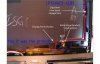
I didn't begin to risk with removal of a metal frame (there were difficulties with delivery of a panel and once again there was no wish to wait for it) therefore made undercutting
-
Is there a way to recover Microsoft Office once you switch the stock hard drive out?
-
It seems that their search options are wrong - when limited to show only the 1600x900 panels, it only finds like 6-7 panels.
I still wonder what is the difference between LP133WD2-SLB1 and LP133WD2-SLB2 - the specs show no difference, so perhaps they have different framing (the B2 photo is not available)..
What about the Samsung PLS screen for the Series 9 X3B and X3C models? It has a very small bezel size so I suppose the framing might be more suitable (i.e. similar to the original one)? Yes, it's not a Pro IPS panel, but e.g. for my purposes, it would be more than enough. I didn't find the model number or some available on eBay (only for the early X3A model which was a glossy 1366*768 TN). -
@wwiktor: what did you do to the frame to get the LCD fit the blue line ? if you didn't cut the metal, you say "I didn't begin to risk with removal of a metal frame" so is there enought place ? or did you move this part of the lcd panel ? thank you
-
If he didn't cut the metal on the panel, but just the attachment points, maybe he removed some parts of the plastic bezel which were in the way?
-
Darkimmortal: I agree. The screen costs around 80 to 100 $ according to alibaba and various sites that look like they where made for the us-market.
I would mind donating 20 or even 30 dollars. Would be a fun little experiment. I'm not game right now, I need my laptop for my graduation thesis, so if I screw up somewhere then I'm metaphorically dead in the water.
ijozic maybe you can check it out? Seen if you find any documentation about the screens. Start with finding the product id, serial numbers, screen type, manufacturer etc. Then find technical docs, measurements, pictures of the panel, etc ..The samsung screen is an excellent one. The deal breaker that I foresee is that the pinout will be 30pins instead of 40 that we need.
amino2 I think he filled down the circuit board to fit. Not sure, but from his previous posts that is the most logical explanation.
prone I took a look at that screen as well; but I'm not willing to go all out for a marginally better screen. All or nothing. In this case; either the pls-samsung screen (ijozic suggested) or ips-lg screen (But that's me being stubborn)
-
I have a SVS1511V9EB Swedish version.
I´ll try to install with the ones youve recomended and see how it goes. I´ll do a clean install first. (will be like my 8-10th reinstall of windows 8 by now....)
The last 10% of the drivers do you know where you got them ath all? And what file was it that you got from win7?
Thanks alot for the kind help. And lets hope it goes well. I´ll get back with the results. -
Finally I can reply to this thread. For whatever reason, when clicking the "+ Reply to Thread" button it transfer my reply to the "AMD ultimate thread of something".... The database of the forum seems to be corrupted.
Anyways, I've read a lot of pages, used the search function in this thread, but never found my question.
I just bought the S13A that ship with Windows 8. Since the BIOS is different than the previous model that shipped with Windows 7, I assume there might be some hardware changes.
My question is simple: Does the Win7 and Win8 models uses the same memory part numbers? I'd like to upgrade my RAM to 12GB via either Crucial or Kingston options, but I cannot find the SVS13A290S / SVS13A290X on their site, only the SVS13A190X / SVS13A190S. If both S13A revision uses the same memory module, I'll order the M1G64J90 from Kingston.
Thanks in advance,
Phil -
yes it is the same memory module, no hardware was modified between w7 and w8 S13, it is only the bios, you can go for the same memory module ( 1333Mhz with CAS9 )
-
Thanks amino2.
-
It just refuses to work......
First i donwloaded and installed every driver up to step 15 in this list: http://forum.notebookreview.com/son...y-s-series-owners-thread-511.html#post8955315
Then i followed your list and did it in the order you wrote and installed exactly the version numbers you posted. But it still wont work like it should... The Smart network dont work.
And controll center dont work fully. This is how it looks:![[IMG]](images/storyImages/bild1yv.jpg)
![[IMG]](images/storyImages/bild2to.jpg)
![[IMG]](images/storyImages/bild3pj.jpg)
![[IMG]](images/storyImages/bild4m.jpg)
![[IMG]](images/storyImages/bild5fv.jpg)
-
That's odd.. No battery saving, no power plan options, no keyboard backlight control, and no Hardware and Sound Quality categories at all!
I have no idea why.. I should have made my own list while installing but then again I was experimenting and improvising, not sure if I will come out clean in the end.
I started with the list you linked too but I remember I had to switch the order of drivers, e.g. some of them didn't really click until after I installed others, e.g. I think I had to install Intel® Management Engine Interface later. Maybe try to reinstall it as well as Sony Firmware Extension Parser Device Driver and Sony Shared Library.
Does Vaio Care and Update work for you? What is your model though? Maybe you have different BIOS (mine is R0142C5) and therefore need different drivers? -
i have the same bios as you. (but i use the bios mod to clock graphics) Vaio update wont work now. It worked last time i installed. Not sure why it wont work now tho.
I tried to reinstall what you said but dident change anything.
Just dont get why this is happening. Especially since i had all the right tools when i ran windows 7
Also in the controll center the strange thing is that some times the keyboard option dont show up ath all. So something is really wrong. Im not getting any errors when i install anyhing.
And im useing a clean genuine install of windows 8 profesional.
And also my chargeing of the battery is stuck on 80%. Im guessing cos i left it on 80% when i was running windows 7. -
I asked this question to a supplier here in the US that is selling both the B1 and B2 (eastcoastlcds.com) and they said there is no difference. I went ahead and found pictures of the B2 and it looks like it has a different bezel:
B1: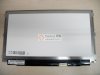
B2: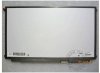
B2 (closeup):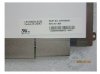
I don't think the supplier knows what he's talking about. The picture on their website is also for a different panel. Can you guys recommend a reputable dealer that ships to the US?
Quickly checking around, I can't find any Samsung 13.3" displays at 1600x900. They only have 14" displays at that resolution.
I agree. All or nothing. I'm gonna continue searching for that Samsung screen... -
I tried searching the thread, but nothing came up.
I remember reading about a hidden USB port inside our laptops? I don't know where that post is but I want to put my Logitech USB Adapter in there...
Any ideas for me?
Thanks in advance! -
Yes, I removed some parts of the plastic bezel and electric board
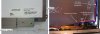
On an electrical board sections without signal lines (only ground copper) are deleted -
Good find. The frame seems much narrower so maybe less bezel cutting is needed.
I searched for it, but couldn't find it on eBay or anywhere. It was used on the NP-900-X3B, X3C and X3D series. I have one at home, in fact, but have no service manual to disassemble it. I found photos of a disassembled one on some webpage, but they didn't take apart the bezel.. -
Thanks for the help and useful photos. What did you use for this? Some kind of drill?
-
so the part of the electronic board you removed is just for ground, no really impact on the LCD display, good to know that
removing the metal around the lcd panel will probably provide more space but i think it will be hard to remove it without broken the lcd
for me there is no big difference between the B1 and B2 ( at least i can't see it), i see :
-on one black plastic and he other is a sort of aluminium tape to cover the electronic board
- the metal around the lcd is thiner for the B2
is there an other difference ? -
Or even the firmware/bios version in which this problem isn't present would help in my search...pleaaaaase!
-
I think this might be a considerable difference if it turns out that it can fit the S13 bezel without cutting its insides as the original mod author had to do with the SB1.
-
Regarding the Samsung display panel, thanks to a tip from the Samsung forum for the service manual (a $28 purchase), I managed to find the display on sale there, too (price is not encouraging):
BA96-06015A - ASSY LCD
Now, there are no photos, but searching the Internet revealed this link:
Samsung - Samsung spare parts | SamsungOnderdelen.com
Again, no photos of the BA96-06015A item (ASSY LCD;AMOR2-13 CRV,133HD+AMO2,13.3Inc), but there are some of the BA96-06016A (ASSY LCD;AMOR2-13,13.3HD(1366x768),13.3I). The interesting thing is that the latter seem to come with the entire bezel (ASSY stands for ASSEMBLY, obviously), so I don't know how easy would it be to dismantle one. I have one at home, but would rather not try to tinker about it without a service manual. And I'm not paying $28 just to see if it contains the descriptions on bezel disassembly or if you're supposed to buy the whole new part.
The photos are too small to be of any other use (e.g. to see the connector type). Also, though it's stated that it's the 1366*768, I guess that's wrong as its reference name has the "HD+" in it, while the other two items have only HD in their reference names.
Can't seem to find a panel part number reference anywhere so who knows if they're available by itself at all. I guess SB2 is a cheaper option to try currently. Who's getting one first?
-
I see that such a screen is $.150.
Is that expensive? Are you up for some experimenting?
I'm sure we have more people around here who are willing to donate just for the sake of testing things out
-
I'm coming into this discussion as an SB owner but take a look at my mod here:
http://forum.notebookreview.com/sony/698474-vpcsa-sb-convenient-egpu-mod.html
full pics at: https://www.facebook.com/SpecializationIsOverrated
I managed to add usb ports to the computer by taking advantage of the unused WWAN port in my machine. Normally this would be populated with a gobi/3g card but I didn't srping for that option on my machine. Even though the port is a minipcie it only carries a USB signal (unpowered,) Not completely sure about the 2012 S but i'm assuming you guys have a WWAN port as well. I haven't spent too much time on this particular board but I'm sure someone here has taken theirs apart and can confirm.
This card: Amazon.com: Elecity Mini PCI-Express USB & SATA Coverter Adapter Card: Computers & Accessories will break out the usb signal to flying leads. I'm taking the 5V from the DVD drive to power the usb. -
Hey guys, been trying to read as much as I can because I'm thinking of purchasing a 15 inch S Series. I know that:
It has an orangegate issue. I dont think it will be a huge problem for me. I have a built desktop for editing.
The speakers suck.
I've heard mixed reviews about the fan.
This is my main concern. Is the fan extremely loud? I don't want a loud laptop. I owned a VAIO before, and it was so loud. I want to give Sony another chance because of the pricing right now and the stuff you can get for $800. Can you guys direct me? I want to pull the trigger sooner than later because school is starting up. Thanks. -
orangegate bothered me maybe for like an hour... once i compare my last laptop screen to the new one all was forgotten.
the fan is typical sony.. i personally don't care that it constantly runs, but if u've had previous sonys and was bothered by it, then i can't recommend the s15. -
Well, I just bit the bullet and ordered an LP133WD2SLB2 from an Ebay seller. Those numbers are so ingrained in my head from all this searching that I'm gonna have nightmares about them. Just keep your fingers crossed and I'll get back to you guys when (or if) I actually get my hands on this screen.
-
I am just wondering,
After I did a system restore, I think my fan keeps spinning. Before, I remember it being really quiet in "Priority to Silence" but now, I still hear it spinning in a quiet room...
With 108 processes, my CPU is at around 2% and my GPU Temp. is around 43C...it's always around 43-47C....and I hear the fan spinning...
My CPU is around 1600MHz as I turned it down.
My ambient temp is 22C....
I don't ever remember my fan spinning...it is quiet but still hearable at 30cm...in a quiet room. -
Cool! As the Samsung thing seems to be a bust, the SB2 (not OB1) is our only hope. Fingers crossed!
-
You are so awesome!
When is your expected delivery date? -
I love this notebook. I've been using it for a week and it works great. Did a reinstall and the drivers SUCK (especially the Sony software) but i managed it.
Only thing i noticed is that i have to really press the ENTER key in order to get it work. Any others having that issue?
Oh and these things are small but can bother me;
http://www.uploader.gamergun.com/files/1/2013-01-16 18.06.53.jpg
Gaps between the screen and surrounding.
http://www.uploader.gamergun.com/files/1/2013-01-16 18.07.12.jpg
Far right numpad keys 'hanging' a bit to the right.
http://www.uploader.gamergun.com/files/1/2013-01-16 18.07.58.jpg
Gap at the bottom is slightly larger than higher up.
http://www.uploader.gamergun.com/files/1/2013-01-16 18.08.54.jpg
Gap at the right is larger than at the top/bottom/left. -
There were alot of small things that bothered me when I first bought my laptop as well.
ENTER key is fine for me, no need to press really hard.
My Trackpad also has a larger gap on the right hand side than the top/left/bottom.
BTW. Can anyone help me with my fan problem? I am only running Chrome for about 2-3 hours and my Intel 4000 GPU temp has raised to around 50C, now back down to 45C, which is still really high.
And my right side of the palm rest is getting warmer...even if I have a SSD... -
I had a fall 2010 F series with i7 (1st or 2nd gen), 4gb ram, 1gb graphics card, 16.3 screen, and I killed it. Two major gripes with the machine was the rediculous battery life (maybe 2 hours with the extended battery, sheet wasn't available for that unit) and it got rediculously hot. It was very uncomfortable on my wrists. Oh, the fan was so loud it would drown out the tv from across the room.
I'm looking at replacing it with the S series, svs1512DCXB is probably the way I'll go. They claim 3hr 45 min with standard battery. What have your real world experiences been? With the sheet battery, I'm hoping for 7+hrs. I know the i7 sucks more juice, but the 3rd gen is supposed to be more efficient right? From what I've read the 12gb ram can drain the bat as well, but only when it is demanded, right?
It appears the heat situation has been rectified. From what I've read, people complain about fan noise. I'm ok with louder than the average bear, but not F series loud.
I suppose knowing what you know now, the best recommendation is, would you buy the unit again? If not what?
I'm being offered the unit with the sheet battery for $1251 +tax. I'm sure that I can do better. Does anyone have a coupon, code, or other that will bring the price down. It would be nice to have it in white, but I'm not willing to pay more for it. Also, I'm not opposed to custom ordering, but I've had a bad customer service experience in the past. -
Dude, I just got the vaio s 15.5 with core i7 3632 quad core, 4 gb ram, 500gb hdd, with the 640m LE graphics card and a keyboard cover and hard shell case for 921 express shipped.
-
FIIINNAAALLLYYYYY..
Finally everything works as it should.
The shortcut buttons work.
And i have all the settings in controllcenter. Im not sure what i did diffidently (that really made it work) this time i re installed and installed drivers. What i do know how ever is that i fixed the exclamation mark alot of people are haveing in the device manager. (all i have is a small one on the usb controller that i dont know how to get rid of. The usb works how ever.)
It is the parser driver thats not updating corectly. First i installed the parser driver ofc. After that i right clicked on the device and then updated the drivers and chosed to point to a specific location.
Then i chose the location C:\Users\*Your user*\AppData\Local\Temp and in that map there are alot of maps with strange names. Just open a browser window and sort that map after last map updated. And then chose that map in the device manager search. And presto the driver gets correctly installed.
Also i downloaded the authentec drivers from their homepage.
And i ended up useing about 6 different vaio models to look for drivers. (which is kinda silly tbh...)
Now everything works just like it should. Even all the shortcut buttons.
The only thing im not 100% satisfied with is the mouse pad. It is not as responsive as it was in windows 7.
And if i use the latest version that is version 16.3 i notice when i do really small moves the pointer sometimes bounces back to the place i started moving from (its the same in the older one but its much worse in the latest one). So i reverted to the older one but im still not really satisfied. It just feels abit unresponsive compared to win7.
If any one know a fix for the bouncing i would love to hear it.
Cos it is REALLY annoying when you wanna move the marker when trying to edit text or to press small things with the pointer.
Also smart network dont work. It is installed and i can see it in programs. But no shortcut and nothing happens when i start it.
Thank you for all your help. Im sure that if i dident get your help i wouldn't have goten this working. So thanks a lot for the time and effort you put down to help me! Big reps to you!
Also im happy to say that the ASUS sound fix still works in windows 8 which is awesome
-
5400 or 7200 HDD? Standard battery? How is your battery life?
As for price, blu-ray reader? -
5400 or 7200 HDD? Standard battery? How is your battery life?
As for price, blu-ray reader? -
You just made my day
It is the parser driver thats not updating corectly. First i installed the parser driver ofc. After that i right clicked on the device and then updated the drivers and chosed to point to a specific location.
Then i chose the location C:\Users\*Your user*\AppData\Local\Temp and in that map there are alot of maps with strange names. Just open a browser window and sort that map after last map updated. And then chose that map in the device manager search. And presto the driver gets correctly installed.
And all works 100000000000%
After 2 months of reinstalling I can sleep easy tonight
Thanks again -
Any idea why the right side of the palm rest is so warm? I have a SSD not HDD, so there are no spinning parts, hence why is shouldn't be so warm to the touch...
How can I reduce the GPU Temp? I think that may be the problem to blame. I get around mid-40Cs on idle. -
Well this sucks..
Bought the VGP-PRS25 expecting it to work with the S15. The dock connector is actually reversed w/ the new revision. Shorts out the computer if you try to put it on there (battery pull fixes things). But really wanted a docking station without dropping $200 on the PRS35... but i guess i'm only out $40.
VGP-PRS25 DOES NOT WORK WITH THE S15 -
Its 7200rpm. Standard battery. I havent gotten it yet. No bluray. But for the price, I havent seen anything like it. I'm planning on getting the sheet battery
-
By Jan 22. Looks like it's already been shipped via USPS. Never ordered anything from Ebay, so I am already quite impressed. Looks like I'll finally be investing in a Dremel tool in anticipation of all the cutting I'll be doing!
wwiktor is laughing right now. -
I have also ordered this one for S1512. So you're saying it is not compatible? So it's not working?
OK... now I see... they have on their site written that it is compatible with VAIO S15, but if you click on it... it opens you the old S15. So, I guess I'll return it back. Anyone has experience with returning items back to Sony store? What is the procedure? -
Np i think a lot have the same issue.
But this fixes it.
I must say tho that i have never in my years had a computer with such SUCKY driver support.
It not enough that you have to install about 20-25 of them (on most other brands its like 5-10 for everything). But you have to go to different models and pages to find them all.
And there is almost no instructions on what order to install drivers or what you need to do to fix issues like this. And that really sucks.
This should be added to first post tbh:
To fix the exclamation mark in device manager on Windows 8 do this:
1. Install Sony® Firmware Extension Parser Device Driver first.
2. Go to device manager right click on the exclamation mark and press update driver. Then choose the install driver that is already on the computer. Now a box opens to point to the driver.
3. Now open your browser and go to C:\Users\*Your user*\AppData\Local\Temp and sort the maps after latest map changed. Then find the map that had the latest changes (mine was named GLF830 or something like that. It will be something similar for you)
4 Now point the device manager search to the map you found that was changed last. And press OK.
Now your parser driver will be installed like it should be, the exclamation mark disappears and a lot of problems whit control center and other stuff disappears. -
Hi ,
i just bought an SVS 1312 vaio laptop with Windows 8 , haven't put anything in yet so i can't say really evaluate but the screen is not by far nice to read .
I wanna swap the HDD with an SSD (and then install windows 7 instead of 8) and after reading about 100 pages i am still not sure if it's possible (should i use drivers of older model ? ). I am between OCZ 4 vertex (215 E) and Samsung 840 pro (260E) . Especially for the OCZ i've read there is an issue with the Vaio S series . Any advice is appreciated .
PS: sorry for my bad english
Milton -
yea, it doesn't worked... i assumed it did b/c someone posted chat dialogue with a sales rep from sony saying it works, and also the S15 chassis is extremely similar to the SE as well. So i thought the chances of it working was pretty high... but o well.
-
Hello!
Is it possible to revert BIOS back to older version?
Ps: i have win8 model.
Thanks!!!! -
hi
does anybody have SVS13A290X laptop?
my problem:
laptop was shipped with win8 GPT partition
i need NTFS... so i decided to make fresh install of win8. i've deleted recovery partition and didn't make a recovery media =(
after few days reinstalling i finally made all devices work properly in device manager.
everything is ok except one thing - when i switch stamina/power - speed indicator in tray switches to hybrid graphic but my nvidia doesn't start working! monitor is still connected to intel GPU.
ideas? or maybe someone can share me image of recovery partition for this laptop? (i can pay for this) -
What about power connector and adapter. Is power adapter the same as it is for a laptop? Have you tried this? Because when it is, it is still cheaper if you need an extra power adapter
Official 2012 Sony S Series Owners Thread
Discussion in 'VAIO / Sony Owners' Lounge Forum' started by Petrov, Jun 9, 2012.


![[IMG]](http://imageshack.us/photo/my-images/819/bild1yv.jpg/)
![[IMG]](http://imageshack.us/photo/my-images/72/bild2to.jpg/)
![[IMG]](http://imageshack.us/photo/my-images/96/bild3pj.jpg/)
![[IMG]](http://imageshack.us/photo/my-images/687/bild4m.jpg/)
![[IMG]](http://imageshack.us/photo/my-images/33/bild5fv.jpg/)


