 Problems? See this thread at archive.org.
Two 1 TB
One 320GB
have broken out of light use.
Have had problems only with Hitachi drives.
-
Ok I figured as much, and technically they are electrically compatible, but the slot has to be connected to the sata controller
-
I believe that someone has already tried to put a USB port there, but unsuccesfully. I found only his 1st post.
-
Does anyone have an issue with the screen brightness fluctuating while on battery even when Automatic Brightness is disabled in the Sony Control Center? It's very distracting.
-
Urgent!!
I spilled water onto my keyboard and now some of my buttons/keys won't work now.
Everything else works, just the keyboard.
I did everything that was supposed to do like take out battery, let it air dry etc. Was wondering if my keyboard would work properly again...
Also, how would I change the keyboard by myself? Is this covered undered warrenty?
Thanks so much, my laptop is my lifeline as I am a student. -
Yo! Did you let it dry +24 hours? Did you turn the laptop as soon as possible upside down with battery facing upwards using the help of gravity to prevent water from accessing inside? And in this position removing battery and using vacuum cleaner to suck all the remaining water out? -survived 2 spillages with these tips
Probably too late for this but now you know how to prevent any damage in future. I'm 99% positive Sony warranty will not cover it and you will end up paying even for transport/inspecting ~30€ for sending it to them.
It is easy to replace but the problem lies - where to find new one?
Here is picture of the keyboard from the other side: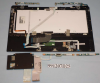
Also had problem with some functions not listening to Control Center. Everything works 100% after this guide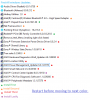
-
Disable the thing under power>battery in the Intel GPU panel, it's evil.
Sent from my GT-I9000 using Tapatalk 2 -
Absolutely, I just heard the same thing from somone else, I'll get on that right away. Many thanks!
-
If it worked and if there was enough room that would be perfect.
I found something similar on ebay.
EDIT: I remember that slot being available for the 3G adapter, but that it didn't work with other devices. Let's see tomorrow if I can find it. It would be great if I could just put that stupid mini-receiver inside instead of bumping it and throwing the cap off. -
Close to making a purchase decision. Can anyone confirm is the Vaio S13 premium runs on SATA II or SATA III?
Thanks -
Cool! If anyone will try something with this and tell if it works it would be great. Where can I find this PCI-E connector?
-
Just purchased a SVS1512DXCB. Fresh install of Windows 7 - really didn't like 8. Now FN keys don't work and drivers from Sony support page give me the following error: "Not intended for this model". Anyone get this figured out yet - I've searched the forum but no luck.
Thanks! -
Yes, use an extraction tool such as X-UniExtract to unpack the vaio software installation .exe file.
Then open the TEMPEXEFOLDER within the extracted archive and you'll see 3 more folders: BC, VCC, VPM. Within those folders are the individual installation packages, without the annoying model check.
VCC (vaio control center) is the one that is going to get your FN keys working again.
Now I have a question of my own:
Is there a way to manually create the recovery media from the recovery partition? Vaio Care does not show me the option to create recovery media.
I purchased my SVS1512CXB second hand and it didn't come with recovery media, I guess the previous owner either made it or turned off the prompts to do so. I'm not sure why it's giving me such problems though since the recovery partition is still there...I can even mount it and browse the Source files. -
for those with the version with W7 originally, and upgraded to windows 8, is there a difference in battery life??
-
I don't have an S, but my SVZ appears to have better battery life with 8.
-
Dear forum,
Having stalked this thread for about 6 months, and having recently put an order in for an S15, I am finally required to post. I am awaiting delivery of this system:
Product ID : SVS1512C5E
Description : Laptop SV-S1512C - Configurable
Memory : 4 GB 1333 MHz DDR3L-SDRAM
Storage : 320 GB Serial ATA (5400 rpm)
Optical Drive : DVD disc drive
Processor : Intel®Core(TM)i7-3632QM,2.2GHz
Display : 39.5cm LED, 1920x1080+webcam
Finishes : Black
Operating system : Windows 8
Graphics : NVIDIA® GeForce® GT 640M LE
Having taken the advice of previous posters, I have an extra 8GB RAM to put in as well as a 512GB SSD as soon as I receive the machine; I will then install a copy of W7.
Now my query is this: I go to this page ( Support for VAIO | Manuals & VAIO Drivers) to look for the drivers I will need to install once W7 install is complete, yet my model number does not exist? I rang Sony but the chap said I was 'too technical' for him (I only mentioned that I wanted to know where I could find the relevant drivers).
Does anyone on the forum know an exisitng, corresponding model number that matches my system? Any help greatly appreciated.
Paul. -
Since your model is a W8 model, you won't find direct drivers for windows 7, but since I'm assuming nothing has changed between the W8 model and W7 model other than a sticker, you can likely use any of the drivers for W7 SVS's.
Sony : SVS1511X9RB updates | Download updates for SVS1511X9RB
towards the bottom there's a drop down box for preinstalled W7 drivers.
Any reason you're going from your preinstalled W8 setup to W7? Easiest method for you would be to make the Sony restore media and then restore to your new SSD. -
I, too, was skeptical about goin to Win8. I initially figured I would reinstall Win7 like you, but I highly recommend giving it a shot. Better battery life and everything. Just replace the HDD with the SDD and install Win8 with any disc you can find and it will be pre-activated.
As for model number, you can download anything for a SVS1512. If you're in a pinch and can't find a driver, you might try the SVS1511 (old Win7 model). -
Does anyone else have frequent wifi disconnects with Win8? I'm using the latest drivers.
-
Not disconnects no but the performance is a bit crap sometimes
-
Windows 8 is supposed to be considerably less resource intensive. I ordered my Vaio S 13P. I have a 20 day wait

About my SATA question... Vaios are throttled at SATA II.
I think you all should continue adopting windows 8. Its not bad once you get the hang of it. It is inevitable. -
Hey all...
I have a question for people who bought by themself (not at Sony) 8GB of RAM. I am thinking of buying it but I am not sure which one should be ok, because of the latency of RAM.
Can anyone suggest me something? What have you bought? And is working ok?
4GB of DDR3 RAM that are now inside is Nanya DDR3 1600 - this one was default one as I bought it and it looks like it's timing is 9-9-9-24.
Will it be ok to put in 8GB DDR3 1600 Corsair Vengeance 8GB that has timings: 10-10-10-27 or should I buy exactly the same timing that is already inside?
Thx. -
Hey everyone,
Ok so getting water spilled was like the worst thing in my life.
I called Sony and they are allowing me to ship in my Vaio and have a diagnostic. Since I have cleaned installed Windows 7 onto a SSD and its not OEM anymore, can I just ship my Vail with no hard drive? And should I pull out my extra Ram as well?
Also, was there anything that can make my Vaio void the warranty? Was there any stickers or anything
PS: how would the technitian know my keyboard damage was caused by water? I really need my laptop fixed. -
I seemed to have this problem with the latest drivers from Intel. Last night I reinstalled the drivers from Sony and we'll see if things change.
-
Is this the same person who did the LCD MOD in this forum?
Very nice indeed!Last edited by a moderator: May 12, 2015 -
Read the first post in the thread for general questions. And more specifically, this post.
-
Question for anybody with the sheet battery. Does it come with another power brick (charger)? I realize it comes with an adapter so you can charge the sheet battery on its own. But I'm wondering if it also comes with an additional charging power brick, like the one that came with the laptop. I read a review on Amazon that seemed to imply that it does.
I would love to have an extra charger and this would seal the deal on the sheet battery for me if it comes with one. -
I have that ram exactly, works perfectly fast under multiple vm use
Sent from my GT-I9000 using Tapatalk 2 -
It doesn't , but it comes with a converter to let you plug the one power brick into it directly
Sent from my GT-I9000 using Tapatalk 2 -
The "In the Box" portion of the Sheet Battery listing on sony's site only mentions an adapter, not an additional power brick. The power brick itself is another ~$90 or so.
I ordered my sheet battery (refurb) off ebay and it only came with the adapter for my existing power brick. It did come in a sealed Sony factory-refurbished box, and my Vaio reported it as "excellent" condition in VCC. -
Thanks for the responses guys.
-
So I've begun using my S13 as my primary home and school computer and thus far I've been pretty impressed with the system. It's plenty snappy and lightweight enough to not be a huge burden to carry around like my T400 was. Battery life isn't as great but that's expected considering I had an extended 6-cell on the T400. But it's still sufficient enough for every day use.
I'm really liking the keyboard on the laptop as well. It's very easy to type quickly on and is rather comfortable. One of the main reasons why I chose the Vaio S over the Vaio T was the reported horrible keyboard on the Vaio T. Thus far the only downside I have found are the screen whose vertical viewing angles leave a bit to be desired along with the relatively low resolution. But it's acceptable enough especially since I plan on using an external monitor at home. The full power i5 CPU and 6 gigs of RAM are nice along with the speedy 7,200RPM 750Gb HDD. I'm happy I chose the S over an ultrabook. -
Any plans for a 2013 VAIO S thread?
Also, do you guys think it's worth the wait for the Haswell series of chips, or will they even make their way in to the S series?
Thank you, -
Sony's Vaio S series will probably get Haswell and be slimmed down somewhat. It's just a question of whether or not you want to wait till summer or if you need a laptop now.
-
Just picked up a Series S 15 for my gf. Question for those of you with the Win 8 version:
1. Any throttling while gaming and is the GPU overclockable?
2. Any display issues?
3. Build quality issues?
4. How is the battery sheet? Does it add too much bulk + weight?
Also, the estimated shipping time on Sony's site is 20 days, is that how long it normally takes?? I didn't add anything aside from extended warranty to the configuration + the battery sheet. -
Alright I'm still having this problem even with the Sony drivers. Do you have WiFi on Maximum Power Saving in power options? I'm wondering if that's it?
-
Dunno, but the instructions are somewhere between pages 560 to 570. They are spread out over multiple posts.
Sent from my SCH-I535 using Tapatalk 2Last edited by a moderator: May 12, 2015 -
(first, my apologies if this has been answered somwhere, but I could not find absolutely any mention of it with forum/google search of the forum)
Are the speakers on SVS15 (IB variant) normally THIS silent? (and not of any good quality really). I upgraded my F1 (Nehalem series) with SVS15 - the speakers are waaay better on the F1. Both much louder and with a better sound quality.
Am I missing something for the loudness? The windows and WMP volumes are on max. Dolby is set for music, but the same song is considerably more silent on the SVS15. (I don't see any software/hardware switch for xLoud?) -
I confirm that the Orangate problem still exists, this is a SVS15290S I got on Feb. 5th, I compared to all of screens I have, Retina Mac Book Pro, ThinkPad, iPad, iPhone, and Dell U2312, all of others show red as red, but S15 shows as orange, attached is a side-by-side with Dell U2313. When I called tech support, they said enigeers are still working on to find a solution, that's rediculous, it's been there for one year, and all other LCD screens (some IPS too) do not have this issue. Together with other issues I found from this thread, no Bios MOD, CPU usage when replacing ODD with Caddy, I decided to return it.

-
I wouldn't call those other things u listed as "issues". They're modifications that void warranties.
-
Was your model CTO or pre-built? Because my CTO model shows reds perfectly.
-
I don't return it because of no MOD, I return it because of Orangate screen, however, the fact of no MOD help me make the decision to return, otherwise I may live with the orangate screen.
-
Yes it's CTO, did you compare with other screens? When I called tech support they confirmed that Orangate issue is still there and their engineers are still working on...
-
Compared to my HP IPS desktop display and my Galaxy Nexus smartphone. Reds look perfect to me. I'm no photo editor, but there is a clear distinction between red and orange. Netflix is red, Ferrari logo is deep red. I'll try to take some pics this weekend and post em up. Sorry to hear you got a bad one.
-
I'm surprised this thread is still up here.
I bought my S15 back in June/July for use in school.
Last month, it developed this unbearable sound out of the fans. Even with priority to silence on stamina. Not to mention two little brightspots on my LCD that's been here since it arrived from Shenzhen, China. I'm starting to regret my purchase
Here is a link demonstrating how loud and unbearable it is.
Sony Vaio S15 Loud Fan - YouTube -
Then you are lucky enough
-
That should be easily fixed using a colorimeter. -
Yeah I had Wifi on maximum power savings, i didn't know about that option until now.
-
I also have ordered and bought VAIO SVS151290X and when I look at your photo here, I see red and orange. It is normal on my VAIO screen - red is red and orange is orange. What is you configuration of the VAIO?
-
Bought this laptop case for my S13p:

Altho it was designed for macbook pro 13'' it still fits perfectly ^^
And i specially wanted something that would protect the screen as i've read some people report Vaio logo burning throught the screen due to pressure from carrying.
Amazon.com: Case Logic QNS-113 13.3-Inch EVA Molded Laptop / Macbook Air / Pro Retina Display Sleeve (Black): Computers & Accessories
Official 2012 Sony S Series Owners Thread
Discussion in 'VAIO / Sony Owners' Lounge Forum' started by Petrov, Jun 9, 2012.


