 Problems? See this thread at archive.org.
I highly recommend the SSD option on your vaio. I can't stress enough how critical SSDs are in modern personal computing.
If you upgrade the internal disk after market you run the risk of screwing with the warranty status.
The warranty company that Sony uses is very good. I had a 17" Vaio F with a 3 year warranty. I spilled beer after 2+ years and they offered me a new comparable machine or a check.
If you go with ADH I recommend that you go all out on the specs, if possible.
-
I have the exact system you are looking at except I added an additional 4gb stick on my own (total of 8gb), and replaced the HDD with an SDD (HIGHLY recommended). SSD is giving me more battery life than you will see with HDD (estimated at 45min more).
All that said, I get well over 4 hours while taking notes in class. Sometimes pushing 5hours, but that is with my brightness settings at half brightness or lower. At the lowest brightness setting, this thing could easily break 5hrs, but that's unrealistic to use that lower brightness all the time. At full brightness, I think it would last about 3-3.5 hrs with normal computing (word processing/internet browsing).
I can't speak to the warranty stuff as I didn't get it. I can say that you can replace the HDD and add additional RAM without risking your warranty. Both are very easily accessible directly under the battery door. No warranty stickers or tabs are broken in opening that panel either. So if something ever happened, you could easily replace the original parts and ship it back to Sony.
TL;DR Buy an aftermarket SSD. Cannot stress how worth it, it is for speed and battery life (also gets rid of heat and noise you get with traditional HDD). Cost me $225 for the best 256gb SSD on the market (Samsung 840 Pro).
Good luck! -
Thanks again for the information. I would love to do an SSD install on my next PC, but all the guides posted on forums make it seem like such a complicated endeavor. I've seen on Newegg that some of the Samsung drives come with kits and software to help clone hard drives, but it looks like cloning is frowned upon? I just wouldn't want to screw up a new computer with my fumbling.
-
There are no problems with installing the SSD drive. You just change the HDD with SSD. You have two options... you can do a clean install of Win 8 (check the forum for walktrhough) or you can do as I have done. I created a Recovery media of my Sony HDD to a USB Flash drive that has to be above 22GB or you can do it with 6 DVDs and then after you change the HDD with SSD, you just run recovery out of the created rescue USB flash drive or DVDs. It actually makes you the same sistem as it is when you first power up the laptop after unboxing it.
My recommendation is also that after you install all software that you must have for your work (Office, all sorts of movie, music players, photoshop if you use it etc. ) you can easily create an image of your complete disc in Windows 8. So next time you want to create complete new system, you can create it with all software already installed and that saves you a lot of time.
So... this is "shortly" said
-
When does the S usually get refreshed? (I'm a Z owner.) I was thinking about buying the 13" S to replace my 2010 Z (and putting in an SSD), but I don't want to buy it right now if a new one is going to come out soon.
Also, anyone know how the S compares to the 2010 Z? I want to get the quad core version of the S, but it seems like it's slower than the dual core in my current Z. -
There is no quad S13. There's an i7, but it's a dual core. Last S refresh was June/July of last year but I don't know how often the refresh.
-
Probably whenever there's a new generation of Intel CPU out? So, if there will be an S refresh, it should be when Haswell comes out.
-
That's obvious, but there was a refresh of some other models last week with no new procs...
-
Oh.. What was changed? Touchscreen was added or the whole laptop was redesigned?
-
I have an S1312, i7, there are four CPUs listed in device manager. So I guess it's quad core?
-
Quad thread. Dual core.
-
Just saw "new vaios are here!" and a quick scan revealed none I'd be interested in.
-
Hi guys!
I replaced the HDD in my Vaio S15 (Windows 8 version) with an SSD, added 8GB of RAM and did a clean Win8 install in UEFI mode.
After fiddling around with different drivers and the order of installation, everything's working fine right now, except the keyboard backlight.
There are options in the Vaio Control Center for AC and battery mode but they have simply no effect on the keyboard backlight.
Doesn't matter if I set it to "always on" or "always off", AC or battery, it just doesn't matter.
That's my first problem, my second is the following.
The light sensor is quie unprecise, it's quite annoying and drives me insane
because it's turning on for about 10 secs, dimms until it's off just to enable it on full brightness again.
Maybe someone knows a solution, thanks in advance. -
To nemesis (regarding screen swap):
From what has been translated on post #5947, it looks extremely interesting.
I myself have 13" Sony S Series, and would jump at the chance to update my screen.
Do you have any idea where this could be done?
OR ANYONE ELSE? -
I think they are saying they will soon put a 1920x1080 IPS display in the S13, once they get the funds to do so. The pictures show a 1600x900 IPS display. I only know this because it looks exactly like the LG LP133WD2-SLB2 I put in mine. They are offering a custom service for this mod for US$335, not bad!
-
$335 for a Z 1080p panel installed is a great deal... But wouldn't one need to also cover shipping to/from South Korea?
-
Hi could I swap my s13 non premium screen with a vaio Z 1080p ips?
thanks. -
Short answer is yes. Go back to around page 565ish for photos of the LG lcd swap. Z panel is likely easier... but pricey.
-
My unit has not shipped yet but I'll take my chances with my S13P and its regular LED. I just prefer the higher CPU clock on the 13 model. My only regret is not having a number pad.
-
Has anyone experienced an issue with windows 8 on this laptop, where it boots to a black screen after the windows splash screen (and even safe mode does this)?
Unlike similar issues I've had with windows on other PCs in the past, in this case there is no mouse or text cursor - it is a fully blank screen. -
Hi guys, i got a Vaio S15 (exact model SV-S1512S1ES) and i noticed a very subtle issue. White/grey backgrounds dont look exactly the same across the whole screen. It looks like the colour on the right side of the screen is slightly warmer than the left side, which is a bit cooler. It isnt very obvious and needs close inspection to be noticed. If you can't see it on white backgrounds, try this site Tech|Inferno Forums and see if the vertical grey bars on each side of the main page are exactly the same.
-
Hello there guys, I'd really appreciate your help.
I decided to purchase Vaio s 13" (SVS1312R9E regular screen caled sth Vaio Plus?, in my country you cant upgrade 13 to better screen), because technically after looking at it it was still supposed to be better than my old Vaio (former E series). I know it's not IPS or anythig so I cant expect much. I didn't recognize the issue right away, it was when I started photoshopping I realized how big of a deal it could become in the future; the colors are kinda "off", not quite there? Blueish, even though I tried adjusting both with the Windows calibration system and Intel Control Panel. It still didn't help much (ive been trying to adjust it comparing to my old pc and some printed photos ._.), still very bright and far more blue.
I am not a pro in terms of PS or anything so I just deduced I'm going to be quite pleased with the computer as it's great deal (and portable), but now I'm just annoyed; is there anyone who could help me solve this problem or just diminish it in a way? I would be grateful for all tips, I'm kinda desperate now... Ehh. Its still kinda good laptop I guess and it's sleek. Im just surprised they packed display like this in such machine. However, from what I read online it's still not as bad as some other portable laptops or am I just fooling myself... -
You need the latest version of controll center 6.0.4.10100 it fixes the dim issue and such.
If you have windows 8 here is a link. http://esupport.sony.com/US/p/swu-download.pl?mdl=SVS151290X&upd_id=8190&os_group_id=24
I know i read about your issue in some driver update that it fixes that or if it was an bios update i dont remember.
But one of those im sure i read about a fix for it in update notes. So go on to sony site and read the notes and im sure you will find whats wrong. -
Thanks, I've got the SVS1512C5E (misslabeled as SVS121 12C5E everywhere),
As I wrote, I reinstalled Windows 8 (clean) but I won't let me install this version of the VCC because I already own a newer one (6.0.5.10150).
Uninstalled it but it changes nothing.
And by the way, it isn't the display dimming (I disabled that, the auto-dimming function in the VCC was non-functional since the clean install either),
it's the keyboard backlight which dims.
So I'm in need of a driver/VCC that reenables the VCC to control the keyboard backlight, which would fix the dimming issue of it because I would set it to "always on" anyway.
EDIT: THANK YOU SO MUCH!
Got VCC version 6.0.4.10100 working by uninstalling 6.0.5.10150 and downgrading to 6.0.1.08290 which didn't care about a newer version
so I could install and 6.0.4.10100 and overwrite 6.0.1.08290!
VCC is now able to control the keyboard backlight again!
The display auto-dimming feature does work too! -
I'm considering puchasing the VAIO S15, but I need to know the version with dedicated graphics is silent in idle and light office/web work (stamina mode) ?
I also need to know if the harddrive bay is standard, so I can install an Intel SSD without any problems.
Thanks a lot -
I understand your concern. But it's really much easier than many people on this forum make it out to be. I'd be happy to help out step-by-step if you're interested. The Win8 product key is baked into your bios, so you don't have to worry with any troubles of activation. It's just a matter of swapping the drives and popping in a windows disc. Then you simply install all drivers from the sony site, of which there is a list on this forum. You'll definitely be glad you did, SSD is the single greatest upgrade you can do.
-
Please use the search function, or at the very least look at the first post.
The HDD bay is 9.5mm but has brackets to securely install a 7mm SSD, so you're good in that department. And the machine is silent as far as I'm concerned. Never noticed any audible noise in stamina mode. -
This is a photo of what it looks like in a completely black background http://i48.tinypic.com/28k7mfr.jpg
Same photo overexposed to show better what i am talking about http://i49.tinypic.com/2qjf85c.jpg
A white background http://i49.tinypic.com/2u61zci.jpg
And a grey background http://i50.tinypic.com/2brwqp.jpg
Do these look normal? -
Brightness variations are normal, but it likes there are some stress lines on the screen, which shouldn't happen.
-
Thanks for your help. What do you mean by stress lines? Any idea what might be causing them?
Anyone who can be bothered to check their display for something similar? -
I found a refurbished SVS151290X in the Outlet with 3rd gen Intel Core i5-3210M, NVIDIA® GeForce® GT 640M LE (1GB), and even a Blu-ray player for less than $1000 even including a 2 year warranty with accidental damage coverage. Would you guys trust one of these units for a non-orangegate screen or anything else majorly wrong with it? The deal seems too good to be true because there's a sale on Outlet computers and it would save a lot of money over a new system with i7 and 2 gb GPU with the corresponding warranty. Anyone have good experience buying from the Outlet?
-
Good deal. It has ADH. I would validate that the ADH contract is still active.
-
Actually, the ADH is something I added in the Outlet to my cart (it was offered on the product page) and it was still under 1K!
-
What CPU is on the '13 model?
-
If you press on an lcd it will cause artifacts from the stress to the lcd. Sometimes if an lcd isn't mounted well or if it wasn't fired properly, stress from the bezel or residual strain from a poor anneal can leave the same types of artifacts. Try pinching the screen at the edges to see if you can reproduce the artifacts.
-
Has anyone compared a EUROPEAN S13P screen (the Display Premium, not Plus which was an option at one time) with the US one, or with the S15 EU IPS display?
-
Is it normal for the windows 8 upgrade tool to not create a fully functional driver setup? Of course I've tried manual first (even with lots of windows 7 drivers too), no joy. This is with a fresh install of 8 on an originally 7 s13.
I'm missing brightness hotkeys and the sections of vaio control centre for performance mode etc. and keyb backlight control -
Thanks olee22 - added to OP. Great guide.
-
I have found the solution for clean installing Windows 8 on the Windows 7 model!
@Petrov: please add this to the OP
Firstly the issue: No hotkeys except volume, missing sections of Vaio Control Center especially performance modes, battery warning popups. There is 1 unknown device in device manager. The issue occurs regardless of what order you install drivers, how many times you reboot (from not at all to once per driver), or even if you use the official windows 8 upgrade tool.
The problem arises because the Sony Firmware Extension Parser driver, whether you download it from the Windows 8 section on the US site or the Windows 7 section on the UK site, is always the Windows 7 version of the driver and does not actually install despite looking like it has. This is why people have had success only when upgrading from Windows 7, not when doing a fresh install of 8.
I have created this little package which you can install either by right click install on the inf or by pointing the unknown device in device manager to the folder containing the inf.
http://dl.weeaboo.com/Dark_SFEP_Fix.rar
Once installed, simply reboot and all the issues will have disappeared
-
Thanks again. Pinching at the edges doesnt seem to change much, apart from creating bleed where i pinch. Pressing the actual lcd very slightly seems to reproduce the issue in some spots and remove it in others. So, my issue is different to the ips glow i read about? With black background i can only see it if the room is very dark and with bright backgrounds it appears as very slight yellow tinting.
That guy [H]ard|Forum - View Single Post - Is this what S-IPS panels are meant to be like? looks like he has something similar and says it went away after 2 weeks. I have had mine for 1 week, so i dont know if it might gradually disappear. Or it might be similar to that http://forums.macrumors.com/showthread.php?t=824940 -
Hi there!
Has anybody tried to use the fan control software NoteBook FanControl ( [Vorstellung] NoteBook FanControl (NBFC) - ComputerBase Forum) with the Sony Vaio S13P? Instead of the Sony control center it seems like this software might be able to get the notebook completly silent.
Til now there is only a config file available for the Sony Vaio SVE1711 and it seems that this file is not really compatible with the S13. :-( So I tried to create an own config file using the documentation (PDF) and the tool Read & Write, but til now i wasn't able to find the relevant parameters of the embedded controller, because there are so many hex values changing every 5 seconds. Maybe someone can help me?
Does somebody know which embedded controller Sony is using? Maybe there is a documentation somewhere in the web.
BR,
JackShepard -
I made some instructions about how to fix this earlier in this thread. With just downloading the latest driver on the Sony home page and nothing else.
I voted for it going on first page since many had this issue and got help from the instructions. But its not on first page still unfortunately.
And like you say if the parser driver don't get installed properly it causes a lot of problems and a whole lot of functions don't work.
-
I have got one question and I would be incredibly grateful for some help
.
I've read somewhere in this thread that it is possible to replace the display of 13" S to LG PHILIPS LP133WD2, but it was on premium edition. Do you know if it would work on the regular vaio S (max res. of 1366x768) Everything apart from the resolution seems to be the same, so I guess it should? I'm by no means a specialist, so excuse me if it's kinda dumb to even ask...
As you probably figured already I have got zero experience in this, so I should find somebody more qualified, but I'm still wondering... could Sony do this for me? Is it even worth it to ask? I know they tend to mess some things up, but egh it still feels like a better choice than dealing with this by myself and not having a clue what to do.
One more thing, somebody mentioned Vaio Z screen, would it fit as well being a little bit smaller? I reckon it's the pricey choice, though, but I'm just curious.
Thank you in advance for your help) much appreciated!
P.S Sorry for my poor English! I do what I can!
-
Hey all,
Sorry if this is redundant, its my first time posting and I didnt find what I needed trying to google through the forum. I have a windows 8 sony vaio s13p with the 256 gb raid 0 ssd. I made system recovery disks and am wondering if it is safe to delete the recovery partitions that sony included and merge the remaining space wit. One is a 1.4gb partition and the other is a 37gb recovery partition which is a significant amount of space I could use.
Thanks for your help! -
Since it's been out for a while, any opinions on durability, for the 15" "S"? Thinking of getting one, but I'll be travelling with it a lot, and it seems flimsy.
-
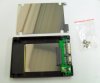
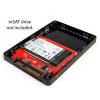
Here's an odd situation I'm in: I am looking to buy a S 15" (this model here, I think: Amazon.com: Sony VAIO S Series SVS1511GFYB i5-3210M 15.6" FHD IPS 1080P Laptop, NVIDIA GeForce GT 640M LE with 1GB, HDMI, 6GB/640GB/DVDRW, USB 3.0, Bluetooth, WIN7 Home 64: Computers & Accessories) and I'd like to set up an SSD + HDD configuration. It seems like the best way to do this is to move the 640GB drive to the ODD slot in a caddy, then replace it with a 7MM SSD. But I happen to have a msata drive kicking around (128GB Sandisk U100, I took it out of my Samsung Series 9 when I upgraded that) and I wonder if I could use that to save $100 or so. I assume I'd put it where the hard drive is now... I even have a msata-sata adaptor to use, but I feel like it would be bouncing around unprotected. Is there a real caddy I could use or should I just sack up and get a new drive? To be fair, the Sandisk is not the fastest SSD in the world, rather one of the worst. Opinions welcome...
-
I'm having a problem, it telling me that the is a hard drive issue, anybody has this? and it also makes this clicking noise sound. What happened? anyway to fix it?
-
Clicking noise usually means your hard drive is about to fail (especially if your computer is telling you there's a hard drive problem).
1. Back up your most important data in an external drive, before the hard drive fails
2. Do a complete backup of your system on an external drive
3. Replace your hard drive, or if you don't know how, have it done.
4. Restore system from complete backup, if possible
Sorry to be the bearer of bad news.
I'm stating the obvious above, about backing up on another drive, because I've met people who copy files into another folder on their "C" drive, and think that constitutes a backup. -
If you think that mSATA ssd is slow, I would go for the Samsung 840 Pro 256 GB. I have this, and I'm impressed.
Otherwise, you need to use a "msata to 2.5 caddy", look on amazon, there are some of these.
-
Write a personal message to Petrov, and maybe he will add it in, it's easy to miss a post in this huge forum.
Official 2012 Sony S Series Owners Thread
Discussion in 'VAIO / Sony Owners' Lounge Forum' started by Petrov, Jun 9, 2012.


