Problems? See this thread at archive.org.
yes here in Italy is the 2013 model, i'm really satisfied with this notebook, i have i7 3632QM, 12Gb ram, Samsung 840 SSD and 640m LE. the quality doesn't reach the macbook for example, but still good; is really light and i love the IPS screeni buy in march and it was shipped from directly Shanghai with a perfect comunication from sony online store
-
Well, well, I'm from Italy too. Glad you enjoy your notebook.
-
good, you can follow italian thread in this forum: [Thread Ufficiale] Sony Vaio Serie S - Pagina 220 - Hardware Upgrade Forum /OT
-
I've read on some other thread that a user managed to remove the piece of plastic which covers the vent on the back side of the notebook and now the machine runs much better (cooler I assume). Is that piece removable or do you have to break it?
-
my ventilation is ok so i don't touch this piece, anyway if the notebook is in warranty my opinion is that these operations aren't suggested beacuse you take only risk and lose warranty..
-
I'm interested as well! I didn't check the laptop much since it runs quite cool and quiet unless I burn x264, but the exhaust is definitely something I want to improve if possible.
-
I've sent him a PM and I'll update here as soon as I get a reply.
-
You'll find the general consensus for best overall PC controller will be the XBOX 360 wired USB controller. Since most games are built for console, it saves you the trouble of having to program the buttons of a controller for each different game. Plus, it is affordable and extremely comfortable IMO:
Amazon.com: Xbox 360 Wired Controller - Black: Video Games -
I get around 60FPS with most settings on low playing in 720p.
It is playable even at 1080p, but the frame rates were closer to 30fps for me. -
~ URGENT!! ~
Just wondering, my laptop keyboard piece has a gap between the bottom piece...
I took apart the keyboard following the Youtube tutorial, but the gap is still there..This is the only part that does not "clip/snatch" together..
Any help or suggestions? Also, mine is the 13inch, so taking I couldn't get it to take apart fully, but I managed to unclick the keyboard.
~ URGENT!! ~ -
Hi, I have a sony S series laptop that I purchased sometime in September, and ever since the first start up, the CD/DVD drive has always made an electronic noise on startup, which is quite loud and annoying. The noise also occurs whenever i press the eject button. The noise lasts about 2-3 seconds and has become very annoying, especially the fact that it happens on start up and wake.
Also to mention, the noise occurs both when there is a disc inside and when there is no disc inside.
The laptop product code is: SVS1511AGXB.
I was wondering if anyone else has had the same problem, or if anyone could help fix this issue, as it is becoming highly annoying. I was told to update the BIOS, however I have the newest version of the BIOS and it continues to make the noise.
Any help will be much appreciated. Thank you. -
In 1080P low graphs you get around 30 FPS, what is the exactly configuration ? You say that with no overclok right, in core or memory. And 1600x900 could you tell me something ? I think that is the resolution that I might play if I get this laptop.
I ask about BF3 because not only I like the game, but it is very heavy, so it's easy to estimate how heavy games would be in a short time, and other ones in present of couse, but thanks. Thanks very much!
For those of you who suggested to me stop asking and make my own conclusions... Well I live in Brasil, I think you don't know how poor is here. And I'm not talking about money or people, I'm talking about the market. We don't have Chronos since the HD6750M model. We don't have a refurb market, anywhere, I wish we had, but we don't. I'm sorry if I bother you for asking if my money, my poor money will be well spent. -
@KGjini, that's normal I'm afraid
I disable the ODD in BIOS, anyway, since I never use it, so it does not bother me.
-
Hi, I'm just waiting for delivery of my SVS1513C5E from the Sony store.
I spec'd it with the 320gb HDD as I'll be upgrading to an SSD as soon as it arrives.
I'd like to know if its possible to download Windows 7 drivers as I can't seem to find any on the Sony support site? Also, am I correct to assume that the laptop won't come with Windows 8 on DVD so that I could simply install it on the new SSD?
From what I've seen of Windows 8, I get the feeling I'd prefer 7 but don't want to install it on the SSD if the drivers aren't available!
Cheers -
I'm looking to buy a new 2013 Viao S 13P and would also like to hear about any compatibility or driver issues with Windows 7! My plan is also to install and SSD and Windows 7 on day 1.
Thanks. -
Hopefully someone will be able to let us know then!
-
Hello there, apologies if the following concern have been beaten to death, but this dilemma is troubling me quite a lot.
I'm looking to buy a new laptop, and my choice goes to S Series Sony little gems. Basically i look for a lightweight laptop that doesn't compromise on performance with a 1000€/$ max budget. Let's say i'm a nomad, with some gaming/graphic intensive needs and limited cash at hand.
Originally i was going for the Sony S13 but looking for informations and reviews I learned the screen was seemingly terrible, and judging by some threads here, people go as far as to replace the screen themselves to fix that which would be a major pain in the neck for me.
Going with the S13 i can customize it to get :
13" 1600x900 IPS *terrible* display
Intel i5 3230M 2,6Ghz (dual cores)
Geforce 640M 1Gb
4Gb Ram (i will add more later on, just to save a bit of cash at first)
500Gb 7200 tpm HDD
All that goodness for just 882€ going through the student shop.
Scared by the "terrible screen" comments, i instantly got interested by the Sony S15 and it's far superior screen and specs, at the expense of price, size and weight (size and weight being a nuisance for my mobile lifestyle, although bigger keyboard + bigger screen = more comfort)
For 1082€ - still through the education shop - so obviously a steep price increase (and slightly overbudget, but that might be ok if it's justified !) :
15" 1920x1080 *awesome* IPS screen (and apparently orangegate has been fixed, yay !)
Intel i7 3632QM 2,2Ghz (Quad core for cheap ! me gusta)
Geforce 640M 2Gb
4Gb Ram (again, i'll upgrade the ram later on)
500Gb, 7200 tpm HDD
I could go without the quad core obviously, but it's only a 40€ increase, so i could not possibly resist that upgrade (i3 is of course out of the question).
So what I want to know now, to make my final choice between that 2 seemingly awesome rigs, is the following :
- How bad really is the 13" 1600x900 screen ? Is it god-awful eye-destroying-ly bad ? Or just subpar/disappointing for the price range. Screen is very important to me although i can eventually plug the laptop to a desktop screen when i'm at home, but if i suffer the rest of the time, it might not be worth it.
- What would be the respective weight/size of the 2 rigs ? From my understanding the S13 is 1,7kgs (could be more because of the GPU) and the S15 is 2,1kgs (again might be more). No idea about the respective size though (apparently it's less than 2,5cm thin for both ? i could figure out the other dimension with screen size)
- Orangegate : fixed or not ? I have not read definitive answer about that so it would be helpful.
- What about refurbished ? It's by far the most economical option, but then i get slightly outdated products, and run a greater risk of orangegate and other latent issues. Price matters a lot obviously, but if it's too get a piece of junk, that's not worth it. I experienced refurbished purchase only once with a samsung TV and got no issue, but that refurbished tag still worries me a lot (might just be mere superstition).
- Heat / noise ? I heard the venting was not so great on the S15, this can be a problem given the spec specified above. What about the S13 ?
- I have a spare Windows 7 I could use if Windows 8 is being such a cockblocker (i heard it can be problematic for overclocking and stuff, though i'm not too hyped about doing this with a laptop. Any other W8 problems to report ?
- Bottom line : given my needs and expectations, is it worth it to put additional 200€ on the table for the S15 ? given i'm not too hyped about having a bigger laptop (again it's mainly the screen issue that drive me towards the S15, even if i don't mind the quadcore and additional gpu memory).
I expect to make the final decision by saturday hopefully.
That said, thank you for your attention and thank you if you take the time to answer my concerns (even partial answers are ok !)
/d
edit : doh i almost forgot : is there any sign of the crappy optimus technology in these laptop, a friend warned me against this as it seems to be a real plague ! If there is, is there any way to work around it ? -
I have the S15 since a few months. And I'm really satisfied with it.
The screen is indeed awesome. Very sharp and high contrast, very good viewing angles.
I've got the dualcore i5. It's running very fast, combined with Samsung 830 SSD. The need for quad-core depends on your usage. Video editing and gaming are a good reason to get quad-core.
I've seen the 13" 1600x900 screen a few times, and it surely looks terrible compared to my S15's IPS. But is not any worse than the average Dell/Asus/Acer screen, even slightly better than most because it is 900p instead of 768p.
Weight is not an issue with the S15 in my opinion. In terms of weight, you can't go wrong with either. But the S15 is certainly a lot bigger and therefore less portable. S13 is clearly more portable.
Both are really thin by the way.
It should be fixed now.
My S15 has the orangegate, but for me (and many others) it is no problem.
S15 has very good cooling/air flow, but is not very silent. It is noticable in a quiet room. Then again, it is not noisier than most other notebooks, and not annoying at all (in my opinion).
I'm running dual boot Windows 8 and Ubuntu Linux. Both running extremely well actually. Windows 8 is in my opinion superior to Windows 7 after getting used to it. Faster hibernating/shutdown/reboot, more SSD optimized, improved driver support, and simply runs smoother. Animations and scrolling are slightly improved compared to Windows 7. It is also slightly more battery friendly.
The only possible concern with W8 is the lack of the regular start-menu+button, which is now actually replaced the Modern (tile-based) interface. I personally think this is a non-issue, because functionality is still the same, and you can immediately run programs by search and the enter key. (just like with the classic start menu in W7). If in the end you still hate Modern UI, the start-menu can be restored with some tweaks, but I can understand this is not preferable. I personally like the 'fancy' modern UI, but don't often use it really. But I like the more flat/simple look of W8 compared to W7. It looks more professional and less glossy/cheap imo.
The only serious issue (I have) with my S15 is that:
-The magnesium body/chassis gets damaged VERY easily. I have many bounded(deformed) edges and some damaged spots on my S15 already.
I even use a sleeve but It does not help. When I travel, I often have to put my bag on a table or on the ground fast, sometimes I was not careful, which seriously damages the magnesium. Even worse, I have been really stupid recently and dropped it on the floor(from about 1 m) and now one edge it has hole in it, magnesium broke off. A repair would probably cost far too much. Luckily the screen is still in perfect shape.
I think the S13 is built from the same materials, so this not S15-specific.
All together, I can really recommend the S15 over the S13 if you don't care about the significantly bigger dimensions. I cannot discuss current price/peformance ratio, that is different per country / configuration.
It is less portable than the S13. But in my opinion, the fantastic 1080P IPS half-matte screen, (and in my case overall performance vs the S13), is really worth it. Especially for me, because I do programming (Computer science student), a bigger, higher res screen is very nice to have, when some serious work needs to be done. It's worth 200€ for my needs. -
Hence why I wondered if it's possible to get these parts somewhere (e.g. the lid cover or the handrest). I just got my S13A and can already notice a few scratches here and there, plus a dent from dropping it (a new bag shoulder straps were not strapped properly so they got detached).
-
Thank you very much for your insights, you are a scholar, and a gentleman !
I will certainly reflect on your comments and answers to make my decision.
Your points about screen size and quality are especially relevant to my dilemma as i expect spending a great deal of time on it (both work and leisure), i can certainly see the advantage of the higher quality, bigger screen of the S15 (by the way my current laptop has a 1440x900 14" inch, which is actually a great format but sadly seldom used by manufacturers).
At the same time, your comment about the S13 screen was reassuring, as I feared it was unbearably bad ...
I guess i'll try to find a sony store where hopefully the laptops are on display if such store exist in my city (i think so) so i can judge with my own two eyes the screen quality and size/weight etc.
As for the chassis, i'm usually very careful when there are items that cost a grand in my bag or on my lap, but i guess some extra caution/care can't hurt ! -
Go to a local Sony store and look at the S13 and S15. VAIO EU screens are usually not the same as those elsewhere. I keep mentioning that the F series screen in Europe is something that is, IMO better than the S15 IPS, but I would throw the US F screen before using it myself. That said, my sister is an architect and she is fine with it. That (US F) is the same screen that I saw on S13/S13P in Asia, which I believe most call hideous (me, too).
The S15, depending on the country, should weight around 2kg. And IMO, it is extremely portable and lightweight, overall, not just in its class.
Cooling is not bad on S15. It just looks strange The vent is between the monitor back cover and the bottom chassis, which looks as if it closes the exhaust. But I ran a 5 hour x264 encode (all cores used full load on 3632QM) and the vent kept the CPU cool enough with "Balanced" profile (there is Priority to silence which limits CPU speed to 1.5GHz and also Priority to ventilation which is IMO too loud, but it would keep the CPU under 65*C in x264 task) with not too much noise.
If you do compiling, with pauses you're unlikely to see high temps and noisy fan without the outside temps being >30*C or something. -
Hmm anyone encountered this weird issue as well ?
When my laptop is put to sleep, it occasionally "wakes" ( the power light turns green and the wireless+hard disk activity light blinks ) , but the screen remains off.
After a while, it goes back to sleep again.
Any clues to this werid occurrence ? -
Does anyone's battery indicator turn on when you press the Power button?
Also, does anyone's battery start charging after you turn it on from an off state? Everyday when I turn on my laptop, the battery starts charging even tough it is 100% complete. This is when I fully charged it the day before... -
Your battery cannot really be at 100% if it was charged a day before, but it is possible that it is just a bad indicator, and it is not actually charging. Especially possibly if you come back from RapidWake sleep.
-
Anyone know if it is possible to connect 2 mSATA SSDs to the SATA slot with some adapter or something?
I'm thinking if it's possible to RAID 2 (or 4 even) mSATA 480GB SSDs on the S15. -
Hi.
This happens when laptop is long time in sleep mode, then it turns back on, the screen stays black and he puts himself into hibernation. It is nothing wrong. I think that all laptops has this function to prevent the battery to drain while on sleep. -
So your battery indicator does not turn on when you press/hold the power button? Weird...How will I be able to fix this?
-
Do you mean the physical battery indicator? I meant the WIndows battery status. I never noticed the physical one.
I just checked this: battery charged, laptop sleeping (RapidWake mode), press Power button, the battery LED does blink for a very short time. -
Thank you for your comment, I ended up taking the S13 after all. As good as the S15 screen was seeing it at the store, i couldn't bring myself to take a "much" larger laptop (as I said previously, my current one is an old 14" and feels already large to me). I couldn't see the 1600x900 screen on the S13 but the 1366x728 didn't look so bad even if it was indeed blue-ish and less bright.
Alea jacta est. If it's too bad (aka unbearable bad) i will still able to return it and take the S15 instead (it's the worst case scenario because i don't know if my current laptop will hold out that long ^^).
I'll receive in like 10 days. -
Thanks for checking! Yep, that's what mine does.
The longer you hold the power button, the longer the physical battery indicator stays on for. I don't know why the power button affects the battery indicator.. -
Weird issue happened today, I updated Windows, restarted it, used for a bit and them closed the lid.
When I opened the lid something super weird happened. Computer resumed from the point before restart with all the identical windows and apps open! Super weird! Ok since it prompted me to restart it again I did and it configured itself just like the last time restarted it.
Once it got boot up my Windows was deactivated and I couldn't do the activation.
I restarted it again and S couldn't boot up at all, trying couple of times and ending up in nice new blue screen. It even did hard disk check but nothing.
After few tries it prompted me to do the restore which it did and finally we are up and running.
I still couldn't activate the Windows so I did another System Restore manually which was unsuccessful but somehow I managed to re- activate the Windows
Now everything seems but when I go to Control Panel - System - Windows Update I get an error window. Nothing regarding Windows Update on Desktop mode seems to work. If I try to do the update via Win8 interface it works flawlessly.
Updates that installed were bunch of Office 2013 updates and around four of five Windows Update (not Security Updates). One of the updates said that it solves the problem with PC refresh after registry corruption, that's all I remember.
EDIT: My Bluetooth RAPFC or something like that protocol is gone, it had yellow triangle and tired uninstalling it to reinstall it but with no success. Now its just a UNknown Device in Device Manager. I cant use headset with the S.
My IE10 cant open any page other than Google.com
So there you go.. Its going to be a fun next few days of me restoring the laptop back to factory state! -
So.. had my laptop taken apart, in the process of doing the display MOD, and everything was going great. Display worked, just had to put it back together..
Got up to eat, while the laptop was open, cat walked by and knocked an empty coffee mug off the top of my desk (desk has a 3 level book shelf surrounding where my monitor would sit), onto the motherboard and shattered a few of the tiny components on the motherboard. Those tiny orange/yellow resistors or whatever. Bottom line is the mother board is garbage.. Any idea where I can order a new one, and the cost? 0.o My cat's so lucky im not a spiteful person..
exact model is SVS13A12FXB. -
So.. had my laptop taken apart, in the process of doing the display MOD, and everything was going great. Display worked, just had to put it back together..
Got up to eat, while the laptop was open, cat walked by and knocked an empty coffee mug off the top of my desk (desk has a 3 level book shelf surrounding where my monitor would sit), onto the motherboard and shattered a few of the tiny components on the motherboard. Those tiny orange/yellow resistors or whatever. Bottom line is the mother board is garbage.. Any idea where I can order a new one, and the cost? 0.o My cat's so lucky im not a spiteful person..
exact model is SVS13A12FXB. -
What is it with people doing this mod and cats destroying laptops?
-
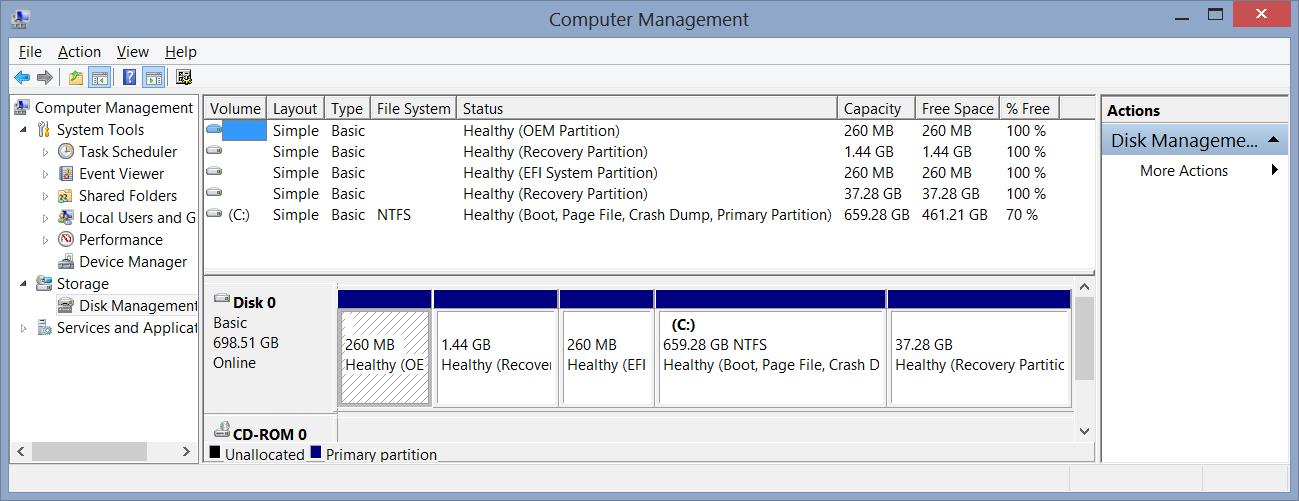
New SVS15125CXB with 6 partitions in HDD, and need help with clean install.
Had it for a couple months, great machine, incredible display, but factory installation put 6 partitions (see attached screen shot) and lots of bloatware. I'd like to do a clean install (Win 8), but I have some questions:
1. Can anyone explain that partition table? Just curious here.
2. I didn't get any disks with the machine, so how do I do a clean install, and is there a thread that details the process?
3. I've used TrueCrypt full disk encryption with Win XP/7, but not Win 8. When I tried to encrypt the HDD, TrueCrypt balked at the UEFI BIOS, not Win 8. So when I do the clean install I assume if go to the Legacy BIOS, I might have more success. Anyone got any experience here?
Any help will be appreciatedd.Attached Files:
-
-
Hey!
I have this annooying issue where i loose my internet connection all the bloddy time.
Ex: browsing web... suddenly no internet connection found, trying to connect manually= unable to connect, then after 1 minute it connects automatically. ??????
Wireless adapter settings is set to "Maximum performance"
I´ve also unchecked the "Allow to turn off this device to save power"
Does anyone have any clue? -
Hi all,
Having some issues with the Wireless and available Ram?
I have installed the latest drivers I could find for my svs1513c5e but Wireless only seems to work up to 54Mbps and on G mode (no N mode can be seen in the settings).
And available ram is at 7.88GB despite me having 8GB and installed all the latest BIOS / Chipset firmware/drivers.
Any thoughts? -
I have exact same model!! And the Wifi problem is driving me nuts!!! Even with latest drivers from Intel i still have that issue.
About the Ram, your system reserves some for hardware, it's perfectly normal.

Is this normal, or something is wrong with my network/driver/wifi?

The problem with Wifi i'm having is: Whenever i stream or play a game it drops my connection randomly for 1 minute which during the time i can't connect to the internet at all. - after that 1 minute it reconnects itself automatically like nothing happened.
Is it something to do with when playing game eg: Skyrim it eats my battery even when plugged in?? -
Hmm not sure you are right about the RAM mate - although it could be reserved for the intel HD graphics? but then only 12MB of RAM doesn't seem enough to do anything for graphics use.
And with regards to the WiFi - if you ever do find a fix let me know - I've tried to un-install the drivers a few times and use the latest ones but no joy ! -
well after talking to a Sony rep, it appears the replacement Motherboard would cost $1500.. twice what i paid for the laptop =0 any other ideas out there? Places to check other than ebay?
-
Update to the WiFi issue!
I have downloaded the drivers from the intel site here: https://downloadcenter.intel.com/Se...oductProduct=Intel®+Centrino®+Advanced-N+6235
Then I un-installed the current drivers for the WiFi. - no wifi brilliant!
THEN install the drivers from the intel site and...TADA! 150Mbps speed the Wifi has synced at!
I don't think this can do 300Mbps just yet but this 150 Mbps is a massive improvement over the 30-50 i was getting before. -
![[IMG]](images/storyImages/2649954275.png)
much better! was topping out at 20 before. -
If i knew before Sony would be such ***** *** ******* when it comes to warranty and replacement parts- never would have bought this Vaio.
My uncle spill water on his ASUS and guess what! They replaced laptop for free after he explained what happened.
But Sony charges 150€ for a freaking keyboard to MoBo cable. Which i soldered myself in 10 minutes costing me under a €.
Intel HD 4000 shares Ram so it might be also using it - that explanes the usage.
I managed to solve the Wifi issue:
First i installed all wifi related drivers under "Preinstalled Windows 8 drivers" in no particular order all at once.
Secondly i messed with these settings in here:
I changed them so much i forgot the actual things that i touched.
Thirdly this guy had similar issue:All in all the source of the problem was WLAN AutoConfig
IWMSSvc.dll file
Now it seems stable as i'm streaming 3 pages with constant 1080p and it haven't dropped out. FINALLY
-
Thanks for that link mate!
I changed those settings in the "preferred Band"
And now the thing is syncing at 270 Mbps
-
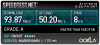
Using 5ghz I get 450Mbps link speed between pc and router
-
Just wanted to follow up and let you know that I finally got my laptop from Sony (a week late), and switched out the HDD for an SSD, clean installed windows, and then installed BF3. I have the SVS13a290x with an i5-3320, with 640M LE (2GB). It worked nice and smooth on low and medium settings. I could play on high, but there was a lot of motion blur and it was less smooth. I didn't bother with fraps or anything like that to get fps, but the frame rate was high enough that I had no problems on medium settings.
After doing some extensive searching, I'm fairly confident that this is the best gaming laptop you can buy that is under 5 lbs with a screen size less than 14". i.e. if you want portability and gaming, I think this laptop is your best bet. -
aside from the Gaming Laptop Clevo W110ER Core, I agree. The screen on that laptop is simply too small though, its unusable in my opinion.
S13 FTW! -
So weird issue.. Laptop is about two weeks old, ordered off of amazon as a like new openbox from amazon warehouse.
Today the touchscreen locked up, and would only read input if i held the left or right click button down while moving my finger. After a few minutes in unlocked, but now tap to click and all gestures do not work.
I can move the mouse, and I can click using the physical buttons, but i can not use any gestures or tap clicks.
Any advice?
I uninstalled and resinstalled the synoptics drivers with no luck... -
can somebody please point me to a guide where i can downgrade my svs15 from win8 to clean win7?
cheers -
Yesterday i´ve recieved my configured vaio s13 with i5, 6 gb ram, blueray-burner and 320 gb hdd from sony store. Next days i´ll do a Switch from hdd to a 256 gb ocx ssd but i´m not sure if there will be a Problem with using the created recovery usb stick for this process?
The Point is the things i´ve to do after die recovery, as the Special ssd Settings are not set in this Image, right?
Official 2012 Sony S Series Owners Thread
Discussion in 'VAIO / Sony Owners' Lounge Forum' started by Petrov, Jun 9, 2012.