 Problems? See this thread at archive.org.
I live in Delhi, India. Ordered it from one of the sony store in Green park. The guy is offering me 2% discount only.
Can someone tell me if orangegate problem has been solved or not??
-
-
Most S series laptops sold presently dont have the orangegate issue but you never know..
What price did you pay for it? And what specs ?
btw, I too am from India and visiting USA so I bought mine from here.
-
Depends. If you play to install SSD some time later I'd recommend clean install. If you plan to migrate to SSD just clone partitions and uninstall some useless Sony stuff.
I just switched to SSD right after buying SVS15 and cloned all partitions (including Recovery) and the system works smoothly. -
Sorry for the OT: but what is a typical discount folks get in EU countries and US?
-
For this I have to pay INR 63k here. I will also buy extended warranty of 2 years by paying 2500 bucks.
I still hsvr option of entry level macbookpro. But first i will see how this goes. Today going to take a demo there.
-
I've googled for Windows 8 Upgrade from Sony and found one interesting thing: VAIO Upgrade Tool for Windows 8. It installs all necessary drivers/apps for Windows 8 when using Sony VAIO SVS15. Has anyone tried it already?
-
Thanks guys..
I am paying around $1100.. For i5(3rd gen) GT640M LE (2GB); 750GN HDD, 4 GB RAM, full HD 15.6", backlit keyboard etc.
http://www.sony.co.in/product/svs15135cn -
I got my 2012 S13 with the moddable BIOS from Amazon Warehouse in the US for 42k, shipped here for a further 3k. Already had a Samsung 830SSD, installed it with Windows 8, this thing flies.
-
Will definitely try that if I do clean install of windows.
-
Trying to clean install Windows 8 pro on my vaioS15 with windows 8 OEM. Made a bootable USB drive, booted UEFI, entered setup and it doesnt install, saying something about the GPT partition order. How can I install Win 8 pro without deleting the recovery partitions that the laptop came with.
-
Tried switching to Legacy Mode? You're using MBR partitions, that's the problem so far. Converting them to GPT will clear all data. Anyway, try using Legacy Mode, I had no problems with installing Windows 8 without UEFI on my old ASUS N53SV.
-
I will try legacy mode but the OEM partitions are in GPT and nor MBR.
-
Hi All, I just bought a Sony S SVS1313C5E . I created the recovery media and installed the OS over a 128GB SSD, all worked fine. So using Easyus partion manager I deleted the 19 GB recovery partition and increased the OS partition with the free space. Now, restarting the notebook, It appears the installation keyboard language menu request. Entering the proper keyboard layout I can access the recovery menu. I tried some options but I'm not able to boot the OS partition. Is there a solution to delete the recovery partition and make booteable the OS one?
I read some thread bud didn't find any info. Thanks in advance for any answeer. -
It's been a few months and I still have my VAIO S15, and I love it. I was tinkering with the sound and I noticed something. My right speaker sounds different than my left speaker. My left speaker sounds fuller and can do some lower frequencies, while my right speaker can't, and it sounds louder at high frequencies. Is anyone else experiencing this? While watching stereo video I can't tell the difference at all, so it's not anything major but when watching a simple left right speaker test on youtube, the difference is slightly noticeable. It has more to do with the pitch of the sound going through them and that's what seems to cause the imbalance. Does anyone else notice this with their VAIO S15? Could this have anything to do with the layout of the chassis with all the extra buttons near the right speaker? Everything else works perfectly, and I know that both speakers are clean and It's not a driver issue.
Thanks -
Guys, I need your Help!!! During the last weeks my computer was running very slow and Wireless get down after a short period of use. So, i decided to reinstall every thing from the beginning. I started, and after insert the Disc #2 the installation failed and I'm not able to start the Recovery.
QUESTION:
- Recovery is still available on the recovery partition but I can't figured out how to start it (I tried F10, F11, F12,...)
- Something to fix Disc#2?
Thanks in advance!!!!! -
Solved! With recovery media I reinstalled the OS over the SSD. So I've rebooted from DVD media. Under the recovery tools there is an option to remove the recovery partition and automatically enlarge the C: one. Rebooting from the HD recovery partition, this tool is not available.
-
Boot the computer by using the ASSIST button instead of the power button and select Repair from the menu.
-
-----snip-----
-
Hey there.
I am here to report after 10 months of usage of my S13A. Model SVS13A1C5E with gunmetal finish.
Both batteries are still showing as excellent in the vaio center. While at home I keep them at 50%, for university fully charged I can manage my courses if I deactivate sound & wireless lan.
Gaming is still good, ran bio shock infinity with my Xbox controller in full HD on my TV without any problems.
Now some signs of the notebook getting used a lot:
Palm rest left, a kind of covering material is falling off. You can see at the VAIO sign the gold is as well disappearing.
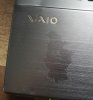
One pin of the R key is broken which makes typing quite a bit annoying

The track pad is feeling quite a lot different in the centre. I hope it is visible on the photo.
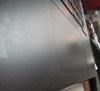
The surface can easily be scratched etc. I dont really mind

I had an USB 3.0 Problem where the drives randomly disconnect. After removing all drivers and updating to the newest ones the problem seems to be fixed.
Now one of the more disturbing problems: My notebook randomly shuts down. Sometimes it doesnt happen for weeks. Sometimes five times in one hour. It does not matter which graphic card Im using, if Im on my battery or if the second HDD is active or not. The OS doesnt matter either. It started occurring after ~ 6 months. I cant think of a problem causing these sudden reboots.
It shut down once while I was nearly finished with this post
Greetz Maei -
Will we see a refresh of the S series soon when Haswell will be out?
-
Looking for a nice sleeve/laptop bag for my s15. Any tips on where to find suitable ones?
-
Hi there,
It's ben a long time since i've looked into it and I can't find the answer elsewhere so here it comes :
Are there cheaper alternatives than the UJ267 BR writer for the vaio S15 ?
Thanks a lot -
I'm using a targus sleeve which I got for $10 off amazon, its well made and has good padding on the sides and edges. I'd suggest you give it a try Amazon.com: Targus A7 Slipcase Designed to Protect 15.6-Inch Laptops TSS108US (Black): Computers & Accessories
Btw, the price fluctuates a lot so keep checking until it goes to $10
-
My Zeroshock III for 15'' laptops has been working great until now. It can take a beating and protects the laptop from the rain.
-
After some weeks of use, I really like my S1513 but I am very disappointed with the reach of the wifi card (Intel 6235). The speed is excellent when I am staying very close to the router but the signal strength gets too low when I change my position to another room. I often can't connect while my 5 years old Thinkpad T61p was doing much better in all situations. This is constant with all routers I use (home, work, family).
So I am planing to switch the wifi card.
Has anybody tried the "Killer Wireless-N 1202" adapter? ( Killer Gaming :: Solutions :: Wireless)
And what are the results? Thank you -
Hi guys, my fan on my svs15 is noisy when the PC is in speed mode. It's making a LOT of noise. I'm thinking of changing the fan to something more quiet, and wondering if there is a guide out there how to do this? Has anyone reading this thread tried to do it? There is a vibrating sound + the fan making a awful noise, so I have no choice but to change it
-
Can anyone repost the .icc file for the S13? Thanks.
-
Did someone replaced the screen or keyboard and give me some hints ?
How to get keyboard popped open - it is only one screw from the bottom but how to get it out from the main chassis ?
Also another question, is it possible to insert 16GB ram ? Does the mainboard support it ? -
Is your WiFi set to Maximum Performance at that point? I am getting quite good connectivity on mine on a miniscule ADSL wifi router that my Telecom lends for use. That's on Maximum Power Saving even. My flat doesn't have metal or thick stone walls, but again.. its >30ft/10m distance.
-
Did you also tried it with Bluetooth disabled?
It's because BT covers part of the frequency spectrum of the WiFi, so placement of BT device has sense. Especially if the WiFi AP uses a channel very close to BT. I've read somewhere that people mentioned better WiFi receiption with BT turned off. Could be that Sony placed their antenna's or BT-device on bit unlucky place inside the laptop...
Maybe above suggestion helps a bit...
Alternatively (if you have this issue at home), try setting the WiFi channel (in AP) on different one.
Let us know the results please !
-
@ alfaunits
Yes, my settings are at max performance. Thank you for your suggestion.
@ EiSl
Just a silly question: How can I easily disable BT while Wifi is still enabled?
At home, the signal is sufficient (though weaker than with my old Thinkpad). At work it is much more problematic and I cannot set the access point's channel myself. -
By using Smart Network.
-
I have a Windows 8 clean installation without Smart Network. When I go to Sony's Website Smart Network isn't listed as a preinstalled software for my machine.
So I installed a version of it for another model. The installation process seems to be successful but then I can find nowhere how to access the application. Task manager shows the task and the service are running. -
Check Sony folder in Program Files.
-
I'm experiencing the same problem as you.. right now I'm getting idle temps of 60c with minimal CPU load as well. Anybody else getting this?
-
I appear to be having screen problems. I have the SVS131190X and ever since I bought it, I noticed this one "stuck" pixel that kept bothering me. It's not dead, it's glowing red. I tried different methods, but couldn't fix it. Decided to live with it.
Now there is a new issue. It's been there for a while but I just thought my display needed cleaning. It's a type of..."bleeding" but that wouldn't be the right word. There are a couple of bright spots on the display, the size of finger tips and are only visible on dark backgrounds, but they are certainly there all the time.
While the laptop is still under warranty, I'm not a big fan of the idea of being without it for over a month while Sony ship it around the country (or globe) to get the screen replaced. Instead, I am entertaining the idea of replacing the screen myself with the 1600x900 matte display. My current one is the glossy 1368x768 standard display. Does anyone know if they are compatible? All the sales websites state that the size and resolution should match the original ones...but is that really the case? Can I upgrade my screen? -
I also have red pixel on my new SVE full hd - happens...
You can not change only the lcd panel to something else. If you want a 1600x900 or other then you will need to replace also the inverter.
You should send the screen to warranty if you have bleeds - mine was sent from Sony Poland to UK service center - all happend in one week - collect and return. -
Thanks! I was afraid that would be the case. I don't suppose you can easily change the inverter too...
I called Sony today, it would take 7-10 business days. I guess that's the best option. -
Smart Network folder and executable are actually there but I can see no effect when I launch the executable. I get no user interface.
-
According to my Task Manager there are two files, VSNClient.exe and VSNService. The first one is the mentioned executable file and the second one is just a service. Probably you should start with running the service file first then try the executable.
-
to admins and moderators: double post - please delete it
-
Inverter is attached via two side glued tape and maybe screw - it is removable as easy as the screen. You could see how looks my inverter for vaio premium display Sharp panel from my F12S:
http://hcd-1.imgbox.com/adnrS2Ve.jpg...w&e=1370248586 -
Fix the link.
Popraw linka, bo go zle skopiowales. -
Forum engine shorted it without knowledge. Heres the diffrent one: imgbox - fast, simple image host
-
HELP PLEASE ANYONE! I HAVE A BIG PROBLEM THAT HAS MADE ME VERY SAD FOR A LONG TIME. I could NOTTTT find any solution to my problem and it is really making me hate my laptop
. Ok, so my laptop was fine and amazing with windows 7, however i upgraded to windows 8 CLEAN installation and haven nothing... Now when i play any game, with speed on it does not lag but in a few seconds it starts to lag ALOT and the fan gets quiter.. I think it has a problem similar to this:
- To ensure the CPU/GPU don't throttle or revert to the HD4000 when gaming, open Vaio Control Centre and go to Power Management. Within the Power Management settings, under Cooling Fan Control, set the "Speed" setting to "Priority to Ventilation"
HOWEVER!! THERE IS NO COOLING FAN CONTROL in the vaio control center for windows 8 from the sony drivers website HELP -
If it's the same Vaio Control Center layout as my Z, the windows 8 release has it in the "Power and Batter" section, the 2nd option down just underneath "Power Plan" settings.
-
Nope
All i have in Power and Battery is power plan (high performance etc. ) then power saving 60 Hz stuff and one for plugged in and one for battery..
EDIT: this problem with lag doesnt seem to happen when im not charging.. and also it used to be in control center in windows 7.. give a link for a control center with ventilation settings plz? -
I would suggest installing VAIO Upgrade Tool for Windows 8. It installs all necessary stuff in proper order. Works fine, tested. Otherwise you get different problems when using Windows 8, just like the one you mentioned.
-
Can you give me a link? because i think i tried something like that and it ruined my laptop and started saying things like the battery is broken the laptop is shutting down or something and i am sure the battery is not broken cuz it was a common problem when i searched up the internet and a couple of times i tried to install drivers then games dont even work on nvidia, and then i had to chat to sony to fix it etc.. i just want to do the most secure thing that will 100% not ruin my laptop or cause problem i dont know how to fix except by reformatting windows 8. So please give me a link that is safe for me to use, thank you! i just want to fix this problem that seems impossible -.-
and sorry if my english is messed up, im not a native english speaker
EDIT: sony website also shows this :
Congratulations!
The SVS13A190S is supported for Windows® 8.
Here is what you need to do:
Carefully read the Upgrade instructions or Clean Install instructions BEFORE performing any installation.
the problem is i already installed windows 8 and everything and all i have is the vaio with clean windows 8..
-
Just google it. The program will install all stuff automatically. Just a few restarts and voila! Already tested, so I can recommend using it. Stamina/Speed slider works fine, no problem with WiFi or anything else. Main disadvantage is really quiet sound in Windows 8. Probably due to hardware acceleration enabled in Windows 8 (Windows 7 uses software acceleration). Speakers play really quiet.
Official 2012 Sony S Series Owners Thread
Discussion in 'VAIO / Sony Owners' Lounge Forum' started by Petrov, Jun 9, 2012.


