Problems? See this thread at archive.org.
Don't do the Upgrade Tool - it won't help you. I just dealt with it a couple of weeks ago. It only works if you do a Win8 upgrade, and it won't work on a clean install. The "geniuses" at Sony tech support told me that the only way to get all the functionality right is to re-install the original Windows 7 that the laptop came with, install the Sony drivers, and then upgrade to Windows 8 on top of the current installation.
Naturally this all sounded like a load of BS. So after fighting with it for a few days, I finally solved it. You need to download the Sony Shared Library. Go to the Sony esupport driver download page. Choose Windows 7, because it is not available for Windows 8! You will find it under System Components.
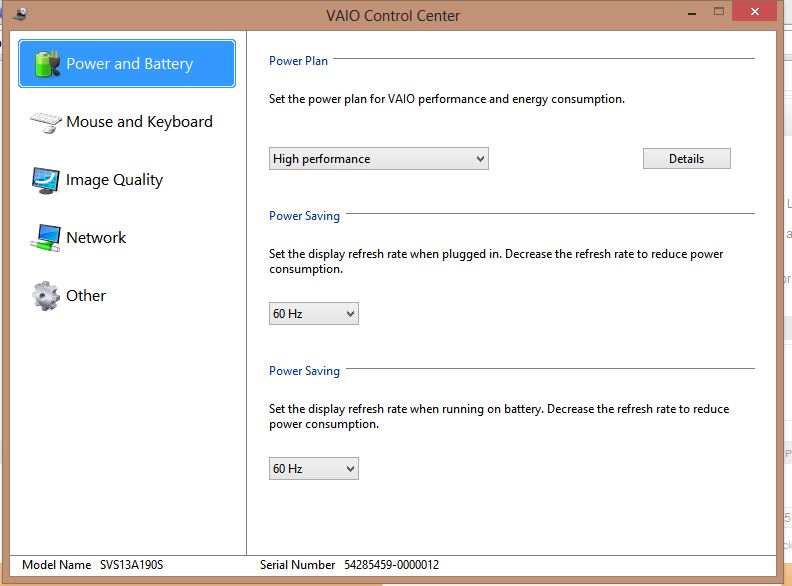
After you install it, the VAIO Control Center should show all the options once again.
(if it doesn't let me know - you might have to download a couple of extra things, such as the Sony fan speed diagnostics tool. But the Shared Library should solve your issue)
Edit: Also, remove the Battery Checker Software. That's causing your other problem. You don't need that application. With the Shared Library and VAIO Control Center you will still be able to control stamina/speed and the Battery Care function will work.
-
-
Upgrade Tool works with Clean Install, tested it myself a few days ago. Using Windows 8 Upgrade from Windows 7 + installed drivers will do the same, but you may get lower performance. After the upgrade you should reinstall most drivers, you will see why once you get the upgrade.
-
hi guys, i have question about vaio s series,
what is the processor type? i mean, is it soldered to motherboard or socket type? -
One question:
Does someone know if there are some stickers on ebay or something else for protecting the S13 around the keyboard, bezel, palmrest and outside?
Thanks very much! -
Hey everyone,
I am just wondering why every time I switch form using my Logitech MX Performance mouse the my Vaio S trackpad, the vertical scroll wheel changes from 3 lines to 1 line..
It seems to always reset itself. How can I prevent this from happening? It is causing my many headaches! -
Hm, interesting. I may have done something wrong then. But the Shared Library definitely works too.
Sorry. I have no idea - I had the same issue and it was a pain! Now it seems to be fixed, but I don't recall exactly what I did. Try getting the latest Synaptics drivers maybe? -
Hi.

I'm interested in buying Sony Vaio S13 with intel core i3-3110M and GeForce 640M LE. Unfortunately it has Windows 8 in it (can't find models with Win7). Are BIOS mods possible in that model? Some say yes, although I can't find a confirmation. -
Is anyone else's trackpad indented slightly downwards compared to the right side?
The right side of my trackpad is perfectly on the same level as the palm rest, but the left side is slight pushed downwards....In general, the trackpad is not perfectly symmetrical. -
It's supposed to be slightly down all the way around.
Sent from my SCH-I535 using Tapatalk 2 -
Got the same, wonder why?
-
Hi everyone! Noob here!
First post... Please help!
I have an SVS15135 laptop link- SVS15135CN : S Series : VAIO Laptop & Computer : Sony India
I want to upgrade the RAM... but it uses DDR3L-1333 (1.35v)
I can't seem to find a DDR3L RAM module here in India... Was wondering if I could use a regular DDR3 -1333(1.5v) or even a DDR3-1600(1.5) instead of the DDR3L?
Please advise.. thanks! -
I don't understand.. So does the upgrade tool install the drivers or not? I just have a clean windows 8 Vaio S right now. and all i want is the correct drivers and programs. Does this application do that? I am not good with coping with problems so i hope it doesnt give me more problems
EDIT!: I am installing the Vaio upgrade tool right now! i remember i did that before and it screwed up my laptop so i had to format it to windows 8 again. I hope it doesn't this time. IF something wrong/weird happens i will say what happened and please help me fix it because i have no chance in fixing it alone
It is uninstalling files now.. -
This has been answered many times, but the answer is: you can use normal DDR3-SODIMM without problems. Battery technically you also won't see difference between DDR3L and non-L version (ok, maybe some minutes). And there is no need to buy DDR3-1600 (unless it is cheaper) because everything will run on the speed of the soldered memory (which is 1333).
-
Does anyone have the SVS1511 (with the i5-3210M) ? Does it have the orange gate?
-
Please do a search... this one also has passing by many times...
It also has it's own dedicated thread, so I would suggest to take a look there.
If I recall correctly, it has been fixed already... (but check it by searching...) -
Me. Bought it in April. It's Orange gate-free.
-
I forgot to mention. Don't change language in Windows 8 before installing Upgrade Tool. It gives error and won't let you go on.
-
Forgot to mention? I just ran it and it is done now... It installed a few programs and stuff and only 1 error (Webcam software thing (arcsoft)) and now the laptop is done. However, i don't feel any difference.. The speed/stamina switch doesnt show anything on the screen but before i installed these stuff it did better gaming on speed but not as good at all as wwhen it was windows7. Is it supposed to show a tooltip when i change to speed like on windows 7? I have yet to try games to see if theres no lag like when i had windows 7. The lag i had is too much. games like dota 2 and far cry 3 lag when on lowest settings, however they dont lag for like 10 seconds in HIGHESt settings but then start to lag even on low. I will try the same games now and tell u if theres still that crazy lag.
EDIT: I just tried far cry 3.. Theres still unplayable lag after the first 4-5 seconds of playing.. even the menus lag and it seems like it is not even using nvidia -.-. However, it does seem to be a little less laggy than before. I HOPE I CAN FIX THIS -.-. Any other thing i can do? like the power ventilation stuff i cant find anywhere.. I have Sony Vaio S13P (SVS13A - Premium) | Gun Metal | i5 | GT640M LE 2GB can anyone in the world who did a clean upgrade to windows 8 play games on this?!
EDIT AGAIN:
Ok thank you i will try that. So far i did the upgrade tool but no difference except the Battery checker thing i fixed that. I will install the shared library ( i already have Vaio control center) and tell you if i see a difference in the control center. Thanks!
EDIT: I installed the shared library but don't notice a difference in the control panel HELP THIS IS ALL I HAVE:
View attachment 97081
EDIT2: When i installed Windows 8 i chose the Remove everything (not keep files settings...) and i think this is a "clean" installation. IS THERE ANYTHING I CAN DO TO MAKE THIS WASTE OF MONEY BE ABLE TO PLAY SOME DECENT GAMES OTHER THAN MINECRAFT? ... other than bringing back windows 7 etc.. :'(
MORE EDITING:I finished the upgrade is there anything i should do now? -
edit: sorry double post i cant delete..
Attached Files:
-
-
By forgot to mention I meant the people who are not using English as their first language, if they change language to some other than English the Upgrade Tool will show error.
Windows 8 apps are different comparing to Windows 7. VAIO Care and Control Center and many others are newer. STAMINA/Speed app is different also, it doesn't show any change when switching from Stamina to Speed and vice versa. I think it's not really necessary.
After installation you can get latest drivers for Intel Chipset Software, Intel RST, Intel HD 4000 and NVIDIA GPU - all can be downloaded from station-drivers. For Sony apps update just use VAIO Update.
If you need newer Dolby Home Theater app just google for Lenovo - go to Support, select Z500 for example and download whole Realtek Audio pack from November 2012. -
If you have any problem with Control Center just install Shared Library, HotKey utilites and Sony Firmware Extension Parser Device. Sony Location Utility is not necessary. You can't install USB 3.0 drivers from Intel, Windows 8 has native USB 3.0 support. There's a workaround to get Intel drivers working in Windows 8, they provide better performance.
-
SFEP sometimes won't install properly (silent fail), a workaround has been posted several times in this thread for anyone with this issue
Sent from my GT-I9000 using Tapatalk 2 -
Hey guys, so my "H" key doesn't stay on the keyboard anymore. It's the same key that I posted pictures about last year regarding it being lower set than other keys.
My 1-year warranty still applies. Can anyone tell me if I can use that warranty to get a new keyboard? And how do I go about using it?
Thanks! -
Just call sony. You will probably need to send it in.
Sent from my SCH-I535 using Tapatalk 2 -
Hell yes. What words do you use most?
-
That would be Sony Canada (I'm in Canada)
Do you know how long it will take for the entire process? -
U can ask them. I figure about a week.
Sent from my SCH-I535 using Tapatalk 2 -
Been waiting for ~3 or 4 months to see a refresh of this. Hoping it comes soon and hasn't been replaced by the Vaio Fit series... Time to worry though with everything else from Sony already being announced? Maybe I need to start looking at the new Acer S3/V7 or Gigabyte stuff to find the 1080p IPS lightweight machine with a decent card that I have wanted for so long... Oh well, at least there are a few more options around this generation.
-
If it's only the graphics you care about then go for Clevo or something like that. I prefer Sony for great design, brilliant screen and nice o/c. No other laptop can give me so much for this price.
-
I can tell you right now that there won't be a refresh, it will be discontinued. And yes, it's been replaced by the Fit series unfortunately. Although I can't understand how in their eyes the Fit is a replacement for the S series since it's lacking in every department from design to CPU.
-
Is it possible to dual boot using an ODD-> HDD caddy? I vaguely remember a topic on it but can't seem to find it anywhere. :/
Otherwise,I guess I could just have a lot more internal storage then.
Also, would it be possible to run W8Pro on a VM level with only 6gbs of ram total?
PMs well appreciated/welcomed! -
Hi, sorry for posting again, but I don't think anyone saw my post.
Is it confirmed that modding BIOS in Windows 8 Vaio S13 is possible? -
To be fair it's quite significantly cheaper than the S series, at least in the UK market
-
Anyone have an logical explanation for us?
With the left side of the track pad slighting indented downwards, this makes pushing the left side much more easier and more pronounced than the right side. -
How do you know? I heard it's coming to Europe in June.
-
The only problem i have is the bad lag in games that used to run without lag in windows 7. I think it is a problem of the nvidia throttling down to intel after a few seconds of playing and i think that is because of the battery and fan ventilation settings that i cannot fix in the windows 8 Vaio control panel because the option is not there. I just want to be sure the games are running using max performance and the Nvidia GPU and i am pretty sure they are not because the only thing i can play without lag even on speed is terraria, minecraft and League of legends and with windows 7 i was running games like Black ops 2 without lag but in windows 8 they lag ALOT. however this issue doesnt seem to be happening whiile using battery power but i cant be sure because the battery runs so quickly while gaming.. PLEASE HELP ANYONE IF YOU HAD THIS PROBLEM AND FIXED IT OR HAVE AN IDEA HOW TO FIX THX
-
What I would do to fix it:
- first install NVIDIA drivers
- update Windows 8 with latest hotfixes
- check if you're really running in Speed mode (run Gpu-z or NVIDIA inspector to check clocks in 3D mode while running NVIDIA dedicated graphics)
- google for DirectX webupdate, Windows 8 utilizes DX11, but you should download webupdate to update DX9 libraries
- go to Control Center and check if in High Performance you have selected Ventilation Priority
I was using Windows 8 for a few days on my SVS1511C5E and honestly, had no problems with games. I did the same as I proposed earlier.
P.S: You should have Ventilation settings in Control Center, definitely - I had them while running Windows 8, 100%! Maybe that's the problem and you work with integrated graphics. -
Who told you that it's coming to Europe in June? I've spoke to a rep and he told me it will be discontinued.
-
Fit, not VAIO S.
-
It's already here. It was available quickly after they announced it at Computex.
-
Really? I just checked Sony.co.uk and can see Fit models available, but still no Support page available for it
-
Shouldn't speed be set to performance instead of ventilation?
![[IMG]](images/storyImages/2m6vea1.jpg)
-
Thanks for the reply. Will I need to register my product online first? And will I need anything else when I'm asking for the repair (like the receipt or ?).
-
Why don't you just CALL them? There is no harm in calling them.
No, you don't need to register your laptop, and yes, you need the receipt. -
I am going to call them, I'm just making sure I won't get any requests or questions out of left field that I won't have ready on hand.
-
Hi.
Is the chassis of white Vaio S13 and S15 good quality? I heard it's basically plastic and only the bottom is alloy. What do you think about the white version? It easy to scratch it? -
Black version is also mostly plastic and it isn't fully stable, some parts don't suit well. I think white should be better than black when we consider scratches.
-
If I'll be carrying it with me all the time in an neopren case between books, will it survive? Now I have old platic Asus and from normal using (im not throwing it around the room) it's got scratches everywhere. I wanted an durable laptop, was looking towards the Samsung series 5, but the graphic card in Vaio S13 is really tempting.
I can buy only white version. Should i take it? As I said, it will be carried ALL THE TIME. Or should I consider something more durable? -
Yes, thats what i think the problem is.. BUT i dont have speed ventilation/performance in my control panel. IMAGE: View attachment 97251
PS: the sony shared libraby added mouse and keyboard options but nothing new to power and battery. I used to have the ventilation option in windows 7 and i just need to find it to make it work. -
My Black s13 Premium (which might be better quality than normal cuz of build materials like carbon fibre) is tough and had survived about 10 drops and little scratches on the screen frame and power cable place
Yes, buy it. I use it for school for about a year now, it is strong for me, except for the screen which feels a bit wobbly and bends but sony claims that is because they built the screen so that it is more durable and bends instead of snapping or breaking.
Official 2012 Sony S Series Owners Thread
Discussion in 'VAIO / Sony Owners' Lounge Forum' started by Petrov, Jun 9, 2012.