 Problems? See this thread at archive.org.
Soooo my is normal S13but I don't really care, it is still awesome ^^
@Edit
But one second... This gold "Vaio" logo is not only in black version? My is white and I never saw white version with gold "Vaio" logo...
-
Find the model number (it will be shown in VAIO CC and in VAIO Care), Google it and you'll know
From what I noticed, the "Premium" part only related to different screen, whereas everything else would essentially be the same (i.e. customizeable on both models). The screen is far from anything one may call Premium. -
Mattis if you have a resolution of 1600x900 then you have a 13p. If you have a less resolution then you have a 13.
Sent from my SCH-I535 using Tapatalk 2 -
How to disable automatic brightness control in Windows 7 with Intel HD Graphics? In Control Center it's disabled, but I don't see any other option available in Intel HD Graphics. The newest drivers don't provide newer Control Panel, quite strange I think. There was such option in older version.
-
Thanks for info. In this case my is S13p, but this:
is soooooo true
-
Ah the beauty of crap setups are seen in this area of consumer needs.
You need to:
- disable Automatic brightness in VAIO CC if it exists
- disable power sving technology in the Intel Control Center under Power options (select to set up On Battery, not plugged in to see this option - it often persists into PLugged in State - bug)
- disable auto brightness surface in Windows (this should not even be present in Services actually, but sometimes it is). First, check under each power management profile (Windows power profiles), under Display that there is no Adaptive Brightness - if there is, disable it there. Then check if "Adaptive Brightness" service is present in Services - disable it if it is (double click for properties, select Disabled for Startup type).
I think I gathered all, but I believe there was on eother I forgot.. someone will add up
-
CC - checked
Adaptive Brightness - checked
There's no Power saving technology in Intel Control Panel unfortunately. The laptop is on battery, but the proper function doesn't show up. -
Select the option "On Battery" when you go to the Power tab. By default it is set to "Plugged In", regardless of whether the laptop is on battery or AC.
How to disable Intel® Display Power Saving Technology -
Found it. Thanks! Was hidden well
-
Has anyone installed Win 8.1 preview?
-
Hi!
I have question to you guys. Do you have some "darker spots" on your screens?
I know that picture quality is bad, but it is hard to catch it.
![[IMG]](images/storyImages/2zg7.jpg)
This is 1600x900 screen... -
I have also wasted many hours dealing with a Samsung 840 Pro and the Sony SVS1511 laptop.
Firmware versions...
SONY SVS1511GFYB Bios/UEFI version RO142C5
SAMSUNG 840 PRO 512 GB Firmware DMX05B0Q
The laptop works fine with its built in Samsung spinpoint HardDisk.
(Day 1)
Initially i was trying to install windows 8 on the SSD.
i received an error during the install about a corrupted file.
rundll32.exe - Bad Image
C:\Windows\System32\WINSPOOL.DRV is either not designed to run on windows or it contains an error.
Try installing the program again using the original installation media or contact your system administrator or the software vendor for support.
Error status 0x000012f
After the install windows kept crashing and giving lots of errors
(Day 2)
- I re-downloaded windows 8 from Microsoft onto a different USB key ,
- I reinstalled Windows, first removing all the filesystems and partitions.
- The windows 8 install went OK.
- But during the first windows update the laptop hung, i had to hold down the power button to reboot.
- I booted the laptop from a USB key with Ubuntu .
- I erased the Windows filesystems and partitions on the SSD
- I installed Ubuntu 13.04 on the SSD.
- I noticed a number of read and write errors during the install, but the install completed. - I booted into Ubuntu from the SSD and it seemed ok.
- I tried to update the OS then the laptop froze
SSD in Desktop PC- I removed the SSD from the laptop
- Installed the SSD in a desktop PC as an additional drive.
- I installed the SAMSUNG magician software on the desktop PC's existing harddisk
- I updated the SSD firmware from DMX04B0Q to DMX05B0Q
[\LIST]
I checked the SMART data. see table below...
Relocated Sector Count 240
Used reserved Block count (total) 240
Power-on Hours 4
Power-on Count 102
Runtime bad count (total) 240
Uncorrectable Error Count 6712
ECC Error rate 6712
POR Recovery Count 97
Total LBA's written 22580694
Considering the drive had only been powered on for 4 hours...
I was concerned by the Power-on Count of 120 and the Uncorrectable Error Count 6712.
* I attempted to perform a secure erase from within the Samsung magician software running on the desktop PC
-when the progress bar reached 20% i received the following error
-- "secure erase could not be completed."
-With any subsequent secure erase attempts I received a message stating that he drive was frozen.
* Using the Samsung magician software I created a USB recovery disk to unfreeze the drive.
-On the desktop PC I booted the recovery image into DOS I could not read the text on the screen perhaps a DOS/video card/monitor issue.
* I performed another fresh Ubuntu install on the SSD. This time just using the desktop PC,
-The install proceeded without error.
After the install was complete....
* I booted from the SSD
* I tried performing an OS update.
- received multiple errors regarding reading and writing to the drive.
(Day 3)
* Installed the SSD back in the laptop.
* booted the laptop from the USB recovery media that i had created from the desktop PC
* performed a secure erase by following the prompts..I had to remove the power cable from the SSD whilst the system was running. wait a few seconds then plug it back in
-The erase completed without any further errors
* I removed the SSD from the laptop.
* I Installed the SSD in the desktop PC.
* I booted from USB and installed Ubuntu on it using the same USB install media as before.
* I booted into Ubuntu running from the SSD without error,
* I updated Ubuntu without error.
* I created a set of files with the following file sizes 1Gb ,10GB ,20GB ,40GB ,80GB and 160GB.
* I calculated md5 checksums on the files and saved the results, I then wrote a shell script to perform checksums on the files and compare them to the first checksum that was calculated.
The scripts ran (in parallel) over night without error.. Each file checksum came back with the same value.
note: as I created the files on the SSD from random data... this test only validated that the SSD and desktop PC was able to read a file consistently with the same results, it did not test if i could write a file without error.
(Day 4)
I installed the SSD in the laptop. Over the next day i received multiple sata resets and files corruptions.
ata1: exception Emask 0x50 SAct 0x0 SErr 0x4090800 action 0xe frozen
ata1: irq_stat 0x00400040, connection status changed
ata1: SError: { HostInt PHYRdyChg 10B8B DevExch }
ata1: hard resetting link
ata1: link is slow to respond, please be patient (ready=0)
ata1: SATA link up 3.0 Gbps (SStatus 123 SControl 300)
ata1.00: ACPI cmd f5/00:00:00:00:00:a0 (SECURITY FREEZE LOCK) filtered out
ata1.00: ACPI cmd f5/00:00:00:00:00:a0 (SECURITY FREEZE LOCK) filtered out
ata1.00: configured for UDMA/133
ata1: EH complete
* I checked the SMART data...
- {power-on count} had increased to 211
- {relocated sector count} had increased by 1 from 240 to 241
strangely the {Reported Uncorrectable Error} count did not increase
(Day 5)
Over the next day i received multiple sata resets and files corruptions.
Possible suspects.
(1) Faulty SSD hardware
(2) Faulty laptop hardware... crosstalk in SATA cable, bad solder joint, power rail is slightly out of spec and causes SSD to shutdown (but doesn't effect a HDD) etc...
(3) BUG in firmware on either the SSD or Sony laptop
What I suspect most is.....
(4) Sony have purposely distributed firmware updates to interfere the correct operation of 3rd party SSD's.
- I have no proof of this and it would be almost impossible to prove.
-
-
-
My money is on crosstalk/interference on the sata interface - I've long suspected this to be the true reason behind 6Gb/s being glitchy
Reasons:
- Some SSD models work at full speed, others not (different tolerances)
- Cable is a flimsy joke
- Loads of glitches on other sensitive things such as USB audio and VGA.
Sent from my GT-I9000 using Tapatalk 2
-
-
-
No, I do not have those marks on my screen at all.
-
OK - so an update on the issue below with USB items suddenly going offline while gaming when GPU overclocked.
Looks like its a power issue. When the graphics card starts to crank up and the heat climbs, BAM, the external keyboard and mouse go along with all the other USB ports on the docking station. Everthing else is fine (including the laptop keyboard and touchpad).
I had it every time with the card overclocked and only a few times when running on default. The docking station power brick was running pretty hot too.
So instead of having 8 USB devices hanging off the back of the dock I have now placed most of them onto a separate powered USB hub. No more issues at all.
I've never noticed this before because I have only just moved into a new office and havent used a separate hub so far ( I wanted to keep the amount of computing stuff to a minimum).
-
i have the vaio s 15, but couldnt get the blu ray version. does anyone know any replacements that would fit? i can find lots for things like macbooks, but when it comes for less used laptops details become sketchy about what wil fit what. thanks!
-
I have question too. Is is possible to buy sheet battery for my S13p, but in white color? On ebay they are cheap ($40-$50), but all of them are black
My Vaio is white...
-
You mean a blueray drive for S15, right? Ask in the Buy/Trade, people who replaced theirs with an SSD are likely to sell it.
People, who like me, got the blueray version since the DVD wasn't available in their country. (no, I am not selling mine, I find it too cumbersome to replace the optical with an SSD) -
I have a white S15 too and looked all around for a white sheet battery, truth is... It sits snugly at the bottom so well that its impossible to notice the color. Bought a black one finally and realized why it doesnt come in colors.
-
Okay, thanks
-
A few questions about this laptop since despite waiting for about ~5 months now I have not seen a refresh on this or a new laptop that competes with it properly (slim, light, 1080 IPS with some gaming capability).
Anyways.
1. Is the 500gb or 750 gb hybrid (like the Momentous XT) or just a regular hard drive?
2. What wifi card is in it?
3. Are there still problems with SSD drives being slowed to 3 gb/s? Any models that work despite this?
4. How is the i5-3210? I feel like I won't need a quad core for the light gaming and occasional Photoshop/sound&video editing I do, any disagreement with that?
Think thats about it actually. I'm really pleased you can OC the 640M LE in Windows 8 now, if I can get 650M~ performance I am happy. And the build/keyboard/trackpad/fan noise seems to be good.
I wish they would refresh this thing with a 740 or 750m, Haswell processor, and an mSATA slot but oh well. I will probably wait around for about a month and then pull the trigger on this old model.
Thanks for your help by the way. -
1. I have 500 gb HDD and it is regular one ( In my opinion it doesn't really matter I think that SSD is must have in every laptop. I will probably remove DVD, add my present HDD into DVD bay and buy 128-256 gb SSD)
2. In my I have Intel Advanced-n 6235.
3. I didn't know about that I knew that there are sometimes problems with SSD installation, but not with performance. Can someone tell something about it?
4. i7-3520M is not quad core I have i5 3320m and I have nothing to complain
BUT this CPU+GPU is NOT for BF3 (720p+ Low still unplayable)... I'm person who can't play fps games when your fps jump from 60 to 30
If I would have to buy laptop again I will probably choose Sony vaio S13 again
If you have big budget ~$1200 maybe you should look on Clevo W230ST (still pretty light 4.40 lbs / 2 kg, IPS 1080p and VERY powerfull):
http://forum.notebookreview.com/sag...-clevo-w230st-sager-np7330-owners-lounge.html
P.S.
Where can I buy good and cheap dvd bay for my vaio? -
Not sure if you wanted an S15 refresh or an S13, but if former, this Samsung might be worth considering, too, although it's heavier and not an IPS (seems to be a decent screen still)..
Review Samsung Series 7 Chronos 770Z5E-S01DE Notebook - NotebookCheck.net Reviews -
Yes, unfortunately the only version of this in the US is with the 8770M and is touchscreen :/ If the 8870 with no touch screen was available I would be really happy. I'm considering mostly the N550JV and the W230ST at the moment, but in some ways the S 15 is still better than them.
-
Oh, wasn't aware that it's limited to the glossy touchscreen option in US and a weaker GPU - that would be a dealbreaker for me, too. So, you don't have the 870Z5e neither (880Z5e would be the glossy/touchscreen variant)?
It seems like a nice laptop - relatively thin, strong CPU, strong GPU, excellent battery life.. though somewhat overweight compared to the Sony.
Can only imagine what a Haswell refresh would do here and maybe an Nvidia 765M option (I guess it should match the 8870M TDP roughly).. -
I agree the laptop seems very nice, although no, we don't have any models with an 8870 (to my knowledge, would I love to be corrected). A Haswell/765~ update would be incredible if it could stay around the same price as the current model, but who knows if/when that will happen and what will happen to the price.
-
Not sure if my reply is going to be of help to you -
My SVS151 has Sony's overpriced 500GB SSD. It appears to be two 250GB Samsung configured in RAID 0.
what is impressive is the Read/Write speed which comes in between 850 and 900 MBs.
Since I have need for a BluRay writer/burner, as a second drive I use and external USB3 enclosure with a Samsung 840 series SSD and its Read/Write speed is at 185 MBs, which is much better than any HDD mounted internally.
This laptop is used primarily for video editing and is performing surprisingly well.
To answer one of your other questions, SSDs have improved significantly and many of the issues experienced in the past have been resolved, or at least mitigated. Even though I would not want the SSDs soldered to the motherboard in the event one of them becomes unreliable.
Cheers
Michael -
Three and a half weeks in on an SVS1512DCXB with the 750GB HDD upgraded to a 512GB Crucial M4. Build is okay (searching through this thread there still seems to be some variability in that), but the trackpad (multiple driver updates tried from Sony and Synaptics both; multiple tweaks on the config) and the fan have become show-stoppers for me. Beyond tired of typing something and watching my mouse bounce to somewhere else, having to correct, re-type. Also (haven't searched through the thread on this one, multiple others - fan, trackpad), anybody have an issue with squeaky keys? I type pretty fast and some keys on the keyboard now squeak when I type.
Adequate machine as a desktop replacement, but as a mobile notebook it leaves a few things to be desired. Too bad, the IPS LCD is nice.
Reverting to my ThinkPad T430s and continuing my quest for my ideal machine. -
In my case I have Crucial M4 working fine as the main drive. I tried to put 740 Pro but had problems similar to the described above. However, the same 740 Pro has been performing excellent as a second drive (in place of optical drive).
It must be something else. -
I'm thinking about getting an SVS 13 from Germany. I've been searching for a US qwerty keyboard to replace the original keyboard, but could only find silver models. Anyone know where to get a black keyboard?
Also since the German keyboard has an oversized Enter key (like the UK version) does the whole top need to be replaced or is it a small plate? Does anybody know? -
I am not sure about the S itself, so if noone answers - on the F series, the US QWERTY could just fit into over a UK one.
-
Do someone know how to bind some action to key "Assist" ? Everything work well right now in my Vaio except that key. I can bind "Vaio" key in Vaio control center, but there is no options for "assist" key.
-
i clean installed my svs13a290x (win8 prev) with windows 7 and everything seems fine except for my vaio control center. i remembered in win8 it had more options and listed the stamina/speed mode in it, but now all i have is this.
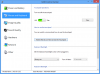 should i try to reinstall my drivers (used the recommended order) or is this normal?
-
I had similar problem with VCC, but after clean windows instalation. Try to reinstall Sony® Shared Library.
-
Can somebody who has done the ODD - HDD/SSD mod tell me if the body is in one piece or if there is a separate plate around the keyboard? And are there any German users that can tell me whether the keyboard has a large Enter-key? Thanks.
-
What can you say about Gobi 3000, modem found in e.g. SVS1312Q9E?
Overrall, is that model (SVS1312Q9E, i3-3110M) worth buying? How about the endurance and reliability? It's silver chassis looks pretty decent despite the fact that it's most plastic, although I'm not sure if it'll survive couple of years.
What's your opinion? It's pretty cheap at the moment in my country with a prize comparable to Samsung NP530U3C-A05PL (i5-3317U). Which one is better built and durable? -
The recommended order is a load of bull, you can do it in one go without any restarts.
The real issue (and fix) is here: http://forum.notebookreview.com/son...y-s-series-owners-thread-120.html#post9083981 -
Hi, can anyone please answer my question? I would be really happy.
-
A lot depends on how you use the laptop. I had the same concerns when I got my S15 white a little more than 3 months ago, It is very delicate in the sense that you wouldnt want to put heavy stuff on it or let it bump around. Its been in my backpack quite a few times with a good thick sleeve and it hasnt taken any sort damage so far. So if you're the kind of user who is extra careful with his stuff - go ahead and get it. For most people with careful use and a decent sleeve it shouldn't be an issue but any kind of rough user should look for a sturdier alternative.
-
Agreed. I have the S13P and the lid is really flimsy and probably sensitive to hits.. It's hard to figure out why Sony hadn't put an extra sheet of aluminum, plastic, carbon fiber or whatever on top of it.
-
Thanks! But what about WWLAN, Gobi 3000? Is it any good? And will the i3-3110M be enough for basic usage, Photoshop and some older games?
-
thanks for the input,but that didn't work for me. I currently don't have any unknown devices in my device manager. I tried right clicking the inf to install it but it says this type of installation is not supported. all my hotkeys work, but a lot of things are gone from the control center. I mainly just want to edit my keyboard backlight settings.
-
Sorry I misread you are using Windows 7 now, in that case you might need to look into drivers for the 7 model, but it's not something I've got experience with
Sony eSupport - SVS13A190X - Support -
Hi everyone!
I have a Sony 15"(VPCSE2MFY) and want to add an SSD drive just for the OS. What is the best deal and brand for a small SSD?(64gb for example) Any suggestions where to look for a compatible SSD, besides ebay and amazon?
Thank you in advance! -
Hello, I am experiencing performance issues on my Sony Vaio SVS151190x after updating to windows 8. When in SPEED mode, the laptop lags and stutters and sometimes even crashes. I have tried 3 separate clean installs and the issue still seems to exist. I was hoping anyone else here had experienced this. I REALLY hope it's not hardware related as I just crossed the one year mark on this thing. =/
-
I'm thinking of buying an s series 13.3 for a college laptop, and I wanted to ask about the wifi connection. How is your wifi connection? Is it stable and do you get to the 5hz band or just the 2.4 ghz?
-
It may be a cooling issue? A dirty or worn fan might be insuficcient to cool both graphics chip and CPU. The lagging and stuttering could be severe throttling. I once (indeliberately) blocked the fan during gaming and the cpu underclocked to 1,2 GHz. Can you check out your temps?
-
Hi again!
I just tested my battery life on power saving mode, screen on 60%, wi-fi and youtube refreshing every 5 sec I got 2h 10min of work... Is it normal? On Notebook Check they got 4h
-
Here is an excellent post about battery life with the sheet battery.
http://forum.notebookreview.com/son...y-s-series-owners-thread-647.html#post9187763 -
So my battery is okay... according to this post. Good and bad in the same way... I'm happy that I don't have to buy new battery and I'm not because I wanted longer battery live
I need to buy battery sheet.
P.S. Very usefull post, thanks.
Official 2012 Sony S Series Owners Thread
Discussion in 'VAIO / Sony Owners' Lounge Forum' started by Petrov, Jun 9, 2012.


![[IMG]](http://imageshack.us/photo/my-images/266/2zg7.jpg/)


