 Problems? See this thread at archive.org.
I haven't used the recovery disks, but I would guess they format it in GPT... So it is a different problem...
What kind of error do you get? Can you give some more information?
-
I finally got myself an S series with the nvidia graphics 1GB. I still don't understand one thing though.. what does the switch from stamina (standard cooling) to speed (performance) do exactly? Does Stamina throttle the gpu and the cpu or only the gpu? I ask because with no load the switch to speed makes the fan start up moderately loud.
-
In 'stamina' the discrete graphics are never used; in 'speed' the nvidia graphics are used dependent on the application running and the settings you choose (see the nvidia control panel).
Then, in vaio control center you can choose cooling/throttling options... In 'priority to ventilation there is moderate noise even while idling, but there is no throttling unless you get to very high CPU-temperatures (somewhere about 95 degrees I think, I have experienced throttling while gaming and blocking some vents by accident, and the cpu was about 95 degrees...). In priority to silence there is a lot of throttling, because the fan never really spins up. In 'standard' there is some cpu throttling (no turbo boost above approx 70 degrees), and a lot of graphics throttling (gpu goes to 135 degrees above some temperature). So for gaming choose priority to ventilation, for cpu-heavy work you can get away with standard, if you care more about silence than the 20 or so percent turbo boost gives... -
Is this computer loud on stamina mode or is it only on speed and when set the priority to ventilation?
Btw. is S13 more silent than SB? -
I've had a 1600x900 S13, but that screen was horrible, especially the screen-door effect. Does the 1366x768 S13 version suffer from the screen-door effect too?
-
I find it extremely quiet on stamina with normal use. When i play games on speed mode. it is loud but not jet fan loud. More like noisy air conditioner loud.
-
Stamina is silent as far as I'm concerned. I hear other people's laptops before mine. Speed mode is also extremely quiet but not silent during idle. When playing games on speed, it spins up loudly but nothing I wouldn't expect during high loads. Overall I'm extremely pleased with the cooling and noise on this laptop (SVS15 2012, had it for about 4-5 months).
-
Yeah it's pretty reasonable noise level when gaming, and any decent pair of closed headphones kills the frequency perfectly
Sent from my GT-I9000 using Tapatalk 2 -
I got more of a software related question ...
Due to my eyesight I was using 1366x768, 125% dpi on my VAIO F1, that's a 16.4" screen, 1080p native resolution.
Now on the SVS15 I set the 1920x1080 since I use it mainly for watching movies, so I reckoned I'd use the native resolution. Font dpi is set to 125% as well.
If I set the F1 to 1920x1080, 125% dpi, the letters, even though the screen is physically larger, are much much smaller than on the SVS15 - any ideas?? (it is not the fonts, both laptops use the same theme).
Even if I set 150% dpi on the F1 the letters and everything is still smaller.
Yes I rebooted on both laptops
-
I got the Sony Vaio SVS151290X early this year and it came with Windows 8. I just want to know if anyone is having problems with their USB 3.0 ports on Windows 8. There are certain devices like my TASCAM USB audio interface which only works when I plug it into the USB 2.0 port. Also, when I try to connect my Android device in Virtualbox, it only works if I've plugged it into the USB 2.0 port. So in a nutshell, USB HDDs and keyboards and mice work fine on the USB 3.0 port, but some devices don't.
I am not sure if this is a problem with Windows 8 not working well with USB 3.0 ports or whether the devices don't support USB 3.0 (which I thought was backwards compatible).
Anyone know where/how I can start figuring out the solution to this problem? Thanks. -
I am STILL curious, my left side of the trackpad is much easier and more pronounced when pressed. On the right side, it is very stiff and does not make a pressed sound.
I am still trying to figure out the cause of this, one plausible solution is the glued on wires near the battery and near the right side of the trackpad...is there any fix to this plausible solution? Or does anyone else have any solutions? -
hi hasisious,
i am planning to buy a custom vaio, i am really confused between s series svs151290x performance and ideapad.. because of a lot of -ve reviews on s series.. but i really loved the design and specs..
Please let me know u r opinion and also can you please comment on the latest fit series.. -
Some devices especially audio are dodgy on either the USB 2 or the 3 ports, no idea why
Sent from my GT-I9000 using Tapatalk 2 -
I have a few questions regarding the screen mod,
- Does anyone have the Vaio splash screen/BIOS on boot? I do not have that, neither do I have the Windows 7 tiles. It brings me straight to Welcome screen.
- How is the screen in terms of contrast? On my LG, I don't really see red colors, maybe Orangate? Go on this site: http://www.hdwallpapersplus.com/wp-c...inbow_1115.jpg
AND compare with a different laptop or monitor, clearly, the red is not as visible when compared to other laptops. Even when comparing to my other SVS13P, the red is much more vibrant, but it has bad viewing angles and grainy words, hence I made the mod. -
Have any of you successfully switch the odd to an hdd on the S151290x? Was it a 9.5 mm caddy thanks trying to do this but dont know which caddy to buy any recommendations????
-
^ there is a thread about this here. i believe it's still on the first page.
-
Thanks so much!!
-
I'm using SVS13A190S. I dont know how to use Vaio update? i dont even think i have it.
-
sorry but what is SFEP?
-
dug back though my posts and found it
http://forum.notebookreview.com/son...y-s-series-owners-thread-120.html#post9083981
Why this isn't in the OP i have no idea -
Hi, i have a problem with my SVS 15 i5, 12GB, 180GB Intel SSD 335. I made clean install of Win 8 on my SSD and it worked well few weeks but now i have power consumption around 24W!!! I tried it on both graphic cards, NVIDIa is on default clocks 135/405. Processor working around 1.18GHz and in task manager CPU load is around 2-3%. Brightness of LCD is in low level.
Pls help me, thanks. -
A windows update may have broken a driver? Try system restore.
Also, what app are u using to determine your wattage usage?
Sent from my SCH-I535 using Tapatalk 2 -
I use Battery Bar Pro.
-
Unfortunately for me the noise is constant even without gaming.
I wuold like to open it again but I've had trouble fiddling with 3 flat type cables inside and don't know how to disconnect them without breaking anything.
Does anyone know what I am refering to ?
Thank you all for your help -
New SVS1512DCXB received a week ago tomorrow. Updated all the Win8 and Vaio drivers, including a notification for the NVidia drivers this morning. My problem - restoring from sleep and going back and forth from/to the port replicator. When I restore from sleep the screen clarity looks "cartoon'ish," isn't real clean, real crisp. Only way to get it back is to do a full reboot. Running both the notebook LCD and my external 23" LCD monitor at 1920x1080 FHD. Would have thought this should be a non-issue, but it's driving me nuts.
Anybody seen this before? Checking monitor output it shows the output resolution - whether to LCD or monitor - is correct, but still it's fuzzy, doesn't look like full resolution, clarity is definitely off.
Thanks in advance, -
If this is what I think it is, it should only affect the laptop's LCD
Simply replug the charger cable -
YES! that fixed it thank you so much! I found the settings but i dont know if they will make a big difference. When i first opened it it was like this :
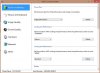
I guess ill just make "SPEED" from standard to performance and see if it fixed the lag once and for all. Thanks again
EDIT: It worked! No more lag finally!! ur the best
-
Actually, I tried the proposed file, but it doesn't work with my SVS1511C5E in Windows 8. Sony Firmware Device Parser is visible in Device Manager, but it doesn't seem to work at all. Checked Control Center and no effect
-
Probably another driver/software missing then
-
I dont have much time recently, I'll try to check it during the weekend. The best part is that now I used VAIO Upgrade Tool once more and... it didn't install everything. Quite interesting, it was working fine 2-3 weeks ago and I had to do nothing.
Nevertheless, I think it's high time to migrate to Windows 8. -
Agreed. This needs to be in the OP.
-
Looking to buy a Sony S series laptop...Does anyone have any comments on their refurbished ones? They have some pretty good deals...Just wondering why they have so many refurbished ones! Makes me wonder if the quality is not what it should be...
Leaning toward the 15" over the 13" mainly because I hardly ever travel and would mostly be using it at home...Plus it sounds like the screen on the 13" sucks pretty bad based on the comments here, especially the 1600 X 900 one...Not sure if I need 1600 X 900 on a 13" though...Like the weight of the 13" along with the GT 640 video card though... -
Hi everyone,
I know this might have already been discussed but since upgrading to windows 8, my SVS151190S (the original with win 7 pre-installed) is unable to play Blu-ray's or DVD's but it oddly runs music CD's just fine. Is their a quick fix to this without installing every single driver over again, maybe its a problem with my bios ? please any help or re-direct to the same problem would be appreciated
-
Hello all!
I bought my Vaio S13 today <3
My Specs:
Intel I5-3320M
nvidia 640M LE 1 gb
6 gb ram 1333 Mhz
13.3 1600x900
500 gb (5400rpm)
CD/DVD player / burner
Windows 7 Home Premium
White
I paid for it $600 and it is only 8 months old
I have 3 problems with this laptop after format. Can someone help me?
1. My hotkeys (fn+f*) don't work at all.
2. My backlit in keyboard turn off after few second if I don't type.
3. My keys "Assist" and "Vaio" don't work.
I have installed all drivers (I hope, but I sure that I have installed hotkey driver) and it still doesn't work.
I hope that someone will help me
Cheers! -
You may have installed all drivers, but you didn't install all of the software on the Sony support site
Sent from my SCH-I535 using Tapatalk 2 -
Yes, that is correct because I don't wanted all this junk software... Which I have to install?
-
matiss, what you need is in this link
Sony actually don't have as much junk software as other manufacturers. The only one that you really need is Vaio Control Center, but in order for it to work properly, you need other drivers and files which Darkimmortal has compiled in one file.
(in addition to your problems, I'm willing to bet you Battery Care, Display Brightness, and Fan Control functions don't work) -
Thank you very much
I have problem with this file "which you can install either by right click install on the inf" when I do it windows says: "this INF you selected does not support this method of installation"
"(in addition to your problems, I'm willing to bet you Battery Care, Display Brightness, and Fan Control functions don't work) "
Yes, that's correct
@Edit
This file is not only for windows 8?
Which driver from there is Vaio Control Center?
http://esupport.sony.com/CA/p/model...te_id=1®ion_id=3&tab=download#/downloadTab -
How much battery life do you typically get with the 13.3p laptop? i just bought the i5-3320, 2gb graphics, 8 gb ram s 13.3 laptop and am currently getting around 4 and 1/2 hours of run time on stamina mode. is this fairly typical? and how much more would i get if i added the sheet battery? ive seen from reviews that 5-6 is normal for this laptop and that the sheet doubles it, but mine seems to be around 4 1/2 with low brightness and stamina mode. kind of worried that the battery life isnt long enough for school use and that i should return it
-
No not exactly, my file is only Sony Firmware Extension Parser for Windows 8.
It's only useful on Windows 8 clean installs on the Windows 7 model, and all other drivers should be installed from Sony as normal. -
That's too bad for me... Okey, thank you for info.
@Edit
I solved my problem. I just had to reinstall "Hotkey Utilities " and install "Sony® Shared Library "
I so happy with my Vaio now <3
Cheers
-
Hi All,
Its been a while and my S13P (UK model) has been running like a dream. However I was always curious about doing the BIOS mod to get some extra grunt out of the graphics card.
So I couldn't believe my luck when I read about the ability to OC the graphics card WITHOUT TOUCHING THE BIOS - all is software. In fact I cant find any reference to it on this thread and I've been back a few hundred pages. Anyway, for those that may not have found it yet, you can overclock your graphics card using the Nvidia Inspector software and generating some bespoke shortcuts to OverClock (and return to default). Details are here:
Windows 8 - Updated Official BIOS - Latest Nvidia Beta Driver Overclock Workaround.
Thought I would post some of my findings. I am using the following:
VAIO S: Model SVS13A1C5E with Official Dock
256GB SSD
12GB RAM
BIOS: R0143C5
Windows 8 64-bit Pro with Media Center - clean install (sort of - had to clean install 7 then upgrade to 8 as I couldnt get the drivers to work but more below on that)
Nvidia Inspector 1.9.7.1
Nvidia Drivers 320.49
Processor Management - max 90% / Min 50%
Priority to Ventilation (or "Performance" on the new Win 8 control center)
OC to 950/1000
Ran the overclock shortcut and it does make a difference. I dont have any 3D mark scores yet but playing Serious Sam 3 jumps from 59 fps to 88 fps for the same scene. Diablo 3 is also a similarly huge leap. However my temps (according to CoreTemp) are over 90 for the CPU - dont know about the GPU. Thats a bit too high for me so I dont know if I'll be using it too much. Ambient is around 22-25 at the mo and normal desktop browsing temps are around the 50C mark.
I also have a default shortcut which returns the GPU to the standard variable state where it can ramp up and down as necessary.
The main problem I have though is that quite often, when I start playing, the keyboard and mouse will drop out. I have my keyboard and mouse connected to a KVM switch (I switch between work and personal laptops) which in turn is connected to the Sony Dock. Now it could be that the Nvidia driver I'm using (320.49) kicks out the USB ports on the dock because a load of other things switch off as well but at the moment I haven't delved into troubleshooting mode to find out exactly what happens. If the urge takes me I will post it here. I'm assuming it's a driver problem because it happens quite soon after playing so I don't think i'ts a heat issue.
Another idea I've had is that it *might* be a power thing?? - If the card now chews through more power and the dock is supplying power to a usb-hub, speakers, ext-sound card, KVM switch and charging a phone, maybe there's not enough power to keep everything running so the USB ports get turned off?? I have no idea, just brain-fartin'...... (btw I'm using the beefier power brick to power the dock).
Does anyone know if this kind of thing is a problem with the driver? I know 320.18 has issues but thought I would go for the latest.
And massive thanks to Darkimmortal for the SFEP driver thing :thumbsup:. I could never get the VAIO control Center working properly in a Win8 clean install regardless of which driver I installed (US or UK) or the order of installation. A silently failing install makes perfect sense as nothing really happened once run. But it did work when I upgraded over Win7 (which obviously carried over the SFEP driver from Win7). Your description (and posting) of the proper extracted version is genius. I may even think about going back to do a proper clean install of Win 8 soon. Thanks loads. -
Is it easy to replace svs13a1c5e touchpad? or would anyone know how much it would be to get it replaced?
-
That is achievable, but it depends greatly on what you do. I would not even trust comparison of "Battery Reader" tests on Anandtech to compare as I cannot believe anything except CPU torture is directly comparable.
That said, unless price is an issue, give that thing back and get the VAIO Pro instead. It can really get almost a whole day with the sheet battery (not the 12h = entire day Apple marketing crap, but actual almost 24h day). Will definitely get more than SVS13. -
thanks for the input, appreciate it. only reason i got it was because i got it for $650 from a friend when its only 3 months old, he probably paid almost double that amount on sonystore. i also do a little gaming so that attracted to me to it.
-
Stupid question: How can I know if my Vaio is s13 or s13p?
Have a nice day. -
Serial number
-
SNY06FA is probably a generic Sony ID. I just replaced the screen on my VPCZ1. Both the old screen (Toshiba? ) and the new one (AOU) show the same ID - i.e. SNY06FA. It is very unlikely that the screen in the S series is the same as that in the Z series.
It is, however, very likely that the lazy people at Sony are using the same ancient EDID for everything. If they can't give us regular graphics driver updates, what chance does a monitor driver have? -
S/N? In which part should be info about it?
-
From my knowledge my friend has a S series 13p and the vaio logo on the back of the LCD panel is gold and from what I can gather is that only the premium vaios have the vaio logo gold my bad about the serial numbers I thought it would tell you but it does not
Official 2012 Sony S Series Owners Thread
Discussion in 'VAIO / Sony Owners' Lounge Forum' started by Petrov, Jun 9, 2012.


