 Problems? See this thread at archive.org.
TBH I haven't tried calling in (or online chat yet) but I think there's been a bunch of positive "testimonials" on this thread. Definitely inspired me. What I would say is: "Can you tell me when the next promotion is? Or if I order now and the promotion starts in a week or two, do I still qualify for the discount (or free accessories)?" Seems like several owners were offered up-front discounts at that point.
EDIT: nvm, I see you gave it a try. 30%?!?!??! You have an enormous set of...self-confidence! LOL
As far as the Samsung-Sony deathmatch, please don't tell anyone I said this (I don't really want to overly bias anyone else's decision at this point), but the scales are tilted toward the 15" Samsung. It's turning into a very "personal" decision, weighed by factors that won't be the same for others (e.g., the "feel" of the build -- I just like the tank-like quality of the Samsung a little more). I was planning to wait a bit, hoping we might see a screen update in 2012, but that is probably not happening until spring. So maybe I'll pick it up now and sell it (barely-used) when the new round come out next year.
The Sony S15 is going back to Best Buy this weekend. I've really loved it (esp. the screen and gaming ability) and will really miss it. I'll probably steal my daughter's Asus for a few weeks and see how I feel without my own machine. Who knows...maybe I'll discover one of these two is my true love. LOL
-Matt
-
-
OK...I´ve canceled my Order for the S13P. I won´t pay so much money to get a Display like this one elninoloco7 posted.
Now...the search starts again :-(.
Asus UX31A or UX32VD are looking very good...BUT 1. Asus Service is, as i read in the net, "not so good". 2. There are many People posting about extreme Lightbleeding on the Displays, and some more Issues.
Other Alternative....Lenovo X230...but 1366x768 in this Price-Class no thanks... -
Just wondering, where is the Dolby Home Theater V4 Dynamic Equalizer, where you can adjust settings using various bars and such. I looked at the ad and they show this in their videos...
So far, all I can do with Dolby is change from Movies, Music and Games...pretty pointless to me.... -
I think that comes in the paid version.. this is some sort of stripped down version..
I haven't yet been able to bring this laptop to a acceptable volume level.. my old dell was way better.. any ideas? -
I don't think you are able to buy Dolby Home Theater, they are only included to select few manufacturers and are not able to be downloaded or bought...Which brings to our question of why can't we find where the equalizer is...
-
As it properly should be!
-
That's easy. Ux32vd. It has a gt620 in it which will give u better frame rates in games then the hd4000. Mobile tech review just posted a review and videos of gaming sessions.
-
Well, look what I found lurking in the bowels of our system!
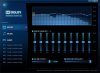
Turns out we do have the advanced version (I also suspect it's in the Realtek driver package you can download from Sony Support). Here's how to find it:
(1) Navigate to C:\Windows\Drivers\EXE\Audio Driver (Realtek)\PCEE4
(2) You should see two MSIs:
- DolbyAdvancedAudio.msi
- DolbyHomeTheater.msi
(3) If you try and install the second (HT) you'll get the setup screen of the "crippled" version that is already installed/running. If you want the other, advanced version, select "uninstall" (I'm reasonably sure you can reinstall later if you have buyer's remorse.)
(4) After HT uninstalls, run the "Advanced" version of the MSI.
EDIT: Hmmm, says Dolby Advanced Audio v2 -- is that earlier than the v4, or does it mean the Advanced app is v2 but audio processing is v4? Not sure.
(5) Once installed, you should have the same dumb little tray icon as before...except...CLICK ON THE SETTINGS ICON! It works! The equalizer menu should pop up. (Oh that's neat: the tray icon -- or not the icon, the mini-app -- animates during audio playback.)
I recall seeing something about it being a "demo" version of the app -- I can confirm the equalizer works, but I'm not sure if it's nagware, if it deletes itself in 30 days...no clue. Anyway, unhappy shoppers can likely revert to the original (HT) install if necessary.
-Matt -
Ok. I need some help. I'm trying to do a fresh install of Windows 7, following the OP exactly how Petrov explained it. I've followed a few guides on how to make a bootable USB drive for installing Windows in UEFI mode. However, even though I follow these guides EXACTLY (including the link that Petrov supplied), I am getting a very specific error message:
"No Device Drivers Found"
Has anyone else run into this error? -
AFAIK UEFI+USB = impossible. If you're doing a USB install, you have to go into BIOS and switch UEFI to Legacy, AND make sure that external USB is the first boot device.
-Matt -
There are quite a few guides out there that say it IS possible. And Petrov's guide even mentions that he himself got it to work.
Would it work if I did it with a DVD instead? -
I better check my glasses and take a second look. Anyway, I installed an SSD (using the method I described) a few days ago. Hope I didn't give you bum advice, but yeah it should recognize the DVD no problem.
EDIT: of course you're right ( Installing Windows 7 in native EFI mode from USB - bit-tech.net Forums). I guess I'd seen several posts noting no major difference between UEFI and Legacy (at least until Win 8) so I skipped that maneuver and just switched to Legacy mode.
-Matt -
I am not able to find the msi listed for Colby advanced .. has anyone else been able to see the equalizer yet?? And is there any improvement in sound?
-
Hey Elninoloco, where were you able to play with a ux32vd? i'd like to go to a store as well to check it out.
Thanks! -
I believe you need to format the USB flash drive as FAT32 for it to work.
-
You sir, are a scholar and a gentleman. This procedure installs Dolby Advanced Audio v2 instead of Dolby Home Theater v4. When you install it, it asks if you want to install the Demo Application, this is just a short video which demonstrates the audio effects in action. The app itself and equalizer appear to be the full versions with no time limits. I guess Sony was afraid of what would happen if everyone got the full version by default or something and started messing with the equalizer.
This should really go in the OP, I can finally control the sound with a full equalizer and add bass boost manually!
Dolby Home Theater v4 vs. Dolby Advanced Audio v2:
Dolby Home Theater v4 PC Audio
Not the same thing I guess, but oh well. -
Are you on the S13 (I've got an S15)? I'd assume they have the same Dolby software, or maybe not. I'm downloading the Realtek driver to see if it's in there.
As for improvement, I guess I don't have the right ear to say -- though admittedly at full volume it's not terribly loud.
Excellent, glad you got it working!
-Matt -
Small edit to my post. Dolby Advanced Audio v2 and Dolby Home Theater v4 are apparently not exactly the same thing. The big deal for me is that I have a full equalizer now.
-
I did this. I made the USB boot with the windows program, then moved all the files to my desktop, formatted the USB as FAT32, then moved all the files back over. Then did the boot folder move, and addition of the extra file.
-
DOHOHOHOHOHO~
So as I've learned, what we get on our Sony S series laptops is either a crippled version of Dolby Home Theater v4, or Dolby Advanced Audio v2 which doesn't have as many features.
However, our friends at Lenovo have posted this for us:
Dolby Home Theater v4 User Interface for Windows 7 (32-bit, 64-bit) - ThinkPad T420s, T420si, X1, X1 Hybrid
Download and install this file, and you get the full version of Dolby Home Theater v4 with equalizer and features missing from Dolby Advanced Audio v2! Yes, this download says it's for Thinkpads but it doesn't check what brand of laptop it's installing on or anything like that. Full version of Dolby Home Theater v4 get!! -
Just got my S15 (i7) with 4gb ram pre-installed. SO, I'd like to add another 4gb stick....just wanted to know if this would work or not: G.Skill SQ DDR3 4 GB (1 x 4 GB) Laptop RAM (F3-10666CL9S-4GBSQ) | Ram | Flipkart.com
-
A gentleman, scholar, AND a mad genius.

-Matt -
As I said in my Last Posting...there are quite TO much Quality Issues (There are many Threads in a few German Forums) And I don't Need the Notebook for gaming! The only Game I played some Times will be Sudoku or Minesweeper
-
Yes i did. Out of 10 Best Buys within a 50 mile radius only 1 had it on Display, however, it is either sold out or out of stock until further notice. They have two models. One with the i5 processor for $999 and another with i7 for $1199.99. Both have dedicated graphics and HDD 7200 hard-drive, but the Hard-drive and RAM is up gradable. I noticed no Light "leakage" but then again i was in a well lit area. But from what i was reading it is only noticeable in dark areas with black background. But mygosh, that IPS screen combo'd with 1080p is AMAZING! PC performs wonderful, but i felt that the graphics were better on the Vaio. I did a simple youtube test.
4K Resolution Time Lapse Stock Footage (timelapse) - American Cities - YouTube
That was played at "Original" format. (higher than 1080p). Under Speed mode on the Vaio S, it did not Lag at all, smooth play. On the Asus, it lagged but only a little. In Stamina mode on the S it lagged like crazy. So graphics and processor are def. a huge plus on the Vaio Sony. Also the speakers on the Asus are very impressive. Sony Vaios have the WORST speaker systems.
Anyways thats just my 2 cents. I still have vaio and love the performance but the screen is killing me. -
This all sounds terrific - but what does it actually mean for the user? Does it mean the speakers sound better or are, at least, able to be made significantly louder? If you think its important I'll add it to the OP of course...?
Petrov. -
I don't know if the speakers can ever sound any better or louder. The laws of physics dictate such things pretty strictly. Still, these speakers don't really seem like they are being driven at anything near max volume output as even my PSP's tiny speakers get louder than the speakers in my S15. So maybe this can do something useful. I don't think it should be added to the OP until people have tested it and determined if it really helps or not with the built-in speakers.
I'm really excited to have the equalizer mainly for listening through headphones where I've really been missing some kind of bass boosting function. The Dolby Home Theater v4 has some kind of "Intelligent Equalizer" function in addition to the 10-band graphic equalizer, I'm looking forward to playing around with it on both speakers and headphones. -
It always surprises me that a company known for its audio and visual products always puts such dire speakers in its laptops. I bought a mbp a while ago as I do a lot of xcode work for clients and although not an apple fan I love the screen and speakers they use. I actually often find myself listening to music on the laptop rather than dragging my speakers out.
I know when my s13 arrives I am going to be really disappointed if I try and fire up some tunes on the speakers. -
If you guys want to test it out, give it a shot and see it helps our speakers out or not. It certainly looks cool with all the sliders.
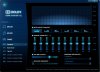
One by one, we're fixing all the problems with our S series laptops. Slower GPU? Done. Crummy speakers? Now in progress. SATA III? Next on the agenda! (I hope.) -
Which German forums you are referring to?
I would like to read how my neighbors are thinking about the S13P. -
Look at ComputerBase Forum here is one large Thread about the UX31 and UX32 or at Forum de Luxx
-
:BUMP: Reply guys?
-
I'm pretty much ready to pull the trigger on an S15 with the 256 GB RAID SSD option, but I've heard here that it comes with a proprietary SATA connector. Would this make it impossible to replace the RAID SSD with a regular SSD later on, without going through Sony?
Secondly, has anyone tried running the Windows 8 Release Preview on their S13/S15 yet? If so, are any of the new multitouch touchpad gestures working so far? -
Hey, I downloaded and tried to install the version, but can you post steps in what to do?
I think it's just an setup wizard, and I only see options of repair and remove? Did you get yours to work?
PS: What is the difference between Advanced Audio and Home Theater V4? -
Also, what color profiles/settings are you guys using to minimize the "graininess"/pixels we are seeing on the screen especially while browsing?
-
Yes. NOT low voltage. Asked and answered many times in this thread.
-
So i took a look at both the s15 and the s13 today. Definitely preferring the latter for mobility and sturdiness. Sadly the Sony center shopkeeper refused to start either of them up because that would then the laptop wouldn't be new anymore.
-
I know my desktop runs a OCZ solid 3 120 gb with 2 1tb WD blacks in raid0 so its to late to save me but besides ram it would be the only other thing i could/would do but with the 640 gb plus 256gb that puts me at 900 gb so it would be like a minivan with a race car engine
-
Also, once I install an clean Win7 on my SVS13, would I still find the Dolby with the equalizers and such?
Also, an BUMP to my previous two questions
-
If they've been put on display they can no longer be sold as new anyway, they would be ex-display models.
-
Is it also possible to do this using a portable USB hard drive, rather than a USB stick??
-
S13 with 640m LE + 1600x900 screen just ordered. Sony site says they _planned_ the production.
Anyway, paid 985€ with the student discount and got also the free slice battery. Anyone knows how much does it weight with it?
Also, chat operator said it's estimated to arrive between 14.8 and 20.8. -
Have been planning to get the SVS13A soon. Can anyone please confirm to me whether the
USA SVS13A's have the VGP-BPS24 battery (4400 mAh).
Asking cause I have the option of picking up the SVS13A from the
USA - http://www.docs.sony.com/release/specs/SVS13A12FXS_mksp.pdf
or from India - SVS13A15GN : S Series : VAIO Laptop & Computer : Sony India
The India model shows battery life of 5 hours whereas the US model has 7 hours.
Curiously I looked at the UK website and it states SVS13A as having battery life of 8-7 (hours) with the VGP-BPS24 battery.
Link : SVS13A1S9E (SVS13A1S9E, SVS13A1S9ES.CEK) : Technical Specifications : VAIO & computing : Sony
Just curious as to why they would spec it at 5 hours in the India model. (Same 5 hours is Singapore/Thailand/Hong Kong)
Does Sony feel that the battery would last less in warmer countries? LOL -
HAHA. :Asians:
-
Buddy FYI Sony is an Asian Co and so are most of the components that make up any notebook PC.
-
Just an update to my Canadian comrades, the free sheet battery for students just went up today for us.
T Here used to be a coupon code VOUCHERCODE that gave you a hundred off, but it doesn't seem to be working. Does anyone know a coupon code I can add to this to save even more?
EDI: I had the coupon code wrong, it is VOUCHERCODES, and it works. I just configured a model with the i5, free sheet battery, min ram and hdd so I can upgrade myself, and it came out to 909. Pretty crazy. I think I have to buy it. I don't like that it gets so heavy with the sheet battery, just to get more than 4 hours of battery life, but this is too crazy a deal.
Since it is so cheap, would it be worth it for me to upgrade to the 2gb video card or i7? I am not sure I need either, wouldn't be gaming that much.
--
Customization Summary
CD/DVD player / burner
Internal lithium polymer battery (4400mAh)
Black
Kaspersky® Internet Security (30-day trial)
Microsoft® Office 2010 Starter
15.5" LED backlit Full HD IPS display (1920 x 1080)
3rd gen Intel® Core i5-3320M processor (2.60GHz / 3.30GHz with Turbo Boost)
English only with Backlight
NVIDIA® GeForce® GT 640M LE (1GB) hybrid graphics with Intel® Wireless Display technology
500GB (7200rpm) hard drive
4GB (4GB fixed onboard + 1 open slot) DDR3-1333Mhz
No Fresh Start
Microsoft Windows® 7 Home Premium -
Hey.
I just called Sony Customer Service about this, trying to get them to give me the sheet battery retroactively. The response was this:
If you use the promotional code, you don't get the sheet battery. Essentially, the sheet battery discount is considered a cash discount, which works the same as the VOUCHERCODES.
If you follow your order through to the final page, you'll notice that your sheet battery will disappear from your order if you use the promo code! -
@Some previous poster that I couldn't be bothered to find
If you have Bass Management not Bass Boost, turn off Full Range Speakers.
Also I have just put together a quick autohotkey script to toggle bass boost off for headphone use:
Code:#NoEnv ; Recommended for performance and compatibility with future AutoHotkey releases. #Warn ; Recommended for catching common errors. SendMode Input ; Recommended for new scripts due to its superior speed and reliability. SetWorkingDir %A_ScriptDir% ; Ensures a consistent starting directory. #F11:: Run Control Panel winwaitactive All Control Panel Items send {Tab} Send s{Enter} winwaitactive Sound Send {Tab}{Tab}{Tab}{Tab}{Down}{Tab}{Right}{Enter} Sleep 20 Send {Tab}{Tab}{Tab}{Tab}{Tab}{Tab}{Tab}{Right}{Right}{Tab}{Space}{Enter} Sleep 20 Send {Escape} WinClose All Control Panel Items return -
Ok. I have seriously fudged something up with my clean install. Can someone who has some advanced tech knowledge please PM me?
EDIT: Nvm.. I think I got it.. It's expanding Windows files now.. So I think things will be fine? Haha -
Sorry for the run around, you are right I just went through to the final page and lost the battery. Harsh. I might call and see if they can take anything else off if I bother them enough.
Official 2012 Sony S Series Owners Thread
Discussion in 'VAIO / Sony Owners' Lounge Forum' started by Petrov, Jun 9, 2012.


