 Problems? See this thread at archive.org.
Just wondering, after I install Win7, how can I install my drivers from my External Hard Drive?
Without any USB drivers, how can my laptop even recognize my External Hard Drive?
-
Win7 has built in drivers for the USB2 port.
-
Thanks, and when do I install my BIOS?
PS: Did anyone got the Dolby Home Theater V4 download from Lenovo to work? I like V4 better than Advanced Audio 2. -
Could someone more knowledgeable than I regarding SSD's please comment on this, to go in an S15? I remember reading that non sony SSD's were being slowed somehow anyway, so is this a good option? It is on sale for 200 dollars.
OCZ Agility 3 360GB 2.5IN SATA3 6GB/S SandForce SF-2281 Solid State Disk Drive SSD - OCZ Technology - AGT3-25SAT3-360G
Thanks in advance -
Can't say I'm more knowledgeable but I got the 128GB version of that drive working in the S15 last week. Absolutely no problems and read/write speeds somewhere near 180MB/s.
-Matt -
Just still abit unsure about the BIOS. When I insert my DVD with Win7 ISO on it, I press F2. So since I am in the BIOS, does that mean my clean install Win7 already has the BIOS? So I don't have to download the BIOS and place in it the External Hard Drive with all of my other drivers?
-
They are being slowed down, as say sony forces sata 2 (sata 2 is 300 mb/s) speeds. I have the samsung 830 ssd, which should be able to get 550 mb/s read, but due to the sata 2 its getting around 230 mb/s.
This might sound like a huge drop speedwise, but the difference isn't really noticeable in windows/games.
I would really get that ssd, and seems like a good deal (money wise)
it definitely makes your boot time speed up, and make the overal windows experience more snappier.
There might be a way to force sata 3, maybe with some sort of bios-hack. But i'm not familiar with that, and am happy with my improved speeds-> way better than the 5400 rpm hdd.
BIOS is not something you install on your hdd, it's soldered on your mobo. ( so it's not an external driver you have to download, which I think is your concern)
The bios indentifies all your components, and than runs the bootloader which will start windows 7 from your primary hdd.
It however can be flashed to newer version, theres also a BIOS version which allows to GT460M LE to be heavily overclocked. <-- see the OP "GPU overclocking through BIOS mod"
To freshly install a new windows 7, you have to change the boot-device order in the BIOS setup( you get into the BIOS setup by pressing F2).
Make the cd/dvd-drive #1 in the boot-priority.
So it will not start windows7 on your hdd, but will launch windows 7 setup from the dvd. -
OH ok thanks for the clarification!
Now my other concern is if anyone has downloaded the Dolby Home Theater V4 from Lenovo yet as I don't know how to get the equalizer from the installation. I also prefer V4 instead of Advanced Audio. -
yes those 4gb g.skill work -> kinda all 1.35 or 1.5V SO-DIMM ram.
although, I chose for 8gb SO-DIMM, making the total 12gb's
up to you tho! -
I would like to second this question. I did a clean install of Windows this afternoon, and when I try to run the Lenovo file, I only get "repair" or "remove" and then it can't complete the installation.
EDIT: Runordie. I found a solution. When you run the Lenovo file, choose the "remove" option. This will remove the previous remnants of the program from when you did the fresh install. Then when you open the Lenovo file again, it will let you install the program from scratch. Works fine. I'm in the equalizer right now. -
OK, US deal-watchers -- the Sony deals are back:
Free Sony PS3 with Sony VAIO Laptop Purchase is Back, Plus $150 Off Rebate!
- Free PS3 or Vita ($250)
- $100/$150 rebate
On select systems (including S13 and S15).
-Matt -
Sorry for the second SSD related question in this laptop thread, but now that we get a free sheet battery in Canada I think I have no choice but to get the S15.
Could someone also please let me know if this is a decent SSD:
ADATA AS510S3-120GM-C 120GB 2.5IN SATA3 SandForce SF-2281 Solid State Disk Drive SSD - AData Technology - AS510S3-120GM-C
I don't know anything about SSD brands, or what to look for, so thanks a lot guys, and to those of who commented on the first one. (This one is more my budget).
Good lord, I need to temporarily register at Washington University and make a quick pickup over the border, that is a crazy deal. -
SSD is fine. Will fit without a problem!
It has less memory(120GB) than the SSD you mentioned before (OCZ agility 3 360GB)
So keep in mind if it's enough space for you, because it's more expensive to replace it for a bigger SSD.
edit: Performance wise -> theres not really a difference in real world usage. [only a 64GB SSD is noticable slower, since it has less physical NAND-flash chips] -
Hi there, thanks for replying. I was aware of the space, I just am not sure what constitutes a good SSD, when compared to another, since they all says SATA3 it seems. I think this will be alright, as I will put the 5400 rpm into the ODD bay.
I was curious, can you buy an enclosure to use the DVD drive externally? -
the combination of a free PS3 plus a $150 rebate is insane! now i'm seriously considering selling my SA2 and buying a S13A.
-
And europe once again gets screwed over. Thanks Sony!
-
Yes there are many enclosures. The thing I cannot find is the type of connector the slot in drive from sony uses( either sata or pata)
for sata: Portable External Enclosure Case Caddy for Apple DVD / Super Drive USB SATA 9.5M | eBay
for pata: New External CD DVD IDE PATA Enclosure for Laptop Computers Netbook Replacement 797734243529 | eBay
so if anyone else has some insight on what connector is used, let me know!
edit: their are many more enclosures available: just look if it has same dimensions and either sata or pata
edit2: I am 99% certain it is sata -
Thanks for the heads up crackertime
Just ordered this
Component: Internal lithium polymer battery (4400mAh)
Component: CD/DVD player / burner
Component: No Fresh Start
Component: Kaspersky® Internet Security (30-day trial)
Component: Microsoft® Office 2010 Starter
Component: English only with Backlight
Component: 3rd gen Intel® Core i5-3210M processor (2.50GHz / 3.10GHz with Turbo Boost)
Component: 500GB (5400rpm) hard drive
Component: NVIDIA® GeForce® GT 640M LE (2GB) hybrid graphics with Intel® Wireless Display technology
Component: 13.3" LED backlit display (1600 x 900)
Component: 4GB (4GB fixed onboard + 1 open slot) DDR3-1333Mhz
Component: Black
Component: Microsoft Windows® 7 Home Premium
Total came to about $1074 with taxes + express shipping(free). Didn't think I'd use the extended battery much so I opted for $100 off instead, using the "VOUCHERCODES" promo code. Will be using this for college (computer science) as well as a bit of gaming on the go. -
Sorry for asking again, does anyone know the overall weight of the S13 with the extended battery OR the weight of the single e. battery?
Thanks in advance. -
Does Sony Store Online in the United States charges tax? What States?
Another question, in case i'm not satisfied with the laptop, does Sony US online store charge restocking fee or do they fully refund you?
Thanks -
OK first impressions of my s13A, it's super light and solid build quality loving the form factor but the screen is just not that good, viewing angles are mediocre at best. This is unfortunate but seeing as I won't be using this for graphics, the screen will suffice.
SSD swap will be occurring tomorrow. -
Hey man, congrats on your new purchase!
Just wondering, do you also notice the graininess/pixels?
How can we compensate this with color profiles? What is everyone else doing with their color profile? -
Oh man I almost bought the s15 yesterday when they didn't have the deal and decided to wait so now i get this 15$ off for student 100$ off plus free upgrade to professional win7 free sheet battery and a free ps3
-
How in the hell did you get all those for free when it's only 1 coupon code allowed? how did u get a free ps3 then a free sheet battery then another $100 off?
-
I tried to apply the ps3 coupon on a ready to ship s15 but it said I cannot use it.any idea how to use ?
The one which has free sheet battery.
Sent from my iPad 2 using Tapatalk HD -
Has anyone been successful in creating recovery media? the damn thing keeps eating my HP dvd +R disks with failures.
-
No issue here with Sony DL discs.
-
Nope, it's either PS3 OR Vita OR the sheet. Sorry. With either one, though, you CAN stack the $100 rebate.
Like I said ^ the sheet and the game system deals can't be combined. One or the other. The rebate stacks with either.
Sorry, there are only select systems available for the deal:
http://store.sony.com/webapp/wcs/stores/servlet/CategoryDisplay?&identifier=S_VAIO_Playstation_models&catalogId=10551&storeId=10151&langId=-1
If you want a "prebuilt" S15, you can take the minimally-configured SVS151190X Enhanced (Core i5, 6GB, 500GB) for $1000 which will include the PS3 or Vita (or sheet battery) and then you can mail in the rebate form for another $100.
I'm also going out on a limb and guessing it's sales tax for any US buyers, regardless of state. Or maybe not NH.
-Matt -
I thought I could have stacked the free sheet battery with free ps3 and then the 100$ visa. Cannot do that I guess.
Sent from my iPad 2 using Tapatalk HD -
Here's a screen shot with the the minimal S15 I just described ^ and the Vita added ($6.50 shipping, $63 sales tax):

The sheet battery drops out of the cart once the game system is added.
Here is the link for the rebate -- you need Win 7 Pro to get $150 back -- Win 7 Home Premium has a $100 rebate:
Visa Prepaid Offer
-Matt -
OH man! I just bought a VAIO two weeks ago! Would I be able to get this offer retroactively or something? Not sure if I used that term to describe it right...
-
Put it this way: doesn't Sony have a 30-day return policy?
Sony eSupport - Electronics
If so, then just give them a call! If they refuse to hook you up, pack it up, ship it back, and REORDER! LOL (Bit of a hassle, tho.)
-Matt -
...got it engraved ^^;; lol. No returns
-
In that case... DOH! But hey they may not know that, call and bluff 'em.
-Matt -
I made a new thread of this in the standard sony forum but thought i would post his here for anyone brave enough to make a guide for the rest of us...
I have a hunch that the Anti Glare coating on the Vaio s 13p screen is what is causing our screen door, shimmering, and other issues with the screen. (just like putting an anti glare screen protector on your phone.) I came across a forum where folks have removed the layer and ended up with a very nice picture.
This will void your warranty, but anybody want to try it with their Vaio and make a walk through for the rest of us?
Here is the link to the forum walkthrough for a Dell monitor.
[Guide] How to remove the anti-glare(AG) coating from a Dell U2312HM LCD - [H]ard|Forum -
The reflection is bad enough as it is compared to a true matte monitor, and you want to make it worse?
-
Oh darn didnt notice the sheet battery dropped out it let me use the code so I thought it would work oh well
-
Thanks. I notice it a bit but nothing one can do.
-
it's possibile to attenute intensity of light in blacklit keyboard?
-
I dont have mine yet but from the reviews you can't do it its either On(automatic brightness) or Off
maybe someone will find a hack to access the control but for now to the best of my knowledge you cannot -
Got a screenshot of the control panel -- kinda limited options:
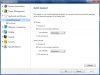
I haven't seen a way to control brightness. There also isn't a keyboard shortcut to turn on/off -- gotta use the control panel.
-Matt -
Regarding sales tax....yes they do...though I think it's only charged in states that have a sales tax and where they have a brick & mortar store. When you enter your zip on the order form it computes both shipping and sales tax.
-
Had my S13 P since tuesday and now just decided its going back for a refund. I didnt think the screen issue was much of an issue but after using it the past few days it became very apparent how bad it was and after paying £1000 for it it should certainly be better than what it is. Even my old M11X is nicer to look at in my opinion. Tried calibrating,adjusting and still looks no better than my daughters £300 HP. Maybe mine was just a bad one. Everything else with the laptop is near perfect. Maybe Sony`s thinking was if they put a better screen on it will take sales away from the Z series.
-
I still don't know what all the fuss is about the screen. Maybe you guys are expecting the world for a sub $1000 laptop, or maybe I'm just completely out of tune with what a good screen should look like in the year 2012 (my last laptop I used was from 2008). But it seems just fine to me.
My biggest issue with the machine isn't the screen, it's the surprisingly loud fan. I know it's a crazy thin laptop, but that thing is LOUD when you have it on "Priority to Ventilation". Still not going to make me return it though. But if I had to complain about anything, the screen wouldn't be first on the list.
To put it another way, if I didn't know this forum existed, I would probably be over the moon with the laptop as a whole. -
Aaand, even though I promised I was done with SSD questions... I am correct in the idea that unless it is an mSATA SSD, you will need a caddy of some kind? Further more, for the S15, you need a 9.5 mm compatible caddy? Tanks!
-
Well it took a while but I finally have the SSD installed and all is running good. currently updating windows and what not.
I initially was going to go via the clean install using win 7 cd but somehow I burned win 7 ultimate not pro so that was no go, and therefore decided to use the recovery discs and they worked like a charm, no hick ups and all I did was replace the disks and let it all install by itself. I will admit that win 7 is something I will need to get used to from vista.
SSD is quick, 12-15 seconds from reboot which is insane for me coming from a hdd that took ages. installing the ssd was also a hell of task since I didn't have the proper screwdrivers but once I got it in it went smoothly after that.
The laptop is quiet and only becomes loud under full load, otherwise while browsing I can't hear the fan at all. Will post more once I get a full day with it tomorrow.
Forgot to mention, I was assuming I would have to activate windows after doing a recovery but I did not have to and this is a nice surprise. -
Like I said maybe mine was just a bad one. I`m usually the last person to return things I`ve bought. And even after reading everyones views on here about the screen I still went ahead and ordered the laptop.I thought it cant be that bad seeing as its 1600 x 900. I wasnt even after anything exceptional, just something that doesnt look too bad. But to me it was far below par.
I noticed the fan can get very loud to. maybe most of the laptops are similar now a days because there much more powerful. -
Are you talking about the graininess/pixels you are able to see on the screen?
I keep asking b/c I want to make sure I didn't receive an bad one.
PS: How do you guys think the keyboard is? I don't know how to describe it, but it's not as "pushy" as other laptops, like there is too much of an cushion when you press on the letters....don't know if I make sense
-
Cheers for the feedback. I'm glad I didn't bite the bullet a few days! I think it's quite ridiculous by Sony UK to charge £1000 for a laptop that has a display on par with budget £500 laptops. The resolution seems the only positive but I'd rather go for good contrast/colour over resolution any day.
-
I've been searching for the laptop of my dreams for quite some time now, and I think this finally may be it (Yay!
)
However, when it comes to build quality I'm really picky, so I',m torn between the regular model and the premium model
So, if someone who owns the regular model would describe the magnesium chassis for me, I would be very grateful
- What is made of magnesium? The bottom? The sides? The palmrest? And especially the lid?
- How is the magnesium? Does it fell like plastic, does it bend easily, and so on?
Unfortunately, there isn't a store which sells these laptops in my general area, so I can't see them for myself.
As a poor student my money situation is a bit tight, so I only want to pull the trigger on the premium model, if there's i HUGE difference in the build quality.
I know this question might already been asked a hundred times, but I have a very limited internet connection for the time being, so hence the question once again.
Thanks in advance! Oh, and sorry for my poor english
Official 2012 Sony S Series Owners Thread
Discussion in 'VAIO / Sony Owners' Lounge Forum' started by Petrov, Jun 9, 2012.


