 Problems? See this thread at archive.org.
I'm almost done with a comparison of the two, if that helps. Feel free to take a look.
After trying both machines, I'm thinking about playing with the Asus N56VZ next week (heavy, but yeah...). I also just started reading about the Gigabyte U2442, which hits the specs I'm looking for to the "t". I'll be interested in seeing what it releases for on Amazon later this month.
-Matt
-
-
Any thoughts as to whether Sony will continue to offer the current S models after Windows 8 release in late October? If continue, will they likely be offered with either Windows 7 or 8?
-
Definitely reading it right now and I will give some feedback in the thread. Thank you!
-
Awesome -- thanks! You'll inspire me to put in the finishing words.

EDIT: and I hope you don't mind but I'm "liking" your post since you didn't spell "definitely" as "defiantly" or "definatly". Drives me crazy. -- So yeah, I like clicked on "like" and like nothing happened....?
Matt -
That's a shame. I would love to have it. Oh well. Hope the laptop lives up to my expectation. Thanks
Sent from my iPad using Tapatalk HD -
Well after about a month the right speaker on my S15 died... it just makes scratchy noises now (I know, very technical term).
I'm really bummed to have to send it back to sony for such a dumb little problem, but they won't just send me a new speaker.
So whilst i sit and ponder my misfortune for a week or so without a laptop, anyone else had the same problem? -
Grrrrrrr. So turns out on the Sony website there are TWO versions of th sfep driver. If I install the right one everything works great!
unfortunately I only discovered this after a fresh install of windows 7, so I have lost my windows 8 installation.
Dunno if I can be arsed to go back and try again... -
anybody else getting the "installed battery may not be properly connected to the computer or may not be compatible with the computer" message and force you to hibernate? I just did a fresh install of windows and install all the drivers in order as suggested on first page. I even took out the battery for awhile (15-20mins) and put it back in but still cannot get pass this message. argh
edit: i am using the original sony battery. -
Reinstalling the Hotkey Utilities probably solves your issue (maybe first check if it can be uninstalled too). The problem is likely caused by conflicting configuration setting / incompatible files.
-
Hahahaha! "Defiantly" always makes me crack up when I see it. It's a totally different word!
-
Thank you VERY much for this tutorial. Does this also work if the target is smaller than the source? I will replace the internal HDD by a smaller SSD. I also plan to install my Win7 U but at first I also want to start off with the retail installation and clean it up as much as possible.
-
@RCYK When you boot into the sony recovery utility select the tools option, and then there is an option for advanced system recovery and from there you can choose to restore the OS without the recovery partition.
It saved about 15gb for me.
The options might not be worded exactly as i wrote them, but they are the same idea, if you look for it you'll find it. -
Hey guys! I just wanted to come here and say THANK YOU ALL SO MUCH for the wonderful information and help that so many of you have provided in this thread.
I'll share my VAIO story for those of you interested.
I went with a Standard Custom model SVS151190x:
US-SVS151190X-LBOM
4GB (4GB fixed onboard + 1 open slot)
500GB (5400rpm) hard drive
i7-3612QM
640M LE (2GB)
Windows® 7 Home Premium 64-bit
Came to $1200 shipped to my work.
First thing I did was crack open the back, take out the HD, and install a Samsung 830 256 and 4GB of GSkill Notebook RAM. Went off without a hitch. I didn't need to use a spacer for the HD or anything.
I downloaded the Windows 7 Home Premium ISO from Microsoft and loaded it on to a USB 3.0 stick using these instructions: ( Protip: Install Windows Using Flash Drive : buildapc)
After that I basically followed all the instructions on the first page of this post. Boot up in legacy, follow the suggested install order, and then modding the BIOS to OC the 640M LE. I went with the 900mhz BIOS just to play it safe.
After all this work I am left with a 4.5lb light-as-a-feather laptop that boots in to Windows in 10 seconds and has what essentially is a 650M in it for gaming (3DMark 2011 score was around 2200 which is exactly what the 650M gets give or take a few points).
I am VERY happy with this laptop except the screen has some light leaks around the edges, the speakers are weak, and the touchpad kinda sucks too. But for the portability it's a great trade-off.
Let me know if you guys have any questions or want me to post pics or benchmarks! -
Hmm crud, this would have come in handy when I was reinstalling :/
-
Keep in mind that if you perform a restore without creating the recovery partition, you will always need the recovery media if you ever want to re-install some software. You also lose access to the VAIO Software tab in VAIO Care and it doesn't even let you uninstall some things which don't appear in the Windows Programs and Features control panel. If you are using a Fresh Start recovery media this isn't a big deal, but some of the bloatware which comes with the regular software image cannot be uninstalled anywhere but from inside VAIO Care.
-
Yes it definitely works. I restored from the factory image in a 750GB hard disk to a 128GB Samsung 830 SSD.
Like I said, I don't see much benefit to clean install Win7 Ultimate since Sony makes it a very difficult task (issues with UEFI, Sony software, drivers, etc.). -
Really?!?! Thanks, I will look for it on my next restore. I checked my recovery partition is 22GB and I have a 2012 Ivy Bridge version.
-
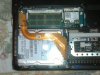
Ok, Im having trouble removing the old HDD, I have removed the 3 screws, but still not able to get the HDD out. Seems to be stuck at the top left corner near the cable connector. I dont want to pull it out with too much force as I dont want to mess up the cable going over the HDD.
PLEASE HELP
-
Unscrew the 2 screw holding the SATA cable head, then unplug it carefully.
-
Unscrew the ribbon connector first and remove it from the top left!
-
Sony Vaio S 13P in Black or Gold? I don't like gunmetal so don't suggest that.
If anyone has the gold color, pls show us some actual screenshots.
Thanks -
There is a neat feature called search that lets you find things... Or you can look in my sig...
-
Hey Deaks, how do you like it? Is it sexy looking compared to black? The picture in the site don't do it any justice because it looks like a oversaturated gold color. Can you tell me what you think of it
-
I linked to pics I took in my sig. I've never seen a black one.
-
I have the black 13A, it is a fingerprint magnet so if hate that do not get the black one, but they clean of easily with the cloths provided.
The black version looks amazing though, the gold logos are a nice touch and add to the premium look and when closed the laptop looks thinner than it is and quite professional. I've not seen the gold version but I have seen the silver one and it would show fingerprints less so if that is something that will bug you, same for white. -
I have a question, which ram is the best for my sony vaio s13? i just want 4 ram or 8 if its really better
-
If you need to uninstall pesky programs go download IObit uninstaller.
It's absolutely free, and its just a 2mb .exe that doesnt even need to install.
It'll uninstall any program, even the vaio smart network which vaio care cant even uninstall, and it'll even tidy up the registry when it's done. -
Does anybody know if moving the laptop around (like in a case while travelling) can somehow affect sound? After travelling a bit, now during start-up and shut-down, I have been getting a pretty noticeable crackling/static-y sound. I'm okay if it only only start-up and shut-down that are affected, but I'm also afraid with more movement over time actual application sounds would be affected by the crackling noise...like, maybe hardware is shifting around and affect the system or something.
Thanks for any info or advice. -
Thanks. That's what I suspect happened.
-
I have dropped the idea of putting a SSD in my new SVS13A, as after reading the forums and expert reviews have kinda made me realize that it is better to stick to normal HDD's.
I travel a lot and will primarily be using the notebook for routine tasks such as MS-office, web browsing, movie-watching and the very thought of BSOD's or undetectable SSD while on the road has kinda put me off. I have owned 3 Vaio's in the past before this SVS13A, all with HDD's and not faced a single BSOD or problem with any of them.
My SVS13A has the Hitachi 750 GB 5400 RPM HDD with 8MB cache and it is a slow drive, thinking of getting a Hitachi Travelstar 500 GB7200 RPM with 16MB cache. Sould increase boot-up time and overall performance by about 20%, without sacrificing too much battery life. Also looked at the WD Scorpio Black 500 GB but reading about vibration and power usage issues.
Does this make sense? -
I've had no such issues with SSDs for the last 4 years, and I have some of the most "problematic" drives (OCZ).
-
If you buy a good SSD there won't be any problems with them. I only own Intel and Samsung SSDs myself, never had a single problem with any of them in 4 machines I've put them in. The performance difference between HDD and SSD is literally revolutionary, to choose an HDD in this day and age (unless you actually need 1TB of space in your laptop) is just a terrible decision.
-
Here are some of my feedback on the S15 after using it for a few weeks:
Pros
1. Incredibly sharp IPS screen. Nothing come close to it as of today in the 15.5 size category. This is the main reason I chose and am keeping this machine.
2. Light-weight for a 15 inch non-ultrabook laptop.
3. Hybrid graphics (with mod option).
4. Touchpad is large and accurate. Gestures are handy.
Cons
1. Horrible keyboard. The amount of flex is unacceptable for this day and age. Very mushy/spongy on the left side and right side, seem like there is not much support underneath. Function keys and even the cursor keys are half normal size on a 15 inch laptop! Left side tab, caps and shift are also reduced size. I owned a Y series before and it was a full size keyboard and as solid as a Macbook.
2. Ports are all on the right side and the LAN port is the first one in front unlike the S13. When you have a mouse and LAN plugged in, the wires really obstructs your hand (if right-handed). This is a very poor and strange design.
3. Even though body is made of magnesium, it looks and feels plasticky. Go check out the premium build on the Samsung 7 Series, it is night & day compared to the Sony (like VW vs. Audi).
4. Paint (mine is a silver) is not durable and will scratch and come off easily. Mine's got scuff marks already on the lid from taking in/out of the laptop bag.
5. Footprint is large for a 15.5 laptop. Just compare the screen bezel to the Samsung 7 series. -
I thought the S15 has the same build quality as the S13A with the Carbon Fiber/Magnesium Alloy? Is the S15 just plastic? -
The S15 is magnesium alloy only but feels quite plasticky. The magnesium does help to make the base very sturdy though.
-
I own the gunmetal S13A and my office has a few black and silver S15's. I can confirm that the Gunmetal finish is MUCH more solid than silver or black. The black is a huge fingerprint magnet, and could potentially scratch over 1-2 years of use. The silver does not leave prints, but feels like it is very easy to scratch.
With my Gunmetal, I get almost no fingerprints and the quality is fantastic. -
I believe you can turn off the ODD in the bios so it won't wake up everytime you boot up.
-
Yes but Gunmetal is only available for the S13 premium. It is a shame that Sony does not even offer it in the S15 models.
-
Gold > Gunmetal
Gunmetal is a wannabe and it's confuse of its true color identity. It doesn't know if it wants to be dark gray almost close to black or tries to be lighter gray tries to be a shadow or silver. -
Yeah but gold = wannabe pimp
Besides, you would have to watch the laptop every damn second because it has 'steal me' written all over it. -
Since you have access to both S13 premium and S15 models, would you say the 1920x1080 IPS is vastly superior to the 1600x900 TN in terms of sharpness and contrast? The video comparison cannot really show this, other than the viewing angles.
-
is white a good color for s15? or does it leave finger prints like the black? I'm trying to decide between silver and white. Black looks like a boring color but its probably the most professional.
-
Imo white looks plasticky and cheap (kind of like the cheapest macbooks).
But of course, that is solely my opinion. -
Oh yeah. The IPS panel of the S15 makes the display of the S13A look like a CRT TV from 1987. The S13A has the worst 1600x900 panel I have ever seen, but it doesn't really matter to me.
If I could somehow install the same panel as the S15 in my notebook, except the panel would be 13" obviously, I would pay $250+ for it instantly.
Sent from my SAMSUNG-SGH-I747 -
Nobody was able to confirm but I am not sure whether the white has a matte or glossy finish. The other thing is I believe only the outside is white color, the inside area for the keyboard, palm rest and bezel are all in silver. Sony does not do a good job of putting out pictures of the different colors.
-
Thanks, that helps to put down most of my regrets on the decision of the S15 with its large footprint.
Maybe the next-gen S13 will come with an IPS option, I would definitely switch. -
Hey!
I have had the S13 Standard in White color for about 3 days now and I can confirm it is a matte finish. It does not feel like a cheap glossy aint at all.I was scared of this too but am now happy I bought the white because it looks nice and does well against fingerprints. The whole laptop is white other than the Vaio logo and the keys, which are silver. The palm rest and the rest of the inside is white. Hope that helps.
It does not feel plasticy at all which is another good thing and I am happy my purchase.
Also, I am very impressed with the standard display. I was scared because of all the complaints about the SA display and since this is a a standard 1366x768 panel, I was prepared for the worst. However the color saturation and viewing angles are pretty good for a TN panel (and I have reasonably high standards due to my IPS desktop monitor). My only real complaint about the screen is the low resolution, but I can live with it of a 13" panel.The semi-glossy finish does decent job of reducing glare as well. Has anyone with a Premium S13 compared it to the standard model?, because I think this display is better than most 1366x768 screens on other laptops. -
Cool, I think a lot of us would love to see some actual pics of the white model!
-
Hey all. Just made my decision yesterday to get the S Series over the Samsung Series 7. I customized it pretty well and got a good student discount.
Big question: Sony has the dock, model VGP-PRS25, on sale now for only $45. I don't need the 500GB backup drive built into the thing, nor do I need one measly more USB port. However, it does not explicitly say it is compatible with this years models, the ones with Ivy Bridge. Anyone know if this dock can work with the newer models? Should I get it and ship it back if no?
I see that the PRS2 WAS backwards compatible. Has the power supply changed drastically? -
Yeah, I'll try to get some pics of it this weekend and post them on Monday! =)
Official 2012 Sony S Series Owners Thread
Discussion in 'VAIO / Sony Owners' Lounge Forum' started by Petrov, Jun 9, 2012.


