 Problems? See this thread at archive.org.
Great! Would love to see those pictures too.
I'm almost 100% set on buying the 13A, yet I still can't decide which colour.
Also, the Gunmetal finish, is it solely a finish or does it effectively have a better build quality than the other colours?
I'm currently leaning towards black, but I haven't seen neither black nor gunmetal irl, so it's definitely hard to make a decent choice.
-
Just got my S15 in the mail from sony. I will say that this is an awesome machine first and foremost. The screen on this thing may be the best I've seen other than the retina display on the MBP in terms of crispness and brightness. Some websites even look bad because the screen quality exposes faults in their images like you see on the retina. HOWEVER, the reds are REALLY orange. So much so that I have to return it unfortuantely. For the record I do web and graphic design work so this just won't work for me. But anyone thinking of getting this laptop for anything else I HIGHLY recommend it. It is unbelievable light and powerful. If I did not make a living in design this would be a keeper hands down. This is the best all around laptop on the market right now I believe. Portability, power, screen size and quality are second to none. The speakers and the orange are only negatives i can find, and it isnt that bad really. I just can't design with inaccurate reds.
-
Hey fundamentals, just adjust the colors. Both the Intel and nvidia utility let u do it.
-
I was sailing in the same boat as you till a few days back, but I dropped anchor at port Black.

The black may be little more prone to smudges from dirty / oily fingers but still looks much sharper than the Gunmetal, and the gunmetal finish felt that it could scratch much easier than the black. Regarding the build quality of the gunmetal vs the black (S13A) they felt the same, so it is mainly the finish.
Anyways it really boils down to personal preference. Good luck with whatever you choose.
The HDD protection on my S13A (750GB 5400 RPM Travelstar) seems to kick in even if I move the machine just a little bit. Scary and annoying.
Will definitely be ordering the Sammy 830 256 GB notebook kit soon. -
I tried everything. Nothing could get it close to real red. I just want to save anyone else in design work from wasting their time and money. All others who need a pretty awesome notebook should still get it though. Back to my search. Leaning towards the samsung series 7 17inch or the asus n series...
-
I just checked out the Sony website and all of the Premium colours seem to be Carbon Fibre.
If I go down the S13P route, I'm more than probably going black
Still can't decide whether to go Netbook + 17inch laptop or 13inch ultrabook + external screen.
What's stopping me is the fact that I feel won't be able to watch a movie decently on the S13P, while lying in bed with my GF.
Funndamentels, have you thought about choosing the Z series?
These are actually specifically made for designers, and their screens are the best 13 inch screens in the world. They have a 90+ Gamut level, or so I've heard.
:edit: Didn't think about the fact that you're listing 15 inch laptops and I proposed a 13 inch. Oh well. -
Yea i really tried to get small too. I was originally looking at the s13, but the screen was not good enough. My wife has an old model Z and i will admit it is awesome. I cant see how anyone can get serious design work on a 13inch tho. Plus i'm 6 foot 4.
-
Anyone has good calibrated color profile to share for the S15? -
Ok, I will be putting in my new SSD soon in my SVS13A.
Some of the options I have:
1. Clone the HDD to the SSD using Norton Ghost or some freeware (if Ghost does not work).
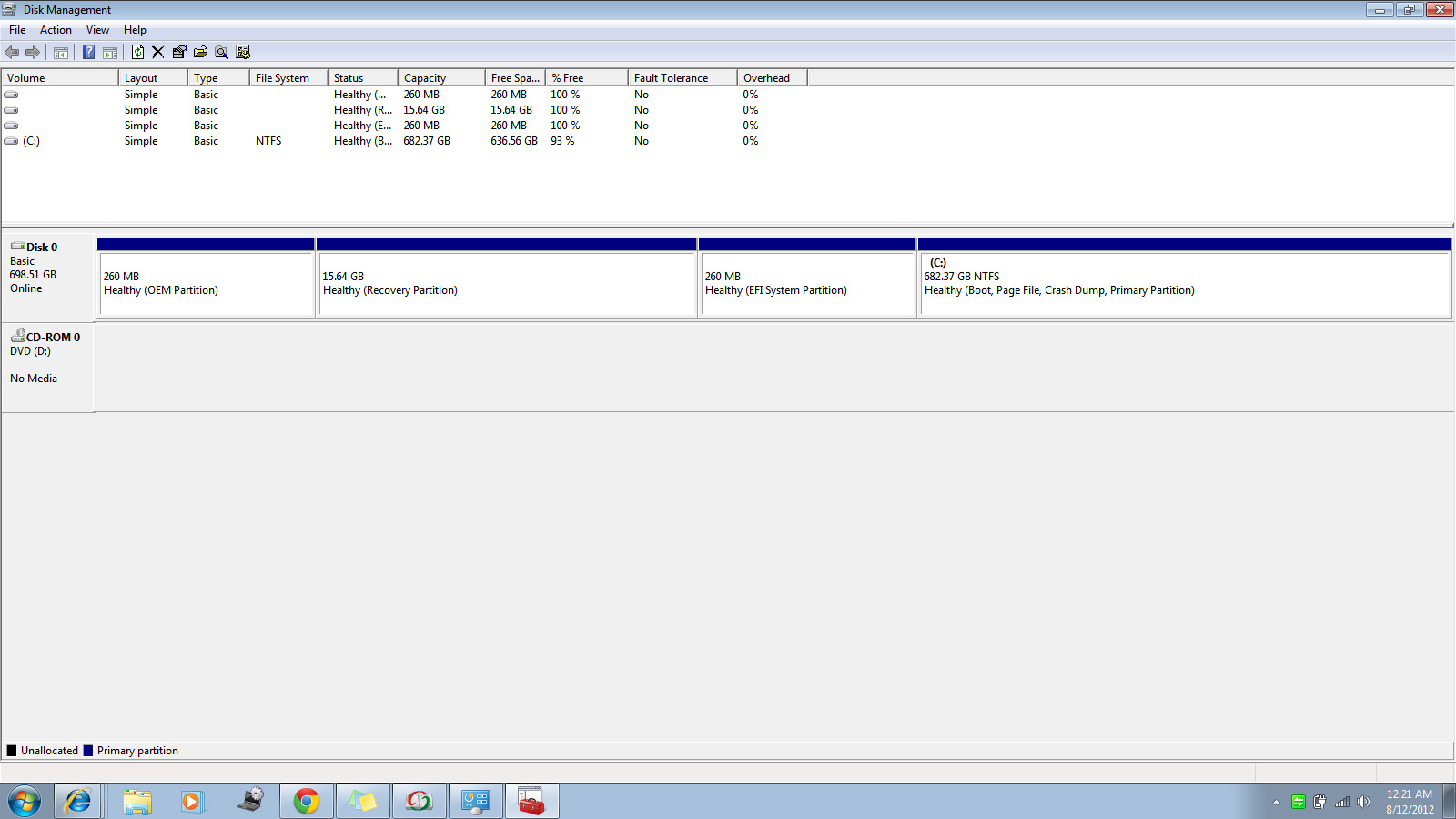
There is 260MB (OEM Partition), 260 MB (EFI System Partition) 15GB (Recovery Partition) and my 682 GB NTFS C: partition. See attached image. Any idea what are the OEM partition and the EFI Partition. Do I need these on the SSD as well?
2. Use the Sony Recovery DVD's I created to create the factory image on new SSD as I have not installed new progs etc on my VAIO yet. That way I just put in the new SSD in the SVS13A, boot using the VAIO recovery DVD and be done. No need to fool around with Ghost etc. Use Samsung's SSD s/w to fine tune the SSD.
3. Clean install option - As I do not have Windows 7 DVD (64 bit DVD) I will not be able to perform clean install and anyways I do not want to loose the DVD s/w or the Adobe Elements etc. I know that in earlier posts there was some talk about being able to recover these programs, but seems to be too much of a hassle.
Any info and help would be much appreciated.Attached Files:
-
-
How are temperatures when gaming on the s15? I noticed that the Lenovo Y580 gets pretty hot so I wand to see how this compares.
-
Well the deal is back on. Sony Canada emailed me saying that I can in fact use a gift card online, so Monday I will be getting the S15.
Could someone please tell me if this RAM is alright? I figured 1600 future proofs me, and it isn't that much more than the 1333 I found.
G.SKILL F3-1600C10S-8GSQ 8GB DDR3-1600 204PIN CL10 SODIMM Non-ECC Unbuffered Single Memory Module - G.Skill - F3-1600C10S-8GSQ
Also I bought this SSD
Kingston SSDNow V200 128GB 2.5IN SATA3 Solid State Disk Flash Drive - Kingston - SV200S37A/128G
Could someone please confirm that I do not need any kind of bracket for this laptop? I believe I do not, but thsi will be my first time opening a laptop so I wanted to double check.
Also, will I need a bracket of any kind to put the HDD in the ODD slot?
Thanks very much, I'm excited now. -
If the SSD is 2.5 and 9.5mm high then it will be standard swap of HDD and SSD, no issue, this is how it was on my 13A. As for replacing the ODD with a ssd, you will need a special dummy drive with space for an extra hdd, read up in this thread, there were a few posts and in the 1st post there is a link about it.
-
I used the recovery discs, partition is also added to the SSD but when you are doing a recovery you can opt not to have it but then you will need your discs if you wish to recover the laptop.
-
Thanks. It looks like it is 7 mm, so I will need some sort of kit with it? Also, the old HDD is going in the ODD, so that should be fine as is? Thanks!
-
The mounting brackets you attach the SSD to before you put it in the notebook remove the need for a separate kit. You can just buy the bare drive.
-
Thank you for the reply. Where would I be getting the mounting brackets from?
-
My question might not be very apt for this thread but the reason I am posting here is because I was almost certain on getting the S15. I know it is plain stupid to compare a 1080p screen to a 768p one but after checking the 1080p screen I feel I might not really be much comfortable with the higher resolution. Also I am no pro in judging things like viewing angles, blacks, contrast ratio as I feel even my 4 year old toshiba too has very good screen. It has 1280 x 800 WXGA screen.
Also since I do not play any games or do any graphics intensive tasks I don't need a dedicated graphics card and on board will be fine for me.
So as an alternative to the S15 I found one from E series good enough (as per me)
Please tell me how this is ?
http://www.amazon.com/Sony-SVE15114...344735828&sr=1-1&keywords=SVE15114FXS
Sent from my iPad 2 using Tapatalk HD -
my first pass with a spyder4 elite shows red as being way off:
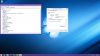
good thing this is just a travel laptop and not my photo editing machine.
-
Damn :-/ After reading that again and again I am now thinking about cancelling my Sony order to get the Samsung 700Z7C :-/ I am still not that sure though....
Many wrote also that the Samsung feels more like a quality device. Of course it is 1kg heavier, looks like this would be the only drawback for me. -
I built my own custom vaio without certain programs and with certain programs, will the recovery disk be unique to what I chose if I changed out my HDD?
-
No........
-
When I am swapping the HDD with an Vertex 4 SSD, are there any screws on the current HDD that I have to place onto the SSD? Similar like the Macbooks?
PS: Is an 9mm-9.3mm SSD fine?
PPS: How do ppl with an Samsung 830 SSD place into the laptop? That SSD is only 7.5mm -
By reading or searching the thread you might stumble upon these posts, I hope they make things clear for you
http://forum.notebookreview.com/son...y-s-series-owners-thread-352.html#post8777719
http://forum.notebookreview.com/son...y-s-series-owners-thread-352.html#post8777919 -
Any European Sony users here?
After all the bad news I've read about Sony Europe in a thread on this forum (Europe's in the title, can't be bothered to look it up right now), I wonder if anyone here had a less than great experience with them.
Furthermore it's actually really sad that USA shoppers get the laptop about 20% cheaper + they get a free ps3 to go with it.
-
Yes. There are 4 screws that come off the original HDD that you will need to use to attach the original brackets to install the SSD. There are no issues with the thickness.
Steve -
Short answer: YES
The recovery disks are made from the recovery image on the hard drive, which is identical to how your laptop was shipped.
I ordered mine with fresh start and it came with sony vegas, soundforge, etc... All those programs were reinstalled when i put my new hard drive in and used the recovery disks to reinstall windows. -
For me to install Windows7 on my SSD, should I first put the DVD into the ODD, and then completely shut down the laptop and then swap out the HDD with the SSD? Then I just boot via ODD?
-
sure that is an option. if you've ever installed windows on a machine before the wap to ssd is no different than a new HDD
-
Hi all! I ordered an S13A last week due in large part to the information in this thread, and since I'm checking out the overclocked BIOS and running stability tests right now, it seemed like a good time to share my own experience.
I originally found out about the S13 from doing a power search on Newegg for any laptop less than 14 inches with a 900p screen or better. I was looking for something to take notes on in class, with a high enough resolution to work on two documents side by side. I wasn't actually looking with the intent to purchase anything, I just wanted to see what was available. Within a couple of hours, due mostly to the information in this thread, I decided to sell my gaming desktop and go all out on the S13A.
I ordered it online at 10 AM on 8/2. At 10 PM on 8/7 it left the factory in Yantai, China. Google told me it would take a while, but by 11 PM on 8/9, it was in Memphis, TN. Three hours later it left Tennessee, and eight hours after that it was at my door in San Diego (the estimated delivery date had been 8/13). In retrospect, I wish I had ordered by phone since it seems people are able to get better deals that way, but I got a PS3, a $100 mail in gift card, and $19 off a dock with HDD using a coupon from retailmenot, so it's still a pretty good deal and I'm happy with what I paid.
I ordered a 4 GB stick of low-voltage RAM off Newegg, an optical drive replacement caddy off Ebay, and I'm going to add my 120 GB Vertex 3 (taken from my to-be-sold desktop), but before making hardware changes, I wanted to get a baseline so I would know how much of an improvement I was getting. I was excited about my new toy, and by the time I was done checking out all the bundled software to see what I would be keeping after doing a clean install, creating recovery discs, moving all my files over from my old computer to the dock's HDD, and running benchmarks and taking notes on scores and temps, it was 6 AM Sunday. I had a cable guy due to come from 8-10 AM, and was in serious danger of falling asleep if I didn't keep busy, so I turned to the one modification I had seen no mention of in this thread: re-pasting the CPU and GPU.
I was mostly able to follow the S15 video on replacing the optical drive. After that, it was just a matter of removing the last few cables and screws and removing the motherboard. Upon removing the heatsink/fan, this is what I found:
![[IMG]](images/storyImages/img0114mp.jpg)
![[IMG]](images/storyImages/img0115xd.jpg)
I cleaned the old stuff off with alcohol and then realized I had no idea where my Arctic Silver 5 was (I just moved to a new place last week). All I had lying around was some generic gunk, and I certainly wasn't going to use that! I also wasn't going to be waiting a couple of days to have something shipped. I was going to have to get online with my cell phone, find what was available from retailers in my geographic vicinity, look up reviews, place a will-call order, drive over there in my car, and pick it up by hand like some kind of caveman.
The store wouldn't be open until I had to be at home waiting for the cable guy. I had at least an hour to kill, and probably three. I hadn't intended on lapping, but that HSF looked like it'd seen combat. By 8, I had this:
![[IMG]](images/storyImages/img0118zt.jpg)
When I went to Fry's to pick up the thermal compound, I went to look at the S15. Two other guys and I were checking out all the laptops and constantly coming back to the S15 to lift it, check the specs, or just stare at it and sigh. I like my S13's screen, and the narrow vertical viewing range doesn't really bother me, but I was blown away by what's on the S15. I just kept moving the lid back and forth while staring at the screen, entranced by how clearly I could see everything no matter the angle. I would have happily paid $100 more for those angles on my S13, but alas. I just have to remind myself that it's still much better than the glossy 1366 x 768 screens on most laptops.
When I finally got home with my precious Shin-Etsu MicroSi X23, I applied far too much of it and closed the S13A up.
Before I get to the results, I have to confess to a flaw in my methodology: I don't have a thermometer. I don't know what the ambient temperature is in my room. My temps with the original paste were taken between midnight and 6 AM, and the temps with the repaste were taken between noon and 6 PM. The outside air temperature was between 0 to 5 degrees Celcius hotter during the second round of tests, so if anything, the results are probably understated, but I can't know for sure. Maybe there was a breeze coming into my room during the day that wasn't here last night; I don't know.
The max temps below were taken with Open Hardware Monitor and generated with at least 10 minutes of Prime95 Small FFT for the CPU and at least 10 minutes of Furmark's default 720p burn-in test for the GPU. The clocks are stock. I didn't take readings while stressing both at the same time because I didn't think of it, but, since they share a HSF, I should have. It also would have been good if I had made sure to keep the exact same angle on the screen or just output to an external display with the lid closed, since the fan is blocked more the greater the angle. Oh well.
I'll update with final max temps once I find my highest stable overclock. When I get my optical drive caddy later this week, since I'll be halfway into the system anyway, I'll check how the Shin-Etsu spread and reapply it, probably using a lot less, which may help temps another degree or two.Code:[U]Stock Compound (idle / load)°C[/U] CPU1: 49 / 79 CPU2: 51 / 81 GPU: 40 / 68 [U]After Repasting[/U] CPU1: 45 / 75 CPU2: 45 / 75 GPU: 40 / 65 Stressing Both: -CPU: 90 -GPU: 76
Thanks for reading, and thanks to all the people who wrote guides or collected information and answered questions! You've been a great help! -
Sony's online tech support says the dock is compatible. It doesn't have USB 3 though, and one review on their website says you can't use the VGA and HDMI ports at the same it.
12:04 AM Patrick - (C4KI): Hi. Welcome to Sony Online Support. Im Patrick.
12:04 AM Patrick - (C4KI): I understand that you need information regarding the docking station; is that correct?
12:05 AM Customer: Yes, I just bought an S Series laptop and I'd like to know if this docking station will work with it.
12:06 AM Patrick - (C4KI): Okay.
12:06 AM Patrick - (C4KI): Will you verify the model number of the computer?
12:06 AM Customer: SVS1511GFYB
12:07 AM Patrick - (C4KI): May I know the model number of the docking station?
12:07 AM Customer: Model number: VGP-PRS25
12:08 AM Patrick - (C4KI): Okay.
12:10 AM Patrick - (C4KI): Yes, the docking station is compatible.
While searching online for the AC charger that came with my S 15 (VGP-AC19V32), it's a discontinued model according to B&H and cdw.com. What AC adapter came with your S 15? -
Sweet! Well done dude.
I used to do that on my desktop. Might do it again when my S13 finally comes in. What grit did you use? Looks like 800-1000 or so.
I can also see an open mini pci-e port. Was there something there or is it available for a small upgrade? -
I used 400 to get the really rough scratches out (seriously, that surface was scarred) and then 600 for polish. And that port was free on my unit. I guess that's where the 3G card is going on our international cousins' machines?
-
@ erikalikesfire
May I ask how long the whole process took to finish? Was there any tricky stuff to take the complete internals apart to change the thermal paste? Until now I only planned to change the HDD to SSD but if I do open it anyway..... I also did the same (flatten and polish my desktop cpu-heat spreader and the cooler) before and the cooling was so much better. Nobody believed that my temps were real after doing that. -
I'll take a look when mine arrives. I am one of your Dutch cousins.
-
I believe in the S15 video the little felt bay cover that goes in front of the ODD was held in with screws. I spent a good three minutes looking for them before I just decided to wiggle it and it instantly slid a centimeter towards me and came right out :laugh:
It took me about an hour to take it apart, an hour to lap, and an hour to put it back together the first time. I was going slowly because I was afraid I would tear a poorly soldered wire or snap a brittle plastic clip or something; I imagine it will take about half the time when I do it again to install the caddy.
The biggest concern was all the different screw sizes. I kept a sheet of paper off to the side, put the screws in boxes that I drew on the sheet in the same relative position as when they were installed and wrote down what step they came from (hdd, hdd ribbon, motherboard screws with arrows, backplate, etc.).
Other than that, taking it apart was easy. It was putting it back together that was hard; I had to remove and replace the motherboard about five times because I kept finding one more cable that should have been routed under it. I was constantly referencing the pictures I took before disassembly to make sure I got it back together the same way. One good thing to note was that there were no "Warranty void if removed" stickers or anything that I had to take out.
I still have the pictures and notes and I can write up a guide when I get home later if you like
Edit: After taking it apart and putting it back together a second time, I can say there IS one pretty tricky part about the S13, and it comes back to that felt ODD bay cover again.
I mentioned how it slides and lifts out of the bottom assembly instead of being screwed in like with the S15. It turns out the bay cover also slides to lock to the TOP, the keyboard piece. I was having a lot of trouble putting the S13 back together because the bay cover is made of soft, flexible plastic and it wasn't providing enough resistance for the clips on the keyboard to snap into place and make the keyboard and bottom assembly flush.
I eventually found it was a lot easier to drop the bay cover into place but not slide it up and lock it into place immediately; after putting the keyboard back on, stick your screwdriver slightly into the ODD port and use that to slide the bay cover toward the back of the unit, locking the bottom assembly, bay cover, and keyboard together all at once. -
Mine was
-
You made that video right? That thing inspired me My last Sony laptop was impossible to take apart; I never would have tried with this one until I saw you do it in like three steps lol
-
Yeah I did. I was just confused because I did have screws holding in the bay cover. Maybe it's different on the s13?
-
Just bought the preconfigured 13.3 vaio s ivy bridge model. I was hoping someone could help me out- I notice the fan is ALWAYS on. The fan is really quiet, not noisy at all or to the point where its distracting- but should it really by running while on stamina even if the computer is just idling/simple microsoft word tasks?
Is this normal for the s series or should i return it? Your help is really appreciated! Please let me know -
URGENT!! ~
I ran into some trouble when trying to install my Win7 on my new Vertex 4 SSD.
I keep getting the error message: Windows Cannot install required files. Make sure all files required for installation are available. Error Code: 0x80070002
This is when booting from DVD.... -
Hi, did you try burning another DVD? Sounds like possibly the file got corrupted? Else, try creating a windows install flash drive and boot from there.
---------------------------------------
In any case, so my sister has the S15, and at 100% dpi the menu text is HELLA tiny. My Sager 9130 at 100% dpi has larger menu texts and I have a feeling that the problem with the S15 is most likely some setting that hasnt been changed. Anyone got a clue as to how to solve that problem?
Thanks,
edit: NVM, looks like it's a windows bug. To fix, just select another windows theme (you'll lose your theme if unsaved) then set up windows back to what you had before. Not sure if you can save your theme, then switch to another and come back. Didn't try, but it's not a big deal to change back your theme without saving it. -
Can anyone clear up my confusion about model numbers? I'm looking at the 13 inch one on both Sony.com and newegg/amazon and it seems like this notebook is both SVS13A12FX and SVS131190X. Is that true/is there a difference?
-
Thanks for the input, I am installing an Bootable USB Flash Drive as we speak.
The weird thing is, when the DVD was finished burning, there was no error code saying anything about corrupted data... -
Simply model numbers. Just know that the laptop you're looking at is the Vaio S13. The 1190X means CTO (customized to order) and the other one is a pre-configured model. There are other pre-configured models too, so there will be other options. Now I'd probably go with a CTO because for me, pre-configured laptops usually have something i dont need and lack something I do.
That is interesting... well, keep us updated on the progress! -
Some of my friends pointed out I have to update my BIOS in order for my laptop to recognize the SSD? But I don't have any OS yet...
-
I have finished with the USB Bootable Drive and now I am getting the "Operating System Not Found" Message...Even with UEFI and Legacy modes.
This is starting to get on my nerves...
NVM: got it to work in Legacy mode. Is there any difference between Legacy and UEFI modes? -
First page, first post, under "Win 7 Clean Install and Sony Drivers, Utilities, etc":
- To get the laptop to recognise the USB flashdrive with win 7 on it, I had to switch to Legacy boot mode in the bios rather than UEFI mode. Now my laptop only boots in Legacy boot mode, no O/S is found using UEFI mode. There is a pretty easy workaround for getting a USB stick to boot in UEFI mode: Getting a Win 7 USB Boot Stick Booting in UEFI Mode. I redid a clean install using uefi mode, but please note I had to swap the USB stick into the second USB 3.0 port for it to work - the first usb 3.0 port I tried installing from kept causing a 'missing driver' type error at the start of the win 7 installation process.
- Wondering what the difference between UEFI and Legacy BIOS modes are? Orionz has collated lots of good information in a single post in this very thread! Thanks Orionz.
- Note, some users (eg Fruban) have reported that they needed to set the bios to boot in "legacy" mode even when doing a clean win 7 install using a DVD, otherwise you may receive an "operating system not found" error message at boot-up.
Including the links: Installing Windows 7 in native EFI mode from USB - bit-tech.net Forums Getting the USB-stick to boot in UEFI
http://forum.notebookreview.com/son...y-s-series-owners-thread-311.html#post8748196 Seems you already have gotten the answer to the question about differences between Legacy and UEFI
-
The only real difference is GPT instead of MBR for HDDs. Most of the other stuff is hidden from the user.
Win7 stock DVD will not load on a UEFI machine, you need to use Legacy mode. Bootable FAT32 USB (not memory card or portabel HDD) should work as per: forums.bit-tech.net/showthread.php?t=209045
Edit: above poster beat me to it. Most questions are not new, search the thread!
-
URGH! Still getting the same error message from both the USB bootable device and the DVD....
Is it my SSD is defective?
Any other help? PLEASE?? I'm really stuck!!
I only get the error message when I am at the "Expanding Windows Files" part of the installation. -
Sounds like an issue with your copy of Windows. Maybe something went wrong while downloading?
Official 2012 Sony S Series Owners Thread
Discussion in 'VAIO / Sony Owners' Lounge Forum' started by Petrov, Jun 9, 2012.




![[IMG]](http://img41.imageshack.us/i/img0114mp.jpg/)
![[IMG]](http://img717.imageshack.us/i/img0115xd.jpg/)
![[IMG]](http://img16.imageshack.us/i/img0118zt.jpg/)


