Problems? See this thread at archive.org.
Thanks! I suspected that this might be the case.
-
-
Hey everyone, after successfully installing my Crucial M4 256GB and Windows 7 Ultimate on my SVS13A, I noticed that my i7 processor went from 7.2 to 6.4 in WEI....What is up with that?
-
I'm looking at getting a Crossover 2560x1440 27" monitor to use with my S13. Has anyone here any experience with running such a high resolution through the HDMI port? I presume it'll work fine but just wanted to double check here before I made the plunge.
Also the HDMI and VGA ports are too close together to run two external monitors, has anyone figured away around that? -
Mobiletech says max output is full hd, northing larger. No Displayport.
-
That's really disappointing, I guess it's just regular old 1080p for me then!
Thanks for pointing that out, I actually saw that review but just skimmed it and missed the stuff about resolution. -
I have another question, why is it whenever I press the Power button, my battery indicator always lights up....
My battery indicator light stays lit for however long I press my Power button... -
Just need to correct you.
I think you are right and wrong. Putting it into speed mode does not reduce the battery life compared to stamina unless the GeForce card is in use. Also putting it into speed mode does not activate the GeForce card.
When you move the physical switch to stamina, it deactivates the GeForce card and forces it to use the intel hd 4000 regardless of what you are doing, and when you turn the switch to speed, it puts it into Optimus mode like all other laptops with Optimus and you can still achieve the same battery life like on stamina mode since Optimus takes over for auto graphic switching and intel hd 4000 is more than enough to run the common daily task and only uses GeForce when gaming.
Am I right or am I wrong? -
yes but i have to wonder if the dedicated is turned off completely for stamina... or speed for that matter. what i mean is that lets sat that stamina makes the card draw 0.0v but the speed even though it is in optimus leaves the card in idle and still consumes power.... idk
-
I've only managed to see the S13 in a Sony Shop with a 768 screen. It was very dull, washed out and the viewing angles were very bad. Is the 900 premium any better?
-
hi guys,
I'm new to this forum and just got my new S13p delivered yesterday. Must say quite happy with it so far (though would have liked better viewing angles for the price i paid) but nevertheless quite an impressive machine otherwise (at least for me). I have got few queries and would really appreciate if someone can guide me through these:
1. I want to replace the windows with my other Win7 ultimate but also would like to keep the selected softwares provided by sony with this machine. how do i do that, i know how to do a clean install but not sure how i would migrate selected softwares. is there a way around this?
2. Is there a way i can improve the screen/ viewing angles by changing any colour/other settings. I know its a TN panel so one can only do so much but has anyone tried playing around with the settings and found any difference?
3. how safe is it to store your passwords/finger prints on it. I meam does anyone know these security software store/share this data in some way or form with sony servers or some other portals. I heard something like this from somewhere and now cant find the source. Personally dont think thats the case but pls do let me know if anyone knows about this.
4. With my old Hp business notebook, the fan was a problem. though its not the case with this one but still i can hear the fan noise (and sometimes the bottom can get fairly warm) even if i am on stamina setting and just browsing the net. Is that common - i read previously somebody was saying on those setting you cant heaer the fan and its stay pretty cool? is it something i should be concerned about?
cheers, -
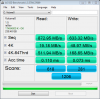
Hello all, new S13 owner here, below are the benchmarks of sony's 128 x2 SSDs in raid 0
Attached Files:
-
-
Would Windows Anytime Update work?
-
I can answer that question for you:
It fits perfectly without the need for any spacer. A ticker SSD will cause trouble. The 830 fits great. -
no not really viewing angles cannot be changed with a color profile. it is more physical.
windows security is encrypted and sony has no reason to take it let alone have the ability to read it. if you use the same password for your windows pc and sony website then they already have it. other than that they dont get it.
for the 13 i assume it is a lot different as it has a smaller chassie but i have the s15 with me now (DELIVERED!!!!) and ive been doing some light gaming with it. arma 2, l4d, tf2... no bf3 or la noire yet but in speed it seems that it can stay cool enough to stay on my lap. it does get warm but not nearly as warm as a mac... my buddy has one and games a little on it. the fan however gets noticeably audible... not annoying but noticeable. honestly when i read the reviews i expected worse. i have fan set to priority to ensure good performance and in stamina set to be silent. when it is silent it is really silent. at the same time is also matters where you tested i have the ac on high and the tv on in the other room so the fan is the least of my sound problems.
Edit: i should note. I am over clocking my graphics... by a lot -
As to your Q1:
The EASIEST but not necessarily the BEST way would be to run an upgrade on the OS you already have installed from Sony. There MAY be issues with the UEFI BIOS mode that the preinstalled Sony package uses. It refuses to recognize some DVD's and other installation media when in UEFI mode which is required by the original Sony install.
See my post on this page for more info:
http://forum.notebookreview.com/son...y-s-series-owners-thread-311.html#post8748196
If you want to go the clean install route you can install in whichever mode you prefer, then reinstall the software you choose....BUT you must recover several of the license keys from your ORIGINAL install registry BEFORE you do the install. Also the install executable for PowerDvd must be decompressed and recovered from the (hidden) Recovery partition before you repartition the drive. You will also need the software for your fingerprint reader! Most of us don't have that as it's not available in the United States. See this thread:
http://forum.notebookreview.com/son...ys-hidden-recovery-partition.html#post8678764
IMHO a clean install is the Gold Standard in how to do this for many reasons including recovering drive space taken by the Recovery Partition, faster boot times, less annoying crapware constantly nagging you to "Buy this...do that...RIGHT NOW!" What do you lose? Not a whole lot except some supporting things like sound effects for the sound/movie studio software. I'm still trying to reinstall that but I really don't use it that much. AND a clean install requires a fair amount of manual labor & comfort with advanced software/disk operations....but the satisfaction of taking back your system is again IMO worth it! -
Thanks for the answer. So, all the 830 variant are all 7mm? Execpt the desktop version has the spacer and the cables, right? Because I want to buy the plain version, the cheaper one that comes with nothing.
Thanks again! -
the highest resolution, when you use the HDMI port, is 1920x1200@60Hz. you can drive higher resolution monitors (like the 2560x1440 IPS ones), but you need to do some .inf hacking and reduce the refresh rate of the external monitor to around 30Hz or so. there is a thread on this for Z series.
-
I even called and still wasn't able to get the deal. They said the free battery sheet will not stack to other discount.. e.g... CAMPUS10, 250PS3 etc..
However, I am not sure if the rebate stack.. I forgot to ask this. -
Honestly, I wasn't expecting both a discount and a free sheet battery. I called sony with the interest of purchasing a new laptop, I picked a model and asked if I would be able to receive a student discount, I was given the student discount and apparently the model I chose also came with a free sheet battery. I didn't ask for the sheet battery, it was just an unexpected bonus.
-
No, you can feed 60hz and higher as well as resolutions over 1200p, you just need a monitor that will accept small timings and a huge pixel clock (ideally one with a displayport connection available as it's more likely to have the necessary wizardry inside)
I've fed 1080p @ 108hz from the hdmi port -
I'm curious. Did anyone ever attempt to replace the screen in a Vaio S13 with a Full-HD one from the Vaio Z?
Is it physically possible or are the dimensions completely different/the screen draws more power?
Since it is supposed to be a better screen than the S13's. -
Does anyone know or has anyone tried if ordering a Sony Vaio S from the Sony.com and shipping it to Canada works? The US ones have WAY better deals, so I was wondering if I could place an order on Sony.com and have them ship it to Canada.
Any help would be appreciated. -
Three potential issues:
. Interface. The Z uses eDP or embedded displayport. Unless the current S model use the same interface it's essentially impossible (don't know if the current LCD panel have been identified yet). Last years VPC S uses LVDS panels.
. Mounting. The Z screen is 13.1" so it won't fit without some hacking.
. LCD cable. Even if the interface is correct the cable have to be long enough to reach the screen while still fit in the chassis. If the panels have the connector at the same position that will probably be okay. -
Hey there, I tried to figure this out, but after all my research it seems as though the only option is to pay for a PO BOX at the border (which you can do for a two week period, and then drive over and pick up your order). Or have a friend in the US ship it to you. They are not keen on us getting the better US deals. They did give us the sheet battery offer recently though, and I think the PS3 deal may happen right before school goes back into session, just a hunch though.
-
Doesn't work. It opens the control panel and stops. Any ideas?
-
Can Anyone Confirm if the VAIO S 15 comes with fingerprint reader? Cause i've seen some VAIO S 15 on Youtube with Fingerprint Reader but in Sonys page it saids its only available for the Premium VAIO 13.
-
i spoke to Vaio sales rep online and he advised me that the 15 inch UK version comes with the finger print reader.Now i am not sure about the US or other European versions.
-
hi everyone,
I have been reading a lot on the s series laptop and found very useful information. However, there are couple of things which I am still not sure of and thought I may seek the advice of some Vaio S series 2012 owners.
I am planning to buy the new SVS 15 inch series UK CTO model. I have read a lot on the orange-gate issues on this and other forums. I spoke to the Vaio sales chap online and he didn't know anything about it. He advised me to have a visit at the local pcworld and Sony shop to see it myself and decide.
I took a ride to the Pcworld and saw a 13 inch S series on the display. I opened the MS paint and Netflix website. To my surprise I noticed that red color to be normal and nowhere closer to the orange as mostly shown in the pictures by some people on the web. While I was testing this a sales rep who actually works on behalf of Sony came and asked me if she could help me?
I asked her if she had heard of the orange gate issues. She replied to me: Yes!! it was the issue with the previous 15 inch S series but the new svs-series has been fixed. I had to agree with her as I didnt notice orange on the netflix website and the virgin media.com. Now it could be my eyes but I am currently an owner of vaio VPCF 2D series with the premium display and I can clearly identify the difference between red and orange.
I also disabled the vaio color settings in the vaio contol centre and the screen looked even better. She told me not to worry becuase Sony uses the same 1080p plus panel in 13 and 15 inch laptops.
Why do you guys say? Have you tested the new 15 inch model more specifically the UK version? Mostly I have read reviews of US models and the older S, SA and SB series and come to the conclusion that either people are speaking about the older pre-june models or they are over-reacting and being too critical. I would like to hear what you guys have to say on this?
I have also seen the youtube review on s series. tbh i dont see any significant difference between both screens, actually I find the vaio colors to be much better than Apple. See yourself at 05.00
Sony VAIO S Series 15.5 Review Pt 1 Ivy Bridge 2012 - YouTube
The second thing I want to clear out is the ssd sata 3 speeds. I am planning to get these specs:
i7 3615QM
4GB RAM (Add 8 GB myself) any suggestions which one should i get
256GB SSD
Nvidia gt640M Le
DVD writer
Since I am getting the ssd from Sony, will i get the sata 3 speeds? Sony website says the ssds are 3rd gen. I believe I should get the sata 3 speeds right? could someone who has a ssd pre-built from Sony confirm what speeds are you getting?
Other than that I would welcome any feedback or comment that you would like to share. lets reach to the bottom of this mystery...
Waiting for your replies.
Thanks -
you need to read a little bit more.
the orange gate has a lot of confusion around it. but you are really really confused. the s13 and 15 use very different displays (this is in the us... maybe diff in europe but i doubt it) the 13 is at best a 1600x900 tn panel and doesnt have orange gate. the s15 has a ips 1080p panel with orange gate. to be honest it is very annoying when you are looking for it but in day to day use it is no big deal. if you find yourself doing activities where you stare at colors a lot then maybe you will be annoyed. i also tried a few different color profiles around but i could not get the red to appear.
all sony bought ssd's have full sata 3 speed and then some. look a few pages back and there is a benchmark... only a few. it will hit 800mb/s sequential a crucial m4 at sata 3 will really only reach 500mb/s... idk of any drives that are that fast... or that expensive.
edit: there is a beep that comes with pressing any of the function keys. do you guys know a wy of disabling it. i cant find the pi wave and the folder "vaio events manager" mentioned online i cant find -
US version does not come with the fingerprint reader.
-
Hy guys

Today i get an email which said my laptop is in production and the estimated shipping date is between 25-30 of august. i`m a little bit worried as i`m going to holiday on the 4th of september. also i ordered this on the 6th of aug. can anyone tell me in the uk, how long did they get them laptop after sony started the production? it said after shipping to EU it should be around 2-3 days to deliver it to me, so it should be here by 4th of sept. -
I made a video showing how to upgrade memory on the Sony S13P (SVS13A190X).
How To: Upgrade Memory on Sony S13P (SVS13A190X) - YouTube
I also recorded a video showing how to upgrade from a HDD to an SSD (Samsung 830 Series). However, I need to edit the video before I put it on YouTube. I'll get that up as soon as I can. -
I managed to install Windows 8 RTM on my Vaio S15 and now I about to dispair with the following problem:
I want to connect my Vaio with my Dell U2412M monitor. The monitor only has a DVI and DisplayPort input. I have tried several adapter cables (HDMI -> DVI and HDMI -> DisplayPort) without success. Windows does not even recognize the monitor in display preferences, even after pressing WIN + P or the FN + F7 key. However when I connect my TV using a standard HDMI cable it is working.
I found out by searching the internet that the DisplayPort -> HDMI can only convert from DisplayPort to HDMI, not the other way around.
Did someone else managed to connect a DVI or DisplayPort Monitor? Are there any hacks to tell the computer that I have connected a monitor? Maybe some information about the monitor are not being transfered (like Max Resolution, Model Name).
The max resulution of 1920x1200 (not 1080!) should however be fine for HDMI cables.
Thank you! -
Unfortunately Sony relies on boat leads if software to do simply tasks... I'll try tomorrow on my screen but HDMI to dvi should be a snap. Check the Intel display thing in the sys tray and then in the normal windows monitor dialog where you can change the res. See if it sees the monitor. Then ensure the fn keys are working and use the LCD key to transfer the desktop.... the windows dialog should also have a miror option
Anyways I fixed my beep problem new software doesn't utilize an even manager or the like. VAIO control center has the pi.wav time everyone has been deleting. I found it after an hour of having my fn keys not working... reinstalled the shared resources and one other thing under hotkey and those didn't help... VAIO control center is where its at
Sent from my SGH-I777 using Tapatalk 2 -
Had same problem while ago. My U2412M monitor refused to work with my Sony SA model thru HDMI-->DP cable. Currently I'm using HDMI-->DVI cable and everything is working like it should.
Didn't had a time to do a research to find out what are the DisplayPort advantages over HDMI but I'm quite happy with a current setup. -
Thanks for your information. In fact FN + F7 shows the same windows "mirror/extend display" dialog that WIN + P yields.
Maybe I have received an incompatible or faulty HDMI -> DVI cable. I have ordered an Amazon Basics which will be shipped on monday.
It's good to hear that niebyl2002 managed to get a working HDMI -> DVI cable for the U2412M. -
Does anyone know if there is a new Synaptics Click Pad Driver (newer than V8.1) that supports Windows 8 multitouch gestures (to show charms, start menu, etc.). I have seen a concept on Windows 8 | Synaptics
-
Right, thanks for the answer.
-
I have a Uk SVS1511c5e and have had it for about a week now.
Yes it does have a fingerprint reader
Yes the reds are orange
An amazons basic hdmi to dvi cable works just fine (win 7)
It arrived 17 days after I placed the order online at Sony.
It arrived without me receiving a delivery email.
I bought this laptop for photo editing with Adobe Lightroom 4 and orange gate is a non issue.
You just dont notice the lack of pure red in day to day use. For me the superb viewing angles make this a great photo editing laptop.
Sure if you a a colour professional and make a living from colours it may not be for you but if all you want to do is share you photos online then I doubt many of your photo viewers will have high gamut calibrated screens anyway.
I have showed the screen to various friends with no prior knowledge of the orange issue and none of them noticed anything wrong with any of the photos I showed them on it, even those photos with red objects.
Dont dismiss this laptop on orange gate only as it would be your loss. -
@sonerone: Expect it to arrive on August 25. I have read many times, that it will arrive on the first shipping date. Mine arrived on the first shipping date too. It probably arrives on the day you receive the shipping confirmation email.
-
Hi guys, I have a serious problem with my notebook (vaio s13 premium). Last night I shut it down, and this morning when I turned it on the display stayed black, and I haven't found a way to turn in on.
The computer is on (backlit keyboard, when I press the eject button I hear the ODD working, etc...). I tried resetting but to no avail.
Right now I connected the notebook to an external HDMI monitor and it's working, however the actual vaio display screen remains black. Does any1 have a clue on what might be causing this issue?
Thanks in advance -
Either use old style control panel or do some hacking
Sent from my GT-I9000 using Tapatalk 2 -
Well that sucks.
I missed out on the free sheet battery again it seems. Damn it. -
Setting "View by" to Small Icons in Control Panels fixed the process. Thanks
-
Would you like to share some pictures with us? I would really appreciate if you could show MS Paint, Netflix and Virginmedia site.
Also which color did u get? I am still undecided between black and silver. They have taken down the white one -
well try playing with some settings. first it should be set to miror displays with both running. then go ahead and play with the intel display panel and the windows display service.
also try to go into the bios and disable the nvidia card and see if the intel one can drive the display.... or send it in for repair... -
Having had the S13A for a while now, I'd lick to chip in a few of my views...
I got the i7 with the 640m 2GB and 4GB of RAM, swapped out the HDD for a Samsung 830 and added a 8GB RAM module.
- Screen flicker is noticeable at 60Hz, and bad in certain colours at 40Hz. As others have said, it's only the top right corner that is affected. I notice this and my eyesight isn't great.
- While in general the build quality is good, there are a few poorer patches:
The plastic bezel of the front of the screen clicks in and out (might just be mine) when squeezed.
The left side above the CD drive is a bit softer and has some give compared with the rest of the top.
The lid of the screen is fairly easily scratched/ scuffed although not noticeable unless under certain light/ angles.
- Colours aren't that vibrant, but that's the sacrifice of a matte screen
These are really the only major issues for me. I find in general it's a top machine. Mine easily plays Skyrim at top settings on a 1920x1080 monitor. And on the stamina side of things, I can get a good 5 hours web browsing or word processing. Definitely happy. -
i would like to add to the orange gate discussion. i just put in paint an orange square next to a red one. and they are very very different. so describing it as a lack of reds is not accurate, its more like reds arent as deep as they could be... but they are very differentiated so if you are viewing a picture you will probably not notice too much of a problem.... if your in the business of getting kicks at looking at deep vibrant reds all alone... then you should look for something else. but other than that its not bad.
-
Try outputting to HDMI off the bat to try and diagnose it.
-
thx pal
i hope it will happen as u say, but if they dont send me shipping email how the hell i will know that i need to be at home :/
Official 2012 Sony S Series Owners Thread
Discussion in 'VAIO / Sony Owners' Lounge Forum' started by Petrov, Jun 9, 2012.