 Problems? See this thread at archive.org.
Are you 100% sure that HP fixed the issue? I did not find anything related to that. Did they change the panel? The software fix did not work (which was not that surprising).
I prepared everything for a detailed screen comparison. When I come home from work I can take pictures comparing the reds of my Eizo, my Galaxy Nexus and the Sony S15 screen. The comparison will not be so positive from what I have seen already :-/ Let's see how the issue will show up on my photos.
-
I order to recover the originally installed PowerDVD software you will need access to the original Recovery Partition AND you will have to follow a guide to recovering bundled software referenced in the first post. Not an easy process but it works!
-
Anyone using the phrase "pulled the trigger" should be barred! Jus' sayin'....
-
hahaha orionz!...for the record i said "finally bit the bullet"
 . I second that btw...
-
on my SVS13A..it needs around 20gb for the recovery image. you would need a 32gb for that.
-
Correct me if I am wrong... but that appears to be a screenshot....
This would completely bypass the screen... The laptop *wants* to show the correct color and a screenshot would show colors exactly how the panel your viewing it on can display them... you actually need a picture of the laptop displaying reds compared to another screen showing the same screen.
I did a google search for red vs orange on this lapto and an envy 17 at a microsoft store... i found a picture of 2 gummy bears that were almost the same on the S 15 and clearly red and orange on the Envy
All said i dont think the issue is that bad for me..... i only notice if I compare -
My S13P just shipped from Yantai, China this morning. On Fedex, it said the estimated delivery is before 10:30 AM on next tuesday the 28th. I searched the thread to see other peoples experiences and I know a lot of you guys got your laptops within 2-3 days of it being shipped. I was wondering if the 28th is a conservative estimate and that it might be here sooner(based on your experiences) or if I should just expect it here on the 28th
-
For recovery if you run it. it tells you. 20gb or 6 4.7gb DVDs. Staples had a pny 32gb drive normally 50 for 20$ idk if that is still going on or even in your area. Note that you cannot use the drive for anything else...
As to shipping times mine spent a day traveling to shanghai then another 3 there... FedEx seemed to say that happens regularly but not to all. Then once it hit us shores it took less than a day to get to me being delivered exactly 1 day late
Sent from my SGH-I777 using Tapatalk 2 -
Well I ordered my prebuilt laptop on the 21st and on sony's website they said they shipped it out on the same day.
Aug 21, 2012 12:37 PMShipment information sent to FedEx
Aug 22, 2012 1:13 PMPicked up CARSON, CA
Aug 22, 2012 4:49 PMArrived at FedEx location CARSON, CA
Aug 23, 2012 4:48 AMLeft FedEx origin facility CARSON, CA
Aug 23, 2012 6:01 AM In transit BLOOMINGTON, CA
Basically Fedex received the shipping info on the 21st but they waited until this morning for it to go in transit. fkn bs. The estimated delivery is on the 28th like you. Keep in mind that I ordered mine earlier than yours and mine is coming from California not China. I'd say you should be happy if you get yours by the 28th. -
Ok i figured out my own problem... For some reason you have to disable rapid wake to get the light to pulse. Not sure what that has to do with anything but it worked
-
If Europe gets any crazy deals, or if the S13P in europe loses the unnecessary wwan module, pm me please
-
Don't forget weekends are not considered business days.
So your ETA is pretty accurate. -
Is there an effective way to conserve battery & resume instantly when closing the lid?
With sleep mode, it resumes immediately, but it consumes a lot of power.
With hibernate, it consumes no power but the resume process is clingy, expecially with a 5400rpm drive (I don't know with SSD, but I generally dislike hibernation). -
Yes, just whisper to it softly.. "hey electronic toy, do everything for me instantly but don't use any power!" and maybe it'll listen to you.:thumbsup:
-
Why? will that make a real-world difference? Oh, maybe all bad guys don't do anything if you stop people saying b0mb on an airplane!...
-
The HP still runs the same screen..And the op said he wanted one that would meet his expectations Ie in the same league which the HP could only wish for.
-
Ivy bridge envy 32xx does not have orangegate issues. Only sandy bridge envy does
-
Envy 33% off Code: NBY9121
-
Hi guys, cheap Samsung 830 256GB SSD here - Cheap Laptops, Computers and Cheap LCD TVs | Ebuyer.com
Also if you are a student, you qualify for £20 cashback - Promotions - SAMSUNG UK
Total price with student cashback: £124.99
Bargain -
The loud screeching sound my laptop makes when it wakes up is just not acceptable in the library or in class. How do I disabled it?
-
If every post that announced that the (usually noobie) poster had "pulled the trigger" and quoted a set of specs for that purchase was deleted this thread would be 20% shorter! How's that for a real world difference?
I'm all about helping people and sharing tips about how to make our lappies run better than Sony says they can but just announcing your specs or asking the age old (already asked 10,405 times)....how long will it take to get here from China? Nobody really knows/cares and it makes it hard for the folks trying to get REAL info to find it. <endofrant> -
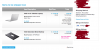
I finally got mine.. Thanks for this idea. I actually found a way to get a good deal basing from your idea.
The laptop came out $791 after discount and it includes free $132 battery sheet and $100 rebate.
To break it down..
$792
-$132 (say I sell the battery)
-$100 rebate
=====
$560
And I just flashed the 640mLE to be as fast as 650m ... This is a hardcore $560 gaming machine with 1080 IPS screen at 4.4lbs and less than an inch thick. There's nothing out there that can beat this machine at this killer price!
-
Nice! Glad to help. My laptop is waiting for me to come home (stuck at Puerto Rico overnight because AA cancelled flights due to 'tropical storm Isaac'). However, when I do get it, I have a USB 3.0 enclosure for the stock hdd and a samsung 830 waiting to be put in. I can't wait!
-
My new S15 makes some noise when resuming from sleep. It sounds like the same noise the optical drive makes when ejecting a disc. This sound is kind of annoying, especially in quiet settings. Is this a normal sound or is there a way to disable it? I saw one other person a few pages back mention this but no replies yet.
-
Disable OD in Bios
-
I dont think you are going to get the rebate. I talked with sony and you can't stack a promotion with a discount. Just read the terms & conditions.
My question is what discount coupon did you use? I used the 10% student discount and that same laptop you ordered went down to $810. Also, did your free sheet battery get shipper already? After I used the coupon it seemed like my sheet battery disappeared. I just guessed that I couldnt stack a coupon on top of a promotion just like the prepaid card. -
what model is your sony vaio? Also what was all the promotions/coupons did you use? was it $100 off and do you know what student discount you used? I'm asking this because you were able to use the student discount and you still got your sheet battery. My sheet battery seems like it disappeared from my order.
-
I just uploaded the pictures of the display problem in the Orangegate thread :-(
http://forum.notebookreview.com/sony/673678-vaio-s15-orangegate-again-8.html#post8802003
Makes me really sad now. -
hey. ive noticed that my mic really picks up the fans... especially when gaming. do you guys know where it is located or how i can get it to filter the fan noise out
-
Lmao this is hands down the biggest flaw of this notebook. I cant wait to get my hands on this laptop and check out how bad this orangegate thing is. I was optimistic that it wouldn't be as terrible as what people say, but there are way to many pictures from different cameras that show how bad the panel is.
I'm still probably not going to return it because it is adequate enough and I need a notebook for school. I can see this laptop lasting me 2 years and then upgrading to a 2014 model whether it is dell, sony, asus, etc. $810 isnt that much and I can just give it to my parents when im done. -
Why not? I bought it in a participating store (sonystyle). Also, the model number of the VAIO I got is in the rebate list and I have a barcode, receipt and a postage stamp. I think I have all the ingredients to get this $100 rebate. I'll try my luck.
Student account + battery sheet don't stack, but some got lucky with a phone call. I have a friend who knows someone with a Employee account. Employee account is around 12% off on this particular item and can be stacked with the battery sheet. I should receive the battery today according to FedEx tracking. -
you are going to have to send in an invoice to sony. On that invoice they will see that you used a 12% discount. read the top. "this offer cannot be combined with other offers"
maybe if you call sony and complain that you didnt know how the rebate works then they will give you the rebate. I plan on calling sony and complaining that my free sheet battery just disappeared in my order and demand that they give me the sheet battery or im returning their product (but im not going to). -
The same goes for me. I was also optimistic but I was very wrong. In reality the issue is even worse. I just hope that everybody who experiences the problem contacts Sony about it. Or nothing will change at all. Maybe next revision will get the same display again if nobody complains :-(
-
It's really not that bad at all. You can only notice it if you are looking for it
-
had an unplanned upgrade from HDD to SSD due to an acrobat upgrade that messed up my registry...
![[IMG]](images/storyImages/WEInew.jpg)
good upgrade though...but if it waited for next month i would have gone 512GB....oh well... -
double post...sorry
-
The "orange gate" issue really aint that bad.
Its very over exaggerated. Ath least on mine (bought in sweden) dont have a big issue. I would never have noticed even if no one told me. -
Just picked up a nice sleeve for my SVS1511 from PC World in the UK. Fits very nicely and is pretty stylish. Nice brushed inner material and the outer material is not so dissimilar to the finish on my black SV1511.
SANDSTROM S16CS11 Canvas 16" Laptop Sleeve - Black buy online | Currys
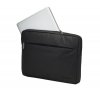
Sandstrøm S16CS11 Canvas 16 -
just got this laptop. has 0% batter wear (checked) and it died from 100% to 0% in 2 hours. was about 60-70% brightness and was on stamina mode was listening to music and surfing the web. its the 15.5" why does it die so fast???
-
delete, sorry ><
-
my laptop has auto brightness off in vaio control center but when i open google chrome and other applications it gets brighter by the second..? and how do i make the laptop turn off at 5% battery not 10%?
-
click the battery in the tray and choose advances profile settings. scroll down to the bottom and then click battery... this is the same place you change maximum cpu power and the like.
-
thanks for the info. ^ anything about the auto brightness? its annoying and is off in sony control center...
-
Just wondering, how can I enable to use the Fn key to wake laptop up from sleep?
-
Hey, I can't seem to PM you, but I think I saw your username on slickdeals too. Could you check your PM there?
-
Problem solved, thanks!
-
the fn key is really only to put it to sleep. why would you want to wake it up with the fn key... that why there is a power button. mine also wakes up when i open the lid... that can be changed in the vaio control center
HELP: I was wondering if anyone stumbled across a screen profile manager. i like my screen with the stock settings most of the time but when i game and watch movies id like to have presets for them to change contrast and he like... is there any way to do this -
guys auto brightness is checked off in control center but it still uses auto brightness???
-
Not that I know of... it will change brightness based on power profile and battery vs plugged in
Sent from my SGH-I777 using Tapatalk 2 -
Just a question on bloatware...
Anyone know any details on VCAdmin, VCSystem Tray, VESmgr or IA StorIcon are? VCAdmin is taking up almost 100MB of RAM.
Official 2012 Sony S Series Owners Thread
Discussion in 'VAIO / Sony Owners' Lounge Forum' started by Petrov, Jun 9, 2012.


