Problems? See this thread at archive.org.
Anyone know how to turn off the beep when using the Fn keys? Thanks.
-
yes... search for posts by me.. i posted a fix a while back. it involves renaming a file. it is not in the place in most guides (they are out of date) idr what the new path is off hand but its on the forum
EDIT: found it it is at:
C:\Program Files (x86)\Sony\VAIO Control Center
then search for the pi.wav file. rename it to anything else or delete it. ive done this for at least a week now and have seen no problems related to it. -
Oh cool... good info! That beep is HIDEOUS. I might have to replace mine with some sort of nice sound instead. The one Apple uses is pretty good.
-
yea i agree i dont know why they even put it on there... i run mine with no beep at all. the last thing i need is to sit in the library and have it beep every time i use it. ( i often turn the track pad on and off bc i have a wireless mouse)
-
hi guys,
quick question on the camera for S13p. i have been skyping for last few weeks and not happy with the camera performance so far in fact it is quite bad in the low light. i have tried playing around with the settings in arcsoft magic (sony own software) but hasnt been able to improve it all. anyone knows how to improve it. in my experience it only works (with normal quality with a lots of light in the room which in my case only possible on a bright sunny london morning).
appreciate any help i can get here.
cheers, -
It's been great in my experience in low light, one of the best webcams I've used
-
setting? may be i have messed mine up..
-
could you pls let me have your webcam settings? i have now reset mine to the default but still no difference.
many thanks, -
there are actually many complaints about the webcam.
if it is too dark you can up the gamma setting one or two but there is nothing we can do about the noise... which there is a lot of. i just found a reduce noise feature of the arcsoft companion software but it seems to just turn gamma and sharpness up, not actually reduce noise.
if the mic is picking up the sound of your fan which it was for me when i was gaming you can turn on the noise cancellation feature in the mic preferences... DOES WONDERS for reducing the fan noise... -
double post...
-
Which colour is better, Black or Gunmetal Black? Also, what's the difference?
-
actually the best combination i have found so far is as below:
Birghtness: 22
Contrast: 4
Hue: 526
Saturation: 38
Sharpness: 3
Gamma: 256
White Balance: 4271 (but set at Auto)
Backlight compensation: 3
Grain: 4
every thing else 0
as i said light in my room isnt the best anyway but with these settings now i am getting slightly better results but do take your point.
cheers, -
@ snoopy: i personally like carbon black simply because it just feels good to me. Gunmetal is also not bad it has slightly metalic/greyish touch to it.
anyone else finding the flickers on the right side of the screen, these are quite prominent when you have a plain darker colour on that side of the screen??? -
Thank you!
-
![[IMG]](images/storyImages/SVS13P_review_001.jpg)
More pictures (perhaps the OP wants to add this link to the first post?)
Basically Gunmetal grey has a visible carbon structure (not a weave like most cheaper carbon fiber) , almost like brushed anodised aluminum, and is slightly lighter in colour than Carbon black. -
Petrov...can you check your BIOS screen and tell me if there is a ENABLE/DISABLE option for the WWAN PCIE slot? I'm trying to get a USB adapter to work in that slot (which is unused in US machines) and it just doesn't work! Doesn't even show in Device Manager. My theory is that it's enabled through BIOS in machines with the option....can confirm or deny?
-
Can anyone tell me about the power brick? Like the weight/dimensions and how much more weight it adds when you're carrying it?
And my order got pushed back. Originally slated to come on Sept. 11, now it's the 25th. I'm going to call them and see if I can get something out of this long delay. And it's really bad too since my classes start on the 10th. -
the power brick was for me a huge question... my buddy has an alien ware with a monster... his brick ways as much as my s15.
ill be back with some pictures and weight specs...
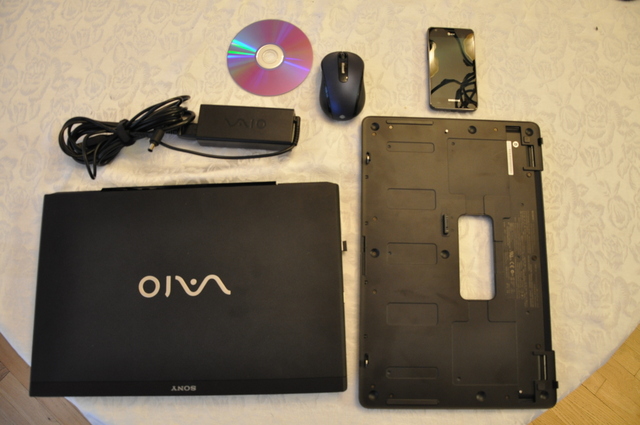
EDIT: IM BACK. there is a standard dvd in the picture for size reference. in the picture is:
svs151190x-vaio s 15" 4lbs 7 oz
sheet battery 1lb 5-1/4oz
vaio power supply 14-3/8 oz
samsung galaxy s 2 4-1/4 oz
microsoft wireless mouse 3-3/8oz
and the dvd...
all weights taken with a baking scale. should be very accurate as a little too much flour makes my pizzas terrible.
ill also note, sony was nice enough to put a velcro strap on the cables but it is not big enough to wrap around all the cables and the brick... so i wrap it as you see in the picture with all the cables velcroed together and the brick hanging off...
for you college students thinking about their weight other items in by backpack include
3" chemistry book-5lbs 7oz
1" calc 3 book (just calc three not the previous two... got them seperate)- 2lbs 4oz
notebook sleve (neoprene) 13oz
3ring binder with paper for a week or two- 1lb
small messenger bag with pens-3lb 8oz
ti-89 10oz
finally for you camera carrying folk... and this is no means how much a nikon d90 requires you to carry but a full frame camera with a moderate 55-105 lens is- 2lbs 8ozAttached Files:
-
-
Sure thing. Under the Advanced menu in the bios are (amongst others):
- USB ports
- Memory card slot
- Optical disc drive
- Wireless devices (could this be it, or is this more likely to be WLAN?)
- LAN device
Does your bios have the same options?
Petrov. -
Hey, I'm just curious to know if the s13a has an extra unused USB port when you open up the laptop. I read somewhere in this thread but can't find it anywhere.
Also, where would this USB port be, and can o use my Logitech Unifying receiver?
Thanks in advance! -
I notice this all the time, almost sounds like a bearing on the fan but it's not coming from the fan it's coming from the mobo or something. I notice it when I scroll on a webpage.
-
For me it is the same behavior when I scroll a web page. I wonder what causes this, since scrolling a webpage should not be a CPU expensive action.
-
when the pc is running i dont hear any high frequency stuff. the noise i hear i have come to the conclusion, is the hard drive not the fan... at least in priority to silence and just browsing. (means as soon as 512gb becomes more affordable im getting one) when the laptop is off i do hear a faint whine... my brothers tv does the same when off only and it is due to a bad capacitor... doesnt affect operation. i cant say if it is the same for our laptops. i also dont remember if it was charging at the time or not.
-
Why not replace it with a smaller SSD and put the main drive in the optical bay? That's what I did, and I'm very happy with the configuration.
-
That's what I'm planning but ID still like to have the larger ssd. Around Christmas or so I believe ssd s will be really cheap. I plan to swap out the HD to ssd caddy a tb HDD and lap and replace the thermal grease with something a little better. (Although in the past few days I've seen very very cool temps.). But I'm planning on doing everything at once
Sent from my SGH-I777 using Tapatalk 2 -
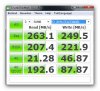
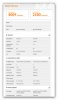
Just installed a Samsung 830 256GB SSD after I installed the modded VBIOS earlier. PCmark 7 almost doubled from 2180 to 4009 points! Now i'm waiting for my ODD replacement drive so i can reinstall the original HDD as storage drive.

-
I'm a dead man then!!

-
Yep...you sure are!
Welcome aboard! -
Just found something to considerably improve the sound quality of the so called speakers we got with our 'premium' notebooks xD
Link: Audio Enhancer DPS Plugin by Bongiovi Acoustics -
Thanks...I have the same options...along with Virtualization Technology and Execute-Disable Bit. I have enabled all of them and the PCIE USB connector doesn't work in the WWAN slot but does work in the wireless card slot! Go figure. You'd think it should work in either place unless it was disabled in BIOS. <scratcheshead>
-
Hey, I'm just curious to know if the s13a has an extra unused USB port when you open up the laptop. I read somewhere in this thread but can't find it anywhere.
Also, where would this USB port be, and can I use my Logitech Unifying receiver?
Thanks in advance! -
Is it possible that VAIO Smart Network utility (running in the tray) disables the slot because it does not see WWAN card there?
Edit: Scratch that, only the service can do that since administrative privileges are required. Tray utility simply communicates to service and does not do any switching itself. -
Also, after I run CrystalDisk Mark, how do I delete the file? If I choose 1GB, will that be deleted automatically when I exit the program?
-
Well after a long wait and a lost package with the USPS, my SVS13A finally arrived; Model SVSA12FXS - 1GB Nvidia, 640 RPM hard drive, Gunmetal finish - made sure it worked (powered on, ran few items, downloaded a few updates. Then powered down and added 8GB memory and a Samsung 830 256GB SSD. Fresh install of WIN 7 HP-64 and we are up an running. Overall impressions: compact, clean design and light, overall very quick (especially after the upgrades). Screen - not sure I understand all the comments on the forum - screen is very nice (better than many of the laptops I've owned/worked with for several years). Did not think I would like the matte finish after years of owning glossy and working with several matte finish laptops at work. Pleasantly surprised. Keyboard and touchpad - nice, clean & responsive. This was purchased as a replacement for my travel laptop (little Sony Y simply could not keep up with the processing tasks I was requiring). Happy new owner of a SVS13A.
For all the info on the first post (assembling, updating links etc) - Great info asset. Many thanks and rep. -
OH sweet. Thank you so very much tmckenn2.
Since my machine was delayed 2 weeks do you guys think that if I call them I may be able to get them to throw in something extra? -
Why does the language bar [EN] come up on the bottom right of my desktop? is it the same with you guys? I think it's cause ive started playing guild wars just wondering whats triggering it to appear
-
Bump for my questions please?
-
Not on mine but it's easily disabled in the control panel -
Benchmark programs should all use temporary files that are automatically deleted.
-
anyone using any type of cooler for the s13?
-
Picked up a S15 silver a few weeks back when the Canadian site had the free battery sheet offer. It's currently a free 160GB PS3. I5 3320, Blu-ray player, 2GB 640M LE. Everything else stock. Only mistake was to purchase one with a bilingual KB. Wasn't paying attention and didn't notice the English KB was the second option. Not the default. Also purchased a KB skin, lid protector skin, 4GB Crucial low voltage memory module, 240GB Kingston HyperX 3K SSD and Sony 15" black sleeve. I'm coming from a ultrabook that had horrible screen and noisy fan. Sold it after 2 months. I usually keep my laptops for around 2 years before upgrading. Was thinking about a S13 with the 1600*900 screen but didn't like the viewing angles.
Here are a few initial impressions
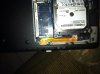
- The laptop came with the bottom service panel not properly seated. It also doesn't sit flush. But this is also the case with my Dell latitude business laptop. See attached pics.
- Build quality is good. Doesn't feel as solid as a Lenovo thinkpad or Macbook Pro. But that is to be expected for a laptop this light.
- Screen is great with the exception of the reds being more orange. Not an issue as I use this for surfing and watching movies. Love the viewing angles. Matte and IPS FTW.
- I prefer the track point over the touch pads. The Sony touch pad closes the gap a bit. Love the size. 2 finger scrolling and 3 finger swipe work just fine. I turn off zoom.
- Battery life is ~4 hours with surfing and YouTube. 5 bar brightness, stamina mode.
- The battery sheet does add thickness and weight to the laptop which effectively makes it a standard size laptop. But you don't have to carry it with you all the time. it's a nice extra to have when you know your going to need more then the standard battery can offer.
- The 15" Sony sleeve is nice and offer good protection for the laptop. It's a decent deal at $30cnd. I have seen worst sleeve for more money. Sleeve is a little too small for the S15 though. There is a bit of pressure on the corners of the laptop. I used it to store the battery sheet now.
- The lid seems to scratch easily. I brought a Skin for the lid at Gelaskin to protect it
- The KB Skin's lettering doesn't align with the ones on the KB. It creates a ghosting effect when the back light is on thus rendering the KB skin unusable. Anyone with one have the same issue?
- Replaced the HDD with a 240GB Kingston HyperX 3K SSD and boot up times are less then 15 seconds from start up to the desktop fully loaded. This is with the default Sony pre-loaded image minus a few bloatware I uninstalled.
- Fan is always on and is audible in a quite room. It's not loud though and not annoying unlike my last laptop. I use my laptop in bed at nighttime so it more noticeable for me.
- HD and memory are very easy to replace or install. Just wish the HD cable wasn't so flimsy.
Has anyone been able to disable the Realtek Audio power saving mode? It makes a slight popping sound every time the sound card go from sleep to wake. Very annoying. I was able to disable this on my Toshiba ultrabook through the registry. But those registry keys are not present on the Sony. Even when updating the drivers to the ones on the Realtek site.
I've attached some pics.
The bottom plate wasn't installed properly at the Sony factory!
My Gelaskin

The corners are outside of the 15" sleeve
KB Skin
-
i very much like the look of your geleskin and keyboard protector with the silver finish. a few observations. i dont know how it is with the silver edition but the black has a very rough textured lid and seems very hard, maybe the silver is more mbp like. and the other one is that the s13 screen should not suffer from the orange gate. that only exists on the s15 ips panel.
-
Hey, I'm just curious to know if the s13a has an extra unused USB port when you open up the laptop. I read somewhere in this thread but can't find it anywhere.
Also, where would this USB port be and where is it in this thread? Also, can I use my Logitech Unifying receiver?
Thanks in advance! -
Ok...I have the S15. It has an open PCIE slot for the WWAN card. The S13 likely has the same port if the WWAN card is an option (which I think it is) for you guys. Now here's the bad news: I purchased a PCIE to USB card and inserted it in the unused slot. I doesn't work. I does work when substituted for the Bluetooth/Wireless card but not in the WWAN slot. Can't figure out why. The S15's WWAN slot is under the mobo. If your's is the same you must do a complete disassembly to get at it. Keep us posted on your progress....others would like to find a way to install an internal USB port. I do not believe either machine has an actual internal USB port. I KNOW the S15 doesn't.
-
Oh, I have to do an complete disassembly? I know in this thread somewhere there are some pictures of the disassembly and the USB slot...Can anyone direct me to where it is? I just can't find it when I try and search for it.
I also never knew we need an adapter, if I recall my memory, it was an actual unsed USB port from the pictures which I can't find... -
I have a question. When playing games, every now and then I randomly get kicked back to the desktop. The game doesn't crash, it just minimizes, like some other process is taking over. All I have to do is click on the game in the taskbar again to get back in. Still, it has gotten me killed a few times. Anybody have any idea what might be causing it or how I could find out? Thanks.
-
Sony's little marketing and maintenance update notices do that on mine when playing games. Annoying.
-
How do you like the keyboard skin? Does effect the feel of typing much?
-
I had the same issue with my S15. Sony doesn't like to install that back plate correctly. Not an issue really but just strange.
-
I got my Vaio S 15 about a week ago now. Here are my impressions:
Touchpad: I really don't like it. Too big, awkward to use the buttons. Tweaking some stuff in Win7 helped, but it's almost unusable in Ubuntu even after a few hours of hunting for and trying fixes.
Screen: great, awesome 1080p, beautiful matte
Keyboard: It's alright. A little flex, but my typing speed seems to be pretty high. I hate having to use the function keys to raise the volume, brightness, etc.
Performance: I replaced the HDD with an SSD, re-installed win7, and the machine really really flies. Actually, I think it's even a bit excessive for my purposes (developing, watching tv shows, browsing)
Im actually considering returning it and getting the MBP 13 inch because this feels too big. Hard decision though, since the resolution takes a HUGE hit and the screen becomes glossy...
Also, as you all know, the speakers suck.
Official 2012 Sony S Series Owners Thread
Discussion in 'VAIO / Sony Owners' Lounge Forum' started by Petrov, Jun 9, 2012.