Problems? See this thread at archive.org.
The scans you describe normally remove temp files and old install files - no issue. another program that will help clear up space is CCleaner - safe, useful & been around for years.
Another very easy way to "recover" some space is adjust the size of your recycle bin. Normal default I believe is 10%. easy way after a re-boot to gain back some space.
-
Thanx for your kind words!
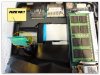
I actually have quite some experience with building desktop computers. These little babies are really different stuff,..... I think i messed up the flatcable trying to pry it in the connector. The excellent video made by Wizzardxexe show those flatcables coming very easy out of the connectors and also easily slid in again. Mine didn't! The connector was covered by some sticky black tape which was hard to remove. Getting the flatcable back in was far more difficult and after multiple times trying to get it right i finally damaged the flatcable as you can see on the picture. I think this part of the flatcable has something to do with power, as it won't power up. I didn't touch anything else!
In my opinion i have 2 options:
- Finding a way to get some replacement flatcable and put it in
- Send in my laptop to to Sony and be honest about what i did. Yes, i will lose my warranty (3 years) but at least my laptop will be fixed.
Any other suggestions?
Thanks guys for helping me!!
-
Yep...sorry to say it but that ribbon cable is toast. You can probably buy a replacement ribbon cable from Sony Parts. You have to call the PARTS people @ 800-488-7669 and describe which cable you need. DON'T call customer service...not the same people! Since there are only two ribbon cables there that shouldn't be too hard. It's the LONGER of the two cables (the one with the 90 degree twist) under the HDD bay. Now the bad news. The part will cost ten times more than you think it should. I would guess this cable would be between $50-$100 just for the part....IF they will sell it separately...some parts they do...some they don't. Second you have to install it. Those cables connect to the TOP of the mobo....which means no more disassembly than you did to change the ODD out. You can clearly see the other end of those cables once the top of the case and keyboard are removed. BUT you still have the same problem connecting the new ribbon cable. It could be the problem you had was that the original ribbon cable was defective causing the problem and that the new cable will not have the same issue. It could be a defective connector at the mother board end or it could just be...ahem...user error. I just can't tell from what you've posted. You did open the latch on the ribbon cable connector before you removed it/reinserted it right? A little flap should lift up to unlatch it!
Otherwise you will have to send it back to SONY and hope they don't charge TOO much for the repair. Sorry no easy options here. -
WOW! Important safety tip there Dark! I'm amazed it didn't mash that corner of the mobo (or display) and cause a MAJOR malfunction!
-
I'm using S15 (asia model SVS15116GG) which I believe is the same as UK version (with finger print scanner)
I did a clean install on my SSD and managed to bring the laptop back to life without the Sony bloatwares and useless drivers. I've skipped the following:
a. Sony - Realtek® High Definition Audio Driver 6.0.1.6570
b. Sony - Audio Driver Registry Patch 20120308
c. Sony - VAIO® Location Utility 1.1.00.06060
d. Sony - VAIO® Care Software 7.3.0.14170
e. VAIO® Hardware Diagnostics Software 4.5.1.1424000
f. VAIO® CPU Fan Diagnostics Software 1.1.0.09200
Q1. I'm currently using Intel HD Audio driver instead of (a) above; are there better drivers around?
Q2. Is (e) and (f) required to ensure CPU Fan and hardware is in good shape? eg.. not overheated etc
Thanks in advance! -
Sorry for the noob question, but, how do I boot from a USB drive?
I've set the "External Device" as primary option in the boot order list in the bios, but it doesn't work. -
well there is something good that came form the fall.... WE CAN NOW CONFIRM... IT IS REAL METAL. months of questions finally answered by one intrepid... clumsy poster

try connecting it to the usb2.0 port. also make sure it is flagged as bootable. google make usb drive bootable. -
Thanks again J&SinKTO. CCleaner is just what I needed. The recycle bin tip is also excellent.
-
To all Windows 8 users:
The Alps driver for Windows 8! So recent that it says on the download page it's released 24 October 2012!
With all the slide-in gestures
But no circular scrolling, no pan scrolling, no pinch to zoom
-
Does anyone else's Sony Vaio S 15.5 have a key on their keyboard that isn't the same height as others right out of the box? My "H" key is a fraction "shorter" than the keys around it ..... Not sure if this is return worthy lol ...
EDIT: Actually it's more than just a fraction .... Is there anyway I can remedy this myself? The travel on the "H" is a bit less than say the "F" or "G" or "J" ....
EDIT 2: It may be because of the keyboard flex ... because around the "H" there is virtually no flex ..... Just wondering if anyone else experienced this ... -
guys i want DELETE everything on my vaio. i tried f2, f3, f4, f5, f10, f11, f12, delete, esc on bootup and they give me boot options but not recovery menu... also tried f8 and tried using assist key like the online support told me.... NOTHING happens besides the boot options...
-
Try ALT + F10.
-
i did... i cant think of anything else. i tried so many things i had more to add to the list lol...
-
^ Still looking for an answer.
Also, I just noticed that the 15.5 screen brightness while on Power Saver kind of brightens and darkens randomly (in little increments, but still noticeable). I have Power Saver brightness on the lowest possible setting, and it kind of just brightens and darkens in increments. It's hard to describe really. Does anyone else notice this or know why this is happening? Is this normal or does my screen have some sort of defect? My Desktop BG is mostly black so it may be more noticeable to me ...
Any help is appreciated.
EDIT: It seems to darken when I'm just idling on my desktop and brightens when I'm on like a web page or anything else. Maybe it's a feature? -
Need some help. I waNt to create recovery dvds for my s15. Cam anyone suggest me how to go about and how many dvds will i need ?
-
Does anyone know how to use the normal audio jack for sound while outputting in HDMI to a monitor?
I have my s13p outputting in 1080p to my monitor through HDMI, but the monitor has crappy speakers on it. I want to use my headphones in the regular audio jack instead of the monitor speakers, but plugging them in does not override the HDMI audio and there doesn't seem to be any settings that I can see to disable it. -
thats auto brightness in vaio control center AND in another place, the intel graphic settings.
the one in vaio control center is basic, just go under display and its the first one under.
this is for the intel one:
Graphics — How to open the Intel® Graphics Properties window
happened to me too,
-
If you have EFI boot in the BIOS, for something to be able to boot you need to partition it as GPT and not MBR and you'd normally, be it the HDD (the bundled one comes as GPT already) or an USB drive for example.
-
Hello all. Original poster here. Just wanted to let you know I'm still using my S13P heavily, travelling with it, gaming with it (Path of Exile open beta weekend this weekend!!) and it's doing great. No BSODs, no hardware issue, no temp issues.
I keep up to date with the thread despite my relatively few posts. However, if anyone thinks there is something important that is worth updating the OP, please do let me know.
Petrov. -
hold down f2 when your computer boots up, tapping it won't work
-
I've an issue with my new SVS13A touchpad.
Does anyone find that the "tap and drag" speed is just too fast to use? (I mean, the feature where you do a quick double-tap on the pad, and hold your finger on it after the second tap, then can drag and move things).
It seems to require a fantastically fast double-tap. I checked the Synaptics settings, but nothing is available to change this. I also checked some new drivers, and in the release notes for the latest ones from Synaptics, it says they fixed the issue with the double-tap speed being too fast in version 16.2.xxx (Sony drivers are 16.0.0.5).
I tried installing a newer version, but no luck - it blue-screened my laptop as soon as I used the pad (other than holding down the pad "click", which requires a lot of pressure).
So it seems it's a driver issue - surprised no one else mentioned it, or is it just me? It makes the touchpad unusable as far as I'm concerned. Or is there an alternative way to move windows or select text using just one finger on the touchpad? -
It's just you
Sent from my GT-I9000 using Tapatalk 2 -
I use the latest drivers from here and they work fine. I'm using Windows 8 btw and have the S15, but the pad should be similar enough.
-
Hi there, I am the proud owner of a S13A 1C5E however I need to ask for your help!
The main issue I am having is with the fan noise. Even in Stamina mode with priority to silence, low loads and low temps it is constantly running. Not excessively but still audible and certainly noticeable in a calm and quiet surrounding. What am I missing? Other people have been saying they cant even hear their fan.
I have Stamina running, GT640MLE is clocked at 135Mhz, CPU is around 1200 mostly and the laptop is on a table with nothing underneath. Newest available Bios version was already installed (R0142C5)
GPU temp: 43-47C , CPU temp: 46-52C
Unplugged I only get 2h15min of battery out of my Sony. That doesnt seem right especially with display set to 50% brightness.
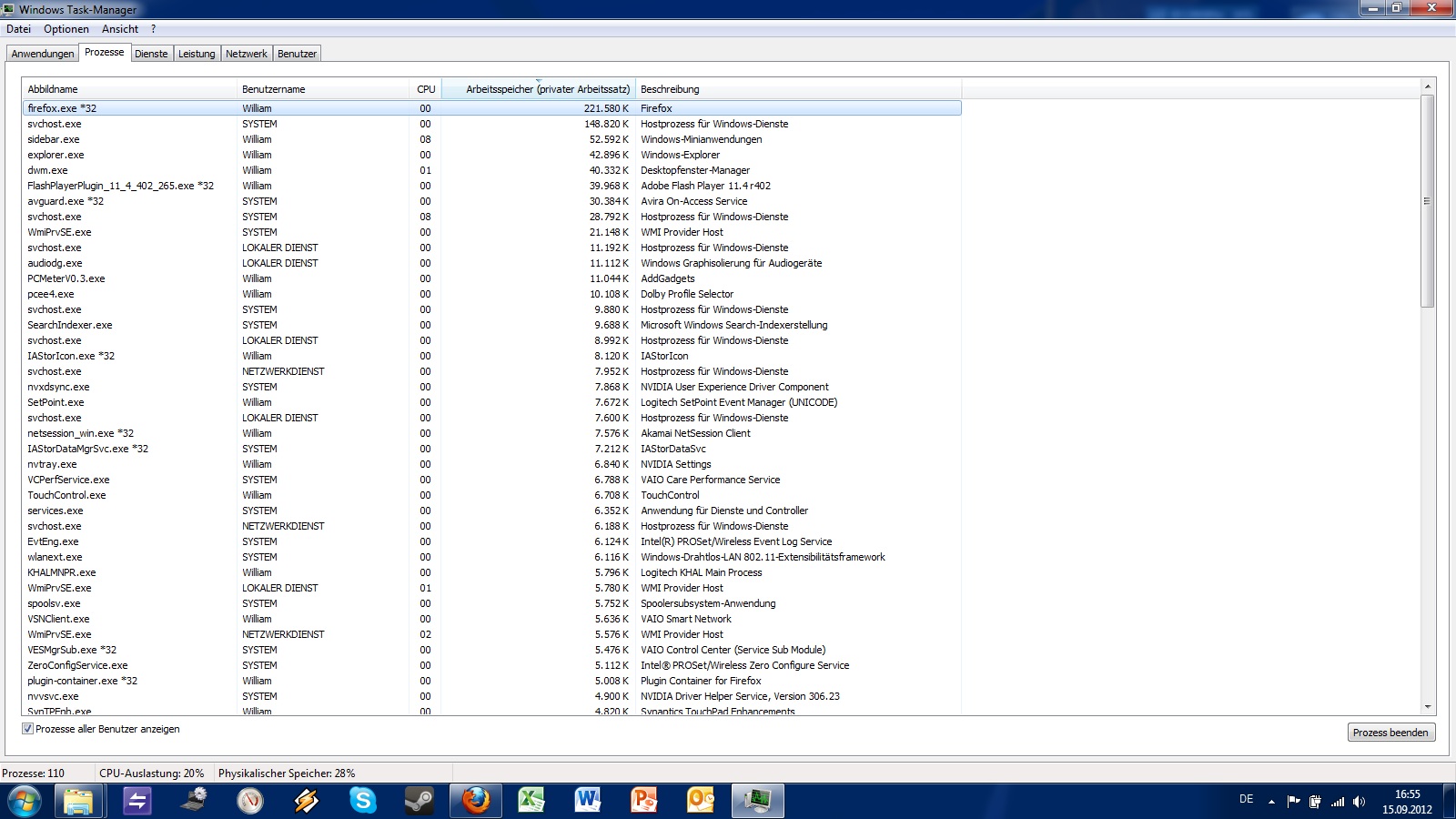
The only changes I have made since I bought it are a clean install, added 4GB of Ram so I have 8GB in total and replacing the standard 320GB with a Momentus XT750GB/8GB SSD (hybrid). Wiindows 7 Ultimate 64bit. I attached a screenshot of my taskmanager
Please help, thanks in advance!Attached Files:
-
-
So, I'm still having this issue with a squeaking spacebar on my S13. Anyone know a way to fix this? Are the keys safely removable and easily put back? What should I do? I called Sony, but they said it's not their fault and that they can't do anything. But I mean this shouldn't happen after two weeks...
-
What's your ambient temp?
Your GPU temperature seems a bit high on idle.
Are you sure it's on 135MHz all the time?
Bare in mind, our GT640M LE clock might still stayed on full clock when running GPU-Z or any application with bug that will make our clock stays on maximum, EVEN on Stamina Mode. -
Hi Amal,
my ambient temp is around 18-20C. Its getting cooler in Europe I dont use GPU Z, I read through ur thread on the GPU Bios mod and people were complaining about it. I use MSI, OrbLog and GPU Meter. They all confirm low clock. The odd thing for me is that my battery life is so short. I should at least be getting 4-5h in stamina. I dont even get half that. I do see the CPU active @1200MHz with loads between 15-30% constantly. I just switched to the standard HDD now but can still hear the fan. GPU temp now at 40C and 135MHz.
I was planning on getting one of ur bios mods but shelving that until I get this fan issue resolved.
Greets
EDIT: Oh and 1 question. Does the fan run constantly on your Vaios? And if so is it audible? I have a 2010 macbook and a Asus zenbook here and both i can not really hear when sitting in front of them. The Vaio on the other hand is audible. Maybe someone can share their experience too -
I'm getting ready to apply for the rebate, but what did you or anyone else submit for Receipt? When my computer arrived there was a document in the box labeled Packing List, but nothing titled Receipt. Does the Packing List serve as the Receipt?
-
Mine does run constantly... but your loads are really high. I see 1-2% load at idle
Edit: with BTW two chrome with Windows 10 tabs each plus sticky notes and a few other things. But when I first got my PC I couldn't hear it... now I sort of can. I can't hear it over my Sony TV or HP desktop 20 feet away from me or even a Toshiba laptop 5 feet away from me...
Sent from my SGH-I777 using Tapatalk 2 -
Ok, well Windows seems to have finished indexing (after two days! sigh) and loads have gone down slightly - hovering somewhere around 25%, I only have steam and firefox running + my meters. I have 119 services/processes running. Is that too much? I didnt install any bloatware
Killing the Vaio Care processes help lower loads a bit further but still doesnt seem to want to idle. Is Vaio Care running on ur notebooks? -
Mine run constantly if it's on SPEED MODE, but still, I can just barely hear the fan.
When I switch it to STAMINA MODE, the fan just like totally stopped or spin very slow, when I put my ear very near to the laptop.
The reason why I asked about the temp is because mine on SPEED MODE with ambient of 24c, my GPU float around 35 - 37 celsius.
While yours seems a bit high even on STAMINA MODE and on a much lower ambient than mine.
It is as if your GPU is on 500MHz all the time.
Your CPU temp does seems normal eventhough you have those process running.
Edit : On SPEED MODE with 30-50 percent CPU usage at 56c, my GPU does reach 40-42 celsius.
So, yes, that might also be the issue(constant cpu usage).
Mine currently running 225 process as usual(sometimes higher), and can still get 3 hours on SPEED MODE on 80% brightness, as far as I can remember. -
OK so this is really strange now, I set the Vaio to Speed mode because I ran 3dMark and once I was done the CPU started idling somewhere between 3-6% but as soon as i turned it to Stamina the CPU went right up to 15-25% and stayed there. But I think that is because in speed mode the Cores run at aprox. 2900MHz and in Stamina mode they run at 1200Mhz and thus the load seems higher because it is distributed among less processing power.
At least I seem to be getting similar temps in Stamina and Speed mode of around 40C for the GPU.
*UPDATE*
OK so after playing around with various processes and gadgets it turns out that GPU Meter conflicted with MSI. As soon as I closed MSI the clock shot right up to 500Mhz. Now I am idling around 3% CPU. Will update further on battery life -
Hi guys,
My early 2008 MBP died a couple of weeks ago and I now just got the bill for repair : 542 euros, not gonna happen
So I'm on the market for a new laptop, in the range of 13" to 15".
I thought first I had it : The Dell XPS 15" but after reading the WIFI problems, let's say I'm not very "warm" for it.
Then I found out about that nice little Sony S Series ... I think it has what I want, especially since 2 months before my previous laptop died, I had bought an SSD (512GB Crucial M4) to put in it, and I'd like to reuse that one in my future laptop.
Therefore it excludes most of the ultrabooks.
I was not sure what to take between the S15 and the S13 but I think I go towards the 13" in its premium version which seems to have higher build quality. Is it really the case ?
My use case is home stuff (so browser and watching movies) + some compiling as I am a programmer and I would use it also for that on my free time. I like the resolution of the screen, not crappy 768 but not full hd, which I think would be too small for my eyes on a 13" and I don't see any competing laptops (well, I guess you guys would anyway not tell me about it )
Also, I live in the Netherlands and there is an offer right now where you can get the extra sheet battery for free (and a PS Vita for 99 euros but I don't think I'll take that one). It runs until Monday.
However, I've read here and on a Dutch forum that there might be a refresh of the S during September.
So I'm a bit hesitating ... on one hand, the extra battery is nice, on the other hand ... well would be a bit crappy to get a laptop to just discover it has a refresh 2 weeks later ... but if I wait, in theory, the offer for the battery will be gone. I say in theory because my gf bought a Z2 which had a similar offer (with the power media dock for free also) the last day of the offer ... and actually she checked a week later and the offer had been extended ... so it could very well be the same here.
So, what do you guys think ? All those rumors are just what they are : rumors with no backing ?
Do you also know if they limit the number of laptops per students ? My gf bought her Z2 in June ... and well, the perspective to have 10% off is quite nice, but maybe they will be more checking because it would be her 2nd laptop in 3 months ?
Thanks in advance,
Gmooron
PS: I also had bought some DDR2 memory for my MBP, I could reuse it for the additional slot in the S13, but do you have any idea if the slow down would be worse than the gain of additional memory ? -
Oh, LOL I didn't even consider to check Intel Settings. I was wondering because my auto brightness is off ...
And no one have any input on the other question I posted about my "H" key not being the same height and having less travel than the other keys? -
no we'd tell you... but your right we chose these laptops for a reason. if you search for posts by me on either this thread or the 640m bios mod thread (idr which) i voice my opinion on the s15... but if you can hold out. the asus U500 is by far going to be the best (but there is no release date) the ux32vd was the only other option for me. it was between the svs15 or the ux32vd. but i wanted the 15 inches...
-
CAN SOME1 PLS TELL ME WHY I CANT ENTER RECOVERY MODE..... i tried f2, f4, f5, f7, f8, f9, f10, f11, f12, delete, esc, assist, alt + f10, EVERYTHING. they basically all go to boot options besides f2 takes me to a blue screen with boot option settings..... and in boot option i went into repair mode but it can only let me restore from a previous saved update. i want it brand new.
-
The build quality of the S13A and the S15 is the same, so unless you really want something that small I'd advise you to get the S15 instead as it's cheaper and it's a wonderful machine with a better panel (it's a beautiful FHD IPS panel, I don't notice the orange unless I go look for it specifically).
Also, don't even try to put DDR2 in it. Even if it fitted you'd just get your laptop and RAM burned. Get DDR3 \ DDR3L 1333MHz or faster, doesn't really matter. A 4GB stick of DDR3 1600MHz is pretty cheap anyway. -
Having a problem with my new Vaio S13 and hoping that someone can help:
I wanted to reformat and install Windows 7. Laptop would not recognize my dvd as a bootable disc in UEFI mode. I switched to legacy mode and used the command prompt at the "Select Partition" screen to "Clean" all partitions. Installed Windows 7 and initial bootup was fine. It restarted again and goes from the Vaio screen to a black screen with a blinking "_" character. From what I could find on google, this points to Windows somehow not knowing to boot from the hard drive. Not sure how to fix this.
Tried to boot in UEFI mode and got the "Operating system not found" message. I know the Windows 7 dvd is working as I just reformatted a different computer with it. Thanks. -
Hi Gmooron,
I visit that forum regularly using the same nickname. Despite the possibility of a refresh, I did order the 13P. It is due to arrive around the beginning of october, and I have 14 days to send it back. This way I make sure I get the sheet battery, if the refresh was not worth it, or unexistant...
And about the memory, for 30 euro I would be willing to invest in a new stick of ram. Although I'm certain your memory will only work at ddr2 with that stick, I do not know what difference it will make. -
I have a question , the chipset on Sony Vaio S 2012 used is H77 that i've found on notebookcheck.net and it does support 1600mhz ddr3 but why Sony only use 1333mhz in RAM
-
First of all I'd advise you to get that installation done by USB drive since you can freely partition it as GPT (for EFI) or MBR (for Legacy) and it's much faster than the DVD anyway.
The CDs \ DVDs may also get read errors much more easily than flash drives, though that shouldn't be a concern.
That error suggests that the MBR got corrupt or something like that and didn't direct the bootloader to the correct sectors. Try cleaning and reformatting the drive previously to the installation (or try the repair option in the DVD, if it's just a bootloader issue it should suffice).
You shouldn't have any problems with EFI + GPT drives or Legacy + MBR drives.
No, no, no, do NOT mix DDR2 into DDR3 slots (and vice versa), not only it will not work but may also damage the computer and \ or RAM. A DDR3 RAM module won't suddenly turn into a DDR2 one (and vice versa), even though they may be pin-compatible.
Probably cheaping out on the DDR3L. Notebook manufacturers are usually known by their ability to cripple their machines (most notable is limiting SATA-3 capable laptops to SATA-2) or by cheaping out on some components. -
Hi, so i'm planning to grab myself a SVS151190S, equipped with a quad i7, 4gb ram, 2gb graphics, and the lowest end HDD.. I'm planning to get myself a Samsung 830 ssd (230$), and an 8gb stick of ram (65$) in the future. I'm hearing that there's a lot of bloatware pre-installed, and was wondering if I should do a fresh install. If so, how would I do that? Since I don't have the windows disc.
(picked the S15 over the Asus UX32VD) -
Dust and lint are quite a nuisance here. I must clean my SVS15 every week. But how to best clean this keyboard on a regular basis? There seems to be a considerable gap around the keys, making it difficult to avoid dust and lint being pushed into when cleaning. Would it be safe to use a vacuum cleaner? (Of course, very carefully with a weak suction, to avoid statics’ accumulation.)
-
Yeah I think I'm gonna do that.
@Others : Thanks for the tip about memory, I think I would probably have tried otherwise, would have been a disaster
@bolt.pt OK. It's just that the S13P has a different material than the normal S13 or S15 that's why ... and there is no S15 premium ...
So I'll still have to think about it
-
As I sit here with only Chrome open.....I have 96 processes and CPU utilization of 0%. I am on a clean win7 install without VAIO care. I also use the XT hybrid...in fact I use TWO of them. Yes my fan runs all the time but then I'm set to priority to cooling and all performance modes enabled.
Sounds like something is keeping your CPU very busy. That would explain fan noise and short battery life. -
So ... on the dutch sony site, you can't order the Vaio S15 anymore ...
That leaves me with ... taking the S13P now to have the free sheet battery or ... waiting
-
For anybody interested, I have a completely brand new, still sealed S15 battery sheet for 70 dollars posted in the for sale section of these forums.
Sent from my GT-P3113 using Tapatalk 2 -
I used the order confirmation email as a receipt. I ended up contacting the rebate customer service, and had to fax a duplicate rebate package (rebate form, two stickers from the box, and order confirmation). Still waiting for the rebate (~4 weeks), but status sounds like it is in the mail.
-
I was just looking around the Asus U500 forums and came across an interesting piece of information. apparently, the u500 has the same LG panel that is in the sony S15, but it doesn't have the orange problem. How is that possible? Also, anyone know about any upcoming deals on the S15.
-
hey everyone, i need help deciding. i know i'll probably get a biased response, but below are choices at this point with a $1000 budget.
2012 Macbook Pro 13" - $950
2012 Macbook Pro 15" non-retina - $1200 ~ $1300 (i know this is out of my budget, but it is under consideration...)
Sony Vaio S13 Premium - $1020 (with the GeForce 640)
Sony Vaio S15 - $900 (with the GeForce 640)
i've tested all of them. i'm attracted to the Sony's due to the price, weight compared to the Macbooks (S15 weighs as much as the Macbook Pro 13), dedicated GPU, and screen resolutions. on the other hand, imo they just feel flimsy (especially the screens) in comparison to the Macbooks unibody construction. i've also seen pics and read issues about Sony screen quality issues are hit or miss (light bleed, grainy, showing orange instead of red aka "Orange Gate").
i'm in need of a laptop for every day use and on-the-go photo & video editing along with some light gaming. obviously the dedicated GPU would be a big plus and narrow my choices.
if u could choose again, would current Vaio owners pick the Macbook instead of the S13/S15? why or why not?
Official 2012 Sony S Series Owners Thread
Discussion in 'VAIO / Sony Owners' Lounge Forum' started by Petrov, Jun 9, 2012.