 Problems? See this thread at archive.org.
Just checked on the price and this is crazy indeed.. £120 for a combo, and I couldn't even find the writer on UK's eBay. Wish I had known this before ordering, all I did was a quick search on internal laptop Bluray writers and there were plenty at a fraction of price, apparently slot loaders are much more expensive.
Anyone who had replaced their ODD with an extra HDD willing to sell the former?
-
So All this "Offers while supply last" on Sony VAIO S is like a confirmation that something new is coming for with Windows 8 Launch? .. Better hold and wait for till the end of october...
-
I doubt it would be a major leap tech wise. Unless they somehow squeeze in a touch screen into that thin display. Which won't happen.
-
why is there a high pitch sound coming from the laptop...? its so fking annoying. The sound is coming from the area next to the mousepad....
-
Well, my keyboard has now completely stopped working. Plugged in a USB one and things look good as of now.
I am in India, laptop bought in US, not sure what kind of Sony support I can get here under the 1 year warranty. Going to try and see if I can get a replacement of the keyboard here form Sony.
I love the laptop otherwise, these issues are very frustrating though. -
Already confirmed a couple of pages back. Sales rep said they are updating it.
-
Hey everyone!
I finally got my SSD (intel 520 - 480gb). yay!
So of course I had to install windows myself (and i was happy to get rid of the bloatware).
In short: I won't get it to work.
For sure i followed the recommended order of installation, but the Unknown Device (ACPI/SNY5001) does not disappear and I think as a reason the hotkeys and the wlan don't work either. Plus I get this annoying message telling me that there is something wrong with my battery.
So far I reinstalled everything three times and double and tripple checked to install everything important.
Am I missing something? I really hope that you can help me out here! -
Could you provide a list of what you installed?
-
At the moment I have exactly the same list as suggested here:
NicholFD's Recommended Order of Installation -
Hm.. that's strange. I did the exact same thing yesterday and there wasn't problems.
-
If I switch my bios to legacy mode, can I get the restore partition and everything working again by going back to UEFI?
-
Did you cleanly install Win7 or Win8? Also, did you make MBR partition with Legacy boot or GPT partition with UEFI boot?
I don't have any unknown device on my Win8 clean install, are you sure you installed all the drivers?
If you don't have Vaio Control Center and you had limited the battery charge to 80% or 50% it will probably tell you that the battery is gone bonkers because it can't charge above that %. The battery charge setting is NOT done in windows or program settings, it's probably some setting in the battery firmware, so it will stay that way and the OS might stupidly complain about that because it doesn't know any better.
If the Windows installation in the HDD works you can always mirror it with proper software and proceed to uninstall the crapware from there, there should be no problem whatsoever.
Edit: Some drivers in that post you mentioned about the clean install are outdated, you can try to install newer ones. Hotkeys won't work and Windows will complain about that battery if you don't have the Shared Library and Hotkey programs (includes 3 programs) properly installed. Double-check if they're well installed.
Also check for the device ID and vendor of the unknown device so you can check what it really is. -
Ok...another issue?
I am trying to load a blu ray drive into the slot loading drive and I press the disc all the way in but it just doesn't go in. -
Now, I've been trying to get this to work, but it doesn't.
Care to go into the details? Did you install the touchpad drivers from another manufacturer? -
i did a clean install of win7 pro using uefi.
I thought about mirroring already but I want to use my win7 pro, but it would be sollution of everything else fails (which it shouldn't).
the device ID is ACPI/SNY5001 - and as google tells me really is a device from sony that should do some important stuff.
It also should get its driver from the "Sony Firmware Extension Parser Device" and after installing that, it (and so everything else) should work fine. Which for some reason isn't the fact here. -
I - with my really fresh windows - can do a right click by just tapping with two fingers. It doesn't work alway but most of the time.
-
one doubt...can we use ssd in Sony s15 model when we purchase it with HDD?
-
I'm interested in buying a vaio
configuration:
- Carbon Fiber Gunmetal
- 13.3" LED backlit display (1600 x 900)
- Intel Core i7-3520M
- 6GB DDR3-1333Mhz
- NVIDIA GeForce GT 640M LE (2GB)
- 640GB (7200rpm) hard drive
- Internal lithium polymer battery (4400mAh)
- Windows 7
But i don't know if that's good enough for a program like autoCAD. What do you think? -
My guess is that you did miss something, missed a restart, or perhaps some other unknown error. I'd recommend just doing a fresh install again and being extra careful. I know you are sure you did it all correctly, but small oversights do happen and you don't have much to lose except a little time by doing another fresh install.
I did the recommended order myself (skipped the webcam one and something else I think) and I had no issues (s13p here). -
good enough for autocad..... HA... HA..........HA. yes it will be more than enough. i use it for inventor and it works great... the 13 may be a bit small as far as screen space goes though. thats more personal preference though.
-
Im using it with Revit opening files of like 50MB++... and its really smooth

-
yay, i got it working now! "All" I had to do was install some 25 optional updates. I did this is a final atempt without much hope.
I always skipped these because I thought it should be working at this point.
Damn, now i feel stupid. -
Hello Sony owners,
I am in this thread because I am looking for a replacement laptop for my XPS M1530 (going on 4 years now). I have been looking for a laptop that can be considered a good ugprade on all the specs. I tried the XPS 15, it's successor, as well as the Samsung Series 7, and both had to go back due to the crippling wi-fi issues. I had originally looked at this laptop as well, but decided upon the other two after reading about the screen's color issues, as well as the poor speakers. I just want to know from some owners how bad these issues are and if it should affect my considering this laptop. I don't really know any other mainstream laptops like these, so i'm kind of in a pickle.But I would appreciate some guidance. -
Original prob sounds like a problem with either Firmware Parser or Sonny Shared Library. I KNOW the battery prob has been discussed before....just can't remember the exact resolution.
-
"Orangegate" screen is only a problem if you do photo editing or some other app that requires a accurate RGB colorspace. It can be reduced but not eliminated by tweaking your color settings.
Speakers are "voice quality" only. Expect nothing more. I use a headset on the road and an external sound card at home. -
Whats the chance that there is already a disc in there?
Other than that....it's likely the drive is failed mechanically.
-
YES. Search the thread. Asked and answered MANY times.
-
Hi everyone,
I would like to replace the dvd drive of my vaio S15 with the BR Burner shown below, can anyone tell me if this drive wil be compatible (interface/size) ?
UJ-240 - Panasonic 6X Blu-Ray Writer (Blu-Ray Burner) Laptop Drive - Laptop Blue-Ray Burners
Thank you -
Hey, does anybody with Intel HD and Amd 6630m graphics experience a laggy aero desktop after you startup your laptop on speed mode? It very noticeable and it only goes away after switching to the basic theme and then back to aero. I own a VPCSA35GX.
-
has anyone else had a problem with their webcam?
i have the s15 and i tried using skype yesterday only to notice that i was barely a silhouette even in a bright room.
in moderate to low light the webcam is completely black.
i'm going to call sony when i finish classes today, but i've already sent my s15 back twice for repair
and i'm to the point where i absolutely need it for school.
does anyone know if sony will loan you a laptop while they fix yours? -
my s13 is scheduled to arrive today.
I got my m4 256gb ssd and 4gb ram stick ready. I'll also be following most of Petrov's instructions (found on the first post) and will be using 950/1000 mod for the GPU overclocking. cant wait! -
Has anybody else had problems getting the Intel AntiTheft to work on these laptops? I've not been able to get mine to enroll since I bought it. Intel's customer services are being quite useless.
-
I just received my s15.....
It's filled with unwanted stuff...
How to install a fresh copy of win 7......?
I didn't get any win 7 os disc..... -
No disc in their, never tried till date. Used eject multiple times.
Damn, time for a replacement once I get back to the US in January. -
Your question has been asked and answered a million times. Stop being lazy and either use the search function or at least read the first page of this thread. It covers all important issues!
-
Here is the refreshed Vaio line for Autumn: http://www.sony.jp/vaio/2012_autumn/pdf/spec.pdf
There's an S15 with a refreshed CPU (i7-3632m instead of i7-3612m, 100MHz bump), rest seems pretty much the same even though I can't read Japanese so I can't be 100% sure. There's a bump in the HDD size, 500GB to 750GB (although not sure if that's the base model), battery life keeps being advertised as 7h with normal battery and 14 with sheet, so no change there as well I guess and weight is the same.
Also we don't know about chassis \ panel \ etc possible changes.
There's also an S13 that looks basically the same as the current one, no mention for S13A (premium). Battery life announced as 9h normal and 18h with sheet battery, not sure if it's the same as the current one, which probably translates to 6-7h with normal usage.
They'll come with Windows 8 by default, so get ready for new drivers \ applications by then. -
Really want an S15 with a touchscreen and a trackpad with gesture support for Win 8
-
http://www.sony.jp/vaio/2012_autumn/pdf/S_Series.pdf
Windows 8 S series product page on Sony Japan -
Hi everyone, I have installed a caddy and a ssd in my s15 2012 but my secondary drive (ocz vertex 2) is only detected some times and dissapear after suspend or reboot.
Is someone having this same issue? -
Those of you, who are using the Intel HD 4000 as their primary graphics processor: I'd strongly advise you to get a 4+4GB dual channel RAM combo (instead of 4+8GB or 2+4GB).
Asynchronous dual channel or single channel (like in most ultrabooks) apparently have a negative impact on the performance of the integrated Intel HD graphics:
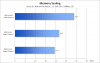
Dual channel vs. single channel equals a performance increase of 34% (although the benchmark only shows DDR3-1600 dual channel, DDR3-1333 dual channel should be a little over 27 fps); DDR3-1600 vs DDR3-1333 has an 11% impact on performance - too bad Sony uses DDR3-1333.
[edit] A quad core i7 helps to increase the performance aswell, see:
Kurztest: Performance-Übersicht und Skalierung der Intel HD Graphics 4000 - Notebookcheck.com Tests
[edit2]- not 29%, sorry! -
Asynchronous Dual channel is not the same as Single Channel.
There is indeed a little performance penalty, but that is not that big !
Oh and for other readers: no need to add DDR3-1600 since it will always clock to the slowest, which is the internal soldered 4GB DDR3L-1300 memory.
And there is also no need to buy DDR3 L (low voltage) memory: the difference in overall laptop battery usage can not be measured. -
Hi. Do you have any proof for that (asynchronous vs synchronous dual channel; DDR3L vs DDR3)?
[edit] I found an old DDR2 benchmark showing a huge bandwith disadvantage of asynchronous dual channel vs synchronous dual channel. And with the HD 4000 it's all about memory bandwith apparently...
Also, if you get the non-low-voltage memory, it should automatically be adjusted from 1.5V to 1.35V, BUT: the timings will also be adjusted accordingly; i.e.: you'll see a (slight) decrease in performance. -
Not necessarily so. It actually depends on the specific i5/i7 procesor as the stronger (more expensive) ones also have higher GPU clocks (e.g. i7-3820QM has a 1,25 GHz GPU clock, same as the i7-3520M while i5-3320M is not so far off with 1,2 Ghz; i7-3610QM on the other hand has the GPU turbo boost clock of only 1,1 GHz).
-
No. Replacement drives have to be 9.5mm and slot loading! That one is a 12.7mm drive AND I don't think it's a slot loader either!
-
Yeah, such drives have only recently became available (not sure if there are any other models available currently)..
E.g.
9.5mm SATA UJ267 blu-ray player burner slot-in load drive Apple Macbook Pro Dell | eBay -
yea it needs to be slot loading, 9.5mm sata not ide.
-
does anybody know why i see white screen when i open the weather in windows gadgets and when i open mcafee?
![[IMG]](images/storyImages/Untitled.jpg)
-
Something interesting today. I went into my local frys electronic store yesterday and they had no vaio s15 on display. Usually they have 2 out on the floor.
This is very interesting when matched with rumors that changes may come to the s15. This may be a sign, or just a fluke... Not sure
Sent from my SCH-I535 using Tapatalk 2 -
Multi-channel memory architecture - Wikipedia, the free encyclopedia
4+4gb: Synchronized Dual Channel
4+8gb: 4+4gb will be dual channel, the remaining 4gb will be single-channel = Asynchronized Dual channel
Let me put it this way:
if you're on 4+8gb and you run programs that use your total memory up to 8gb, it'll still be fast up as it's still dual-channel up to 8gb. If you run beyond that 8gb you get single-channel which slows down slightly.
BUT if you're on 4+4gb, up to 8gb of memory you still get the same fast dual-channel speed. But above 8gb of memory, you start using paging file (i.e. SLOWWW HDD and even SSD), or your comp crashes.
-
OK, but how do you know that the 8GB dual channel is used first (for programs and the graphics processor) - and the 4GB single channel last?
Official 2012 Sony S Series Owners Thread
Discussion in 'VAIO / Sony Owners' Lounge Forum' started by Petrov, Jun 9, 2012.


