Problems? See this thread at archive.org.
I have no idea but it helped with my acpi.sys spikes
Ndis spike remains however
Sent from my GT-I9000 using Tapatalk 2
-
-
Actually scratch that it's still f*cked up
-
Just got a 13 inch 1600x900 with W7 and i5-3320M. Got the 2GB memory video card as well. Upgraded base ram to 12GB (8GB stick cost $44), installed a Crucial M4 512 GB ($400) by using USB recovery method. I need the unit for business to run process modeling software - it is exactly what I was hoping for in terms of performance and speed of storage/retrieval once the memory and SSD upgrade was done. For about $1500 I have an incredible productivity machine. Thanks to everyone on the board for their contributions.
Confirmed that trick to try and get 6 GB/s doesn't work with the Crucial SSD. I don't care at this point - the unit boots and operates amazingly fast. Even tested an old VMware XP virtual machine - wow.
Agree that it is too bad the cherry on top of getting actual Sata III speeds is not there - but understand fully the perspective argument. It is short-sighted that sony aftermarket SSD installation is so poorly supported and that SSD prices in original installations were so out of whack compared to adding your own. Apple has some problems in this area as well - looking into upgrading my wife's Macbook pro to Same SSD - lots of threads about no Trim support by Apple of 3rd party SSDs... gimme a break.... (workarounds may exist but jeez...) -
Do you know if the ram has to be 1.35 or 1.5 voltage? Or do you think either one will work? Or has anyone used the 1.35 or 1.5 voltage into their laptop and know for sure it works?
-
YES, YES, YES and yes! Search the thread please!
-
I installed Windows 8 through Sony's upgrade program. Unfortunatly now the authentic truesuite is VERY buggy. Sites which I linked with the truesuite (fingerprint reader) in order to fast logon no longer load. Deleting the sites from the truesuite doesn't help. What can I do?
-
There's a lot to search through. I tried searching and didn't come up with anything. Thanks for the help though. Do you or anyone else know if their is anything different between the new Windows 8 models vs the old Windows 7 models?
-
MEMORY FAQ's for the S15 and S13 answered (I hope):
The memory for both these lappy's is divided into TWO banks. Bank 1 (really Bank 0 to be technically correct) is soldered to the motherboard (that means you can't change or upgrade it) and totals 4GB. It is DDR3/1333mhz memory. The other bank is in a removable slot and the amount (if any) is determined by your model or by how much you specified in your customization.
The total RAM recognized according to Sony specs is 12GB even though (according to various posters here) the chipset will support 16GB.
The memory provided by Sony is the LOW VOLTAGE 1.35V type which combines with the memory controller in the mobile chipsets like ours to save some (but probably not a lot) of battery power.
YES you can use 1.5V memory in these machines. I am doing it and so are many others. IT DOES NOT HAVE TO BE ANY SPECIAL TYPE OR BRAND. Some people have brand preferences. Some people like Coke...some like Pepsi.
YES you can use FASTER memory (DDR3/1600 for example) and it will simply run at the slower speed. No harm no foul no better no worse. Using SLOWER memory NOT recommended as it will likely crash (BSOD) when asked to run above it's rated speed. Try running a 6 minute mile when you're used to a 10 minute pace and see how you like it!
The replaceable memory slot is under the battery cover on the bottom of the lappy but above and to the left of the battery right above the hard drive. You need only remove two screws to remove the battery cover. Nothing magic here. Good electronics handing practice dictates that you REMOVE THE BATTERY AND DISCONNECT AC POWER before disconnecting and removing/replacing ANYTHING under here. Also if you live in a static prone environment (i.e. dry to very dry climate) remove/discharge and static from your body before removing/replacing items here. Easiest way is to simply wash your hands before touching the lappy. You DON'T want to hear that nasty static electricity POP when you touch the memory or the hard drive! It may survive the discharge or it may NOT!
Prior to this machine I had always thought you needed equal sized memory amounts in each bank. That is no longer true. Running 4GB in Bank 0 and 8GB in Bank 1 clearly works fine. Many of us are doing it. If you choose to run a larger that 4GB chip in Bank 1 you will still have DUAL channel mode. CPU-Z clearly reports that to be the case in my machine and this is documented by many others here. Other posters here say that you will go from synchronous to asynchronous mode when using unequal memory chips. I can neither confirm or deny this...but it seems logical. Is there a performance penalty? Maybe in theory but in practice none of us seem to be able to notice it.
I think that covers it. I hope this will put the never ending string of questions about will this memory or that memory work? Can I upgrade it myself? and the like to bed. There is nothing new in this post but maybe having it all in one place will help! If someone finds I have said something grossly incorrect...please post or PM and I'll address it ASAP...don't want to be the source of bad info!! -
Thanks for all the good info.
-
I noticed the new Windows 8 models have the imagination software on it and was wondering if those came with a discs? Because I was looking to switch my regular HDD out with a SSD. What would I have to do to add the software to the SSD? Does anyone know if I would need the disc or not?
-
Do the new Windows 8 models still come with "orange gate" issues with their screens?
-
Short answer : yes
-
when i go to the unknown device and select update driver and select the folder that the SFEP driver is in , it says it can not find the driver .Is this the driver you are using (SODFEP-00270203-0082) , I downloaded it from the sony website . -
@dark immortal I have the same problem. I just reinstalled win 8 BC someone else with win 8 had system running at 1-2% mine is at 10. So I thought all that rampant driver installing did me in. Well I reinstalled... 20% system ... sony or windows 8 needs to fing work BC I'm getting really tired of this ... before install I ran a trace and got acpi.sys causing the majority of problems ndis wasn't too bad but could be better
Edit: so I got the speed stamina switch to work and system drops to 7% when in stamina... but I've lost a solid 30min to an hour of battery life and now I have to record figure everything since I did a clean install and got nowhere... f this
Sent from my SGH-I777 using Tapatalk 2 -
Anybody have any success with getting bluetooth to work after installing Windows 8? That's my only hang up right now. I can't get Sony Smart Network to install or run properly, and that seems to be key.
-
It says it starts fine but I've never connected a Bluetooth device to it. Smart network doesn't show up at all for me I just use the built in toggles for WiFi and Bluetooth. Settings charm> change my PC> then in there somewhere are the toggles
Sent from my SGH-I777 using Tapatalk 2 -
Great summary orionz, link added in OP to thread. Thanks a lot.
Petrov.
-
If you are just using the restore media you generated as soon as you booted up your laptop the first time (you did make them right??) then all you have to do is restore the original Sony install to your SSD. If you're going the clean install root see this thread:
http://forum.notebookreview.com/son...vd-etc-sonys-hidden-recovery-partition-2.html
on how to recover bundled software. Read at least the first two pages if nothing else. It's not for the faint of heart or those who lack computer skills...but it can be done...at least with some of the s/w as mentioned in this thread. DO NOT erase your original install until you recover the license key from the registry of the original install!
And no these lappy's do not come with physical install disks...except the restore media you have to make yourself. -
Coming from you...that means a lot!
-
RECOVERING FACTORY APPS... you have to read the post posted by orionz above. in that post there is an easier way than described in the first post.
its really easy. plug in the restore media which you made. install vaio care from sony's website. then use vaio care to install the software. tons easier than the extract change header stuff that was in the first post. plus then you can get all the apps. the method described requires you to hunt for the app because the files dont have the names of the program on it -
Have you tried installing the Vaio Smart Network in compatibility mode? If u managed to install all other win 7 drivers successfully install the Vaio Smart Network last in compatibility mode (Right click >> Properties >> Compatibility >> select Win 7 + execute as Administrator). That's how it worked for me.
-
As far as I can see this is a Windows 8 upgrade driver. Am I correct? The driver I refer to in my description is the Windows 7 SFEP 32 bit driver. Also did u do a clean install of win 8 or a upgrade? My description is based on a clean install.
-
Just installed Windows 8 Pro this past weekend. Had the same issue that others did with high CPU usage even while idle. Task Manager showed that System.exe was the main problem, using around 15-20% constantly. Not sure what I did. May have been updating some drivers. I also downgraded to the old BIOS version, and now it's more stable, but the CPU still seems to use too much power. Instead of 4+ hours of battery life I used to get (even using Win 8 RP), I'm only getting about 2 hours.
Still trying to figure out the problem. I haven't installed all the drivers on the Sony site, just the ones that I needed to according to Device Manager. I may try to install the rest of them to see if it helps. Will update if I find anything. Anyone else have the same experience? -
speclegacy. i have the same problem and see the same battery life drop you have. I have been doing everything in my power to determine what the problem is. i ran a trace and it lookss to be system.exe but more importantly acpi.sys. this makes sense as my power light doesnt blink when in sleep mode and a restart call from the os results in a shutdown not a restart. either the bios or drivers are not working or we are missing something. do this for me
download the performance tools from here ( Installing the Windows ADK)
should download the adk then when that opens uncheck everything but performance toolkit. then run this in an elevated command prompt
xperf -on latency -stackwalk profile -buffersize 1024 -MaxFile 256 -FileMode Circular && timeout -1 && xperf -d "%USERPROFILE%\Desktop\HighCPUUsage.etl"
It needs to be run for 30-60 seconds
then post that file here. should be on the desktop. (if it doesnt work change the %USERPROFILE% to the path to your user folder
I should explain what this does. In short. It runs a trace on all the things running. So you should wait 30 sec to let the computer settle into a relatively idle state. Then run it and as it runs it records events That are happening and processes and their time utilizing the CPU. Then we can open it and look at what parts of system are causing the problems. It will most likely be the same as mine where ACPI.sys is causing large amounts of CPU usage along with hal. Which I know to be hardware abstraction layer though I could be wrong. Both of these would point to a miss behaving driver. -
Thanks for the info! I'll run that tonight. Sleep and Restart do work fine for me. Weird that these issues are coming up, when the release preview worked perfectly
Which BIOS version are you running? -
Does anyone know if anything has really changed under the hood for the new Windows 8 refreshed S13Ps (SVS13A290X) beyond the obvious move to Windows 8 and new drivers? I just ordered one and want to actually downgrade it to Windows 7 and am wondering if there are any issues as far as me installing the old Windows 7 drivers. Seems to me that while the base specs model improved (for the S13 Premium, you can't get only 4gb of ram or the i5-3210m anymore, for example), the components are still exactly the same, and as such I shouldn't encounter any problems?
Also, does anyone know if the BIOS has changed? i.e. a new version for the new Windows 8 models? -
the latest bios from amal "R0143C5" im going to roll back to the one prior and see if that helps a bit
EDIT: YESSSSSSSSS. i rolled back to the version before and now system is 0-.5% golden. i dont know why but it seems to have fixed it. thank god! haha
oddly enough bluetooth appeared haha. apparently it wasnt working before but now it is.... that driver...
on another note i think im missing a driver or something since i cant turn off automatic brightness. ive done it before on windows 8 but after the reinstall i cant find it. does anyone know where that setting is? -
I got my S13A2 today running on windows 8 pro.
First thing I did is to replace the harddisk with a Crucial M4 SSD (256GB). Now I need to reinstall windows 8 pro, but what is the best next step?
1. use the recovery discs I made with Vaio Care. I get the full Windows 8 including bloat ware. But will the files be correctly aligned on the SSD?
2. a clean install of Windows 8 pro, my favorite. But where to retrieve this, and where to get the product key for Windows 8 pro? There is no sticker on the bottom of my laptop....
Who can help me? -
Good to hear! I'd done the same thing, but even with that amount of CPU usage by system.exe, I still have much worse battery life than before. Would you mind doing a battery life test and updating us here?
-
sure ill see how long it lasts tomorrow and see if it improves. i still think that sony needs to update a few things in order for everything to get working right
-
I had to send mine in to sony support cause the webcam stpped working, it wouldnt show up on evice manager
-
it seems inconceivable to me that you wouldn't get a product key for windows 8 bundled with your notebook. if not on the bottom of your laptop, have you checked out the other documentation for some sort of sticker? some times they put it on the manual. if not i'd give sony support a call to kick up a fuss. i'm receiving my own S13A290X next week and if I don't have a product key I'm going to be quite upset, myself, especially since i'm going the same route you are and installing my own SSD.
on another note, would you mind checking what bios version you are running if you get a chance? a couple of us on Amal's GT640m LE overclock thread are trying to figure out if it will work on the new windows 8 models and need to know if the bios version has changed between the windows 7 and windows 8 versions. i assume one can find the version number simply by going into the bios or perhaps the vaio control center has a record of it. -
Not a Sony thing but a Microsoft thing. Google the instructions how to dig your actual key out of the registry.
Sent from my SCH-I535 using Tapatalk 2 -
well im half way there. i used to have 4 hours. then i had 2 now im back up to 3. that is a big change. i think my display is also running at full brightness right now since auto brightness is on and i cant find the settings for it. for anyone with win 8 vaio control center that could point me to it i would be grateful. my first install it was hard to find but i managed to find it and shut it off but now i cant find it at all.
-
Correct. I called with Sony this morning and they forwarded me to Microsoft.... I will use a keyfinder to get this....
-
@Warreo Thanks!
My bios version is R0080C8. -
Thank you for the info. You are the 2nd person who shared the same BIOS number.
The BIOS naming seems a lot different than the previous Windows 7 Model of Vaio S.
Thus, it is recommended to stay away from the BIOS MOD, until a new version of BIOS come out for the new Windows 8 model.
Can't do much. Sorry guys. -
Hmmm... that's weird... mine have no CPU load issue on the R0143C5 BIOS though..
I've tried running the xperf command thing, but nothing.. Is it the same as using the GUI Windows Performance Recorder, and select the CPU only?
Thanks. -
Thanks, Meh-integro, much appreciated.
Nothing to be sorry about, mate. Hopefully we'll see something from Sony in the way of a bios soon. -
Yes it is the old school way of doing wpr. And you can use windows performance analyzer to view it. And you are windows 8?
So far I have updated to the latest Intel drivers from their site. And all pertinent drivers from win 8 page and shared library from win 7
One thing I noticed before the bios doesn't do the per startup finish installing like the old one. But before it showed that the bios was updated.... maybe if I flash the new one now it will work idk?
Sent from my SGH-I777 using Tapatalk 2 -
I didn't get a chance to run the performance toolkit last night. I did end up using the laptop on battery the whole night, though. I had it on for 3 hours and had 25% battery left. Usage was a mix of web browsing, playing music, and watching part of a movie, screen brightness set to about 60%. I'll continue to run it down to 0 tonight.
I had been using the battery care feature that limits charging to 80% of full capacity, so maybe it's just due for a full charge and discharge cycle or two to calibrate the battery. I did also install the Sony Shared Library and Firmware Extension Parser from the Asia support site. Not sure if that did anything.
Amal, are you running Windows 8? I think the issue might just be with Windows 8 and the R0143C5 BIOS. If you are running Windows 8, which drivers are you using? Thanks for the help! -
Yup, using Windows 8 since day 1 it is released.
Kind of forgot what I updated and installed after the Windows 8 upgrade from Windows 7.
It was like 2 or 3 drivers or applications only, the rest of the drivers & apps were carried and maintained from the old Windows 7.
BUT, I do have this 1 annoying unknown device with an exclamation mark, which I haven't figure out what it is. Good thing it doesn't affect my daily use.
-
Hi everyone,
i could not find anything on the speakers of the sony S13. I like the machine, but I also like to watch movies on it from times to times.
Is it possible to get the speakers louder? If i run the standard drivers, it is not possible to hear much on it. If I remove the drivers and return to the windows drivers, the sound starts clipping at around 70% of the loudness bar. This really sucks. I do not mind the bad quality sound, but that it is so incredibly silent is a bummer.
Do you guys know if this is a hardware issue and I have to send it back to repair, of that this is just how the speakers are build? -
huh... maybe i should be using just the windows 7 drivers then haha. that unknown device is most likely the wireless state device driver under windows 8. idk how critical it is.
amal can we use the old insyde flash to flash the new bios file or is there enough of a change in the new insyde flash that is not possible? -
if there is anyone with working sata 3 FROM SONY. not done with the work around. can you tell me what controllers you have in your device manager... some say the marvell controllers (which i remember seeing something on ) need to have the driver installed specially and that may not be done when sony only puts in a hdd... who knows but id like to get a bit more info on the sata stuff. having said that the HM77 chipset should support up to 2 out of its 6(!) drives on sata 3... so maybe there isnt a separate controller who knows.
-
Hello all;
I was looking at the S15 at the sony store; my one build complaint is that the screen seems to spring back and forth a lot when the laptop is moved. I'm wondering if it's going to be constantly and distractingly shaking if i'm at an unsteady table, on an airplane, etc. Can any owners comment on this potential issue? -
Have the 13 and I fly a lot for work. Never bothered me one bit.
Sent from my SCH-I535 using Tapatalk 2 -
Totally off forum topic but vaio z is back for u z lovers. Looking at the us site
Sent from my SCH-I535 using Tapatalk 2 -
I just recieved my Vaio S 15 with i5, hdd, W8 and full hd.
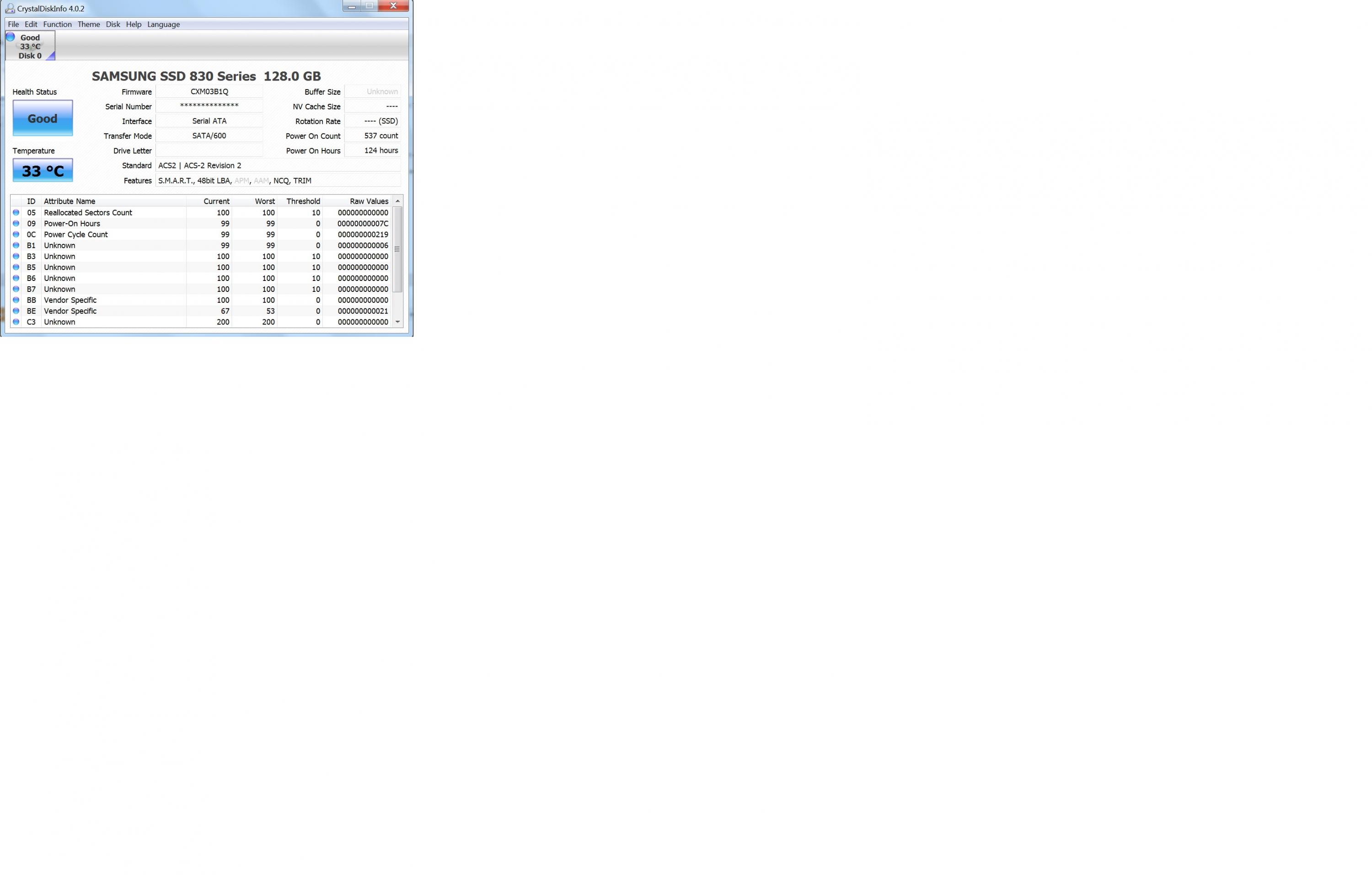
I installed my win 7 Samsung 830 ssd from my Dell 3550 and booted right into windows without any problems, win 7 installed several drivers and i am at least running (alot of vaio software to install later on i guess...)
I have been following this cool long thread for a while now and couple of things i would say about this machine.
1. It seems like the Samsung 830 runs at SATA 600 -- se pic
2. I did a red pic in paint and compared with the same image on my iphone 4s -- the vaio screen is definitively not very orange in comparison, just slighlty - will try to post image later on. The screen is fantastic! I have no issues with reds/orage whatsoever
3. Noise - fan barely audible (about 30-40% of a regular 5400rpm 2.5" hdd) Cpu runs cool at 33-36c while surfing and HTML5 youtube
Machine feels solid - it is metal chassis and housing so very good for this priceAttached Files:
-
-
Hi Amal, the unknow device is "wireless state device", download and install the driver here: Original Drivers and Applications for SVS13A/SVS13/SVS15 Series (Windows 8 64-Bit) : Download : Sony Asia Pacific after this right click on unknow device -> update driver -> insert ENTIRE path C:
Official 2012 Sony S Series Owners Thread
Discussion in 'VAIO / Sony Owners' Lounge Forum' started by Petrov, Jun 9, 2012.