Problems? See this thread at archive.org.
Use the Win 7 driver works fine!
-
-
I installed Win 8 over 7 and WIn 8 removed the Bluetooth & WIFI drivers. It reinstalled the WIFI driver itself and I used the WIn 7 driver for Bluetooth.
-
Hi there,
I have a question for you guys. Does someone know what changes (hardware) have been implemented in the "new" S13P WIN8 model?
I'm decided to give this laptop a go, but I don't know if I should buy the WIN7 version with the $150 discount (Canada Store), or the WIN8 version (I have access to a WIN8 license through my school anyway).
The only reason for buying the WIN8 one I think would be some hardware upgrades, like the screen (a lot of different opinions about the quality of the WIN7 one in this forum), SATA3 activated etc. But these changes, if any, are not clear in the webpage, it looks like pretty much the same laptop but the OS.
Thanks for your replies.
Cheers,
Da Fig -
Any suggestions on what ram I should buy? and should I go for the 4gb or 8gb in total of either 8 or 12gb.
Model # SVS13A190X -
8GB = 2x 4GB Sticks.
4GB = 2x 2GB Sticks.
Bare in mind that one of those sticks will be soldered to the board. So if you go for 4GB, there will be a 2GB stick soldered to the board.
So you can add a 8GB stick to a maximum of 12GB if you go for 8GB option, or 10GB if you go for the 4GB option.
Hope that makes sense... -
Every time I adjust screen brightness and/or volume there is a beep. Does anyone know how I can turn off this beep?
-
I have downloaded this: Sony eSupport - VPCZ21SHX - Drivers & Software
the .exe wouldn't install on my S series so I extracted it with UniExtract and started the HGdriverSetup.exe in the TEMPEXFOLDER directory. They install and work - I am just typing this using my 3G connection with W8 pro. -
This is NOT correct !!!
(at least for The Netherlands, but I cannot imagine they have differences here)
The soldered memory is 4GB (for all models).
If you order 4GB laptop, then the single SO-DIM slot (for additional memory) is empty.
Do not order >4GB for your laptop. Its WAY cheaper buy yourself extra SO-DIM memory module and plug it in. Very simple and straight forward.
If you buy 8GB module (4+8), it runs Asynchronous Dual Channel, which is a very little less fast then full Dual Channel (which is 4+4). -
Yeah mine has 4GB soldered, so its better to get 4+4 then 4+8?
-
Turned on the Vaio, it worked! I then immediately shut it down, removed the HDD (replaced with M4 SSD) and added the RAM.
I've managed to install Windows 8 Pro to the SSD. It works fine but I'm just unsure which drivers I need to install. When I go into Computer, however, it says that I only have 4GB of system memory.
Is there anything I need to change in BIOS for the additional one to work or have I got a broken RAM stick? It's brand new from Crucial. Is there any specific way of putting it in either? I just slid it into the slot, pushed down until it made a loud clicking noise and then assumed all was okay. -
There are no hardware changes. Save the $150 and use it for upgrades since you already own a Windows 8 license.
-
Just make sure the one you are buying has the 1600x900 HD+ display and GT 640m LE dedicated card or it is a fail.
-
It depends on applications you are using.
I, for example, uses sometimes Adobe Photoshop which LOVES more memory. But most the time I use the additional memory as scratch RAMDISK. All my software development is doing their compilation stuff on this RAMDISK. And that is incredible waaaay faster. I also often have 1 or 2 virtual OS'es (using VMware) running. So in my case the 12 GB is be used well.
95% of people have more than enough on 8GB, even if they think they need more....
BUT... with those low memory prices....it won't cost you a rib...
Regarding performance 'penalty' when going in asynchronous dual channel setup: you cannot measure it in your daily usage. Except with benchmark tooling you see very little degradation compared to 4x4 setup (if I recall correctly something in 3%).
Hopes this answers your question, -
The newer CPUs support Flex Memory which means that the first 8GB of the 12GB works in dual channel mode. The other 4GB works in single channel mode. So if you are using around 8GB then it will be accessed in dual channel mode. Only when you go past 8GB utilization will it drop to single channel mode for the reaming 4GB.
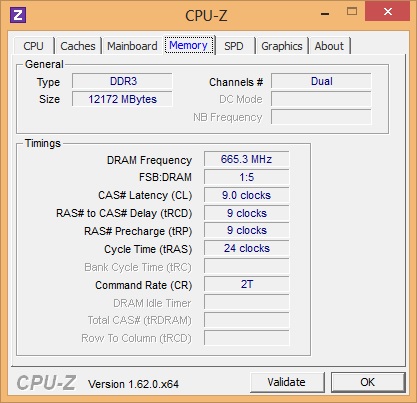
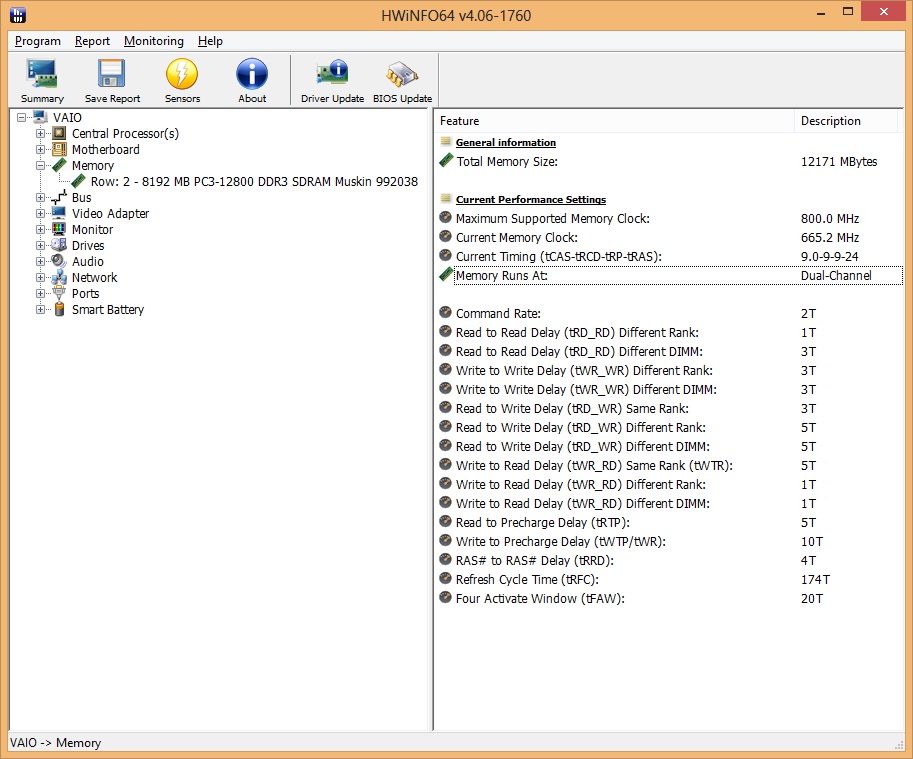
Here is mine running 4GB + 8GB SoDIMM:Attached Files:
-
-
If I recall correctly, it actually does not single channel, but 'splits' it internally. Its not really dual channel. That is why they call it asynchronous dual channel. But I can be wrong. I got this info from other long time forum member here.
-
I don't think that is the case anymore with the newer processors, especially Ivy Bridge:
Choosing the Best DDR3 SDRAM for Ivy Bridge. Page 2 - X-bit labs -
BEEP has been mentioned 3-4 times on this thread please use the search function (if your really having trouble ive answered it in my posts at least twice)
anyone with WINDOWS 8 have you noticed the computer running hotter and the fans kicking in a lot even in silence. ive had it where ill just be browsing and ill open up the start menu or something like that and the fans go absolutely haywire. i know how loud the fans are normally since i had win 7 and it wasnt whisper quiet but now its not even in the range of quiet. its loud! :/ -
find the file name pi.wav (most probably is located at C:\Program Files (x86)\Sony\VAIO Event Service) and rename it to pi.wav.old or something.
-
If I perform a Windows 8 upgrade, will everything still work fine?
Will my Vaio care enable me to update my drivers, etc?
I have the S13 (bought in in August)
And how will the touchpad perform? -
Don't work!
-
So my web button has never done the whole "get web access before booting into full windows" hell it doesn't even pull up the browser after it boots the computer. Also, it gets stuck on a black screen - where I am assuming it is supposed to be pulling up my web browser, but after a little bit it just goes back to normal installation. Does anyone know how I can get it to work properly? Or get it to not boot up my laptop. (I have had times where an accidental press has had it turn on right after I turn it off haha!)
-
ok well i figured out the cause of my heating problem.... at the lightest hint of work.... my processor goes into turbo boost... its a constant 133% with just chrome open. but i dont know how to get it to go down. even reducing maximum clock in power settings didnt help?
also for you win 8 buyers... i just read this article: http://www.zdnet.com/how-do-you-get-the-best-deal-on-a-windows-8-pro-upgrade-7000006718/
those of you who are buying a laptop with win 8 not pro... are getting screwed. -
I need someone to check something for me -- I asked about this before but there was no response.
It's about the bottom cover, the one going over battery, RAM and HDD. Is yours tight and level? No flex at all?
Mine is doesn't sit very tightly, and is not exactly level on one of the sides. More importantly though it flexes at one end when pressed, giving a click before getting back to original shape. This isn't an issue at all if I keep the laptop on my desk, however I am not sure the components will be adequately protected when travelling with it. Is it enough to get it replaced as defective, and is it worth to bother with replacement anyway?
Thanks! -
You mean your CPU is on 33% OC?
I've noticed that if you set your Nvidia Global settings to use the Nvidia GPU and maximum performance, lots of windows 8 apps will run on full clock on the GPU.
So, better beware.
You might also need to turn on the Nvidia "Display GPU activity icon in Notification Area" for a better monitoring of your GPU. -
that gpu tidbit was a good one. but yes. in resource monitor it would show at 133% so turbo boosting 33%
its really odd. i think we need to wait for better drivers. or i deeply regret installing drivers from windows 7 page randomly. i used to run at a cpu usage that would spike at 3% idle with windows 7. with windows 8 im at a constant 10% and spikes at 15%. i ran a trace on cpu usage and came up with a few things... the big problems are:
ACPI.sys
ntkrnlmp.exe (This one is HUGE but im not sure what i can do about it)
hal.dll
the hal in android is the hardware abstraction layer and is the interface between hardware drivers and the system... the ntkrnlmp is the NT kernal and acpi is the power thing (yes i know very technical) so i know i installed a acpi driver from win 7 i wonder if that is the problem? -
Sorry, I mean, did you also monitor your CPU clock speed? Was it 33% faster than the max CPU turbo boost clock?
Have you resolve the issue? -
Is it possible to upgrade cpu? or is it soldered?
-
I just recently bought the Sony S laptop and was wondering about the Ram. What type of ram are you able to put into it? I got the 4GB one so i'm looking to add 4GB to the other slot but I'm not sure if their is a certain kind I need to be buying. Also is their any difference between the 640m le(2GB) compared to the 1GB? Thanks for the help.
-
Anyone running into connection issues with the Intel Centrino 6235 wireless adapter? I've noticed that coming out of sleep mode it can drop the connection until the adapter is reset or the computer is restarted. Couple of threads about it on the Intel forums with no real response and it's a huge issue on the new Dell XPS 15. I tried searching but didn't see anything in the Owners thread about it. Thanks!
-
I haven't personally checked but I really doubt it's soldered as it's a full-voltage CPU and they're 99% of the time PGA.
Any kind of DDR3 1333MHz or up should work without problems. The cheapest should be 1600MHz so just grab one of those.
The 640M 2GB has more VRAM which doesn't really make any difference for gaming, as the GPU would probably be crawling anyway at the video settings that would require more than 1GB. For working with images and video I have no idea though.
No issues whatsoever with the 15.1.1 drivers, neither with the 15.5.6 newer ones. I just grabbed the latest ones from Intel site (for 6235) and never had any trouble with them in Windows 7 or 8. -
Thanks - I've got a SSD on order and plan on installing W8 so we'll see how it goes with the new drivers then.
-
How are we getting screwed if some of us don't need the pro edition? On my configuration, getting pro adds 50 bucks and I get to save that since I dont need pro. Again how are we screwed? -
Did anyone receive the new windows 8 Sony Vaio S15 ? Does the Orange red problem still exist ??
-
no i didnt monitor the actual speed of the cpu..... i should do that
I had that same problem with the wifi. i installed the drivers direct from intel and if im on the same network when i wake from sleep it connects. if i go to school for instance or restart, i have to manually connect but i dont have the problem where i have to turn off the wifi and then turn it back on like i used to.... also check device manager and see if there are any yellow triangles.
and i guess its not a huge deal about the pro thing. but microsoft is giving out tons of free stuff for pro users and there are some features i guess. the upgrade from windows 7 to windows 8 is only 15$... but if you bought windows 8 then the upgrade is i think it showed 80$... thats ridiculous!
anyone else with windows 8 seeing system at a constant 8-10% i was at a solid 9% and i went to device manager and disabled all of the "allow the system to shut down this system to save power" on the network devices and ive seen a drop of 1-2% constantly... is that conclusive... not at all. but i still feel like there is some wacky driver problems happening. -
The one I saw at Microcenter definitely still has the problem. And another user confirmed the issue on one they purchased.
http://forum.notebookreview.com/sony/673678-vaio-s15-orangegate-again-13.html#post8922234 -
 damn could not they fix it like HP !!?? Ok that's it for me Sony , I will search for another brand !!
-
Hi,
First post needing advise.
I am receiving my new -SVS151290X in couple of days and would like to:
1- Swape the 750GB (7200rpm) hard drive to an SSD
2- Upgrade the windows 8 to windows 8 pro.
What is the best way to do it?
Configure the machine,then update to Win 8 pro then clone the drive to the SSD ? or back up the drivers and swape the drive then do a clean install?
Do you get a Windows 8 disks with your order? do you get a restore disk? I can not find any drivers on the Sony web site.
And if you have to restore drivers, is there an order to do that?
Any advise will be appreciated.
Best regards. -
upgrade to win 8 (just to get the key) then install ssd then do a CLEAN INSTALL... there are a few really good success stories with the win7 to 8 upgrade... mine was absolute hell. its easier in the long run to just do a fresh install.
-
hmm, deciding whether it is best to purchase one of the standard sony s13's that are in clearance with windows 7 (for 889.99), or buy the premium s13 (for around 1099.99) with windows 8 that recently came out.
- is there a huge difference between premium and standard models? I mean they both come with the same hardware specs online, and have 1600 by 900 resolution screens, and I have been looking for some comments on the standard screen in this resolution sony seems to have added over time, and have found none
-I doubt clearance laptops have that refund policy in the first month...?
any opinions on this? happy to listen
-
Only the premium version comes with the 1600x900 screen, be it the W7 or W8 version, so check that with the retailer.
Aside from that I think the W7 version is advantageous since it's cheaper then. -
amal i checked it is at the 4 core turbo frequency... so 2.1 ghz is 100% 2.9 is 130%
-
Please, please -- can someone shed light on this? I have a HDD with a death click but since I'm replacing it with SDD I might not be bothered to return it for that reason alone.. But if there is another defect like described below, I will probably send it back.
I'm just waiting for someone to confirm this isn't a messy design but indeed a defect cause compared to the rest of the build it certainly appears to be. -
I see.. so, it is not OCed but on the highest Turbo Frequency clock?
Coz it will be awesome that it can be OCed without going through the BIOS as how you normally OC the CPU.
Btw, yours is 3612QM right?
The clock should be, 2.1GHz Base speed, 2.8GHz max turbo clock on 4 cores, 3.0GHz max turbo clock on 2 cores, and 3.1GHz max turbo clock on 1 core. -
Is the S15 model prone to screen bleeding issues?
I just got one and it's annoying me, since it's quite visible when I use 3/4 of the brightness, sadly I'm not in the US so sending it back isn't an option
Does anyone knows a way to fix it by oneself?
Btw: the LCD seems to have some other issues too: the default colors were too warm so I had to adjust them a bit, but even then I'm not satisfied, also the auto brightness option is always enabled even when I turned it off in the VAIO control center
To make things worse they didn't ship the free battery pack
-
that is correct and it actually seems to underclock so when i am in stamina i am at 56% clock 1.8 ghz it used to be when i switched to speed it would dynamically clock but now it just pegs itself at 133%. the cpu utilization also jumps from 10% to 25% both idle stamina and speed respectively. which is really annoying to me. i would like to confirm this behavior with other windows 8 users and if that is not the behavior they are seeing i will reinstal again and do a better job with drivers but i have a strong feeling that there is a bios or driver problem that needs to be fixed on sony side... or intel or whatever. but since win 8 is so new, i think things need to get ironed out. (also programs like avast may be the culprit here as high system has been linked to that too.)
-
Yeah, the screen bleeds noticeably at the bottom of it when black/bright. All the Vaios I had does that -- only becomes annoying when watching very dark movies though as far as I am concerned. Don't think it's easily fixable too.
However, why do you think you can not return it if you're not in the USA?
Sony didn't send me the free extended battery as well, was told they ran out of it (and it was true cause checking back on the website it was clearly marked as "sold out", although when I placed my order it was still there).. -
Well... that makes it a bit comforting, it's just that the punny Acer Atom netbook that I replaced with this laptop had a nice screen despite its low profile (no screen bleeding, correct tones and even lightning), and I can't return it because someone who lives in the US did me the favor to bought it there and bring it to my country (Honduras), the point was to take advantage of a past Sony store offer that included a free PS VIta and the battery pack with the purchase of this laptop (sadly besides the lack of the battery pack, the PS Vita got stolen at the airport .. -_- .. ... I even had bought some accessories for it)
Anyway I'm also having some annoyances with the software besides the auto-brightness, long windows startup times and all the Steam games I've downloaded with the exception of TF2 crash at their start-up even while using speed mode and updating the software dependencies to the latest versions. -
I was actually robbed off my last Vaio (which was FZ11E if I recall right) after a gig, so I been sitting on an atom netbook (Asus EEE PC1000) for well over a year just because I couldn't really afford any decent machine.. Got so used to the small screen that the 15.5" now seems huge! And the display quality is so much better as well.. Despite having some bleed and the orange/red issues, the screen is not a problem at all for me -- if anything, I'm missing eSata or Thunderbolt as I'm afraid USB3 isn't the best solution for external storage when it comes to HD video editing.
-
Perhaps something new for the OP:
Far lower DPC latency (dropouts/stutters in audio and games) and idle CPU usage from interrupts and kernel dropped from ~3% to ~0.4%
HKEY_LOCAL_MACHINE\SYSTEM\CurrentControlSet\services\ACPI\Parameters
Create dword "Attribute" with hex value "100" -
^ even with this registry setting enabled, i have a periodic DPC spike every 65 seconds (like how it was before). in between everything is below 500us, with spikes happening to 1000us every 65 seconds. what does this do exactly?
Official 2012 Sony S Series Owners Thread
Discussion in 'VAIO / Sony Owners' Lounge Forum' started by Petrov, Jun 9, 2012.