 Problems? See this thread at archive.org.
I have an old broken Z1 900p panel sitting in my workshop. It is LT131EE12000. The 1080p panel that I replaced it with (in my Z1) is B131HW02. The 1080p panel is installed in the Z1 so I can't tell give you the "LT" number from it. I have not had to open my Z2 or Z3 to find out which panel(s) they have but it sounds like all three series are using the same panels!
-
I just ordered the one in the link. Nice guys there they helped me to verify, we sent pictures back and force and now are sure its the right one.
b131hw02 is the one I need, it has 30 PINs connector as well. I have compared both data sheets from AUO.
After I got it and bring it to work in my SVZ13 I will post it here. -
Z1, Z2 and SVZ use the same screen. If you want to go with 1920x1080, then go with LT131EE11000
Sent from my SGP561 using Tapatalk -
Anyone's SVZ up and die with the latest round of microsoft patches? :\
-
No?! I'm running 7 Ultimate on mine and have all the latest MS hotfixes installed and no issues...
What happened? -
False alarm. I'm on 8.1, never had a single problem with my SVZ concerning bluescreens or whatnot but after patching the blue screen hit and itself locked up. Couldn't boot after that, screen would stay black and fans would eventually ramp up to 100%. Pulled the battery and tried again, same issue. Plugged in the charger without the battery and it booted fine. Installed the battery and now everything is working fine. No idea what happened.
-
Glad you're up and running again! Very disconcerting when our machines do crazy stuff like that! I inherited a free upgrade to WIN8.0/8.1 with my 1311chxxi....could you comment on how that is working out for you? Does 8/8.1 really do anything useful for you? Did you do a clean install v. upgrade? Do you use the UEFI option in BIOS for your install? If yes how about Secure Boot? My rule has always been to stick with the OS the machine came with...but I'm a bit on the fence here. Your ideas appreciated since we have (virtually) the same machine!
-
System Lockup/BSOD due to Power Loss when connected to the Power Media Dock. Has anyone found a solution to this? (other than to not use the PMD)
I have been searching quite extensively, and so far I haven't been able to find a solution to this. Power outages/surges can spring out of nowhere, and losing in-progress work is not fun.
Are there any programs to halt the freezing, and maybe allow the user to VNC/Remote Desktop into the machine over the network to recover work? I am trying to think of any way to fix this or come up with a work around.
I wonder if its possible to dock, and then shift priority over to the Integrated Intel HD4000 GPU, and still be able to take advantage of the added USB ports. Maybe in this scenario the VAIO won't lock up due to sudden GPU loss.
If anyone else has any other findings or comments please post them. Thanks!
UPDATE:
I just ran a test on the power loss BSOD issue, with surprising results!
The VAIO Z Docked to a Power Media Dock, using the onboard Intel GPU (instead of the Radeon GPU, while still using all other resources of the PMD), does NOT result in a Blue Screen/Freeze/Lockup/BSOD when there is a loss of power. I pulled the power cable, and the Windows 7 64bit OS was still fully operational.
This means when there are Thunderstorms, you can simply swap the HDMI cable from one port to the other, and toggle the GPU setting, while still getting access to all the other great features that the Power Media Dock provides.Last edited: Dec 29, 2014 -
Does anyone know the dimensions of the speakers in the laptop? Mine are blown and instead of replacing with the same ones again, I was going to try and upgrade the existing ones with alternatives that are better.
-
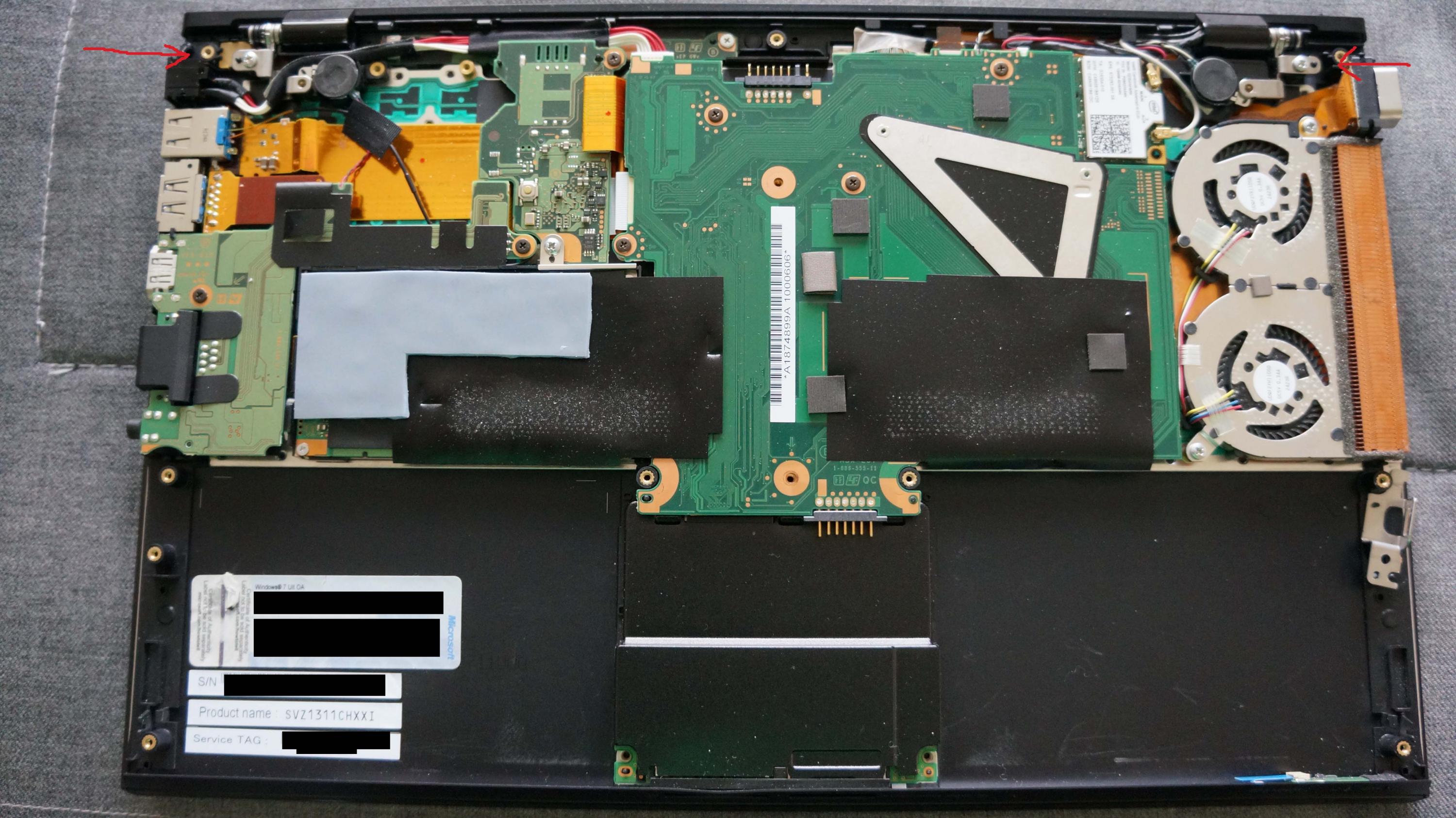
If you remove the bottom plate of you lappy you will clearly see the speakers at the hinge edge left and right. When trying to remove the bottom plate don't miss the two hidden screws at the hinge edge which are under little pads! Another trick is to start unsnapping it from the right edge with the VGA connector on it. The VGA connector will flex upward as you lift/unsnap that side of the plate...it's on a ribbon cable and not otherwise attached. The opposite side of the plate is hooked under the headphone jack and should be unsnapped last as the bottom plate is gently rotated upward from the VGA side.
I did what you are trying to do but with my Z1...it worked...in that I got more volume which was what I was after...but the quality suffered as the speakers were no longer properly matched to the output of the audio board. Physical size is not the only issue here.
Although the audio quality of my Z3 leaves a bit to be desired...I find that is still the best of any Z....with the possible exception of the VGN-Z.
Hope this helps... -
Anyone know where to get replacement hinges? The right laptop hinge broke :/
-
Hallo
Just wanna to know, is there any possibilities to tighten the loose hinge screw on the LCD panel side without opening the whole laptop ..?
From this blue print, it looks like possible, but just want to make sure, if someone here already tried once. It looks like the " 15Th anniversary " engraved hinge could be deattached easily, then tighten the hinge screw from there
https://synrc.com/vaio/SVZ/SVZ131_SM.pdf
thanks -
The hinges on the Z3 can only be accessed by removing the bottom plate. See my last post on previous page. When you have the bottom plate removed (do NOT forget to remove the two HIDDEN screws under pads at the outboard ends of the hinge side of the lappy) there are two large silver screws which are highlighted in the attached photo. Gently but completely tighten them. Do NOT over tighten or they will strip the mount below the hinge! There are also two other screws that come through from the outside of the bottom plate and that secure the hinge extension towards the speakers. These should be similarly tightened when you replace the case bottom.
When your hinges are loose or worse yet apparently broken it is usually the mount under the large silver screws that is at fault. These screws take a lot of stress when the lappy is constantly opened and closed. The mount (which is really a hollow plastic/carbon fiber column lined with tiny brass fitting for the screw threads to engage) typically cracks and/or falls apart releasing the tension on the sliver screw and allowing you hinge to flex. The more it flexes...the more it breaks apart and soon your whole screen is loose. Keep the screws snug and there is no flex...and the mount stays in one piece!
I did have some luck rebuilding a mount on a Z2 with this problem using the fragments of the mount column found inside the case with steel reinforced epoxy glue. I worked but it's likely that the hinge could not be removed later as it was now firmly glued in place. But how many people actually ever NEED to remove their hinges? Even to change the LCD panel does not require removing the whole hinge.
If you want to get at the two fasteners that are actually on the LCD panel buried WAAAAYYY down in the crack of the hinge....I THINK it would require removing the bottom plate, removing the screws securing the hinges to the palm rest (the 2 bigger silvers ones above) and then freeing the lid/LCD from the top of the machine to get at them. I had to do that once to change a screen. There also two (I think) cables that connect the lcd to the motherboard. It can be done but it is very delicate work!
Good luck!Attached Files:
-
-
I'm having a problem with the USB ports on the PMD. Every time I disconnect/reconnect my SVZ, the USB ports on the PMD are unusable. It seems the "Renesas Electronics USB 3.0 Host Controller" is not able to unload/reload correctly. The device has a yellow exclamation mark in device manager and the device status says:
"Windows cannot load the device driver for this hardware because a previous instance of the device driver is still in memory. (Code 38)"
The driver version is 2011-10-25 2.1.28.0
I downloaded the driver from Sonys support site for my exact model number a few days ago, but it's no difference. I think I had the same version before. I've also tried some other version from Renesas but with the same result.
Anyone else got it working? As it is now, I have to reboot the SVZ every time I insert the PMD and want to use the USB ports there.
Magnus -
Wild guess: perhaps a Renesas firmware upgrade from station-drivers.com will do the trick. And using latest Renesas drivers in any case.
Sent from my SM-T800 using Tapatalk -
I was just going to reply, "I already did", but then I remember I tried a driver from some driver download site that didn't work, then I tried a driver from station-drivers that didn't install, and I realize now it was for the wrong chipset. For some reason, I now found NEC/Renesas USB 3.0 Host Controller Drivers | Plugable where I was able to see which chipset I had and then download the correct driver.
I now have version 2.1.39.0 and it works great!
Thanks! -
Did you update the firmware too or was it already at the latest version?
-
Hi
Thanks. Already managed to repair ly loose Hinge
bu the way, Do you know where to download the preinstalled Dolby Home Theather V4 for the SVZ..? Just googling it, but found nothing unless the Realtek Driver
Thanks -
I have the SVZ1311 with Intel Graphics. I am using the win10 9926build. I keep finding a windows update for Intel Graphics 4000 drivers. It downloads and normally fails to install. but still comes bak as an update. Any ideas and is this the best display driver I can use. I do not use a PMD.
-
Install the drivers straight from Intel. https://downloadcenter.intel.com/Detail_Desc.aspx?DwnldID=24592&lang=eng&ProdId=3711
gerrykiddy likes this. -
Thank you but neither that driver or the 64 bit one are compatible.
-
Unpack Intel driver (get correct one for bitness and hd4000) package using 7 zip or universalextractor and install from device manager. Then run the standard installer which should succeed. Then reboot.
gerrykiddy likes this. -
At last guho. Thank you very much. Its so obvious....err
-
Now my question is: if I followed my own instructions would it mess up my ATI Radeon in the Power Media Dock?
-
Obviously I can confirm that it works well in my machine but I don't really notice any major improvement other than the nice date of 2015 instead of 2013. Just using win 10 improves the look of the desktop . Good luck
-
Couple of issues...
1. Any time I load a web page with Flash, Firefox/Chrome become very laggy and the fan goes crazy. It's like Flash drains the whole system. Right now there's ads on this site which are slowing down Firefox for me, so much so that as I type, it takes a second for each character to appear.
2. My PMD stopped working. When I plug it in, nothing happens. My HDMI output also doesn't work anymore, though the USBs are all fine. This happened after I sent my laptop in to Best Buy to repair under Sony's Extended Warranty, but I'm wondering if it's a drivers issue over a hardware issue.
3. I tried installing the latest Intel HD drivers from the posts above, but had no luck. It said they're not compatible with my system. Can anyone walk me through what exact link to download and how to install it?
4. Are there any other updated drivers I should have?
5. Is there any reliable place to buy a new battery for my SVZ? -
Has everyone moved on from the SVZ?

-
5.ebay 4.use vaio update 3. Extract using 7zip and install latest intel video drivers using the device manager.
-
Nothing I'm doing is working.
Is this the link I download? https://downloadcenter.intel.com/download/24593
When I go into the Device Manager, I click "Display Adapters," pick "Intel (R) HD Graphics 4000," then browse to the extracted folder from the link above. But nothing happens, it just says it's up-to-date when it's not (it reports it's updated to version 8.961.1.0 from 4/14/2012). What am I doing wrong? I've got the i7 SVZ with 8 GB ram.
-
Are you installing driver from devmgr using 'have disk' method? Should work.
-
Oh I see it now! Thank you!
Now what about the power media dock?
Last edited: Mar 27, 2015 -
And now my display brightness won't stop jumping up in brightness. It does it on its own and I can't figure out how to stop it. I even installed the stock HD 4000 driver and it still keeps adjusting itself.
-
You need special hybrid drivers for the power media dock. Installing direct from Intel drivers will break the hybrid function. Leshcat is a good source for drivers, although I haven't used them in some time. I gave up on the PMD and strictly use the latest drivers from Intel without issue.
Be wary buying batteries on ebay. Make sure it's OEM, even if it is, it might be faulty. I got one that was brand new but has trouble charging to 100% even after multiple attempts to condition the battery. -
I have just received a notification about a free upgrade to Windows 10 being available. Is this upgrade safe to install or will it result in any problems with drivers, vaio control center or anything else?
-
I used the "get windows 10" app to check if the SVZ13 is ready for Windows 10.
The result is as follows:
Windows 10 will work on this PC
This PC can be upgraded but there may be some issues
These devices aren't fully compatible with Windows 10:
Intel HD Graphics 4000
You'll experience problems with your display
These apps might not work correctly after the update:
Bluetooth Server
Intel PROset/Wireless for Bluetooth + High Speed
-----
I then downloaded the Intel Driver Update Utility and received the following result:
Graphics:
A customized computer manufacturer driver is installed on your computer. The Intel Driver Utility is not able to update the driver, Contact the computer manufacturer for the latest driver for your computer.
-----
A research on Sony's driver & utility website for the SVZ1311C5E did not help either. There are no updated drivers for the HD4000 available.
The question is: Should just stick with Windows 7 or upgrade anyway? As I am not using the docking station, it might work to use a generic driver for the HD 4000 chipset instead of the original driver.
Please share your thoughts and/or experiences about this with me. Thanks! -
I have NOT used windows 10. That said I have some thoughts. I did successfully upgrade a previous Z to Windows 8. I did well after the release...long enough that 8.1 was out and I could take advantage of the experience of many on this forum. If you review the thread...there are many pages devoted to the tribulations of those who were early adopters of win8. NOT pretty. And win8 was (supposedly) supported by Sony. The good news for you is that many of the drivers for our hardware will be organic to win10. The major problem will be the video driver. It always is. Judging by what the upgrade tool told you....win10 MAY not have a driver available for it...but Intel SHOULD...be sure you check and have a win10 certified driver ready to go before starting any upgrade. As for the Sony utilities like VCC/shared library there will be no updates for win10 as Sony is now out of the VAIO biz altogether. I'm not sure how to work around that one at all. I would say that SOME functionality is sure to be lost. How much is lost and how much you care would be of interest to us all.
In short....I wouldn'tdo it. Sorry to be negative. Stay with win7....that's what I'm doing. Use win8 if you like. The rest will work fine...just upgrade to win8 first then upgrade again to win8.1. Download ALL upgrade utilities from Sony first! I don't see how win 10 is an option without a way to update the Sony proprietary utilities....too much of our machines is controlled by Sony specific firmware.
Last thought. When Sony released the Z3's they used there own firmware to produce an experience almost like win8 but with win7! (Very fast & secure boot process....and highly encrypted SSD if you use Bitlocker) I found little advantage to being on win8. That's why these beauties were so far ahead of their time and still kick butt today. If we could only find a way to upgrade the video chip in the PMD for us gamers....
If you try we'd love to hear how it works!! -
On my SVZ 1311 I am using Windows 10 preview as my normal Operating system. With the early builds I had problems with the 4000 graphics, although easy to fix. The Synaptics Touchpad was almost impossible to use and I resorted to a mouse, there was also an issue with the Realtek memory card driver. The last 2 builds however have been really good and no issues with drivers at all. Hope this helps. BTW I am using build 10130 at the moment.
Qwaarjet likes this. -
My SVZ13 crashed several times today while I was working on something in Photoshop. I restarted it and checked the fan with diagnostics: It seems to be working. After a restart, the picture of the external screen wasn't right (flickering). Now it crashed again and if I restart it, the fans rev up to full speed and that's it. Black screen. Did anyone experience a similar problem? Did my Z3 finally reach EOL after three years?
-
This sounds like what has happened to some people (usually but not always Z2 owners) who load a BIOS not designed for their machine. Obviously not the case for you but I would suggest that getting your Z running again would likely required a motherboard change. I would guess that a hardware failure has occurred somewhere on the board. The only good news here is that the mobo's can be purchased fairly cheaply on Ebay. Installation is detailed work and not for novices though.
-
Just updated from 8.1 to 10 with no issues to report so far. Painless update.
gerrykiddy likes this. -
Do you use the Media Dock? I have read in other posts that people had trouble updating from Win 7
-
No, I retired the Media Dock. I can connect it tonight to see what happens, but I'd imagine the GPU doesn't work, will probably just function as an external optical drive.
-
The touchpad drivers seem flaky. The default drivers lead to very jerkey movement. Anyone have better drivers?
-
My Win7 => win 10 upgrade resulted in no functioning touchpad at all. Not very practical... Also issues with Intel RTS , and SD cards couldn't be read either.
Downgraded back to win7, will wait now for new drivers.gerrykiddy likes this. -
My touchpad had jerky movement too. I went into the touchpad properties and disabled all the extra features, like scrolling and multifinger gestures and it improved substantially.
My card carder works as well, do you have the latest driver provided by Sony? One was released last year actually, https://esupport.sony.com/US/p/swu-download.pl?mdl=SVZ13114GXX&upd_id=9412&os_group_id=27gerrykiddy likes this. -
Hello everyone,
I'm urgently looking for the matching VGP-CKZ3 leather case for the Z series but I'm not having much luck. Does anyone here have one that they would like to sell? I can make a reasonable offer.![[IMG]](images/storyImages/227272.jpg)
-
I've contacted the seller days ago and had no response. They also have 0% feedback based on two bad reviews. I really want this case bad.
-
I also checked eBay and nothing. Unless someone here has one for sale. Wait you may get a response I got a very nice one from Waterfield Design in San Francisco.
Sent from my iPhone6 using Tapatalklalami1990 likes this.
Official NEW SVZ Z series Owners Lounge
Discussion in 'VAIO / Sony Owners' Lounge Forum' started by avmaxfan, Jun 6, 2012.




![[IMG]](images/storyImages/4ab1006bf785a5eb6ce45a9ecd731dc2.jpg)
![[IMG]](images/storyImages/451ac588b473bd5367826aaaf19b1d7e.jpg)