Problems? See this thread at archive.org.
tbNB, CHECK THIS OUT --
http://www.amazon.com/review/R3LHKD0LVXPJ1H/ref=cm_cr_pr_viewpnt/179-6693127-4846864#R3LHKD0LVXPJ1H
Coincidentally, not even an hour ago, I stumbled on this review of "our" AW model by one "J.Bechtol" at Amazon. I don't think s/he lists his model # but look at the date & how long they'd had it @ time of review, & where purchased. There were only 2 models available from this retailer then. No matter which AW # I've looked at @ Amazon, the same 11 (now 12) reviews come up every time for months now.
Found this review compelling because I've experienced some irregularities myself. USB things work & then they don't, both external & internally connected---& I've seen that system tray balloon you describe more times than I can count...would pop up unprovoked, often along w/Windows sound FX notification for device connected/disconnected The only time I stopped seeing those is when I finally gave up on not 1 but TWO great wireless gaming mice that ceased to function at the very same time. My 3-mo old cellphone also stopped being recognized but I figured that was the phone or its USB cable's fault. After reading the Amazon review & now your post, I got some doubts. The FingerPrint reader as well...it's been real iffy; I scarcely use it anymore.
Shortly after I received my AW in May, I called for assistance @ a misbehaving brand new keyboard (erratic spacing & unresponsive after typing 10+ mins), plus the infamous spacebar issue. The Costco Concierge tech had me power off, unplug, remove battery, hold power button down for 30 seconds, then replace battery, plug in, reboot. That was, he said, to discharge built up electric current which, in his words, could cure a host of ills. Well, it didn't fix my erratic keyboard (that problem just stopped on it's own somehow, don't ask!;-) -- but the FP Reader straightened up its act for a while after that. Both my mice were still unrecognized after I ran Sony's diagnostics on all external USB ports PLUS devices. Those tests reported the devices failed while all 3 ports passed...go figure.
Been preoccupied w/personal matters so not enough time to pursue this further. But I'm really REEAALLY interested in knowing whatever you find out, ok?
And PS: I know it's a bit late but...hat's off to you for conquering that spacebar---you DID it!;-)
-
I consider buying one of these AWs but I wonder if keyboard can change and has it to be changed from Sony since there is no keyboard in sale @ ebay for these series.
-
tbNB...
You installed that USB registry patch? (update at Sony support site) Somehow I get the impression you're 100% current;-)
IAlready spoke of my FP Reader & wireless mice stuff but there's more. Posted a while back @ another device issue that may or may not be related (??) re: my BD/DVD drive, particularly BluRay movie playback. Following the most recent (late March) optical drive update including firmware update, I no longer get the usual msg that Vista Aero w/be temporarily lowering to a basic theme for power mgmt purposes. Your glitchy thing (screen blink, Aero shuts off when going to Device Mgr) made me think of that. BD movie playback still works fine but that power mgmt concerns me. When you refer to something (device?) "going offline", do you mean that item stops responding? I hope to hear if you get anything useful from that Amazon review. -
The USB devices suddenly not working issue was posted and discussed about 100 or so pages back in this thread. I think it turned out to be Windows Vista related. Try searching this thread for USB.
On a similar note about things working and then not working for no explicable reason. I kept getting dropped connections to a wireless router, after lots of hours wasted in trying to find out what was wrong I had to give up. I did the obvious things like looking at Sony driver updates etc...
Then, luckily, I noticed Badboy2k5's post #2398 regarding updating the AW's network card 5100AGN to the latest Intel drivers. This fixed the probem. So, anyone having wireless network dropouts should do this. -
Yea, I had inexplicable, sporadic "router droppings" too (thought it was Verizon/ISP or my Kyocera mobile router, oops). Going to check on Intel drivers for the 5100 card. Thanx!
-
edgain,
L4D is able to handle full settings, but have you been able to play fallout 3 on your AW?
its been blotchy for me at 1920x1080, even the mouse gets all laggy when they talk. playable at 1280, have you been able to handle a higher res? -
I can't say I've had a single USB issue after 3 months of ownership.
But I have noticed that my bluetooth devices will randomly stop working, forcing me to reboot the machine (as simply turning off the BT device doesn't fix it). it weird and random. -
Thanks for the help and advice. I think that I'll be happy with the graphics card in the AW then, just have to make a decision regarding hard drive size, blu-ray, RAM, and processor. Could spend alot of money just in those few decisions!
It's been almost 10 years since I was at UM-I might go back for a weekend visit this fall. Not sure if I'll bother trying to catch a football game though! -
Some items I purchased for the AW that help manage the cables without a docking station
All items from or via Amazon:
HDMI Right Angle Male to Female Flat Adapter
![[IMG]](images/storyImages/31G9u4B--OL._SL500_AA280_.jpg)
Eforcity Black 6FT /2 Meter HDMI Male to DVI Male Cable
![[IMG]](images/storyImages/418Qh5KwMtL._SL500_AA280_.jpg)
Optical Toslink Female to Male Mini Gold Plated (L-Shape) Adapter
![[IMG]](images/storyImages/41lAendewTL._SL500_AA280_.jpg)
Fiber Optical Toslink Digital Audio Optic Interface 6 Foot Cable
![[IMG]](images/storyImages/41Oj1LEYnjL._SL500_AA280_.jpg)
Cables To Go - 30501 - FlexUSB USB A Male to A Female Adapter (Black)
![[IMG]](images/storyImages/219z4C7%2B5wL._SL500_AA160_.jpg)
It really helps clean up the cable clutter since I use an external USB hub for other peripherals, a Logitech Z-5500 for 5.1 (optical), and an external DVI connection for a second monitor. I bought all of this over a month ago and everything is working great, just thought I'd pass along the info for those wanting to do the same.
The only cable that sticks out is the RJ-45 Gigabit LAN cable. Does anyone have a source for a right angle adapter? -
re the USB ports going dead... Yes, I had read that a few weeks back but thought more along the lines of the USB patch at the time, which by the way is a vista patch, not a sony patch since the thinkpads have the same patch available. And yes, I installed that when I first reported having the finger reader go offline the first 2 days I had it for which the patch seemed to help at the time since it was only after hibernate that I had the issue.
Thankfully, no problems to report in the last 2 days with the USB/finger reader. It sounds like the future quicker remedy might be pulling the battery out from what I've read on related links, etc. -
I´ll download the game and give it a try and tell you more or less what happens, but I can tell you that the only game I´ve played with full settings including at 1920x 1080 swiftly was L4D so I suspect I´ll be having the same issues as you!
-
great post! thanks for the detailed insight. I too am looking to purchase this model before the rgb-led goes away and your summary really did answer a lot of my questions without me having to read through this long long thread.
in canada they now introduced the AW390 model which does not have the display selection available upon customization. it is also must cheaper compared to VGNAW170C (which becomes AW290 when I customize) which still has the display option of "XBRITE-FullHD (1920x1080) with Adobe® RGB color management". Which I find funny since you can't even change it.
seriously considering driving to US to buy a US model as well since availability in canada is also scarce! -
buy mine and save some cash. I can ship to Canada for a little extra

-
haha that's funny cause I actually replied to your post as well!
since I still can't PM, email yoinked at gmail . com so I can get a hold of you! -
aleicgrant
Hi
take a look -
Good Man !!!!!!!!!!!!!!!!!!!!!!!!!!!!!!!!!!!
-
djbootea, how are you doing with fallout3?
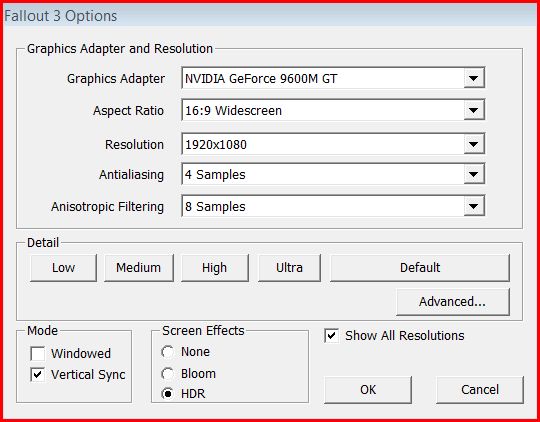
Downloaded and playing and these are the configuration specs I´m using and with absolutely no problem at all! It handles very swiftly with no lag at all!
Optimize your system, clean out junk and try defragmenting to see what happens, it´s just a thought!
Here is the configuration window for you to see. Keep in touch!Attached Files:
-
-
You haven't reported back w/any more USB probs, I'll take that as a positive (should I?
Looks like that one phone tech I spoke with was right @ removing battery, depress power button for 30 seconds (to discharge) -that what you meant? You're right, that USB registry patch is Vista NOT Sony's.
As posted, I had a variety of USB devices fail that had worked previously. Error msgs read either device not recognized by Windows, or port selected lacks power for whichever device is plugged in--OR it plain flatlines (no msgs + device doesn't register or turn on). My issues have not been limited to post-hibernation/sleep modes except for the FP Reader sometimes.
Hard to discern what might be Vista-related or hardware-based but as someone more experienced posted here @ router excessively dropping connections then working again, intermittent probably indicates s/ware (drivers). Always something to learn.... like, I notice sometimes an error msg is itself an error;-) -
THIS IS ADAPTER HEAVEN! Yep, definitely cuts down on clutter (cable spaghetti) esp given the shortage & positioning of the AW's USB ports. I'm on WiFi Only for now (via wifi card or mobile router) but w/be looking out for a R-angle RJ-45 for use in near future... Must be 1 available somewhere & if you find it FIRST, feel free to post;-)
HDMI to DVI, a couple of FlexUSB's, R-Angle HDMI - I neeeeeeeed these stat!!!
tbNB...Thanx for taking time to post this. Made my search easier plus I didn't know some of these existed. Sent the link to your post to a several non-forum ppl who(m) will welcome the info.
Since you're using a USB Hub that connects via USB port, you're still not having a problem w/your USB ports working intermittently? (aside from past FPReader failure now resolved)
Yayee! Logitech Z5500 5.1 audio - Been enjoying my Zees for 3 yrs now & used more often than home theater stuff. 1st time ever choosing speakers purely on specs, sound unheard. They did not disappoint! -
Just upgraded my AW11S to an Intel T9900 and it is naaiiiss!
It was easier than I thought. I took some pictures, will probably make a small guide later. -
*** PLEASE ADVISE ***
1) Is there such a thing as an eSATA card (express card) to add an eSATA port to this lappy? Might've heard of that long ago; didn't need it then, I do now.
2) How to conveniently deactivate mousepad while typing then conveniently turn it back on again after typing??? Can't always keep my palms/thumbs above & aside of the mousepad. Have tweaked mouse settings all I can & it's better than before but still a nuisance. Disabling Synaptics mousepad in Mouse Properties &/or turning off tapping in system tray t-bar still leaves basic function intact so even a brush of my palm can set off the mousepad when typing. The only other way I know is to Disable Pointer in VAIO Control Ctr then use mousekeys to re-Enable Pointer---Waaay toooo much work! Wish there was a polite little on/off button like on HPs. ANY SUGGESTIONS??? -
Hibernate and Sleep Issues
However, I've had a horrible time getting hibernate or sleep to work reliably. Many times when hibernating it fades to black, the disk light is on solid for 15 seconds and then starts flickering very lightly for a long time (minutes and minutes). It never does go all the way off. I've tried everything I've found with limited success. Here is what I have tried:
- uninstalling power manager for a day
- unplugging USB hub (which also unplugs: IR receiver, epson printer, angel USB mpeg TV tuner)
I thought this was the issue for a long time because it worked great for probably 8 hibernates in a row without the USB hub plugged in. Then finally, it hung during hibernate without it plugged in. Back to finding something else...
- unplugging DVI cable to monitor
Sleep mode is also about as unreliable, same scenario, dark screen, hard drive light on solid for 10 to 20 seconds, then a very light flickering of HD activity light.
I also have a 4GB SD card configured with readyboost and I've tried it with and without that being used.
The worst part is that it now works 50% of the time so troubleshooting is nearly impossible. You never know if the problem is solved for sure until you use it for a few more days and try it.
I may reinstall the old drives with the original installation and see if I can reproduce the issue. Perhaps something I installed has made it unreliable, but I sure can't figure out what.
EDIT: 07-31-09 07:06a: I think that I've had 100% success at hibernate and sleep when not using readyboost. Odd because my thinkpad T61p works 100% of the time using the same micro SD cards for readyboost. There must be some flaw or driver issue on the AW that prevents this functionality.
regarding right angle adapters, glad to have helped. I'll post if I ever get the right angle network jack.
re USB... No new problems to report with USB devices not working nor any issues with the fingerprint reader. -
Yes, Newegg has them. Link: http://www.newegg.com/Product/ProductList.aspx?Submit=ENE&N=2030260421%201208420269&name=SATAII%20ExpressCard
Look at the synaptics "PalmCheck" setting under 'sensitivity' within the synaptics tab and popup. Although it sounds like you may have found that setting? -
Hi,
1) Do You have some graphic card drivers for Windows 7?
Even beta or alpha ... PowerDVD and Photoshop CS4 don't see 9600gt under windows 7
2) CompactFlash (JMicron JMB368 ExpressCard CF) driver is not available on Sony's web site. When inserting the card, it does not show up as a drive in Windows Explorer. I have to
a. Insert your card, go to device manager and click on "scan for hardware changes"
b. Boot Windows while the card is inserted
Any solutions?
Under Vista OEM everything worked great... -
I had a quick question about the screen. This has probably been answered but I really do not want to read all 263 pages to find the answer, sorry for my laziness lol.
Is there a noticeable difference between the RBGLED and the regular XBRITE-Full HD?
Im gonna be using this AW laptop for college. I wont be using it for like video or photo editing. Normal everyday use.
Lets say I was watching a Blu-Ray movie or browsing the internet, would I notice a difference between the two screens?
-Thanks -
well if budget is your concern for potentially giving up RGBLED, you should consider the refurbished aw170 from sony which is at 1799 and get the RGBLED for a low price. It is basically almost half the price of a new one so I don't think you can go wrong.
-
I dont want to spend that much. I was thinking of getting this one.
https://www.sonystyle.com/webapp/wc...10151&langId=-1&productId=8198552921665537422
But can anyone answer my questions? -
i asked the RGB question as well ... havent gotten a clear answer yet.
people have said the RGB is awesome ... but havent compared it to the non-RGB ... so it is impossible to say clearly at this point.
i wanted a side by side comparison and wanted to know if there are any noticable differences when watching a blueray as well.
still waiting for a good detailed comparison from someone. -
I discussed the screens here, but not side by side.
I don't think watching movies would make much difference unless you did so on battery in which case the LED would probably last longer.
If I recall the color gamut on the LED was better, if you are concerned with photo/video editing and having the colors be as true as possible. -
EUREKA, I FOUND IT! The above quoted post from late June partially addresses the question of difference between the 2 high-end AW display types (NOT including the low-end XBRITE-ECO found in the lowest priced AW's).
When researching which screen type to buy, I was baffled---couldn't compare them side-by-side for myself at the time, & all I got from Sony was consistently contradictory "facts." I think I have something to add on the subject---but am just too sleepy to give it a try now (yawwwwn). Will try to get back this way tomorrow----OR, excuse me, it's after midnight now so officially, that'll be later today;-) -
With regards to CPU's does any AW lover know if it would take a QX9300 quad core?
I have a toshiba x300 at the moment and i dont like the screen or the design, but i love the speed. -
Morning Guys.
Is it possible to put Windows XP on these things? Are the drivers available?
If not ill just run windows 7 x64
thanks in advance -
I know it is a long thread but if you search you'll find the necessary XP drivers for most of the components.
Thanks for digging up the bit on the screens! I'm glad I went for the rgb led since I would be kicking my self if I haven't. -
I just want a good quality screen, I do not need the screens to show exact colors, but colors that are close enough to the real thing. The AW I am going to buy is one of the higher end ones, with EXO-BRITE Full HD screen. Will that have good clarity and color representation?
-Thanks
EDIT* I am also concerned about battery life since this laptop will be used for college. Is there anything I could do to extend the battery life beyond the 2.5 hours. I read somewhere that you could turn off the GPU and use integrated graphics to get better battery life. This true? -
real-eyes: Glad I could help.
KruperTrooper: the standard Vaio AW screen is excellent. and you can get the high-capacity battery and 3 hours or better with some power management and CPU undervolting. -
Okay thanks man. I think ill pull the trigger and order this notebook today. Would this be overkill for college, I want a good notebook but I wont be using Photoshop CS4 and programs like that. Simple things, papers, occasionally gaming, internet.
-
I don't think that this model comes with the full LED display, even though the spec written down on Sony says so, but I could be wrong. Does anyone have this model & can verify?
-
I'm sure you'll make it work.
-
No integrated graphics on the AW and you would get better battery life with the LED model.
-
I've got the AW with the two solid state hard drives and the one standard hard drive. The standard one has not been used, and is currently empty. Am I right in thinking that I can get Windows 7 Professional E on Oct 22nd and install that directly onto the spare drive and I'd be able to select to use Vista or 7 every time I started it up?
If this is right, would installing the 64bit version mess anything up, as the Vista installed is 32 bit? -
be advised: there is a wireless network software update available on the Sony Support website. came out a few days ago and makes wifi connections significantly more stable.
-
Addonics makes some great SATA and eSATA stuff. I use their 2 port ADEXC34-2E (express card 34) on my AW290 and have no complaints. Vista x64 drivers are working perfectly in Win7 RC1 x64 as well.
-
Hi everybody! I have AW360 and I'm really concerned about high GPU temperature... Idle temp is about 56-62 degrees C. When I turn on Call of Duty 4 it gets up to 73-77. Is it normal or abnormal?
Thank you!
Dimitry. -
Do you have a link as I can't find it. Thanks
-
Intel Wireless LAN Driver Updates - Vista
64bit - http://esupport.sony.com/US/perl/swu-list.pl?mdl=VGNAW290&SelectOS=36#div_pos_114
32bit - http://esupport.sony.com/US/perl/swu-list.pl?mdl=VGNAW160J&SelectOS=28#div_pos_114 -
Problem with installing VAIO Edit Components ?
every time when i try to install this update its give an error message that i need the old version of this program to update it ?
Note : i have a clean win vista -
maybe ... but you might need VMware to manage it... or install Linux and do it that way.
But the real question is ... why would you wanna dual-boot vista if you have windows 7? Just replace vista with 7 ... otherwise you'll just be wasting space right?
Windows 7 will do everything and more than Vista. and be more stable. -
Does anyone have a coupon code for sonystyle? I know there was a 10% code floating around but cant seem to get it to work anymore.
I didnt purchase the AW yet, i am thinking of getting the Refurb AW with the RBGLED display instead. I might get the RGB if i can find a code, if not then ill go with the other Refurb AW.
-Thanks
EDIT* nvm, found a 15% code for back to school sale -
hi all
i have sony vaio aw11z\b and i want to install clean vista from disc that i have at home, can i delete all hard drive and install clean vista and after all the drivers from sony style support ?
other question
can i restore the computer with the recovery disc that i burn
(i mean restore company)
tnx -
Sure, if it is a retail disk, or an Sony OEM specific disk.
Absolutely, just make sure you don´t wipe out the recovery partition just in case.
cheers ...
Official Sony VAIO AW Series 18.4" Owners thread
Discussion in 'VAIO / Sony Owners' Lounge Forum' started by Phil, Sep 9, 2008.