Problems? See this thread at archive.org.
Hello, was thinking about buying an SSD, but from reading some pplz input wasnt sure.
Was thinking about buying this model, http://www.newegg.com/Product/Product.aspx?Item=N82E16820233087
So my question was:
1. Am I going to be able to just pop it into my drive bays
2. Does it matter which side the SSD is in, i.e. needs to be on the left side when upside down to have the OS on it
3. If I do choose to put SSD on right side, will I need these parts?
M780 SATA HDD 2 FPC / 1-730-230-11
M780 HDD BRACKET SUB ASSY / X-2320-154-1
thanks in advance guys.
-
Hi, first time poster here. Also a happy AW11 owner.
Like djbootea, I too am thinking of buying Windows 7 and installing it on a new SSD. For me, having read all reviews, Intel seems to be the way forward. It is the 34nm X-25M SSD (second generation) 160GB disk I'm considering.
Now, the AW11 BIOS tells me that there is support for 3 drives. I called Sony technical support, who confirmed there is space for 3 hard drives. Sony did tell me that if you install a third drive you have to buy the SATA cable separately as it is only provided for 2 drives. All good and well.
However, I can't quite seem to work out, having just done a close inspection of my laptop:
- where would the third drive (SSD) actually go?
- how do you get there? which parts do you have to remove to open the frame, etc?
Thanks,
MC -
I bought my Sony VAIO AW31S/B 1,5 months ago. After 3 days my battery gone crazy. Windows battery icons says that its 100% loaded but when I turn off AC my laptop immediately goes off and it won’t start without AC connected. For the next 2 weeks sometimes battery works fine but for the most time it won’t charge. Battery icon says that its loaded for 71% or 100% (but still charging). Charge led is on or off. It can charge for 10h and percentage won’t change. After this 2 weeks I’ve got a new battery from Sony but after 3 day my horror start again. Then I send laptop with battery to Sony Service. After 1,5 week they send it back and tell me that nothing is wrong and it works fine. Again, for 3 days it was ok, but then you know what happened. I don’t know that to do…
-
DrLastContaQt, tell Sony that you will continue sending it back at their cost until they sort it out completely. Requires some patience unfortunately but Sony will also realise (definitely worth stating the obvious to them) that this is not a sustainable solution - and rather costly for them too! Good luck.
-
Hi mcmc and djbootea,
I just ordered one drive system. So I'd like to know how your guys doing.
So far I leaned from this thread.
If you just stay in the same number of drives you don't need new cables or anything. Just unplug old device and plug in new one.
If you want expand then
If you see SATA device there are 2 L shape connectors. small one is data cable and large one is power cable. You need to find this small L connectors on the mother board or maybe on raid daughter board. if you find 2 then support 2drives if you can find three the support 3 drives.
post 839 have a picture of 2nd SATA connector.
You can get cable and blacket from Sony to install 2nd drive.
This option is most likely need to open the bottom case and void warranty.
Or If there is a space and connector is access able from open door I think you can get a split power cable and get a SATA cable shown in this sample with desktop 1TB drive.
http://www.amazon.com/gp/product/B000VDLA5A
And mount drive using insulator and masking tape that way you will not void warranty. Remember new SSD is very good for shock and vibration.
Where 3rd drive is going is anybody's guess. Some say may be using 2 small 1.8 inches SSD drives mount for 1 2.5 drive slot.
By the way there is 1.8/2.5/external 80GB SSD drive is on sale now.
http://www.fatwallet.com/forums/hot-deals/967803?highlight_key=y&keyword1=ssd
Good luck and keep update us what you find. -
Hi HT2,
I already have two 320GB drives in my laptop. I want to add a third, an SSD. My issue is, I only see - when I open the space on the bottom of the laptop near the headphone/mic connectors - space for two drives. I wouldn't have a clue where the third one would go!
So I would like someone to confirm there is space for a third one? Or that it indeed requires two 1.8" hard drives and has anybody tried this? Sony say the space exists, but can't be more specific. If there is such a space, what would one need to do to expose that area and insert the third drive? I will soon enough see if SATA/power cables are provided or not. It's more knowing for certain that there is a space and how to get there.
Thanks! MC -
Hi mcmc,
There are few 1.8 inche SATA connectors type. (not compatible)
See post 3378 for the cable connector you need and see post 3415 for 1 drive and 1 1.8 SSD drive picture.
Seems 3 drive setup works only 1 2.5 inche drive and 2 1.8 inche drive.
Guess is proper cable you can install 2 1.8 SSD drives in there after you removed the SSD case.
Remember 1.8 SATA connector is not all same so you need to buy exeactly same connector type.
Do you see Raid option in BIOS?
With out Raid option this is not worth it just buy Big 2.5 SSD drive.
Good luck.
PS:
There is a third party device to replace your BD/DVD with 2.5 inche drive. -
Hi DrLastContacQt,
You may want recalibrate battery meter.
procedure is here.
http://www.ismckenzie.com/how-to-recalibrate-your-laptop-notebook-battery/
If you still have problem change the battery.
Good Luck.
----------------------------------------
When users power up in short sessions and then recharge without fully draining the battery, it reduces the amount of power available in a single charge cycle and can render the battery meter inaccurate.
Calibrating your laptop battery is a simple process:
1.Fully charge your battery
2.Go to your Control Panel: (Start->Control Panel) and open Power Options.
3.On the Power Schemes drop box click on “Always On. This prevents the notebook from going to sleep.
4.Click on the Alarms Tab and uncheck the low battery and critical battery alarms.
5.Unplug the AC adapter from your computer and leave the notebook running until it loses power and shuts off by itself. Don’t use your computer while it is discharging.
6.Reconnect the AC adapter and fully bcharge the battery
7.Go back into your Power Options (Start->Control Panel->Power Options) and select the power scheme you want and re-select the alarm options. -
See, I knew that was going to happen. It's totally stupid, but I've learned to type in hover mode, so this doesn't happen. I bought mine in April 09 also and even as careful as I am, there are a few questionable spots. I wonder if a needle syringe with glue would work.
BTW, I think ajreynol, had the whole piece replaced by Sony with much chagrin. -
This is not an option to me. When I unplug AC my laptop goes off, despite that Windows says that its 71% loaded.
-
HT2, that's really good to know. In that case, I think I'll just put a 1TB SATA 'file drive' in my system and a 160GB or better 250GB SSD and that'll do. I'm not planning on swapping for 1.8" drives, as you say... the effort (and cost) is not worth it!
As for BD/DVD 2.5" drive, I bought for £50 the other time an external 1.8" 320GB HDD via USB. Works fine for me!!!
MC -
Geeeze! I'd hate to send it in just for that, but it does look funky. Looks like a wave along the bottom.
I just had hard drive problem, thought I'd get it fixed if I had to send it in, but they keep sending me drives till I got it fixed.
Guess if they just sent me a new one, I'd figure how to fix it. -
dilemma.
OK so I spoke with Sony Style and the AW-450 (latest model) is not customizable and wont be for a while i guess.
These are the minimum specs I want:
Intel® Core™ 2 Duo Processor T9600 (2.80GHz)
1066MHz Front Side Bus
3MB L2 Cache
4GB DDR2-SDRAM (DDR2-800, 2GBx2)
128GB Solid State Drive + 500GB (5400rpm) Hard Drive
Blu-ray Disc™ playback/burning
18.4" widescreen display with XBRITE-FullHD™ LCD technology (1920x1080)
However the computer is not customizable and i cannot get near these specs with the stock version.
The dilemma is this ... do i wait for it to be customizable and get all the specs i want ... or will it be better to buy a refurbished AW?
I can get a AW170 w:
Intel® Core™ 2 Duo Processor T9400 (2.53GHz)
1066MHz Front Side Bus
6MB L2 Cache
4GB DDR2-SDRAM (DDR2-800, 2GBx2)
1TB2 (500GB2 x 2) Serial ATA hard disk drive with RAID 0 technology.
Blu-ray Disc™ playback/burning
18.4" widescreen display with XBRITE-FullHD™ LCD technology (1920x1080)
w/ Adobe® RGB
the new one would be about 2200
the refurb is about 1900
Im at a loss as to what to get ... i really wanted a new computer and am weary of a refurb. i really wanted an SSD too and the faster processor and 1GB of dedicated memory for graphics that i would get with a new customized version.
what would you guys do? is it easy to just go get an SSD and swap it out if i want? should i be weary of a refurb through sony considering the refurb is a REALLY old model (but the screen is a huge plus)? gotta make a decision soon to either wait or buy the refurb.
Also: what are the main hardware differences besides the obvious? Since the model is older ... can i anticipate the motherboard and stuff are all 3 years old too on the refurb? etc etc -
SWIFTMAN, i've got tired to wait the "new" models in the series, at least DDR3 ram, or 1 GB GPU, since a long year now, and the result is the DULL AW450, their only choice today. My AW290Premium (RGB led display, 2x320GB, 6gb RAM, read/write BD, etc) refurbished is in her way home today (to Argentina, a long road....). I simply can't wait!!!
-
ECO-
I see, so you are getting a 290. I would be getting a 170 so I am wondering if there are any major differences between such a low number like 170 and a high one like 450?
I guess if not and the computer is like new .... i could swap out the drives with SSD. Do you know if it is easy to swap out the hard drives on this particular model? The 170 I am looking at has 4500 rpm drives and i want them to be at least 7200 if not SSD.
man... so frustrating ... all Sony has to do is make the computer customizable and put in options for everything anyone could want. it is the top of the line model after all ... sheesh!
-
Just a question, the AW seems to have 2 different full HD screens, is this correct?
X-black LCD with multiple lamp
X-black LCD with RGB 3chip LED technology -
I have a 170 and hardware wise the biggest difference, besides the ones you mention, is that the 170 has a built-in NTSC tuner (now useless in the US) and no ATSC tuner. If you want a ATSC tuner you can just buy a tiny USB one and attach it like I did.
Software wise the 450 will have more current updates to the machine online. -
There is a Virtualization Technology bios update for the AW170 and to think I doubted Sony would provide it. New InterVideo WinDVD BD update (2 weeks ago?) as well but still same old video driver.
-
hmmm that is good to know... virtualization is important for me cuz if i get the 170 ill be running ubuntu and 7 through VM ware
-
...and it seems the RGB LED screen is matte ?
-
Hi all,
I read this topic and i need ur help :
i've VGN-AW31ZJ and i want disassemble it for this raison :
- add one more HDD caddies (where i can buy caddies and cable ?)
- change wifi card
Do u have a guide for disassembling it ?
Thx by advance ! -
Hi, hopefully someone can offer some suggestions. I have recently purchased an AW41XH/Q and am very dissapointed with the graphics drawing speed. The (Windows 7, 64 bit) performance rating is 6.4 so I would have expected it to be fine, but it is worse then my previous laptop - maybe because of the 1920x1080 resolution?
The problem is that the contents of windows seems to take a little while to draw and the fade in/out effects were so jumpy that I had to disable them. Also google earth, when you see the initial globe the outlines for the land masses they draw very slowly. Flash files seem to flicker a bit and are jerky as well.
Trying to get the latest drivers from nvidia gives a message saying that I need to get them from sony and as far as I know I am running their latest.
Has anyone else had a similar experience? -
I have no such screen speed problems, try disabling Sony's bloatware and Aero. There are threads on this forum on how to do that.
If you have a raid, defrag it. -
Bloatware is gone, I know how to disable aero but don't think I should have to on such a high spec laptop and the raid array is SSD, so I thought defragging was a bad idea?
My previous laptop was a Dell Vostro 1500 and it coped with aero fine so I would have thought my new sony should do at least as well although admittedly it was only 1400x900 resolution. -
Yeah, don't defrag if you have SSDs. It won't help anything and will just shorten their life span a bit.
Personally I would never use a system without Aero enabled. In my experience, not only is it nice, it makes everything feel more responsive, if anything. I guess I'd guess a driver issue (I'm able to just use Nvidia's normal drivers on my Asus...presumably Sony's distributing really old ones :-/ ) -
It does not hurt to try and see if there is of a less lag by disabling Aero, you can just turn it back on. I find Aero useless myself.
-
Does anybody figure out how to check which screen you have?
I bought refurbish AW-290J CTO premier model with black case very cheap. 2GB memory, no BD, no TV tuner and only 1 HDD but should come with adobe color management screen.
But web say “3RGB LED back light model is available”.
It has Full 1080P sticker. Screen is very bright and after I install ICC file in this thread and setup Firefox picture getting warmer color but I don’t have keen eye so I cannot tell this is LED back light or not.
I know this question is asked several times but please share with us if you know how to tell which back light is using without open the computer.
Thanks. -
Do all the Q models have the very same RGB LED? I mean the first and fourth series, for instance. Cause from the financial point of view it's much cheaper to buy the first series Q model and replace the HDDs to some new ones (as I understand, all AW models support RAID), rather then pay extra money for all those unwanted (for me) blue-rays and SSDs.
Given the scenario, are there any apparent differences from the first and fourth series I'm missing? -
qBot,
I think key words for RGB LED is
Display : XBRITE-FullHD™ (1920x1080) with Adobe® RGB color management
If model is indicated Adobe.... then it has RGB color management and my understanding is all LED model have Adobe RGB color management so without Adobe... it is not LED back light model.
But Does reverse also true?
All Adobe® RGB color management installed AW = LED back light?
Sony web site is not clear. -
Well, Adboe management is a software thing, as I understand, so to hell with it
Indeed it does only add some confusion as they sometimes add it to the specs and sometimes they don't.
I've just found a Sony VAIO VGN-AW160Y/Q in Moscow for a very reasonable price, so I wanted to make sure that it does have a RGB LED display. Well, and the spec says that there is this Adobe management
UPD: and the other question is: can I fit two Western Digital WD10TEVT (1TB HDD) inside? And is there any possibility for a Core-Quad upgrade (does the motherboard support one)? -
May be your issue is internet content or source. I think Google map is constantly download map information if you move around city to city so Google earth may be doing same. AW has weak wifi card and there is driver update in Sony web site. Before update the wifi driver I could not go beyond 54Mbps but after update driver some times reach 104Mbps now. (I am in bad wifi noise area. I can see at least 6 routers from our home)
Update wifi driver and check internet connection speed may fix your issue
Good Luck. -
If you mean without cracking open the notebook, the telltale sign would be the lack of a noticeable light leak on the bottom of the screen. A real RGB LED would not have that. If you mean how to tell before buying it.. well there is no way that I know of.
-
Thanks laptodd5,
I don't have major light leak so may be I have LED version.
I know LCD will not have burn-in but I have faint burn-in like bar on bottom and left of screen but this is refurbish model so may be acceptable. -
There is no guide but forum member Jay has very nice web site and show us inside of AW pictures.
http://www.jaykeller.com/vaio/ -
A thin bar or a thick bar? Is it something you see sometimes or always?
-
There are 2 types of 2.5 inches disk. 9mm thick and 12.5mm thick. see photo of above web site. SSD and most of drives below 600GB is 9mm thick. I think this drive must be 12.5mm thick so you need to make sure you have enough room. One member said in this thread it will fit 750GB drive(12.5mm) but if I were you I will double check my self before spend big $.
-
A thin bar about size of windows desktop toolbar on the bottom of the screen. Noticed only when all black screen. color is very dark grey. I only have this notebook for 2 days but always there.
-
Yea, so that's just the thing I wanted to know: whether AW accepts a 12.5 mm HDDs or not. Maybe someone has already tried that...
Btw, is WiFi card the same in both first and fourth series? -
I think all AW come with intel 5100 and he think it is not as good as top of the line 5300 or even old 4965 model. but there is 5100 driver update(v12.4.3.9 5/28/2009) so try it.
For the 1TB drive see this thread.
http://forum.notebookreview.com/showthread.php?t=403926
one member think you can upgrade. -
Which driver utility applies to the S1 and S2 touch buttons?
-
Hey guys,what bags and slip case do you use?
-
As of processor upgrading on AW-1 it seems to be that the only difference in chipsets is that Intel GM45 has integrated graphics while Intel PM45 (AW-4) doesn't. And they both support the same range of processors: http://ark.intel.com/chipset.aspx?familyID=35509. That seems to include Core™2 Quad Processor Q9100 (12M Cache, 2.26 GHz, 1066 MHz FSB) as well. The only concern is that there are two kinds of chipsets: Mobile Intel® GM45 Express Chipset with 82801IBM I/O Controller Hub ( ICH9M) and Mobile Intel® GM45 Express Chipset with 82801IEM I/O Controller Hub ( ICH9EM). The firs one doesn't support the core quad
The question is: which AW has which kind? -

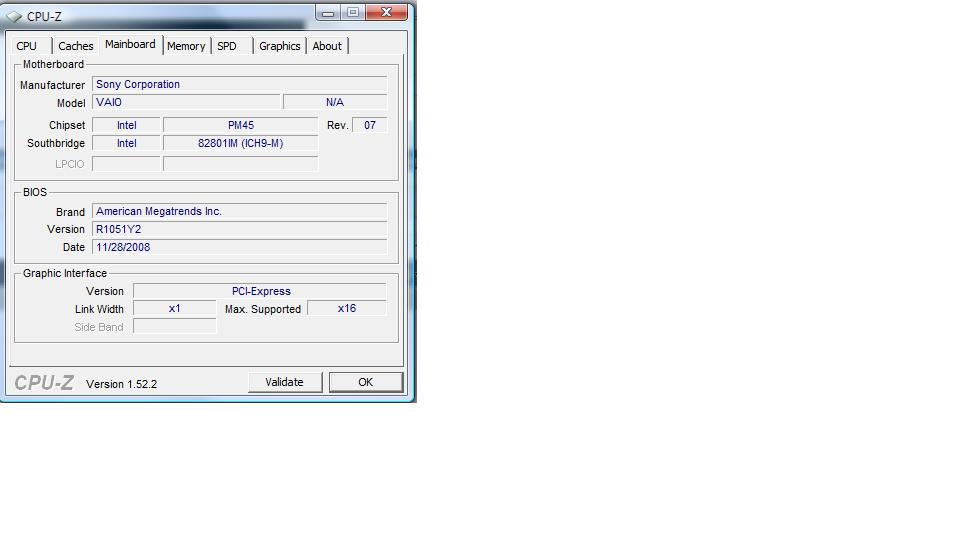
I don't know how accurate cpu-z is but bad news for you.
My AW-290J (US model).
North bridge PM45 rev.07
South bridge 82801IM (ICH9-M)
I used CPU-Z v1.52.2
How can I paste result JPG here?
Cut and paste is not working.Attached Files:
-
-
There's a "manage attachments" button when making a non-quick reply (press "quote", for example, or a "go advanced" button)
Hm, then It looks like it is worth waiting for Sony to finally accept core i7 and make customization available: RGB LED + core i7 should make me happy
I've read that it is really faster than all its predecessors! ASUS and Lenovo, for instance, already have laptops supporting core i7... -
I could not find driver utility but you need utility called "VAIO Control Center".
May be that's all you need. it was pre installed with system.
Thanks to Mujja. 64bit version of all the utilities included "VAIO Control Center" and all drivers for AW here.
http://forum.notebookreview.com/showthread.php?t=379870 -
PM45 so I think you have to use this link.
http://ark.intel.com/chipset.aspx?familyID=35515&code=Mobile+Intel®+PM45+Express+Chipset
and one of ICH9M option is
Intel® Core™2 Quad Processor Q9100 (12M Cache, 2.26 GHz, 1066 MHz FSB) Mobile Intel® PM45 Express Chipset with 82801IBM I/O Controller Hub (ICH9M) No No 1 54.5 Watts $890
Too hot and expensive for me but may be good news for you.
Sony has bigger and one of the best display then asus or Lenovo. -
Oh, yea! There are two versions of Q9100 - one for ICH9M and the other for ICG9EM, so that's good news indeed.
Yea, I think I would agree about the display, although I haven't checked that myself nor have I seen any side-by-side pictures. But still that's what most of the people say. -
how i install windows 7 on my sony vaio aw
what about the drivers ?
please help me -
Sony esupport has a webpage for how to install win7 on a AW. If you cannot find it I think someone a few pages back had a link to it.
-
All the drivers you need are in the first link in my sig.
Official Sony VAIO AW Series 18.4" Owners thread
Discussion in 'VAIO / Sony Owners' Lounge Forum' started by Phil, Sep 9, 2008.