Problems? See this thread at archive.org.
-
Your welcome. Let us know if you buy it. I've never purchased a refurbished notebook from Sony Style but being that there are some good deals to be had, I'm interested to hear some opinions on the matter.
-
I think I'm going to pass. They won't negotiate and I don't want to risk good money on a refurb with a limited warranty. I only paid $2800 for just about the same unit in 2008. I appreciate your help.
-
Wow, sorry to hear that. Maybe it was just a commission hungry Sony rep you had.
-
i too have purchased intel x-25m 160 gbs.
had a couple of questions.
did u reformat/hdderase the new ssd from the beginning?
for some reason i cant find the option to change ide to ahci and also the legacy options in bios? did u kno why? update bios? maybe b/c im not on my ssd?
what i was going to do was too load os on new ssd, then do programs, then copy to image, erase with hdderase on ssd, then load new image to fresh ssd.
what do u think?
also, this can i put this processor in my sony vaio 120 http://www.newegg.com/Product/Product.aspx?Item=N82E16819111006
thx in advance -
Was it stolen while you were mobile?
-
The Sony BIOS is very sparse, no options that I'm aware of to change modes.
I had a very fresh install of win7 on the Hitachi 500gb HD and did a win 7 backup program 'create image' to a USB drive. I used this method because I wanted to test the windows 7 image restore function from the 'rescue cd' and took less than 10 minutes. It restored to the SSD without issue and booted up with no messages whatsoever. I've since disabled superfetch and defrag.
No need to erase or format the SSD, but I do recommend getting the intel driver I mentioned then download and run the SSD Toolbox utility (from intel) to delete (trim) unused space.
I don't know anything about the newegg processor, perhaps another user can advise.
Good luck! -
Yep. I'd taken my wife on a long overdue honeymoon to Kauai. I had some work to do and the second day at the house we'd rented in a swanky part of the island some guys broke in and stole it. Turns out they have a big unemployement/meth problem there and we tourists are sitting ducks becuase the only cars we can rent are Jeeps and Chryslers. You can spot a tourist a mile away and so can they. Don't stay at Turtle Cove Suites if you ever go there. The owner didn't take very good care of us. Wouldn't file a claim with his insurance company. Did nothing to improve the security after the break-in. Stopped talking to us and instead told us to talk to is attorney.

-
I have the AW21Z/B model which came with a 64GB SSD (90MB/s) and 500GB HDD (45MB/s). I ran a few tests and they are both REALLY slow, i've since replaced the 500GB HDD with a samung 640GB model which now runs at around 100MB/s which is actually faster than the SSD.
I now want to replace the SSD with probably the Kingston SSDNow V+ 128GB model but noticed the SSD is a uSata "drive" and it doesn't have a normal sata connection so how am I supposed to do this?
I don't think i'll buy another sony laptop, how can they put such poor drives in what was at the time one of the flagship laptops. -
I bought refurbished AW-290 Last November from Sony Style US.
P8600 320GB/7200rpm 2GB ram RGB-LED display No digital tuner + 2 years extended warranty for around $1500.
Arrived like a new condition but missing most of the documents. I did not have any issue yet and I will buy from them again if there is a good deal.
I added to 4GB ram and looking for good place to buy 2nd slot SATA cable and caddy.
Does anybody know who has good price?
Thanks. -
BIOS Question!
anyone kno where i can change AHCI into IDE and vice versa? also trying to figure out the legacy part too?
do i need to update BIOS? from where would i do that?
also, would this processor work on my sony vaio 120A/J http://www.newegg.com/Product/Produc...82E16819111006
noticed alot of ppl had the T9550, but this is the T9600.
thx in advance. -
Hi, anyone can point me to the most recent nvidia driver for vaio aw? I am using dox 185.85
-
Can anyone confirm if these are good?
http://forums.laptopvideo2go.com/topic/26002-forceware-19562/ -
I just figured to throw this out there if anybody is interested. It's listed as available and brand new, not a refurb. It's a great price for what it is configured as.
http://www.newegg.com/Product/Product.aspx?Item=N82E16834117831
Looks like it's unavailable now. Figured it wouldn't last. -
Hi AW owners. An earlier 'A' owner here. I'm thinking of getting a refurbished AW-290 w/AdobeRGB display. A question to those in the technical know...
The following article is speaking in regards of the 'legacy' NTSC gamut as it is quite close to the AdobeRGB gamut and I've come to learn much wider than all the other gamuts [including today's updated NTSC gamut] only outdone by the full gamut and "Wide Gamut" ...
hxxp://markzware.com/blogs/markzware-news/top-5-laptops-for-review/2008/10/14/comment-page-1/#comment-1308
[ replacing hxxp with http ]
...where in it the article states the AW + RGB display is capable of 137% of the color gamut. My question to those in the technical know is, "how"? How does Sony achieve this where I don't believe I've seen any other laptop manufacturer reach such levels beyond 100% of the NTSC/Adobe RGB gamut? Or, is this article wrong? (could very well be, as they seem to be simply equating display bits, wich really just provides the color smoothness and removes banding, with gamut, which in lay terms is 'color intensity extents' ; I also had a post of mine dropped from the blog's comments, so a raspberry to them!)
Also, Is anyone using their AW w/a calibrated RGB display to do D-SLR post processing work, and finds the output to match their prints well? Thanx for the informed replies. -
I have had AW11z/b for a while now no problems. Upgraded to windows 7 no problem and it's been fine for 5 months.
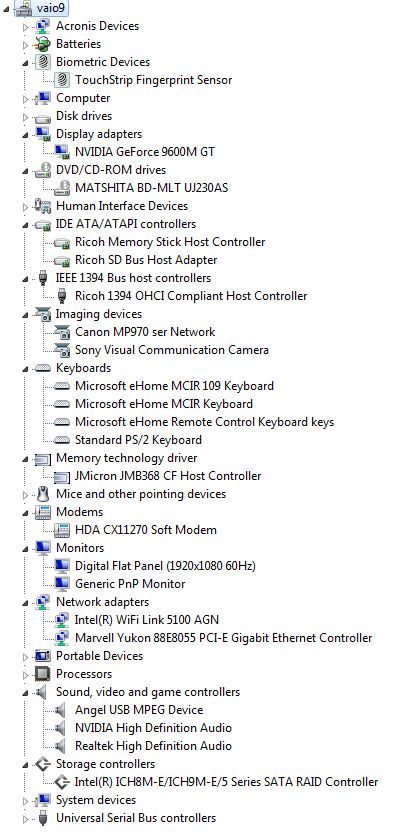
Today however, MSN wasn't working for me so I restarted the laptop. When it came up with the fingerprint logon, it said "Cannot find fingerprint scanner device". Ive looked in the device manager and there is no "Biometric" device there. Also some guy on page 90? seems to have had the same problem as me but no one has replied.
Any ideas on why and how this can be ressolved? -
greetings,
i did a clean install win7 on my aw290.
works great
noticed in device manager under Other Devices that multimedia video controller driver is not installed.
all other devices are fine.
any idea of what this is? display and sound are installed OK.
TIA
bruce -
A couple of pages ago I uploaded some calibration results that clearly show that AW has an indeed wider than AdobeRGB gamut
I'm post-processing but not printing yet, but as soons as I print out something, I'll tell about it. -
Lost fingerprint reader and USB ports?
The short answer is shutdown, remove power, remove the battery for 10 seconds and replace.
More info on this issue is here:
http://forum.notebookreview.com/showthread.php?t=341828
I've had to do this 2 times this week already. Basically, it is an electronic discharge that needs to happen. The motherboard or USB ports are most likely not properly grounded. -
It may be the motion eye video camera if you do not see the device listed under 'Imaging Devices'.
On my win 7 (32 bit) install, I believe the standard windows 7 update found it.Attached Files:
-
-
That's right. I'd read and even saved those for future reference. Looking forward to hear how you find matching to [I'll assume a calibrated] printer as well.
-
Hello!!! Sorry if this has been answered! My Sony AW 390JCH only allows a screen resolution of 1280X1024 in Windows 7... All of the NVIDIA Driver 'upgrades' say they won't work on mys system... Am I doomed to a stretched bloated looking screen in Win 7???
-
I had a similar problem using the sony windows 7 32 bit nvidia file too.
After you get the error when extracting, you have to find the installation 'setup.exe' in the c:users\YOURNAME\appdata\local\temp directory. Hunt around for a largish 80MB setup.exe in a folder (sort by descending modified date). Then run the nvidia setup.exe. -
UPDATE: OK I think i've just figured it out with a bit of self help and searching of this very thread (390 odd pages is a lot to trawl thru), but the use of a few well placed keywords, seemed to identify my issue and the resolution - I will give it a go when I get home!
Thread for fix of this issue here : http://forum.notebookreview.com/showthread.php?t=341828
Hi,
I turned on my AW11s PC last night and none of the 3 USB ports or Fingerprinter biometric sensor's are working.
When it gets to the login screen it says the fingerprint sensor cannot be found and I can only login via my password. Then when logged in I can here it make the "beep" as if it's found new hardware but it then displays in a speech bubble bottom right - drivers failed to load/cannot find drivers or words to that effect.
In device manager it shows 3 usb ports as "not recognised" with an exclamation mark.
I have tried uninstalling the 3 usb ports via device manager and letting windows find them again on restart, but the problem persists.
I also tried reinstalling the UPEK fingerprint software but to no avail.
I'm running Windows 7 64 if that helps.
Please help, as i've only just purchased the laptop (2nd hand) and it was all working OK for the first 2 weeks!
Regards
Paul -
Unplug the mains cable from the laptop,remove the battery for at least 30 mins, refit battery etc fire up the laptop and everything should now be back to normal. -
hey guys, I saw a few people had requested details into what happened with my AW and why Sony issued a full refund almost a year after purchase. Here are the fine details:
my first issues started around here, a couple of months after purchase (palm rest bubbling, those that don't have the 290 series AW's with the rubber palm rest will never have to deal with):
http://forum.notebookreview.com/showthread.php?t=297224&page=235
after the first issue was "fixed" and a second issue caused by the first one's fix was "fixed", another cropped up here:
http://forum.notebookreview.com/showpost.php?p=5567671&postcount=3505
http://forum.notebookreview.com/showpost.php?p=5586524&postcount=3522
the final straw issue here:
http://forum.notebookreview.com/showpost.php?p=5645043&postcount=3570
resolutions here:
http://forum.notebookreview.com/showpost.php?p=5714568&postcount=3621
http://forum.notebookreview.com/showpost.php?p=5718634&postcount=3626
http://forum.notebookreview.com/showpost.php?p=5722762&postcount=3636
and the long story:
see attachment. it's the actual letter I included with my returned laptop back in December. it chronicles the complete series of events along with a demand to not send the laptop back.
it all started from the repair of a bubbling palm rest (the rubber will bubble on you guys eventually...just a matter of time and heat where your palms spend most of their time). to repair it they had to take the entire laptop apart to replace the entire keyboard area. the reassembly was difficult and problems showed up during a poor reassembly process. it was almost like taking a car to a bootleg car shop only to have new problems you never had before after your small issue gets fixed.
it was sad because I loved my AW and its screen, despite some shortcomings. and I'd still buy another Sony, because the problem was somewhat small and unique (rubber palmrest bubble) to this model, and the problem was moreso with the poor repair processes and design choice that lead to that palm rest than the hardware itself. but since Sony backed out of the 18.4" market entirely and went cheap (outside of the Z) there really isn't anything for me to buy from them. it's a good time to be back in the market with all of these i5/i7 devices available with that $2600+ back in my pocket...but I still would have been perfectly happy with my AW. I can get workstation power for that $2600 nowadays.
also not covered in the above links and attachments...it took them 3 months and 4 phone calls to finally get my refund check in the mail. but I did get it. it was confirmed in January, but that process appears to not be as well organized as other processes. maybe because they don't like to do it.
If anyone has further questions for me, shoot me a PM, as I'm not in the thread very often anymore.
be sure to check the links in my sig for random Vaio fixes. continue to enjoy your AW's if they're working well. you'll miss them when you don't have them anymore.
Regards.Attached Files:
-
-
Every time I see the name of the Sony AW I think Sony Alienware and get confused.
-
USB ports and fingerprinter reader offline
Yep, although 5 seconds seems to work for me, and I've done this process weekly for months now. Just did it again tonight although I went about a week since the last episode.
Has anyone had this successfully repaired by Sony????????? -
Well this fix worked for me - much to my relief. However, the same question has gone through my mind, can't believe that no one has raised this fundamental issue with Sony and what their response might be!
For such a high value investment (at the time), this is a pretty major flaw! -
I raised it with Sony over 12 months ago and ended up telling them the fix. I'm sure someone on here did mention that Sony were advising the battery removal as the fix, I've have my AW since Nov 2008 and I've only lost the USB/Fingerprint reader once while I was aways in Oz.
-
hi, does anybody noticed a sound or a vibration coming from the keyboard wen you are playing any music or sound loudly on the vaio aw??
its pretty anoying... it seems the keyboard or something is not correctly attached and vibrates..
anything about this???
thank you!! -
I have not had this problem...but I agree that something is likely loose in the case. The unit has a subwoofer so if it's loose it will vibrate! I did a post on how to open the case within the last two months. Use that as a place to start. Once all the bottom screws are out the grill for the upper speakers/fingerprint sensor can be removed (don't forget to gently detach it's ribbon cable too). Then gently but firmly pry off the keyboard surround. You can then remove the keyboard after detaching it's ribbon cable. You should now have all the access you need to find the offending item. Oh yeah blow out your cooling fan while you're in there! CAUTION: Lots of delicate stuff in there...far too much to cover here. Open at your own risk.
______________
VGN-AW180Y 2x64 SSD's 1TB HDD T9900 8GB OC'd 9600M GT -
Hey ajreynol:
Your old AW is now up for sale at Sony outlet:
Sony Outlet & Refurbished Products
VGN-AW290 Premium
REFURBISHED Notebook - Customized AW Series PC
More info
Installed Memory: 4GB
Processor Speed: 2.66GHz
OUR PRICE
$2,348.99 $1,997.95
LOL, buyer beware....
-
I was seriously considering that. I decided to get a new HP 8740w with DreamColor2 30-bit color RGBLED backlit screen + much more instead, for just $650 more. This is not meant to diminish the AW-290 in any way. It's a great machine and I really thought I'd get it. But as re-furbished and a few years old now, I could get the cutting edge with a 2x or more faster processor, what's likely to be the best screen ever put into a mobile workstation, an incredible build quality, and incredible warranty, for just a bit more money. That's all I mean to say.
Oh, and it came w/a license of Lightroom and I already have one, so did not want to get banged for another. I spoke to a Sony salesperson and she said once the techs come up with a price, it is nonnegotiable; and they would not consider taking off Lightroom, or discounting it in any way. I guess some insider will walk away with it at a 50% reduction after a year when someone wants the inventory cleared out. -
That 8740w looks like a real nice notebook, except no optical s/pdif output available. That's a deal killer (unless the docking station provides it?) Hmm, not finding it in the docking station specs: http://h18000.www1.hp.com/products/quickspecs/13449_na/13449_na.HTML
I use the optical out on the AW to drive a Logitech Z-5500 speaker system with 5.1 Dolby or 5.1 DTS output. Can't do that with std line-out. Gotta have good sound especially when testing 5.1 dvd's out of adobe encore. -
I'll be the 1st to admit that that HP is lacking in many/most multimedia features. It's definitely a 'business workstation' lacking the video and audio options you might expect from a top of the line consumer machine. I also understand the sound card it uses to be a generation or two old.
-
Hello everyone,
I have a VAIO VGN-AW11M (French version). I used it for over a year and it worked great. I did update my BIOS and after the update the computer never turned on. The charger works fine, but when I connect it to the computer, there aren't any lights on. I have a feeling that the motherboard is burned. What should I do?
I want to replace to motherboard, but I can't find the one that I have. Does anybody know if I will buy a mb with better graphics (I think that I have 9300 and I would buy e.g. 9600GS) it will fit without any trouble?
Thank you in advance! -
Guys I need some help, I have a AW11XU with Full HD LED screen, when using the screen normally the brightness and colour are fine, when playing back DVD's and Blu-ray etc the screen is very dark, can someone help out with setting or two that I need to change to improve PQ.
I tried to playback a blu-ray disk (Transformers) this plays OK on the laptop all be it very dark (see above), I get the following HDCP not support, can someone advise/provide a link to the latest drivers for the AW11 laptop.Thanks -
Link for official video driver for AW using Win7 64bit.
Sony eSupport - VGN-AW290J - Software Updates & Drivers
You should have same for EU version from Sony EU site.
If you are gamer you can download beta driver from here.
NVIDIA & Laptop News | Latest NVIDIA drivers and related news | laptopvideo2go.com
For HDCP issue.
1. Try disconnect external display and play BD.
2. Use AnyDVD HD software to bypass HDCP. You can download 21days free version from here.
SlySoft AnyDVD HD
Good Luck! -
Hi! Does the -AW series notebooks have TPM chips? I can't find anything about it in BIOS (usually, it's enabled through BIOS), so I am wondering...
(I made a separate topic but so far no responses, perhaps someone might reply here; thanks in advance). -
Hiya, Thanks for the info, I managed to fix the blu-ray playback, it's was a common well know silly mistake, you can't display Blu-ray movies on two screens, once I pressed Fn PF7 and selected the other screen, it played back fine all be it very dark. I still need help with setting up calibrating the screen.
-
No, I do not think so. Not on mine. The BIOS options on the Sony are incredibly dismal for such an expensive notebook.
-
Looks like Overstock.com has a decent deal on the led equipped aw series (cheaper than the outlet at sony style)
Sony VAIO VGN-AW290JFQ Laptop (Refurbished) | Overstock.com -
Big Azz LOL. See, exactly what I was talking about! If Sony were just willing to negotiate Sony could have sold it to me for that or maybe even a little more than that, instead of selling it for even less to Overstock so that they could mark it up to the price we see there... Sony, f'n big biznuss numb nutz.
-
m8o when are you getting your 8740w? I have the 8730w with dreamcolor now. It's a great machine.
-
Good question. Ship date is supposed to be tomorrow. But if I were to call HP, I might find my order was canceled on me by the factory, due to the lack of DC2 and backlit KBs. ...hopefully HP will decide they have enough uniformity and high quality in the display stock they were supplied to release mine. I'll know soon.
-
Hi all, great thread with heaps of really useful info.
I see that plenty of people have upgraded to the T9900 trouble-free, but what about the X9100 or QX9300. Will they work in an AW?
My machine is an AW17GU (Australian), not sure what it is equivalent to in the US/UK. It came with the T9400 and the PM45 chipset that i presume we all have...
Thanks in advance. -
Hi all.
Just stumbled across this thread searching for a new AW model to replace my now aged AW11/XU.
Anybody in the EU that has an idea of an online store that sells AW models
- or -
Anybody here replaced the AW with something from another manufacturer
To me the 18.4" display, SSD, nVidia are almost a must ( Developer using VS, SQL etc ) and I'll be torched with flames if I can find a successor model for the AW11 here in italy ... 's like they never made one.
Regards,
SR -
hi just install the xp in vaio AW.
Function key of brightness is not working and other key also.
any way to adjust the LCD brightness in AW in xp os.
or any other application or power mgt to do it ?
thank -
I bought one of the overstock.com deals and got it in Friday. Looked brand new. Upgrade the drives to 500gb 7200rpm models and installed win 7. Very nice. Also have to say the screen is really amazing. I think it's better than the dreamcolor on my 8730w and as good as the screen on my mbp 17 matte (I only use matte screens, hate glossy).
Love the keyboard too, just like my mbp keyboard sans backlighting.
Official Sony VAIO AW Series 18.4" Owners thread
Discussion in 'VAIO / Sony Owners' Lounge Forum' started by Phil, Sep 9, 2008.