Problems? See this thread at archive.org.
You should be able to use Win DVD or Power DVD. I have Win7 64 bit and use both successfully to watch Blu-Rays. You can get Win DVD from the Sony site.
-
Yeah I guess I just have to clean out my computer a bit. What's the best way to clean out the cooling fan?
And how did you overclock ur 9600m gt?
Was there a significant diffence? -
Cleaning out the cooling fan can be a bit tricky. The simple way is to use a can of compressed air from Radio Shack, Frye's etc. and shoot it INTO the fan exhaust on the left side of the compy. It's easy but the dislodged dust particles will be blown INTO the computer....this will not do any damage but will cause the fan and heat exchanger to clog again sooner. To do it the RIGHT way you have to open the case (remove EVERY screw from the underside of the case icnluding the little ones inside the hard drive compartment and under the battery) and gently pry the case apart with your fingers starting at the front left corner. Remove CF card or plug and any memory stick or SD card FIRST! There is one wire connection to disconnect at the center of the mobo which goes to the subwoofer...don't forget to reconnect during reassembly! Once the bottom case is off you can blow out the fan and heat exchanger easily with your can of Air Duster and watch the fur fly! Do it outside! THIS PROCEDURE IS NOT FOR THE FAINT OF HEART. If you are not comfortable removing the hard drives and opening the case let a computer repair service do it.
As for overclocking the video board...I use the Dox modified 185.85 drivers available thru this link http://forum.notebookreview.com/newreply.php?do=newreply&p=6081592 and recommended by ajreynol...check out his posts...he turned me on to this. I use these drivers combined with NVidia system monitor and control panel to do the overclock. Yes it does make a difference..but only for high level games where high frame rates are important..you will see a difference. Bad news is that if you fo it wrong you can roast your video card which will mean a motherboard replacement to fix it. And if Sony finds out you did it ...NO warranty! Once again NOT for the faint of heart. You can google up overclock Nvidia 9600M GT for lots more info BEFORE you try this. And get your cooling system straightened out FIRST!
Hope this helps you and/or others. AJREYNOL's posts are also invaluable in this area!
AW180Y/Q T9900 9600M GT -
A really fast and simple way is to use a vacum cleaner, I tried it and it seemed to work a bit.
As for my CPU at idle it is 37C and GPU is 51C. Do you live someplace hot? -
hahaha OMG I hope yu didnt sucked processor in ? :hah oh dear where on earth u cleaning laptop with hoover
 hahah
hahah
yu need just dry brush for painting (some thin one) and clean fan ..
it wont help anyway just little ... -
Really hard to figure out what you are trying to say with your broken english.
Anyway I used the notebook vents to avoid opening up the notebook, it is a common solution although one should not expect great results. -
Thx There's already a step by step available on this thread. Someone made a RAID-0 out of two 128GB SSDs with lots of pictures
The part numbers have also been already discussed a few times before - search for HDD FPC.
-
Hello guys look on this beautiful laptop i think it is gonna be a replacement of my oldish AW vaio ... wil say good bye to it
the video is not english so u won't understand but you will see nice design of laptop !
http://www.youtube.com/watch?v=cdwojMM3Xls -
AW thanks man)
-
The screen is glossy, so in no way this is an AW replacement
-
And what do u think AW is Matte ??
-
Well, it's semi-matte, to be honest, but in any case it's a big difference between glossy and matte (or semi-matte).
-
HEy vaio aw is glossy .. not any matte ok ? semi mate or semi glossy doesnt exist!
-
Sorry, but I disagree. The AW screen is of a " less reflective "type, kind of like the " old " Z series, in which reflections and glare due to external light sources are minimized unlike a regular glossy screen. Examples of regular glossy screens are the CW, S, Y, etc. Those are glossy screens and are quite annoying to use.
-
So then your and qBot's will be X-brite Display (more quality one)
there are two types in AW series I have double-lamp and its total glossy .
and you have probably X-Brite .. that top one .. probably is semi as qBot siad..
I've seen X series lapto it's total matte .. its very nice -
2 Peter-X:
Glossy AW is not an AW The only good thing about AW is their Adobe RGB displays. In my footnote it's said that I have AW2XRY/Q where Q stands for "more quality one" as you say
-
what do u mean?
-
maan dont worry i know how is it with vaio aw series i have it one and half years .. I know it from scratch ... just never seen x-brite display ...
really would see difference between double lamp and x brite .. -
I do have the X-Brite Full HD screen. I bought it from Newegg.com in December 2008.
http://www.newegg.com/Product/Product.aspx?Item=N82E16834117831
Brand SONY
Series VAIO AW Series
Model VGN-AW190JAH
General
Operating System Windows Vista Home Premium 64-bit
CPU Type Intel Core 2 Duo P8600 2.4GHz
Screen 18.4"
Memory Size 4GB DDR2
Hard Disk 250GB
Optical Drive BD Combo
Graphics Card NVIDIA GeForce 9600M GT
Video Memory 512MB
Communication Modem, Gigabit LAN and WLAN
Card slot One ExpressCard /34 slot
Dimensions 17.2" x 11.4" x 1.45 - 1.56"
Weight 8.8 lbs. (with standard capacity battery)
Tech Intel Centrino 2 Processor Technology
Other Features Fingerprint reader
CPU
CPU Type Intel Core 2 Duo
CPU Speed P8600(2.40GHz)
CPU FSB 1066MHz
CPU L2 Cache 3MB
Chipset
Chipset Intel PM45
Display
Screen Size 18.4"
Wide Screen Support Yes
Resolution 1920 x 1080
LCD Features XBRITE-Full HD Technology
Operating Systems
Operating System Windows Vista Home Premium 64-bit
Graphics
GPU/VPU NVIDIA GeForce 9600M GT
Video Memory Dedicated 512MB
Graphic Type Dedicated Card
Hard Drive
HDD 250GB
HDD RPM 7200rpm
HDD Interface SATA
Memory
Memory 4GB
Memory Speed DDR2 800
Memory Spec 2GB x 2
Max Memory Supported 4GB
Optical Drive
Optical Drive Type BD Combo
Optical Drive Interface Integrated
Optical Drive Spec BD-R DL Read : 5x max.
BD-R Read : 5x max.
BD-RE DL Read : 5x max.
BD-RE Read : 5x max.
BD-ROM Read : 5x max.
Blu-ray Disc Support : Yes (read only) (BD-ROM/ DVD±RW/±R DL/RAM Drive)
CD Read : 24x max.
CD-R Write : 24x max.
CD-RW Write : 24x max.
DVD Read : 8x max.
DVD+R DL Write : 6x max.
DVD+R Write : 8x max.
DVD+RW Write : 6x max.
DVD-R DL Write : 6x max.
DVD-R Write : 8x max.
DVD-RAM Read : 5x max.
DVD-RAM Write : 5x max.
DVD-RW Write : 6x max.
Communications
Modem Integrated V.92/V.90 Modem (RJ-11)
LAN 10/100/1000Mbps
WLAN Intel WiFi Link 5100AGN (802.11a/b/g/n)
Bluetooth Integrated Stereo A2DP Bluetooth Technology
Ports
Card Slot One ExpressCard /34 slot
USB 3
Video Port 1 x VGA, 1 x HDMI
Audio Ports Yes
Audio
Audio Intel High Definition Audio with Dolby Digital Live
Speaker Built-in stereo speaker
Input Device
Touchpad Electro-Static touch pad
Keyboard QWERTY, 103 keys, 19.05 mm pitch, 2 mm stroke
Supplemental Drive
Card Reader Compact Flash media slot
One Memory Stick Duo media slot with MagicGate functionality
One Secure Digital (SD memory card) media slot
Webcam Built-in 1.3 MP MOTION EYE camera
Power
Battery Standard Capacity Lithium-ion Battery (VGP-BPS13A/S)
Physical spec
Dimensions 17.2" x 11.4" x 1.45 - 1.56"
Weight 8.8 lbs. (with standard capacity battery)
Manufacturer Warranty
Parts 1 year limited
Labor 1 year limited -
I'm not completely sure, but afaik x-brite is the same as double lamp (the screen is glossy in this case). And Adobe RGB (or RGB 3 chip) screen is matte.
-
The screen I have, as I previously stated a few posts back, is the less reflective type, a cross between glossy and matte. And this X-Brite screen is a CCFL dual lamp, but is not the Adobe RGB version.
The premium AW series which had the piano black finish and that leather palm rest area that first were for sale were supposed to have a total matte Adobe RGB compatible screen finish and that Adobe Photoshop Lightroom software. -
That's almost what I was trying to say with one exception: Adobe RGB screen is not totally matte. At least compared to a desktop matte screen or some other laptops matte screen (a rather rare thing to find), but It's definitely more matte than the X-Brite screen (which I would call glossy) These are all quite relative things... I won't say there were first for sale, as one can still an AW bla-bla/Q model (at least in Moscow).
-
I think the AW190, AW290, and AW390 series in the USA had various types of screens. The 2 already mentioned and then in some cases the downgraded 1600 x 900 resolution version. I'm not sure about later models or other models released elsewhere. No matter, the screen on my AW is less reflective, it's bright with fantastic resolution, and is the best screen I've ever owned.
-
Al in all, I would say that a good AW series replacement should definitely have a matte screen option otherwise it's not fully a replacement.
-
And I wish Sony would have continued evolving the AW series instead of what seems to be a discontinuation of it. Sometimes I think about buying another one from Sony Style USA's clearance section, but a higher end one like with the T9900 processor and other top end specifications just in case my current AW prematurely craps out.
-
I am gonna buy that acer aspire ethos ...
it's very nice design and screen is the same .. 18.4''
and with core i7 up to 16 GB ram DDR3 with RAID 0 5.1 sound ..
that is gonna be very cool notebook ! -
True. My AW170 display is matte.
-
Thanks a lot Orionz. I'll definitely give the overclocking a try when i figure out my cooling system first. I'm new to this forum. How do I search for AJREYNOL's posts for the overclocking.
(noobie question):
Also, I'm interested in upgrading my cpu to the t9900. Would any t9900 SLGEE fit the aw290? -
I forgot to mention that I have a t9550 in my aw290 right now
-
Check out the NZXT CRYO if you haven't already. It's pretty powerful---and BIG---big enough for 18.4" AW. Not the typical cooler, for sure, not that I've seen anyway. I plan to get one soon. Also, it comes in black aluminum.
-
hi yes of course yu will find couple on ebay quite cheap from china ..
-
really ? never thought that aw has got matte screen hmm ..interesting !
can u post picture ?
thnx -
Peter-X: so you think all that I've been telling you for the last 10 posts was b@ll?
Google that and see!
-
no definetly no !
why u thinking like that ? -
I ordered one from ebay and it works great...also the perfect to replace OEM thermal compound!
AW180Y/Q T9900 9600M GT -
I ordered the IC Diamond Thermal Compound a couple days ago and came in today. I opened up the back of the laptop like you said and got rid of all the dust in the fan (there was a lot of it). I also replaced the thermal compound for the cpu and gpu.
Now my computer's temp idles at cpu 44c and gpu 55c.
HUGE DIFFERENCE! I was pleasently surprised it cooled down as much as 20c. Plus my computer's cooler than it was when I first started using it.
My next step is to upgrade the cpu and ram (only 4gb right now). I'll try the overclocking after I get those done.
Thanks again for your help -
SSD with Windows 7 TRIM on AW RAID equipped models
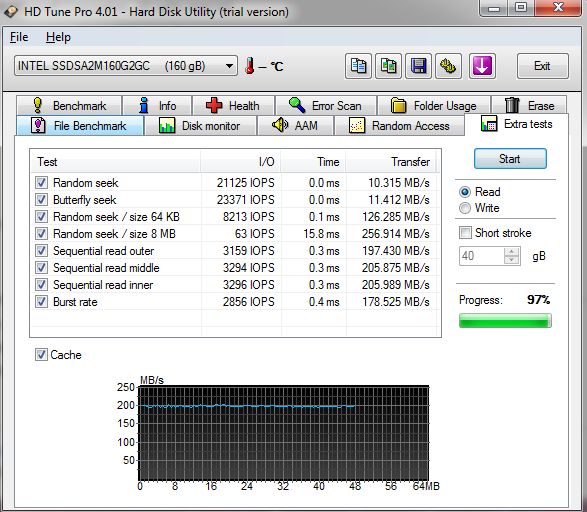
Well, I finally decided to get the Intel 160GB Gen2 SSD drive and the performance is very good, as it should be for the $$$ it cost!
Anyway, on the Sony AW with a RAID controller with the default win7 installation you won't have win7 TRIM support using the included win7 intel driver unless you install the latest Intel Rapid Storage Technology Manager driver located here:
http://downloadcenter.intel.com/Detail_Desc.aspx?agr=Y&ProdId=2101&DwnldID=18859&lang=eng
This was released just 2 weeks ago (3/23/10) and finally ( discussion here) supports TRIM for drives not part of a RAID volume (see bottom row):
http://www.intel.com//support/chipsets/imsm/sb/CS-022304.htm
I'm also running a Hitachi 500gb 7200 for primary data storage. -
can you show me some results AW with SSDSs ?
-
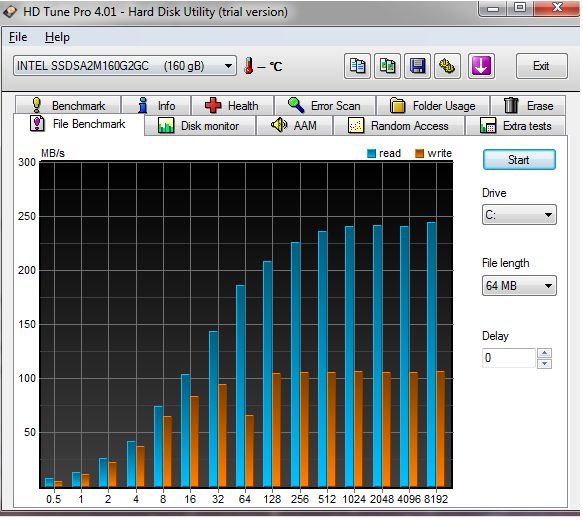
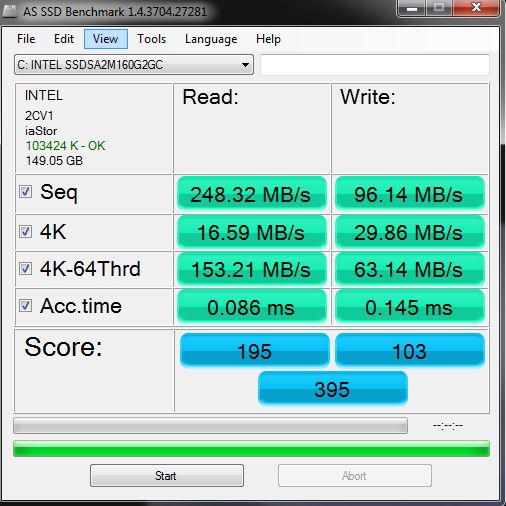
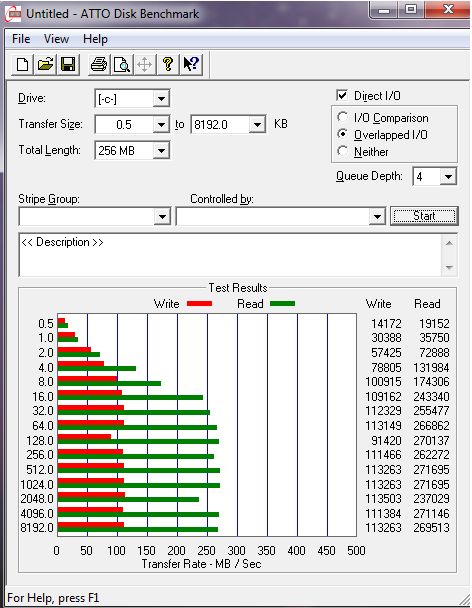
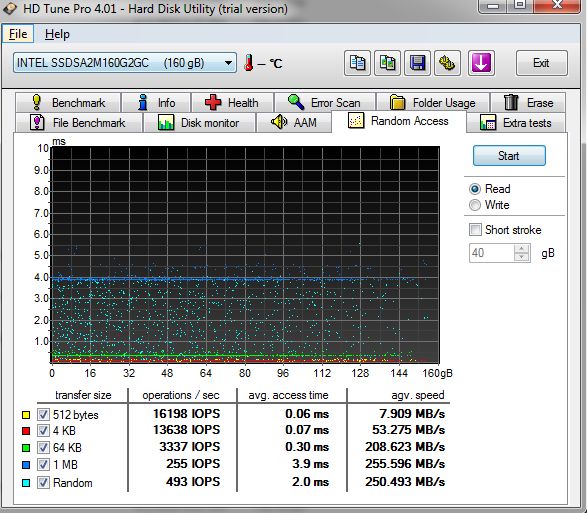
Attached are several SSD results on my AW 160 J/Q system. They seem to be very comparable to the other Intel Gen2 SSD results being posted.
Worth noting is that the intel SSD drive arrived with 02HA firmware and I upgraded it to 02HD but I had to use my thinkpad t61p because on the sony, the intel updater could not see the SSD ironically because of the intel RAID controller. And the intel controller was not in RAID mode. -
@tbNB
this is not RAID or yes ?
looks like nothing much perform ... write so low .. ? -
It's 50 MB/sec faster than my Apacer SSD which costs about 40% less than Intel, so that is a very good performance. As for the writing speed - HD Tune sometimes measures it in a strange way... It either depends on the amount of free space left, or something else... Compare my old benchmark made with 5% free space and the new one made with 40% free space:
Attached Files:
-
-
hd tune is worst program dont use it it will install bad driver forr hdds only an it slowing down whole PC !
show me crystal mark -
@PETER-X:
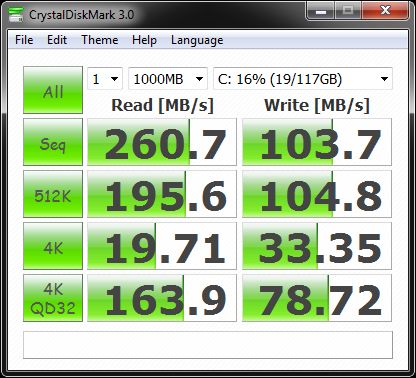
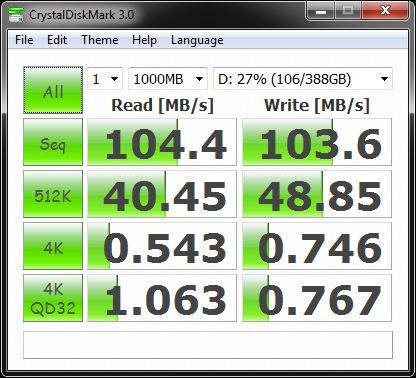
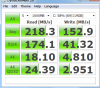
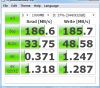
Ok, here is crystal disk mark score for the Intel 160gb G2 SSD (drive C) and my new Hitachi 500gb drive (drive D). No, I'm not running these drives in a RAID volume.
The write speed of the Intel SSD is 100mb which corresponds to my results. But where you feel the speed of SSD is random access; booting, loading programs, etc. The entire system just responds instantly, no more delays at all when launching programs, etc.Attached Files:
-
-
thank you very much
that intel write is not so good BUT 4K is VERY GOOD !
I really recommend you buy same ssd and make raid on your vaio with 2x ssd
it will speed up your machine 1 time more
and your aincient HDD put in 2.5 enclosure
or sell them -
Increasing something 1 time means leaving it as it was
OK, if you don't like HD Tune, here's that silly looking crystal mark (no graphs is bad):
Attached Files:
-
-
DON'T LOOK how programs look .. look what programs can do ..
crystal mark just released new and it is designed for SSDs and HDDs (mostly for SSDs)
Attached Files:
-
-
My AW CTO Premium with Adobe was stolen. I miss it. I bought an F but the screen is seriously lacking. SonyStyle discount center has a couple of AW' s for sale that are comparable to the one that was stolen. Would I be a fool to buy one given the tech is outdated? Or is this a timeless machine that would be enjoyable even though its a dual core, etc.? Also, they're Vista machines. Thanks.
-
This is the closest model I see comparable to maybe what you had. I think this Core 2 Duo AW isn't outdated and as far as the Vista OS, a simple upgrade to Win 7 is a must do and upgrading to 8GB of RAM for sure.
Base Unit : VGN-AW290(7516)
Display : XBRITE-FullHD (1920x1080) with Adobe® RGB color management
Wireless Local Area Network : WLAN (802.11a/b/g/n) with integrated Bluetooth® technology
Processor : Intel® Core 2 Duo Processor T9550 (2.66GHz)
Memory : 4GB DDR2-SDRAM (DDR2-800, 2GBx2)
Solid State Drive / Hard Drive : 640GB SATA Hard Disk Drive [7200 rpm]
Optical Disc Drive : Blu-ray Disc Read and Write Drive
TV Tuner : TV Tuner
Battery : Standard Battery
Operating System : Microsoft® Windows Vista® Home Premium 64-bit
Pre-installed Software : Microsoft® Works
Software2 : Works with HST / SP09-IRX4690
Photo Software : Adobe® Photoshop® Lightroom® 2.0
Video Software : Video Standard
Finance Software : QuickBooks Simple Start
AntiVirus Software : Windows Live OneCare 90-Day Trial
Limited Warranty Term : 90 Day Limited Warranty
OUR PRICE
$2,583.04
Add to wishlist -
Where did you find that? The one I saw had a slower processor for about $3900. Is that in sonystyle usa?
-
Yes, Sony Style USA's Clearance section. If you view 100 at a time, it's on the 4th page.
Official Sony VAIO AW Series 18.4" Owners thread
Discussion in 'VAIO / Sony Owners' Lounge Forum' started by Phil, Sep 9, 2008.