Problems? See this thread at archive.org.
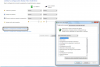
Inside the windows 7 energy schemes have you tried the advanced power options configuration. This is what I mean, look at the thumbnail I provided, maybe you have an option there!
What I meant to say yesterday is have you updated the BIOS? (firmware upgrade from sony support), because I remember that I had to update mine to get use of the virtualization technology which didn´t appear in the menu before my bios upgrade.
-
Attached Files:
-
-
Edited thumbnail, advanced power options inside black rectangle.
Attached Files:
-
-
ahh okay, i will try it. I just went to download the latest bios and when I ran it, it said "The system BIOS is current, and does not need an update" :\ About to reinstall windows anyway (new HHD), I'll try it after install.
EDIT:Reinstalled, still not there =\ -
Hi gurus!
I'd like to know if there is a way to use the Wake on Lan feature on this laptop, in order to remote control it using my iPad when I'm traveling.
I am able to wake it up when its on sleep mode, but not when the computer is completely shut down. I've looked at the bios but didnt find anything.
Thanks for your help. -
what is the best aw 9600 nvidia driver i could download from
laptopvideo2go.com
i need a new driver not an old one imean 27x or 26x
with out that blue screen problem
i need the last best driver for my nvidia 9600 gt
thanks -
Hi there klnu2000,
Right know I´m using the 263.09 64 bit driver driver from laptopvideo2go.
It´s not the latest but it is the most stable and compatible with the brightness functions which does not happen with the newest ones and futhermore the new ones give lots of bsod with the 9600m gt. This is from the comments on laptopvideo2go from other users that have tested new ones. Here´s the link if your interested:
v263.09 Windows 7/Vista 64bit | NVIDIA Desktop - LaptopVideo2Go Forums
I get quite good frame rates with this driver on portal 2 for example and have also played Crysis 2 with them (even though it´s more console port this time). Hope it helps!
Remember to download the inf modified file and replace it in the installation folder of the driver so that it detects your card! -
My power "DC in" round input broke off when I tripped over the power wire. I have to fix right away as I can't open or close the laptop unless I hold the power module in place. Anyone replaced this before? Not quite sure what exactly may be needed.
Last edited by a moderator: May 8, 2015 -
I installed Windows 7 64b Pro and the Sony website drivers worked but the refresh rate was stuck at 59hz. I installed a update from Laptotogo version 253.xx and it fixed this. I get the 60 hz refresh rate now. Also it has been perfect!! no issues. I had issues trying to go higher but it was unstable. This version has an installer and no INF file to worry about. PERFECT!
http://home.comcast.net/~analog414/Nvidia-drivers.cabLast edited by a moderator: May 8, 2015 -
Can you post an image of the broken piece! I´m trying to imagine what you´re telling and you might have to send it in for repair! The power hinge is attached to another rotating hinge that closes and opens the lid, so if that´s busted... I would not mess around with that, call up sony and see how much that could cost to repair.
There was a case similar to yours on another vaio model in another forum and they had to send it in for repair.Last edited by a moderator: May 8, 2015 -
I took the laptop apart and was shocked to see that the DCIN power plug is fixed to a chassis that looks to be made of "potted metal". This cracked off and is the reason the power plug was loose. This "trip" over the power wire pulled the jack off the screw. This whole time I assumed it was a screw that was the issue. This last incident was the back breaker. I could not find a part number on this metal section of the bottom panel. You have to buy the entire bottom panel and that is $131.64. Here is a picture. Notice the super glue at the break and the cap that the screw hole sheered off and bent back in place. This cap is a $69 part!!!!!!! Add labor and this repair is over $300.00!!

![[IMG]](images/storyImages/PowerDCIN.jpg) Last edited by a moderator: May 8, 2015
Last edited by a moderator: May 8, 2015 -
Out of curiosity, edgain, are you getting higher temperatures using this driver? I am using the same driver and have noticed my CPU and GPU temps are a little warmer than they were before. I can also feel the left-hand side of my palmrest (by the Vaio marking) get pretty warm after some gaming.
-
Originally Posted by edgain View Post
Hi there klnu2000,
"Right know I´m using the 263.09 64 bit driver driver from laptopvideo2go.
It´s not the latest but it is the most stable and compatible with the brightness functions which does not happen with the newest ones and futhermore the new ones give lots of bsod with the 9600m gt. This is from the comments on laptopvideo2go from other users that have tested new ones. Here´s the link if your interested:
v263.09 Windows 7/Vista 64bit | NVIDIA Desktop - LaptopVideo2Go Forums
I get quite good frame rates with this driver on portal 2 for example and have also played Crysis 2 with them (even though it´s more console port this time). Hope it helps!
Remember to download the inf modified file and replace it in the installation folder of the driver so that it detects your card!"
If you notice, this driver will not allow your refresh rate above 59hz. It looks like you are setting back to 60hz but if you go back and check it reverts back to 59hz. I consider this unacceptable! You can really tell the difference in game.Last edited by a moderator: May 8, 2015 -
Can anyone use this Windows 7 upgrade from Vista (32b or 64b) disk? I got it from Sony and when I found out it was only the upgrade I never used the DVD or the KEY! I instead bought the OS because I only wanted to do a clean install. Again I never took the DVD out of the case. This is for the AW series, not sure it works with the non USA models. UPGRADE DISK ONLY!! NEEDS TO BE INSTALLED OVER VISTA! $25.00, shipping is included.
![[IMG]](images/storyImages/windows7sony.jpg) Last edited by a moderator: May 8, 2015
Last edited by a moderator: May 8, 2015 -
Musicis, where is it listing your refresh at 59Hz? I'm using the same driver version and my Nvidia control panel constantly is listing my refresh at 60.
-
I tried that driver 263.09 from the post on the last page and after it installed the driver version was not 263.09. Maybe I mixed the files up. But 59hz is what I would see in Nvidia panel. Look in device manager and double check your version (263.09).
-
When heavy gaming cpu will go max to 80-81 degress and gpu will go to around 80. A bit warm but I like to stress the pc a bit, I dont want the unit getting lazy!! Palmrest area does not get hot, but it does blow out hot air through the vents.
-
You really did make a mess of it, it even hurts me!!!
Sony is expensive on repair but I think you really hit the most delicate part of the unit because it´s the power up and it affects the lid opening. I would get it in to Sony unless you know someone that is a whizz fixing computers and does not charge a lot!Last edited by a moderator: May 8, 2015 -
This glue has held out so far this week. I used a longer screw, thread lock and a grip star washer and got the plastic cover fastened down well. If the glue snaps the cap cover will be tight enough so opening and closing the lid is not effected as was the case for a year. It was the trip over the power cord that made me open up the unit.
Last edited by a moderator: May 8, 2015 -
Hmm, okay, thanks. My CPU gets to around 85, I think, and GPU 95. I couldn't imagine I pasted it wrong twice in a row. Either way, my AW is my secondary computer now so I'm not too worried about it.
-
You mean you changed cpu and didn´t paste it properly, is this correct?
If you have not touched cpu these temps are too high, especially the cpu (85 degrees), gpu can handle well but they wont last long! Are your fans clean and dust-free?
The maximum I got ever was:
93ºC on northbridge
87ºC cpu
85ºC gpu
and this was doing some crazy stress tests using prime95 and fur mark gpu benchmark at the same time, I only did this for 20 minutes just too see the limit! Check it out! -
Well I hope it goes well but beware the glue doesn´t snap, it´s like loctite, this is,you stick something (especially plastic) it breaks and you wont stick it again, some glues are abrasive and eat away surfaces. Anyway good luck and careful where you step!Last edited by a moderator: May 8, 2015
-
By the way, what´s your main laptop now! I don´t see myself replacing this monster very easily!
Oh, and I still have 8gigs of ram left to chuck in for my next upgrade! -
I ended up buying this year's new F (3D laptop). I was originally going to get a Z for the portability factor, but then Sony mentioned last year that a 3D laptop was in the works. Therefore I just waited for that to come out.
I switched out the CPU for a couple of days before going back to the stock one in my AW. Maybe I did paste it wrong, I'm not really sure. Either way, whenever I do get around to checking it all out again, I'll try to blow out any dust from the vents if there's any. -
I'm based in the UK and need to replaced the battery on my AW11XU can anyone advise a good replacement rather than the very expensive Sony version or know where I can pick a Sony battery at a competitive price.
-
Just one question, do you really need it? Do you move your laptop around often? Mine died 5 months ago and I use it only with the AC mains. Here in Spain you can only get it from Sony. Went to many places and asked but nothing! For now I can live without the battery, and I save myself some money!
-
Same here. I've decided not to buy a replacement battery, getting an iPad instead
-
Not really, Just would be handy if I could get a another battery at fair price.
-
Hi all
my laptop is aw290 came with 9600gt 512mb
my graphic card bios is 62.94.3c.00.39
i read on the internet that i could update my nvidia bios so i can then install the newest drivers from laptopvideo2go web site like 27x without the blue screen problem
my q here is that correct ?
if no i need to fix this bsod happening only with new drivers from laptopvideo2go
if yes ?
i need to know what is the correct bios file for my graphic card and the safety steps to do this
![[IMG]](images/storyImages/2xr.png)
-
Hello, everyone. I have a VGN-AW21XY/Q. As it's part of the AW series, thougt I'd ask a question here. I did search through but got no real answer.
Has anyone tried upgrading their AW laptop to the Intel Quad QX9300 processor? Or even the Quad Q9100 processor? It looks like the Motherboard and chipset supports it, just wondering about the BIOS? -
Hey I recently upgraded my VGN-AW 290 from vista 64 bit to windows 7 32 bit. I am having two problems, my display looks stretched and blurry and my AVCHD files from my camcorder play in slow motion. Any help would be great.
-
Why Windows 7 32-bit? Shouldn't that be 64-bit?
Anywhere on the desktop, right click and click properties. Then go onto resolution to change the resolution to it's highest settings, unless it's your wallpaper, then click on the wallpaper tab and untick stretch.
As for your videos, no idea (it may be to do with your resolution that I just explained. It may work now that you've put your resolution to it's highest setting), what program are you using? -
Hi!
is there anyone that can upload the recovery disc?
I have an AW11M model that came with vista home preimum.
Thanks in advance! -
Thanks Darklish for the advise, but i didn't find any Post 3343 for replacing the HDD ?
-
Hi Musuta
How everything is possible ?
right now i plan to replace my two 4200rpm by two SSD 256GB! is it possible? and how?
I plan also to replace my CPU to X9100, is this possible too.If possible i would be happy man!!!
Any help is appreciated -
I am experiencing this coloring cycling problem as well on my AW180Y with RGB screen. Any solutions or advice?
-Mike -
Hi
I Have Sony Vaio AW11Z/B And I Want To Update My Graphic Card
Now I Have Graphics Driver (Nvidia) 8.15.11.8640
VAIO : Sony Europe
Do We Have Another Update Since That Model ?
I Have Windows 7 64bit
Thanks Alot -
That's cause it's post 2343, not 3343. Check it out.
-
Hi Darklich !!!
Thanks for the reply. Can you get the link for that post, i will appreciate.
Especially now, when I am ready to upgrade 3 AW Vaio, 2 out of the box and the third is in still.
Cheers
1/AW290JFQ. US
2/AW 21XY/Q UK
3/AW31XY/Q,
As you guess, I have much work to do even being a newbie, but I want to learn in this Awesome Forum, with Awesome people! -
Try using driver 263.09 from laptopvideo2go.com
It´s quite stable and brightness controls work with this one.
Other drivers over this are giving people with 9600m gt blue screens.
I look it up quite often and if there´s better I´ll tell. -
I have made a modded Nvidia inf with OEM settings that supports all AW models. Use the Nvidia 275.33 driver in the guide linked in my signature.
-
Hi Darklick!
I made my search in this forum but fcannot find the Post 3343, can you please tell me where I can find it?
Your help will be appreciated!
I am to replace at least 4 full small SSD and 2HDD for two vaio AW with SSD, and 2HDD for 2SSD for the AW290JFQ.
What do you think?
Thanks in advance!!
My 3 AW are:
VGNAWa 290JFQ (comes with2HDD at 4200 rppm
VGNAW 21XY/Q(2x64SSD+500GB at4200rpm
VGNAW31XY/Q(2xSSD+500GB at 4200 rpm
There All for one purpose : photography and Video for my Kid,
And I just make more room for System and Apps in upgrading the SSD,
Ands the Same for the HDD, for larger one to store my work from SSD to HDD, then the External HDD for Backup as you can see.
The HDDs are really Slow and the SSD in two last models are Small in instance, so not space of the likes of softwares, OS, and apps,
But the VgnAW290 OSS 2 HDD, and I am planning to replace them also with 2xSSD. I am thinking about Intel 510 series with 250GB! Can I replace these HDD at 4200 rpm with 2SDD 250GB each?
I was told AW290 has SATAII but not sure!
My Questions are for you All guys, if you can help, I will appreciate so much.
Note: the VGN AW21XY/Q is still in the Box, since I ordered it and received it from The London/UK
CHEEERS -
Thanks for the driver update, will try out during the next couple of days and I´ll reply back with results. You really do your homework, nice guide. FW owners will be happy.
-
Here 's the info in post 2343 that explains how to set up RAID when installing new HDDs. Like said earlier, don't install the OS until you set up the RAID.
-
can some one provide me with the nvxx.inf orginal oem file for aw290 nvidia driver
-
hi guys,
have you ever used the dlna?
i have clean windows 7 and wonder what program does dlna in oryginal software. is it possible to intall it on clean win 7?
===
ok I did it on WMP - but prefer sony vaio.
have someone ever used DLNA on sony fimware software? -
Over the two years that I have owned my VAIO VGN AW11XU/Q (something similar to american AW290 version), I have read every single page of this forum.
Every few pages somone mentions about the upper left portion of their VAIO becoming very hot. I would like to say that this only becomes very hot with heavy graphics/game use and when the battery is installed.
Your VAIO will run much cooler on the mains lead only, with the battery completely removed. This also saves your battery from over use.
Hope this is helpful to all users. -
This is due to your palm hitting the mouse pad. It is indeed somewhat annoying and makes most laptops a little difficult to use for heavy text input.
-
ALL USERS OF THIS FORUM
The above question and just about every other conceivable question relating to these laptops is answered in great detail somewhere in the 400 plus pages on this forum. (I have read every single one over the past 2 years.)
You just need to do a search - even a simple google search quoting the forum name will help you to find the relevant pages to you query. I recall that there are even pictures and diagrams of how to take apart your VAIO. -
I own a Vaio AW series and the small TV tuner adapter cable got missing.. does anyone knows that is the part number or how can I order another one?
-
is that a TV Cable or a small antenna ?
Official Sony VAIO AW Series 18.4" Owners thread
Discussion in 'VAIO / Sony Owners' Lounge Forum' started by Phil, Sep 9, 2008.