Problems? See this thread at archive.org.
My 290J is super fast all alone. Put a second large HDD in the second. TRIM is not supported in RAID Windows 7 as well.
-
Lets see then, I have a total of 128gb ssd as primary and for windows 7, for storage I had already upgraded to a 750gb hdd 7200rpm, so maybe I should just abort the idea. Maybe I just wanted more more faster. I think my ssd is slow now because my windows is all cluttered up with 10 million files and a jumbled registry! I´ll see my options! Thanks for the input.
-
NEW NVIDIA GeForce 295.73 Windows 7 x64 Display Drivers
For Sony Vaio AW (FZ, AR, and CW) use this drivers
http://www.studiorec.com/drivers.htm
this driver not have blue screen -
Thanks! I needed to update my drivers and did not know what needed to be done!
-
I got these drivers from laptopvideo2go but the inf they supply was not working for me and gave me blue screen.
I am currently using the INF supplied by Coolguy. The driver works flawless. Get around 5-6 frames per second more in Skyrim, and temperatures are fine. -
Can you please check your refresh rate in the Nvidia panel and make sure its set to 60 hz and not 59 hz. This has been the issue for me changing drivers. You have the option for 60hz but when you go back and recheck the refresh rate it keeps reverting back to 59hz. Thanks
-
You CAN try this version..
-
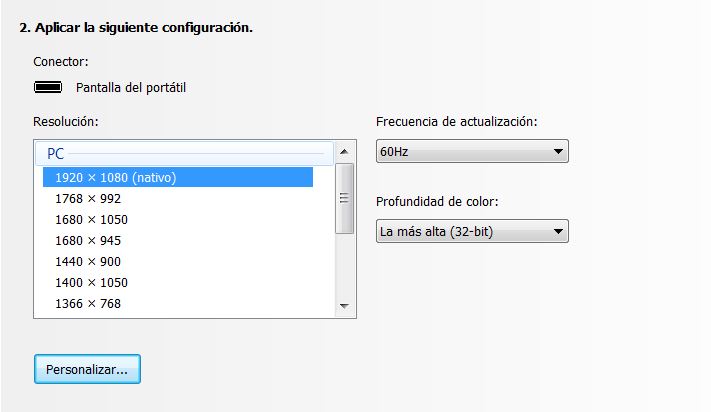
Went to control panel, on default options:
Attached Files:
-
-
Thanks for the lead! Indeed, no BSOD and the refresh rate is @ 60. Wicked!
-
NEW NVIDIA GeForce 296.10 Windows 7 x64 Display Drivers
For Sony Vaio AW (FZ, AR, and CW) use this drivers
NVIDIA GeForce 296.10 Windows 7 x64 Display Drivers
this driver not have blue screen ( BSOD ) -
Your link is broken. I can´t stress enough how good these drivers are and the good work that Coolguy does with his modded INF´S. We all benefit from updated drivers!
-
I fixed link
-
Hello,
I've had my Sony AW220J for about 2 years now. This morning the screen dimmed for a few seconds and went completely black. I could still actually see the menus if I shined some light on the screen and I even connected the laptop to an external monitor and it displays fine. I've rebooted many times to see if the screen would come back to normal but still no luck.
Now on to my questions. Should I be looking to get the lcd screen replaced? If so, what screen do I need. CCFL or LED? Or could the inverter be bad? Any good places to purchase a replacement screen from?
Display specs on my laptop are:
18.4-inch LCD with XBRITE-Full HD (1920x1080)
Any help would be appreciated. Thanks! -
My screen went out about a month ago. I have the upgraded LED screen. I searched the internet for a replacement and I must say that it was quite confusing. Plus, I was not 100% sure the screen needed replacing. I gave in and sent the laptop to Sony for repair. The screen did need to be replaced and they charged $625. I suspect you can find the part for $400, but it was not worth taking a chance to save a couple hundred bucks.
-
Hi there,
I have a AW21S/B I want to upgrade it by upping the mem from 4GB to 8GB, now the official specs say that 4GB is the max but on the Intel site the motherboard specs say that its max is 8GB any one done this or it it a no go!
Thanks Dave. -
My screen went out when in warranty thank God. I have the LED screen. I learned NEVER LET DIRECT SUNLIGHT SHINE ON YOUR SCREEN!! It freaks out the display with hues of different colors and then it dims real low. My screen went permanent like this. My new screen will do the same thing if direct sunlight hits it. I have no idea why???
-
Hi.
Sorry for my poor english.
A must replace my bd drive in Vaio AW11Z/B (uj230as doesn't write anything) - can you tell my how? Do you have any instruction? (For example How to replace keybord).
I will be thankful for any sugestion.
Thanks. -
This may help you. This is the service manual with complete parts list and blowups.
VGN-AW1 Series Service Manual #985239403
-
Thank you for this instruction.
I'am a real amateur and I'am not sure about one thing: do I have to remove the bottom cover to get acces to odd? -
Yes you do. Don't forget the screws in the two HDD bays. Need to take the hdd out first.
-
Hey All!
Just wondering I have the Sony Vaio VGN-AW11S now I have the 64 bit of windows 7 installed can I upgrade my memory to 6 or 8gb with 2 x 4gb dimms?
If so what would I need to order and best value?
Cheers
Paul -
Does anyone now if some one still sells the original 18.4" RGB LED screen of the Sony VAIO VGN-AW21XY/Q? Not those "compatible with" screens. I've heard say it was discontinued.
-
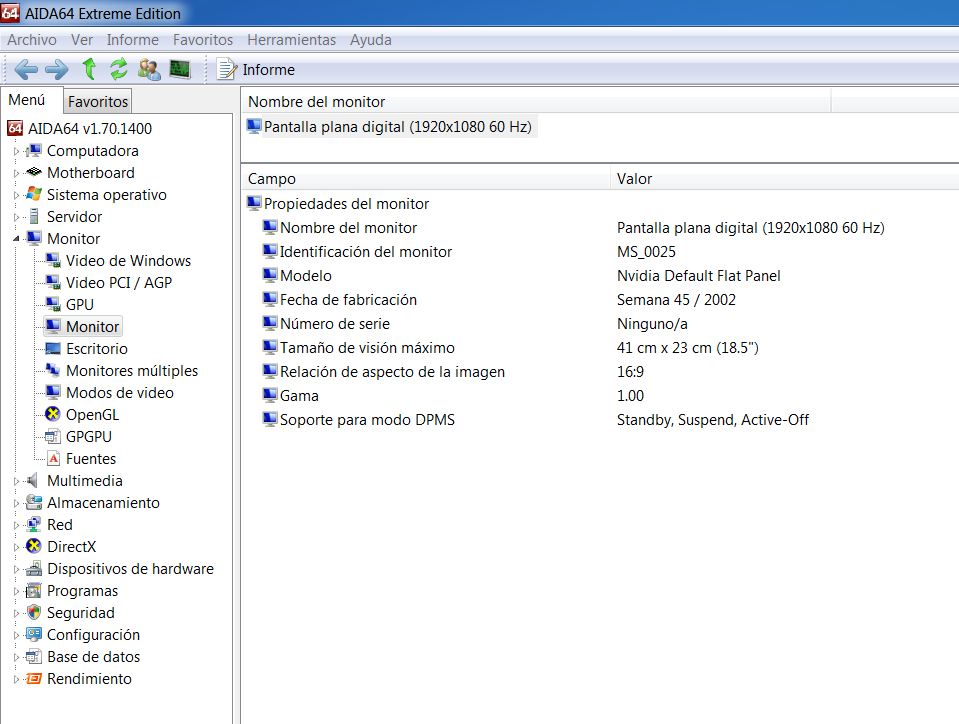
Hi mate can you please check what type and model is your LCD display panel on your laptop ?
You can use soft called AIDA 64 and under display and then under monitor section you will see all details like here in my case .. (see pic)
Thank you very much !
![[IMG]](images/storyImages/aidar.jpg)
-
Here you go. I installed aida64 also so that you get the same information format. It´s in spanish but I´m sure you´ll understand.
Attached Files:
-
-
By any chance, do you know if Sony still sells replacement screens for your laptop?
-
Well since my screen has never failed I cant really answer that question but I can tell you that they do have to have replacement screens but they certainly wont come cheap.
-
Could you translate it to English please? or just change language on that soft
thnx
I found one website they selling it for £270 ? or more?
http://www.screentekinc.com/sony__Vaio_VGN__VGN-AW_Series-series-laptops-lcd-screens.shtml -
Where is the £270 one? I'm only seeing $167 screens and for that price they are surely Chi Mei.
I think I'll check with my local Sony dealer if they still sell replacement screens for the AW series. If they still have the LTN184HT02, I'm ready to pay for it. -
I forgot the website I ll keep looking.
here is one but u need to call them ..
Sony Vaio VGN VGN-AW Series Laptop Screens
http://www.screentekinc.com/sony__Vaio_VGN__VGN-AW_Series-series-laptops-lcd-screens.shtml -
AAAAh I ve got it there says it is LED that bottom one $279.99 USD
Sony VAIO VGN-AW11XU/Q replacement Laptop LCD Screen from $114.99 Brand-new screens (never used). -
Out of stock...

-
I have emailed them ..
-
Hi All.
It's some time since I posted but I'm still here and still loving my Vaio AW11XU/Q (UK/European model). For north American owners, this might be similar to the AW290 or something like that.
I have the still truly amazing 18.4”LED X-black matt finish 1920x1080 screen, 2.8GHz speed, GeForce 9600MGT graphics card, 4GB RAM, 128MB SSD, 500MB second drive, all the card readers, Blu-ray writer, TV with recorder, etc etc.
I bought it new in June 2009 from PC World (Abbeycentre), paid £2299.99 (reduced from £2446.74). All, including power adaptor is original and still operating on Vista Home Ultimate.
Apart from the minor issues, I have had no failures or faults. I have had fantastic use from this laptop, minimum 3 to 4 hours a day solid for almost three years (that’s in the order of 3,500 hours!) Yes, I have the leather palm rest slightly uneven, paint chipping a little off front lip of lid (separate piece to main lid) but no operational problems whatsoever.
I have every single item of original software still on board with many other programs added. Laptop is still ultra fast. I have used a lot of the photographic on board software but I am still discovering software I did not know was there, wow!
Well done Sony, you get what you pay for. This is perhaps the best piece of technology I have ever bought. Boy have I gotten my £2299 value from it. I should also say that there is not a single mark or sign of wear on the machine because I treat it like it is my child - always ultra careful not to score or mark it.
I have not opened up the laptop or messed with things I shouldn't have. I have however moved it from shelf to desk, or sofa in living room and back to desk every day which proves that movement does not constitute a problem.
I do always use laptop on a flat even surface, and if using it on my knee, sofa or bed, I place it on a contraption that I made for the purpose to ensure unobstructed airflow underneath. This consists of a large plain rectangle of glass (from a glass chopping board) with a lip on the front edge to stop laptop sliding off. If on my knee, I set the whole thing on a cushion for comfort. Laptop cooler is totally unnecessary if you provide unobstructed airflow underneath.
Also, to save the screen backlight, I use a low brightness setting. When using the laptop indoors at night time, I always use the lowest brightness setting (on the scale of 1 to 8). If the room is bright during daylight, I would use 5 or 6 out of 8. I only use the max brightness setting if there is direct sunlight into the room and the extra brightness is really called for.
With very few moving parts inside, fan runs at very low power in normal use. This means that airflow through the laptop is quite low, hence dust ingestion is not a problem. Looking inside through vents, I cannot see any dust at all, everything is still shiny as new.
I have read about lots of people here experiencing high temperature problems. I have NOT had this problem. Laptop still runs at the same temperature that it did on the day I first purchased it. Temperature only runs hotter if working with high level graphics or video editing.
I took out PC World’s insurance at £13 a month at time of purchase which I have never needed (yet) and guess I had better just let it run.
I absolutely love my machine. I use it for digital photography, video, administration (personal & work), banking/share dealing, flight tracking, flight simulator, music, language study, internet browsing, email, ebay, just about all aspects of my life.
My worry now is how long will it continue to serve me? When will I need to replace it, and what will I replace it with? It is alarming that Sony didn’t develop this laptop further, probably because too many people (some of them on here) gave them too much trouble by returning laptops and complaining about next to nothing, like chipping paint, bubbling leather palm rests etc. he he
I believe that this actual model was perhaps the best laptop ever made with nothing equivalent available today. I bought it as a desktop replacement, and boy has it delivered exactly that!
I saw another AW11XU/Q for sale on Ebay a few months ago with everything original for around £800 if I recall correctly. I just did not have the cash sitting around but the next time I find an original in as good condition as mine, I might just buy it to have a backup.
My life will just not be quite the same if I no longer have my AW11XU/Q! I don’t know what I will buy next, I just hope it lasts another few years. -
Yes, that was truly a gem. It's such a shame Sony discontinued it. I guess desktop replacements are a niche market that manufacturers believe is not worth the investment. Besides, not a lot of people are ready to spend £2299 on a laptop, especially nowadays.
Clevo has discontinued the P180HM, the Asus NX90 will hardly be missed and, AFAIK, the only 18.4" laptop currently in production is the Alieware M18x. I too dread the day when I will have to replace my 18.4". I will be a sad day indeed. -
I still have my AW190JAH I got from Newegg. I maxed it out with 8GB of RAM and Win 7 Ultimate. It still has the same 250GB hard drive. That 1080P screen is so gorgeous and Blu-ray movies and photos look fantastic. It's a beauty of a machine so I am really trying to fight that upgrade itch. I keep thinking of wanting to buy the 16.4 inch F Series VPCF233FX/B. If I did that then I would sell the AW but maybe I would regret it after. Any opinions from you AW owners ?
-
Out of curiosity, what was the last 18.4" AW series model produced?
-
I never saw anything beyond the AW390 which was around Sept. 2009.
-
One day I'll have to buy a backup pc, since my backup Acer is dying. However, Sony AWs with that RGB LED matte screen are hard to come by and expensive. However, if I could find one of those I might bite the bullet. I love to sit in bed and watch movies and the AW seems perfect for that.
-
why would you buy it?
buy just screen and buy proper new laptop -
Ah, my friend, the screen is THE big question! I'm starting to doubt that there are any decent 18.4" LED screens still in production. Chit Mei is all it seems to be available. Why, oh, why did Sony discontinue the AW series?
-
they did long time ago 2010 i think
i said before .. it was too expensive for sony and not many people purchased them ..
you wouldn't believe how many of 'em staied in warehouses or shelfs etc... -
---------------
-
RE: Sony VAIO VGN-AW160 Screen Dead - Fixed it!
I posted a few mos ago that my AW160's RGB-LED display had cycled thru reg, green, blue, flickered a few times, dimmed, then went jet black. It remained that way for 2 whole mos during which time I invested in a 23" Samsung HDTV/Monitor (works great). After 2 mos however, my VIAO's screen suddenly came back on, as if nothing bad had ever happened, whew - was I thrilled!
The same black-out occurred again recently, only this time I tried something different...
I figure most ppl already know how to discharge built-up static electricity but will include it here just in case:
Unplug unit, remove battery, hold down power button 30-60 secs, replace battery, reconnect power supply. Done.
What I didn't know mos ago when this 1st happened (heartbreaking!) was that sometimes up to 3 discharges are required to fix a hardware issue. This last time my screen came on immediately afterward---plus (hehe) I did shake the unit while still unplugged & upside-down, just in case some connection (i.e. the ribbon) had come loose). Whichever... it worked again, still working. Happy happy! -
Upgrading nVidia gfx drivers for Win Vista x64 on AW160J/Q:
I'm sure this is mentioned in this thread many moons ago but I can't find it (probably from laptopvideo2go where I just spent too much time & got lost) --- where is a safe source to download the latest nVidia gfx drivers (9500 model)? I will be eternally grateful for the help! -
Question on my AW battery. The orange battery light is on (not blinking) for several days now, which I think means it is charging. However, the charge indicator says it is at 100% and the power mgmt. says the battery is good (3 of 4 stars). Today it now says 99% charge. The AC power cord is still plugged in so I'm thinking the battery is near end-of-life. Does this sound correct?
-
Hello Guys
Can someone provide me service manual of Vaio AW ?
Thnx -
Hi!
If anyone is interested I've modded the .inf file to install the Nvidia 296.10 drivers on the AW11Z/B Windows 7 (64-bit).
Phys X, HDMI Audio Out & Control Panel all tested & working as expected.
Download the file and copy in to the following path if you chose the default path:
C:\NVIDIA\DisplayDriver\296.10\WinVista_Win7_64\International\Display.Driver\
nvac.inf -
hello all!
read the last 70 pages, but didn't find the exact answer. somebody tried to install the Intel Core 2 Quad Q9000 or Q9100 cpu in aw-series? -
anybody knows if the aw41jf model comes with one or two ccfl?
-
Hi. If its lower resolution one (which seems to be the case - 1680x945) it will be 1 ccfl. I believe Sony didnt release 2 ccfl for lower resolution screens. Which is a shame as some ppl would prefer that. I got two AR series laptops home as well and they came with 1 and 2 ccfl for lower resolutions.
Dan
Official Sony VAIO AW Series 18.4" Owners thread
Discussion in 'VAIO / Sony Owners' Lounge Forum' started by Phil, Sep 9, 2008.