Problems? See this thread at archive.org.
My problem is that you asked about why we are running HD Tune while there is a ton a fresh & recent posts just above your question with a ton of screen captures by 4 F users on that subject with explanations like this one: Re: VAIO_F Slow HDD - HD Tune Benchmarks & Safe Mode..
It's not our fault if your English is not good enough to understand the posts & replies to your multiple questions.
While I would like to be able to gather tips & info from the Italian & German F owners forums, I don't speak those 2 languages good enough to frequent them and don't post questions in them either.
The best way I found for learning languages besides talking with people is to search for a translation every time there is something I don't understand. Now trying to learn a language in a technical forum about a computer, well that's quite a challenge!
You could also search the wealth of posts in this thread and the previous ones instead of posting automatically any question that crosses your mind. Look at the search tool top right of this page:
![[IMG]](images/storyImages/Search_MelodyMaster_Ani.gif)
-
Hello everyone,
What's the latest driver for GT330 197.44 (that I found here: http://forum.notebookreview.com/son...ate-197-16-gt-330m-10de-0a29.html#post6092381
or 258.96 on nvidia's website?
Thanks in advance -
Hmmm. Seems the same. I may test it out some more, but it isn't bothering me enough to expend any time and effort on it, tbh.
I do seem to remember it being ~100Mb/s before the encryption mind (I remember benching before / after and it being slower), so my curve may well be due to that, and in fact be a coincidence. -
Uninstalled as you proposed and saw that the drives are in UDMA Mode 6 which is 133 MB/s (SATA1 is 150 MB/s and SATA2 is 300 MB/s). I get the same result as before.

Tried to activate ACHI in Registry again, but no change. ACHI is a faster mode for SATA disks. The Bios should have AHCI activated because no IDE-devices is used. Past Vaio laptops did not have AHCI activated and should have been slower (no evidence found ).
http://forum.notebookreview.com/son...a-rosa-platform-phoenix-bios-vaio-laptop.html
EDIT: Shell see what is loaded in SAFE MODE
![[IMG]](images/storyImages/HDTune_Benchmark_ST9500420AS.png)
-
70.7MB/sec isn't that bad for a 5400rpm laptop drive. Check this out:
http://www.tomshardware.com/charts/...s/h2benchw-3.12-Avg-Read-Throughput,1110.html
http://www.tomshardware.com/charts/.../h2benchw-3.12-Avg-Write-Throughput,1113.html
The 5400.6 which most of us with the VPCF115FM have is listed on there at 63.80mb/sec average write. I've done some network transfers (with the drive itself in another machine) and those were easily averaging in the 60MB/sec range (with the bottleneck being the machine I was transferring from lol).
I can't say much about doing a network transfer to the machine itself since the rest of my machines run OS X, and SMB network transfers move fairly slowly between OS X and Windows
230MB/sec?! Peak maybe?! Damn.
Also:
http://forum.notebookreview.com/har...-5400-6-500gb-hard-drive-hd-tune-results.html
Addressing the screen flicker:
A very subtle flicker is normal when you're not at full brightness, from the backlight. Of course, these nice inverters use PWMs and at lower brightness, a PWM would simply cause the CCFL bulb to pulsate.
(PWM == Pulse Width Modulation - in essence pulses of electricity are sent [your backlight is turning on and off REALLY fast])
I found this on google, it explains what I'm talking about:
http://stekinc.thomasnet.com/Asset/ccflcontrol.pdf
(it also notes about "singing" inverters.. humming ones that is).
If you think CCFL flicker is bad with a PWM inverter, you should see LED flicker with those RGBLED backlights. Nothing like having a hundred plus LEDs flashing in your face!
Since at full brightness, the inverter isn't using PWM and instead supplying full brightness, you shouldn't see a flicker or hear a hum from the inverter. If you're having either symptom at full brightness you might want to call Sony because something's up with the inverter or the backlight.
The bright side to the Vaio F screen is since it doesn't get that bright, you should be ok using it at full brightness.
One more totally random thought: When you buy christmas lights, you may notice that LED christmas lights flicker as well. That's not a PWM, rather the lights are connected so that the LEDs ride one half of the sine wave and flash at 60hz. XD -
We have the 7,2k drives and it is slower then it should be by 30 MB/s.
-
We're on the 7200.4 ST9500420AS, which should be around 80MB/s according to that benchmark page. The only way we've been able to get up to 80MB/s is in safe mode. Otherwise, were in the low 70's.
Philm94 - understood. I, unfortunately, have way too much free time to obsess over something so trivial.
-
its the 258.96 unless another new driver came out
-
@ philm94: could you also run HD Tune in Safe mode & post a screen capture so I could add them to the Re: VAIO_F Slow HDD - HD Tune Seagate 7200.4 Benchmarks & Safe Mode?
@ lundstrom.emil: I did not play with the ACHI neither did I touched the BIOS nor hack the registry nor installed any third party system tweak programs like CCleaner, Perfect Disk or whatnot. My Seagate 7200.4 produced similar read transfer rates with the OEM OS, clean install with OEM Discs, Safe Mode & also in the ODD bay.
UDMA Mode 6 and SATA Gen 1 are both higher than the max +- 83 MB/s I get with the 7200.4.
You cannot infer that a SSD would not work in Gen 2 mode because you simply did not try it. No F owners to date reported choked SSD's.
My ultimate troubleshooting steps suggestions:
- Create a full system image to an external drive, which is good practice anyway to preserve your customized OS, added software & personal data, with Control Panel\All Control Panel Items\Backup and Restore > Windows Backup.
- Restore F to OEM factory state with Vaio_Care > Recovery & Restore or your user created OEM recovery discs.
- Before installing or updating anything: run the most recent HD Tune Pro trial & other HDD benchmark utilities.
*****
I also ran Everest & got similar results as you guys. Which begs the question: what if it's a HD Tune in conjunction with your system reporting quirk?
Note than you can run it several times like I did & it conveniently shows in the same table where you can see normal variations:
![[IMG]](images/storyImages/Everest_Disk_Benchmark_Read_Test_Suite_Seagate.jpg)
![[IMG]](images/storyImages/Everest_Disk_Benchmark_Read_Test_Suite_Seagate_anseio.jpg)
![[IMG]](images/storyImages/Everest_Disk_Benchmark_Read_Test_Suite_Seagate_lundstrom_emil.jpg)
-
Ah yes, just what I was looking for at Newegg.com
Newegg.com - Kellogg's Pop Tarts, Brown Sugar, 6 per box
Might even experience a performance boost. -
I've got too much free time on my hands, have a freshly installed system and freshly created backup images. I'll do the full OEM install on my c: partition and then run HD Tune.
Will then restore from my image. -
Intel® Core Quad i7-720QM processor (1.60GHz)
Forgive my ignorance but is that good? How come it's only 1.60GHz? How much better is the following processor?
Intel® Core Quad i7-720QM processor (1.60GHz) with Turbo Boost up to 2.80GH -
That's correct. I ran Everest on both 7200.4 & the F115FM's OEM Samsung HM500JI 5400 rpm. You can see the that the 5400 is slower:
![[IMG]](images/storyImages/Everest_Disk_Benchmark_Read_Test_Suite_Seagate_Samsung.jpg)
HD Tune also confirmed that but was is really strange is that my slow Samsung 5400 rpm gets similar speed while in the ODD bay than you guys with the fast Seagate 7200.4 as the main system drive! Schadenfreude. :wink:
![[IMG]](images/storyImages/HD_Tune_Seagate_C_2010-07-31-02.jpg)
![[IMG]](images/storyImages/HDD_ODD_Bay_Samsung_500GB_HD_Tune.jpg)
![[IMG]](images/storyImages/HD_Tune_Seagate_2010-07-31-03_lundstrom_emil.jpg)
![[IMG]](images/storyImages/HDD_ODD_Bay_WD_400GB_Teaser.jpg)
*****
"...understood. I, unfortunately, have way too much free time to obsess over something so trivial" - Nah, it's fun to troubleshoot! Besides read/write speed is not trivial as it affects the overall experience hence all the guys with SSD's pushing us to spend our money (if any).
***** -
The reviews are fun to read.
Do you think that using those instead of the stock HDD would improve my specs? Hold on, let me get out HD Tune.
On unrelated (but more on-topic) note, is the 310m only capable of 1600x900, or would I be able to get a 1080 screen and run in 1080 with my 310m?
EDIT: According to http://www.nvidia.com/object/product_geforce_310m_us.html, the max display size is 2560x1600, so theoretically it is possible. Has anyone tried it? I've seen some posts about upgrading to the better screen with a 330m, but nothing with the 310. -
*looks at the tests* That's very weird, but I'm not surprised about your Samsung being faster than the Seagate 5400.6. I had a Samsung 500gb in my previous laptop and it SEEMED faster.
Kinda weird about the 7200rpm drives throttling down though! -
But i can't understand how a damned HD Benchmark will solve the problem!!
-
It's a benchmark utility, it's function is to show how your HDD is doing.
It's not a tweaking utility which is used to try to modify performance by modifying parameters.
Use the Google & search for: HD Tune to find tons of web pages explaining it's use. I'll bet they are some written in Greek.
-
About AHCI, I try to find out possible solutions and problems, nothing more. If you havn't played with that then ACHI is out of the questions.
Bote UDMA Mode 6 and Sata Gen is higher Yes, but different optimizations and those speeds corresponds to it ones technology. A drive can have different advantages and disadvantages over these two kind of communications protocols. I do understand you.
I have never sad that SSD would not work, I can not take the risk either because things don't add up. Do you have some benches from F owners with SSD:s.
The peformance is the same in Everest in All modes . Can I reach Nirvana?
![[IMG]](images/storyImages/Bench_roundup.jpg)
-
Check i7-720QM review benchmarks and also Intel's Intel® Core i7 Mobile Processor page.
I suggest reading a little bit about Turbo Boost:
Intel Turbo Boost Technology frequently asked questions
i7-720QM, 740QM, 820QM vs 840QM Specs Side-by-Side on Intel's site.
![[IMG]](images/storyImages/i7_CPU_Specs.jpg)
Intel Core i7-720QM Processor product page:"Max Turbo Frequency 2.8 GHz ...refers to the maximum single-core frequency that can be achieved with Intel Turbo Boost Technology..."
i7-720QM:
Max Turbo Boost Frequency
4 Core: 1.73 GHz
3 Core: 1.73 GHz
2 Core: 2.40 GHz
1 Core: 2.80 GHz
Core Frequency: 1.60 GHz with DDR3-1333
LFM* Frequency: 0.933 GHz (same as 933 mHz)
Shared L3 Cache: 6MB
*LFM: Lowest Frequency Mode: the power saving CPU clocking mode used by the Vaio_VPCF11 when running on
battery which has a power output too low (54W) to be able to feed an F working @ full speed which needs up to 100W + 10% according to_Sony's power requirement specs. That's why the VAIO_VPCF11 and_F12 comes with a 120W A/C power adapter. Lowest Frequency Mode is also used @ iddle even when the F is plugged to save energy & reduce heat. Note that since it has 4 cores: 0.933 GHz x 4 core.
This is for the i7-920XM but just to illustrate the concept:
![[IMG]](images/storyImages/i7-920XM_hothardware_com.jpg)
*****
Pros of a quad i7 in a notebook:
- fast, powerful
Cons:
- consumes more energy so runs hotter compared to i5 or i3 (45W TDP vs. 35W) so it requires more fan work and consequently makes for a noisier laptop
- much shorter battery life
If one does not really need the computing power of an i7 quad for it's every day tasks nor uses multi-threaded apps then one may be better served with a lesser CPU.
Why buy a muscle car to commute to work?
-
To all of you on this site, I MUST apologize!
A few hours ago I asked what the deal was with a poster complaining about not having SATA II. Then I read another poster say that his F didn't have a "jumper" needed for SATA II.
What??
I made a major mistake by not asking WHY the poster thought that the F was working in SATA I mode. Now I see...the poster is running a low power 2.5" laptop HDD and expecting 300MB/second???
OK, to answer the question...YES!!!!! There are very fast 3.5" desktop enterprize HDDs that are capable of very close to 150MB/second in real world use. NONE are capable of anything faster than SATA I. Hard drives have gotten faster over the last year, but even the best 2.5" laptop hard drives will not come close to the SATA I max thoroughput of 150MB/second.
If you want to know if your F has SATA II, by all means feel free to install a Sandforce based SSD and see how far above the 150MB/second limit you can get. With my old school Indillinx based SSD, my HD Tune chart shows 140-156MB/second thoroughput, which is slightly better (on the high end) than SATA I is capable of. However, that is simply the HD Tune benchmark. I can use larger, continuous files and my reads will fly over 240MB/second and if I set the benchmark to use a larger file I can raise my sustained read speeds to AVERAGE 218MB/second.
Everything is relative when benchmarking. We can compare apples to apples when using these benchmarks if all parameters are the same, but trust me...SSDs are the ONLY way to get anywhere near the limits of SATA I (and exceed it).
Just as an illustration...
If I run a R/W benchmark using 4KB data strings, my speed is about 5MB/second for writes and 10MB/second for reads. People can look at that and say "WHOA! THAT is SLOW!!!" However...think about it this way...
My SSD has a .1 millisecond seek time. If it reads 10MB/second and the file is 4KB, that means that I am reading the file in .4 ms. Therefore, to seek and read the 4KB file takes .5 ms. On the other hand, average seek time for a decent laptop HDD is about 12ms, and there is an additional "latency" of 3-4ms while the hard drive spins up, and then another 2ms or so to read the small file. In the time it takes a laptop hard drive to start, find and read this small file, my somewhat slow SSD could do it 35-40 times!
As files get larger and more sequential, my SSD read speed increases to as high as 250MB/second, much faster than any laptop hard drive (at least laptop hard drives that are of standard form factor). My average large file read speeds are around 218MB/second, which is about twice as fast as the fastest laptop hard drives, but again, latency and seek times mean that my SSD is done in about 1/3 the time of a very fast laptop hard drive.
Also, when talking hard drives...rotational speed means less than it used to. Yes, 7200 rpm disks may be a touch quicker than 5400 rpm drives, but not 50% faster as you would expect. Good 5400 RPM drives can be as much as 90% as quick as 7200 rpm drives and they use less power and create less heat.
Finally, REALLY fast 10K rpm enterprise class laptop hard drives have faster seek times, but also use very large amounts of power, even at idle. This generates a lot of heat. I am not even sure any of them will fit into a standard 2.5" HDD bay. Most of them are the oversized (thicker) drives, which are (I believe) 2mm thicker than standard drives. -
Yuck! :confused2: Those HD Tune curves are really ugly & choppy.
You illustrate my point above: why fine in Everest > Read Test Suite & bad in HD Tune?
AGAIN: run the most recent HD Tune Pro 4.50 trial & other HDD benchmark utilities. -
To illustrate my last post, here is a new article that I JUST found:
Enterprise Storage: Two 2.5" 600 GB Hard Drives Tested : 2.5? Enterprise Hard Drives
Check out the speeds for 15K RPM enterprise drives and 10K enterprise drives. On the benchmarks page, the two fastest 2.5" 7200 RPM drives are shown to have max thoroughputs of around 100MB/second and average thouroughputs around 75MB/second.
Ths speeds of your hard drives are really quite good for a consumer class 2.5" 7200 RPM spinning platter drive. -
Yep, I think this is one subject most of us can agree on.
If you really want a kick in the pants with boot times you'd best go for an SSD. Windows 7 is just a meaty mofo when it comes to booting up, and takes its sweet old time to do so.
It's not the machine, OS X boots up on the very same Vaio F (and I have the 5400rpm drive) in a little bit less than 30 seconds for me (somewhere around 27).
Really though, if you don't want to worry about boot time, do what I do: When I'm not using my computer, it sleeps. WARNING! Be sure to dig through the power settings and DISABLE HIBERNATE AFTER XX MINUTES. With auto hibernate enabled the computer will wake up from sleep and hibernate.
That's a very dangerous situation when your computer is in your backpack or in a hot car trunk or something. Sleeping for 12 hours will eat up about 10-15% of the battery, which isn't really that big a deal because powering up the computer from off will likely eat a good 8-9% of the battery as well >>
Sleeping it with the lid closed is really quite safe though, so long as you have auto hibernate off, your computer will probably sleep and wake just fine.
-
or ... you could be very happy with a defective unit (mine had one stuck red pixel) and then have them send you a brand new replacement with a free ram upgrade and 10% off.
-
I thought about your post & you mentioned a previous bad experience with Sony_support so... maybe they pulled your file (or you mentioned it) when you called about the red pixel on your new_F12 & they said ho-ho, we must do something for this guy as it's the second time he has problems?
I don't think anybody else should expect or feel entitled to the bonus you got for one measly stuck pixel out of the 2,073,600 pixels found in a 1080p display. Just a plain unit replacement would have been fine customer support IMO. You got lucky with the royal treatment.
***** -
That, to install the bloatware, it takes more than twice the time as the actual recovery process. Ugh!
I've got captures of task manager, HD Tune (unimpressive), will get winbootinfo as well. -
i must agree. my experience was out of the ordinary. i was pretty surprised they did it ... although i was on the phone for 2.5 hours getting it done.
-
I just picked up a leftover F115 and put an OCZ Vertex 2 SSD in it. For what it's worth, I'm seeing the same kind of performance reduction in HD Tune compared to safe mode. I'll try to post some screenshots tomorrow. For now, here are some read benchmarks stats I'm getting with the default 64k block size in HD Tune 2.55:
Normal Mode:
Min 97.3 MB/s
Max: 144.5 MB/s
Average: 127.5 MB/s
Access time: 0.2 ms
Burst rate: 101.8 MB/s
Safe Mode:
Min 131.9 MB/s
Max: 205.0 MB/s
Average: 185.9 MB/s
Access time: 0.1 ms
Burst rate: 140.8 MB/s
Interestingly, if I run the benchmarks with a 1MB block size, the difference between normal mode and safe mode is much smaller and I get rates near 250 MB/s. That suggests to me that my F is SATA-2 capable in normal mode, and there is something else in the OS or driver restricting performance at smaller block sizes.
I'm running an out of the box OS install (installed onto the SSD from recovery DVDs).
I also have a VAIO Y which I'm super happy with - it's what swayed me to get another VAIO for a desktop replacement. I'll try the SSD in that and see if it's similarly affected. -
"... I get rates near 250 MB/s. That suggests to me that my F is SATA-2 capable in normal mode" - "Suggest" is an understatement IMO.
Dunno much about SSD's except the current prices but I don't think that HD Tune is the best tool to benchmark them.
-
I wonder if it has to do with the intel disk management stuff.
-
Did anyone read my prior post???
Even the very best SSDs are only capable of 55-65MB/second reads with small files. The larger the file, the faster they read. Thus, now they are beginning to post I/O ops per second also. If you think that an SSD like mine, which reads 4KB files at about 10MB/second is slow, average HDDs read 4MB files at under 1 MB/second.
I stated earlier that the larger the file size, the faster they read and write. This is why SSD (and HDD) manufacturers post read and write speeds of "UP TO (X) MB/second". You are seeing just that. At 64KB files, my read speeds are about 100-105MB/second. Yours should be faster. By the time I get to a256KB block size, my reads are very close to 200MB/second and at 1MB blocks I get to 218MB/second with peak read speeds of about 240MB/second (give or take 5-8MB/second depending on how clean my SSD is at the time).
This is NOT the AHCI driver, it is how hard drives work, including SSDs. They are more efficient at reading larger, sequential files than they are at small files. Worse yet are files that are non-sequential (random file read).
Just for giggles, plug in a 4KB block size and see what kind of speeds you get. Also, remember that the Vertex 2 is the newest Sandforce controlled SSD and is VERY fast at small reads and writes when compared to older SSDs, and will completely destroy any HDD at small block reads. -
A really good article regarding SSD
SSD Benchmark Tests: SATA IDE vs AHCI Mode | AHCI vs IDE,SSD,AHCI,IDE,SATA,Solid State Drive,Benchmark Performance SSD Testing AHCI vs IDE,Benchmark Performance SSD Testing: Intel ICH10 SATA AHCI vs IDE Mode Speed and IOPS Comparison
a program to test your ssd
Alex Intelligent Software - Downloads: AS SSD Benchmark
You need to have this driver loaded for AHCI
A program to know if MSAHCI.SYS is loaded
DriverView (64-bit) - Free Software Downloads - ZDNet Australia
how to enable AHCI in the registry
Error message when you start a Windows 7 or Windows Vista-based computer after you change the SATA mode of the boot drive: "STOP 0x0000007B INACCESSABLE_BOOT_DEVICE"
Still, I am not sure that my WDC 128GB SSD is performing like it should be. -
I did!
So, can I get some rep for that?
BTW 64kb is the default file size in HD Tune which we 7200.4 tester have been using so far. -
I know 64KB is the default size. Three months ago I went through tis same problem with HD Tune. Then I figured it out. There is nothing wrong with these results. This is the nature of the beast!
Techware Labs tests a lot of hard drives and they use HD Tune Pro. Look at their results at 64KB. They use the HD Tune app that shows different R/W speeds based on file block size. You can see how much lower 64KB is than larger block speeds.
I'd give you rep Joe, but we have been giving it back and forth so much that they told me I could not give you any more! -
Sony Keyboard Skin f/ Sony VAIO E Series Notebook VGPKBV3/B -
1 more time.. This was already answered but will this fit if i cut the number pad out? and just move it so there is enough room? i really want some sort of keyboard skin and this is all i can find.
do you think it will fit if i cut it?.. because i dont know the exact length between each key on this keyboard -
I think you missed the point: we are 4 users with the same drive in our F & I kick their butts both in normal & safe mode (except anseio's): Vaio_F Series Monitor Calibration and Users Created Profiles Roundup.
80-83 MB/s Average Read speed is excellent for that drive for 64kb files in HD Tune. I'm not the one complainin' and we did not find why such a difference for similar systems & identical drives yet.... -
I'm kinda surprised you need to cut the numpad. Try a skin for the E series 17"?
It's gonna look like if you cut it. Besides, a new keyboard is only about $30 shipped, prolly less than the cost of those silicon thingies. -
Er well I dont want a new keyboard i just want to avoid any hairs or something getting in the keys also in case i may spill something on my keyboard..
anyway the one i posted suposedly the numpad closer on that one compared to the f11 im not sure a e series 17 would work.. -
Chat conversation with sony support !!
------------------------------------------------------------------------
Problem: i am having problem with my m-audio sound card which is conflicting with my wireless card.
analyst Whitney_ has entered room
Whitney_> Hi Bigyan. Welcome to Sony Online Support. I'm Whitney. Please allow me a moment to review your concern.
Bigyan > hello whitney
Whitney_> Thanks for waiting, Bigyan. I'm sorry that the Sound Card is conflicting with the Video Card. Ill be happy to assist you with this.
Whitney_> Please provide some additional details so I may better understand your concern.
Bigyan > i am myself a sound engineer and an electriconics engineer. and my sound card is having high latency problem with the artheros wireless thing.
Bigyan > i am using the maudio sound card with 4pin firewire cable.
Whitney_> Bigyan, I'm sorry that we can not assure the compatibility of third party Hardware with the Computer.
Bigyan > the third party hardware is not a problem ... but i have talked with few of the engineers too. that if sony can update the bios it wont be of any problem. the dropout of the fire wire port is not a third party hardware thing the drop out can be found with any hardwares.
Whitney_> There is a BIOS Update for the Computer Model and it resolves the issue with the thermal managemant issue with the Computer.
Bigyan> In detail, if you use a video camera or a sound card with the firewire port, dropouts are visible, hence the problem is the firewire port isnt giving a reliable connection, even using old sony dv style handy camera can cause dropouts, i think now you are more aware of the problem
Bigyan > I have already updated the thermal update we really would like to thank sony for that. but the fire wire dropout problem is really big problem in the audio and video forums if you have ever checked it out.
Whitney_> I'm sorry, Bigyan. We are not aware of this being an issue.
Bigyan > what do you advice me then
Whitney_> However, I will definitely pass on this feedback to the concerned department.
Bigyan > my friends have installed a pcie firewire card slot in the laptop which too dosent solve the problem
Bigyan > i am really ready to provide all the problem and others who are havin problems in the firewire port
Bigyan > hope sony would contact me in my email as provided.... sooon with some solution. thanks whitney from your support.
------------------------------------------------------------------------ -
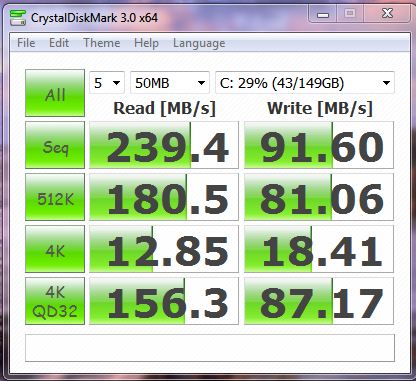
Not sure what this has to do with the price of eggs in China but here's some of my HD results. The one using Crystal used 50 MB files for testing. This is an Intel SSD 160 gig G2
Attached Files:
-
-
Has anyone done a clean install of an EU spec F11 ? I have not as yet . Is it any different to the US spec procedure ?
My EU F11 average month boot time is 1 min 30 secs currently. -
Unsure how to say this, but we are NOT trying to reach 300 MB/s with HDD:s. Our OEM HDD, Seagate Momentus ST9500420AS has a SATA2 communication protocol
that MIGHT boost performance. To use the SATA2, a jumper needs to be removed which it is on our OEM drives, but the OEM drives still uses SATA1 or a slower communication protocol.
We are trying to find out why the OEM Drives is slower (proven by HD Tune, but not by Everest :/) then Joes HDD which is the same drive (but faster) as ours but not a OEM Drive.
-
One of the first clean install guide for the F was made by Ilfuca from Italy. Check post 1, page 1. No, not any different from US. A few drivers may vary but then they are on the discs or on your esupport (wifi card for example).
For an HDD, 1 min 30 secs is not bad, depends on what is loading on start. For example, mine boot's faster w/o Bluetooth but then I like my Bluetooth mouse to be ready when the OS kicks in. Same for iTunes which is bloatware to me but convenient for others, etc, etc.
Download the free Autoruns & check the Logon tab to see what is loading on your system. You can tweak at will there. -
Thanks Joe. I had forgotten about Ilfuca and lost track of things in this saga.
http://forum.notebookreview.com/sony/460685-win-7-fresh-install-guide-vaio-f-series.html#post5903300
I have use VaioCare to defrag the HDD and done the registry cleaner. The one click report is still showing a few problems which I will make a note of and post later- not affecting real world performance that I can see but still bugging me a little.
I will try uninstalling a few programs I added myself which I do not use. I have to date avoided putting iTunes on my f11, still relegated to my desktop. I hope I can keep it that way. Sorry, where do I find the log on tab ? -
In Autoruns for Windows, an msconfig on steroid with the ability to save snapshots & compare them or go back to a previous startup configuration.
Check the clean install link in my sig below for some suggestions of what you can either disable in Logon or uninstall completely.
Some programs want to start with Windows & many of them call the mother ship. Several don't need to be started on boot nor run constantly in the background. For example, my current setting:
![[IMG]](images/storyImages/Autoruns_2010-08-03.jpg)
You can do much more with Autoruns but then you need to know what you are doing. Help file & forums. -
Someone help me fall in love with this machine again. :]
-
Yes, I did, but you seem to be missing the point.
I'm getting 60 MB/s faster speeds in Windows safe mode than I get with the same 64k block size in normal mode. That's the same type of degradation others are seeing with their hard drives. Also, the performance I'm getting in normal mode is slower than other published results for this model SSD using the same block size.
I didn't post my results to highlight the normal, expected difference in SSD performance at different block sizes. I posted to show that the issue others were having is not something unique to the OEM Seagate drive and also to help confirm that it's not a SATA-1 vs. SATA-2 thing.
I'm going to repeat the same tests with my VAIO Y and post the results tonight.
Thanks. I'll run AS SSD in both normal and safe modes and see what I get. Can you run HD Tune and do the same? -
since the models I'm looking at are i7 quad core, is it true what people are saying about the overheating and loud fan? does it heat up more than say, your average laptop? could it withstand being on for 12 hours a day?
-
Quote me any post that says the F overheats? lmao
True it has a loud fan, but the cooling is excellent for an i7 laptop.
Plus, I think when most people use the computer, people get absorbed into the screen without noticing the fan noise.
Unless you like watching benchmarks loop, and concentrating on the fan noise, I don't ever get annoyed by it.
and there are screenshots of after-benchmark temps of the VAIO F, Envy 17/16 i forgot, and MacBookPro.. you'd be surprised, it's posted some where in this thread earlier -
it's mostly from people who are hesitant to buy an i7 laptop. Which F model do you have? I'm currently looking at these two but since the F11 is out of stock I'll probably get the F12. With my specs it comes to $1,250 without tax. What do you think?
CTO | Customize | Sony Canada
CTO | Customize | Sony Canada
i would love to see these screenshots if you can remember when and where they were posted. if the screen truly is superior, there's no overheating problem, and the fan isn't noticeable, then I'd buy it right now.
Official Sony VAIO F Series i5/i7 owners thread *Part 3*
Discussion in 'VAIO / Sony Owners' Lounge Forum' started by eagle17, Jan 7, 2010.