Problems? See this thread at archive.org.
I've looked the two programs over now, and I can say that there is no massive difference, but with absolute certainty "Vaio Care" is no better for a beginner.
They both do the same suite of cleans, except Vaio Care has limited 3rd party app support - some of those can make a lot of mess about the place.
The difference between Vaio care and CCleaner was 104mb / 1,547 files - based on 3rd party tracks / traces mostly.
Now, to the central nexus of your argument "Vaio Care is customized to the F" - I say nay. The F is no different to the C, Z, or my 4 year old Dell. The software environment, Windows 7, is the constant here, not the underlying hardware, which these tools have no access to. Bar some different driver versions CCleaner will see each Win 7 machine as the same job. Vaio Care, if indeed it could run on other hardware, would work just as well.
I'd rather 'trust' a software cleanup tool tested by millions of users, on all imaginable software combinations, than a company like Sony who dump it in as an extra with their hardware.
Not to mention, the support information given with CCleaner is a lot more verbose than Vaio Care offers.
-
Visit your favorite p o r n site?

-
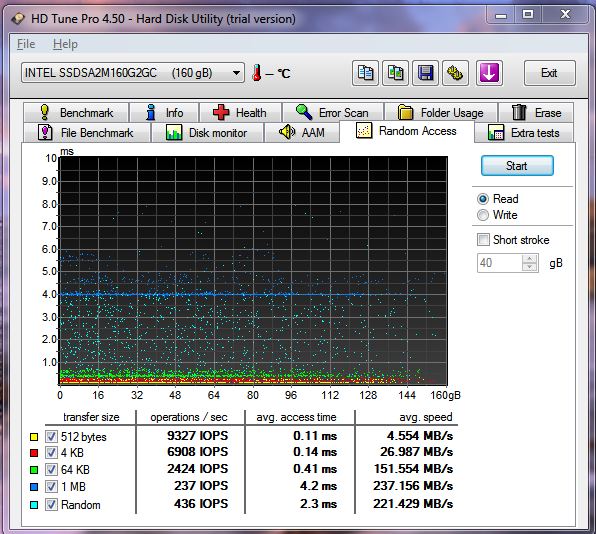
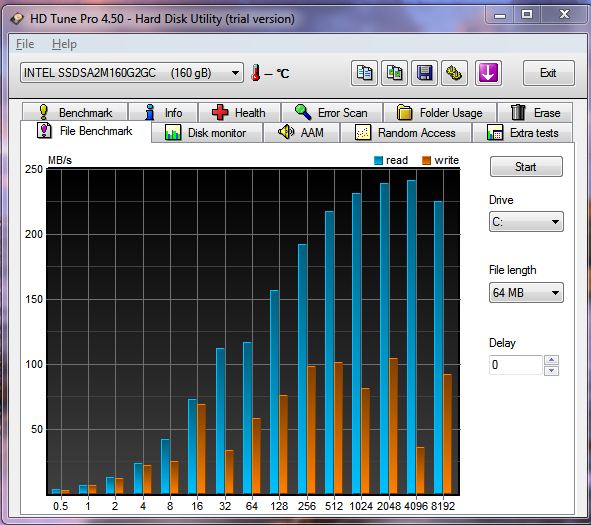
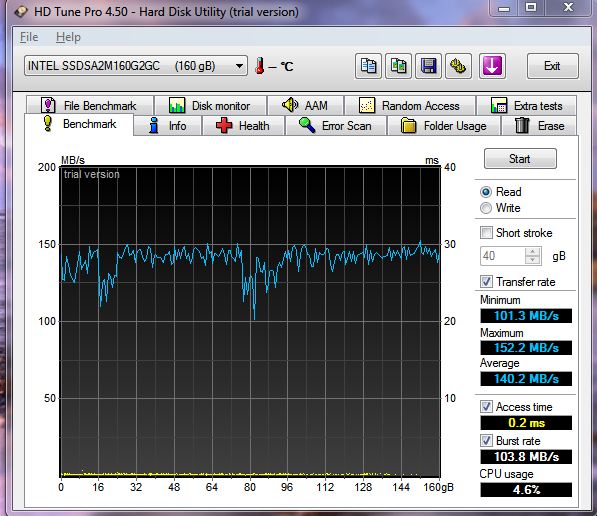
Here' some HD Tune results ( I just downloaded test ver ). I don't have time to figure out how to use it properly so I just ran what was obvious. When I tried to do a write it gave an error (something about disabling partitions I think). My boot time using the Sony Vaoio stuff is 28 sec. Hope this is what you're looking for.
Attached Files:
-
-
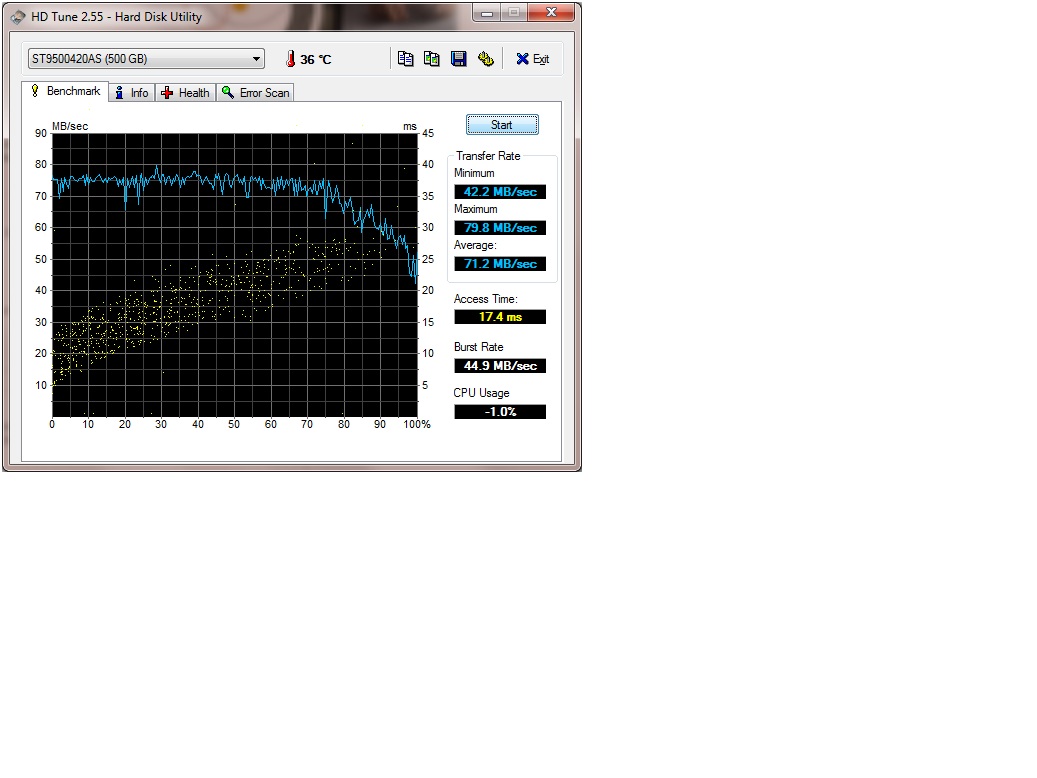
Here are my HDTune Pro Read results for my aftermarket replacement hard drive. Very similar to Joe's. Seagate Momentus 7200RPM 16MB Cache 500GB
![[IMG]](images/storyImages/seagatemomentus500gb720.png)
Not in safe mode. Clean install, but I installed lots of programs. -
I plan on making a purchase by today so if some of you all F series fans could help me that would be great. I'm having trouble deciding between two models, the F11 and the F12. Is the F11 out of date? Should I get the F12? What does the F12 have that the F11 doesn't? Does the F11 have little problems like overheating, annoying high pitch sound etc? I could either get the F12 for $1028.21 or the F11 for $868 (discount included).
F12
CTO | Customize | Sony Canada
F11
CTO | Customize | Sony Canada -
Hi all!
Just wondering if anybody has installed the latest Windows Update KB2286198.
I am having issues with it - it keeps freezing out after 15%. Anybody else having this problem? It also freezes up when I try to uninstall/cancel the update.
(Keep posting up those diagrams and graphs, adds a splash of colour and pizazz to this place!) -
I recently got a Vaio with Win 7 and there's a lot to recommend it. It's so much faster than my old brick. But one thing I have an issue with is the volume controls.
To adjust the volume - which for me means trying to hit the mute late at night when something too loud bangs up - I have to either mouse over to the volume icon and fumble there or hit one of the function keys. There's no outside volume control or even a quick mute button.
Complicating this is the print on the Fn keys. What genius decided to use DARK BLUE print on a black key?! Every time I want to adjust the volume, I need to lean over real close to even see which key to press. And then I have to use 2 buttons!
Dedicated volume control buttons either above the keyboard or the front edge would have solved this. Instead we get play/pause, stop, track previous and track next buttons - which would be great if I used the disk player more often than I use the volume!
Is there a way to reprogram these buttons to something more useful? I'm thinking of reprogramming one of the top right buttons (Assist, S1, Vaio) to Mute. I know at least one of them can be reconfigured though I haven't checked out how to do it.
I'm also considering etching VISIBLE icons above the function keys. Classy solution, I know, but at least I would be able to see them. -
just curious, which model did you buy and for how much?
-
Slightly better processing speeds. I would get the F12 for additional dollars mentioned.
-
Not issues so far with my update.
-
the F12 has better processing speeds? but the F11 has the turbo boost while the F 12 doesn't. Or am I missing something? Remember, for both models I'm going with the basic specs.
-
Hi Fishon,
After some research it seems it may be due to my AV software. For anybody who uses ESET:
ESET Knowledgebase - Microsoft security update (KB2286198) for Windows 7 hangs or causes a BSOD on restart
Will have to go home and try it out tonight and hope it works ok.
-
As far as I can tell, you're looking at the same CPU in both machines -- the i7-720QM. That CPU supports Turbo Boost up to 2.8 GHz. The issue is simply that the SonyStyle CTO page for the F12 doesn't explicitly say "with Turbo Boost" like the page for the F11 does. Even so, both pages list the same processor model number.
I'm not aware of the existence of a i7-720QM CPU that does not have Turbo Boost, so I'm pretty sure you're getting Turbo Boost technology no matter which F model you pick. -
ok thanks. which model would you choose? keep in mind the F11 is offering a $200 discount. is there a big difference between 310M GPU (512MB VRAM) and 330M GPU (1GB VRAM)?
-
Someone has already answered your question about the Turboboost. I've included a few comparisons here. Just go back into the thread and you will see more comparisons of the two. Either way you will be happy.
-
A while back (in part 2 of this thread), Paingiver posted a way to remap the media keys (previous track/next track/etc.) to something more useful. I haven't tried it myself (my F12 doesn't get here until Thursday), but I bookmarked his post. Check it out here.
Regarding mapping "Mute" to one of the buttons, I've read that if you uninstall Media Gallery, the "Vaio" button will be remapped to Mute by default. You can also configure the function of the S1 button using Vaio Control Center; you might be able to set that button to Mute using that method. That's what I plan to do.
Caveat: Again, I don't have my Vaio F yet so I'm just going by what I've read here in the thread.
-
thanks. I'm just worried that it would be a waste of money to buy the f12 if i'm just going go with the basic specs. if you go with the basic specs for both models, what would the F12 have over the F11? if the answer is nothing then i will go with the F11. is the difference just that the f12 offers better specs or did sony really iron out all the kinks and made the f12 a superior laptop, regardless if all the specs are the same to the F11?
-
I think this depends on what you'd use the system for, and how much you can afford.
The difference in the configuration of the two machines you're looking at seems primarily to be the GPU -- either the 310M in the F11, or the 330M in the F12. The 330M would be an improvement over the 310M mostly if you intended to play 3D games on the system. If you're not into gaming or heavy-duty 3D graphics work, I think the 310M would suit you fine. My last business laptop had essentially the equivalent of the 310M and I never felt like it was a limiting factor for anything except gameplay.
As far as bundled software, the F12 gives you MS Office 2010 Starter and a newer version of Norton Internet Security, which could be seen as improvements over the F11 depending on your viewpoint of those programs.
Otherwise, the differences between the F11 and the F12 are pretty small, all things considered. In my case, since I intend to do some gaming with my notebook and I'm a stickler for getting the most current revision of hardware, I would (and did) go with the F12. But if you're not much into games, and could really stand to save the $200, I think you'll be perfectly happy with the F11. -
Hi,
your results look much better than mine, which are similar to the ones of
lundstrom.emil.
I just got the free version of "HD Tune":
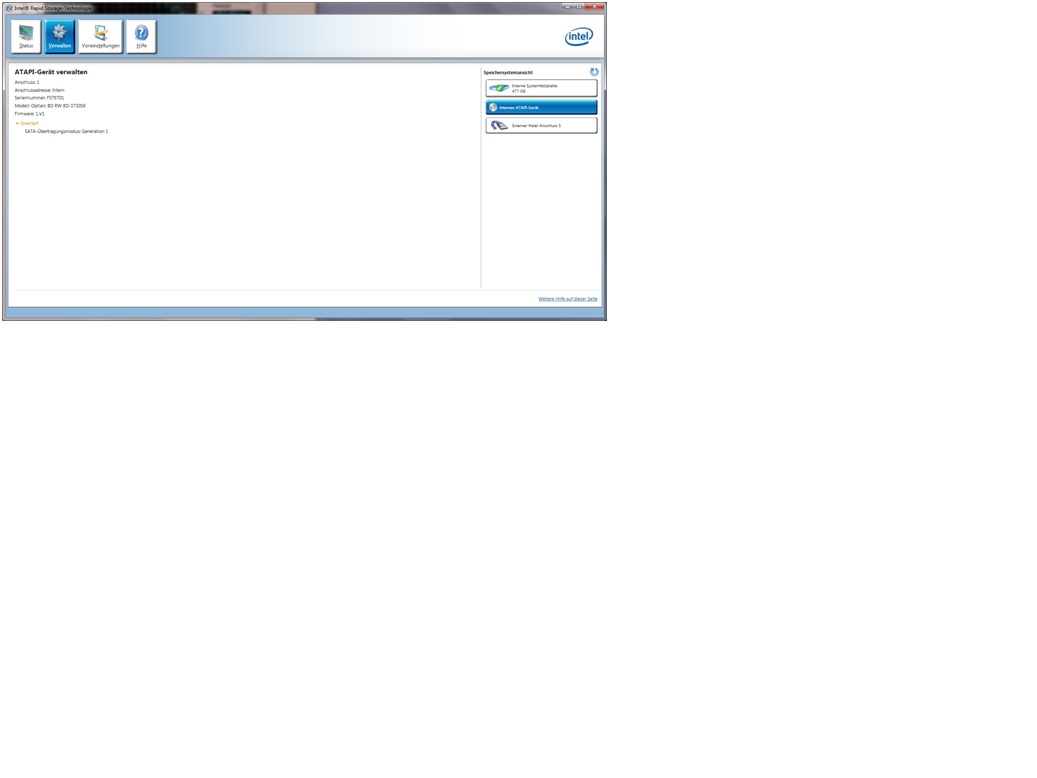
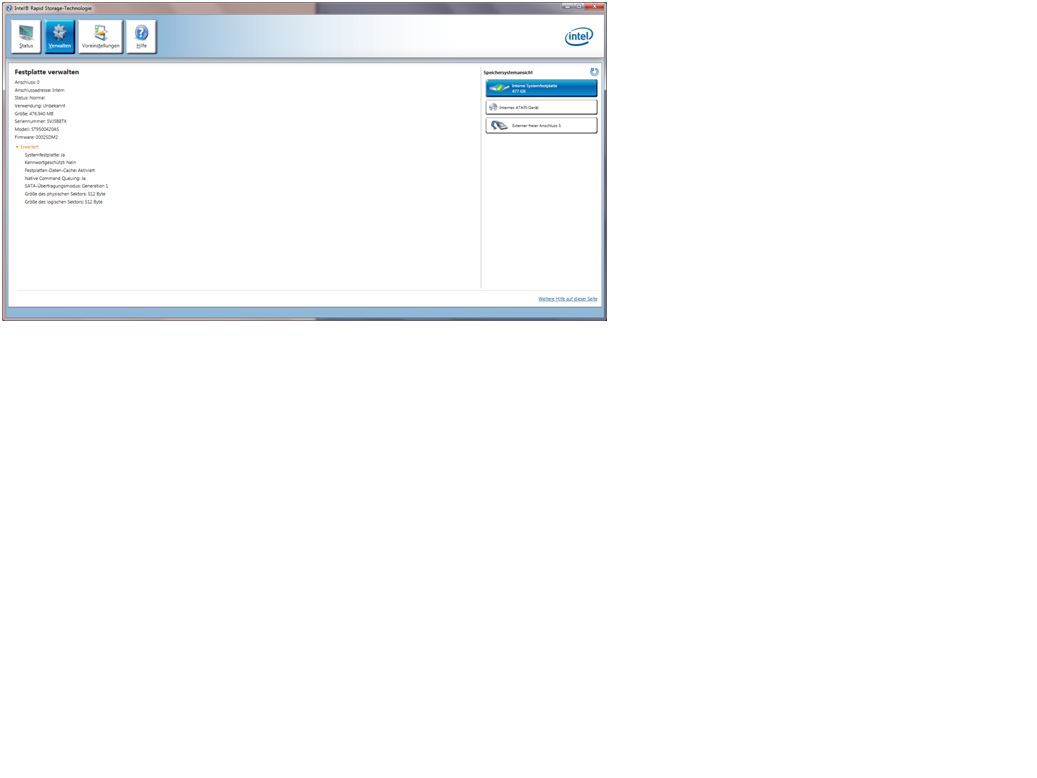
The "Intel Rapid Storage Technology" says its only SATA 1.
I wonder if this might be in someway connected to the fact that my blueray writer is also only SATA 1?
Here is a link to the optiarc-sony site:
BD-5730S | Sony Optiarc
Could you all please look at the specs of your dvd/blueray drive and tell what it says?
@Joe: I know that you have a second drive installed,
but I couldn't find out if you did a test before you took out the drive.
You also made a screenshot from the "Intel Matrix Storage Console".
Could you please tell me where I can find this tool.
I assume it's not quite the same as the "Intel Rapid Storage Technology", correct?
Servus,
kcirtaP
P. S.: Sorry, I still haven't found out how to add a screenshot to post.
I think I need a lesson ;-)Attached Files:
-
-
thanks for your quick response. i think I'm leaning towards the F11 now. I'm not much of a gamer but i do intend to watch movies on the laptop. so would the gpu affect that?
-
F series
Intel i7 740QM with turbo boost 1.73GHz
6 GB DDR3 RAM
500 GB hard drive @7200 RPM
Blu-Ray R/W player
True HD display (1920x1080)
1 GB vRAM
Large battery
Win 7 Home Premium
MS Office 2010 Student/Home Edition
Backlit keyboard
Grey
Paid? Too much! $1800. But I shopped other brands for the features I wanted and thought the Sony beat the Dell, which was my second choice. -
I use mine all damn day lol..
Yeah it runs hot but it depends on what your doing.
Like if im running a game or a demanding program the fan will make more noise and laptop will get hotter.. which is expected
just browsing the web or doing other things its pretty quiet -
As you can see I have a F11 and am completely satisfied. However, for the extra $130 or so I would go the the extra processing power.
-
is the Quad i7-720QM processor not powerful enough as it is?
-
The 310M should be perfectly sufficient for watching movies. The only time I'd be concerned about video playback performance is when you're dealing with certain integrated graphics chipsets, and that doesn't apply to the Vaio F.
My experience tells me that these minor differences in CPU clock speed will not be noticed by most users except under very particular circumstances. I went with the i7-740QM in my CTO F12 because it was the lowest CPU available in the U.S. store. For the small difference in clock rate between the 740, the 820 and the 840, it did not seem worth the money to upgrade. IMO, only when you jump up to an "Extreme" i7 processor like the i7-9xx would you start to see perceptible difference, and those aren't available on the Vaio F.
You will be just fine with any of the processors available on the F, including the 720QM. -
If you feel you hit your spending limit, then go with the F11. I spent money on the SSD but did not go with 8GB RAM. Could I conceivably need it in the future? Sure. Remember the processor cannot be replaced. The 720 is very fast. Again, if you afford it get the F12. If that becomes a stretch get the F11 and never look back!
-
More test results:
Win7 64-bit normal mode
(now using 4.50 instead of 4.01, but no difference)
![[IMG]](images/storyImages/HD_Tune_3.png)
Everest
![[IMG]](images/storyImages/Everest.png)
-
all i'm wondering is, option to upgrade the processor aside, if both models have the same specs, is there really a big difference between the two? does the F12 have some advantage over the F11 even though it has the same gpu, same processor, etc? am i just better off going with the F11 because it offers the discount?
all i'm really debating over is the screen size. the F12 offers 1080p while the F11 doesn't. that and the fact that its a newer model but does that really make a difference?
also, who here bought extended warranty? -
Ah, I hadn't realized that the screen availability was different as well. Do either of those machines you're looking at come with a Blu-ray drive? If so, bear in mind that you won't get the full 1080p resolution from Blu-ray movies on a 1600x900 screen.
Do you need the extra pixel density of the 1080p screen? I've seen the 1600x900 screen on Vaio F units in-store and it looks great in terms of pixel density, but I wouldn't settle for anything less than 1080p on my own machine because 1) I want to watch Blu-ray movies and 2) I need all the pixels I can get for Photoshop and web development work.
In regards to other differences between the F11 and F12, I do not know the exact nature of any differences; presumably they are minor. The F12 is a newer hardware revision and presumably carries some behind-the-scenes improvements, but they are not obvious to me and perhaps are not even documented publicly.
The lack of the 1080p screen would be a deal-breaker for me and I would thus get the F12 in your situation. But everyone's needs are different and I can't say for certain that you would need the 1080p screen. If you don't, and it's important to save the additional money, my recommendation for you to get the F11 stands.
I declined the extended warranty on mine. The cost was prohibitive for me, Sony has a good reliability rating, and some of my family members have owned Vaio notebooks and never needed the warranty on theirs. I decided to take a chance. -
Oh, so your F12 choice will get you the 740 and 1080 screen, then I would really favor the F12. On other matters maybe others will help or you can look into past postings. Also, I purchased the three year non accident warranty which brought my total to appox $1980 US dollars.
-
yeah they both come with bluray players. the f11 will come to $1,050 while the f12 will come to $1,370. is it a huge difference playing a bluray movie on a 1080p screen as opposed to a 900p one?
another option someone recommended was to buy an external 1080p monitor.
also is the backlight keyboard worth it? i was thinking about saving the $30.
"Blu-ray Disc™ Read and Write Drive". Does "write" simply mean burn? -
Hi I ran one click care report and it keeps saying:
Disk Cleaner: 272 problem(s) found
Registry Cleaner: 598 problem(s) found
Is this anything to be concerned about ?
BTW my backlit keyboard has arrived but I need some precision screwdrivers before I get started. -
same problem, same AV. in the end it worked
-
I can't answer your question about the Blu-ray movies on a 900p screen, as I haven't tried that myself -- perhaps someone else here can help you with that. I'm sure Blu-ray movies will play, but the picture won't be quite as detailed as it would be on a 1080p screen. You may not even be able to notice the difference; depends on how much of a graphics zealot you are.
The backlight on the keyboard is a nifty feature but not a necessity, especially if you don't plan to use the notebook in dim light. More importantly, according to earlier posts in this thread, you can buy the OEM backlit keyboard unit for about $25 and add it yourself later. So if you want to save the money now, then change your mind later, that's always an option.
Yes, in the context of an optical drive, "Write" simply means "Burn." If you get the Blu-ray "Read Only Drive," it will still be able to burn CDs and DVDs -- it just can't burn Blu-ray discs. The Blu-ray "Read and Write Drive" adds the ability to burn Blu-ray discs as well. -
thanks. i could save $250 by buying the F11 and then use that money to buy a larger 1080p monitor. would that work? or are $200 monitors not equipped with quality screens? or am i just better off buying the laptop with 1080p?
-
The option to go this way if you plan on getting the F series is not as effective unless you're getting a smaller laptop like the CW series. The viewing experience between the 16.4" display and a 19-20" monitor (at the $250 price range) might be minimal. You might as well get the F12 with the better GPU and 1080 display and have less clutter.
-
You chose the perfect username with Undecided... IMO.
Several F11_owners replied to you that the more recent_F12 is worth the minor price difference you found. How many more questions & replies before your change for decided?
You come back again with saying that the F12_does not have Turbo Boost after I took the time to post a lengthy reply to your question with several links (including to Intel) that I researched for you + some images with data: Re: Why i7-720QM CPU? Did you even read it? Then you say that laptops with i7 quad overheats. True for some other brands & models but absolutely NOT for the F. Search this Thread (top right of this page) with: overheat, overheats or whatever & find me a post by an F owner saying that his F overheats. Try searching for: Everest to find ton of posts by F owners with stress tests & operating cool temperatures reports.
It's OK to ask questions but it's cool to Search this Thread because there is a wealth of info that we took the time to write & post, and to read the replies to your questions too.
-
It would work, sure. You might have trouble finding a quality 1080p monitor in that range, but it's been a couple years since I've shopped for screens.
If you definitely want the 1080p screen, though, relying on an external monitor isn't what I'd do. I'd say you should go with the F12. Think of it as paying for the better-quality screen and getting all the other improvements as a bonus, if you want. -
First I would like to mention that you (probably) wont notice a different between the 1600x900 and 1080p screens while watching movies. As large as a 17" screen is for a notebook, you really need to get a larger screen to really begin to notice a difference in movie quality in 1080p.
Where you WILL notice a difference is in screen real estate. With the 1080p screen, you will be able to fit more icons on your desktop, and it will appear as though your screen is larger than the 900p screen. The caveat is that if you do not have excellent vision, you will probably prefer a lower screen resolution anyway.
As for whether or not you can/should upgrade the screen- I believe you can. Even the lower 310m GPU supports screen resolutions far beyond what you can actually buy. The trick is finding a screen that fits the laptop well. If you do this, you may also have to lower the graphics quality on graphics-intensive games (like Crysis), but you should still be perfectly fine playing blu-ray movies and the like. -
I'm sorry Tanis.7x but I disagree with you on several points.
I have an external monitor 900p connected to my F (extended monitor setup) and the difference compared to the 1080p on my F is unbearable when editing photos. The difference in sharpness & details when zooming in for editing is HUGE.
It's like comparing a photo printed in a newspaper vs. in a magazine. The more pixels, the more details & sharpness:
- 1600 x 900 = 1,440,000 pixels, 112 DPI
- 1920 x 1080 = 2,073,600 pixels, 134 DPI
So the 1080p has 633,600 more pixels to create the image for the same surface as both screen have the same size.
Yes you can upgrade the display afterward from 900p to 1080p but it's cheaper, better & easier to simply order the 1080p right off the bat.
Unless: you get the more powerful GT 330M video card with the cheaper 900p LCD & then get a better display than the OEM F 1080p glossy found in North America. That would be the_FW's dual CCFL 1080p glossy + it's corresponding inverter or better: the EU 1080p Premium matte + it's corresponding inverter IF you can find the exact brand & model number as the OEM Sony_replacement parts are very expensive. In the $600 price range vs. $200-300 by third party resellers. One could resell the 900p to recoup some of the costs. Follow link to LCD replacement how-to in my sig for LCD parts #.
The Windows 7 OS is very easy to scale for people farsighted like me. Much better than in XP and the 1080p on the F is very sharp. See this post: VAIO_F Series 1080p: Text & OS Size Scaling
![[IMG]](images/storyImages/Control_Panel_Display_Scaling.jpg) .
.
There is an other problem in swapping 900p for 1080p after the fact if you have the less powerful GT 310M. Besides having less video memory, it's less powerful compared to the GT 330M. While it will work, it will be slower rendering images, editing videos or playing games.
The 310M card has less work to do w/ the 900p so the performance is somewhat similar compared to the 330M handling the 1080p with 633,600 more pixels BUT the 310M w/ the 1080p display is significantly slower compared to 330M w/ 1080p. For more details about each cards, check: GT 310M (class 3) while GT 330m (class 2) with 73 gigaflops vs. 182 (besides other significant differences) according to those pages.
Note that both cards now have higher benchmark results when using the most recent NVIDIA video drivers than showed in this table but it gives an idea of the difference:
![[IMG]](images/storyImages/GT_330M_vs_GT_310M.jpg)
*****
I just received my spare OEM Vaio_F US backlit keyboard from Hong Kong for $35 shipped. Will try it tomorrow in my F and will post a mini how to replace the keyboard guide. For EU people, you can probably swap some keys like Euro, special characters, etc.
![[IMG]](images/storyImages/Keyboard-Box_Kitten.jpg)
-
Indeed it is a "Big problem in the audio forums..." It's not a Texas Instruments Firewire chip, therefore it does not WORK like a TI Firewire port, and a lot of legacy software does not like it at all.. I also have an M-audio USB thingy, and I just gave up getting it going properly. Now I simply capture on another PC then transfer the projects to the F11, using a USB D/A convertor to maintain sound quality on the output of the F11.
-
That's normal if your boot drive is SSD.
-
But Cleaner is not defrag. He should be able to clean the registry & delete unwanted files & let TRIM clean the SSD instead of defragging, no?
One can adjust the Preferences in the One Click Care tab so that TuneUp does not defrag an SSD as it's not recommended.
Err... not sure... Yes!
-
I will agree that there is a very noticeable difference for some applications. However, for movies (and even many games), there will not be that much of a difference. If you go to your electronics dealer of choice, you will notice that absolutely no TVs smaller than 32" and very few below 40" offer 1080p. Again, this is because most TV manufacturers agree that you need to get to around 40" before the difference becomes noticeable.
Again though, there are a number of very compelling reasons to get a 1080p screen and there are plenty of cases in which you will see more clarity.
If you can afford it, I would say go ahead with the 1080p screen. There certainly is no downside to doing so. -
Melody master
Quote
"I also have an M-audio USB thingy"
--------------------------------------------------------------------
i was thinking to buy a maudio usb sound card ... and you are saying that it dosent work with even usb sound cards ....
i thought that was just problem with firewire devices ?????????
pls reply me soon i need to cancell my order if thats true !!
-
Actually Sharp Aquos has a 22" 1080 tv. ViewSonic, Vizio, Sceptre etc also have them under 27" at 1080. (whether they're made well...?...) . Also there are many LCD/LED monitors well under 32" that handle 1080 resolution and can be used as a tv's. Buying a monitor instead is probably the cheaper route anyway.
-
I've got the 1600x900 display and I play blu ray movies ALL OF THE TIME. I'm sure 1080p would be best, but seriously... it's a 16.4" display. Just how "hi def" does hi def need to be? I think the clarity and sharpness is fantastic. I'm also sure that the 1920x1080 clarity is even better.
How's your eyesight? Will you be able to see the fine difference anyway.
-
Finally! I was wondering why the heck I was the only one with Average Read transfer rates in the 80's MB/s for that drive and thinking about benching errors or whatnot. Thanks! That's a nice smooth gradually falling curve,
exactly as it is supposed to be for a HDD.
I added your screen capture to the roundup post: VAIO_F Slow HDD - HD Tune Benchmarks & Safe Mode.
Could you also run it in Safe Mode to compare with mine & the others? Reboot > press F8 when Vaio_logo appears. BTW for those interested : F2 for BIOS and F10 for Recovery and some hardware diagnostics.
*****Yuck, that ugly curve again. I added it to the roundup linked above.
Intel loves to confuse people with stupid labels like Core 2 duo OR Turbo Boost driver for a graphic driver as described previously OR calling also the dual core 620QM an i7 like in the newest Macbook Pro while all other i7's are quad core! "Intel Matrix Storage Console" was stupidly renamed to "Intel Rapid Storage Technology" in their last update. They work both the same in the F except that the latest version allows TRIM if your SSD supports it.
"...@Joe: I know that you have a second drive installed, but I couldn't find out if you did a test before you took out the drive" - As explained in the roundup, all my benchmarks are consistent: OEM, replacement, in ODD bay, OEM OS or clean install, etc except... that I have an other Seagate 7200.4 and the only way I can get the flat curve as you guys is when it's an external enclosure so I presume it's the enclosure's board & chip that slows down the read rates but then it's similar to your main C drive speeds!
![[IMG]](images/storyImages/HD_Tune_Seagate_Power_Over_eSATA_Enclosure.jpg)
![[IMG]](images/storyImages/Vaio_F_Series_Power_Over_eSATA_Port.jpg)
And it's not the eSATA/USB combo port that slows it down has I have high benchmarks with an external LaCie drive connected via that eSATA port. Note that it's a fast 3.5" HDD in that enclosure and the first half of the curve is flat which is again probably the enclosure's circuit board & chip that chokes the drive max possible speeds. Nevertheless, the Average Read rate is quite good @ 87 MB/s.
![[IMG]](images/storyImages/HD_Tune_LaCie_1TB_Enclosure.jpg)
The mystery thickens!

*****Thanks for posting that, useful for people wanting an SSD.
You can't run write tests on an active C drive with HD Tune as it would destroy your system. You can run that on a blank drive in a secondary bay or an enclosure connected via eSATA.
Anyway, I've read somewhere that about 90% of the drive work in Windows 7 is reading files. Dunno if that's correct or not. -
Yeah, I doubt I would be able to see the difference either, especially not at normal viewing distance. That said, I have known some people who would be picking nits about it all day if the hardware was anything short of optimum, perceptible or not, so I thought I'd mention it.
For me the 1080p screen is far more valuable for the real estate it lends to the workspace, which is a need driven solely by one's use of the computer. My wife, for example, would probably throw away my 1080p-equipped Vaio F because she can't stand high-PPI screens where "all the text and icons are too small." On the flipside, I can't tolerate the 768p screen on her MacBook; I actually get feelings of palpable claustrophobia while using it. -
I agree, I can't stand the 768p either. When I was shopping and comparing, the VAIO really popped out with its finer resolution. I'm the kind that would very much enjoy 1080p, but the 900 is more than suitable for me in the real estate it lends.
Official Sony VAIO F Series i5/i7 owners thread *Part 3*
Discussion in 'VAIO / Sony Owners' Lounge Forum' started by eagle17, Jan 7, 2010.