Problems? See this thread at archive.org.
Just updated myself.
-
Nice one!

Bench
I did get little higher peformance. Did several tests.
Previous Benchmark post
![[IMG]](images/storyImages/HDTune_Crystal_Disc_Bench_2.jpg)
-
"Is it worth it" - yes.
"what is the difference between the two?" - 2 GB.
-
HERP DERP SAFE MODE RESULTS UP!
Seagate Momentus 7200RPM 16MB Cache 500GB
![[IMG]](images/storyImages/seagatemomentus500gb720.png)
-
I'm old enough to had the chance to see the first series about 2 years after it came out & I was a pre-teen. That show was revolutionary because it was during the cold war and a several nationalities were on board including a Russian & women (yes, they come from an other planet) and all humans were finally at peace with each other & working together for the greater good.
So Spock would say: there must be a logical explanation... and would find it.
*****Wow! Same as me, our read rates are actually slower in Safe Mode but still beat's the pants off those guys.
That's cool as we are more often running the OS in normal mode, right?
Will add your screen capture to the roundup post: VAIO_F Slow HDD - HD Tune Benchmarks & Safe Mode in 2 minutes, thanks!
**** -
Who agrees with me that Sony should get the guts to make a stylish looking laptop like the F, but with enthusiast hardware in it!
Can I has 940XM and 480M?
Edit: btw i scratched my lit when i accidently scraped a stapler on it
-
It might still be stylish, but it wouldn't possibly be as thin as the f-series.
-
OMG your back~!? :O You are the one with with the Win7 Pro Fresh Install option configured on Sony's site right? Do you remember how many processes did you have when you first booted up? I want to compare it with Joe's fresh install method
-
If it helps at all, I've done several Fresh Installs, given my lack of forethought to make reliable backups. I have screen captures on my HDD, which I cannot access (due to my lack of forethought) until my enclosure and power over esata cable arrive.
I've done Joe Bleau's version 2x and another version kinda similar when installing on my SSD. All THREE times, I had about 47 process and 800MB or so of memory used. I think I have posts somewhere in my history with screen captures.
If anyone is keen on removing the Sony Recovery partition, then the bloatware cannot install w/o the recovery discs. So, while installing on the SSD, I did a complete recovery, but opted out on the bloatware partition/installation. It was, by far, the simplest process yet. I was cautious and thought I had to install all of the drivers, but when I went to Device Manager, all of the devices were recognized. It was great. I haven't fully installed all of my programs, but i'm idling right now at 62 processes and 1.1GB. That will make its way up to about 70 processes or so, but still really efficient.
-
Just found a french site, but don't speak a word of it, that has a ton of Intel Chipset Drivers:
Intel Chipset Drivers - Download -
Here are my benchmarks using various Intel Rapid Share Technology Chipset Drivers on the Intel X25-M 80GB SSD. I ran duplicate tests in Safe Mode, but all the results were consistenly higher at being maxed out. So, am only going to post the one benchmark for it. Once I get my HDD up and running again, I might run these tests again. Like lundstrom.emil wrote, it'd be nice to understand why there's such a gap between safe mode and normal mode.
In the meantime, it's nice to know which drivers will yield better performance.
![[IMG]](images/storyImages/4862172272_7fd4918f5f_z_d.jpg)
![[IMG]](images/storyImages/4861551319_9231346e3f_z_d.jpg)
![[IMG]](images/storyImages/4861551369_34830faed4_z_d.jpg)
![[IMG]](images/storyImages/4861551455_cdbfa5faf2_z_d.jpg)
![[IMG]](images/storyImages/4861551285_3cac75f6cf_z_d.jpg)
![[IMG]](images/storyImages/4861551613_cdeb01a552_z_d.jpg)
![[IMG]](images/storyImages/4861551561_8ec6d1000c_z_d.jpg)
![[IMG]](images/storyImages/4862172344_843d5e4af7_z_d.jpg)
![[IMG]](images/storyImages/4861551509_1b7ea43998_z_d.jpg)
![[IMG]](images/storyImages/4867406576_7c3855e076_d.jpg)
![[IMG]](images/storyImages/4866790693_6045820295_z_d.jpg)
-
Hey, I just got my vaio. What should I look out for and what tweaks should I apply? My screen seems a little too white, hoping you guys could show me the way!
-
Hi, please provide your model, processor, display specs, and ram (at the least) so someone with a matching configuration can give some better advice.
-
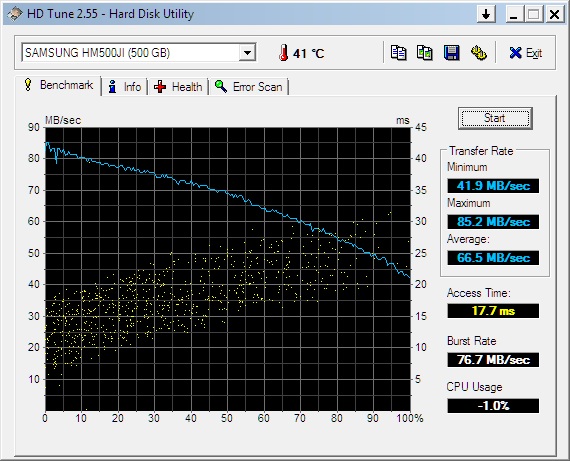
Joe Bleau, here is my SAFE mode HDtune results on my 500gb 5,400rpm drive.
Attached Files:
-
-
Thank Joe Bleau for this wonderful post and of course the people who contributed!
Monitor Profiles by F Owners -
Thanks, added to the HDD benchmark roundup post under: OEM Samsung HM500JI 5400 rpm Benchmarks.
Your results are similar as when you ran it in normal mode which is good. -
Can you test with this SSD benchmark and Crystal Disc? My Crystal Disc results shows that the HDD is not slower in normal mode, like EVEREST do.
A Benchmark For Just SSDs - AS SSD Benchmark : General Software Programs
Crystal Dew World - Software - CrystalDiskMark -
I'll definitely do that for you. It might be a day or two though, as I'm super busy tomorrow.
Also, I've been changing settings in my VAIO to be more optimized for my SSD and can see the visible increase in speed. I watch it boot w/in 20 seconds, but WinBootInfo reports that the boot up was 30 sec. Wierd. Have to find another tool. -
Maybe you should go easy about running write benchmarks on your SSD.
From this SSD Tweaks and Optimizations in Windows 7 guide:
From legitreviews.com Intel X25-M 160GB review:
-
At the risk of you actually being omaroo, and this merely being question 1 of 426 about the RAM, I would like to chip in.
More RAM, at the point of purchase, is always better. When you buy an F series BOTH memory slots will be filled ... 2x2 / 4+2 or 2x4 - so any upgrade will necessitate discarding one or both DIMMS to be able to get an upgrade. i.e. to move from 6 to 8Gb you will need to buy 4Gb. This makes any upgrade half as efficient cost-wise as it ought to be.
I am of the camp that more RAM is always better, unless budgets are hardlines. There is never a harm in having more than you need; you can only ever have too little
The benchmarks done by Tom's hardware are all fine and dandy, but don't really go into the experience of using a machine with more RAM. Games may get the same framerate, but I can Alt+Tab out of Crysis into firefox, check my email and go back, no hiccups. On my 4Gb machine that same process resulted in LOADS of page-swapping, severe stuttering and the occasional crash. Having the 'spare' RAM means Windows can leave the existing application alone, and does not need to write it to swap.
Likewise, when just running idle, Windows will consume more memory if the machine has more available. Why? Because it has stored less of the OS in SWAP, and more in RAM. You want this to happen; as it makes the whole experience feel 'snappier', even if it doesn't show on benchmarks. -
That's why I'll stick to spinning platters for a while 100Mb/s is plenty enough for me.
-
Agreed. These 2 were the the only write benchmarks I've done and I didn't really want to do them. Would be nice to be able to disable the write portion of the tests.
After going through the optimization tweaks, it really points out just how differently HDD's and SSD's operate. -
n.b. - anyone wanting to get the most of their HDD should check out Ultimate Defrag : UltimateDefrag Version 3
It will allow you to specify WHAT to move where on the disk. That way you can shove all the AAC / MP3 and JPEGs to the end of the drive and keep your EXE's and DLLs at the start, where it's upto 100% faster.
EDIT: The site doesn't mention it, but there is also a free version : http://download.cnet.com/UltimateDefrag-Freeware-Edition/3000-2094_4-10582157.html -
My trial of HD Tune Pro ran out long ago, so here is my newest Everest result from a few minutes ago:
This disk read utility defaults at 1MB blocks. I could change it lower, but I know it would be slower at 64KB and much slower at 4KB, and I really don't want to tie up the computer all day. You can see that my CPU usage went to 13% max. It actually sat at 0% for most of the time, especially during the last 70% of the test. In the beginning, CPU usage was 1-2%, then it jumped to 13% when something in the background kicked in. A few minutes later the CPU usage went to 10% when another process started and ran. You can see these two points very clearly as the SSD read times slowed while these events occurred.
I ran this in normal mode with all processes running, including security, internet and email.
I still say that for those of you with issues where the hard drive reads faster in safe mode, it is because other processes are accessing the drive during your normal mode testing. For instance, normally drive indexing is not running in safe mode. Caching may be off as well and also prefetch and superfetch. Plus, many other unneeded processes are disabled during safe mode.
You can see how my SSD slowed when other processes ran during two events. Safe mode definitely turns off certain processes and I am sure that some of these disabled processes access the hard drive.
Just my opinion.
EDIT: Here, I just ran the Disk Suite Bench from Everest:
-
+1. It may be a good way to see what cr@pware & unwanted processes can do to your system's performance.
Did you bench your Power Over eSATA enclosure? -
I did not. I will right now!
-
I have the F12 series with-
i7-740qm
nvidia 330gt 1 gb vram
1920x1080 screen
4 gb ram
blu ray burner/reader
backlit keyboard
extra battery
is there any way to turn off the auto backlighting?
Thanks in advance -
But i tried to disable all turn-off possible services(which includes prefetch, superfetch and indexing) and start-up apps, but again no different in performance.
-
Check in the how to install profile here: Monitor Profiles Roundup by F Owners for a reply to your question + much more tips.
Hit S1 >
Any feedback about your new machine for all the people thinking of buying one?
***** -
VERY interesting results with eSATA!!!
I have TWO power over eSATA enclosures, so I ran them both, plus I added a 128GB Crucial M225 SSD to one of them. Here you go:
First is the Power over eSATA enclosure with a 500GB WD Green HDD in it. As a background, I bought this HDD for backup purposes. When I installed it in the eSATA enclosure and ran it 2 or 3 times, I accidentally pushed it off the desk WHILE IT WAS RUNNING and it fell onto a hard wooden chair. The drive is junk, so I could not get Everest to graph the full disk read. It simply locked up. I was, however, able to do a quick read suite bench. Hre it is:
Next, I ran my other eSATA enclosure. This one houses my original Viao 320GB 5400RPM Hitachi drive. I used this drive to create a complete system image, in case I ever have to start over. It has a system image of my clean install plus all installed programs and files. It will not contain any program or OS updates since I created this image a few months ago. What is interesting is that the Sequential read was a perfectly smooth line. I have no idea why, other than perhaps it can't actually "read" the system image??? I quit this test after several minutes because I did not want to wait for another hour +. As a note, my SSD defaulted to 1MB read blocks with the Everest bench, so when this hard drive read defaulted to 64KB blocks, I changed it to 1MB so that I could test my HDD with my internal SSD "apples to apples".
I have no idea why this flatlined. Any suggestions?
Here is the real cool test! I have a 128GB Crucial M225 SSD sitting here, so I installed it into the Power over eSATA enclosure and ran the Everest benches. Because this is not the C drive, there are no major performance dips. The eSATA drive is simply read without interuptions due to other processes accessing the drive. I was impressed with my results as I had read that external eSATA drives were only capable of about 80-100MB/second. My results definitely blow that myth! While not as fast as the internal drive, it shows me that eSATA works much faster than other portable drives, including published USB 3.0 results.
Here is the Disk Suite results for the eSATA SSD:
And here is a very nice full disk read bench for the eSATA SSD:
Again, this is not as quick as the internal drive, but I will take this over USB 2.0 drives ANY day! -
Finally, (thanks to Joe), here are some HD Tune captures. First is the internal SSD:
Now here is the 128GB Crucial M225 SSD in the Power over eSATA enclosure:
Here, jut to show you that Everest results are the same, here is the 128GB Crucial SSD in the eSATA enclosure disk read using HD Tune. Compare this to the Everest results above.
-
That's ... that's just ...
-
As a comparison, here is my C drive, the Crucial 256 GB M225. After I started, a couple of programs ran in the background for a bit, lowering the beginning results, but these are better than I got with the Everest test.
-
Hi,
I've made test with HD-Tune in save-mode. Nothing very special here tough. Looks a lot like the one from emil again:
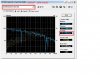
Just for the protocol, here are some specs of the vaio:
F12 (VPCF12C5E)
i7-740QM
nvidia 330gt 1 GB
1920x1080 EU premium mate screen
RAM 4 GB
blu ray burner/reader
HDD ST9500420AS 500 GB / 7200
premium black (leather like palm rest)
premium clean install powered by Joe Bleau
Her some devices of the vaio:
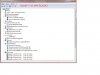
Servus,
kcirtaP -
I think the major slowdowns are associated with parts of the drive that are in use, not background processing. If you run the test over & over with different things going on in the background, the slowdowns always occur in the same places. The noise pattern (small spikes in the data) seems to change a bit depending on what's running, but the big slowdowns don't.
If you compare your own Everest and HD Tune results, you can see the same slowdown pattern in both.
I can accept some difference in results between normal mode and safe mode, but not the magnitude we're seeing here. I've tested with almost all startup processes blocked and services disabled on a fairly clean install and saw very little change in results. Also, how do you explain why some posters seem to be affected and some do not? Or why this issue doesn't show up regularly with other computers? I'm seeing a big difference in performance when comparing the VAIO Y to the VAIO F using the same drive, same Intel storage driver, and both running a fresh install from recovery DVDs. Here's the difference in HD Tune with 64k block size:
VAIO Y:
![[IMG]](images/storyImages/vaio_y_hdtune_64k_normal.png)
VAIO F:
![[IMG]](images/storyImages/hd_tune_normal_64k.png)
How do you explain that? -
Können Sie die "IDE ATA/ATAPI - Controller" zeigen.
-
If you read my earlier posts, block size matters a lot! If you run 4KB blocks, they will be VERY slow, but still quite fast when you consider the size of the block will still be read in milliseconds.
Here is a new one...I tested my Sandisk Cruzer USB 2.0 thumb drive:
-
I would say that you most likely have something impeding you SSD. Your Vertex2 (if the NEW Sandforce controlled Vertex2) should crush my older, Indillinx based Crucial C225 SSD.
From here, I can't tell what is wrong with your computer, however. -
Yes, there's definitely something holding it back.
For sequential reads, our drives should produce similar numbers, and I can get close to your numbers if I use a 1MB block size.
I've also noticed the differences between normal mode and safe mode on the F are a lot smaller when I use a 1MB block size. Likewise, the differences between the Y and F in normal mode are a lot smaller with a 1MB block size. The performance differences I'm seeing really show up with smaller blocks. To me, it suggests the problem might be some unexplained extra overhead per I/O operation (percentage-wise, that would have the largest impact on the smallest operations).
How sure are you that your computer is unaffected? Have you tried running with a 64k or smaller block size and then comparing to safe mode? -
Well, my read and write speeds meet and exceed what is listed by the manufacturer. My specs call for "Up to 230MB/sec. reads and 200mb/sec writes". I am slightly above these specs with both. I also slightly exceed every published test I have seen on my SSD.
If yours is an Indillinx (Barefoot) controlled SSD, then you should be similar to my results. If, however, you have the new Vertex2 that is Sandforce controlled, then you are running at 2/3 to 3/4 of the speeds you should be capable of, and your drive should then kick my SSD's butt!
If you read prior posts, I talk about smaller block sizes and what my speeds are. However, if you look back just a few posts to the bar charts with different block sizes, you can see how my 256GB Crucial SSD fares (the internal drive). These numbers change a bit from trial to trail, but the trend is the same...a 4KB file is MUCH slower in both reads and writes than a 256KB-5MB block will be.
On the top post of this page, you can see that my internal drive runs about 150MB/sec at 64KB blocks. -
Interesting program. It says it was made in 2008 for XP/VISTA. Would there be any problems using it on Windows 7?
-
No problem, Win 7 = Vista with a new GUI.
Simplified, but unless software is actually checking for OS version number it's all the same under the hood. -
Hier, bittte schön:
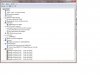
Servus,
kcirtaP -
I just disabled all of that stuff last night to help optimize my SSD. Will run HD Tune tonight and report back.
-
Not neccessarily disk optimization processes...you may be running several unneccessary drivers or perhaps you have hidden background processes. Finding performance drains are never easy and for what it is worth, all computers naturally pick up processes that cause them to lose performance over time. The trick is simply to minimize the losses so you can go longer between clean installs!
-
whooooooooooooops- flicker changed their HTML grab and it's not working. sorry.
-
@ dmk2: You are comparing apples to oranges, measuring the distance between 2 nutshells floating on an agitated ocean.
While your 2 laptops have nearly identical OS & services, they are NOT identical nor is ALL the settings & drivers identical.
This is an F owner forum so people always tend to blame the hardware first while it's exactly the opposite 95% of the time: Win 7 or third party software or user induced "issues" IMO. And this is obvious for somebody who have been reading all 3 F threads.
danielh97, Willscary & I have amazingly fast benchmark results for our drives as the screen captures we posted proves. And they are near or above the data found in published reviews for those drives, operating similarly in normal & Safe Mode in our_F11. Note that we have lean OS's & not much cr@pware on it.
"How sure are you that your computer is unaffected?" - 100%! :smile:
Thanks Willscary for that informative post(s): +1 for your rep power![[IMG]](images/storyImages/reputation.gif) .
.
-
Thanks! But again, I doubt that I can get rep power from you for a while!
EDIT: I stand corrected! Thanks! -
Aha! Hence the power of data.
-
No kidding Joe. Obviously they are not identical configurations. The purpose of my comparison was to rule out the drive itself and the particular Intel storage driver as causing the problem, and also to counter Will's initial posts suggesting there was nothing wrong.
I've made everything else as identical as possible to reduce the number of things that could be causing a difference. Hopefully I'll be able to narrow it down further.
Not a single person has blamed the hardware. There is clearly a performance problem here that several of us are experiencing, but we don't know the cause yet. It still *could* be hardware, but I doubt it.
However, I reject the notion that it is a user-induced or third party software issue, since I've run the tests right after doing a fresh install from recovery DVDs.
Official Sony VAIO F Series i5/i7 owners thread *Part 3*
Discussion in 'VAIO / Sony Owners' Lounge Forum' started by eagle17, Jan 7, 2010.