 Problems? See this thread at archive.org.
Same as Fishon, no problems on mine. I use Norton AV, not ESET.
-
Again and this w/o changing the LCD's native resolution which is not recommended: VAIO_F Series 1080p: Text & OS Size Scaling.
Try it & show her your display.
-
Oh yeah, I definitely know about those settings and in fact I do plan to experiment with them to see for myself how Windows 7 handles scaling. I haven't yet had the opportunity to use an OS that's actually competent at increasing text size on a display that warrants it.
I tend to prefer the standard (100%) setting since I am nearsighted and don't have trouble with high-density displays. Then my wife looks over my shoulder and makes a remark about how unbearably small the text is. Should she actually want to use my Vaio F, I'd set her up with her own user account with the text adjusted to larger than 100%, and that would probably satisfy her.
She won't be wanting to use it, though. She's gone to the (MacBook) dark side and defiantly refuses to return.
-
It took you more time to type that than it would to try it. Don't forget the ClearType tweaking.
-
Ive ordered Fenvi hdd case and now Im wondering what can I do with my blu ray reader. Is there any external case I could fit with that optical driver ? Power over esata would be usefull.
-
I tried by removing the ODD, but no different in Intel Rapid Storage Technology .
-
Hey, Joe Bleau.
I've installed my Intel 80GB SSD and ran around trying to get its support applications for best performance. I then ran some HD Tune tests while exploring the different Intel Chipset Drivers:
Intel Matrix Storage Technology (8.9.4.1004)
INF Update Utility - Primarily for Intel® 5, 4, 3, 900 Series Chipsets (7.0.0.1013)
Intel Rapid Storage Technology (9.6.0.1014)
Windows Driver when all else are uninstalled (6.1.7600.16385)
Surprisingly, the Matrix Storage and Rapid Storage drivers have very poor performance. Almost matching tests at 115-117MB/s. While the INF update and Windows defaults were MUCH better at around 152MB/s.
So, the chipset driver has a definite impact on things and Windows installs w/ Intel Matrix Storage Technology 8.9.4.1004
If someone is interested in uninstalling theirs, letting windows install its own and run HD Tune? Then use the INF Update Utility and run HD Tune again?
What I find very interesting, still, is that when in safe mode, my results are considerably higher. So... something, along w/ the chipset driver, in Normal Mode is having a significant impact.
Once I get my power over esata enclosure, I'll be able to recover the data from my HDD, restore it, then run tests with the different drivers as well. That is if someone doesn't want to try it themselves.
I have screen shots, and can post if you'd like. -
Hi, I checked the Intel Rapid Storage Technology, and it says my HDD slot os SATA2. However my blu-ray reader slot is only SATA1.
I also got the "free" one. It's the 15 day trial Pro version.
And to post screenshots on forums, simply go to imageshack.us and upload your image, copy the direct link onto the post, then putaround it!
-
MelodyMaster,
my drive is not SSD, its 500gb 7200rpm Seagate one. The above is after defragging and registry cleaning. -
Are you using a third party defragmenting program? If so, disable, run Windows 7 > Accessories > System Tools > Disk Defragmenter twice & benchmark again.
Other people with flat curves, are you also using third party HDD utilities?
Did you try right-click C > Properties > Tools > Check disk for errors?
Just an idea. -
Then just click Fix the problem(s).
-
Last time I posted this something went wrong - trying again.
More test results:
Win7 64-bit normal mode
(now using 4.50 instead of 4.01, but no difference)
![[IMG]](images/storyImages/HDTune3.png)
Everest in normal mode.
![[IMG]](images/storyImages/Everest2.png)
I'm starting to think that this is a problem related to HD Tune and this specific set-up. -
Hey, refer to my post HERE and let me know what chipset driver you're using.
-
M$ 6.1.7600.16385
-
Well, there goes that theory.
Hmmmm..... -
I do have the Intel Rapid Storage Technology software installed however, but the driver shows as the above mentioned.
-
Now that's interesting. Is that software any good? The driver that comes with it (9.6.0.1014) is awful.
-
I added your screen capture to the roundup post: VAIO_F Slow HDD - HD Tune Benchmarks & Safe Mode, thanks!
-
I agree with all that.
-
Do not use third party HDD utilities for defrag.
I will try it soon.
-
Yes, I have clicked fix a few times but when I run the one click report afterward, it still states those problems are there.
BTW I am looking forward to your illustrated instructions on how to replace the keyboard. I will hold off on attempting mine till then
-
Hey, new member here. I just got my f12 from fedex last night. Booted it up and installed my programs and everything, and so far i love it.
Although, when i started it up this morning, the i had to wait for the bios to check my disk consistency. Should i be concerned that this type of check is happening on a new computer? -
I got that random error when I booted up before. For me, I disregard and ignored it. Turned out that nothing was different, nothing crashed. Never got it again
I don't exactly know what that means, but I'd suggest you quickly call Sony support and tell them, as you just got the laptop -
OK, here's my results from AS SSD:
![[IMG]](images/storyImages/as_ssd_normal.png)
![[IMG]](images/storyImages/as_ssd_safe_mode.png)
Note there's not much difference in sequential read speeds, but some difference on sequential writes and a HUGE difference between normal and safe modes on 4k reads & writes and access time.
And here's my results from the HD Tune read benchmark with 64k block size:
![[IMG]](images/storyImages/hd_tune_normal_64k.png)
![[IMG]](images/storyImages/hd_tune_safe_mode_64k.png)
Note the slowdowns are because this is my only drive and thus it contains the OS, apps, etc. These would be a straight line if I was testing a blank SSD. The difference to note here is read speeds of 140MB/s in Normal mode versus 200 MB/s in Safe mode.
Note I have also run the same benchmarks on my Sony Y using the same SSD and it does NOT exhibit the same problem. The differences between Normal and Safe mode on the Y are small, and in Normal mode the lowly Y is kicking the F's butt in disk benchmarks.
I can post screenshots for the Y too if anybody is interested. -
Driver testing and look at my beautiful curves
Result by removing Intel Rapid Storage Technology (9.6.0.1014)

Result by Removing next driver (?)

Result by installing INF Update Utility - Primarily for Intel® 5, 4, 3, 900 Series Chipsets (7.0.0.1013)

-
--------
-
Got another answer from Sony after calling them liar. :tongue:
 :laugh:
Hi Emil,
Thanks for your reply.
We have escalated the matter and will come back to you as soon as we have received a reply from Sony's technical experts.
Sincerely,
Eneli
Sony Vaio-Link Technical Support
Bad that they rejected me with a unlogical answer few hours after they got aware of this.
-
Shizzles!! 128 C SSD!
-
BTW, what is all that ATA stuff in your Device Manager?
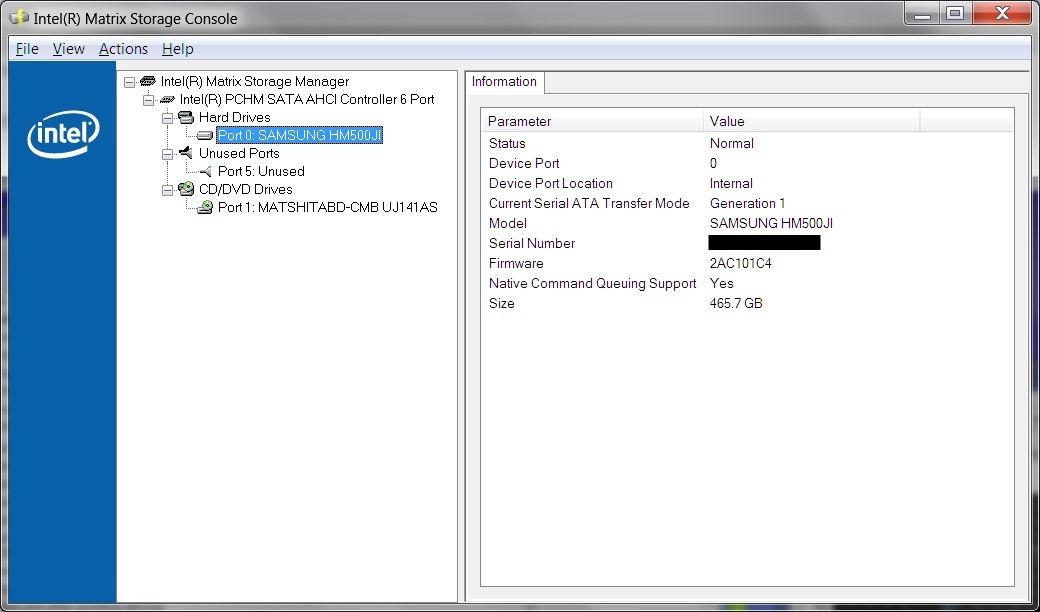
I uninstalled the OEM Intel Matrix in my_F11 & replaced it with the OEM Intel Rapid thing found in an esupport_F12 page but in the end it did not change anything to my benchmarks.
![[IMG]](images/storyImages/Device_Manager_Intel_6_Port_SATA_AHCI.jpg)
-
What's going on here?
-
The other three, ATA Channel X, comes up when the driver from Intel Rapid Storage Technology is removed, or if you do a clean install with a Win 7 DVD.
-
Don't worry, that's a not a real temp. SSDs generally don't report temperature. Depending on what SSD you're using and what tool, you may see zero, or 255, or 128.
Because the safe mode results are good, I'm suspecting it's a driver/configuration issue. I don't know why the Y is not similarly affected, but it is using a different Intel chipset. With nearly identical software installed, the Y also boots faster than the F, so I think the difference is real and not just some benchmarking artifact. -
Here is my HD tune result with my lowly 500gb 5,400 rpm drive.
Attached Files:
-
-
New bios for the F12 EU modell. I am doing HDD tests with Crystal Disc so i will try to do some HDD benches after the update.
BIOS - R1110Y6
This update improves fan control -
Hey, that's a different driver than those of us with the problem seem to be using. Will have to see if I can find it and try it. If you're curious, upgrade to 9.6.0.1014 and watch how it decreases performance..
@lundstrom.emil - That's a nice improvement!!! -
thanks for all the replies. i have one last question before i make my decision.
Upgrading 4GB (2GBx2) to 6GB (4GBx1 + 2GBx1) for $56. Is it worth it and what is the difference between the two? Thanks. -
This came from Tom's Hardware senior editor:
'In general, someone should get as much as they can reasonably afford, even to the point of reaching at least 4-6GB of RAM over a faster CPU, because once the OS starts swapping, that smoking CPU will spend most of its time waiting for work.'
Here is an article 'Do You Really Need More Than 6 GB Of RAM?' which helped me in deciding to go with 6GB instead of 8GB.
Do You Really Need More Than 6 GB Of RAM? : Is ?Too Much? Really Just Enough?
And finally, how much multitasking to you expect to do? Will you be running a virtual machine, playing a game at the same time with other apps up and running as well? If you do not compute this way lesser RAM is required. -
Hi
Can you tell me where you bought your US backlit keyboard?
thks -
The benefits of additional RAM come in primarily when you want to work with many applications at once, especially applications that heavily utilize the RAM (like Photoshop and other professional graphics software). When your physical RAM is full, your hard drive will be used to store additional information that RAM would normally hold, and traditional HDDs are much, much slower than RAM. At that point, overall system performance worsens dramatically until you free up some of the RAM again.
Here's a case from my perspective. I've been using 4GB of RAM in my workstation for a couple of years now. I have three displays and do lots of multitasking, with email, two browsers, Winamp, Skype and IM, plus Photoshop, Word and other software often loaded at the same time. I never have issues with RAM unless I start opening multiple large Photoshop files, or I start working with high-resolution images for print projects.
Users of certain professions will need more RAM than others, particularly graphic designers, software developers, video editors, etc. But for most users, 4GB is still a "sweet spot" and I have no problem recommending 4GB to almost everyone, particularly budget-conscious buyers, unless they demonstrate a specific need for more. 4GB would certainly be enough for watching movies, playing most games, surfing the web and so forth. -
Strange, that is the same BIOS my F12 shipped with almost a month ago. Which model have you got?
-
I have VPCF12Z1E, and yes I recognisse the bios but it was today I saw it on the page and not erlier when I looked yor a new bios. It was linked on the site 3 of August 2010.
EDIT: My current bios is R1100Y6, the new one is R1110Y6. -
After Pizza and a walk with the dog the bench is finished, yes I am slow.
Bios-update did not change the HDD peformance.
![[IMG]](images/storyImages/Crystal_Disc_Bench_1.jpg)
EDIT: I seems that I would be happy, If Vaio Support finds a logical solution then I will be fine but only if it is LOGICAL.
-
Agreed!!!
-
Hey Guys, as I mentioned few weeks ago, I decided to buy a Vaio F series. I recived my Vaio in like a week, which is really nice, and I must say that I love it. My screen seems to be OK, there is slight light bleed, but nothing unusual, it seems that colors are sometimes a bit washed out (it is a US version 1080p). Other than that it is amazing! I just wanted to thank you guys for EXTENSIVELY posting about your Vaios, reading all of the threads was very helpful!
-
Just for info, there are later Intel Rapid Storage Tech versions out there.
9.6.2.1001
9.6.3.1001
I'm running the latter on my S Series without problems (well, none related to that anyway ). But I'm not a benchmarker so I can't comment on how these might affect your issues.
Although not an F Series owner, I do follow your discussions with interest. Learnt lots in here. Ta. -
Thanks! I'll look them up later and benchmark them with my SSD, and eventually my HDD when I get it my enclosure.
-
I second this! I was leaning toward the F anyway based on the specs I needed and the price being offered, but it was all of the extensive information and details here that pushed me over the edge. Big thanks go out to all of the people here who have contributed so much.
My F12 arrives tomorrow via FedEx...completely stoked about running benchmarks and what-have-you. I suppose that makes me a nerd supreme. Ah well, bring it on! -
I found 9.6.4.1002. Bench is coming.
-
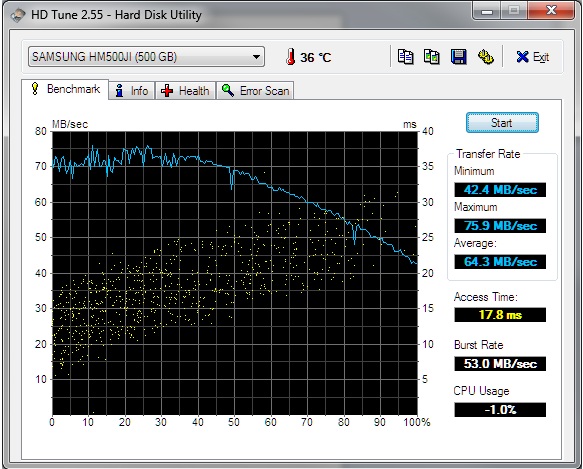
That's similar to my OEM Samsung that is the same model as yours: HM500JI w/ the same firmware and also shows as SATA Gen 1. It's a fine drive, quiet, cool & consumes less power than the 7200.4 so better battery life. Did you try benching it in Safe Mode?
The beginning of your test is a bit bumpy. The reason the curve gradually drops is that the test starts reading on the outer edge of the drive's platter where for 1 full spin of the platter carries much more data then near the center of the platter hence faster read speed from outside slowing down gradually. An SSD does not have that mechanical characteristic hence the flat graph.
So... if you clean the HD & defrag with Win 7, it should put the most frequent accessed stuff on the outer limits & make sure your anti virus is disabled & no other program is running.. Run HD Tune 3 times & post best results is the best practice to eliminate quirky results due to some services starting in the background or whatnot.
![[IMG]](images/storyImages/HDD_ODD_Bay_Samsung_500GB_HD_Tune.jpg)
Will add you screen capture to the roundup. Thanks!
Official Sony VAIO F Series i5/i7 owners thread *Part 3*
Discussion in 'VAIO / Sony Owners' Lounge Forum' started by eagle17, Jan 7, 2010.




![[IMG]](images/storyImages/spock1.jpg)