Problems? See this thread at archive.org.
The Z2 has been discontinued in HK.
-
I'm now seriously considering the Asus UX32VD instead of either. It has an awesome screen (not quite as good as the Z2, but it covers sRGB), dedicated graphics built-in, and upgradeable memory/HDD. Check out notebookcheck's review.
-
with the hacked bios is there any option for uefi boot only? is anyone running pure uefi mode? (thinking about gtp and w8 here).
-
Hey guys, just purchased one of these bad boys and i'm loving it. I do have a quick question. strangly enough, when i use my beats tour (in ear headphones), my z plays both its speakers and the headphones.. its the strangest thing.. any ideas what this could be or how to fix it?
-
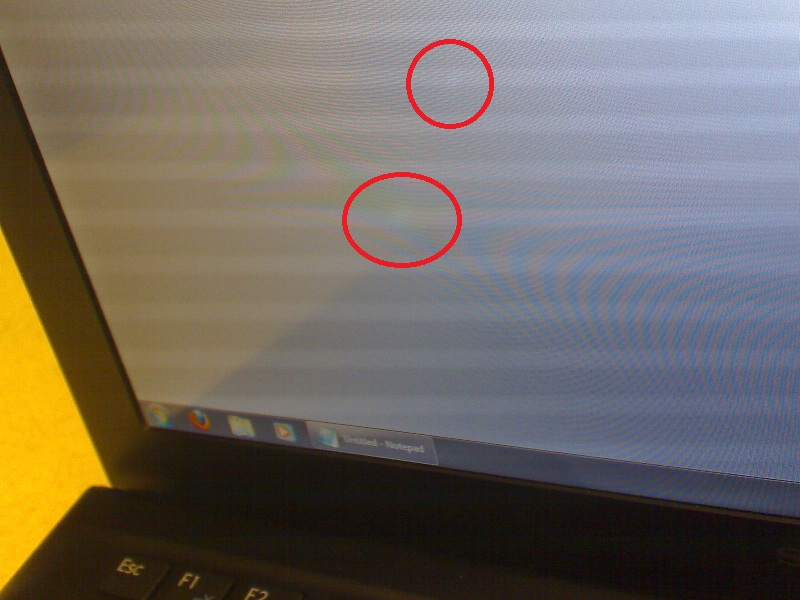
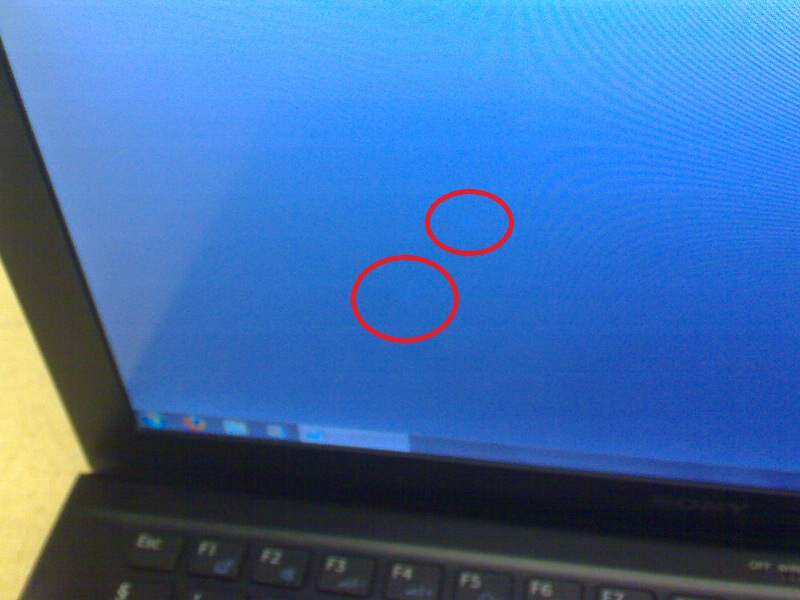
I just noticed two bright spots on my Z2 screen
 They are mostly visible on a white background and when watching the screen from the sides or the top.
I don't know how they got there, I have always been taking perfect care of the laptop, transporting it in a laptop bag, placing a cloth between the screen and the keyboard, etc.
I attached 2 photos. I took them with my phone and it was hard to capture the spots. In person they are more visible than that.
Do you have an idea what those spots are and what could be the reason that they appeared?
Thank you! -
Have you tried playing around with the settings in the Mixer control (right-click the speaker icon in the taskbar) or under hardware and devices in the control panel? Or updating the audio drivers? And you're definitely plugged into the headphone not microphone socket?
-
Wild guess here: the headphone jack on the Vaio may be deeper than usual to accomodate the extra contacts for the included noise-cancelling earphones. Maybe you inserted your earphone plug just enough to make contact with the L and R contacts, but not deep enough for the notebook to "sense" that there is a plug inserted. Make the same test with the included Sony earphones and see if the problem persists.
-
Anyone notice a considerable improvement from the PMD since installing the new drivers?
-
Hello, i have one short question, i ordered my VaioZ last week, it said it had a delivery time of 5-6 weeks.
Is this just playing safe or does it usually takes this much time? It's so hard to wait, i ordered from the Netherlands Sony online store.
-
I just got my Z23 and got a quick question: is it possible to let the laptop wake up from sleep just by opening the lid? Every Notebook I owed did that, but the vaio is not waking up - I have to open the lid AND press a key or the powerbutton to get it out of sleep.
Thanks -
Sony makes you press a key. I've seen no one post an alternative. I've gotten use to tapping the space bar right away.
-
My Z2 (customized) took the estimated 4-5 weeks after placing the order on the Dutch online store.
The wait was hard and long, but totally worth it
-
A question to the US owners of the Z2 (which comes with the noise cancelling earphones).
Has the earphones plug 3 rings and a little "snotch" or 4 rings (see pictures)?
I found a cheap offer for headphones with noise cancellation and they have this little "snotch" which won't fit into my Z2 - I need to cut it off.
If it's the 4 ring one I thought about cutting of the whole plug and attaching the cables to a new one. Only problem is that these 4 ring plugs (which would be 5 connectors - a TRRS plug has 3 rings and 4 connectors) isn't a standard form, I don't know if I can find a matching one. Maybe anyone has further ideas?
3 rings + snotch:
![[IMG]](images/storyImages/2434701546.jpg)
![[IMG]](images/storyImages/f3c23e384072a897fc6d924995b62c8f.jpg)
4 rings:
![[IMG]](images/storyImages/photo.jpg)
-
My US Model has 4 Rings w/o a Notch!
Hope that Helps!
What Model Number is that Sony MP3 Player? Looks nice! -
^Thanks for the answer.
Unfortunately I think then it's quite impossible for me to get it to work - or has anyone an idea where I could get a plug with 4 black rings? (5 connectors). They don't seem to be standardized. I read that some older mobile phone headsets had 4 rings, maybe anyone has something like that and can give me a model number?
Or does anyone have a spare pair of earphones?
The player in the screenshot is a NW-S705F. -
One question.
With all Sony supported drivers rotating an external tft is not possible. When I use leshcat driver it works, but the standby is then no longer working.
Can I rewrite the Sony driver? -
Choose the 2559 Intel driver, then sleep will work.
-
Hello everyone... new forum use here, so please go easy on me if I am posting in the wrong place! I managed to leave my Vaio Z2 headphones on a plane a couple of weeks ago. I tried asking the Sony Shop (without success) where I can get a replacement - headphone model is MDR-NC033L2/BM. If not, which earphones are compatible? I'm really missing this, but I know the jack was quite unique and want to make sure I buy a compatible one.
Many thanks -
I can sell u mine, I dont use it as I have another set of different ones that I use. PM or email me at [email protected]
-
Hi,
How do u get out of testmode? -
Today I notice a strange noise out of my Z21. The SSD Array makes sounds like a normal HDD when I read pr write things on the disk...
Have I to worry about that or is this normal??? -
I do have that too. It's not from the SSD but from the processor I think. It is gone for me when I switch to "Silent Mode".
By the way: Is there any way to create a shortcut / batch script to change the modes? -
You can configure the white VAIO-key to switch the mode. Long press it to open the settings!
-
I have the same problem, it started with one semi-visible white mark, and now that one got stronger, and i've got a few more showing up. Sony service is picking up tomorrow to hopefully replace my screen. Send them that picture and they should offer a repair, sucks to live without your notebook for a week, but nothing else to do...
-
Hello all, I had my Z2 for about 10 months now and mostly happy with it besides the few annoyances here and there.
Quick question, per sony marketing the internal battery should give you up to 6h 45m. I know its marketing BS but I would expect to get at least 75% of that with light use and conservative settings. I need to time my but it feels like I get about 2 hours tops. Care function off, brightness 2 notches from top, wifi on, BT off, silent mode, hard disk off after 5min.
What times are you guys getting with yours? -
I had a full day meeting with the notebook sitting on my desk with a few notes taken here and there (a few per hour). Display was set to switch off after 2mins, everything else on low power also. Meeting started at 10 and was finished at around 17:00 - with 15% battery left. So that is > 7 hours for me.
I think the main factor is the display. When it's on all the time I get something around 4 hours max. So you may save by setting the timeout as low as practical for you. -
Looping HD video, wifi off, low screen brightness, I get 4.5 hours on the internal battery and 8.5 hours with the battery slice attached.
-
Yup I know and use it that way. But I would still prefer a command line switch. Then I could assign an own hotkey for silent and balanced and wouldn't have to toggle with through all three modes.
-
thank you for the battery times. I will need to more closely time my but this is basically work time, mostly codding / debugging. No music or view.
-
Will you guys ever forgive me?
http://forum.notebookreview.com/apple-mac-os-x/670186-macbook-pro-retina-pics.html#post8605333 -
Forgive you? I may join you!
-
^
I am also tempted... -
is there anyway u can configure the white vaio button to turn on "high performance" for the fan and the battery setting?
-
Hi
What is the model number for the PMD (DVD or Blu-ray, either is fine) please?
thanks -
Gorgeous machine, but the 15" form factor and 2kg doesn't appeal very much.
-
Still baffled at my touch pad scrolling suddenly dropping out every so often. Merely browsing the web and it stop working. Occasionally pinch zoom continues to work but otherwise scrolling just stops which is weird. Any suggestions?
-
I remember having this happen occasionally before the last driver update. I haven't had any issues since.
I have had some web pages refuse to scroll -- but page down doesn't work the either so I think it's an add-in on the page eating the keystrokes. -
VGP-PRZ20A (BD)
VGP-PRZ20C (DVD) -
thanks for that
-
Overnight Sony US finally posted an updated video driver -- just 11 months after the initial driver was uploaded.
Sony eSupport - VPCZ2190X - Drivers & Software
I installed it and compared the version numbers and everything looks the same as compared to the version that SirRobbin posted in Nov.
http://forum.notebookreview.com/sony/625418-new-z2-gpu-driver-released.html -
Yes, it isn't light by any means. Built like a tank tho, and the screen. Oh the glorious screen.
The Z2 masses may be pleased to know that Sony's SSD implementation is roughly 2x faster than the MacBook Pro.
I'm not sold on it. Yet. -
I was about to install this, but noticed that it actually may be older than the Z3 driver posted in this thread. Has anyone confirmed?
-
I'm pretty sure these are older drivers than the Z3 drivers. I'm trying to stick with drivers that are supported by Sony for my model. It does sound like people are having success on the Z2 with the Z3 drivers though.
-
Hmm...the Z3 drivers are working just fine on my machine, as far as I've tested the last couple of days (docking, undocking, a few games, all controls work). To install, all I had to do was run the installer once while docked, restart, and then run it again undocked, then restart . If I have any instability, I'll repost.
-
They're working like a charm for me. Had no issues whatsoever. Had several issues with leshcat ones but these are running great.
-
I reinstalled drivers (I forget which version) and was going well for a while. I'll try and update them soon and post again if the problem persists.
-
Just returned my MBPR because of the heat issues. I have a small blister on my left index finger from playing MW3 for 45 mins! (No Joke) Almost got burned on my other hand picking up the charger.
The screen is stupid good. But, it is hindered by the state of the web and the current OS's.
Although, I still would take the MBPR over the Sony 15" offerings. I would like to see the 13" S Premium in person. Seems like it could be a good mix between the Z and the MBPR.
Should have my Z3 Wednesday. -
Hello,
I'm looking for the windows seven iso image for the Z21.
Can you help me ?
I can't re install seven from a standard image.
Thanks in advance -
Can i install Vaio Control Center version SVZ13 on my VPCZ21?. I want Rapid Wake function but i don't know if it is possible.
Thanks. -
I got a Z2 (i7 2.7GHz, 8gb RAM, full HD) from the Sony Outlet store for $1,211, all in. It's on its way from NJ to Manila. Not sure about the SSD size because it wasn't listed on the page; hopefully it's at least 128gb.
I'm coming from a TT, whose fan has died (second-hand fan on the way from Ebay). The 128gb Sandisk SDXC is also on its way from Ebay. Hopefully it will be enough. If not, I might have to get two 64gb microsds to put in a Photofast MS Duo adapter for a total of 128gb.
I've been looking for skins and screen protectors on Ebay but it seems the only ones available are for the Z1. I'm particularly interested in an SGP screen protector but I can't find one. I think the Zagg is too glossy for my taste. Can anyone here help? Thanks.
Sent from my Galaxy Note
Official Sony VPC-Z2 (VAIO Z 2011) Series Owners' Thread
Discussion in 'VAIO / Sony Owners' Lounge Forum' started by SPEEDwithJJ, Jun 29, 2011.