 Problems? See this thread at archive.org.
I just installed the Z3 touchpad drivers on my Z21. The version is 16.0.1.3 (14Mar12). I was having issues with two finger scrolling. Perhaps this new version will help.
I wonder why Sony doesn't make what is obviously a universal Synaptics driver available to all the models that use this same touchpad?
-
Ignore this I posted in the wrong forum.
I am looking at buying the sony vaio z21 with i7 2620M, 1080p, 6gb ram, 256gb, PMD (6550M, blu-ray read), battery slice, free xbox for $1,500 ( Buy Sony VAIO Z Series (VPCZ21BGX/B), 13.1-inch ultraportable notebook pc, sheet battery, power media dock, Blu-ray Disc - Microsoft Store Online) but just have a few questions first. I was looking at the asus ux32vd but the vaio gives a much better processor, hard drive (without me having to install one) and I can always buy the next pmd to get a better graphics card. I currently have a sony vaio FW590, 1080p, p8700M, HD 4650M graphics card and 4gb ram.
Going to college next year and looking for a computer that is light enough to bring to class and take notes on but can play games occasionally. Needs to last for a long time which is why I want the faster processor and upgrade ability for the graphics card.
1. How is the screen compared to one with IPS?
2. I have heard mixed reviews on the keyboard. Is it comfortable for taking notes on and typing longer essays?
3. How much money can the xbox be sold for? (I've heard $150)
4. How long do these deals usually last? I was planning on waiting until the end of the summer to make sure nothing better was released or went on sale. Might jump on this though since its such a good deal.
5. How well does the exterior of the laptop hold up in terms of scratching?
6. Resale value for the PMD? I would like to upgrade to the 2012 or 2013 (if they release it with a PMD) and sony said they are all compatible. Any problems with switching or selling?
Thanks so much, sorry if these questions have been asked before. I have been trying to get through as much of these threads as possible to read up on it but probably missed a few things. -
I am looking at buying the sony vaio z21 with i7 2620M, 1080p, 6gb ram, 256gb, PMD (6550M, blu-ray read), battery slice, free xbox for $1,500 Buy Sony VAIO Z Series (VPCZ21BGX/B), 13.1-inch ultraportable notebook pc, sheet battery, power media dock, Blu-ray Disc - Microsoft Store Online) but just have a few questions first. I was looking at the asus ux32vd but the vaio gives a much better processor, hard drive (without me having to install one) and I can always buy the next pmd to get a better graphics card. I currently have a sony vaio FW590, 1080p, p8700M, HD 4650M graphics card and 4gb ram.
Going to college next year and looking for a computer that is light enough to bring to class and take notes on but can play games occasionally. Needs to last for a long time which is why I want the faster processor and upgrade ability for the graphics card.
1. How is the screen compared to one with IPS?
2. I have heard mixed reviews on the keyboard. Is it comfortable for taking notes on and typing longer essays?
3. How much money can the xbox be sold for? (I've heard $150)
4. How long do these deals usually last? I was planning on waiting until the end of the summer to make sure nothing better was released or went on sale. Might jump on this though since its such a good deal.
5. How well does the exterior of the laptop hold up in terms of scratching?
6. Resale value for the PMD? I would like to upgrade to the 2012 or 2013 (if they release it with a PMD) and sony said they are all compatible. Any problems with switching or selling?
Thanks so much, sorry if these questions have been asked before. I have been trying to get through as much of these threads as possible to read up on it but probably missed a few things. -
^^^^
1. How is the screen compared to one with IPS?
Better color gamut, poorer viewing angles. The side to side is pretty good. Vertical is on a weak side. In terms of color/contrast, this panel is considered one of the best in a small laptop. It's also a matte screen -- you can decide if you like that or not.
2. I have heard mixed reviews on the keyboard. Is it comfortable for taking notes on and typing longer essays?
The keyboard has a good "click" but is very, very shallow. Some like it, some really don't like it. I'm OK with it but I use an external keyboard/monitor for serious input work.
5. How well does the exterior of the laptop hold up in terms of scratching?
I've found that the standard carbon fiber black exterior is very easy to scratch. I've gotten new scratches everytime I've taken the Z2 on an airplane.
I also recommend keeping a microfiber cloth between the keyboard and screen when traveling as the screen is very flexible and the keys can scratch the screen surface. -
1. Screen is great for a 13" notebook
2. Keyboard is good for typing lots, i.e reports, essays (My view)
3. Depends which xbox 360 model and which config
4. With Windows 8 coming up, do expect more notebooks to be released, there may be new specs if you wait such as 802.11AC and the Vaio your looking at doesn't have Ivy Bridge processor.. But if you don't care about this then it looks like a good deal. This offer is valid until August I think, so you have time to chose.
5. Depends how well you look after it..I have had mine for 2 years and no major scratches
6. Im not sure on the PMD.. In 2013 there may be a complete design change which may not have use for the PMD.. -
Could anyone from the US please link me the audio drivers which includes the one for the noise cancelling headphones?
The driver package for my EU model doesn't support the noise cancellation - but the chipset does, I just need the right drivers (according to the Sony Support). -
Sorry to hear it. I'm about 95% sure 'll be keeping mine, but I'm keeping the Z2 as well.
I made a post about this. I ended up cutting a Wrapsol kit made for the 17" macbook. Worked well and it is still on Z2
http://forum.notebookreview.com/sony/610365-vaio-z2-shielding-z2-how.html -
I think this lin here is a valid source for drivers? VPCZ21SHXX
I installed the Realtek Audio and the Chipset driver but the noise cancelling icon is still not appearing. Could anyone help me out here? -
Question: on Vaio Z2 or Z3, how do you enable the fingerprint reader security at power-on/BIOS (instead of typing a password)?
My old SZ did this. I tried enabling TPM in bios, etc, cant find the option. Few others posted this question but cant find responses. -
Did anyone hear of an alternative soundcard driver that allows to record what you hear? The necessary option for "Stereo Mix" on the Recording tab of Manage Audio Devices is missing.
Hey anyone remembers when Sony was another word for cool and good sounding stereo devices? Nowadays they sell crappy speakers and audio drivers in their top line of notebooks *sigh* -
@xosebay:
Your best investment is this:
Audio/Video Recorder, Editor, Converter. Capture streaming video and audio.
a bit tricky, but its absolute beauty, trust me! -
@ss_blake:
I think it does not work anymore, because I tried that route earlier, and never got it working, maybe some guys in here can shed some light if its Doable! -
Wow! That's a heck of a deal. I haven't visited these boards in some time and surprised to see how the price has gone down. This is my exact computer and it was going for $3K just a few months ago. This is 50% off and an Xbox!
I heavily rely on mine as I'm a daytrader. I take it with me everywhere and have 3 monitors at home and my parent's home. I sometimes have a nightmare of this Z2 breaking down. Hell, I may pick up another one at this price just as backup. Although not perfect, I still love my Z2. I bought mine new for $2,500 from e-bay and it had the Microsoft Signature. Been very happy with the Signature image and this is the first computer I've ever owned where I didn't need to install the OS from a fresh start to get rid of bloatware.
Anyone think it'll go lower than $1,500???? -
Maybe this wasn't a good idea. I've had the trackpad stop accepting a tap several times now. I've reverted back to version 15 (last Z2 version from Sony US)
-
I'm surprised they still have some in stock... either Sony must've shipped them far too many or people just really dislike the idea of buying a Sony product and getting a free Microsoft Xbox
 .
.
I'm very tempted to buy that machine. I shouldn't. But I want to. I don't know what I'd do with three Xbox 360s, but they'll RRoD anyway. -
Don't think you can beat the price. Battery, let's assume $100 and $100 for the XBOX 360. That means you're spending $1,300 for a relatively loaded Z2. Microsoft Store generally has 25% off sales during Black Friday-Christmas time so I have doubts on the price dropping.
-
Let me start by saying sorry for asking this but when I search this thread for upgrade I get "invalid_search_query" error.
Can someone summarize for me what's possible on the front of SSD upgrade-ability? I know that it's a proprietary SSD but I was hoping someone could answer the following questions for me and also please comment on whatever you think is good info about the upgrade-ability of the SSD on the Z 2011/2012 models:
1) Is it soldered onto the MB or can you still remove it?
2) Has anyone here successfully purchased it through a third party and installed it on their 2011 or 2012 Z?
3) Any other info you think would be helpful.
I know I can add an SD and Memory Stick Card but I am still very curious about SSD upgrade-ability. I just purchased a 2012 Z and I'm really excited but I figure you guys will have some great info on this topic.
Thank you!! -
this post can be deleted, oops!
-
Just got my Z2 from the Sony site. I just found out that Vaio Care won't let me use a blu-ray disc to create recovery media. Why not?!?!?
Sent from my Galaxy Note -
I've got a Z227GG (Australia) and It won't let me upgrade to the newer versions of Vaio Care that are available on the support site.
My thought is to go back to the original condition and try to upgrade again.
Vaio Care doesn't appear as a stand alone program in the original drivers/applications/utilities section of the support site.
does anyone know whether the original version of Vaio Care is a part of the "Sony Shared Library" or "Notebook Utilities"? -
If you want the keyboard backlight to be on all the time, you could set the following registry value located in:
HKEY_LOCAL_MACHINE\SOFTWARE\Wow6432Node\Sony Corporation\VAIO Event Service\Settings\VESAutoDimmer
P20KBDBacklihgtIlluminanceLow
its default of (decimal: 12) on my Z1. Setting it to a higher value will make it stay on in more bright setting. Set it to something like 100 will keep it on while booted into windows. -
Agreed. I installed the latest legit Z2 touchpad update that fixes "the mouse cursor may accidently jump" and it effectively cripples the left and right click hardware buttons so that it registers maybe 4 of every 5 clicks. Infuriating. Luckily, following the advice of somewhere on these boards, I rolled back the driver in Device Manager and it's working fine again. What an "update".
-
I found my issue was still happening even with the drivers uploaded last July. And it's only happening in Lightroom 4.1 so I suspect it may be the root cause. I've reinstalled v16 of the drivers.
-
Found KBDBacklightSetting at
Computer\HKEY_LOCAL_MACHINE\SOFTWARE\Wow6432Node\Sony Corporation\VAIO Control Center\Plugins
with value "KBDBacklightSetting.dll". Not sure how to edit it from there. -
As far as we know, the Z1 and Z2 operate differently w/res the backlight. I am unable to make your fix work.
-
If anybody is interested, my flirtation with the new MBP+R is over.
http://forum.notebookreview.com/app...a-impressions-windows-guy-18.html#post8691707 -
Anyone develop an issue with their Z2 where the headphone only transmits to one channel (in my case only the right side of my headphones)?
I've tried it with multiple pairs and get nothing out of the left. -
Retrofitting the Z1 kit on the Z2 failed when I tried a while back. RMCX is correct, there is something in the BIOS that has made this unworkable.
Still, $250 to whomever gets the backlight to stay on indefinitely.
May be a bad microjack. Try wiggling it and pulling it in and out (preemptive that's what she said). Remember that the Z1's/Z2's have an extra pickup for the noise canceling function. -
Pre-emptive that's what she said was def. called for there lol.
By "wiggling it" do you mean the jack input itself or the headphone input? I've tried wiggling the headphone inputs.
Listen again with volume on high and the left headphone is outputting volume... just very low. Prob 15% of the other side's output. -
I'm interested! I was following your thread and I really appreciate your efforts. Your final comments, particularly with regard to Lightroom speeds, have finally helped me get past my irrational need to buy the rMBP.
The Z2 has proven to be nearly perfect for my needs. I didn't originally purchase it with the intention of replacing my desktop but that's how it turned out. A 2.5 pound desktop replacement -- still hard to believe.
Thanks! -
The male adapter.
If you are getting some sound from it and assuming the headphones work in other devices, you either have a bad connection or some software problem.
Check if there isn't any lint or other nastiness in the port itself and shoot it a few times with some compressed air. If you have some, clean out the port with a pipe cleaner and some rubbing alcohol.
On the software side, who knows. You could try reinstalling the Sony-stock drivers. You could also boot into the Splashtop thingy and try the headphones there. -
Thanks good suggestions.. I'll try when I get home. I didn't even know Z2 had a splashtop... how do you access?
-
shut down, hit the web soft button
-
Thanks! That was exactly what i was looking for...as expected, apart from monitor, new Macbook with retina is similar to lower in every single aspect in comparison to the z2.
Just remember that with bootcamp in windows you are forced to use dedicated vga (GT 650M) all the time without switch. That probably causes battery "drain".
Next step is to install mac os x (whatever version, starting from Snow Leopard) on the Z21 as normal OS in dual boot with windows 7, and not only as Virtual Machine with VMWare or Virtualbox...anyone managed to obtain this?
As usual, sorry for my bad english! -
The lady on MobileTechReview said that the Z3 Web button launches Windows and opens IE. I wish the Z2 could be made to do that. The "quick" web access is something I've never used. Why should I when windows boots as fast or faster than the web shell?
-
Hi guys. I'm having a problem with my sony z where the caps lock and the num lock light are always on all of a sudden. I just closed the lid one day and let it sleep and the next day i opened it up -- it seemed windows had restarted my computer for some update -- and now the 2 indicator lights are always on. this happens even when i boot -- it doesnt seem to be a Windows issue from what i can tell. It's like a hardware problem or something, but I dont see this option in the BIOS and dont know how to address it. If any help can be given it would be appreciated. I have a Z3 btw. thank you
-
The Z2 has that on all models. It is the power button
I usually uninstall Splashtop, it is basically useless since Windows boots so fast. I'm sure the battery life is good, but there is plenty of power
If you are looking for a way to see if an issue is hardware or software, it'll do that OK I guess.
Oh, and in other news... I remember a thread where people were talking about the USB 3 port losing it USB 3-iness. Mine did it too and thought it was a HW problem. I installed Windows 8 and it worked fine, but I reinstalled the OEM Sony Windows 7 and it is broke again. Whee -
Sounds like a call to Sony to me. I hope you have another computer to use for a few weeks while they fix yours.
Is your Z3 still returnable? If so, I suggest going that route. -
The offer from MS Store for the i7/256gb Z2 is driving me nuts, @ $1499?
I paid exactly $2999.00 for mine.
That Never Ever happened with previous Z's, from VGN-Z upto VPC-Z1
Sorry for ranting, but just cannot get over it! and don't know how they are even doing this, it costs much, could it be that SSD started falling in price? -
On a Side-note, This Gesture Navigation feature in Z3 is so next century!
http://store.sony.com/wcsstore/Sony...deos/vaio_overview_z_series.flv&autoPlay=true -
They actually did do 40% off for VPC-Z1, though they were the low-end models that went from $2000 to $1200. They were gone in two hours.
-
Willy.
I agree the offer is just crazy. So that I pulled the trigger. Was waiting for an Ivy Bridge option (was going with the ASUS UX31A) but couldn't resist when I saw the offer on MS Store. I do have a 5 year old Sony VGN and happy with Sony.
I could even get the offer with the free X-Box (I know, Sony and X-Box???) which could drop another $150 in the price. -
Well, is it really usefull? And I guess it should be possible (with the correct drivers) as well on the Z21?
Another thing I noticed is that the text says "charge even when powered down and unplugged". This doesn't work for me on the Z21, I have to be either plugged in or in standby (I'm ususally just in standby anyways, no biggie). -
^ Loved the Charge function when there is no power adapter attached to the Z, this is a plus.
And i fully agree that with proper software and/or drivers, we might get this Z2 to understand gestures, its basically done through the Camera, and I wonder if it will have an advert effect on battery life, since theoretically, Camera should be ON always.
JAPS Keep impressing man!
Z is from a different league, I never recommend Vaios to friends, HP, Dell, etc are way better IMO, but when the talk starts about the Z, then get me in to the conservation:::Anytime!
-
Received my Z2 yesterday from MS Store. Loving it.
What is the best setting to maximize battery life so it can get closer to the advertised 4-5 hours? -
BTW. Just checked MS site and no more Z2s available. Glad I got probably one of the last ones.
-
Keeping the screen brightness to half or less, I've never had any issues with getting 4-5 hours of battery life while for web/document editing type work.
With the screen at low and WIFI off, I find that I can loop HD video for 4.5 hours on internal battery and 8.5 with the battery slice attached.
Obviously if you start doing video rendering, batch photo work, or anything that has the CPU pegged, you will get less life. -
Did the new graphics drivers help with the D3 auto shutdown issue?
-
^ Not quite sure what you mean! can you explain more?
-
Hi
Does anyone know where I could buy the cover for this please:
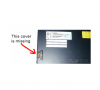
Thanks
Official Sony VPC-Z2 (VAIO Z 2011) Series Owners' Thread
Discussion in 'VAIO / Sony Owners' Lounge Forum' started by SPEEDwithJJ, Jun 29, 2011.


