Problems? See this thread at archive.org.
humph, i'd do that too but mines got a blu-ray writer which I use all the time.......good luck with the modification
-
-
I bought a Sony VPC-EC1S1E in August 2010 and have since experienced the dreaded blue screen on a number of occasions.
I contacted Sony about this and they advised that I carry out a hardware diagnostic. The diagnostic revealed that there were no hardware problems. I then had more crashes (inc 3 in one day). I contacted Sony again (in December) and they told me to do a system recovery. After doing this, I have subsequently had yet another crash today.
I am getting extremely PO'd at this computer. Sony say that if I send the laptop in to be repaired by them, and it is revealed that the problem is NOT a hardware problem, they will do a system recovery and charge me a £58.00 fee. This is unacceptable.
Anyone else had similar issues? What else can I do to sort this problem out? Is it possible that they might just replace the unit? -
Hopefully, this information will make sense to someone...thanks. I am getting problem when idly surfing the net or listening to music.
Loading Dump File [C:\Users\David\Downloads\121910-21403-01.dmp]
Mini Kernel Dump File: Only registers and stack trace are available
Symbol search path is: SRV*d:\websymbols* Symbol information
Executable search path is:
Windows 7 Kernel Version 7600 MP (4 procs) Free x64
Product: WinNt, suite: TerminalServer SingleUserTS Personal
Built by: 7600.16617.amd64fre.win7_gdr.100618-1621
Machine Name:
Kernel base = 0xfffff800`03055000 PsLoadedModuleList = 0xfffff800`03292e50
Debug session time: Sun Dec 19 18:21:58.278 2010 (UTC + 1:00)
System Uptime: 0 days 1:13:17.464
Loading Kernel Symbols
...............................................................
................................................................
......................
Loading User Symbols
Loading unloaded module list
....
*******************************************************************************
* *
* Bugcheck Analysis *
* *
*******************************************************************************
Use !analyze -v to get detailed debugging information.
BugCheck 7F, {8, 80050031, 6f8, fffff8000308dec0}
Probably caused by : ntkrnlmp.exe ( nt!KiDoubleFaultAbort+b2 )
Followup: MachineOwner
---------
2: kd> !analyze -v
*******************************************************************************
* *
* Bugcheck Analysis *
* *
*******************************************************************************
UNEXPECTED_KERNEL_MODE_TRAP (7f)
This means a trap occurred in kernel mode, and it's a trap of a kind
that the kernel isn't allowed to have/catch (bound trap) or that
is always instant death (double fault). The first number in the
bugcheck params is the number of the trap (8 = double fault, etc)
Consult an Intel x86 family manual to learn more about what these
traps are. Here is a *portion* of those codes:
If kv shows a taskGate
use .tss on the part before the colon, then kv.
Else if kv shows a trapframe
use .trap on that value
Else
.trap on the appropriate frame will show where the trap was taken
(on x86, this will be the ebp that goes with the procedure KiTrap)
Endif
kb will then show the corrected stack.
Arguments:
Arg1: 0000000000000008, EXCEPTION_DOUBLE_FAULT
Arg2: 0000000080050031
Arg3: 00000000000006f8
Arg4: fffff8000308dec0
Debugging Details:
------------------
BUGCHECK_STR: 0x7f_8
CUSTOMER_CRASH_COUNT: 1
DEFAULT_BUCKET_ID: VISTA_DRIVER_FAULT
PROCESS_NAME: System
CURRENT_IRQL: 2
LAST_CONTROL_TRANSFER: from fffff800030c4ca9 to fffff800030c5740
STACK_TEXT:
fffff880`02d69ce8 fffff800`030c4ca9 : 00000000`0000007f 00000000`00000008 00000000`80050031 00000000`000006f8 : nt!KeBugCheckEx
fffff880`02d69cf0 fffff800`030c3172 : 00000000`00000000 00000000`00000000 00000000`00000000 00000000`00000000 : nt!KiBugCheckDispatch+0x69
fffff880`02d69e30 fffff800`0308dec0 : 00000000`00000000 00000000`00000000 00000000`00000000 00000000`00000000 : nt!KiDoubleFaultAbort+0xb2
fffff880`02d85d90 00000000`00000000 : 00000000`00000000 00000000`00000000 00000000`00000000 00000000`00000000 : nt!SeAccessCheckFromState+0x58
STACK_COMMAND: kb
FOLLOWUP_IP:
nt!KiDoubleFaultAbort+b2
fffff800`030c3172 90 nop
SYMBOL_STACK_INDEX: 2
SYMBOL_NAME: nt!KiDoubleFaultAbort+b2
FOLLOWUP_NAME: MachineOwner
MODULE_NAME: nt
IMAGE_NAME: ntkrnlmp.exe
DEBUG_FLR_IMAGE_TIMESTAMP: 4c1c44a9
FAILURE_BUCKET_ID: X64_0x7f_8_nt!KiDoubleFaultAbort+b2
BUCKET_ID: X64_0x7f_8_nt!KiDoubleFaultAbort+b2
Followup: MachineOwner -
Try doing a checkdisk /r to make sure your hard drive is not faulting either. A bad hard drive can corrupt files and give you blue screens.
-
Unfortunately these mini-dumps don't really tell us a whole lot - it only tells us what crashed (in this case part of the system kernel) rather than why or what caused it to crash. Since ntkrnlmp.exe relates to the processor and handles vast amounts of work, any one of those things could have caused it. If you're consistently getting 0x7f_8 BSODs, it's most likely software/driver related. If you're getting a bigger varietly of codes it's probably hardware. I can only suggest the usual things re: BSODs:
Have you tried a clean install (either via the Sony recovery partition/DVDs or you own copy of Windows)?
If so, have you updated every driver you can? Ignore the drivers from Sony's site for the most part, they're out of date. Just get the most up-to-date you can direct from the device manufacturer - particularly the chipset/mobo drivers.
Running any 3rd party anti-virus or firewall?
Tried running memcheck and/or checkdisk?
Checked Event Viewer to see if anything is flagged up there?
How are your temps? Do the BSODs happen soon after startup or only after the laptop's been running for a while? -
Do you think it's possible to send it back to sony/a service center and have this swapped or upgraded in some way?
-
I'm afraid not - as I said, the GPU isn't just a slot-in part as it is on a desktop (and very few laptops), it's an integrated part of the motherboard. The only way would be to return the laptop for a refund and get a new one - I'm not sure of Sony's returns policy but I'd imagine they only offer limited time to do it after you receive the laptop.
-
Hi, Can anyone tell me how to fully uninstall ati drivers and re-install the latest 10.12 mobility radeon pack ?
Thanks -
Hey Everyone, I bought my Vaio E Series a while ago, and the service has been a pain in the neck, with terrible mistakes mistaking my graphics card replacement after i had a BSOD, and now my new bent motherboard which came replaced on my Laptop has a dent which allowed my Hard Drive to corrupt itself, and it is now faulty.
I am having a hard time with it, as it's faults are affecting my studies (I study Computer Science). I am gonna try and get this "Quick Web-Access" feature installed on it, more likely fail too, but i will say one thing. We have this thread to help each other, find resources unknown to us in an easy manner and make our lives with our notebooks as fun as it can be. It has now reached 291 pages and now it is being cluttered with The new E Series Talk. Let's all work together and try to have the first page have a Table of contents Links to specific pages so that future owners (no matter how little they may be) can easily find their way through this thread. Even maybe seperate this thread from the new Vaio E Series.
Here is an example of what i think we should do:
Quick Web Access
http://forum.notebookreview.com/son...official-vaio-e-series-owners-thread-181.html
http://forum.notebookreview.com/son...-official-vaio-e-series-owners-thread-53.html
Clean installation instructions:
http://forum.notebookreview.com/sony/146033-how-optimize-any-sony-vaio-semi-clean-install-35.html
----------------------------------------------------------
FN Keys Fix (Common Problem):
Have to be installed in sequence,
Install Event Service (VAIO Event Service 3.3)
Restart
Install Shared Library (Sony Shared Library 4.1)
Restart
----------------------------------------------------------
Vaio Ftp Resources:
ftp://ftp.vaio-link.com/pub/VAIO/
Sony official Support (for drivers,etc...):
http://support.vaio.sony.eu/computing/vaio/index.aspx
I wish this was on the front page, i hope you can do that Metsn >_< I don't care how you edit it. Would be nice to have it there... and updated too.Last edited by a moderator: May 8, 2015 -
I second this. It can be a daunting task to wade through the information and find what is truly appropriate. A post on page 234 that explains a promising solution may be completely repudiated by page 267. It is almost impossible to implement suggestions in this thread without reading practically every page. The search function only gets you so far, since many folks use abbreviations or alternate spellings, etc.
The Definitive Online Hackers Guide to the Sony VAIO E-series
Yeah. I like that. -
I support it too, it is painful to search through the whole thread just to find one issue.
-
'Lo all.
I'm going to upgrade my RAM to 8GB soonish, I was just wondering which of these two are better.
1. 8GB Kit (4GBx2) - Part #: CT1528576 • DDR3 PC3-10600 • CL=9 • Unbuffered • NON-ECC • DDR3-1333 • 1.5V • 512Meg x 64.
£83.99
2. 8GB Kit (4GBx2) - Part #: CT1528584 • DDR3 PC3-8500 • CL=7 • Unbuffered • NON-ECC • DDR3-1066 • 1.5V • 512Meg x 64.
£89.99
My logic is usually 'bigger number = better' so I would assume that option 1 is better but why don't the prices reflect this? -
The PC3-8500 will probably be slightly better. The 10600 will only run at 8500 anyway since the laptop only supports up to 8500, and the 8500 has a slightly lower CAS latency (bigger isn't always better!).
-
Ah ok, ta for the info
 . Why does Crucial suggest the 10600 if the Sony can't make use of it?
-
To sell them.
-
Fair point
.
-
Thanks for your response.
I did run a hardware diagnostic and it disclosed no hardware faults. However, I then followed Sony's advice and did a full system recovery (or whatever it's called) and still ended up having the same problem with crashing.
I have arranged for a courier to send my laptop to Sony so that they can sort the issue out. Laptop runs pretty cool so over-heating is not a problem.
I am getting the BSODs after the computer has been running for a while. -
Have you taken any pictures when that happens? I would take pictures of the BSOD, print them out and send them along with the laptop.
-
The fault (an "unexpected Kernel Mode Trap") certainly would seem to imply a hardware issue. Before you send it back, be real sure it is as "vanilla" as it was when you got it. I'd be especially suspicious of any hardware modifications or additions (think RAM chips, perhaps even external HIDs such as mice, keyboard). From what I understand with these faults, hardware - especially memory chips - are the first suspects. Software and drivers can also be culprits, but less likely.
When Sony gets it back, you should expect that they'll tear it down into the exact same state they shipped it originally. What that means is that if you're absolutley certain there is NOTHING you added or modified, then return is definitely your best option. If you're not prepared to make that stand, you have more work to do.
If the latter, then one more thing you can try is Everest. It does a very thorough job of checking the system. Consider one of the many RAM testers as well, although I understand that they don't always detect RAM faults (but if they do, the diagnosis is made).
If you are feeling especially motivated, try removing memory chips one at a time and running on one chip or the other. Invite your friends over and have them join in on the fun. Can you think of a better way to party? All kidding aside, if the BSOD occurs at a predictable rate, the system presents a good platform to do that kind of trouble-shooting. From what you previously posted, it has BSODed several times in a day. That meets one definition of "predictable".
Good luck. -
I still have a fan noise issue
any advice would be greatly appreciated
model no: VPCEA3C5E
when i boot it up its noisy and then it becomes quite but after 10 mins or so it becomes noisy again-even with just doing stuff like web browsing
Room temp is 17 degrees so it cant be that
Ive tried using it on my bed -noisy
and on my desk -also noisy -
I'm getting a Sony ea next week and understand they come with quite a bit of bloatware. I'm thinking of doing a clean install as I have a retail copy of win7.
My last comp was a dell and I did the same the drivers were really easy to get off the dell site. Are the drivers easy to get off the Sony site so I can do a clean install ? -
Yes, just go to support in sony.com (or equivalent if you are living in Canada or EU) and you can find the driver you want. They also have auto detect function in the USA site to detect your laptop model if you are not sure.
-
thanks for that found them on the uk , do you know what driver is for the three buttons specifically the quick web button. or do i need to find that on the recovery partition before i do the clean install?
-
I don't have e series laptop (I am still waiting for the Full HD display for EB series in the US), so I am not sure if there any specific driver for it.
Base on my experience these three buttons should be associated with the keyboard driver. -
Well my caddy hasn't arrived yet (has to ship from the USA to Australia) but I went out and bought 8GB of ram and a 500GB Seagate Momentus XT disk. Great performance improvement! If you have one of these HDDs make sure you update to the latest firmware (SD24 at the moment) for a hefty improvement in performance and power consumption.
I'm just planning to completely replace my optical drive with a second HDD when the caddy arrives. There is a USB dvd drive around here somewhere I can use if need be. -
Haha, you're doing exactly what I plan on doing.
Gonna install at Seagate Momentus XT at some point... waiting to see if they ever come out with a 750GB/ larger cache. Did you do a clean install or did you clone your drive? -
I did a clean install, but only from the Sony discs - could not be bothered sitting through setting all the drivers and the like up myself. Revo Uninstaller takes care of the bloatware enough for me.
-
The auto detect site here in the USA is rather useless. It does not show the current installed drivers, only the drivers available for download. So if you see drivers listed, you may well have that version installed. Further, they will list drivers for all variants even after auto-detecting your system - so you may be presented with drivers for a video card you do not have.
Google "Secunia PSI" - they have a great little program that will scan your system and list driver updates.
As far as the bloatware, I have yet to see a comprehensive discussion about just what is worth keeping and what isn't. I lived with my notebook "as shipped" with respect to the VAIO-specific software, deciding to give it a shot on selling it's usefulness to me. I wiped away non-VAIO stuff such as the Accuweather widget and anything Norton (use their uninstall utility!). I'm seriously considering flushing the VAIO Gate thing - seems more annoying than useful and uses gobs of resources. -
In case any new members are interested or may find useful-
Vaio EB teardown -
Good video. Does anyone know what the black and white connectors here are?
![[IMG]](images/storyImages/xLL17.png)
-
I'm planning to buy this laptop and currently choosing between the EA and the EB.
It seems that in sonystyle USA currently, the EB is cheaper than the EA. Is that normal? I plan to CTO with i5 580m, 5650HD with the large capacity battery. Does anyone have the same configuration, how is the battery life (i.e. how many hours)?
In CTO of EB, how do you know if the HD display is already available? -
"I'm afraid to press that button...."
I have noticed that on every boot, I get an event error stating "LMS Service cannot connect Intel MEI driver". I haven't had much luck tracking it down, but suspect it may be causing some of the occassional issues with wireless card connectivity I've been having.
In my explorations, I have found that when I open the Intel Control Center, it contains a statement that "There are currently no registered applications available" and offers an Uninstall button. I called Intel and was told it was OK to press that button. Frankly afraid to press that button, despite my thought that getting rid of ICC may eliminate some system event errors.
I suspect this is the case with a lot of new EB's. So I ask - does anyone have any thoughts on this? -
I am also wondering why, since the spec is almost the same (actually EB have an extra component)
For CTO of EB, currently the Full HD (1080p) display is not available. It's been out of stock for a while already, according to the sales support I've contacted.
PS: They seems to be slow in restocking component... I've heard that they have been out for months already. -
Have'nt been here for a while but, i'm concerned as to why from yesterday my Vaio is displaying a problem. Push the button and it allways comes on straight away, now after pushing the button it just hangs at the Vaio screen and i have to turn it off/back on and it eventually comes on.
Not installed anything - Nor done anything and, its allways started up 1st time. Very worrying as its only 9 months old. Any one got any ideas?? -
A couple of thoughts...
A system restore may help - restore to a version that worked before the difficulties. Also check the event viewer and see if any new event errors started happening around the time of the problem. Even if you haven't installed anything, there may have been an update or something along the way. For example, if you have Windows automatic updates configured (and you should), you may have updated a normally appropriate device driver that just doesn't play well with Sony Vaio. A good way to check is to look at your Windows Update history next time you get a successful boot - if you see that, then go to the Device manager and roll back the driver. I had a similar issue on more than one occassion with a Lenovo, and although Windows saw a newer device driver in Windows Update, I learned to steer clear if Lenovo wasn't offering it.
Sometimes you have to be Columbo, so pull out the shabby raincoat... -
Kidz
No updates done as i have them turned off as i use a use mobile broadband dongle and the updates would eat into the data allowance. What part off event viewer do i look at, as ive not used it before. Also if i use a restore point would it be best to do it via the Vaio Care software as i have 2 choices from Vaio Care automatic restore point or just an automatic restore point, dont no what the difference is ??
I ran a hard disk diagnostic test with the vaio care software and it came back ok. Laptop turned on tonight ok, it just seems to be trouble in the morning when i turn it on. Like Monday morning[ didnt start 1st time] then monday night when i got home it was ok, same today. Would off thought if it was hardware it would be difficult all off the time. -
Hi Steve -
Rt-click Computer and you'll see Event Viewer listed under System Tools in the Computer Management Window. If you open it up you'll see subfolders. Go Event Viewer -> Custom Views -> Administrative Events and it will list the anamolous events. You'll almost certainly see some, even if your system is running at peak. But concentrate on those that occur with time stamps correlating to the bad boots. That's what I mean about being a Columbo about this (an old TV detective, btw) - you really are playing detective.
As far as a restore point, pick one that is close to before when the problems started. I don't think it matters where you invoke it, as long as it is a true Windows Restore point. To eliminate doubt, go Control Panel -> System and Security -> Action Center -> Recovery -> System Restore and pick a point to restore to.
Since you are not updating Windows, perhaps you have some security vulnerabilities that could ultimately be to blame. Do you run an anti-virus software? Have you run a Malware check (my favorite is Malware Bytes). I'd most likely run those scans before even roilling back to a restore point, since it may resolve the issue. The only thing I don't like about Restore point is that while it can make the system workable again, it will not tell you what went wrong (ie. diagnosis). So I'd definietly run the scans first, because it can both repair AND give you a clue.
I'm no expert. I'm just telling you what I would do. So proceed accordingly.
Good luck. -
Is your antivirus Avast by any chance ?
There was a "bad" update recently giving all sorts of problems.It is slowly being rectified with some pre-releases before a definitive release.
*** NEW PRE-RELEASE UPDATE 5.1.884 NOW AVAILABLE ***
Ian -
Kidz
I Have that ""LMS Service cannot connect Intel MEI driver" issue as well.
I googled it a while back and lots off reading there matey about it.
Well I also use Mailware bytes as well as Microsft security essentials both come up clean. This morning was the 1st time the vaio started up normal and i am wondering if the 3 mobile broadband dongle is maybes a problem as i did leave it detached last night so wondering if it's just a coincidence or not that the Vaio started??
Event Viewer shows lots off AppHang B1 error's causing Internet Explorer to shut down . The dates for these are 9th & 10th Jan and thats the time the Vaio wouldn't startup properly so could they be related!!. I just need to suss out if they are linked in any way as i'm not sure myself..
Ian no mate don't use that software.. -
Sounds like you're on a track. Just thought I'd mention it's probably not the LMS/MEI error, though. I have that as well - appears at every boot - but doesn't appear to be impacting performance in any way. I suspect the Intel Control Center (Under Programs -> Intel -> ICC. When I invoke it, it mentions there are "currently no registered applications available" and then presents a rather prominent UNINSTALL button. I posted here about that last week, no response. I would bet a lot of the E-series Vaio owners here have that event error, since it occurs in the as-configured, as-shipped "vanilla + bloatware" state. It would be nice if someone commented on it. Some day I'll press that button...
-
Kidz I agree on the LMS error - that's just a comment as i new i had that and then saw your coments above.
In all honesty i'm doubting a hadware fault and hedging towards a usb and / or a software problem. Do you think i'm being sidetracked and should have hard drive tested with some software etc?? I'm not getting any signs/errors that hard drive is acting up.. -
The black one was leading to the screen and the white socket there is empty- It says inverter connection below it so I assume the motherboard was made for previous model of laptops that accommodated an inverter for the CCFL in the LCD. I think, therefore the newer vaio can be seen to have a LED backlight. .................Or did you mean the connectors all the way far right on the edge of the screen?
later* I think I remember! I think they were for the speakers, I'm 70% sure they were for that -
I doubt hardware as well - if anything a scan of the hard drive wiht a free utility. In order i would suspect configuration, driver, malware/software, hardware.
-
it's looking like it could be the dongle/usb problem as i have an Acer laptop with Vista installed and now this is misbehaving with the 3 dongle and it's never been anything but smooth before hand. The dongle has the files installed on it so they could be corrupted.. Or it's a voltage problem with it..
-
Hey guys
My sister has just bought a new Sony E-Series notebook and im giving her a helping hand with trying to remove some (note: ALL) the bloatware. Im making some recovery discs now using VAIO care but after thats done is there a recovery partition I can boot from and restore to? My Envy did and im just wondering if it's the same? I've not had a proper look around yet and I thought I may as well ask here whilst the laptop is making the discs
I had a look at the Windows 7 install guides sticky in the main forum but none of them mentioned the E-Series and another said if you had a non-US Sony then it wouldn't work.
Cheers guys -
Yes there is a recovery partition on the HDD that can be accessed during the boot process.
-
anyone know of any reputable places to get a spare battery for the ea series laptop. wouldnt mind getting a spare or a higher capacity battery
-
Cheers for that
I tried it last night, but it installed all the bloatware again...annoying. 2 hours of my life wasted and im still at square one! haha
Am I stuck with it like this or is there a way of stopping it from being installed at the root? If not I could always uninstall things but thats my last resort probably -
I saw this post before, it might help.
http://forum.notebookreview.com/sony/146033-how-optimize-any-sony-vaio-semi-clean-install.html -
Hello community!
VPCEB3C5E model I have a laptop with a 300GB Hitachi hard drive specifically this: Technical Library - Travelstar 7K500
OS: windows 7 home premium x64
RAM:6b
CPU:I7
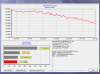
The problem is the disk transfer is very low. Attached image with the HDTach.
Do you have these transfers so low?
HKEY_LOCAL_MACHINE \ System \ CurrentControlSet \ Services \ Msahci
I tried to change the value "start" from 0 to 3
But nothing has changedAttached Files:
-
Official VAIO E Series Owners Thread
Discussion in 'VAIO / Sony Owners' Lounge Forum' started by Metsn, Feb 3, 2010.