Problems? See this thread at archive.org.
Thanks for the thoughts. Small text isnt an issue for me since ive been using a TZ as my only laptop through 2 yrs of my grad program. I need the extra real estate so i can have many programs open at the same time without having to flip between them.
Im not a gamer, so that isnt an issue either, although, i do photography as a hobby.
On another note, has anyone swapped their original HDD on their FW with an SDD? Im thinking of one in the 32-64gb range; just enough for the OS. Its mainly to speed up boot times, lower noise, and lower temp.
-
I am sure you can install SSD but if you only use 32 to 64GB range, there would be no place to install anything else. You would need to install applications in a secondary HD but installing both SSD and HD is not possible with FW. The laptop doesn't have enough place for both of them.
-
Can't you just set the resolution lower on a 1080 screen if you want your games to run faster? Unless you have a GPU manufactured by retarded monkeys, setting the resolution lower will speed up your FPS.
I can see if power drain is an issue since 1920X1080 has a lot more pixels than the 1600X900 screen.
2073600 pxiels as opposed to 1440000.
By the way, 30fps at 1080 is 6,222,080,000 pixels per second. That's mind boggling. 6 billion! That's how many pixels when a blu-ray movie is playing.
-
Sure you can but lowering the resolution will make the screen looks ugly. You either you to stretch it to make it fit into the screen or maintain 1 pixel for 1 pixel ratio in which you will have black bars on 4 sides of the screen. Neither solution is desirable.
-
Love my 285
-
Hey,
First of all thanks for the interesting read in this thread, lots of good info here.
I've just ordered the FW21E here (hope it was a good choice!) and after reading the thread I am now left wondering whether I will get the HI-COLOR or ECO screen. Thanks for any help
-
Hi,
According to your site, I saw the screen resolution is 1600 x 900, maybe that's a ECO screen. -
Oh wow! I think I have truly found notebook discussion nirvana!
Let me just say that this website has already come to my rescue many times in the past, most noteably when I was having issues with my first Sony Vaio (so long ago now I can't recall the model) and I'm proud as punch to finally get round to joining, the knowledge here is truly outstanding!
However, the very thing being discussed here is the reason for my grief and the reason for my registration...the Sony Vaio FW Series, the VGN-FW21L to be precise.
http://vaio.sony.co.uk/view/ShowPro...s&category=VN+FW+Series&assetid=1218032875460
This is my 2nd Vaio and my 5th laptop in total and my first computer that I've ever bought with Windows preinstalled. (not unusual being that I'm a PC engineer)
The price and specification of this lappy was so outstanding that I simply couldn't ignore it...it has Vista installed, no big deal I guess, if I really can't stand it, I can always downgrade.
Well I wasn't disappointed! It's an absolutely kickass laptop! I haven't tried any games on it yet but so long as it plays Vice City, GTA3 and San Andreas I'll be happy. But I do have one annoying problem...
"FULL HD 1080"
There's a sticker on the case that says "full hd 1080" and being that it has an HDMI port, I already guessed that it supported 1080. The graphics chipset supports 1080 (Radeon HD 3470) and after plenty of googling I understand that this particular laptop does indeed output at 1080 via the HDMI port.
But it doesn't.
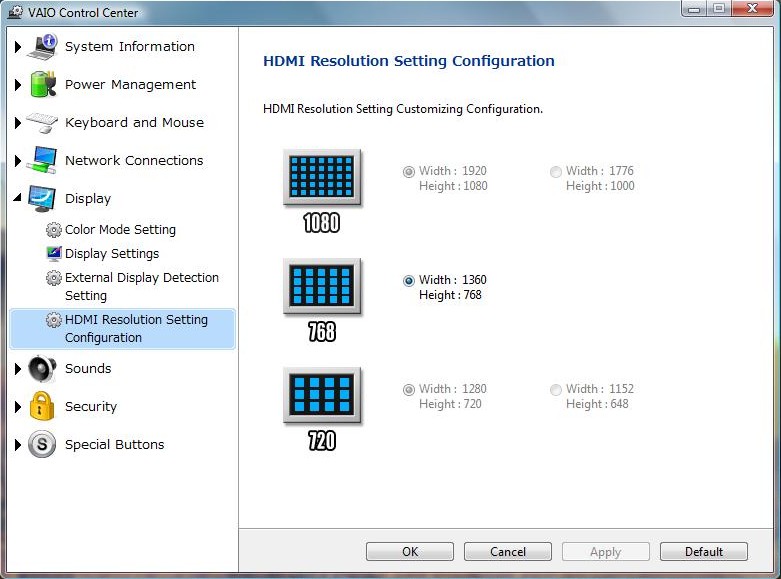
I've tried it on two different LCD TVs (one LG and one from Novatech) which both output at 1080p through my PS3 but when I plug in the HDMI port, it autodetects and sets itself up at 1360x768 and I cannot change it!
The Vaio Control Centre has 1080 and 720 greyed out and if I use the ATI drivers, I can only change down to 1024x768 and lower. There's a "force" option where you can force a resolution but neither 720 or 1080 are listed.
Blu Ray films look great though, no complaints there. The video properties say "1920x1080" but the desktop is still on 768.
It's driving me mad because the last laptop I bought didn't output anything from it's VGA port and after such great expectations, to have this one not output at 1080 from it's screen (1600x900) or from a 1080p TV when it has a "full hd 1080" sticker on it is just ridiculous.
I've searched the Sony websites for the answers and have emailed them.
Anyone know what's the deal with it?Attached Files:
-
-
Thanks, I guessed it might be unfortunately. Is the screen really that bad, bearing in mind my last laptop was a 4 year old Toshiba (Satellite pro L20)?
-
Compared to the screen on my previous low-budget Acer laptop, the ECO screen is pretty good and I'm perfectly satisfied with it. OTOH, I can imagine that if you're used to a better-lit and higher-contrast screen then anything less won't do. As with TV sets, it's always easier to upgrade than to downgrade in size and picture quality The only visual drawback that you'll notice in your daily activities is the rather low vertical viewing angle, so if you like me switch between sitting and lying down in front of the laptop, you'll have to slightly adjust the screen position in order for the colors not to be too washed out...
-
Thanks for reassuring me, I doubt my old laptop had a good screen so I should be okay.
I know they are completely different machines but could anyone compare the quality of the Eco screen and the acer aspire one if they have seen both?
Thanks for all the help so far
-
what if the picture on the internet is too small? then what do you do?
-
Use FireFox. It have Zoom feature that makes images and text larger in a natural way and looks great.
-
or press Fn F10 to zoom in and Fn F9 to zoom out
-
How come some models are only on sonystyle? I'm interested in getting the fw290
-
Thw FW290 is the model designation for their custom build FW; when you choose it and it brings you to their custom build process.. ie. its not available in stores. All their other models should be available at retail.
-
http://www.sonystyle.com/webapp/wcs...10151&langId=-1&productId=8198552921665507468
I'm leaning towards this one instead of completely customizing. I don't know. $1,649.99 is an arm and a leg. And the warranty will add $349.99 or something. Do you need the accidental damage? It's overkill but if copying blu-ray discs become the norm then i'll be set. I'm also not sure about the battery. I read some posts and people said that 1080p drains the battery very quickly. So is the extended battery worth it? -
http://www.techbargains.com/vendor_detail.cfm/208/Sony-Style-coupon-code
There is a $200 off for pre-configured models that lasts until January 6th of 2009. Make sure you know about that before you finally decide to buy a pre-configured model.
TECHBARGAINSVAIODEAL
is the coupon code. Active until 1/6. That's Tuesday. -
Yeah that's totally true. When it's not 1 pixel for 1 pixel, it always looks a little weird. But if I have a choice between a Terran Siege Tank looking crappy or a Victoria Secret model in 1080 looking crappy because her legs got cut off... I think the choice would be obvious. Siege Tanks don't need to look that great anyway is all I'm saying.
-
Where can i find nice wallpapers that are perfect for the Full HD screen?
-
http://gizmodo.com/5123157/lenovo-i...htest-16+inch-notebook-thanks-to-carbon-fiber
HP's HDX16 and Lenovo's Y650. Looks everyone is going 16:9 nowadays except for Apple who vows to never use industry standards. :-D
"Puhshaw, hdmi is for fools and globlins" - Steve Jobs*
*quote not actually factual -
the lenovo looks nice... wow this makes the decision harder!
But I'm located near a Sony Style so it might be easier for me if I ever needed help.
EDIT
I just saw the resolution for the Lenovo...nm. -
The Lenovo screen resolution is a bit too low. For 16" screen, I would expect the resolution to be higher than 1366x768. But it is nice to see them embracing 16:9 screen. True HDTV ratio is the way to go in my opinion. It is nice to watch Lost or 24 without the black bars.
-
Hi guys,
What kind of cards that card reader of FW can read?
Thanks -
The Lenovo is not bad but the res is too low. The display itself might be very good if its LED backlit though this doesn't mean that black levels and colour reproduction are necessarily top notch (look at the T400). Can't wait for a review. I don't regret buying the Sony though. I'm sure the Y650 will be pretty expensive when loaded with 4gb RAM and other stuff given that its base price is 1200$.
-
SD/MMC and Memory Stick Duo.
-
I can get to a sony style store. Do they have the 290 models there? If you wanted to customize it could you do it there and then pick up?
-
Hi TetonWolf,
Im getting the FW with the eco screen tommrow, can that screen be calibrated with this same method?
Thanks in advance. -
Hey is that for the US only? -
Wait, it's not 1080? Haha. I just assumed that it would be. Sorry about that. Lenovo has a lot of catching up to do in the home entertainment laptop business. It's where the money is at frankly. Businesses laptop update at least twice as slowly as home laptops. And when there is an economic downturn (or as I like to call it, Great Depression 2), the first thing to go for ALL businesses is updating computer equipment. I would imagine Lenovo is hurting quite a lot by now.
-
Why would you want to do that? That would be like a ship to store option. And I don't think that's possible. The sony style stores only carry computers already built.
Don't worry about the model number. It's almost completely meaningless. Worry about the specs on the computer. The processor, the video card, the screen resolution, whether or not it has blu-ray. The hard drive and ram you can update yourself. You can even update the processor yourself, but it's not economical to do that right now. It's cheaper to get the processor upgrade straight from Sony.
Sony pays like $27 a processor for a P8400. You'd have to pay like $199 for the same processor retail.
It's cheaper to upgrade the ram and hard drive yourself. Just get the lowest hard drive and ram option possible.
Because of Great Depression 2 though, I'm sure Sony Style stores would LOVE to move some inventory. You can go to the store and if you know what you're talking about, I'll bet you can get like $200 or $300 off without breaking a sweat. Especially if you have a printout of the same computer at sonystyle.com for a cheaper price after coupons. -
It shouldn't be. It's techbargains.com. That's not limited to a specific country. The coupon code might be limited to sonystyle.com though as opposed to sonystyle.canada or something. Sorry if you can't order from sonystyle.com if you're overseas. I forgot about that.
-
Does anyone know if the keys on the keyboard can be popped off without breaking them? Somehow there is something stuck under the W key and it won't press down all the way. It is really starting to get annoying. I just want to pop off the key and clean it out, but I'm not sure if I'll be able to get the key back on. Any experience with this?
-
Hi guys,
really thinking of getting the FW21L, but with only a Ati HD 3450 graphics im wondering if it is a decent card for basic gaming (the odd rpg) - nothing spectacular??
Also the screen resolution and blu ray look nice - and its a sony so quality is there.
Its just im also looking at the Acer Gemstone Aspire 6920G and HP DV7 which seem to have slightly better graphics.
so whats it like for performance?
thanks,
Marc -
I heard it somewhere that Sony Brick and Mortar Store will charge you restocking fee if you return notebook that you buy from them. Only if you buy it online do they not charge restocking fee.
-
I asked a question back on page 251 (post#2508) about the FW21L and a problem I was having with the "Full HD 1080"
Unfortunately, nobody has answered but maybe I can help you...
Firstly, the card is an HD 3470, not a 3450 and it's a pretty decent chip actually! It plays Half Life 2 just fine as well as GTA3, Vice City and San Andreas. I actually chose it because of it's fairly powerful graphics.
The 1600x900 screen is great, fantastic picture quality...but Blu Ray doesn't look great on it. Vista looks great but Blu Ray video looks a bit washed out.
The Blu Ray looks much better when connected to an external LCD TV BUT it still refuses to work in anything but 1360x768 so it never lives up to the "Full HD 1080" sticker.
And today I came across a problem with the keyboard, the down arrow to be precise. I hadn't needed to press that particular button until today and found that it sticks like a sonofa.
I'm taking it back to PC World tomorrow for a refund, not a replacement. It's a good looking laptop with a lovely screen but the 1080 problem is a big problem and now this dodgy down arrow key...that's a lot of issues considering I've had the thing only 3 days. -
Just got this today.
http://www.sonystyle.com/webapp/wcs...10151&langId=-1&productId=8198552921665507468
Online it's $1,649.99 but at the store it was 1,449.99. And if i bought it yesterday i would have gotten another $200 off. The warranty was $500 but i got 4 years of coverage with accidental damage. At the moment it has way more than i need but i wanted to make sure i got everyhthing that i might need in the near future. -
I'm looking at this exact one, and I'd be getting a student discount of 10% + 200.00 off. The only problem I have with it is the 2.40 processor. I'm looking for a 2.53 or 2.8... I can get the hard drive replaced.
-
hey guys,
I recently bought a hp dv5-1165 notebook, but I´m really disapointed with the screen, the colours are very washed out, there are no blacks, justs greys, bad viewing angles and too many reflections on the screen, all of this is a pain if you want to use the notebook to watch movies. Today I saw at a store this new vaio series, fw, and the screen looked much better to me, to you guys who already have it, I would like a unbiased opinion, is the screen good? does it have good colours and good blacks? how about reflections? I have heard that vaio´s are very good on the screen bur I would like to hear the opinion of someone who uses it everyday.
thank you. -
The only way to go with regards to FW in my opinion. With respect to acer, i stay away from acers like i stay away from aids infected escortz.
-
I wish it weren't so.
I was just about ready to pop for this puppy but this is a deal breaker. One of my rationalizations for the cost was that I'd get a blu-ray player for my HDTV as a bonus.
Well, at least I found about it now. Thanks. -
Does anyone use an FW275 (or similar config) to rip/encode DVDs? How fast can you rip and encode?
The ripping part is fairly fast on my TZ (limited by the drive speed, really); but, encoding a 100min video to 720x480 mp4 takes 4 hours! (lol)
(im using Handbrake) -
Don't forget there are 2 levels of blu ray (R and RW) and 2 different 320 GB hard drives (5400 and 7200)
-
I have a FW290CTO (was $999 now $1249) and it works very well with my 1080p HDTV and my external HD 24" monitor. See both as HD (both are 1920x1200) and plays the movies without difficulty. The LCD on the laptop is 1080p (1920x1080) but is not as good as some. The blacks are not totally black and the screen isn't as vibrant as some LED backlit displays but for such a reasonable price it is worth it.
Cheers, -
I just saw that it's $1449 now online with the $200 off. I am concerned that the included 500GB drive is 4200RPM. The size is great but won't I notice slower performance compared to a 7200 drive? Any help here would be appreciated.
Phil -
You will notice; 4200 is too slow. If you are going the pre-built route with this unit, plan on replacing the drive with at least a 320GB 7200rpm drive ($100 or less from several Internet resellers) after purchase and use the 500GB as a slow backup and archive disk in an external housing.
Cheers, -
Well, a dedicated blu-ray player by Sony costs 99 dollars from Walmart so it's not exactly a big loss if you can't get blu-ray to work. It does work very well though. And in 1080. As least with my HDTV it does.
But blu-ray playback on the computer is always at the whims of Sony because they keep those keys so tightly guarded. Kind of stupid really. Who the heck is going to download 50GB for a movie anyways? Completely useless copy protection in humble opinion. -
Actually it IS black. I'm betting that you're using the "Windows is loading" screen to judge the blackness of the black. That screen isn't actually black to begin with I don't think. Just find something with actual black color and you'll see that the black really is black. There is still some light bleeding through, but it's not nearly as bad as the Vista load up screen would lead you to believe.
-
You mean blu-ray rom and blu-ray rw right? blu-ray r and blu-ray rw are all stuff you'd use with the blu-ray-rw drive. Just kidding.
You don't need blu-ray rw in my option. A single blu-ray r disc costs $12.99 give or take. That's a single layer blu-ray r. Dual layer costs like $20.00.
Blu-ray movie from Walmart costs $20.00. So you're spending $20.00 to make a copy of a movie that costs $20.00. And if you have a bad burn, you just spent $40.00 to steal a $20.00 movie.
DOES NOT COMPUTE in my humble opinion.
And that argument that you're using blu-ray rw to archive your family pictures? Just get an external hard drive. At the prices media for blu-ray cost, it's cheaper to get an external hard drive. Heck, you can get like 2 hard drives and the price per GB would still be better.
-
I just bought my very first laptop (Sony Style Mexico)
...
FW290 CTO | 2.4 GHz | 160 GB | 2GB RAM | 3650 Radeon | Blu-Ray Drive | Full HD
A bit pricey 1500 Dlls but includes as "free" gifts a PSP-2000 and 3 Blu-Ray movies.
Since HD and RAM are cheap I will upgrade my laptop later this year.
What do you think guys?
Official VAIO FW Series Owners Thread
Discussion in 'VAIO / Sony Owners' Lounge Forum' started by Hinduemperior, Jul 28, 2008.