Problems? See this thread at archive.org.
Awww. I want a free PSP too. Sigh...
-
By the way, you also get a free picture frame if you add that $170 picture frame to your cart with a pre-configured Sony VAIO FW at sonystyle.com.
Make sure you get that free picture frame because they ain't gonna give you one after they ship you your laptop. -
Is that a Core 2 Duo processor on the TZ? Are you using Handbrake 0.9.3?
-
A couple of questions regarding my new VGN-FW290 JRB:
Is the I-Link port (IEEE1394) Firewire 400 or Firewire 800?
Does anyone know what percentage of the Adobe RGB Colorspace the X-Brite Full HD and ATI 3650 combo can produce?
Can the X-Brite Full HD screen be calibrated? If so, how do you do it?
I'm planning to use this computer as a portable Adobe Photoshop / Lightroom workstation. I looked at the AW series but it was to big and heavy to be carried around.
When at home I plan to connect it to my 32 inch LG 1080p LCD TV (32lg70). Will this combo give me better more accurate color than the X-Brite Full HD screen? -
Just comparing it to my 32" 1080p HDTV and my 24" 1080p monitor. The laptop screen is not bad, I find it works quite well but for most viewing at home or in the office I use external screens that are more expensive and have a bit better display. When I'm on the road I take my FW290 along with my Macbook Pro (work system) and find the the Sony is very nice to play games and watch movies when I'm not working.
Cheers, -
The X-Brite Full HD is only like 95 percent of the Adobe RGB gamut or something like that. Now I have no idea what that means....
 But the AW has 135 percent of the Adobe 1998 RGB gamut. So I'd get the AW and just deal with it being heavy.
Sounds like you need to find a Sonystyle store and look at the AW and the FW side by side though. -
That and the rather "hefty" $$$ difference.
-
After a month of ordering snafus I FINALLY got my FW yesterday hallelujah!
I ended up getting the FW373J/B and there's so much I want to test out and play with but I don't even know where to begin. I need to make my recovery discs before I load any of my personal stuff but once I do that does anyone have any tips on what to start doing next? I'm hesitant to do the clean install bc knowing my luck with technology it would go horribly awry but I would like to get rid of any unnecessary programs......I guess it's just been awhile since I started from scratch with a new computer and I haven't used Vista so I'm still trying to figure out the quirks vs. XP (which includes finding out that some of my programs may not work on Vista). Any tips on an order of getting this computer set up? Thanks
-
It sucks that i don't have a computer desk in my room yet. I'm not gonna set it up untill i get one which should be very soon. One thing i noticed in the store was that the black finish on the outside is not that really smooth finish like the ps3 has. I'm sure you know what i talking about. It's more like a rough finish.
-
probably becuase a laptop is designed to be more portable?
Im sure you dont carry your PS3 around everywhere with you? My PS3 sits in my room and computers/tvs can grab music from it etc. using as a media centre
-
I'm trying to set up my new FW but I can't get it to connect to the internet. We enabled the PCI-E ethernet controller which was de-activated so I enabled it and the wifi was already enabled. We've tried connecting to my desktop's wireless router but the FW said it had limited connectivity so we plugged it directly to the cable modem box and it still wouldn't connect. Additionally, when we try the broadband connection it asks for the ISP name and password but it's just a cable modem so that seems like that shouldn't be necessary. We've been doing all the troubleshooting/repair options it gives us but nothing is working.
Has anyone else had this problem and if so how did you fix it? Thanks!
Edit:
We disabled the wireless card in the device setup and it immediately stopped asking for a password and we were able to connect through broadband. We're downloading Windows updates right now and hoping it solves the problem as there's no reason we should have to disable the wireless card at any time other than flipping the switch on the front.
Also, does anyone use the OneCare service? I currently use Webroot Virus and Spy Sweeper and was going to add them to my FW but am wondering if OneCare is worth getting. -
Hello Do you know where to find a sony FW series 64 bit image file (sony.wim) or a 64 bit recovery disk from a FW model with vista 64 in order to put in my FW21Z laptop? Now it has 32 bit I have collected the sony.wim file but it is 32 bit and I want to go to 64 bit.
-
Does everyone use the anti-virus/anti-spyware software that it comes with or do you install something else? I know after 90 days you have to pay for it but is what most people use? The guy said it's good becasue it's the same company that makes the operating system.
-
Check with your ISP, mine offers full suite of security software for free through McAfee. BTW, I use Comcast.
-
There are other threads in the Sony forum talking about this. Have you tried any?
Here's one: http://forum.notebookreview.com/showthread.php?t=233256 -
I have read all of these my friend.
I get my sony.wim file but from this file I cant make a vista installation disk in order to istall the 64 bit version. This image is a direct copy of my computer disk containing program files, windows, users etc and it is in 32bit. So I need a image of a FW that has already 64 bit vista installed -
Getting it from Sony would be your best bet then. 64-bit is not an upgrade in cost but you won't find that image floating around...at least not legally.
-
Hi guys,
I have just found one site about new VAIO models for 2009. The new type F has dual digital TV tuner but the ATI still 3470. It's weird!
Here's the link: http://www.akihabaranews.com/en/news-17272-New+Sony+Vaio+Desktop+and+Notebook+for+2009.html -
I've only had my FW for two days but I can't get the battery to charge past 80%. I've had it plugged in for hours and it still says "80% available (plugged in, not charging) - why would it stop charging before reaching 100%? Has anyone else had this problem?
-
This is because you have the Battery Care function enabled.
It's part of the Sony Notebook control software (I think that's what it's called).
Battery Care allows you to set the max charge at 80% for those that normally use it under battery power, or 40% for those that normally have it plugged in. You can alter those levels if you wish. Apparently this keeps the battery in its most optimal condition.
I use it at 80% - I get around two hours run time.
First time I've been able to help someone on these forums! -
Not much of an upgrade. May have to wait until the end of the year for the new procs to see a significant change. Time will tell.
-
Does anyone else with an FW290 get a "display driver atikmdag has stopped working and successfully recovered" error message?
after that appears in my taskbar, the blue screen errors come next, followed by an auto reboot. Wonder if there's any fix for this... -
This one is also worth mentioning: GUIDE : Clean Vista install using Extracted Recovery Image
-
Hi guys...
without being too biased, im deciding between the FW21L and the HP DV7 and FW11M.
Now, the FW21L is £580 and the HP and FW11M are £699. Now, the HP DV7 and FW11M are pretty much the same specs but obviously the FW11M is last years series and both are £120 more than the FW21L.
Im deciding if the price increase is worth the T5800 to P8400 processor and graphics card increase or if the FW21L is the best option?
Thanks,
Marc -
I think they are talking about FW Japanese model http://www.vaio.sony.co.jp/Products/FW3/spec_vom1.html . And the TV Tuner is an external Express Card, not built-in and may only works with Japanese Broadcast. The TV Tuner has been part of FW Japanese models from previous release so this is not new.
-
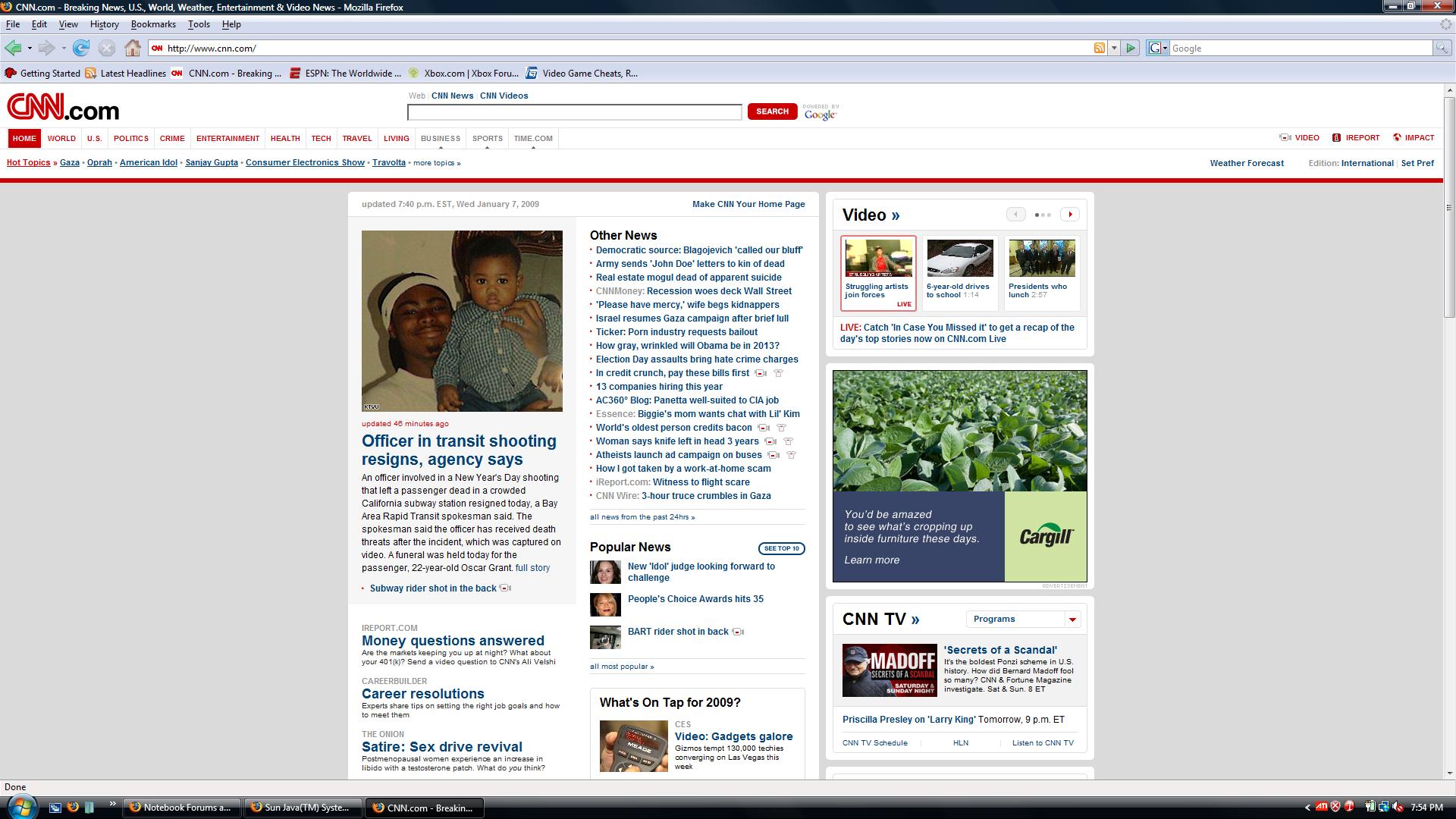
I finally got my FW. Anyway, I have a question about displaying websites. In firefox or ie (doesn't matter which), some websites, like cnn.com, only display in the middle third of the screen. Is this something you can change? I don't remember the sites looking like this before, is it because of the Full HD resolution ?
Look at the pic below...see how the website is framed on each side? How do I fix that?Attached Files:
-
-
Yes, it's because of the HD resolution. It also looks like that with my FW but not quite as dramatic because mine has lower native resolution. You can fix that by lowering the resolution which may make the website looked ugly. Or you can enlarge the font but you will get less number of lines of text horizontally.
-
Yeah, that's what happens when you have a high resolution...
-
But its not the resolution. I've changed both the resolution and dpi settings and the result is the same, certain websites only take up the middle third of the screen. Besides, earlier today the sites were displaying in the whole window.
-
Try to set the scaling option of ATI Catalyst Control Center to Full Screen and lower the resolution to 1024x768. The site should fill the whole screen, but every text and picture will be stretched.
-
Just one little quick question, does this ram is compatible with the lap?
Thanks
I can't wait my FW arrives in 8 days :S -
Probably but since the FW supports the faster DDR2800 RAM this is better.
http://www.newegg.com/Product/Product.aspx?Item=N82E16820104036
I ordered it before my FW arrived and updated it before I even turned it on. It scores a Vista experience rating of 5.9
Cheers, -
This is due to the high resolution screen, yes.
Web sites are coded/written either to a fixed resolution or to fit the current window/browser size (un-restricted/dynamic width).
In this case (CNN), the page is coded both dynamic (top) and fixed (body).
According to the screen cap, the browser window is Maximized. Un-Maximize/Restore it by clicking on the Restore Down button/icon (two squares icon beside the "X" close window). Then resize the browser window to your liking.
Regards. -
Congrats! I'm glad u finally got your FW. Did u get it from newegg?
-
Open up two windows of firefox, right click the taskbar and select "Show Windows Side by Side"
There. Problem solved. You can have TWO browsers open at the same time.
-
Live Onecare will become free by June of 2009. Microsoft is moving to an all-free virus scanner system.
http://www.microsoft.com/presspass/press/2008/nov08/11-18NoCostSecurityPR.mspx
Live Onecare will be replaced by Microsoft Morro.
I feel sorry for you if you actually paid money for Live Onecare. I really do. Sorry. -
Ok. So i have to make an HDD recovery disc. Will it show me how to make one and do i need to put it on a dvd or cd? If so, what kind of dvd or cd do i need?
autumnale, i just got my laptop that's why i asked what people use. What do you use then? So live onecare isn't good? -
that. is. awesome.
Never used vista before, or a computer anything like my new fw. Tons of stuff to learn about. -
Hello all! I recently purchased a z540 CTO from the sony style website and have been quite pleased with the laptop, but a few things puzzle me. First, something, SOMETHING is taking up 26 GB. 26GB was taken from the starting configuration of the laptop. Is this normal? Does vista really require a minimum of 20+ GB to be installed on a computer?
Second, I want to shrink my vista volume to leave enough free space to install linux, but for some reason the Vista Disk Management program won't let me shrink my volume beyond 10gb, even though I have more than 60 GB of free space left. Is there any way to solve this? -
Just placed an order for my CTO-290. I ordered 2G X1 RAM config.
I am trying to buy 4G chip to add it.
would this chip do?
Kingston 4GB 800MHz DDR2 PC2-6400 Non-ECC CL5 DIMM Kit (78 $CAD)
I also FOund this
Kingston 4G DDR2 800Mhz Non-ECC CL6 Dimm (137.25 $CAD)
Also, any idea what CL5 and CL6 means?
Thanks,
Louai -
CL5 means cas latency 5 clock cycles
CL6 means cas latency 6 clock cycles
lower is better.
CL5 is a must considering how the BIOS in the FW does not allow you to change the clock speed or any of the timings (CAS latency and others) at all.
800mhz is also a must.
I knows for a fact these work:
http://www.newegg.com/Product/Product.aspx?Item=N82E16820231156
That's because I have them in my FW right now. Download CPU-Z.
http://www.cpuid.com/cpuz.php
Just do it.
It doesn't matter what brand you get, just get CAS 5. The numbers will be 5-5-5-15 and 800mhz. And DDR2. -
Thanks for the response, that was informative.
One more question, who much of a difference would the 6 GB RAM make compared to the 4GB?
Thanks in advance. -
http://www.av-comparatives.org/
Read it!
It'll tell you which anti-virus to get.
-
You mean like one stick of 4GB and one stick of 2GB? It wouldn't make any difference at all I don't think. Unless you have something specific that uses a lot of memory. Maybe photoshopping really, REALLY big pictures? I have 4GB in right now and it's only using 32% running Vista 64. It's highly unlikely that you'll need more than 4GB in the next 5 years. After that 5 years, it's anybody's guess.
I'm guessing that you already have 2GB in your laptop and want to get a single stick of 4GB? That could work. You should open up the ram slot and check that you have ONE stick of 2GB instead of two sticks of 1GB though. You can use mismatched sticks of ram in the FW.
I had one stick of 2GB and one stick of 1GB in my FW before I upgraded to two sticks of 2GB. I just bought a matching set because the ram that Sony gives you is probably complete s$#&. It's Qimonda memory modules. And it doesn't even have a brand name.
I don't know if the FW has dual channel memory though. The PM45 and GM45 chipsets support dual channel I'm sure, but I don't know if it is enabled in the FW BIOS.
For dual channel to work, you would need to have two matching sticks of ram in the two slots. Dual channel adds like 5 percent to your memory performance I think but every little bit counts.
-
Which one do you recommend? You're saying just look at the 2008 tests right? So AVIRA did the best?
-
Um so the hard drive on my FW just died. Luckily, it died on the day its replacement arrived. I thought the 5400rpm drive was too slow so I got a faster 7200rpm one and it arrived the day the 5400rpm drive died. It's pretty funny, but it's only funny because I got lucky.
These Hitachi hard drives in the FW's are just pure crap in my humble opinion. Hitachi hasn't had a profitable year since it bought IBM's hard drive business. I wonder why....
The date stamp on the failed hard was only 15NOV08. The drive is not even 2 months old and it failed. Lame...
Luckily the Sony tech support was very nice. At least the second guy was. The first guy was completely useless. The second guy got me a replacement hard drive in the mail right away. I guess it's just luck of the draw if you get a knowledgeable tech support guy or not.
They sending me a replacement hard drive with a return label to return the failed hard drive. That's pretty good customer service in my humble opinion. All because of the second guy. The first guy was useless.
Anyway, if your FW ever gets stuck on the "Windows is loading" screen in Vista and the safemode gets stuff on crcdisk.sys or something like that, it's a good bet that your hard drive has gone the way of the Dodo.
It's probably a good idea to buy an external hard drive and do some regular backups of your FW if you don't plan to swapping out the crap Hitachi with something better. Anything but a Hitachi.
This is the one I got:
http://www.amazon.com/gp/product/B001FBJJQ4
Get the WD3200BJKT one instead of the WD3200BEKT one. The JKT one has a free fall sensor and it has a 5 year warranty instead of a 3 year one.
I the WD3200BJKT is a little warmer than the 5400rpm drive it replaced, but Google said that there is no correlation between high temperature and hard drive failure so... In fact, Google said that cooler hard drives were more likely to fail than hotter hard drives.
Anyways, I'm blabbing. Just make sure to back up your data. Good thing I had nothing important on my drive before it failed. -
So AVIRA did the best?
btw, how do you make a hdd recovery disc? -
You're looking at the on demand testing right? The retroactive means how well the anti-virus did without updating the virus definition for a few months. That sort of testing is completely useless if you update your virus scanner regularly.
Reading the test results, it looks like Norton did the best. The highest catches with the least number of false positives and fast on demand scanning. I'm a little surprised frankly, but the numbers don't lie.
It looks like AVIRA caught like EVERYTHING even though it has a lot of false positives. Hmm. I guess AVIRA is worth getting. Just be aware that it has a high number of false positives.
Make sure you get your anti-virus with a rebate or coupon or on sale or something. You should never pay full price on your anti-virus since someone somewhere is always have a sale on them.
-
there should be a program called sony recovery center in your start menu shortcuts. Run it and make the recovery discs. Use DVD-Rs or DVD+Rs since they're the cheapest.
You can also order the recovery discs from sony for like 20 bucks or something like that.
Or you can make them yourself for free. -
Cool thanks. How do i run it? I'm at the user guide. It just says what to do when you're using the recovery disc.
Official VAIO FW Series Owners Thread
Discussion in 'VAIO / Sony Owners' Lounge Forum' started by Hinduemperior, Jul 28, 2008.