 Problems? See this thread at archive.org.
Look up your exact model - normally two drivers - one for the Wireless LAN (driver) and one for the SmartWi connection Utility.
-
Go see a display version somewhere - Personally, I like the extra working space the high res provides. I wear bifocals and can read the screen font without my glasses because of the clarity and sharpness. On my HDTV the HDMI works fantastic for second screen or showing movies. It's a great laptop.
-
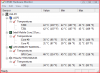
Snippet of my temps (have the FW285) been typing, surfing and music for about one hour. Laptop runs cool (compared to others I've had). Have not measured doing games lately, but last time played Far Cry it was running without a hitch and still not warm.
Attached Files:
-
-
Just a question in regards to the Vaio FW's graphic drivers. How often do Sony release updates for the ATI video card. My laptop has a HD3650 with 256mb of RAM. I was trying to play Call of Duty 4 on my laptop and I was getting choppy performance even with everything as low as it could go.
I know laptop video cards are crap, but so crap they cant handle COD4?
I also play Team Fortress 2 on my laptop frequently, strangely enough I get top performance on it with everything on High. Maybe just Valve's great support for laptop cards? -
Thank you for the response.
 The idle temperatures are reassuring.
-
I've been having this issue recently on my FW-390 where I close the lid at night when I'm done using it and it goes to sleep. The problem is when I go to use it again it's powered on and woken up and when I open the lid the login screen is there instead of the screen being off or screen saver on. When I login all my stuff is still open, so it wasn't rebooted. I thought it was because updates were installed over night and it was rebooted because that did happen once, but I checked and the last updates were installed 9 days ago. Does anyone else have this issue or know what could be causing it? Thanks.
-
so the ATI 3650 512mb in the newer FW models is a lot better then the ATI 3650 256mb version in the old models?
-
only the european models had the 256mb 3650, the canadian and US FW290 came with the 512mb 3650. apart from ram size everthing else is identical on the cards i believe.
-
has anyone downgraded an FW to XP? I can't seam to find the drivers for it on their website..... if you can point me in the right direction or PM me that would be awesome.
Thanks
Sean -
Has anyone tried installing a Mac OS X onto their FW?
I'm curious because id like a more reliable OS then Vista on there for my Graphic Design work. The only real reason behind buying this laptop over a Apple was its BluRay drive.
EDIT: Come to think of it I dont really care about having a MAC OS on my laptop. -
Which CPU do you have with your FW? Are you running the CPU at full speed?
-
vista is quite stable on the FW, I've never had it crash once on it since I got the laptop back in november of 2008.
-
P8400, 2.26 - even under full lad conditions most I remember was around 45-48 degress - as stated, this runs much cooler than other laptops I've had in the past. My previous HP doubled as a hand-warmer when under heavy load...
-
I would like to get OS X working on mine, I could get rid of my Macbook pro and have the best of both worlds.
Cheers, -
Question folks. I really like my 378. Had it about three weeks now but noticed a stuck green pixel, upper left hand quadrant. Didn't notice it until watching a movie tonight and the screen was mostly red and my eye happened to catch the dark speck. It's pretty minor and I'm thinking of just keeping it as in all other areas the laptop is great. Anyone think I should return it though? Could be a symptom of more trouble with the screen down the line? Just curious what others thought.
-
It sounds like you have power option set to hibernate when lid closes. I believe what you are experiencing is the expected behavior when it wakes up from hibernate. You may prefer Sleep mode instead which is what I set the behavior to when lid closes. I've had too many unpleasant experiences with hibernate.
-
Nope, power option is set to Sleep when the Lid closes.
-
Power Management on these VAIOS is pure crap. Or is Vista to blame? Or both? My FW11M has been waking up randomly from sleep from the start, several times a month, for no reason at all (no entry in EventViewer log).
Moreover hibernation triggers a "0x00000044: MULTIPLE_IRP_COMPLETE_REQUESTS" error. -
Mine has woken up every day now for the last week. I checked the Event Viewer and have the following from this morning:
3/30 1:35AM - Source - Kernel Power - The system is entering Sleep.
3/30 2:09AM - Source - Power-Troubleshooter - The system has resumed from sleep. Sleep Time: 3/30 5:34AM -
This link might give you more info - http://forum.notebookreview.com/showthread.php?t=151947
-
The paint has started to come off my left touchpad button after just 6 months of usage (took the picture with the built-in webcam, btw)
![[IMG]](images/storyImages/touchpadf.th.jpg)
So, I thought I'd check in here for opinions on whether the warranty would cover a replacement button or are they going to assume that this is self-inflicted (maybe "excessive clicking" is one of those things that automatically voids the warranty)? In case warranty is not a likely option, I might skip the hassle of sending it in and repaint the button(s) myself, so any suggestions which type of paint to use? Obviously, in that case I'd like something that's going to last a little longer than the factory paintjob...
-
I think I found the issue. I looked in task scheduler and a scheduled defrag ran at 2:09AM this morning, which is the same time the system resumed from sleep. I also see scheduled defrags running at random times throughout the day even though I had them setup to run once a week. I turned them off completely, so hopefully that fixes it.
-
wow - my lg is two years old and has all the paint in great condition
my sony though which i returende today , on the pam rest i could start to see discolouration on the grey..
thats one thing i didn't like about the paint job on this laptop -
Thanks! I tried the easy fixes just to see what would happen. The stuck green pixel is still there but honestly it's minor and I've decided to keep it. In all other respects the laptop is wonderful. It runs cool and quiet. Display is evenly backlit and the blu-ray drive is quiet in operations. Plus I got a great deal on the 378 from Sony with that one day coupon some other reader posted here recently.
-
try right-click on power icon, go to power options on on top right hand corner choose 'require a password on wake-up then choose 'change settings that are currently available with uac icon beside it and you will be able to change the option at the bottom to don't require a password .
Hope this helps
-
Slight discoloration on the palm rest? Well, I've got that too
It's just that it's not as obvious (yet) as the button issue...
Yeah, the paintjob on the FW seems to be really subpar, I recall reading others in this thread having similar issues with the paintjob months ago, but never paid much attention to it as I thought these were just a few isolated cases... -
i have to agree that one of the very few things(if not the only one) that i'm dissapointed with is the actual paintjob-fair enough i wouldn't like a high gloss palmrest but a bit more of clear lacquer would do a great job.
I actually ordered a vinyl to pu on the palmrest and only have to figure out how to take the whole palmrest cover off to do the job properly would be great if anyone had any link to do so
-
well, i just got my fw after like 5-6 weeks of waiting, and it seems ok atm.
i am making recovery discs so cant make it fast yet.
but somehow with only internet running its using up 1.5gb of ram. there is so much crap installed on this....
the screen isnt that bright i think, i have it 2 bars down from top.
On the right of the touchpad, the palm area is quite hot to touc aswell.
and the 1920x1080 text is small, im going to change the DPI later. -
Just a quick Q, is your palm-rest made out of metal, or just silver paint on plastic (like the earlier FW models)? What colour are your keys, too? (I've seen pics of white and black keys). And it nearly took six weeks to assemble and deliver?
I had a similar 'hot' area to the right of the trackpad on my old Fujitsu laptop. It was either the graphics card or the hard-drive causing the heat underneath there.
Let us know how you're getting on with the new FW. -
its hard plastic as far as i can tell and i think all FW's have a plastic palm rest. only the top caseing is metal. its painted silver.
keys are black. the o nly colour i could get in the uk is silver with black keys. -
Re the p9iant coming off the touchpad button, I had teh same thing happen on my old FS after a while.
I just put an adhesive sticker on it, much easier tha trying to paint it. -
my laptop takes long to turn on , i dunno why.
when i log in its pretty close and doesnt respond to much until like 30 sec afterwards.
do i need vaio update and the vaio smart network thing?
if not, how do i turn them off, they dont seem to be in msconfig
edit: removed them both and its quite a bit quicker but still slower then my old acer 8930g or dell studio xps 16
Also, windows task manager says i have 4000mb of physical memory (4gb ram) but i can only use like 3gb?
why is that because i have 64bit vista and 4gb ram????
![[IMG]](images/storyImages/vaiou.jpg)
![[IMG]](images/storyImages/24792789.jpg)
-
I just got my FW 190 today. I have experienced the same problem like my right palm rest near the touch pad is too hot. I barely can touch that palm rest area. Is there anyway to fix this? I use my Coretemp and it show normal CPU temperature around 41 degree. Please help me. Thanks
-
BluRay was a deciding point for me as well. It may be years before Apple decides to support that. From my post on page 297. Best to get a laptop with nvidia or intel graphics for an osx install.
-
^ so what exact;y happens when you try to boot into OS X?
-
world's collide.
-
Thanks. I thought a selling point of the FW, from the website, was that it had magnesium alloy somewhere. I assumed it was all metal with the newer models, but it appears it's not the case. That bodes not so well for me as I'm a coder and will be doing a lot of typing. That palm-rest is going to see some use!
Have you used Vista before? I have both Vista-64 and XP-32 on my desktop PC (a 2.67GHz Intel Quad) and Vista takes a lot longer to boot up than XP does. Apparently Windows 7 will be a lot better in this aspect, but that doesn't help you at the moment.
4GB was only a limitation with 32-bit operating systems, for allocating memory addresses to dedicated graphics cards as well as system RAM etc., so you'd only be able to use 3GB system RAM or so on a 32-bit OS.
With a 64-bit OS that limitation has been removed. Theoretically a 64-bit OS can allocate addresses for up to 16 Exabytes (16,000,000,000 Gigabytes)! Therefore your Vista-64 will be able to access and use all of your 4GB RAM without any problem.
-
ok, well iv messed about for like 20min and iv got the laptop to turn on from a cold start to get to a google page of firefox in under 50sec.
it use to do it in 2 min and my otheres laptops did around 1min so i guess its pretty quick now.
make sure to remove vaio smart network and vaio update, they are a pain, useless and slow your laptop sooooo much. -
I just did a clean install of Vista x64 on my 140D and am having problems with the video drivers. I initailly installed modded Catalyst 9.2 drivers and found that there is a lot of horizonatal lines during motion (tearing?) when playing video on my secondary display. I then reverted back to catalyst 8.11 with no improvement. I also tried setting Vsync to "always on".
I had no problems at all before the clean install. Does anyone have an idea of what went wrong? -
Does anybody play World of Warcraft on their FW on a regular basis? Every laptop I have ever had has been a Dell, but I am looking for a change. I love the look of the Vaio FW, and have read/heard great things about the display and overall performance. However, I play World of Warcraft frequently for several hours at a time. I realize that this is not a gaming computer, but will World of Warcraft work reasonably well on it? Or should I go for a Dell m1530 instead?
-
The paint job problem is worrying me.. Looks like I'll probably have to go with the HDX16 instead
-
16 Terabytes = 16,000 Gigabytes dont it?
-
i'd guess so, haven't yet seen the term exabytes
-
Been using my FW daily for at least 2-3 hours since October - no issues with the paint.
-
Really depends what model you get. Ive got a ATI 256mb HD 3650 in my VAIO, with 4gb RAM and P8600 processor.
I can run games like Team Fortress 2 on High Settings comfortably, and play Company of Heroes with everything High, I would wager that WOW can be handled nicely on this set up, even though I do not play it myself. -
World Of Warcraft is not that demanding and you can play it on almost any computer so you should be more then fine with the FW as long as you go with the ATI 256mb HD 3650.
If you can hold out till windows 7 drops I am sure the next FW will have a better ATI and or a nVidia graphics card in it. -
My bad (I used 1x10^6 instead of 1x1000^6)
1 Exabyte = 1,000,000 Terabytes.
Therefore 16 Exabytes = 16,000,000 Terabytes = 16,000,000,000 Gigabytes!
Anyway, that's how much memory a 64-bit OS can address.
Either way, 4GB of system RAM is insignificant, and you will be able to see/use all of it.
... Unlike a 32-bit OS. -
If you want an example of how well the machine performs for gaming...I can play FEAR 2: Project Origin multiplayer deathmatches online on highest settings & Full HD resolution flawlessly on the ATI HD3650 512MB DDR3 video card
-
NO WAI!
Thats insane... I guess the 256mb variant of the HD 3650 just doesn't cut it. Makes me feel like I got gibed!
EDIT: Just checked the ATI "will it run on my system tool" and it reported my videocard as:
Video RAM = 1.5 GB
Video Card 3D Acceleration = Yes
Video HW Transform & Lighting = Yes
Vertex Shader Ver. = 4.0
Pixel Shader Ver. = 4.0
Umm... no.
Does this laptop (FW26G) use shared memory or something?
If so are their settings in the bios where I can adjust this. Im sure having 1.5GB of "video RAM" isnt good for performance, considering more then half of it isnt provided by the video card itself. -
it does use a vram memory alrtie-only reason why it makes sense to have 4GB of ram i guess-but i can't really tell if it helps at all...
Official VAIO FW Series Owners Thread
Discussion in 'VAIO / Sony Owners' Lounge Forum' started by Hinduemperior, Jul 28, 2008.


![[IMG]](http://img12.imageshack.us/my.php?image=touchpadf.jpg)


