Problems? See this thread at archive.org.
it does use a vram memory alrtie-only reason why it makes sense to have 4GB of ram i guess-but i can't really tell if it helps at all...
-
il try games soon.
but i think that the 3650 512mb GDDR3 card is comparable to the 9600m gt 512mb GDDR3. -
Yet the performance is absolute rubbish. I have COD WaW installed on my laptop I couldnt even get a solid 20 frames a second with everything on rubbish settings.
And thats with a p8600 2.4ghz dual core processor, 4gb Ram, and 256mb HD3650. What the hell, and here you are, with what... a 512mb card... shouldnt make that much difference, seriously, except for maybe texture detail. Yet WaW works fine for you.
Bloody ridiculous is what this is. -
Can someone please tell me if the xbrite-eco or xbrite-full screens reflect light from the ambient? like the glossy screens?
Im traveling for 2 days to the US and I wanto to buy a vaio there, but I cant stand glossy screens.
Thanks!!
Pablo -
I am now a Sony VAIO FW31ZJ owner.

My first laptop ever!
Can anyone tell me where to get one of those cool sigs with computer specs? -
Something's up with your computer then because I played WaW on my FW with the 3470 and it was perfectly playable on low settings (not lowest though because the game looked absolutely rubbish on lowest settings) and a resolution of 1024x600 and I was getting fps in the mid 20s.
-
Hi Guys,
just got the FW290 from Sony outlet. Nice machine must I say. But here is one question. It came with 320Gb 7200RPM Hitachi HDD, which I thought would be sweet, but now I have noticed that a strange sound comes from the area just below the arrow keys, like a low fan sound, but apparently it is HDD spin sound. The bad thing is that it is comes out even when the driver is not active - any clues?
For me it seems that it is spinning even when it is idle, but why should it?
Another guess was it is Video Adapters fan, but again does not make sense to place it under the right lap, right opposite to the ventilation hole.
Any explanations? -
A hard-drive will spin up any time it loads a file (even a very tiny file). After the hard-drive has spun up, it remains spinning for up to 3 minutes, before revving back down.
-
Hey Kieran, I know that, but the sound/feasible vibration remains there at any time. Does anyone have similar experience?
-
his 512mb is quite a bit better then your 256mb card.
there are 2 versions of the ATI 3650:
ATI 3650 256mb DDR2 version (made over a year ago around the 8600m gt time and is slightly worse then the 8600m gt)
ATI 3650 512mb GDDR3 version (newer and put in the newer FW's which is comparable to the 9600m gt but also slightly worse then it)
so thats why his 512mb is fine playing cod waw on decent settings.
GDDR3 and DDR2 makes a big difference as well as the 512mb GDDR3 version is newer and made to compete with the 9600m GT. so i guess it would be better in other aspects.
The GDDR3 version is put in the newer FW's while some older models (like fw11z) come with the 256mb version.
Although your 256mb version should still play cod waw on low settings at that res easily and should do better then any 3470. -
Sony also do newer 256mb versions with gddr3. if u have these they might have underclocked the GPU clock speed to 450mhz . the stock is 600mhz.
this is what my clock speed is, which i just checked on gpu-z. this may be your problem, anyway, im going to overclock it with ATI gpu clock tool to the stock 600 mhz again.
try it, it might help
or download the ATI gpu clock tool.
my gpu atm is 450 mhz because i havent overclocked it and the temps are like 45-50 degrees. which is pretty cold for a GPU, as my acer, dell sxps 16 and m1530 had a gpu temp of about 60degrees+ a lot and then the laptop cooled it.
so making the clock to 600 mhz should be fine. it should not overheat or stress the gpu. im only going for 600 mhz as well as i dont want to mess my laptop up. 600 mhz is fine as thats what the gpu has been made for.
http://forum.notebookreview.com/showthread.php?t=342426 might help. -
I have the sound and slight vibration a lot of the time also on my new FW-390. My hard drive light blinks constantly also, even when I have nothing open. It doesn't blink rapidly all the time, but it always is blinking steadily like once per second.
-
As stated in few posts above-it makes a big difference apparently-as in my signature-alle these games play flawlessly and WaW is the only one where I need to reduce the res to still very comfy 800-600 on full det and 1024 on low-med tho it will handle the full hd with some hiccups
-
Thanks for everyones replies to my question. I just checked ATI control center and it informs me my:
Core Clock Frequency is: 450mhz
and my:
Memory Clock Frequency is: 600mhz
Any thoughts? Worth overclocking the Core Clock Frequency? -
yeh i just overclocked my core clock frequency from 450 mhz to 600 mhz.
you might as well overclock the memory clock as well as to 700 mhz. as mine is 700 normally.
450/700 clock has temps about 48-55ish degrees.
at 600/700 its about 55-59.
but you can clearly tell the fan is working harder.
im going to try a compramise at like 550/700. -
Can somebody PLEASE tell me if there is a significant difference between the xbrite eco screen and the FullHD screen? I am seriously contemplating sending my FullHD back but I do not want to do that if the difference is not that big. Thanks.
-
full hd screen is a lot better.
iv got a eco and full-hd. the full-hd has deerer and richer colours like the eco looks pale.
also its a lot brighter.
the text is smaller though which annoys me.
also, anyone else with the 1920x1080 screen only get 3 screen resolution options?
i get 1920x1080, 1024x768 and 800x600
where do i get the lastest drivers from to fix this? -
you cant. which sucks. But hey how much smaller is the text on the HD screen than it is on the eco screen? Is it significant?
-
only a bit. its easily readable but i was on a 1024x768 before this, so iit just plain pisses me off.
edit: i managed to installed a modified catalyst 9.3 driver so i got all the resolutions.
its a pain when playing games and only having 3 res, but iv sorted it now
-
Where from?
-
Very glossy (FW11M Eco) ; he other XBrite is as glossy as the Eco.
-
i deleted them, they were crap as no resolutions where in widescreen, so they all had black sides. and they stopped my from overclocking the gpu.
ATI GPU clock tool is pretty good. as you can overclock very easily before starting a game to get better performance and once you restart your laptop, the clocks go back to the sony stock ones.
so the fans dont work louder.
i played cod4 on highest settings without AA and i got like 35ish without overlocking and near 38/9 with overlclocking takes 2 sec and is not permanent. plus 600/700 is pretty safe.
i tried 700/750 and i get like 40/41 which is safe and good to use aswell. i use to get 65+ stock on the nvidia laptop gpus (8600m gt and 9600m gt) and i get up to 59degrees overlcocked with the 3650 and i think it runs quicker too. -
Guys,
I am about to buy the FW 373 from newegg, I was wondering if I could swap the P SERIES chip inside with the T SERIES ??? -
So, what's the consensus on the major problems with this laptop? I'm so scared of buying a Sony, their rep is AWFUL. This laptop is perfect if it wasn't for Sony's bad rep for service + crappy products. Is this one better than others? Have they turned a page that I don't know about?
-
I've had excellent luck with this model - no issues at all. My third Sony computer also. All have been good systems. Really like the FW series - the screen is fabulous, the keyboard is wonderful to type on and the system is cool - compared to my last hand-warming HP laptop.
-
Both screens are glossy but between the two, the FullHD is less glossy. And FullHD is still less glossy than other screens from other laptop manufacturers.
You should know that non-glossy screen comes with a price. It scatters the ambient light and hence has far poorer color reproduction. Non glossy screen is horrible for watching DVD. -
colours of my fw3 cto model(full hd) are better then my fw11e(eco). i dont get what you mean
-
Is there any point in opting for the ATI graphics card rather than the Intel one if I'm going to go with the ECO screen rather than the full HD one?
-
intel grapphics is crap, get the 3470 at least.
-
Has anyone tried Left For Dead on this? How does it play?
-
Is there any difference between the FW290 and FW390 in terms of build quality?
-
Fine thanks. You can run everything at medium, to high and get an average fps of atleast 40.
EDIT: Ive been looking at the GPU Clock Tool. Says the engine speed is set at 109. And the memory clock is at 405.
Im a bit confused since the Control Center reports the memory clock to be at 600 not 405.
And the core clock is reported at 450. Im so confused.
EDIT 2: I realize i was using the latest AMD GPU TOOL, not ATITOOL. I take it they do things differently.
EDIT 3: These Overclocking programs are rubbish. They havent been updated for about 3 years now. Especially ATITOOL that just sat there for 5mins without even starting just chewing up my cpu. -
Nope its GDDR3 on this HD3650.
-
use AMD GPU clock tool. it works fine and isnt that old. it doesnt start the program on startup and wont overclock your gpu until you want it to (so every restart it goes to original clocks.
also it says 105/400 as thats how much your gpu is useing at that moment, hence your laptop is not got it at full speed because you dont need it. if the clocks are 450/700 original then while playing a game your laptop will use them. and then putting it to something like 600/800 means its constantly like that so your gpu temps will go from 48-53 to 55-58, those temps arnt bad at all.
just overclock your GPU with ati gpu tool to 600/800 and you should get better fps. and you can reset it afterwards or the changes reset anyway when you reset your pc.
atigpu clock tool works fine as i got windows performmance from 5.1 to 5.5. now the weakest thing is my laptop is the gpu and hard drive.
Also anyone know if a SSD will fit in the FW? -
Just placed my order for an FW35V yesterday. 3-4 week configuration/delivery time, but am expecting at least 5 weeks judging by Owais' delivery.
2.4GHz, 4GB, 320GB, ATI 3650 512MB, Vista-64, 1600x900, 3yr warranty. -
This is probably a difficult question - but if the FullHD screen did not exist, would you consider the ECO screen to be a good screen? I'm not going to get the FullHD screen so the choice for me is either the ECO screen or a different laptop.
-
I would jave probably gone with the Dell Studio XPS16 HD screen
-
Any clue on this one? Cappy Vista thingy?
-
BTW, what is the difference between FW290 and FW390? I saw both models with like crappiest configs and super top ones.
The one I baught for my wife is FW290 with P8400/4Gig RAm/320 7200HDD/BD-RE and 512 ATI card. -
hi,
Im thinking about buying an fw, have any of you guys had any problems with the build quality of the laptop, e.g. parts falling off or wobbling or creaking etc.
Im comparing it to the new macbook pro and just wanted to hear if there any significant problems with the sony.
Thanks -
Hi chaps.
This is possibly a big ask, but I am looking to get a non-ridculously priced laptop for video editing. I'm used to a full HD screen on my desktop, so I am attracted to the FW35 series with this spec:
* Intel® Core(TM)2 Duo 2.40 GHz
* 400 GB Serial ATA (5400 rpm)
* 4 GB 800MHz DDR2 SDRAM
* DVD disc drive
* 16.4" LCD, 1920x1080 + webcam
* ATI MobilityRadeonHD3650 512MB
* Vista® Home Premium - (64 bit)
However, it's vital it works with Avid Media Composer, and Avid are rather reluctant (understandably) to test it with everything out there, and only recommend Nvidia cards. I don't take sides in the ATI vs Nvidia thing, and it's a shame Sony don't/can't offer a choice...
So, the request is this- could someone try out the trial version of Media Composer and let me know if it works?
If you're into film/video editing, it's a great piece of software, so you might enjoy checking it out, who knows?
www.avid.com
Many, many, many thanks!
Phil -
somebody please answer the questions regarding the screen please? Alot of people are asking about this and there are very few responses...
-
my bro used that with his ATI 3470 and it worked fine...
so im pretty sure you can use it with the ati 3650. iv got the exact same setup you want and its great
what Q?
also:
![[IMG]](images/storyImages/vaiou.jpg)
does that mean i can only 3gb or can my laptop use all 4gb. i dont get it. i have 4gb and 64bit... -
to access the dedicated memory of the GPU, the OS uses memory-mapped i/o methods. for every byte of GPU memory, the OS allocates the same number of bytes of main memory. other peripheral devices in the notebook also require their own memory maps. as configured (with 4GB of main memory installed), the total amount of usable RAM (for applications and cache) of the FW will be less than 3.5GB.
-
Thanks for the quick reply. Was that definitely Media Composer (version 3 or later), and not Xpress or Liquid? Avid make a number of different non-linear editors. And I think both Xpress and Liquid are less fussy as they're more aimed at the consumer market. Could I PM you my email address to pass on to him, if neither of you mind? The laptop is almost useless to me if I can't run this one piece of software, believe it or not
As for your memory issue, I believe that as just pointed out, your graphics card has "eaten" 512Mb. Although this is the same issue as you'd have with a 32 bit OS, you have the option of installing, say, a pair of 4Gb sticks. You'll have the hole, but you'll be able to make use of the memory above the 4Gb area that is largely lost. -
i dont quite understand that.
so iv got 64bit and 4gb ram. shouldnt i be able to use all 4gb? i thought its only with 32bit that you have a 4gb max memory which includes the gpu memory?
why does the OS allocate the same amount of bytes from the main memory(ram) when the gpu has 512mb anyway.
also, it still only shows 3gb as useable when the gpu is 512mb.
edit: so even though iv got 4gb and 64bit, the gpu which has its own ram uses 512mb of main ram? why??
so what if someone has 4gb ram and 2 1gb GPU's rams, they only got 2gb left?
![[IMG]](images/storyImages/yjftghb.jpg)
doesent total physical memory show total ram and total virtual memory show ram,gpu,other stuff?
so if the other stuff has its own ram, then why does it use my ram?
and on that pic, it shows the availible physical memory as 2.5gb??????????? where the heck has the other 1.5gb gone.
also, avid program should work fine. my bro doesent want to give his email (sry) but he said it works fine and hes got a 3470 and no errors. seems the 3XXX series works ok for avid. maybe newer ati cards are ok.
http://dvxuser.com/V6/showthread.php?t=157456 he uses a 387- and its ok.
search google, you will see not many people get problems with ati cards. -
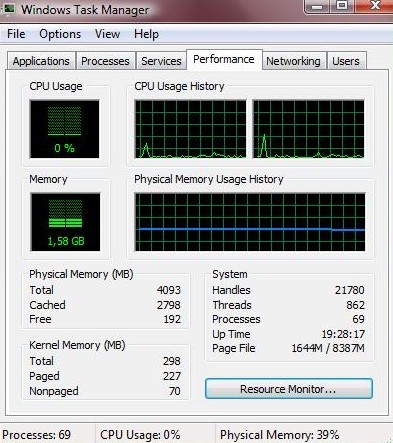
In my FW11M System information is reporting 4 Gb RAM installed and 2,33 GB free. Also I have 1,66 Gb used RAM in task manager using home premium x64. For me it looks normal.
-
so your task manager looks like mine ?
![[IMG]](images/storyImages/78472757.jpg)
whats the difference between cached and free memory?
and if it shows the total as 4000mb, then why does the cached and free add up to 3gb?
and it shows 1.5gb of ram being used? as 1.5gb and (cached and free) add up to like 4.2gb??
this is really confusing me.
so am i able to use all4gb of ram or is it going somewhere like the gou etc.?
i think i have got 4gb and this is just some weird computer thing as my bros fw11e does the same with 3gb, only 2gb shows .
is cached memory aactually being used? as i dont think it is, and i dont get how its different to free memory.
anyway, i cant have no memory free as even if i open any program from firefox to games, its not slow at all. -
Mine looks like this. Pretty much the same.
Attached Files:
-
-
No, it's not being used in the same way the memory on the card itself is being used.
This was all set up long before anyone had anything like 1Gb of memory. When the idea of anyone having 4Gb seemed like a very distant prospect.
There's no data physically on the memory chips in that location, it's just an unfortunate side effect of the fact that the operating system needs to be able to talk to hardware, and one convenient way of doing it is pretending that some part of the device sits in memory. So if you need to push textures onto the graphics card, or read some data from an ethernet card, you open the bit of system memory that it is mapped to. And the OS makes pretend that's where the data is.
It's a very convenient method of IO, but it's now causing headaches, because there's no way of putting real data in that space and getting to it.
However, as I said, buy lots more memory, and you can make use of what's above 4Gb. But you're unlikely to see a benefit. Once possible use is to pre-load all a games files into a RAM disk, but that would have to be done on every boot, thus negating most of the benefit in this case (running a high-uptime database server? Then by all means go for it).
Official VAIO FW Series Owners Thread
Discussion in 'VAIO / Sony Owners' Lounge Forum' started by Hinduemperior, Jul 28, 2008.