Problems? See this thread at archive.org.
These are the HDD protection drivers provided for my model on the europe site but they dont do anything. I tried the drivers from Sony America but they wont install because its a different model apparently.
http://support.vaio.sony.eu/computi...zip&m=VGN-SR41M_S&ip=Preinstalled_Drivers.htm
-
go to ati settings and change to max performance
-
Has anyone tried to see if its possible to boot from an expressdrive on a sony vaio sr.
-
Did you mean the ATI CCC control penal? And the ATI powerplay controling? I have already set it to the max performance. Thanks for the suggestions.
Have you ever tried to run game under battery power? -
For me, battery power and AC makes no difference for gaming. Be sure to check that you have changed it correctly

-
Anybody know this?
Go to the VAIO power settings, should be under the turn DVD drive off icon and under your current power plan make sure your CPU minimum/maximum are set to 100. That helped gaming on battery for me. Also make sure the ATI powerplay settings are set to maximum performance. -
Has anyone played any games on the Newer SR? If so which ones and how was your FPS and heat?
-
Thanks. Have you tried win 7 64bit version? I didn't install the sony power control. I am going to try now. Window power control can't adjust the cpu to the 2.2 G even I have set it to the max performance.
-
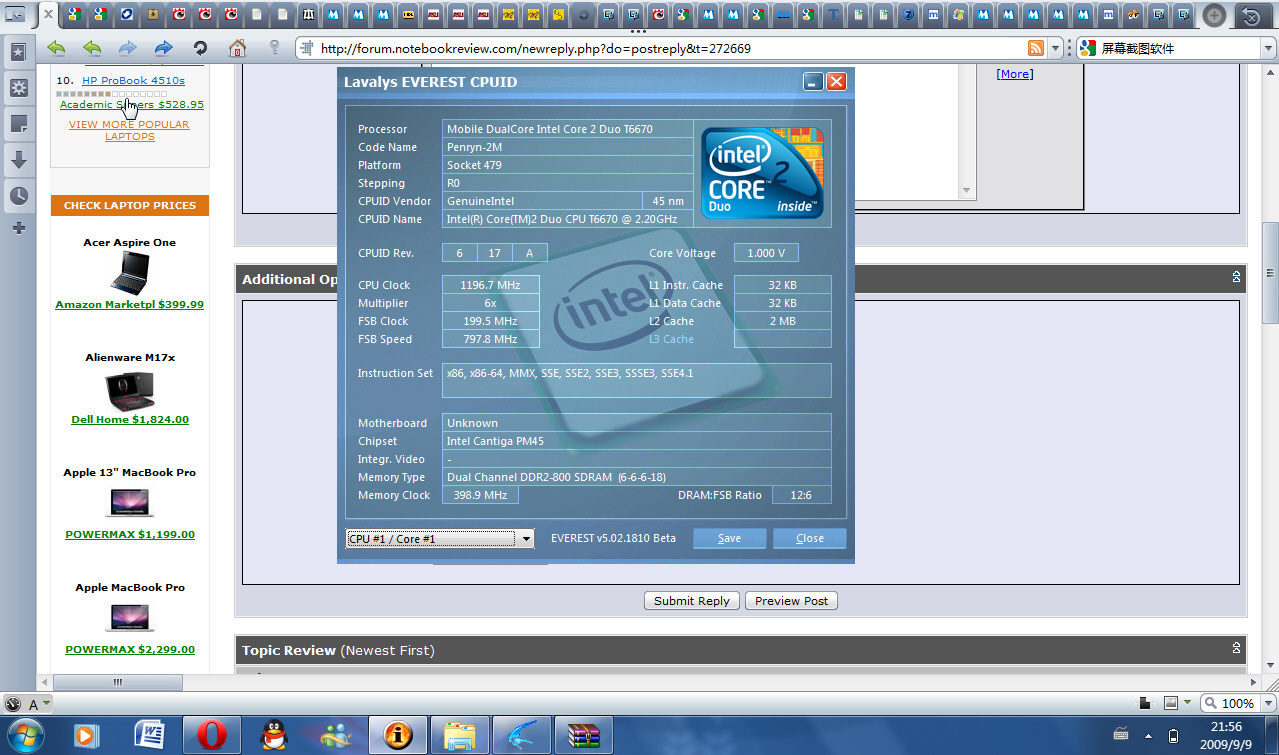
Ok, I give up. I have tried every possible setting I can find. But the CPU is constantly locked at 1.2G on battery. I think it is something to do with the BIOS. Well, I don't game on battery usually, but this just made me feel really odd.
Attached Files:
-
-
I was wondering why when I tried to play WoW on battery i got worse framerates but when plugged in the game ran just fine (usually 100fps and more)
I guess i'll try looking into it. Might be difficult since i didnt install the Vaio power utility and am just using windows power options themselves. -
Actually, when I was using XP with the sony power management, the cpu still couldn't go over 1.2G. Everest can monitor everything. I have set everything max, but no luck at all.
I think I will send a message to sony tech supporting. I think this is a problem of bios. -
are you referring to a usb flash drive?
I've booted from flash drives using linux many times using my SR. -
Got my vaio sr today, signature collection color scheme. Not much difference between this color and white, but does look nice. Guess my only problem is, when ever i touch anything next to the bottom, it just does not feel very solid. The area right next to the dvd drive from bottom is the exact opposite of solid. The battery also doesnt fit perfectly, and that totaly sucks.
-
yeah the build quality does suck at the bottom espeically the little area right underneath the space bar
-
I dont' know if it was in this thread or not but some say the Black SR feels more solid. I don't know why that is but i read it in this thread.
I am getting mixed reviews...some people say excellent build quality and then some are saying it's crap. -
Hi,
I got SR490PBB yesterday. I found out that my dvd rom drive is hitting and rubbing the table when i open it. It doesn't have clearence. If I want to open it all the way, i have to lift it up abit. I hope you guys understand What i am talking about. Does any one have problem like that? Is it normal?
Is it defect?
Thanks. -
That's because no 2 notebooks are made exactly the same no matter how stringent the quality control is. There's also factors such as different usage patterns, different usage habits, "luck" in the quality of components one get in their notebook, etc...
The best method IMHO is to buy direct from the SonyStyle online store & try/test it out for yourself in your regular working environment. Good luck.
-
I've had my SR430 for about 10 days now. No issues with build quality, although it's not as sturdy feeling as a macbook etc. Processing speed is awesome, I encode a lot of video....and it runs cool. I almost went for the 15.5" VN Vaio, but I'm so glad I got this 13.3", much better size, beautiful screen, definitely don't miss the big screen. Great gaming, I'm running Far Cry 2 at mostly High settings with 25fps average which is fine (dx9). Love the size and weight. Yeah the dvd drive tray slides across table surface when opening, but again this doesn't really bother me.
-
I went back several pages and never saw this posted. SR5's are now showing up in the UK.
You will now be able to buy PXXX series processors as standard config.
This model offers a 2.53ghz P8700 processor and 500GB HD VGNSR59VGH.
http://www.laptopsdirect.co.uk/Sony_VAIO_SR59VG-H_Laptop_VGNSR59VGH/version.asp?PID=1041
Edited to add
Actually, there will be cheaper models so that is good.
VGNSR59XGH
This one has integrated graphics
http://www.laptopsdirect.co.uk/Sony_VAIO_VGNSR59XG-H_Laptop_VGNSR59XGH/version.asp?PID=1041
There is also a version with a P7450 processor and ATI graphics SR51MF/P.
http://www.laptopsdirect.co.uk/Sony_VAIO_SR51MF-P_Laptop_in_Pink_VGNSR51MFP/version.asp?PID=1041 -
SOmeone said earlier that you could change the fan speed profile to a quieter mode. How do you do this? Also, when my computer goes to hibernate, I get some weird unexpected shutdowns and it restarts itself. THis is when I close the lid for hibernation (It's set to hibernate). Does anyone have this issue/know how to fix this?
-
I've just installed Windows 7 in my Vaio SR. It works fine but I can't use some Fn buttons and SD Reader.
Have someone installed it and know how to fix it?
Thanks! -
there is a certain order of drivers you are suppose to install, i think it applies to all sony vaio's, to get the FN keys to workall you have to do is install the drivers in order,i forgot which order but hopefully someone remembers
-
You might want to check the following thread:
http://forum.notebookreview.com/showthread.php?t=408848
Good luck.
-
Go to Vaio control center, Power Management > Power Options > Thermal strat.
-
does that really help?
-
Thanks!!! I didn't see it before
-
Hey,
I was wondering people's opinions on sony's vaio power management vs windows 7's built in power management.
Which one is better? -
I finally caved today and ordered an SR. After battling with myself over the last week over the Z and SR I decided on the SR since the extra $600 wasn't justified since I have a nice desktop and I mainly just want a laptop for portability.
I called their customer support to order it after playing around with configurations online where the estimated ship date would jump from 9/22 to 9/29 depending on the hour I clicked on the configuration. The sales rep I talked to told me the estimated ship date was 9/22 and he also gave me free over night shipping.
Sony Vaio SR490 CTO
CD/DVD Playback/Burning
320GB Hard Disk Drive (7200rpm)
Mobile Intel® Graphics Media Accelerator 4500MHD
Intel® Core™ 2 Duo Processor P7350 (2.00GHz)
Standard Capacity Battery
Alpine White
4GB DDR2-SDRAM (DDR2-800, 2GBx2) -
Mine does that too. Anytime I close to lid to hibernate, vista crashes and restarts with the lid closed. I haven't found a fix yet.
-
Congrats on your purchase. I'm very sure you'll love it when you receive your new Vaio SR notebook.
Just curious. I hope you don't mind if I ask why you decided to choose the Intel GPU instead of the ATI GPU.
-
Battery life. I read that 3 hours battery with the ATI card was about all I should expect and the intel card could get upwards of 5 hours. This was the reason I strongly considered getting the Z series because I wanted a dedicated gpu, but still needed battery life. The roughly $600 in savings was the deciding factor between the two models though.
Hopefully the intel card that comes with this computer will be powerful enough so that I don't complain.
It's a little late now, but should I be concerned that I only got the 2.0ghz processors? -
Oh I see. However, I think that the ATI GPU does come with drivers/software that can reduce its power consumption when not really needing to fully utilize the GPU & so on. Anyway, I think the Intel GPU is more than enough when not doing graphics intensive stuff. It is still a very good choice.
Regarding the CPU, I think you're more than fine with that. The good thing about the Vaio SR notebooks is that the CPU is not soldered onto the motherboard. In the future, especially when your warranty has expired, if you want to give your Vaio SR a bump, you can "easily" do so by buying a higher clock speed CPU that the notebook supports & swap them out.
-
I'm a finance major so nothing school/work related should be too graphically intensive. Thanks for all your help.
-
If that's the case, I think your config is more than enough for your needs. Great choice & congrats once again.
-
It doesn't happen all the time. I hope it's just some easy to fix software problem and not a hardware problem with the closing sensor or something. Anyone else have this?
Also, I can't find thermal strat in power options. -
I just bought a vaio sr420. How long should the first charge take? The orange light is still lit. When will I know when it is fully charged? Also, I didnt get a user manual with the package. Is this normal or am i missing it?
-
resal: around 5 ~ 6 hours perhaps. just wait until the orange light gone, then its full.
-
Someone mentioned going to "thermal Strat" on power options to change fan speed profiles, but I can't find thermal strat. Can someone help me with this?
Also, I think the sr is moderately loud in a quiet room. Does everyone else think the same? -
is it just me....or..does anyone notice their CPU temperature 10 degrees hotter with the A/C adapter? It wasn't like this before, i m sure, but recently its been like this.
GPU temp stays the same -
While I'm waiting for my SR to ship can anyone tell me how the mic is on the machine? (I think I saw that it had a built in microphone anyway) I'd like to be able to record my professor's lectures in class, and just wondering how good the mic is at picking stuff up.
-
For skype and MSN talking, the sound quality is great (feedback from my friends). The lecture recording.....em, not sure.
-
i think you'll find that that is a Win7 Only option -
It's in the Vaio Control Center. Power Management > Power Options > Thermal Control Strategy. You might only get it if you install the Vaio Power Managment software.
-
Totally agree with you; actually for me it's an annoying loud until I turn the fan to Silent mode, but I can live with it.
-
First off, I dont know what you guys are talking about loud SR's but I have the ATI card and the p8700 with the 320gb 7200rpm drive and I do not here my SR run AT ALL. It is a silent machine, even when playing games and the fan is at full speed its still quiet. You might want to check to make sure that your intakes/and exhaust ports are all clear of dust and debri and might want to take a can of compressed air to your machine. (Be sure to try and prevent the fan from spinning when you use the air as forcing it to spin could cause damage to its motor).
As for recording in class, its all relevant as to where in class you sit. I sit approximately 10-15 feet from the professor and the mic isn't the best thing for picking up the professor. Especially since the mic is facing you. You could simply get a small notebook webcam and just face it at your professor for better results. -
So my laptop was in the car for 5 hours, battery plugged in to the laptop and not seperated to prevent battery drain, I have it set for 80% battery care, there was no battery drain over that 5 hours, I have the high capability battery. So maybe its fixed since the new bios patch sine this laptop came with patch for virtualization.
-
Does anyone know if the port replicator for the SR will actually provide gigabit ethernet support for the SR?
The specification for the docking station claims "Ethernet Connection(s) : 1 (10Base-T/100Base-TX/1000Base-T) ". However the SR (or at least the model I have... SR490 CTO) itself only supports 10/100. Perhaps the docking station has its own ethernet PHY.
Any help on this would be appreciated. -
No, it's not silent and not anywhere near the noise levels of the real quiet champs like an Acer Timeline. Why even bother debating with people what they hear? We/they hear it, find it obtrusive, end of story.
-
The docking station has its own USB and gigabit ethernet jack. Had the SR been limited to 10/100 I wouldn't have got mine.
-
Really Virtualization was re-enabled? I was just about to look into getting past this but if Sony did it for us that would be great! Please clarify on it?
As for this noise issue. I'm sitting here listening to my machine, and can tell you that I do not hear anything. Meaning that, now bear with me here, that just maybe, please dont run away and click the reply button to troll again, JUST MAYBE something could be wrong with your models or like i said earlier, dust buildup. (YES DUST MAKES YOUR COMPUTER LOUDER) Considering my SR is still only 2 weeks old, my dust levels won't be as high as someone whose had theirs for awhile, but still it makes a difference. As for loud or quiet machines. I know the difference between loud and quiet. I've handled/repaired and dealt with many a different types of machines. So, although maybe your's can be loud, take my advice and just check/clean your system. (Both physically and in terms of software, i.e. defrag, disk cleanup). I'm not here trying to make anyone blow their computers up. I'm simply trying to offer my advice to remedy something that some users find irksome.
Now you can go and reply, thank you for reading...
Official VAIO SR Series Owners Thread
Discussion in 'VAIO / Sony Owners' Lounge Forum' started by Duke2007, Jul 15, 2008.